phone RAM CHASSIS CAB 2009 Owner's Manual
[x] Cancel search | Manufacturer: RAM, Model Year: 2009, Model line: CHASSIS CAB, Model: RAM CHASSIS CAB 2009Pages: 429, PDF Size: 3.51 MB
Page 106 of 429

In order to un-mute the UConnect\3system:
•Press the VOICE RECOGNITION button.
•Following the beep, say\6Mute off.\6
Advanced Phone Connectivity
Transfer Call to and from Cellular Phone
The UConnect\3system allows ongoing calls to be trans-
ferred from your cellular phone to the UConnect \3system
without terminating the call. To transfer an ongoing call
from your UConnect\3 paired cellular phone to the
UConnect\3 system or vice versa, press the VOICE REC-
OGNITION button and say \6Transfer Call.\6
Connect or Disconnect Link Between the
UConnect\3System and Cellular Phone
Your cellular phone can be paired with many different
electronic devices, but can only be actively \6connected\6
with one electronic device at a time. If you would like to connect or disconnect the Bluetooth
\3
connection between a UConnect\3 paired cellular phone
and the UConnect\3 system, follow the instructions de-
scribed in your cellular phone User’s Manual.
List Paired Cellular Phone Names
•
Press the PHONE button to begin.
•After the “Ready” prompt and the following beep, say
“Setup Phone Pairing.”
•When prompted, say \6List Phones.\6
•The UConnect\3system will play the phone names of
all paired cellular phones in order from the highest to
the lowest priority. To “select” or “delete” a paired
phone being announced, press the VOICE RECOGNI-
TION button and say “Select” or “Delete.” Also, see
the next two sections for an alternate way to “select”
or “delete” a paired phone.
104 UNDERSTANDING THE FEATURES OF YOUR VEHICLE
Page 107 of 429
Select Another Cellular Phone
This feature allows you to select and start using another
phone paired with the UConnect\3system.
•Press the PHONE button to begin.
•After the\6Ready\6prompt and the following beep, say
\6Setup Select Phone\6 and follow the prompts.
•You can also press the VOICE RECOGNITION button
at any time while the list is being played, and then
choose the phone that you wish to select.
•The selected phone will be used for the next phone
call. If the selected phone is not available, the
UConnect\3system will return to using the highest
priority phone present in or near (approximately
within 30 ft (9 m)) the vehicle.
Delete UConnect\3 Paired Cellular Phones
•
Press the PHONE button to begin.
•After the \6Ready\6prompt and the following beep, say
\6Setup Phone Pairing.\6
•At the next prompt, say \6Delete\6and follow the
prompts.
•You can also press the VOICE RECOGNITION button
at any time while the list is being played, and then
choose the phone you wish to delete.
Things You Should Know About Your UConnect \5
System
UConnect\3 Tutorial
To hear a brief tutorial of the system features, press the
PHONE button and say “UConnect\3 Tutorial.”
UNDERSTANDING THE FEATURES OF YOUR VEHICLE 105
3
Page 109 of 429

•low-to-medium blower setting,
•low-to-medium vehicle speed,
•low road noise,
•smooth road surface,
•fully closed windows,
•dry weather condition.
•Even though the system is designed for users speaking
in North American English, French, and Spanish ac-
cents, the system may not always work for some.
•When navigating through an automated system such
as voice mail, or when sending a page, at the end of
speaking the digit string, make sure to say\6Send.\6
•Storing names in the phonebook when the vehicle is
not in motion is recommended.
•It is not recommended to store similar sounding
names in the UConnect\3phonebook.
•Phonebook (Downloaded and UConnect\3 Local) name
recognition rate is optimized when the entries are not
similar.
•You can say \6O\6(letter \6O\6) for \60\6(zero). \6800\6must be
spoken \6eight-zero-zero.\6
•Even though international dialing for most number
combinations is supported, some shortcut dialing
number combinations may not be supported.
•In a convertible vehicle, system performance may be
compromised with the convertible top down.
Far End Audio Performance
•
Audio quality is maximized under:
•low-to-medium blower setting,
UNDERSTANDING THE FEATURES OF YOUR VEHICLE 107
3
Page 110 of 429

•low-to-medium vehicle speed,
•low road noise,
•smooth road surface,
•fully closed windows,
•dry weather conditions, and
•operation from the driver’s seat.
•Performance, such as audio clarity, echo, and loudness
to a large degree rely on the phone and network, and
not the UConnect\3system.
•Echo at the far end can sometimes be reduced by
lowering the in-vehicle audio volume.
•In a convertible vehicle, system performance may be
compromised with the convertible top down.
Bluetooth\3Communication Link
Cellular phones have been found to lose connection to
the UConnect\3 system. When this happens, the connec-
tion can generally be re-established by switching the
phone off/on. Your cellular phone is recommended to
remain in Bluetooth\3 ON mode.
Power-Up
After switching the ignition key from OFF to either the
ON or ACC position, or after a language change, you
must wait at least five seconds prior to using the system.
108 UNDERSTANDING THE FEATURES OF YOUR VEHICLE
Page 115 of 429

Voice Commands
Primary Alternate(s)
language
list names
list phones
mobile
mute
mute off
new entry
no
pager
pair a phone
phone pairing pairing
phonebook phone book
previous
record again
redialVoice Commands
Primary Alternate(s)
return to main menu return or main menu
select phone select
send
set up phone settings or phone set up
towing assistance
transfer call
UConnect\3 Tutorial
try again
voice training
work
yes
UNDERSTANDING THE FEATURES OF YOUR VEHICLE 113
3
Page 147 of 429
CAUTION!
•Many accessories that can be plugged in draw
power from the vehicle’s battery, even when not in
use (i.e., cellular phones, etc.). Eventually, if
plugged in long enough, the vehicle’s battery will
discharge sufficiently to degrade battery life
and/or prevent engine starting.
•Accessories that draw higher power (i.e., coolers,
vacuum cleaners, lights, etc.), will discharge the
battery even more quickly. Only use these inter-
mittently and with greater caution.
•After the use of high power draw accessories, or
long periods of the vehicle not being started (with
accessories still plugged in), the vehicle must be
driven a sufficient length of time to allow the
generator to recharge the vehicle’s battery.
CIGAR LIGHTER AND ASH RECEIVER
The removable ash receiver is located in the instrument
panel cupholder tray.
The cigar lighter is located on the instrument panel,
above and to the left of the ash receiver.
As a child safety precaution, the lighter only operates
with the ignition switch ON. It heats when pushed in and
pops out automatically when ready for use.To preserve
the heating element, do not hold the lighter in the
heating position.
UNDERSTANDING THE FEATURES OF YOUR VEHICLE 145
3
Page 150 of 429
STORAGE
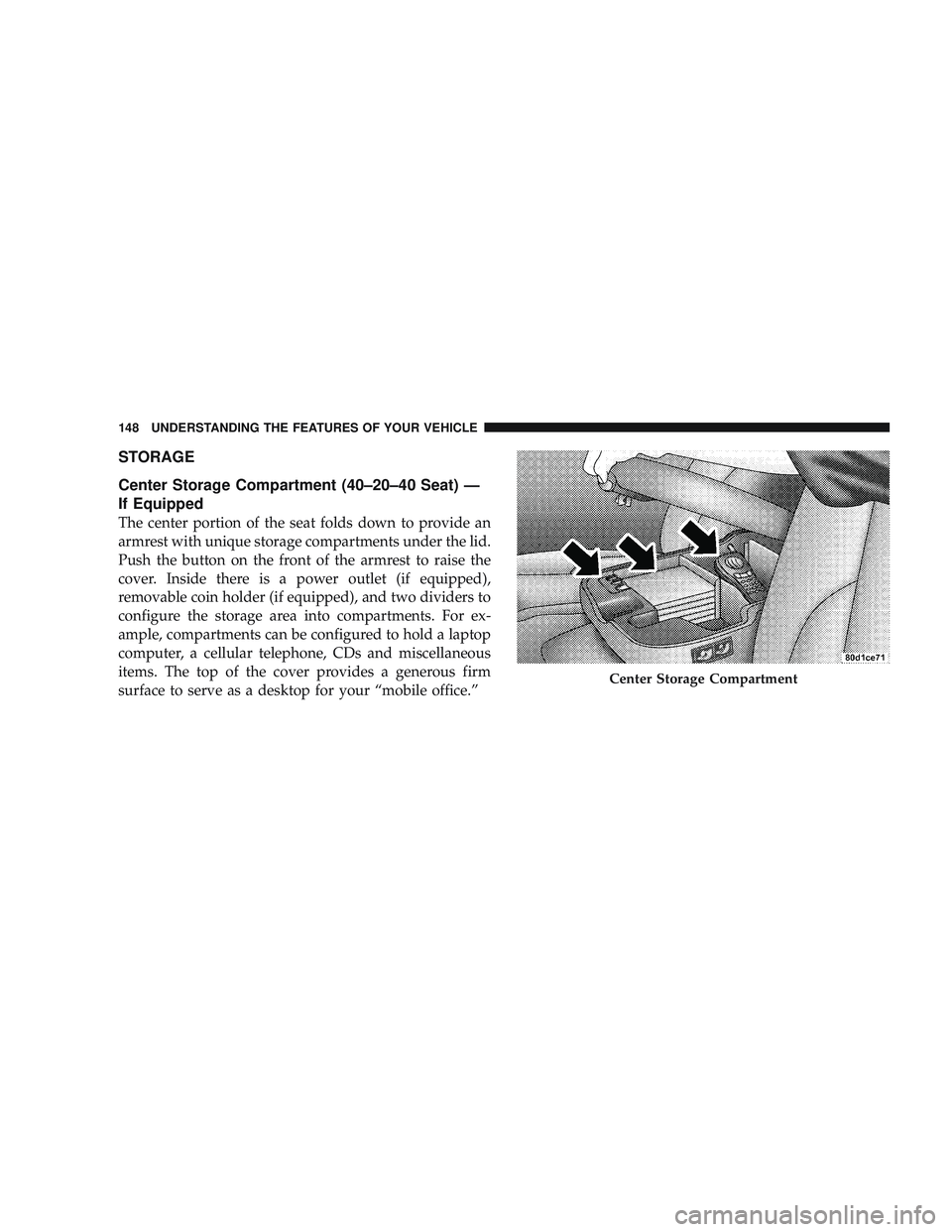
Center Storage Compartment (40–20–40 Seat) —
If Equipped
The center portion of the seat folds down to provide an
armrest with unique storage compartments under the lid.
Push the button on the front of the armrest to raise the
cover. Inside there is a power outlet (if equipped),
removable coin holder (if equipped), and two dividers to
configure the storage area into compartments. For ex-
ample, compartments can be configured to hold a laptop
computer, a cellular telephone, CDs and miscellaneous
items. The top of the cover provides a generous firm
surface to serve as a desktop for your “mobile office.”
Center Storage Compartment
148 UNDERSTANDING THE FEATURES OF YOUR VEHICLE
Page 151 of 429
WARNING!
•This armrest is not a seat. Anyone seated on the
armrest could be seriously injured during vehicle
operation, or an accident. Only use the center
seating position when the armrest is fully upright.
•In an accident, the latch may open if the total
weight of the items stored exceeds about 10 lbs
(4.5 kg). These items could be thrown about en-
dangering occupants of the vehicle. Items stored
should not exceed a total of 10 lbs (4.5 kg).
CAUTION!
•Many accessories that can be plugged in draw
power from the vehicle’s battery, even when not in
use (i.e., cellular phones, etc.). Eventually, if
plugged in long enough, the vehicle’s battery will
discharge sufficiently to degrade battery life
and/or prevent engine starting.
•Accessories that draw higher power (i.e. coolers,
vacuum cleaners, lights, etc.), will degrade the
battery even more quickly. Only use these inter-
mittently and with greater caution.
•After the use of high power draw accessories, or
long periods of the vehicle not being started (with
accessories still plugged in), the vehicle must be
driven a sufficient length of time to allow the
generator to recharge the vehicle’s battery.
UNDERSTANDING THE FEATURES OF YOUR VEHICLE 149
3
Page 152 of 429
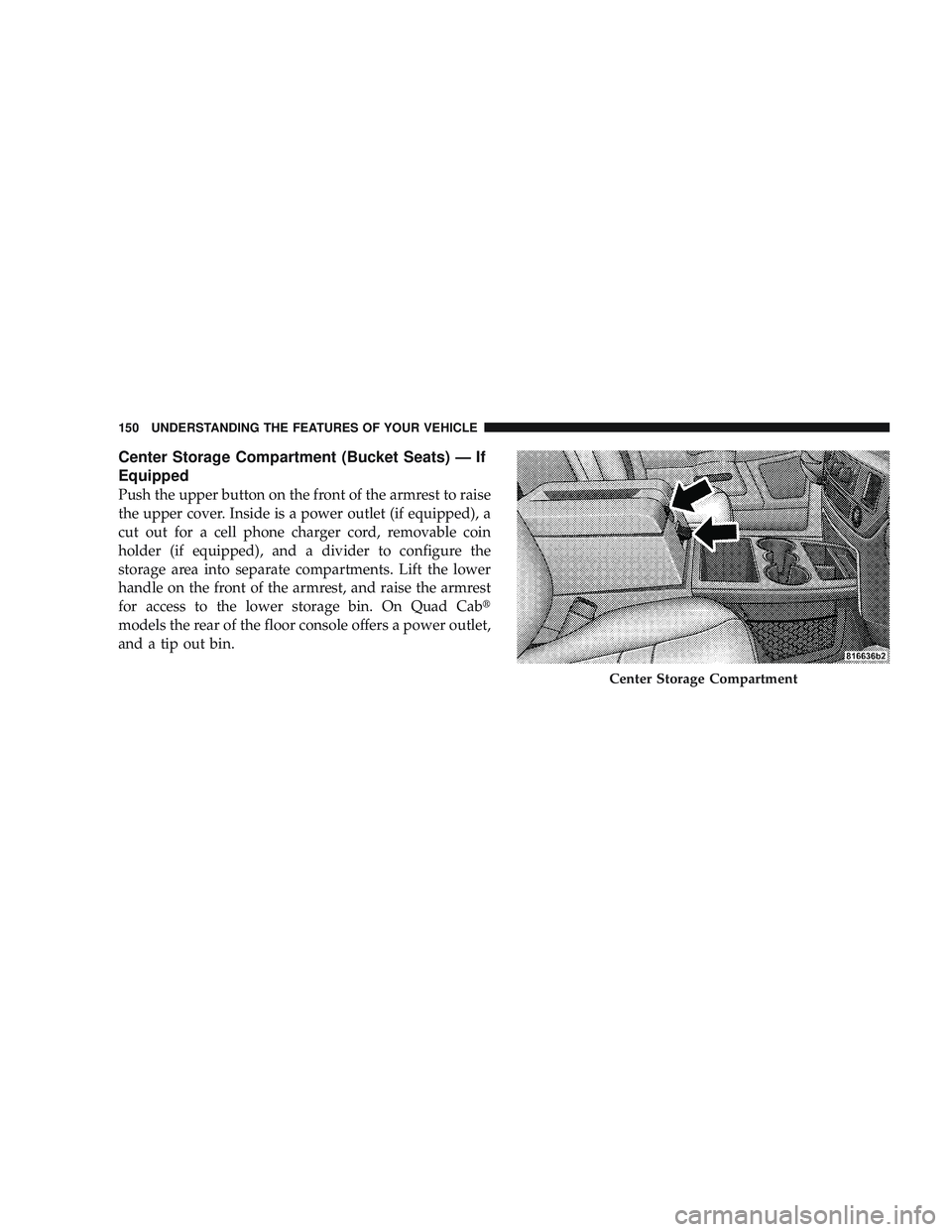
Center Storage Compartment (Bucket Seats) — If
Equipped
Push the upper button on the front of the armrest to raise
the upper cover. Inside is a power outlet (if equipped), a
cut out for a cell phone charger cord, removable coin
holder (if equipped), and a divider to configure the
storage area into separate compartments. Lift the lower
handle on the front of the armrest, and raise the armrest
for access to the lower storage bin. On Quad Cab\3
models the rear of the floor console offers a power outlet,
and a tip out bin.
Center Storage Compartment
150 UNDERSTANDING THE FEATURES OF YOUR VEHICLE
Page 153 of 429
WARNING!
•This armrest is not a seat. Anyone seated on the
armrest could be seriously injured during vehicle
operation, or an accident. Only use the center
seating position when the armrest is fully upright.
•In an accident, the latch may open if the total
weight of the items stored exceeds about 10 lbs
(4.5 kg). These items could be thrown about en-
dangering occupants of the vehicle. Items stored
should not exceed a total of 10 lbs (4.5 kg).
CAUTION!
•Many accessories that can be plugged in draw
power from the vehicle’s battery, even when not in
use (i.e., cellular phones, etc.). Eventually, if
plugged in long enough, the vehicle’s battery will
discharge sufficiently to degrade battery life
and/or prevent engine starting.
•Accessories that draw higher power (i.e. coolers,
vacuum cleaners, lights, etc.), will degrade the
battery even more quickly. Only use these inter-
mittently and with greater caution.
•After the use of high power draw accessories, or
long periods of the vehicle not being started (with
accessories still plugged in), the vehicle must be
driven a sufficient length of time to allow the
generator to recharge the vehicle’s battery.
UNDERSTANDING THE FEATURES OF YOUR VEHICLE 151
3