instrument panel RAM CHASSIS CAB 2012 Owner's Manual
[x] Cancel search | Manufacturer: RAM, Model Year: 2012, Model line: CHASSIS CAB, Model: RAM CHASSIS CAB 2012Pages: 502, PDF Size: 3.96 MB
Page 144 of 502

system will recall any stored settings. Wait for the system
to complete the memory recall before continuing to
Step 3.
3. Adjust the driver ’s seat, recliner, and driver ’s
sideview mirror to the desired positions.
4. Adjust the power adjustable pedals (if equipped) to
the desired positions.
5. Turn on the radio and set the radio station presets (up
to 12 AM and 12 FM stations can be set).
6. Turn the ignition switch to the OFF position and
remove the key.
7. Press and release the S (SET) button located on the
driver ’s door. 8. Within five seconds, press and release MEMORY
button 1 or 2 on the driver ’s door. The next step must be
performed within five seconds if you desire to also use a
RKE transmitter to recall memory positions.
9. Press and release the LOCK button on one of the RKE
transmitters.
10. Insert the ignition key, and turn the ignition switch to
the ON position.
11. Select “Remote Linked to Memory” in the Electronic
Vehicle Information Center (EVIC) and enter “Yes”. Refer
to “Electronic Vehicle Information Center (EVIC)/
Customer-Programmable Features” in “Understanding
Your Instrument Panel” for further information.
12. Repeat the above steps to set the next memory
position, using the other numbered memory button, or to
link another RKE transmitter to memory.142 UNDERSTANDING THE FEATURES OF YOUR VEHICLE
Page 146 of 502

transmitter linked to either memory position, repeat
steps 1 through 5 for each RKE transmitter.
NOTE: Once programmed, all RKE transmitters linked
to memory can be easily enabled or disabled at one time.
Refer to “Electronic Vehicle Information Center (EVIC)/
Customer-Programmable Features” in “Understanding
Your Instrument Panel” for further information.
Easy Entry/Exit Seat
This feature provides automatic driver ’s seat positioning
which will enhance driver mobility out of and into the
vehicle.
There are two possible Easy Entry/Exit adjustments
available:
• The seat cushion will move rearward approximately
2.5 in (60 mm), if the starting position of the seat is
greater than or equal to 2.67 in (68 mm) forward of the
rear seat stop when the key is removed from the ignition switch. The seat will then move forward
approximately 2.5 in (60 mm) when the key is placed
into the ignition and turned out of the LOCK position.
• The seat will move to the position located 0.3 in
(8 mm) forward of the rear stop if the starting position
is between 0.9 to 2.67 in (23 to 68 mm) forward of the
rear stop when the key is removed from the ignition
switch. The seat will move forward to the memory/
driving position when the key is placed into the
ignition, and turned out of the LOCK position toward
the ACC/ON position.
The Easy Entry/Exit feature will be automatically dis-
abled if the seat is already positioned closer than 0.9 in
(23 mm) forward of the rear stop. At this position, there
is no benefit to the driver by moving the seat for Easy
Exit/Entry.
Each stored memory setting will have an associated Easy
Entry/Exit position.144 UNDERSTANDING THE FEATURES OF YOUR VEHICLE
Page 147 of 502

NOTE: The Easy Entry/Exit feature is not enabled
when the vehicle is delivered from the factory. The Easy
Entry/Exit feature is enabled (or later disabled) through
the programmable features in the Electronic Vehicle
Information Center (EVIC). Refer to “Electronic Vehicle
Information Center (EVIC)/Customer-Programmable
Features” in “Understanding Your Instrument Panel” for
further information.
TO OPEN AND CLOSE THE HOOD
To open the hood, two latches must be released.
1. Pull the hood release lever located below the steering
wheel at the base of the instrument panel. Hood Release
3 UNDERSTANDING THE FEATURES OF YOUR VEHICLE 145
Page 149 of 502

LIGHTS
The headlight switch is located on the left side of the
instrument panel, next to the steering wheel. The head-
light switch controls the operation of the headlights,
parking lights, instrument panel lights, cargo lights and
fog lights (if equipped). Your vehicle is equipped with plastic headlight and fog
light (if equipped) lenses that are lighter and less suscep-
tible to stone breakage than glass lights. Plastic is not as
scratch resistant as glass and therefore different lens
cleaning procedures must be followed.
To minimize the possibility of scratching the lenses and
reducing light output, avoid wiping with a dry cloth. To
remove road dirt, wash with a mild soap solution fol-
lowed by rinsing.
CAUTION!Do not use abrasive cleaning components, solvents,
steel wool or other abrasive materials to clean the
lenses.
Headlight Switch Location
3 UNDERSTANDING THE FEATURES OF YOUR VEHICLE 147
Page 150 of 502

Headlights
To turn on the headlights, rotate the headlight
switch clockwise. When the headlight switch is
on the parking lights, taillights, license plate
light and instrument panel lights are also
turned on. To turn off the headlights, rotate the headlight
switch back to the O (Off) position.
Automatic Headlights — If Equipped
This system automatically turns the headlights on or off
according to ambient light levels. To turn the system on,
rotate the headlight switch to the A (AUTO) position.
When the system is on, the Headlight Delay feature is
also on. This means the headlights will stay on for up to
90 seconds after you turn the ignition switch to the OFF
position. To turn the automatic headlights off, turn the
headlight switch out of the AUTO position. Automatic Headlight Position148 UNDERSTANDING THE FEATURES OF YOUR VEHICLE
Page 151 of 502

NOTE: The engine must be running before the head-
lights will turn on in the Automatic Mode.
Headlights On With Wipers (Available With
Automatic Headlights Only)
When this feature is active, the headlights will turn on
approximately 10 seconds after the wipers are turned on
if the headlight switch is placed in the AUTO position. In
addition, the headlights will turn off when the wipers are
turned off, if they were turned on by this feature.
Refer to “Electronic Vehicle Information Center (EVIC)/
Customer-Programmable Features (SETUP)” in “Under-
standing Your Instrument Panel” for further information.
Headlight Delay
To aid in your exit, your vehicle is equipped with a
headlight delay that will leave the headlights on for
approximately 90 seconds. This delay is initiated when
the ignition is turned OFF while the headlight switch is
on, and then the headlight switch is cycled off. Headlight delay can be cancelled by either turning the headlight
switch on then off, or by turning the ignition ON.
The headlight delay time is programmable on vehicles
equipped with an Electronic Vehicle Information Center
(EVIC). Refer to “Electronic Vehicle Information Center
(EVIC)/Customer-Programmable Features (SETUP)” in
“Understanding Your Instrument Panel” for further
information.
Parking Lights And Panel Lights
To turn on the parking lights and instrument panel
lights, rotate the headlight switch clockwise. To
turn off the parking lights, rotate the headlight switch
back to the O (Off) position.
3 UNDERSTANDING THE FEATURES OF YOUR VEHICLE 149
Page 153 of 502

The brightness of the instrument panel lighting can be
regulated by rotating the dimmer control right (brighter)
or left (dimmer). When the headlights are on you can
supplement the brightness of the odometer, trip odom-
eter, radio and overhead console by rotating the control
to the right until you hear a click. This feature is termed
the “Parade” mode and is useful when headlights are
required during the day.
Dimmer Control
3 UNDERSTANDING THE FEATURES OF YOUR VEHICLE 151
Page 156 of 502
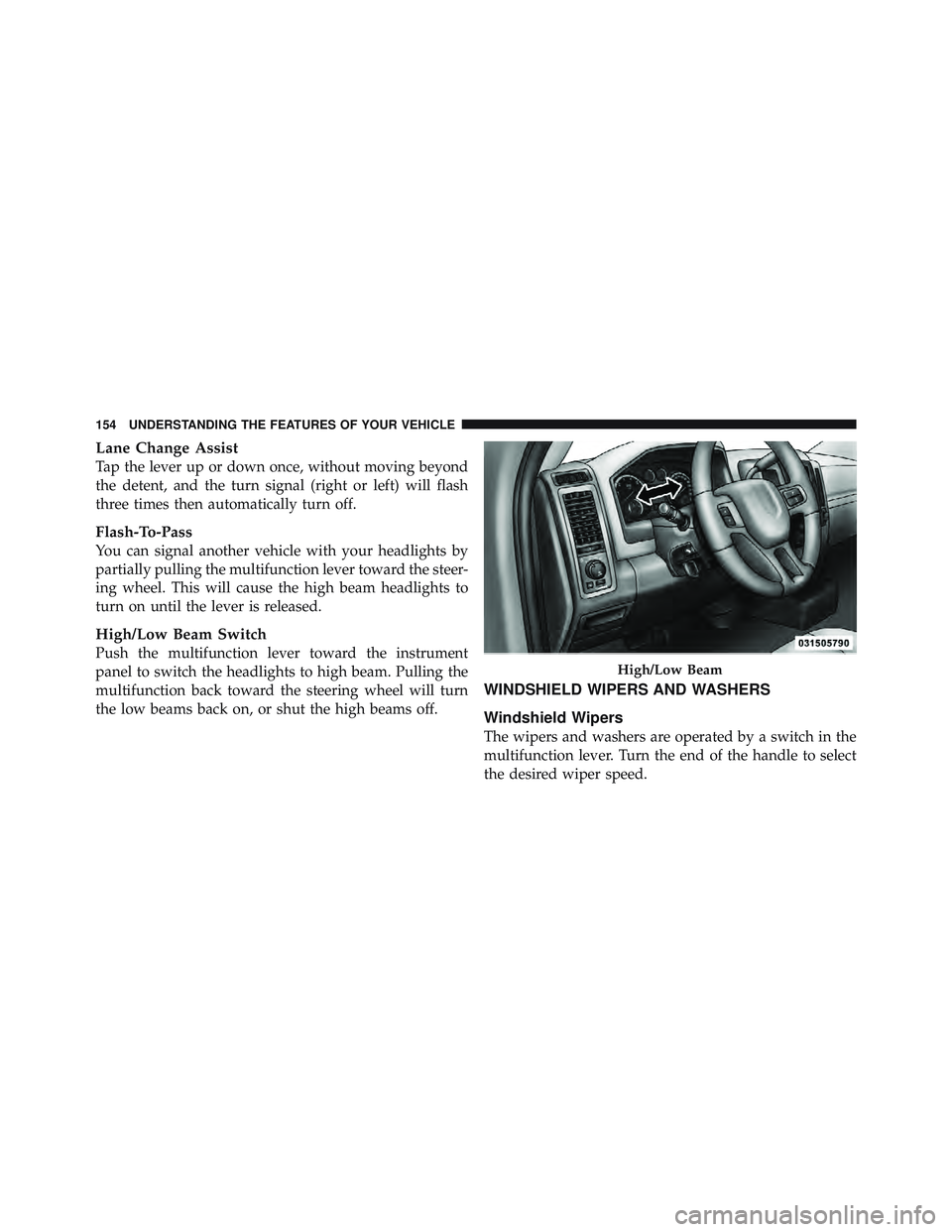
Lane Change Assist
Tap the lever up or down once, without moving beyond
the detent, and the turn signal (right or left) will flash
three times then automatically turn off.
Flash-To-Pass
You can signal another vehicle with your headlights by
partially pulling the multifunction lever toward the steer-
ing wheel. This will cause the high beam headlights to
turn on until the lever is released.
High/Low Beam Switch
Push the multifunction lever toward the instrument
panel to switch the headlights to high beam. Pulling the
multifunction back toward the steering wheel will turn
the low beams back on, or shut the high beams off. WINDSHIELD WIPERS AND WASHERS
Windshield Wipers
The wipers and washers are operated by a switch in the
multifunction lever. Turn the end of the handle to select
the desired wiper speed. High/Low Beam154 UNDERSTANDING THE FEATURES OF YOUR VEHICLE
Page 170 of 502

The key symbol indicates that this outlet can supply
power when the key is in the ON or ACC positions.
All accessories connected to the outlet(s) should be
removed or turned off when the vehicle is not in use to
protect the battery against discharge.
WARNING!To avoid serious injury or death:
• Only devices designed for use in this type of
outlet should be inserted into any 12 Volt outlet.
• Do not touch with wet hands.
• Close the lid when not in use and while driving
the vehicle.
• If this outlet is mishandled, it may cause an
electric shock and failure.Power Outlet Fuse Locations1 — M7 Fuse 20 A Yellow Power Outlet Center Seat (Opt) or
with Console Rear
2 — M6 Fuse 20 A Yellow Cigar Lighter Instrument Panel or
with Console Front
3 — M36 Fuse 20 A Yellow Power Outlet Instrument Panel or
with Console Center168 UNDERSTANDING THE FEATURES OF YOUR VEHICLE
Page 172 of 502

For vehicles equipped with a floor console the cuphold-
ers may be used.
POWER INVERTER — IF EQUIPPED
A 115 Volt (150 Watts Maximum) outlet is located on the
center stack of the instrument panel, to the right of the
radio. This outlet can power cellular phones, electronics
and other low power devices requiring power up to 150
Watts. Certain high-end video games, such as Playsta-
tion3 and XBox360 will exceed this power limit, as will
most power tools.
The power inverter is designed with built-in overload
protection. If the power rating of 150 Watts is exceeded,
the power inverter will automatically shut down. Once
the electrical device has been removed from the outlet the
inverter should automatically reset. If the power rating
exceeds approximately 170 Watts, the power inverter
may have to be reset manually. To reset the inverter
manually press the power inverter button OFF and ON. To avoid overloading the circuit, check the power ratings
on electrical devices prior to using the inverter.
Power Inverter Outlet170 UNDERSTANDING THE FEATURES OF YOUR VEHICLE