lights RAM CHASSIS CAB 2016 Service Manual
[x] Cancel search | Manufacturer: RAM, Model Year: 2016, Model line: CHASSIS CAB, Model: RAM CHASSIS CAB 2016Pages: 675, PDF Size: 5.46 MB
Page 282 of 675

• Engine Temperature Hot
• Battery Voltage Low
• Service Electronic Throttle Control
• Lights On
• Right Turn Signal Light Out
• Left Turn Signal Light Out
• Turn Signal On
• Sound Horn with Remote Lock: Off; 1st Press; 2nd
Press
• Vehicle Not in Park
• Key in Ignition
• Key in Ignition Lights On
• Remote Start Active Key to Run • Remote Start Active Push Start Button
• Remote Start Aborted Fuel Low
• Remote Start Aborted Too Cold
• Remote Start Aborted Door Open
• Remote Start Aborted Hood Open
• Remote Start Aborted Trunk Open
• Remote Start Aborted Time Expired
• Remote Start Disabled Start to Reset
• Service Airbag System
• Service Airbag Warning Light
• Driver Seatbelt Unbuckled
• Passenger Seatbelt Unbuckled
• Front Seatbelts Unbuckled280 UNDERSTANDING YOUR INSTRUMENT PANEL
Page 285 of 675

Setting Names Setting Names Ab-
breviated (Left Sub-
menu Layer) Sub-Menus (Right Submenu Layer)
4 Tilt Mirror in Re-
verse Tilt Mirror in R On; Off
5 Rain Sensing Wipers Auto Wipers On; Off
6 Hill Start Assist Hill Start Assist On; Off
7 Headlights Off Delay Lights Off Delay 0 seconds; 30 seconds; 60 seconds; 90 seconds
8 Illuminated Ap-
proach Lights w/ Unlock 0 seconds; 30 seconds; 60 seconds; 90 seconds
9 Headlights On with
Wipers Lights w/ Wipers On; Off
10 Automatic High-
beams Auto Highbeams On; Off
11 Daytime Running
Lights — If
Equipped Daytime Lights On; Off 4UNDERSTANDING YOUR INSTRUMENT PANEL 283
Page 286 of 675

Setting Names Setting Names Ab-
breviated (Left Sub-
menu Layer) Sub-Menus (Right Submenu Layer)
12 Flash Lights with
Lock Lights w/ Lock On; Off
13 Auto Lock Doors Auto Lock Doors On; Off
14 Auto Unlock Doors Auto Unlock Doors On; Off
15 Sound Horn with
Remote Start Horn w/ Rmt Start On; Off
16 Sound Horn with
Remote Lock Horn w/ Rmt Lock Off; 1st Press; 2nd Press
17 Remote Unlock Se-
quence Remote Unlock Driver Door; All Doors
18 Key Fob Linked to
Memory Key in Memory On; Off
19 Passive Entry Passive Entry On; Off284 UNDERSTANDING YOUR INSTRUMENT PANEL
Page 287 of 675
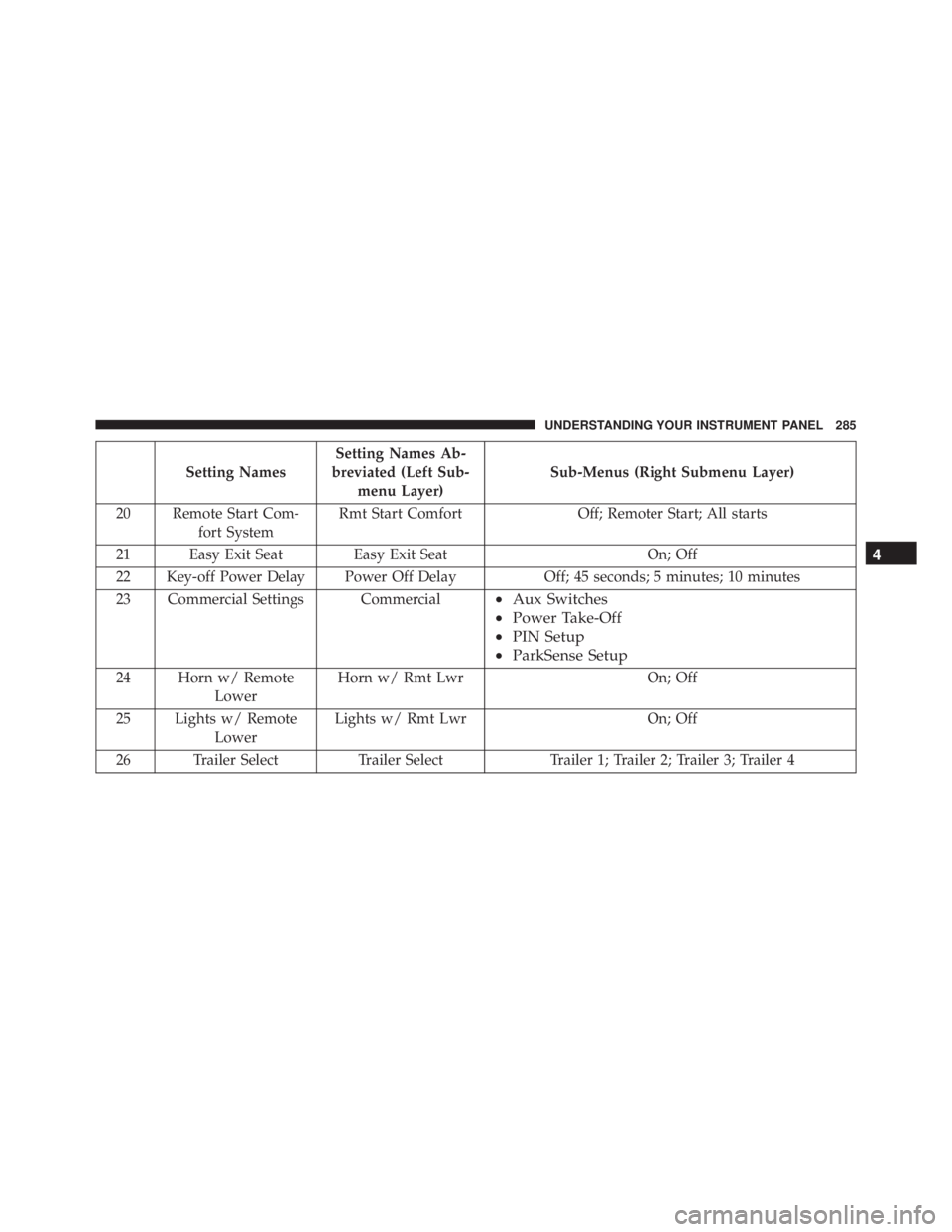
Setting Names Setting Names Ab-
breviated (Left Sub-
menu Layer) Sub-Menus (Right Submenu Layer)
20 Remote Start Com-
fort System Rmt Start Comfort Off; Remoter Start; All starts
21 Easy Exit Seat Easy Exit Seat On; Off
22 Key-off Power Delay Power Off Delay Off; 45 seconds; 5 minutes; 10 minutes
23 Commercial Settings Commercial • Aux Switches
• Power Take-Off
• PIN Setup
• ParkSense Setup
24 Horn w/ Remote
Lower Horn w/ Rmt Lwr On; Off
25 Lights w/ Remote
Lower Lights w/ Rmt Lwr On; Off
26 Trailer Select Trailer Select Trailer 1; Trailer 2; Trailer 3; Trailer 4 4UNDERSTANDING YOUR INSTRUMENT PANEL 285
Page 294 of 675

the DID’s compass/outside temp line. Examples of this
message type are “Right Front Turn Signal Lamp Out”
and “Low Tire Pressure.”
• Unstored Messages
This message type is displayed indefinitely or until the
condition that activated the message is cleared. Examples
of this message type are “Turn Signal On” (if a turn signal
is left on) and “Lights On” (if driver leaves the vehicle).
• Unstored Messages Until RUN
These messages deal primarily with the Remote Start
feature. This message type is displayed until the ignition
is in the RUN state. Examples of this message type are
“Remote Start Aborted - Door Ajar” and “Press Brake
Pedal and Push Button to Start.”
• Five Second Unstored Messages
When the appropriate conditions occur, this type of
message takes control of the main display area for five seconds and then returns to the previous screen. An
example of this message type is “Automatic High Beams
On.”
Oil Life Reset
Your vehicle is equipped with an engine oil change
indicator system. The “Oil Change Required” message
will flash in the DID display for approximately 10
seconds after a single chime has sounded, to indicate the
next scheduled oil change interval. The engine oil change
indicator system is duty cycle based, which means the
engine oil change interval may fluctuate, dependent
upon your personal driving style.
NOTE: Use the steering wheel DID controls for the
following procedure(s).292 UNDERSTANDING YOUR INSTRUMENT PANEL
Page 297 of 675

• Battery Voltage Low
• Service Electronic Throttle Control
• Lights On
• Right Turn Signal Light Out
• Left Turn Signal Light Out
• Turn Signal On
• Sound Horn with Remote Lock: Off; 1st Press; 2nd
Press
• Vehicle Not in Park
• Key in Ignition
• Key in Ignition Lights On
• Remote Start Active Key to Run
• Remote Start Active Push Start Button • Remote Start Aborted Fuel Low
• Remote Start Aborted Too Cold
• Remote Start Aborted Door Open
• Remote Start Aborted Hood Open
• Remote Start Aborted Trunk Open
• Remote Start Aborted Time Expired
• Remote Start Disabled Start to Reset
• Service Airbag System
• Service Airbag Warning Light
• Driver Seatbelt Unbuckled
• Passenger Seatbelt Unbuckled
• Front Seatbelts Unbuckled
• Door Open 4UNDERSTANDING YOUR INSTRUMENT PANEL 295
Page 308 of 675

Setting Names Setting Names Abbreviated
(Left Submenu Layer) Sub-Menus (Right Submenu
Layer)
3 ParkSense ParkSense • Notification — Sound Only;
Sound & Display
• Front Volume — Low; Me-
dium; High
• Rear Volume — Low; Me-
dium; High
4 Tilt Mirror in Reverse Tilt Mirror in R On; Off
5 Rain Sensing Wipers Auto Wipers On; Off
6 Hill Start Assist Hill Start Assist On; Off
7 Headlights Off Delay Lights Off Delay 0 seconds; 30 seconds; 60 sec-
onds; 90 seconds
8 Illuminated Approach Lights w/ Unlock 0 seconds; 30 seconds; 60 sec-
onds; 90 seconds
9 Headlights On with Wipers Lights w/ Wipers On; Off
10 Automatic Highbeams Auto Highbeams On; Off306 UNDERSTANDING YOUR INSTRUMENT PANEL
Page 309 of 675

Setting Names Setting Names Abbreviated
(Left Submenu Layer) Sub-Menus (Right Submenu
Layer)
11 Daytime Running Lights Daytime Lights On; Off
12 Flash Lights with Lock Lights w/ Lock On; Off
13 Auto Lock Doors Auto Lock Doors On; Off
14 Auto Unlock Doors Auto Unlock Doors On; Off
15 Sound Horn with Remote Start Horn w/ Rmt Start On; Off
16 Sound Horn with Remote Lock Horn w/ Rmt Lock On; Off
17 Remote Unlock Sequence Remote Unlock Driver Door; All Doors
18 Key Fob Linked to Memory Key in Memory On; Off
19 Passive Entry Passive Entry On; Off
20 Remote Start Comfort System Rmt Start Comfort On; Off
21 Easy Exit Seat Easy Exit Seat On; Off
22 Key-off Power Delay Power Off Delay Off; 45 seconds; 5 minutes; 10
minutes 4UNDERSTANDING YOUR INSTRUMENT PANEL 307
Page 310 of 675

Setting Names Setting Names Abbreviated
(Left Submenu Layer) Sub-Menus (Right Submenu
Layer)
23 Commercial Settings Commercial • Aux Switches
• Power Take-Off
• PIN Setup
• ParkSense Setup
24 Aero Ride Height Mode Aero Mode On; Off
25 Tire/Jack Mode Tire/Jack Mode On; Off
26 Transport Mode Transport Mode On; Off
27 Wheel Alignment Mode Wheel Alignment On; Off
28 Horn w/ Remote Lower Horn w/ Rmt Lwr On; Off
29 Lights w/ Remote Lower Lights w/ Rmt Lwr On; Off
30 Trailer Select Trailer Select Trailer 1; Trailer 2; Trailer 3;
Trailer 4
31 Brake Type Brake Type Light Electric; Heavy Electric;
Light EOH; Heavy EOH308 UNDERSTANDING YOUR INSTRUMENT PANEL
Page 316 of 675
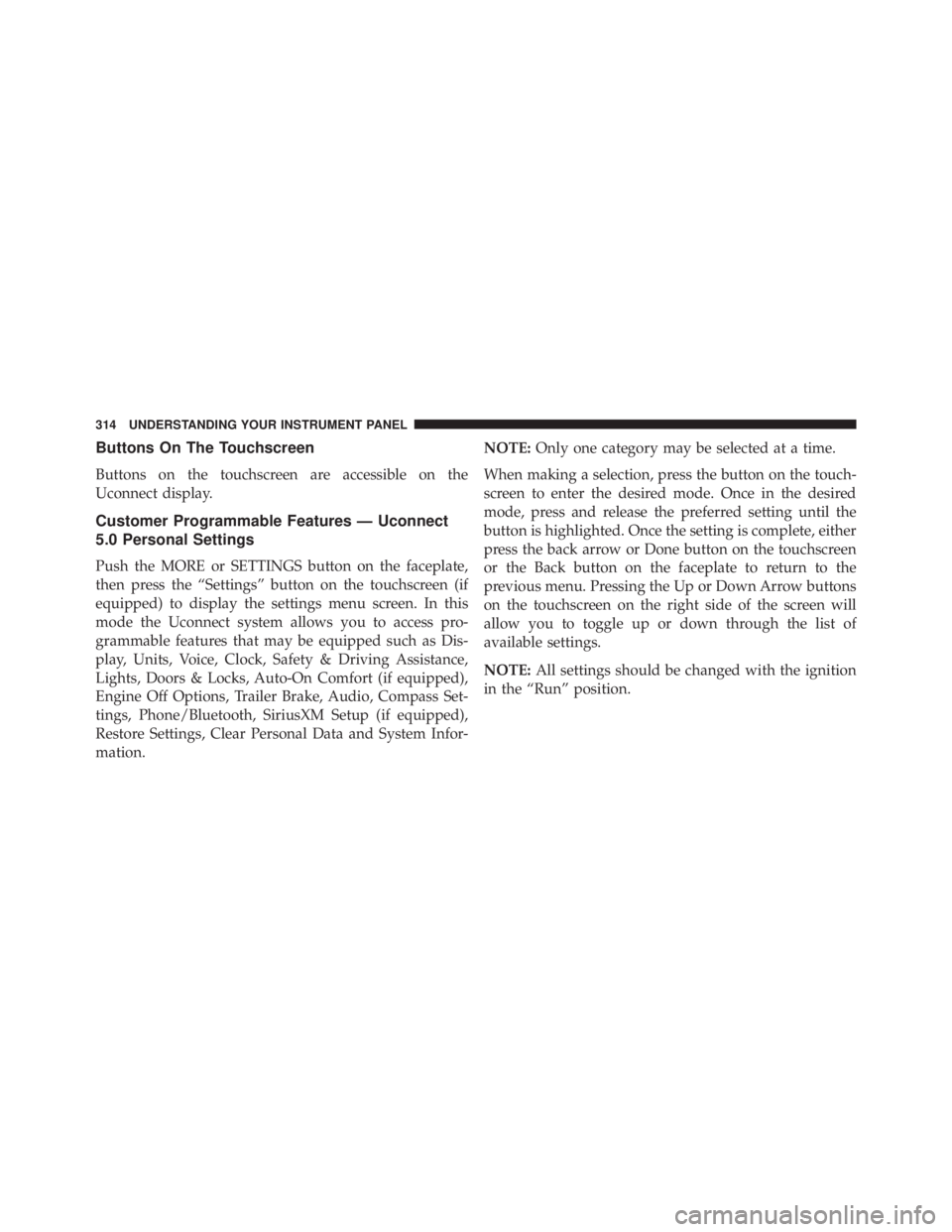
Buttons On The Touchscreen
Buttons on the touchscreen are accessible on the
Uconnect display.
Customer Programmable Features — Uconnect
5.0 Personal Settings
Push the MORE or SETTINGS button on the faceplate,
then press the “Settings” button on the touchscreen (if
equipped) to display the settings menu screen. In this
mode the Uconnect system allows you to access pro-
grammable features that may be equipped such as Dis-
play, Units, Voice, Clock, Safety & Driving Assistance,
Lights, Doors & Locks, Auto-On Comfort (if equipped),
Engine Off Options, Trailer Brake, Audio, Compass Set-
tings, Phone/Bluetooth, SiriusXM Setup (if equipped),
Restore Settings, Clear Personal Data and System Infor-
mation. NOTE: Only one category may be selected at a time.
When making a selection, press the button on the touch-
screen to enter the desired mode. Once in the desired
mode, press and release the preferred setting until the
button is highlighted. Once the setting is complete, either
press the back arrow or Done button on the touchscreen
or the Back button on the faceplate to return to the
previous menu. Pressing the Up or Down Arrow buttons
on the touchscreen on the right side of the screen will
allow you to toggle up or down through the list of
available settings.
NOTE: All settings should be changed with the ignition
in the “Run” position.314 UNDERSTANDING YOUR INSTRUMENT PANEL