lock RAM CHASSIS CAB 2019 Owners Manual
[x] Cancel search | Manufacturer: RAM, Model Year: 2019, Model line: CHASSIS CAB, Model: RAM CHASSIS CAB 2019Pages: 607, PDF Size: 12.68 MB
Page 352 of 607

350 STARTING AND OPERATING
GAIN Adjustment Buttons (+/-)
Pushing these buttons will adjust the brake control power
output to the trailer brakes in 0.5 increments. The GAIN
setting can be increased to a maximum of 10 or decreased to
a minimum of 0 (no trailer braking).
GAIN
The GAIN setting is used to set the trailer brake control for
the specific towing condition and should be changed as
towing conditions change. Changes to towing conditions
include trailer load, vehicle load, road conditions and
weather.
Adjusting GAIN
NOTE:
This should only be performed in a traffic free environment
at speeds of approximately 20–25 mph (30–40 km/h).
1. Make sure the trailer brakes are in good working condi -
tion, functioning normally and properly adjusted. See
your trailer dealer if necessary.
2. Hook up the trailer and make the electrical connections
according to the trailer manufacturer's instructions. 3. When a trailer with electric/EOH brakes is plugged in,
the trailer connected message should appear in the
instrument cluster display (if the connection is not recog -
nized by the ITBM, braking functions will not be avail -
able), the GAIN setting will illuminate and the correct
type of trailer must be selected from the instrument
cluster display options.
4. Push the UP or DOWN button on the steering wheel until
“TRAILER TOW” appears on the screen.
5. Push the RIGHT arrow on the steering wheel to enter
“TRAILER TOW”.
6. Push the UP or DOWN buttons until the Trailer Brake
Type appears on the screen.
7. Push the RIGHT arrow and then push the UP or DOWN
buttons until the proper Trailer Brake Type appears on
the screen.
8. In a traffic-free environment, tow the trailer on a dry,
level surface at a speed of 20–25 mph (30–40 km/h) and
squeeze the manual brake control lever completely.
9. If the trailer wheels lockup (indicated by squealing tires),
reduce the GAIN setting; if the trailer wheels turn freely,
increase the GAIN setting.
Page 353 of 607

STARTING AND OPERATING 351
Repeat steps 8 and 9 until the GAIN setting is at a point just below trailer wheel lockup. If towing a heavier trailer, trailer wheel
lockup may not be attainable even with the maximum GAIN setting of 10.
* The suggested selection depends and may change
depending on the customer preferences for braking perfor -
mance. Condition of the trailer brakes, driving and road state
may also affect the selection.
Display Messages
The trailer brake control interacts with the instrument cluster
display. Display messages, along with a single chime, will be
displayed when a malfunction is determined in the trailer
connection, trailer brake control, or on the trailer. Refer to
“Instrument Cluster Display” in “Getting To Know Your
Instrument Panel” for further information. Light Electric Heavy Electric Light EOH Heavy EOH
Type of Trailer Brakes Electric Trailer Brakes Electric Trailer Brakes Electric over Hydraulic
Trailer Brakes Electric over Hydraulic
Trailer Brakes
Load *Under 10,000 lbs *Above 10,000 lbs *Under 10,000 lbs *Above 10,000 lbs
WARNING!
Connecting a trailer that is not compatible with the
ITBM system may result in reduced or complete loss of
trailer braking. There may be a increase in stopping
distance or trailer instability which could result in
personal injury.
CAUTION!
Connecting a trailer that is not compatible with the
ITBM system may result in reduced or complete loss of
trailer braking. There may be a increase in stopping
distance or trailer instability which could result in
damage to your vehicle, trailer, or other property. 5
Page 367 of 607

STARTING AND OPERATING 365
CAUTION!
• Always check the depth of the standing water before
driving through it. Never drive through standing water
that is deeper than the bottom of the tire rims mounted
on the vehicle.
• Determine the condition of the road or the path that is
under water and if there are any obstacles in the way
before driving through the standing water.
• Do not exceed 5 mph (8 km/h) when driving through
standing water. This will minimize wave effects.
• Driving through standing water may cause damage to
your vehicle’s drivetrain components. Always inspect
your vehicle’s fluids (i.e., engine oil, transmission, axle,
etc.) for signs of contamination (i.e., fluid that is milky
or foamy in appearance) after driving through standing
water. Do not continue to operate the vehicle if any
fluid appears contaminated, as this may result in
further damage. Such damage is not covered by the
New Vehicle Limited Warranty.
• Getting water inside your vehicle’s engine can cause it
to lock up and stall out, and cause serious internal
damage to the engine. Such damage is not covered by
the New Vehicle Limited Warranty. 5
Page 376 of 607

374 IN CASE OF EMERGENCY
(Continued)4. Reach through the access hole of the wheel house splash
shield and disengage the bulb access cover by rotating
counterclockwise.
Bulb Access Cover
5. Disconnect the internal lamp wiring harness connector
from the low beam bulb. 6. Rotate the bulb counterclockwise 1/4 turn to unlock the
bulb from the lamp.
7. Pull the bulb straight out from the housing.
8. Reverse the procedure for installation of new bulb and
covers.
High Beam
1. Open the hood.
2. Disconnect and isolate the negative battery cable.
3. Look under the hood and behind the headlamp to find
the high beam bulb access cover.
4. Reach behind the headlamp and disengage the access
cover by rotating counterclockwise.
5. Disconnect the internal lamp wiring harness connector
from the high beam bulb.CAUTION!
• Do not contaminate the bulb glass by touching it with
your fingers or by allowing it to contact other oily
surfaces. Shortened bulb life will result. • Always use the correct bulb size and type for replace -
ment. An incorrect bulb size or type may overheat and
cause damage to the lamp, the bulb socket, or the lamp
wiring. CAUTION! (Continued)
Page 377 of 607

IN CASE OF EMERGENCY 375
6. Rotate the bulb counterclockwise 1/4 turn to unlock the
bulb from the lamp.
7. Pull the bulb straight out from the housing.
8. Reverse the procedure for installation of new bulb and
covers.
Front Park And Turn
1. Open the hood.
2. Disconnect and isolate the negative battery cable.
3. Look under the hood and behind the headlamp to find
the park and turn socket. Park And Turn Socket
4. Reach behind the headlamp and unlock the park and turn
socket from the lamp by rotating counterclockwise ¼
turn.
5. Pull the bulb straight out from the housing.
6. Separate the bulb from the socket without twisting.
7. Reverse the procedure for installation of new bulb and
covers.CAUTION!
• Do not contaminate the bulb glass by touching it with
your fingers or by allowing it to contact other oily
surfaces. Shortened bulb life will result.
• Always use the correct bulb size and type for replace -
ment. An incorrect bulb size or type may overheat and
cause damage to the lamp, the bulb socket, or the lamp
wiring.
6
Page 378 of 607

376 IN CASE OF EMERGENCY
Side Marker Lamp
1. Open the hood.
2. Disconnect and isolate the negative battery cable.
3. Reach into the front wheel house ahead of the front
wheel, remove the fastener, and lift the cover over the
access hole in the front of the wheel house splash shield.
Access to the rear of the lamp can be gained through this
access hole.
Splash Shield Access Cover 4. Reach through the access hole of the wheel house splash
shield and disengage the side marker socket by rotating
counterclockwise ¼ turn.
Side Marker Socket
5. Pull the socket and bulb straight out from the housing.
6. Separate the bulb from the socket without twisting.
7. Reverse the procedure for installation of new bulb and
covers.
1 — Access Cover
2 — Fastener
Page 379 of 607
IN CASE OF EMERGENCY 377
Fog Lamps — If Equipped
1. Reach under and behind the front bumper to access the
back of the front fog lamp housing.
2. Disconnect the fog lamp wiring harness connector from
the fog lamp bulb.
3. Rotate the bulb counterclockwise ¼ turn to unlock the
bulb from the housing.
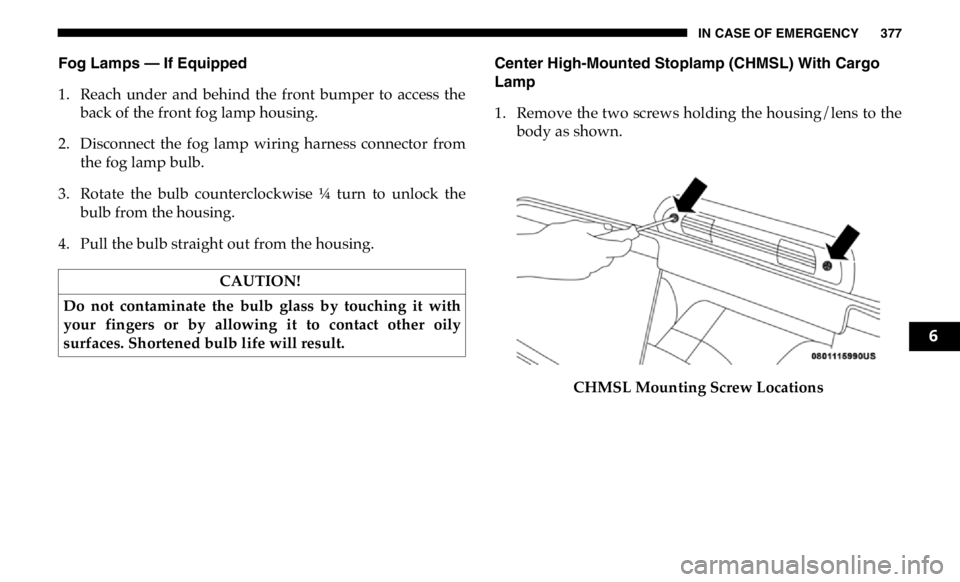
4. Pull the bulb straight out from the housing. Center High-Mounted Stoplamp (CHMSL) With Cargo
Lamp
1. Remove the two screws holding the housing/lens to the
body as shown.
CHMSL Mounting Screw LocationsCAUTION!
Do not contaminate the bulb glass by touching it with
your fingers or by allowing it to contact other oily
surfaces. Shortened bulb life will result.
6
Page 385 of 607

IN CASE OF EMERGENCY 383
F20 30 Amp Pink – Passenger Door Module
F21 30 Amp Pink – Drive Train Control Module
F22 20 Amp Blue – Engine Control Module GPEC / Heavy Duty / Other –
If Equipped
F22 25 Amp White
(Cummins Diesel) – PCM – If Equipped
F23 30 Amp Pink – CBC Feed # 1
F24 30 Amp Pink – Driver Door Module
F25 30 Amp Pink – Front Wiper
F26 30 Amp Pink – Antilock Brakes / Stability Control Module / Valves – If
Equipped (DS 1500 Only)
F28 20 Amp Blue – Trailer Tow Backup Lights – If Equipped
F29 20 Amp Blue – Trailer Tow Parking Lights – If Equipped
F30 30 Amp Pink – Trailer Tow Receptacle / Trailer Tow (Separate
E-Brake)/Trailer Tow (BUX)
F31 30 Amp Pink – Diesel Heater Control – If Equipped (DS 1500 LD Diesel)
F31 20 Amp Blue – Aux App SSV Only - If Equipped
F32 – – Aux Feed, Special Services Vehicle-If Equipped (DS 1500
Only)
F33 20 Amp Blue – Trans Control Module – If Equipped (HD Only)
Aux Feed, SSV Only (DS 1500 Only)Cavity Cartridge Fuse Micro Fuse Description
6
Page 387 of 607

IN CASE OF EMERGENCY 385
F50 – 20 Amp Yellow Air Suspension Control Module – If Equipped
F51 – 10 Amp Red Ignition Node Module / Keyless Ignition Node Module,
Radio Frequency Hub Module / Electric Steering
Column Lock - If Equipped
F52 – 5 Amp Tan Battery Sensor
F53 – 20 Amp Yellow Trailer Tow – Left Turn/Stop Lights - If Equipped
F54 – 20 Amp Yellow Non Memory Adjustable Pedals - If Equipped
F56 – 15 Amp Blue Additional Diesel Content - If Equipped (DS 1500 Only)
F57 – 20 Amp Yellow TCM/PCM / Solenoid Trans Pressure SW (RFE Trans
Only) – If Equipped (HD Only)
Transmission (DS 1500 Only)
F58 – 10 Amp Red Bed Lighting (LED) – If Equipped (HD Only)
F60 – 15 Amp Blue Underhood Lamp / TCM – If Equipped (DS 1500 Only)
F61 – 10 Amp Red UREA Sensor / PM Sensor – If Equipped (DS 1500 LD
Diesel & Cummins Diesel)
F62 – 10 Amp Red Air Conditioning Clutch
F63 – 20 Amp Yellow Ignition Coils (Gas), Ignition Coils Capacitors (Gas) /
Short Runner Valve Actuator / Urea Heater Control
Unit (DS 1500 LD Diesel) / RLY Coil Feed-SCR (DS 1500
LD Diesel)Cavity Cartridge Fuse Micro Fuse Description
6
Page 394 of 607

392 IN CASE OF EMERGENCY
(Continued)6. Block both the front and rear of the wheel diagonally
opposite the jacking position. For example, if the right
front wheel is being changed, block the left rear wheel.
Wheel Blocked
NOTE:
Passengers should not remain in the vehicle when the
vehicle is being jacked. Jacking Instructions 4500 And 5500 Series
WARNING!
Carefully follow these tire changing warnings to help
prevent personal injury or damage to your vehicle:
• Always park on a firm, level surface as far from the
edge of the roadway as possible before raising the
vehicle.
• Turn on the Hazard Warning flasher.
• Block the wheel diagonally opposite the wheel to be
raised.
• Apply the parking brake firmly and set the transmis -
sion in PARK.
• Never start or run the engine with the vehicle on a jack.
• Do not let anyone sit in the vehicle when it is on a jack.
• Do not get under the vehicle when it is on a jack. If you
need to get under a raised vehicle, take it to a service
center where it can be raised on a lift.
• Only use the jack in the positions indicated and for
lifting this vehicle during a tire change.
• If working on or near a roadway, be extremely careful
of motor traffic.