lock RAM CHASSIS CAB 2019 Workshop Manual
[x] Cancel search | Manufacturer: RAM, Model Year: 2019, Model line: CHASSIS CAB, Model: RAM CHASSIS CAB 2019Pages: 607, PDF Size: 12.68 MB
Page 157 of 607

GETTING TO KNOW YOUR INSTRUMENT PANEL 155
— Sway Bar Fault Warning Light
This light will illuminate when there is a fault in the sway bar
disconnect system.
Yellow Indicator Lights
— Forward Collision Warning Off Indicator Light — If
Equipped
This indicator light illuminates to indicate that Forward
Collision Warning is off.
— TOW/HAUL Indicator Light
This indicator light will illuminate when TOW/HAUL mode
is selected.
— Cargo Light — If Equipped
This indicator light will illuminate when the cargo light is
activated by pushing the cargo light button on the headlight
switch. — Sway Bar Indicator Light — If Equipped
This indicator light will illuminate when the front sway bar
is disconnected.
— Snowplow Mode Indicator Light — If Equipped
This indicator light will illuminate when Snowplow Mode
has been activated.
— Front And Rear Axle Lock Indicator Light
This light indicates when the front, rear, or both axles have
been locked. The telltale will display the lock icon on the
front and rear axles to indicate the current lock status.
— Rear Axle Lock Indicator Light
This light indicates when the rear axle lock has been acti -
vated.
— 4WD Lock Indicator Light
This light alerts the driver that the vehicle is in the
four-wheel drive LOCK mode. The front and rear drivesh -
afts are mechanically locked together, forcing the front and
rear wheels to rotate at the same speed. 3
Page 158 of 607

156 GETTING TO KNOW YOUR INSTRUMENT PANEL
Refer to “Four-Wheel Drive Operation” in “Starting And
Operating” for further information on four-wheel drive
operation and proper use.
— 4WD Low Indicator Light — If Equipped
This light alerts the driver that the vehicle is in the
four-wheel drive LOW mode. The front and rear driveshafts
are mechanically locked together forcing the front and rear
wheels to rotate at the same speed. Low range provides a
greater gear reduction ratio to provide increased torque at
the wheels.
Refer to “Four-Wheel Drive Operation — If Equipped” in
“Starting And Operating” for further information on
four-wheel drive operation and proper use.
— 4WD High Indicator Light — If Equipped
This light alerts the driver that the vehicle is in the
four-wheel drive HIGH mode. The front and rear driveshafts
are mechanically locked together forcing the front and rear
wheels to rotate at the same speed. — NEUTRAL Indicator Light — If Equipped
This light alerts the driver that the 4WD power transfer case
is in the NEUTRAL mode and the front and rear driveshafts
are disengaged from the powertrain.
Green Indicator Lights
— Adaptive Cruise Control (ACC) Set With Target
Light — If Equipped
This will display when the ACC is set and a target vehicle is
detected.
Refer to “Adaptive Cruise Control (ACC) — If Equipped” in
“Starting And Operating” for further information.
— Adaptive Cruise Control (ACC) Set With No Target
Detected Indicator Light — If Equipped
This light will turn on when the Adaptive Cruise Control is
SET and there is no target vehicle detected.
Refer to "Adaptive Cruise Control (ACC) — If Equipped" in
"Starting And Operating" for further information.
Page 163 of 607

161
(Continued)SAFETYSAFETY FEATURES
Anti-Lock Brake System (ABS)
The Anti-Lock Brake System (ABS) provides increased
vehicle stability and brake performance under most braking
conditions. The system automatically prevents wheel lock,
and enhances vehicle control during braking.
The ABS performs a self-check cycle to ensure that the ABS
is working properly each time the vehicle is started and
driven. During this self-check, you may hear a slight clicking
sound as well as some related motor noises.
ABS is activated during braking when the system detects one
or more wheels begin to lock. Road conditions such as ice,
snow, gravel, bumps, railroad tracks, loose debris, or panic
stops may increase the likelihood of ABS activation(s). You also may experience the following when ABS activates:
• The ABS motor noise (it may continue to run for a short
time after the stop).
• The clicking sound of solenoid valves.
• Brake pedal pulsations.
• A slight drop of the brake pedal at the end of the stop.
These are all normal characteristics of ABS.
WARNING!
• The ABS contains sophisticated electronic equipment
that may be susceptible to interference caused by
improperly installed or high output radio transmitting
equipment. This interference can cause possible loss of
anti-lock braking capability. Installation of such equip -
ment should be performed by qualified professionals.
• Pumping of the Anti-Lock Brakes will diminish their
effectiveness and may lead to a collision. Pumping
makes the stopping distance longer. Just press firmly
on your brake pedal when you need to slow down or
stop. 4
Page 164 of 607

162 SAFETY
ABS is designed to function with the OEM tires. Modification
may result in degraded ABS performance.
Anti-Lock Brake Warning Light
The yellow “Anti-Lock Brake Warning Light” will turn on
when the ignition is turned to the ON/RUN mode and may
stay on for as long as four seconds.
If the “Anti-Lock Brake Warning Light” remains on or comes
on while driving, it indicates that the anti-lock portion of the
brake system is not functioning and that service is required. However, the conventional brake system will continue to
operate normally if the “Anti-Lock Brake Warning Light” is
on.
If the “Anti-Lock Brake Warning Light” is on, the brake
system should be serviced as soon as possible to restore the
benefits of anti-lock brakes. If the “Anti-Lock Brake Warning
Light” does not come on when the ignition is turned to the
ON/RUN mode, have the light repaired as soon as possible.
Electronic Brake Control System
Your vehicle is equipped with an advanced Electronic Brake
Control system (EBC). This system includes Electronic Brake
Force Distribution (EBD), Anti-Lock Brake System (ABS),
Brake Assist System (BAS), Hill Start Assist (HSA), Traction
Control System (TCS), Electronic Stability Control (ESC),
and Electronic Roll Mitigation (ERM). These systems work
together to enhance both vehicle stability and control in
various driving conditions.
Your vehicle may also be equipped with Trailer Sway
Control (TSC) and Hill Descent Control (HDC).• The ABS cannot prevent the natural laws of physics
from acting on the vehicle, nor can it increase braking
or steering efficiency beyond that afforded by the
condition of the vehicle brakes and tires or the traction
afforded.
• The ABS cannot prevent collisions, including those
resulting from excessive speed in turns, following
another vehicle too closely, or hydroplaning.
• The capabilities of an ABS equipped vehicle must
never be exploited in a reckless or dangerous manner
that could jeopardize the user’s safety or the safety of
others. WARNING! (Continued)
Page 165 of 607

SAFETY 163
Electronic Brake Force Distribution (EBD)
This function manages the distribution of the braking torque
between the front and rear axles by limiting braking pressure
to the rear axle. This is done to prevent overslip of the rear
wheels to avoid vehicle instability, and to prevent the rear
axle from entering ABS before the front axle.
Brake System Warning Light
The red “Brake System Warning Light” will turn on when
the ignition is turned to the ON/RUN mode and may stay on
for as long as four seconds.
If the “Brake System Warning Light” remains on or comes on
while driving, it indicates that the brake system is not func -
tioning properly and that immediate service is required. If
the “Brake System Warning Light” does not come on when
the ignition is turned to the ON/RUN mode, have the light
repaired as soon as possible. Brake Assist System (BAS)
The BAS is designed to optimize the vehicle’s braking capa -
bility during emergency braking maneuvers. The system
detects an emergency braking situation by sensing the rate
and amount of brake application and then applies optimum
pressure to the brakes. This can help reduce braking
distances. The BAS complements the anti-lock brake system
(ABS). Applying the brakes very quickly results in the best
BAS assistance. To receive the benefit of the system, you
must apply continuous braking pressure during the stop -
ping sequence, (do not “pump” the brakes). Do not reduce
brake pedal pressure unless braking is no longer desired.
Once the brake pedal is released, the BAS is deactivated.
WARNING!
The Brake Assist System (BAS) cannot prevent the
natural laws of physics from acting on the vehicle, nor
can it increase the traction afforded by prevailing road
conditions. BAS cannot prevent collisions, including
those resulting from excessive speed in turns, driving on
very slippery surfaces, or hydroplaning. The capabilities
of a BAS-equipped vehicle must never be exploited in a
reckless or dangerous manner, which could jeopardize
the user's safety or the safety of others. 4
Page 183 of 607

SAFETY 181
NOTE:
When filling warm tires, the tire pressure may need to be
increased up to an additional 4 psi (28 kPa) above the recom -
mended cold placard pressure in order to turn the Tire Pres -
sure Monitoring Telltale Light off.
Service TPMS Warning
If a system fault is detected, the “Tire Pressure Monitoring
Telltale Light” will flash on and off for 75 seconds and then
remain on solid. The system fault will also sound a chime. In
addition, the instrument cluster will display a "SERVICE
TPM SYSTEM" message for a minimum of five seconds and
then display dashes (- -) in place of the pressure value to indi -
cate which sensor is not being received.
If the ignition switch is cycled, this sequence will repeat,
providing the system fault still exists. If the system fault no
longer exists, the “Tire Pressure Monitoring Telltale Light”
will no longer flash, and the "SERVICE TPM SYSTEM"
message will no longer display, and a pressure value will
display in place of the dashes. A system fault can occur due
to any of the following:
• Signal interference due to electronic devices or driving
next to facilities emitting the same radio frequencies as the
TPM sensors. • Installing aftermarket window tinting that contains mate -
rials that may block radio wave signals.
• Accumulation of snow or ice around the wheels or wheel
housings.
• Using tire chains on the vehicle.
• Using wheels/tires not equipped with TPM sensors.
A system fault may occur due to an incorrect TPM sensor
location condition. When a system fault occurs due to an
incorrect TPM sensor location, the “Tire Pressure Monitoring
Telltale Light” will flash on and off for 75 seconds and then
remain on solid. The system fault will also sound a chime. In
addition, the instrument cluster will display a “Tire Pressure
Temporarily Unavailable” message in place of the tire pres -
sure display screen. If the ignition switch is cycled, this
sequence will repeat, providing the system fault still exists. If
the system fault no longer exists, the “Tire Pressure Moni -
toring Telltale Light” will no longer flash and the tire pres -
sure display screen will be displayed showing the tire
pressure values the correct locations. 4
Page 189 of 607

SAFETY 187
• Installing aftermarket window tinting that contains mate -
rials that may block radio wave signals.
• Accumulation of snow or ice around the wheels or wheel
housings.
• Using tire chains on the vehicle.
• Using wheels/tires not equipped with TPM sensors.
General Information
This device complies with Part 15 of the FCC rules and RSS
210 of Industry Canada. Operation is subject to the following
conditions:
1. This device may not cause harmful interference.
2. This device must accept any interference received,
including interference that may cause undesired operation.
NOTE:
Changes or modifications not expressly approved by the
party responsible for compliance could void the user’s
authority to operate the equipment. OCCUPANT RESTRAINT SYSTEMS
Some of the most important safety features in your vehicle
are the restraint systems:
Occupant Restraint Systems Features
• Seat Belt Systems
• Supplemental Restraint Systems (SRS) Air Bags
• Child Restraints
Some of the safety features described in this section may be
standard equipment on some models, or may be optional
equipment on others. If you are not sure, ask an authorized
dealer. 4
Page 193 of 607
SAFETY 191
(Continued)Lap/Shoulder Belts
All seating positions except the Crew Cab front center
seating position have combination lap/shoulder belts.
The seat belt webbing retractor will lock only during very
sudden stops or collisions. This feature allows the shoulder
part of the seat belt to move freely with you under normal
conditions. However, in a collision the seat belt will lock and
reduce your risk of striking the inside of the vehicle or being
thrown out of the vehicle.
WARNING!
• Relying on the air bags alone could lead to more severe
injuries in a collision. The air bags work with your seat
belt to restrain you properly. In some collisions, the air
bags won’t deploy at all. Always wear your seat belt
even though you have air bags.
• In a collision, you and your passengers can suffer much
greater injuries if you are not properly buckled up. You
can strike the interior of your vehicle or other passen -
gers, or you can be thrown out of the vehicle. Always be
sure you and others in your vehicle are buckled up
properly. • It is dangerous to ride in a cargo area, inside or outside
of a vehicle. In a collision, people riding in these areas
are more likely to be seriously injured or killed.
• Do not allow people to ride in any area of your vehicle
that is not equipped with seats and seat belts.
• Be sure everyone in your vehicle is in a seat and using
a seat belt properly. Occupants, including the driver,
should always wear their seat belts whether or not an
air bag is also provided at their seating position to
minimize the risk of severe injury or death in the event
of a crash.
• Wearing your seat belt incorrectly could make your
injuries in a collision much worse. You might suffer
internal injuries, or you could even slide out of the seat
belt. Follow these instructions to wear your seat belt
safely and to keep your passengers safe, too.
• Two people should never be belted into a single seat
belt. People belted together can crash into one another
in a collision, hurting one another badly. Never use a
lap/shoulder belt or a lap belt for more than one person,
no matter what their size. WARNING! (Continued)
4
Page 197 of 607
SAFETY 195
Adjustable Upper Shoulder Belt Anchorage
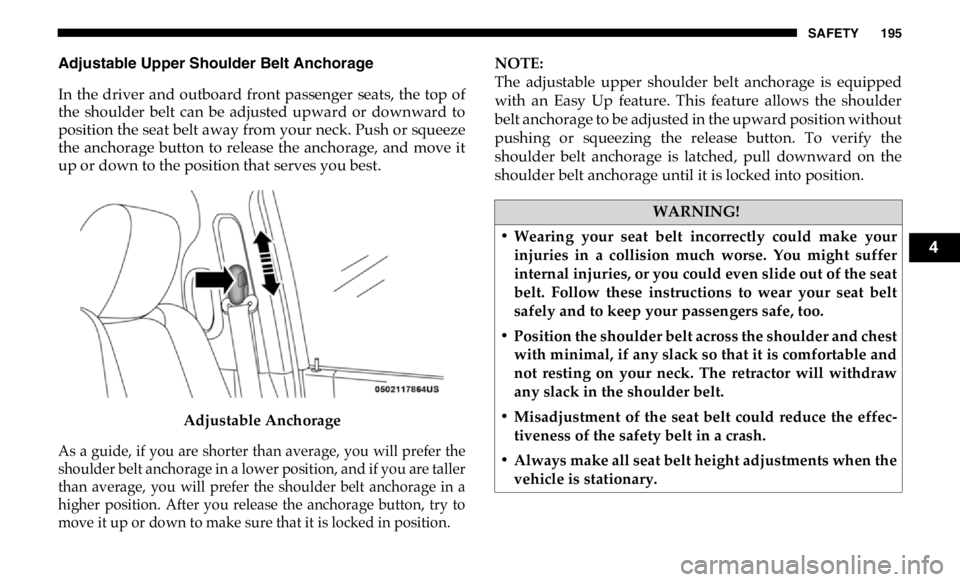
In the driver and outboard front passenger seats, the top of
the shoulder belt can be adjusted upward or downward to
position the seat belt away from your neck. Push or squeeze
the anchorage button to release the anchorage, and move it
up or down to the position that serves you best.
Adjustable Anchorage
As a guide, if you are shorter than average, you will prefer the
shoulder belt anchorage in a lower position, and if you are taller
than average, you will prefer the shoulder belt anchorage in a
higher position. After you release the anchorage button, try to
move it up or down to make sure that it is locked in position. NOTE:
The adjustable upper shoulder belt anchorage is equipped
with an Easy Up feature. This feature allows the shoulder
belt anchorage to be adjusted in the upward position without
pushing or squeezing the release button. To verify the
shoulder belt anchorage is latched, pull downward on the
shoulder belt anchorage until it is locked into position.
WARNING!
• Wearing your seat belt incorrectly could make your
injuries in a collision much worse. You might suffer
internal injuries, or you could even slide out of the seat
belt. Follow these instructions to wear your seat belt
safely and to keep your passengers safe, too.
• Position the shoulder belt across the shoulder and chest
with minimal, if any slack so that it is comfortable and
not resting on your neck. The retractor will withdraw
any slack in the shoulder belt.
• Misadjustment of the seat belt could reduce the effec -
tiveness of the safety belt in a crash.
• Always make all seat belt height adjustments when the
vehicle is stationary. 4
Page 202 of 607
200 SAFETY
Energy Management Feature — If Equipped
3500 Models Only
The front outboard seat belt system may be equipped with
an Energy Management feature that may help further reduce
the risk of injury in the event of a collision. The seat belt
system has a retractor assembly that is designed to release
webbing in a controlled manner.
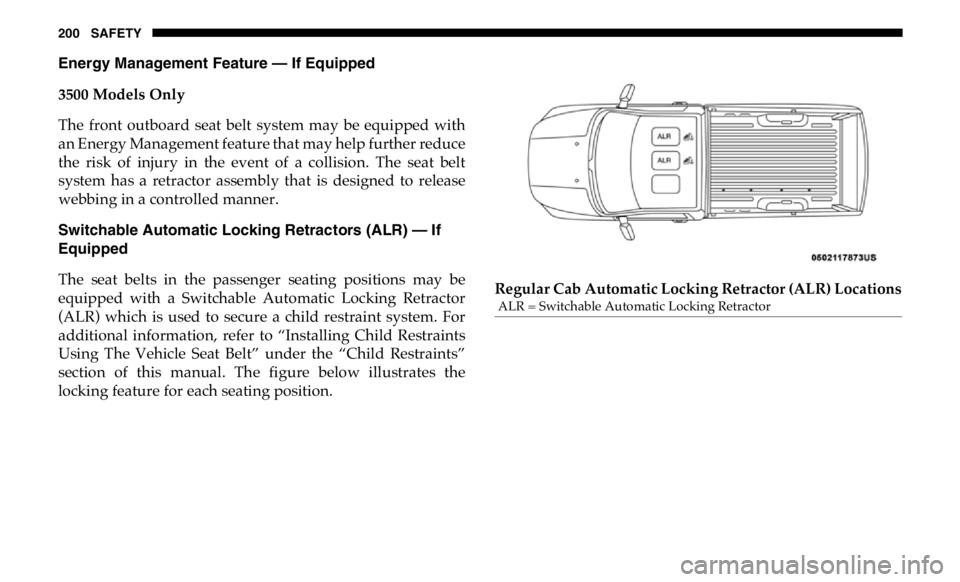
Switchable Automatic Locking Retractors (ALR) — If
Equipped
The seat belts in the passenger seating positions may be
equipped with a Switchable Automatic Locking Retractor
(ALR) which is used to secure a child restraint system. For
additional information, refer to “Installing Child Restraints
Using The Vehicle Seat Belt” under the “Child Restraints”
section of this manual. The figure below illustrates the
locking feature for each seating position. Regular Cab Automatic Locking Retractor (ALR) Locations ALR = Switchable Automatic Locking Retractor