light RAM CHASSIS CAB 2019 Owners Manual
[x] Cancel search | Manufacturer: RAM, Model Year: 2019, Model line: CHASSIS CAB, Model: RAM CHASSIS CAB 2019Pages: 607, PDF Size: 12.68 MB
Page 278 of 607

276 STARTING AND OPERATING
Shifting Procedure
NOTE:
• If any of the requirements to select a new transfer case
position have not been met, the transfer case will not shift.
The position indicator light for the previous position will
remain ON and the newly selected position indicator light
will continue to flash until all the requirements for the
selected position have been met.
• If all the requirements to select a new transfer case position
have been met, the current position indicator light will
turn OFF, the selected position indicator light will flash
until the transfer case completes the shift. When the shift is
complete, the position indicator light for the selected posi -
tion will stop flashing and remain ON.
2WD To 4WD HIGH
Push the desired position on the 4WD control switch to shift
the transfercase. Shifts between 2WD and 4WD HIGH can be
done with the vehicle stopped or in motion. With the vehicle
in motion, the transfer case will engage/disengage faster if
you momentarily release the accelerator pedal after turning
the control switch. If the vehicle is stopped, the ignition
switch must be in the ON position with the engine either
running or off. This shift cannot be completed if the ignition
switch is in the ACC position. NOTE:
The four-wheel drive system will not allow shifts between
2WD/4WD HIGH if the front and/or rear wheels are spin -
ning (no traction). In this situation, the selected position indi -
cator light will flash and the original position indicator light
will remain ON. At this time, reduce speed and stop spin -
ning the wheels to complete the shift.
2WD Or 4WD HIGH To 4WD LOW
NOTE:
When shifting into or out of 4WD LOW some gear noise may
be heard. This noise is normal and is not detrimental to the
vehicle or occupants.
Shifting can be performed with the vehicle rolling 2 to 3 mph
(3 to 5 km/h) or completely stopped. You can use either of
the following procedures:
Preferred Procedure
1. With the engine running, slow the vehicle to 2 to 3 mph (3
to 5 km/h).
2. Shift the transmission into NEUTRAL.
3. While still rolling, push the desired position on the
transfer case control switch.
Page 279 of 607

STARTING AND OPERATING 277
4. After the desired position indicator light is ON (not
flashing), shift the transmission back into gear.
Alternate Procedure
1. Bring the vehicle to a complete stop.
2. With the ignition switch in the ON position and the
engine running, shift the transmission into NEUTRAL.
3. Push the desired position on the transfer case control
switch.
4. After the desired position indicator light is ON (not
flashing), shift the transmission back into gear.
NOTE:
• If Steps 1 or 2 of either the Preferred or Alternate Proce -
dure are not satisfied prior to attempting the shift, then the
desired position indicator light will flash continuously
while the original position indicator light is ON, until all
requirements have been met.
• The ignition switch must be in the ON position for a shift
to take place and for the position indicator lights to be
operable. If the ignition switch is not in the ON position,
the shift will not take place and no position indicator lights
will be on or flashing. Manually Shifted Transfer Case — If Equipped
The transfer case provides four mode positions:
• Two-Wheel Drive High Range (2H)
• Four-Wheel Drive Lock High Range (4H)
• Neutral (N)
• Four-Wheel Drive Low Range (4L)
For additional information on the appropriate use of each
transfer case mode position, see the information below:
2H
Two-Wheel Drive High Range — This range is for normal
street and highway driving on dry, hard surfaced roads.
4H
Four-Wheel Drive Lock High Range — This range locks the
front and rear driveshafts together forcing the front and rear
wheels to rotate at the same speed. Additional traction for
loose, slippery road surfaces only. 5
Page 280 of 607

278 STARTING AND OPERATING
NEUTRAL (N)
Neutral — This range disengages both the front and rear
driveshafts from the powertrain. To be used for flat towing
behind another vehicle. Refer to “Recreational Towing” in
“Starting And Operating” for further information.
4L
Four-Wheel Drive Low Range — This range locks the front
and rear driveshafts together forcing the front and rear
wheels to rotate at the same speed. Additional traction and
maximum pulling power for loose, slippery road surfaces
only. Do not exceed 25 mph (40 km/h).
This transfer case is intended to be driven in the 2H position
for normal street and highway conditions such as dry, hard
surfaced roads.
When additional traction is required, the 4H and 4L posi -
tions can be used to lock the front and rear driveshafts
together and force the front and rear wheels to rotate at the
same speed. This is accomplished by simply moving the gear
selector to the desired positions once the appropriate speed
and gear requirements are met, refer to “Shifting Procedure
– Manually Shifted Transfer Case” in this section for further
information. The 4H and 4L positions are intended for loose, slippery road
surfaces only. Driving in the 4H and 4L positions on dry,
hard surfaced roads may cause increased tire wear and
damage to the driveline components.
The “Transfer Case Position Indicator Light” in the instru -
ment cluster will alert the driver that the vehicle is in
four-wheel drive and that the front and rear driveshafts are
locked together. This light will illuminate when the transfer
case is shifted into either the 4H or 4L position. There is no
light for the 2H or NEUTRAL positions on some models.
When operating your vehicle in 4L, the engine speed is
approximately three times that of the 2H or 4H positions at a
given road speed. Take care not to overspeed the engine and
do not exceed 25 mph (40 km/h).
Proper operation of four-wheel drive vehicles depends on
tires of equal size, type and circumference on each wheel.
Any difference will adversely affect shifting and can cause
damage to the drivetrain.
NOTE:
Do not attempt to make a shift while only the front or rear
wheels are spinning, as this can cause damage to driveline
components.
Page 282 of 607

280 STARTING AND OPERATING
Shifting Procedure — Manually Shifted Transfer Case
2H To 4H
Shifting between 2H and 4H can be made with the vehicle
stopped or in motion. If the vehicle is in motion, shifts can be
made up to 55 mph (88 km/h). With the vehicle in motion,
the transfer case will engage/disengage faster if you
momentarily release the accelerator pedal after completing
the shift. Apply a constant force when shifting the transfer
case lever.
2H Or 4H To 4L
NOTE:
When shifting into or out of 4L some gear noise may be
heard. This noise is normal and is not detrimental to the
vehicle or occupants.
With the vehicle rolling at 2 to 3 mph (3 to 5 km/h), shift the
transmission into NEUTRAL. While the vehicle is coasting at
2 to 3 mph (3 to 5 km/h), shift the transfer case lever firmly
to the desired position. Do not pause in transfer case
NEUTRAL. NOTE:
• Pausing in transfer case NEUTRAL in vehicles equipped
with an automatic transmission may require shutting the
engine OFF to avoid gear clash while completing the shift.
If difficulty occurs, shift the transmission into NEUTRAL,
hold your foot on the brake, and turn the engine OFF.
Complete the range shift to the desired mode.
• Shifting into or out of 4L is possible with the vehicle
completely stopped, however difficulty may occur due to
the mating clutch teeth not being properly aligned. Several
attempts may be required for clutch teeth alignment and
shift completion to occur. The preferred method is with the
vehicle rolling 2 to 3 mph (3 to 5 km/h). Avoid attempting
to engage or disengage 4L with the vehicle moving faster
than 2 to 3 mph (3 to 5 km/h).
• Do not attempt to shift into or out of 4L while the transmis -
sion is in gear.
Transfer Case Position Indicator Light
The “Transfer Case Position Indicator Light” in the instru -
ment cluster is used to alert the driver that the front axle is
fully engaged and all four wheels are driving.
Page 283 of 607
STARTING AND OPERATING 281
LIMITED-SLIP DIFFERENTIAL
The limited-slip differential provides additional traction on
snow, ice, mud, sand and gravel, particularly when there is
a difference between the traction characteristics of the
surface under the right and left rear wheels. During normal
driving and cornering, the limited-slip unit performs simi -
larly to a conventional differential. On slippery surfaces,
however, the differential delivers more of the driving effort
to the rear wheel having the better traction.
The limited-slip differential is especially helpful during slip -
pery driving conditions. With both rear wheels on a slippery
surface, a slight application of the accelerator will supply
maximum traction. When starting with only one rear wheel
on an excessively slippery surface, slight momentary appli -
cation of the parking brake may be necessary to gain
maximum traction. Care should be taken to avoid sudden accelerations when
both rear wheels are on a slippery surface. This could cause
both rear wheels to spin, and allow the vehicle to slide side -
ways on the crowned surface of a road or in a turn.
POWER TAKE OFF OPERATION — IF EQUIPPED
(CHASSIS CAB ONLY)
This vehicle when equipped with PTO Prep and the AS66RC
automatic six-speed, will allow for an aftermarket upfit with
a transmission driven PTO (power take off). The customer
will have the ability to operate the PTO in either a
“stationary” or “mobile” mode. The vehicles will be factory
set to the “stationary” mode. To select “mobile” mode, you
will need to enter the commercial vehicle menu on the instru -
ment cluster screen and select mobile PTO mode. Details of
the PTO selection modes and further PTO information is
available at the Ram Truck Bodybuilders web site:
www.rambodybuilder.com .
AS66RC Six-Speed Automatic Transmission Only
The PTO drive gear (part of the AS66RC) operates at torque
converter turbine speed. The turbine speed will be less than
engine speed when the torque converter clutch is not
engaged and will be same as engine speed when the torque
converter clutch is engaged.WARNING!
On vehicles equipped with a limited-slip differential
never run the engine with one rear wheel off the ground
since the vehicle may drive through the rear wheel
remaining on the ground. You could lose control of the
vehicle. 5
Page 287 of 607
STARTING AND OPERATING 285
SPEED CONTROL
When engaged, the Speed Control takes over accelerator
operations at speeds greater than 20 mph (32 km/h).
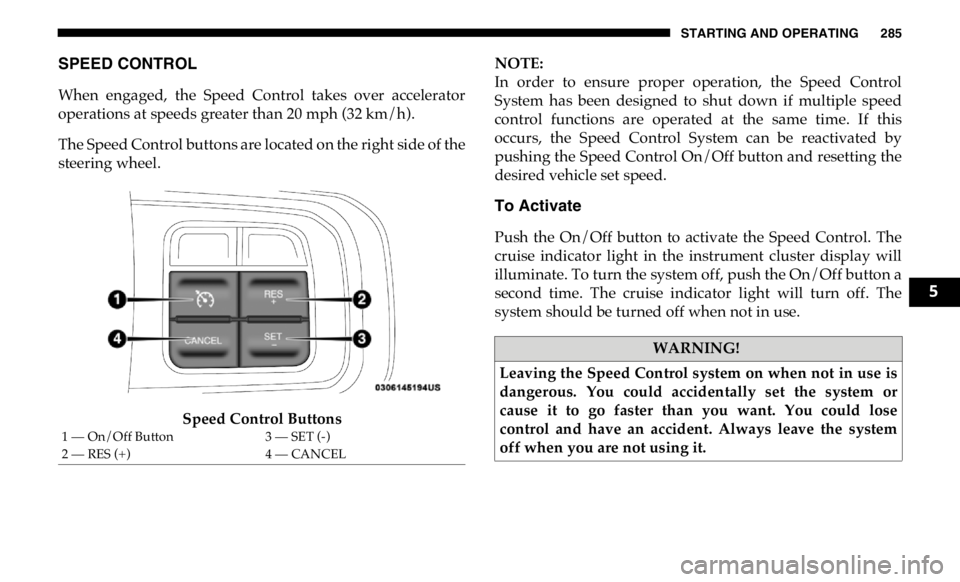
The Speed Control buttons are located on the right side of the
steering wheel.
Speed Control Buttons NOTE:
In order to ensure proper operation, the Speed Control
System has been designed to shut down if multiple speed
control functions are operated at the same time. If this
occurs, the Speed Control System can be reactivated by
pushing the Speed Control On/Off button and resetting the
desired vehicle set speed.
To Activate
Push the On/Off button to activate the Speed Control. The
cruise indicator light in the instrument cluster display will
illuminate. To turn the system off, push the On/Off button a
second time. The cruise indicator light will turn off. The
system should be turned off when not in use.
1 — On/Off Button 3 — SET (-)
2 — RES (+) 4 — CANCEL WARNING!
Leaving the Speed Control system on when not in use is
dangerous. You could accidentally set the system or
cause it to go faster than you want. You could lose
control and have an accident. Always leave the system
off when you are not using it. 5
Page 289 of 607

STARTING AND OPERATING 287
U.S. Speed (mph)
• Pushing the SET (-) button once will result in a 1 mph
decrease in set speed. Each subsequent tap of the button
results in a decrease of 1 mph.
• If the button is continually pushed, the set speed will
continue to decrease until the button is released, then the
new set speed will be established.
Metric Speed (km/h)
• Pushing the SET (-) button once will result in a 1 km/h
decrease in set speed. Each subsequent tap of the button
results in a decrease of 1 km/h.
• If the button is continually pushed, the set speed will
continue to decrease until the button is released, then the
new set speed will be established.
To Accelerate For Passing
Press the accelerator as you would normally. When the pedal
is released, the vehicle will return to the set speed. Using Speed Control On Hills
The transmission may downshift on hills to maintain the
vehicle set speed.
NOTE:
The Speed Control system maintains speed up and down
hills. A slight speed change on moderate hills is normal.
On steep hills, a greater speed loss or gain may occur so it
may be preferable to drive without Speed Control.
WARNING!
Speed Control can be dangerous where the system
cannot maintain a constant speed. Your vehicle could go
too fast for the conditions, and you could lose control
and have an accident. Do not use Speed Control in heavy
traffic or on roads that are winding, icy, snow-covered or
slippery. 5
Page 290 of 607

288 STARTING AND OPERATING
To Resume Speed
To resume a previously set speed, push the RES (+) button
and release. Resume can be used at any speed above 20 mph
(32 km/h).
To Deactivate
A soft tap on the brake pedal, pushing the CANCEL button,
or normal brake pressure while slowing the vehicle will
deactivate the Speed Control without erasing the set speed
from memory.
Pushing the On/Off button, or returning the ignition to OFF,
erases the set speed from memory.
ADAPTIVE CRUISE CONTROL (ACC) — IF EQUIPPED
Adaptive Cruise Control (ACC) increases the driving conve -
nience provided by cruise control while traveling on high -
ways and major roadways. However, it is not a safety system
and not designed to prevent collisions. Speed Control func -
tion performs differently. Please refer to the proper section
within this chapter.
ACC will allow you to keep cruise control engaged in light
to moderate traffic conditions without the constant need to
reset your cruise control. ACC utilizes a radar sensor and a forward facing camera designed to detect a vehicle directly
ahead of you.
NOTE:
• If the sensor does not detect a vehicle ahead of you, ACC
will maintain a fixed set speed.
• If the ACC sensor detects a vehicle ahead, ACC will apply
limited braking or accelerate (not to exceed the original set
speed) automatically to maintain a preset following
distance, while matching the speed of the vehicle ahead.
The Cruise Control system has two control modes:
• Adaptive Cruise Control mode for maintaining an appro -
priate distance between vehicles.
• Normal (Fixed Speed) Cruise Control mode for cruising at
a constant preset speed. For additional information, refer
to “Normal (Fixed Speed) Cruise Control Mode” in this
section.
NOTE:
Normal (Fixed Speed) Cruise Control will not react to
preceding vehicles. Always be aware of the mode selected.
You can change the mode by using the Cruise Control
buttons. The two control modes function differently. Always
confirm which mode is selected.
Page 297 of 607

STARTING AND OPERATING 295
• The ACC system decelerates the vehicle to a full stop when
following a target vehicle. If an ACC host vehicle follows a
target vehicle to a standstill, after two seconds the driver
will either have to push the RES (+) button, or apply the
accelerator pedal to reengage the ACC to the existing set
speed.
• The ACC system maintains set speed when driving up hill
and down hill. However, a slight speed change on
moderate hills is normal. In addition, downshifting may
occur while climbing uphill or descending downhill. This
is normal operation and necessary to maintain set speed.
When driving up hill and down hill, the ACC system will
cancel if the braking temperature exceeds normal range
(overheated). Setting The Following Distance In ACC
The specified following distance for ACC can be set by
varying the distance setting between four bars (longest),
three bars (long), two bars (medium) and one bar (short).
Using this distance setting and the vehicle speed, ACC calcu -
lates and sets the distance to the vehicle ahead. This distance
setting displays in the instrument cluster display.
Distance Setting 4 Bars (Longest) 5
Page 299 of 607

STARTING AND OPERATING 297
Distance Setting 1 Bar (Short)
The system automatically defaults to the longest distance
setting. To decrease the distance setting, push the Distance
Button and release. Each time the button is pushed, the
distance setting decreases by one bar. Once the shortest
setting is reached, if the button is pushed again it will reset
to the default setting (longest).
If there is no vehicle ahead, the vehicle will maintain the set
speed. If a slower moving vehicle is detected in the same
lane, the instrument cluster displays the “Sensed Vehicle
Indicator” icon, and the system adjusts vehicle speed auto -
matically to maintain the distance setting, regardless of the
set speed. The vehicle will then maintain the set distance until:
• The vehicle ahead accelerates to a speed above the set
speed.
• The vehicle ahead moves out of your lane or view of the
sensor.
• The distance setting is changed.
• The system disengages. (Refer to the information on ACC
Activation).
The maximum braking applied by ACC is limited; however,
the driver can always apply the brakes manually, if neces -
sary.
NOTE:
The brake lights will illuminate whenever the ACC system
applies the brakes.
A Proximity Warning will alert the driver if ACC predicts
that its maximum braking level is not sufficient to maintain
the set distance. If this occurs, a visual alert “BRAKE” will
flash in the instrument cluster display and a chime will
sound while ACC continues to apply its maximum braking
capacity. 5