light RAM CHASSIS CAB 2019 Owners Manual
[x] Cancel search | Manufacturer: RAM, Model Year: 2019, Model line: CHASSIS CAB, Model: RAM CHASSIS CAB 2019Pages: 607, PDF Size: 12.68 MB
Page 309 of 607
STARTING AND OPERATING 307
Normal (Fixed Speed) Cruise Control Mode
In addition to Adaptive Cruise Control mode, a Normal
(Fixed Speed) Cruise Control mode is available for cruising
at fixed speeds. The Normal (Fixed Speed) Cruise Control
mode is designed to maintain a set cruising speed without
requiring the driver to operate the accelerator. Speed Control
can only be operated if the vehicle speed is above 20 mph
(32 km/h).
To change between the different control modes, push the
Adaptive Cruise Control (ACC) on/off button which turns
the ACC on and the Normal (Fixed Speed) Cruise Control
off. Pushing of the Normal (Fixed Speed) Cruise Control on/
off button will result in turning on (changing to) the Normal
(Fixed Speed) Cruise Control mode. To Set A Desired Speed
Turn the Normal (Fixed Speed) Cruise Control on.
When the vehicle has reached the desired speed,
push the RES (+) or SET (-) button and release.
Release the accelerator and the vehicle will operate at the
selected speed. Once a speed has been set a message
“CRUISE CONTROL SET TO MPH (km/h)” will appear
indicating what speed was set. This light will turn on when
the system is turned on via the on/off control. It turns green
when the cruise control is set.
To Vary The Speed Setting
To Increase Speed
When the Normal (Fixed Speed) Cruise Control is set, you
can increase speed by pushing the RES (+) button.
The driver's preferred units can be selected through the
instrument panel settings. Refer to ”Instrument Cluster
Display” in “Getting To Know Your Instrument Panel” for
more information. The speed increment shown is dependant
on the speed of U.S. (mph) or Metric (km/h) units:WARNING!
In the Normal (Fixed Speed) Cruise Control mode, the
system will not react to vehicles ahead. In addition, the
proximity warning does not activate and no alarm will
sound even if you are too close to the vehicle ahead since
neither the presence of the vehicle ahead nor the
vehicle-to-vehicle distance is detected. Be sure to
maintain a safe distance between your vehicle and the
vehicle ahead. Always be aware which mode is selected. 5
Page 338 of 607
336 STARTING AND OPERATING
(Continued)Deactivation
Once activated, the image will continue to be displayed in
any gear until the vehicle speed exceeds 8 mph (13 km/h). REFUELING THE VEHICLE — GAS
NOTE:
When the fuel nozzle “clicks” or shuts off the fuel tank is full.WARNING!
Drivers must be careful when backing up even when
using the Surround View Camera. Always check
carefully behind your vehicle, and be sure to check for
pedestrians, animals, other vehicles, obstructions, or
blind spots before backing up. You are responsible for
the safety of your surroundings and must continue to
pay attention while backing up. Failure to do so can
result in serious injury or death.
CAUTION!
• To avoid vehicle damage, Surround View should only
be used as a parking aid. The Surround View camera is
unable to view every obstacle or object in your drive
path.
• To avoid vehicle damage, the vehicle must be driven
slowly when using Surround View to be able to stop in
time when an obstacle is seen. It is recommended that
the driver look frequently over his/her shoulder when
using Surround View. CAUTION!
• Damage to the fuel system or emissions control system
could result from using an improper fuel tank filler
tube cap (fuel filler cap). A poorly fitting cap could let
impurities into the fuel system. Also, a poorly-fitted
aftermarket cap can cause the MIL (Malfunction Indi -
cator Light) to illuminate due to fuel vapors escaping
from the system.
• A poorly fitting fuel filler cap may cause the MIL to
turn on.
• To avoid fuel spillage and overfilling, do not “top off”
the fuel tank after filling.
WARNING!
• Never have any smoking materials lit in or near the
vehicle when the gas cap is removed or the tank is
being filled.
Page 339 of 607
STARTING AND OPERATING 337
NOTE:
Tighten the gas cap ¼ turn until you hear one click. This is an
indication that the cap is properly tightened.
If the gas cap is not tightened properly, the Malfunction Indi -
cator Light will come on. Be sure the gas cap is tightened
every time the vehicle is refueled. Loose Fuel Filler Cap Message
If the vehicle diagnostic system determines that the
fuel filler cap is loose, improperly installed, or
damaged, a loose gascap indicator will display in the
instrument cluster telltale display area. Refer to “Instrument
Cluster Display” in “Getting To Know Your Instrument
Panel” for further information. Tighten the fuel filler cap
properly and push the RIGHT button to turn off the message.
If the problem continues, the message will appear the next
time the vehicle is started.
VEHICLE LOADING
Gross Vehicle Weight Rating (GVWR)
The GVWR is the total permissible weight of your vehicle
including driver, passengers, vehicle, options and cargo. The
label also specifies maximum capacities of front and rear axle
systems (GAWR). Total load must be limited so GVWR and
front and rear GAWR are not exceeded.• Never add fuel to the vehicle when the engine is
running. This is in violation of most state and federal
fire regulations and may cause the MIL to turn on.
WARNING!
A fire may result if gasoline is pumped into a portable
container that is inside of a vehicle. You could be
burned. Always place gas containers on the ground
while filling. WARNING! (Continued)
5
Page 346 of 607

344 STARTING AND OPERATING
Gooseneck Hitch
The gooseneck hitch employs a pivoted coupling arm which
attaches to a ball mounted in the bed of a pickup truck. The
coupling arm connects to the hitch mounted over the rear
axle in the truck bed. Trailer Hitch Type and Maximum Trailer Weight
The following chart provides the industry standard for the
maximum trailer weight a given trailer hitch class can tow
and should be used to assist you in selecting the correct
trailer hitch for your intended towing condition.
Trailer Hitch Classification Definitions
Class Max. Trailer Hitch Industry Standards
Class I - Light Duty 2,000 lbs (907 kg)
Class II - Medium Duty 3,500 lbs (1,587 kg)
Class III - Heavy Duty 5,000 lbs (2,267 kg)
Class IV - Extra Heavy Duty 10,000 lbs (4,535 kg)
Fifth Wheel/Gooseneck Greater than 10,000 lbs (4,535 kg)
Refer to the “Trailer Towing Weights (Maximum Trailer Weight Ratings)” for the Maximum Gross Trailer Weight (GTW)
towable for your given drivetrain.
All trailer hitches should be professionally installed on your vehicle.
Page 351 of 607

STARTING AND OPERATING 349
Integrated Trailer Brake Module — If Equipped
Your vehicle may have an Integrated Trailer Brake Module
(ITBM) for Electric and Electric Over Hydraulic (EOH) trailer
brakes.
NOTE:
This module has been designed and verified with electric
trailer brakes and new electric over hydraulic systems. Some
previous EOH systems may not be compatible with ITBM.
Integrated Trailer Brake Module (ITBM) The user interface consists of the following:
Manual Brake Control Lever
Slide the manual brake control lever to the left to activate
power to the trailer's electric brakes independent of the tow
vehicle's brakes. If the manual brake control lever is acti -
vated while the brake is also applied, the greater of the two
inputs determines the power sent to the trailer brakes.
The trailer and the vehicle’s stop lamps will come on when
braking normally with the vehicle brake pedal. Only the
trailer stop lamps will come on when the manual brake
control lever is applied.
Trailer Brake Status Indicator Light
This light indicates the trailer electrical connection status.
If no electrical connection is detected after the ignition is
turned on, pushing the GAIN adjustment button or sliding
the manual brake control lever will display the GAIN setting
for 10 seconds and the “Trailer Brake Status Indicator Light”
will not be displayed.
If a fault is detected in the trailer wiring or the Integrated
Trailer Brake Module (ITBM), the “Trailer Brake Status Indi -
cator Light” will flash.1 — GAIN Adjustment Button
2 — GAIN Adjustment Button
3 — Manual Brake Control Lever 5
Page 353 of 607

STARTING AND OPERATING 351
Repeat steps 8 and 9 until the GAIN setting is at a point just below trailer wheel lockup. If towing a heavier trailer, trailer wheel
lockup may not be attainable even with the maximum GAIN setting of 10.
* The suggested selection depends and may change
depending on the customer preferences for braking perfor -
mance. Condition of the trailer brakes, driving and road state
may also affect the selection.
Display Messages
The trailer brake control interacts with the instrument cluster
display. Display messages, along with a single chime, will be
displayed when a malfunction is determined in the trailer
connection, trailer brake control, or on the trailer. Refer to
“Instrument Cluster Display” in “Getting To Know Your
Instrument Panel” for further information. Light Electric Heavy Electric Light EOH Heavy EOH
Type of Trailer Brakes Electric Trailer Brakes Electric Trailer Brakes Electric over Hydraulic
Trailer Brakes Electric over Hydraulic
Trailer Brakes
Load *Under 10,000 lbs *Above 10,000 lbs *Under 10,000 lbs *Above 10,000 lbs
WARNING!
Connecting a trailer that is not compatible with the
ITBM system may result in reduced or complete loss of
trailer braking. There may be a increase in stopping
distance or trailer instability which could result in
personal injury.
CAUTION!
Connecting a trailer that is not compatible with the
ITBM system may result in reduced or complete loss of
trailer braking. There may be a increase in stopping
distance or trailer instability which could result in
damage to your vehicle, trailer, or other property. 5
Page 354 of 607
352 STARTING AND OPERATING
NOTE:
• An aftermarket controller may be available for use with
trailers with air or electric-over-hydraulic trailer brake
systems. To determine the type of brakes on your trailer
and the availability of controllers, check with your trailer
manufacturer or dealer.
• Removal of the ITBM will cause errors and it may cause
damage to the electrical system and electronic modules of
the vehicle. See your authorized dealer if an aftermarket
module is to be installed.
Towing Requirements — Trailer Lights And Wiring
Whenever you pull a trailer, regardless of the trailer size,
stoplights and turn signals on the trailer are required for
motoring safety.
The Trailer Tow Package may include a four- and seven-pin
wiring harness. Use a factory approved trailer harness and
connector.
NOTE:
Do not cut or splice wiring into the vehicle’s wiring harness.
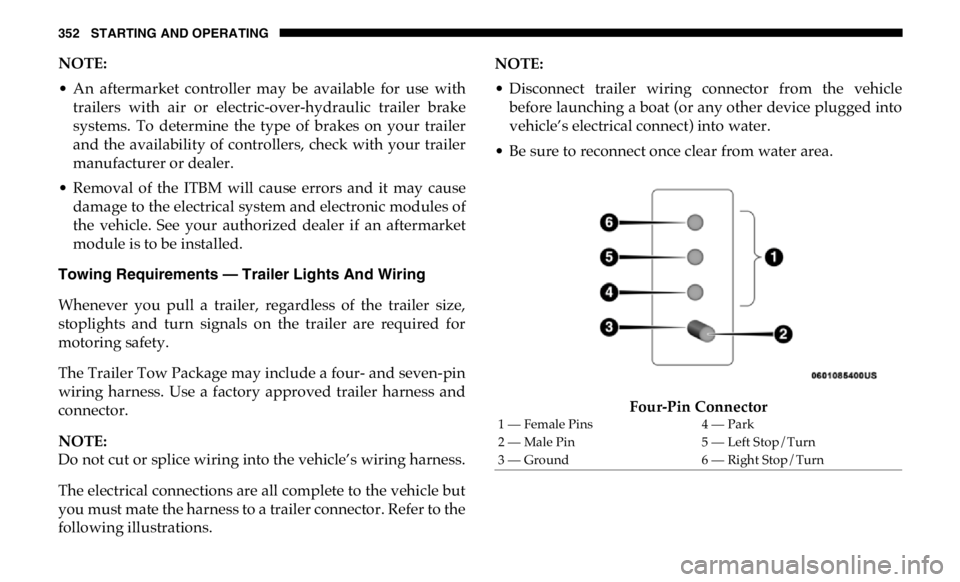
The electrical connections are all complete to the vehicle but
you must mate the harness to a trailer connector. Refer to the
following illustrations. NOTE:
• Disconnect trailer wiring connector from the vehicle
before launching a boat (or any other device plugged into
vehicle’s electrical connect) into water.
• Be sure to reconnect once clear from water area.
Four-Pin Connector1 — Female Pins 4 — Park
2 — Male Pin 5 — Left Stop/Turn
3 — Ground 6 — Right Stop/Turn
Page 356 of 607

354 STARTING AND OPERATING
If you regularly tow a trailer for more than 45 minutes of
continuous operation, then change the automatic transmis -
sion fluid and filter(s) as specified for "police, taxi, fleet, or
frequent trailer towing." Refer to the “Maintenance Plan” for
the proper maintenance intervals.
NOTE:
Check the automatic transmission fluid level before towing
(Six-speed automatic only).
Tow/Haul Mode
To reduce potential for automatic transmission overheating,
activate TOW/HAUL mode when driving in hilly areas, or
select a lower gear range (using the Electronic Range Select
(ERS) shift control) on more severe grades.
Speed Control — If Equipped
• Do not use on hilly terrain or with heavy loads.
• When using the speed control, if you experience speed
drops greater than 10 mph (16 km/h), disengage until you
can get back to cruising speed.
• Use speed control in flat terrain and with light loads to
maximize fuel efficiency. Cooling System
To reduce potential for engine and transmission over -
heating, take the following actions:
City Driving
• In city traffic — while stopped, place the transmission in
NEUTRAL, but do not increase engine idle speed.
Highway Driving
• Reduce speed.
• Temporarily turn off air conditioning.
Air Suspension System
To aid in attaching/detaching the trailer from the vehicle,
the air suspension system can be used. Refer to “Air Suspen -
sion System” in “Starting And Operating” for further infor -
mation.
NOTE:
The vehicle must remain in the engine running position
while attaching a trailer for proper leveling of the air suspen -
sion system.
Page 357 of 607

STARTING AND OPERATING 355
SNOWPLOW
2500/3500 Models Only
Snowplow Prep Packages are available as a factory installed
option. These packages include components necessary to
equip your vehicle with a snowplow.
NOTE:
Before installation of a snowplow it is highly recommended
that the owner/installer obtain and follow the recommenda -
tions contained within the current Body Builders Guide. See
your authorized dealer, installer or snowplow manufacturer
for this information. There are unique electrical systems that
must be connected to properly assure operator safety and
prevent overloading vehicle systems. Before Plowing
• Check the hydraulic system for leaks and proper fluid
level.
• Check the mounting bolts and nuts for proper tightness.
• Check the runners and cutting edge for excessive wear.
The cutting edge should be ¼ to ½ in (6 cm to 1.2 cm) above
ground in snow plowing position.
• Check that snowplow lighting is connected and func -
tioning properly.
WARNING!
Attaching a snowplow to this vehicle could adversely
affect performance of the airbag system in a collision. Do
not expect that the airbag will perform as described
earlier in this manual. CAUTION!
The “Lamp Out” indicator could illuminate if exterior
lamps are not properly installed.
5
Page 363 of 607

STARTING AND OPERATING 361
3. Press and hold the brake pedal.
4. Shift the transfer case into NEUTRAL:
• With manual shift transfer case, shift the transfer case
lever into NEUTRAL (N).
• With electronic shift transfer case, push and hold the
transfer case NEUTRAL (N) button. Some models have
a small, recessed "N" button (at the center of the
transfer case switches) that must be pressed using a
ballpoint pen or similar object. Other models have a
rectangular NEUTRAL switch, below the rotary
transfer case control knob. The NEUTRAL (N) indi -
cator light will blink while the shift is in progress. The
light will stop blinking (stay on solid) when the shift to
NEUTRAL (N) is complete. After the shift is completed
and the NEUTRAL (N) light stays on, release the
NEUTRAL (N) button.
5. Release the parking brake.
6. Shift the transmission into REVERSE.
7. Release the brake pedal for five seconds and ensure that
there is no vehicle movement.
8. Repeat steps six and seven with automatic transmission
in DRIVE. 9. Shift the transmission to NEUTRAL. Firmly apply the
parking brake. Turn OFF the engine. For vehicles with
Keyless Enter-N-Go, push and hold the ENGINE
START/STOP button until the engine shuts off.
10. Shift the transmission into PARK.
11. Place the ignition in the OFF mode, and remove the key
fob.
12. Attach the vehicle to the tow vehicle using a suitable tow
bar.
13. Release the parking brake.
NOTE:
With electronic shift transfer case:
• Steps 2 through 3 are requirements that must be met before
pushing the NEUTRAL (N) button, and must continue to
be met until the shift has been completed. If any of these
requirements are not met before pushing the NEUTRAL
(N) button or are no longer met during the shift, the
NEUTRAL (N) indicator light will flash continuously until
all requirements are met or until the NEUTRAL (N) button
is released. 5