four wheel drive RAM CHASSIS CAB 2019 User Guide
[x] Cancel search | Manufacturer: RAM, Model Year: 2019, Model line: CHASSIS CAB, Model: RAM CHASSIS CAB 2019Pages: 607, PDF Size: 12.68 MB
Page 274 of 607
272 STARTING AND OPERATING
FOUR-WHEEL DRIVE OPERATION — IF EQUIPPED
Four-wheel drive trucks are equipped with either a manu -
ally shifted transfer case or an electronically shifted transfer
case. Refer to the operating instructions for your transfer
case, located in this section for further information. Four-Position Electronically Shifted Transfer Case —
If Equipped
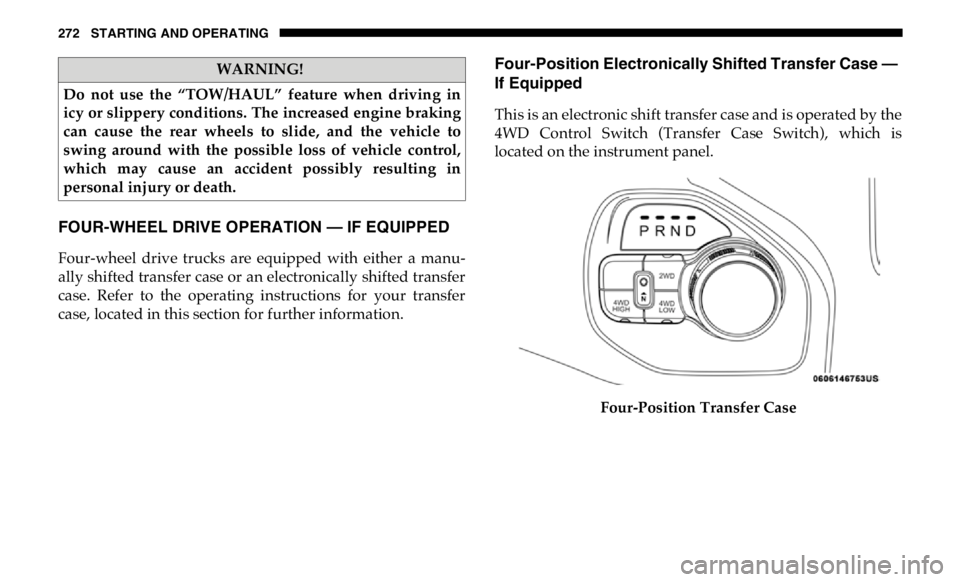
This is an electronic shift transfer case and is operated by the
4WD Control Switch (Transfer Case Switch), which is
located on the instrument panel.
Four-Position Transfer CaseWARNING!
Do not use the “TOW/HAUL” feature when driving in
icy or slippery conditions. The increased engine braking
can cause the rear wheels to slide, and the vehicle to
swing around with the possible loss of vehicle control,
which may cause an accident possibly resulting in
personal injury or death.
Page 275 of 607

STARTING AND OPERATING 273
(Continued)This electronically shifted transfer case provides four mode
positions:
• Two-Wheel Drive High Range (2WD)
• Four-Wheel Drive High Range (4WD HIGH)
• Four-Wheel Drive Low Range (4WD LOW)
• Neutral (NEUTRAL)
For additional information on the appropriate use of each
transfer case mode position, see the information below:
2WD
Rear-Wheel Drive High Range — This range is for normal
street and highway driving on dry hard surfaced roads.
4WD HIGH
Four-Wheel Drive High Range — This range provides torque
to the front driveshaft (engages four-wheel drive) which
allows front and rear wheels to spin at the same speed. This
provides additional traction for loose, slippery road surfaces
only.
4WD LOW
Four-Wheel Drive Low Range — This range provides low
speed four-wheel drive. It maximizes torque (increased torque over 4WD HIGH) to the front driveshaft; allowing
front and rear wheels to rotate at the same speed. This range
provides additional traction and maximum pulling power
for loose, slippery road surfaces only. Do not exceed 25 mph
(40 km/h) in this range.
NEUTRAL (N)
Neutral — This range disengages both the front and rear
driveshafts from the powertrain. To be used for flat towing
behind another vehicle. Refer to “Recreational Towing” in
this section for further information.
WARNING!
• You or others could be injured or killed if you leave the
vehicle unattended with the transfer case in the
NEUTRAL (N) position without first fully engaging
the parking brake. The transfer case NEUTRAL (N)
position disengages both the front and rear drive shaft
from the powertrain, and will allow the vehicle to roll,
even if the transmission is in PARK. The parking brake
should always be applied when the driver is not in the
vehicle. 5
Page 277 of 607

STARTING AND OPERATING 275
3. When the shift is complete, the indicator light for the
selected position will stop flashing and remain ON.
If One Or More Of The Following Shift Conditions Are
Not Met:
1. The indicator light for the current position will remain
ON.
2. The newly selected position indicator light will continue
to flash.
3. The transfer case will not shift.
NOTE:
Before retrying a selection, make certain that all the neces -
sary requirements for selecting a new transfer case position
have been met. To retry the selection, push the current posi -
tion, wait five seconds, and retry selection. To find the shift
requirements, refer to the "Shifting Procedure" for your
transfer case, located in this section.
The “SVC 4WD Warning Light” monitors the electronic shift
four-wheel drive system. If this light remains on after engine
start up or illuminates during driving, it means that the
four-wheel drive system is not functioning properly and that
service is required. NOTE:
Do not attempt to make a shift while only the front or rear
wheels are spinning. This could cause damage to driveline
components.
When operating your vehicle in 4WD LOW, the engine
speed is approximately three times that of the 2WD or 4WD
HIGH positions at a given road speed. Take care not to over -
speed the engine and do not exceed 25 mph (40 km/h).
Proper operation of four-wheel drive vehicles depends on
tires of equal size, type and circumference on each wheel.
Any difference in tire size can cause damage to the drive -
train.
Because four-wheel drive provides improved traction, there
is a tendency to exceed safe turning and stopping speeds. Do
not go faster than road conditions permit. WARNING!
Always engage the parking brake when powering down
the vehicle if the “SVC 4WD Warning Light” is
illuminated. Not engaging the parking brake may allow
the vehicle to roll which may cause personal injury or
death.
5
Page 278 of 607

276 STARTING AND OPERATING
Shifting Procedure
NOTE:
• If any of the requirements to select a new transfer case
position have not been met, the transfer case will not shift.
The position indicator light for the previous position will
remain ON and the newly selected position indicator light
will continue to flash until all the requirements for the
selected position have been met.
• If all the requirements to select a new transfer case position
have been met, the current position indicator light will
turn OFF, the selected position indicator light will flash
until the transfer case completes the shift. When the shift is
complete, the position indicator light for the selected posi -
tion will stop flashing and remain ON.
2WD To 4WD HIGH
Push the desired position on the 4WD control switch to shift
the transfercase. Shifts between 2WD and 4WD HIGH can be
done with the vehicle stopped or in motion. With the vehicle
in motion, the transfer case will engage/disengage faster if
you momentarily release the accelerator pedal after turning
the control switch. If the vehicle is stopped, the ignition
switch must be in the ON position with the engine either
running or off. This shift cannot be completed if the ignition
switch is in the ACC position. NOTE:
The four-wheel drive system will not allow shifts between
2WD/4WD HIGH if the front and/or rear wheels are spin -
ning (no traction). In this situation, the selected position indi -
cator light will flash and the original position indicator light
will remain ON. At this time, reduce speed and stop spin -
ning the wheels to complete the shift.
2WD Or 4WD HIGH To 4WD LOW
NOTE:
When shifting into or out of 4WD LOW some gear noise may
be heard. This noise is normal and is not detrimental to the
vehicle or occupants.
Shifting can be performed with the vehicle rolling 2 to 3 mph
(3 to 5 km/h) or completely stopped. You can use either of
the following procedures:
Preferred Procedure
1. With the engine running, slow the vehicle to 2 to 3 mph (3
to 5 km/h).
2. Shift the transmission into NEUTRAL.
3. While still rolling, push the desired position on the
transfer case control switch.
Page 279 of 607

STARTING AND OPERATING 277
4. After the desired position indicator light is ON (not
flashing), shift the transmission back into gear.
Alternate Procedure
1. Bring the vehicle to a complete stop.
2. With the ignition switch in the ON position and the
engine running, shift the transmission into NEUTRAL.
3. Push the desired position on the transfer case control
switch.
4. After the desired position indicator light is ON (not
flashing), shift the transmission back into gear.
NOTE:
• If Steps 1 or 2 of either the Preferred or Alternate Proce -
dure are not satisfied prior to attempting the shift, then the
desired position indicator light will flash continuously
while the original position indicator light is ON, until all
requirements have been met.
• The ignition switch must be in the ON position for a shift
to take place and for the position indicator lights to be
operable. If the ignition switch is not in the ON position,
the shift will not take place and no position indicator lights
will be on or flashing. Manually Shifted Transfer Case — If Equipped
The transfer case provides four mode positions:
• Two-Wheel Drive High Range (2H)
• Four-Wheel Drive Lock High Range (4H)
• Neutral (N)
• Four-Wheel Drive Low Range (4L)
For additional information on the appropriate use of each
transfer case mode position, see the information below:
2H
Two-Wheel Drive High Range — This range is for normal
street and highway driving on dry, hard surfaced roads.
4H
Four-Wheel Drive Lock High Range — This range locks the
front and rear driveshafts together forcing the front and rear
wheels to rotate at the same speed. Additional traction for
loose, slippery road surfaces only. 5
Page 280 of 607

278 STARTING AND OPERATING
NEUTRAL (N)
Neutral — This range disengages both the front and rear
driveshafts from the powertrain. To be used for flat towing
behind another vehicle. Refer to “Recreational Towing” in
“Starting And Operating” for further information.
4L
Four-Wheel Drive Low Range — This range locks the front
and rear driveshafts together forcing the front and rear
wheels to rotate at the same speed. Additional traction and
maximum pulling power for loose, slippery road surfaces
only. Do not exceed 25 mph (40 km/h).
This transfer case is intended to be driven in the 2H position
for normal street and highway conditions such as dry, hard
surfaced roads.
When additional traction is required, the 4H and 4L posi -
tions can be used to lock the front and rear driveshafts
together and force the front and rear wheels to rotate at the
same speed. This is accomplished by simply moving the gear
selector to the desired positions once the appropriate speed
and gear requirements are met, refer to “Shifting Procedure
– Manually Shifted Transfer Case” in this section for further
information. The 4H and 4L positions are intended for loose, slippery road
surfaces only. Driving in the 4H and 4L positions on dry,
hard surfaced roads may cause increased tire wear and
damage to the driveline components.
The “Transfer Case Position Indicator Light” in the instru -
ment cluster will alert the driver that the vehicle is in
four-wheel drive and that the front and rear driveshafts are
locked together. This light will illuminate when the transfer
case is shifted into either the 4H or 4L position. There is no
light for the 2H or NEUTRAL positions on some models.
When operating your vehicle in 4L, the engine speed is
approximately three times that of the 2H or 4H positions at a
given road speed. Take care not to overspeed the engine and
do not exceed 25 mph (40 km/h).
Proper operation of four-wheel drive vehicles depends on
tires of equal size, type and circumference on each wheel.
Any difference will adversely affect shifting and can cause
damage to the drivetrain.
NOTE:
Do not attempt to make a shift while only the front or rear
wheels are spinning, as this can cause damage to driveline
components.
Page 281 of 607

STARTING AND OPERATING 279
Because four-wheel drive provides improved traction, there
is a tendency to exceed safe turning and stopping speeds. Do
not go faster than road conditions permit.
NOTE:
Delayed shifts out of four-wheel drive may be experienced
due to uneven tire wear, low or uneven tire pressures, exces -
sive vehicle loading, or cold temperatures.
Two-Wheel Drive High Range (2H)
Rear-Wheel Drive High Range — This range is for normal
street and highway driving on dry hard surfaced roads. Four-Wheel Drive High Range (4H)
Four-Wheel Drive High Range — This range locks the front
and rear driveshafts together forcing the front and rear
wheels to rotate at the same speed. Additional traction for
loose, slippery road surfaces only.
Neutral (N)
Neutral — This range disengages the front and rear drivesh -
afts from the powertrain. To be used for flat towing behind
another vehicle. Refer to “Recreational Towing” in “Starting
And Operating” for further information.
Four-Wheel Drive Low Range (4L)
Four-Wheel Drive Low Range — This range locks the front
and rear driveshafts together forcing the front and rear
wheels to rotate at the same speed. Additional traction and
maximum pulling power for loose, slippery road surfaces
only. Do not exceed 25 mph (40 km/h).WARNING!
You or others could be injured or killed if you leave the
vehicle unattended with the transfer case in the
NEUTRAL position without first fully engaging the
parking brake. The transfer case NEUTRAL position
disengages both the front and rear drive shafts from the
powertrain and will allow the vehicle to roll, even if the
transmission is in PARK. The parking brake should
always be applied when the driver is not in the vehicle.
CAUTION!
Do not use 4L (Low) range when operating the vehicle on
dry pavement. Driveline hardware damage can result. 5
Page 282 of 607

280 STARTING AND OPERATING
Shifting Procedure — Manually Shifted Transfer Case
2H To 4H
Shifting between 2H and 4H can be made with the vehicle
stopped or in motion. If the vehicle is in motion, shifts can be
made up to 55 mph (88 km/h). With the vehicle in motion,
the transfer case will engage/disengage faster if you
momentarily release the accelerator pedal after completing
the shift. Apply a constant force when shifting the transfer
case lever.
2H Or 4H To 4L
NOTE:
When shifting into or out of 4L some gear noise may be
heard. This noise is normal and is not detrimental to the
vehicle or occupants.
With the vehicle rolling at 2 to 3 mph (3 to 5 km/h), shift the
transmission into NEUTRAL. While the vehicle is coasting at
2 to 3 mph (3 to 5 km/h), shift the transfer case lever firmly
to the desired position. Do not pause in transfer case
NEUTRAL. NOTE:
• Pausing in transfer case NEUTRAL in vehicles equipped
with an automatic transmission may require shutting the
engine OFF to avoid gear clash while completing the shift.
If difficulty occurs, shift the transmission into NEUTRAL,
hold your foot on the brake, and turn the engine OFF.
Complete the range shift to the desired mode.
• Shifting into or out of 4L is possible with the vehicle
completely stopped, however difficulty may occur due to
the mating clutch teeth not being properly aligned. Several
attempts may be required for clutch teeth alignment and
shift completion to occur. The preferred method is with the
vehicle rolling 2 to 3 mph (3 to 5 km/h). Avoid attempting
to engage or disengage 4L with the vehicle moving faster
than 2 to 3 mph (3 to 5 km/h).
• Do not attempt to shift into or out of 4L while the transmis -
sion is in gear.
Transfer Case Position Indicator Light
The “Transfer Case Position Indicator Light” in the instru -
ment cluster is used to alert the driver that the front axle is
fully engaged and all four wheels are driving.
Page 292 of 607
290 STARTING AND OPERATING
Adaptive Cruise Control (ACC) Operation
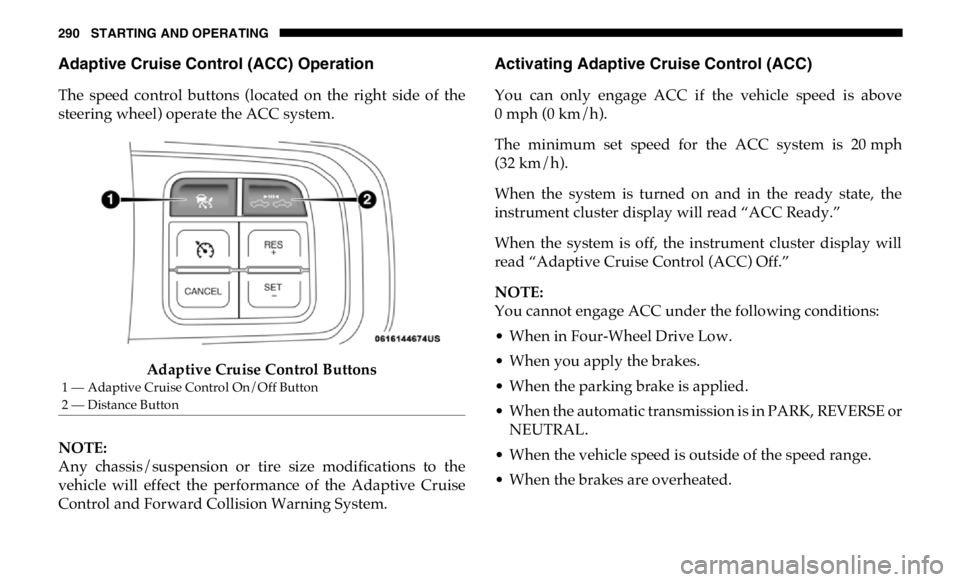
The speed control buttons (located on the right side of the
steering wheel) operate the ACC system.
Adaptive Cruise Control Buttons
NOTE:
Any chassis/suspension or tire size modifications to the
vehicle will effect the performance of the Adaptive Cruise
Control and Forward Collision Warning System. Activating Adaptive Cruise Control (ACC)
You can only engage ACC if the vehicle speed is above
0 mph (0 km/h).
The minimum set speed for the ACC system is 20 mph
(32 km/h).
When the system is turned on and in the ready state, the
instrument cluster display will read “ACC Ready.”
When the system is off, the instrument cluster display will
read “Adaptive Cruise Control (ACC) Off.”
NOTE:
You cannot engage ACC under the following conditions:
• When in Four-Wheel Drive Low.
• When you apply the brakes.
• When the parking brake is applied.
• When the automatic transmission is in PARK, REVERSE or
NEUTRAL.
• When the vehicle speed is outside of the speed range.
• When the brakes are overheated.1 — Adaptive Cruise Control On/Off Button
2 — Distance Button
Page 295 of 607

STARTING AND OPERATING 293
To Turn Off
The system will turn off and clear the set speed in memory if:
• The Adaptive Cruise Control (ACC) on/off button is
pushed.
• The Normal (Fixed Speed) Cruise Control on/off button is
pushed.
• The ignition is turned OFF.
• You switch to Four-Wheel Drive Low.
To Resume
If there is a set speed in memory push the RES (+) button and
then remove your foot from the accelerator pedal. The instru -
ment cluster display will display the last set speed.
NOTE:
• If your vehicle stays at standstill for longer than two
seconds, the driver will have to push the RES (+) button to
reengage the ACC to the existing set speed.
• ACC cannot be resumed if there is a stationary vehicle
in-front of your vehicle in close proximity. To Vary The Speed Setting
To Increase Speed
While ACC is set, you can increase the set speed by pushing
the RES (+) button.
The speed increment shown is dependant on the chosen
speed unit of U.S. (mph) or Metric (km/h):
U.S. Speed (mph)
• Pushing the RES (+) button once will result in a 1 mph
increase in set speed. Each subsequent tap of the button
results in an increase of 1 mph. WARNING!
The Resume function should only be used if traffic and
road conditions permit. Resuming a set speed that is too
high or too low for prevailing traffic and road conditions
could cause the vehicle to accelerate or decelerate too
sharply for safe operation. Failure to follow these
warnings can result in a collision and death or serious
personal injury.
5