light RAM CHASSIS CAB 2019 User Guide
[x] Cancel search | Manufacturer: RAM, Model Year: 2019, Model line: CHASSIS CAB, Model: RAM CHASSIS CAB 2019Pages: 607, PDF Size: 12.68 MB
Page 38 of 607

36 GETTING TO KNOW YOUR VEHICLE
Do NOT grab the door handle when pushing the door
handle lock button. This could unlock the door(s).
Do NOT Grab The Door Handle When Locking
NOTE:
• After pushing the door handle lock button, you must wait
two seconds before you can lock or unlock the doors, using
either Passive Entry door handle. This is done to allow you
to check if the vehicle is locked by pulling the door handle,
without the vehicle reacting and unlocking.
• The Passive Entry system depends on a key fob that is not
fully discharged of its coin battery capacity. • The LED light on the key fob will not blink if the key fob
battery is low or fully depleted, but a low key fob battery
condition will still support the Passive Entry system func -
tionality. When the key fob battery is low, the instrument
cluster will display a message indicating that the key fob
battery is low. Refer to “Keys” in “Getting To Know Your
Vehicle” for further information.
The vehicle doors can also be locked by using the key fob
lock button or the lock button located on the vehicle’s inte -
rior door panel.
General Information
The following regulatory statement applies to all radio
frequency (RF) devices equipped in this vehicle:
This device complies with Part 15 of the FCC Rules and with
Industry Canada license-exempt RSS standard(s). Operation
is subject to the following two conditions:
1. This device may not cause harmful interference, and
2. This device must accept any interference received,
including interference that may cause undesired opera -
tion.
Page 42 of 607
40 GETTING TO KNOW YOUR VEHICLE
Manual Front Seat Recline Adjustment
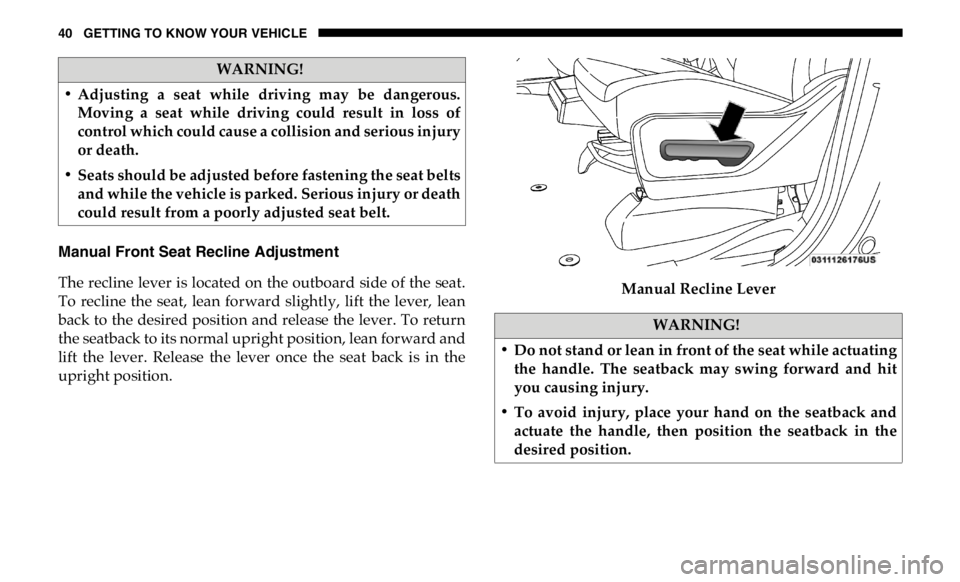
The recline lever is located on the outboard side of the seat.
To recline the seat, lean forward slightly, lift the lever, lean
back to the desired position and release the lever. To return
the seatback to its normal upright position, lean forward and
lift the lever. Release the lever once the seat back is in the
upright position. Manual Recline LeverWARNING!
• Adjusting a seat while driving may be dangerous.
Moving a seat while driving could result in loss of
control which could cause a collision and serious injury
or death.
• Seats should be adjusted before fastening the seat belts
and while the vehicle is parked. Serious injury or death
could result from a poorly adjusted seat belt.
WARNING!
• Do not stand or lean in front of the seat while actuating
the handle. The seatback may swing forward and hit
you causing injury.
• To avoid injury, place your hand on the seatback and
actuate the handle, then position the seatback in the
desired position.
Page 51 of 607

GETTING TO KNOW YOUR VEHICLE 49
There are two heated seat switches that allow the rear
passengers to operate the seats independently. You can
choose from HI, MED, LO, or OFF heat settings. Amber indi -
cator lights in each switch indicate the level of heat in use.
• Push the heated seat button once to turn the HI setting
on.
• Push the heated seat button a second time to turn the
MED setting on.
• Push the heated seat button a third time to turn the LO
setting on.
• Push the heated seat button a fourth time to turn the
heating elements off.
NOTE:
• The level of heat selected will stay on until the operator
changes it.
• Once a heat setting is selected, heat will be felt within two
to five minutes.
• The engine must be running for the heated seats to operate. Ventilated Seats — If Equipped
Front Ventilated Seats
Located in the seat cushion are small fans that draw the air
from the passenger compartment and move air through fine
perforations in the seat cover to help keep the driver and
front passenger cooler in higher ambient temperatures. The
fans operate at three speeds, HI, MED and LO.
The front ventilated seats control buttons are located on the
center instrument panel below the touchscreen, and are also
located within the climate or controls screen of the touch -
screen.
• Press the ventilated seat button once to choose HI.
• Press the ventilated seat button a second time to choose
MED.
• Press the ventilated seat button a third time to choose
LO.
• Press the ventilated seat button a fourth time to turn the
ventilation off.
NOTE:
The engine must be running for the ventilated seats to
operate. 2
Page 58 of 607

56 GETTING TO KNOW YOUR VEHICLE
NOTE:
• Always adjust the pedals to a position that allows full
pedal travel.
• Further small adjustments may be necessary to find the
best possible seat/pedal position.
• For vehicles equipped with Driver Memory Seat, you can
use your remote keyless entry key fob or the memory
switch on the driver’s door trim panel to return the adjust -
able pedals to pre-programmed positions. Refer to “Driver
Memory Seat” in “Getting To Know Your Vehicle” for
further information. MIRRORS
Inside Day/Night Mirror — If Equipped
The mirror head can be adjusted up, down, left, and right for
various drivers. The mirror should be adjusted to center on
the view through the rear window.
Headlight glare from vehicles behind you can be reduced by
moving the small control under the mirror to the night posi -
tion (toward the rear of the vehicle). The mirror should be
adjusted while set in the day position (toward the wind -
shield).
Adjusting Rearview MirrorWARNING!
Do not adjust the pedals while the vehicle is moving.
You could lose control and have an accident. Always
adjust the pedals while the vehicle is parked.
CAUTION!
Do not place any article under the adjustable pedals or
impede its ability to move, as it may cause damage to the
pedal controls. Pedal travel may become limited if
movement is stopped by an obstruction in the adjustable
pedal's path.
Page 59 of 607

GETTING TO KNOW YOUR VEHICLE 57
Automatic Dimming Mirror — If Equipped
The mirror head can be adjusted up, down, left, and right for
various drivers. The mirror should be adjusted to center on
the view through the rear window.
This mirror automatically adjusts for headlight glare from
vehicles behind you.
NOTE:
The Automatic Dimming feature is disabled when the
vehicle is in REVERSE to improve rear view viewing.
The Automatic Dimming feature can be turned on or off
through the touchscreen.
• Press the mirror dimmer button once to turn the feature
on.
• Press the mirror dimmer button a second time to turn the
feature off. Automatic Dimming Mirror
CAUTION!
To avoid damage to the mirror during cleaning, never
spray any cleaning solution directly onto the mirror.
Apply the solution onto a clean cloth and wipe the
mirror clean. 2
Page 60 of 607

58 GETTING TO KNOW YOUR VEHICLE
Automatic Dimming Mirror With Rear View Camera
Display — If Equipped
A single ball joint mirror is provided in the vehicle. It is a
twist on mirror that has a fixed position at the windshield.
The mirror installs on the windshield button with a counter -
clockwise rotation and requires no tools for mounting. The
mirror head can be adjusted up, down, left, and right for
various drivers. The mirror should be adjusted to center on
the view through the rear window.
This mirror automatically adjusts for headlight glare from
vehicles behind you.
When the vehicle is placed into reverse gear, a video display
illuminates to display the image generated by the rear view
camera (for the 3500, 4500, and 5500 Chassis Cab vehicles,
the Rear Backup Camera is shipped loose and not installed.
Please refer to the Ram Body Builders Guide for more infor -
mation). The auto dimming feature is also disabled to
improve rear view viewing. Automatic Dimming Mirror With Rear View Camera
Outside Mirrors
To receive maximum benefit, adjust the outside mirrors to
center on the adjacent lane of traffic with a slight overlap of
the view obtained on the inside mirror.
NOTE:
If your vehicle is equipped with puddle lamps under the
outside mirrors, they can be turned off through the Uconnect
display. For further information, refer to “Uconnect
Settings” in “Multimedia”.
Page 61 of 607

GETTING TO KNOW YOUR VEHICLE 59
Driver's Outside Automatic Dimming Mirror — If
Equipped
The driver’s outside mirror will automatically adjust for
glare from vehicles behind you. This feature is controlled by
the inside automatic dimming mirror and will automatically
adjust for headlight glare when the inside mirror adjusts. Power Mirrors — If Equipped
The controls for the power mirrors are located on the driver's
door trim panel.
Power Mirror Controls
The power mirror controls consist of mirror select buttons
and a four-way mirror control switch.
To adjust a mirror, push either the L (left) or R (right) button
to select the mirror that you want to adjust.WARNING!
Vehicles and other objects seen in the passenger side
convex mirror will look smaller and farther away than
they really are. Relying too much on your passenger side
convex mirror could cause you to collide with another
vehicle or other object. Use your inside mirror when
judging the size or distance of a vehicle seen in the
passenger side convex mirror. Some vehicles will not
have a convex passenger side mirror.
1 — Left Mirror Selection
2 — Right Mirror Selection
3 — Mirror Direction Control 2
Page 64 of 607
62 GETTING TO KNOW YOUR VEHICLE
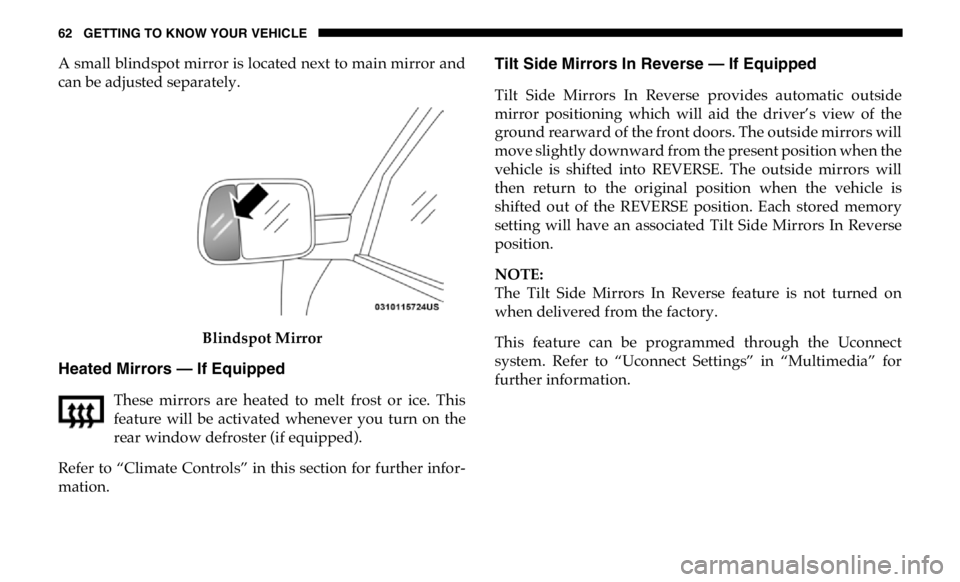
A small blindspot mirror is located next to main mirror and
can be adjusted separately.
Blindspot Mirror
Heated Mirrors — If Equipped
These mirrors are heated to melt frost or ice. This
feature will be activated whenever you turn on the
rear window defroster (if equipped).
Refer to “Climate Controls” in this section for further infor -
mation. Tilt Side Mirrors In Reverse — If Equipped
Tilt Side Mirrors In Reverse provides automatic outside
mirror positioning which will aid the driver’s view of the
ground rearward of the front doors. The outside mirrors will
move slightly downward from the present position when the
vehicle is shifted into REVERSE. The outside mirrors will
then return to the original position when the vehicle is
shifted out of the REVERSE position. Each stored memory
setting will have an associated Tilt Side Mirrors In Reverse
position.
NOTE:
The Tilt Side Mirrors In Reverse feature is not turned on
when delivered from the factory.
This feature can be programmed through the Uconnect
system. Refer to “Uconnect Settings” in “Multimedia” for
further information.
Page 67 of 607
GETTING TO KNOW YOUR VEHICLE 65
Illuminated Vanity Mirror — If Equipped
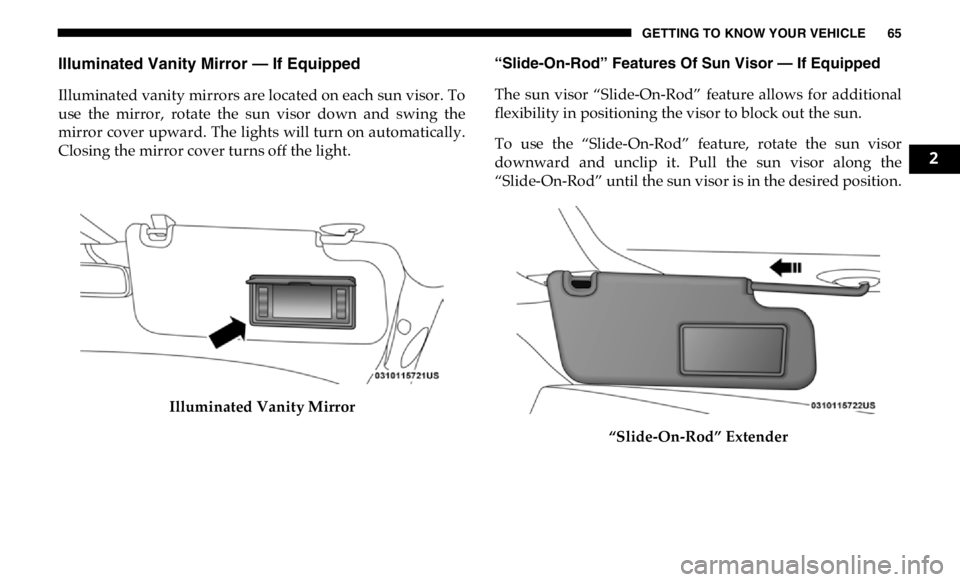
Illuminated vanity mirrors are located on each sun visor. To
use the mirror, rotate the sun visor down and swing the
mirror cover upward. The lights will turn on automatically.
Closing the mirror cover turns off the light.
Illuminated Vanity Mirror “Slide-On-Rod” Features Of Sun Visor — If Equipped
The sun visor “Slide-On-Rod” feature allows for additional
flexibility in positioning the visor to block out the sun.
To use the “Slide-On-Rod” feature, rotate the sun visor
downward and unclip it. Pull the sun visor along the
“Slide-On-Rod” until the sun visor is in the desired position.
“Slide-On-Rod” Extender 2
Page 68 of 607

66 GETTING TO KNOW YOUR VEHICLE
EXTERIOR LIGHTS
Multifunction Lever
The multifunction lever is located on the left side of the
steering column.
Multifunction Lever Headlight Switch
The headlight switch is located on the left side of the instru -
ment panel. This switch controls the operation of the head -
lights, parking lights, automatic headlights — if equipped,
instrument panel light dimming, cargo light — if equipped,
and fog lights — if equipped.
Headlight Switch
Rotate the headlight switch clockwise to the first detent for
parking light and instrument panel light operation. Rotate
the headlight switch to the second detent for headlight,
parking light, and instrument panel light operation.