tow RAM CHASSIS CAB 2019 User Guide
[x] Cancel search | Manufacturer: RAM, Model Year: 2019, Model line: CHASSIS CAB, Model: RAM CHASSIS CAB 2019Pages: 607, PDF Size: 12.68 MB
Page 69 of 607

GETTING TO KNOW YOUR VEHICLE 67
Daytime Running Lights (DRL) — If Equipped
The headlights on your vehicle will illuminate when the
engine is started and the transmission is in any gear except
PARK. This provides a constant "lights on" condition until
the ignition is turned OFF. The lights illuminate at less than
half of normal intensity. If the parking brake is applied, the
Daytime Running Lights (DRL) will turn off. Also, if a turn
signal is activated, the DRL lamp on the same side of the
vehicle may turn off for the duration of the turn signal acti -
vation. Once the turn signal is no longer active, the DRL
lamp will illuminate.
NOTE:
If allowed by law in the country in which the vehicle was
purchased, the Daytime Running Lights can be turned on
and off using the Uconnect System, refer to “Uconnect
Settings” in “Multimedia” for further information.
High/Low Beam Switch
Push the multifunction lever toward the instrument panel to
switch the headlights to high beam. Pulling the multifunc -
tion lever back toward the steering wheel will turn the low
beams back on, or shut the high beams off. Automatic High Beam Headlamp Control — If
Equipped
The Automatic High Beam Headlamp Control system
provides increased forward lighting at night by automating
high beam control through the use of a digital camera
mounted on the inside rearview mirror. This camera detects
vehicle specific light and automatically switches from high
beams to low beams until the approaching vehicle is out of
view.
NOTE:
• The Automatic High Beam Headlamp Control can be
turned on or off by selecting “ON” under “Auto Dim High
Beams” within your Uconnect settings, as well as turning
the headlight switch to the AUTO position. Refer to
“Uconnect Settings” in “Multimedia” for further informa -
tion.
• Broken, muddy, or obstructed headlights and taillights of
vehicles in the field of view will cause headlights to remain
on longer (closer to the vehicle). Also, dirt, film, and other
obstructions on the windshield or camera lens will cause
the system to function improperly. 2
Page 70 of 607

68 GETTING TO KNOW YOUR VEHICLE
If the windshield or Automatic High Beam Headlamp
Control mirror is replaced, the mirror must be re-aimed to
ensure proper performance. See a local authorized dealer.
To Activate
1. The Automatic High Beams are enabled through the
Uconnect system. Refer to “Uconnect Settings” in “Multi -
media” for further information.
2. Turn the headlight switch to the AUTO headlight posi -
tion.
3. Push the multifunction lever away from you (toward
front of vehicle) to engage the high beam mode.
NOTE:
The Automatic High Beams will not activate until the vehicle
is at or above 12 mph (20 km/h).
To Deactivate
1. Pull the multifunction lever toward you (or rearward in
vehicle) to manually deactivate the system (normal oper -
ation of low beams).
2. Push back on the multifunction lever to reactivate the
system. The Automatic High Beams can also be deactivated through
the Uconnect system. Refer to “Uconnect Settings” in “Multi -
media” for further information.
Flash-To-Pass
You can signal another vehicle with your headlights by
lightly pulling the multifunction lever toward you. This will
cause the high beam headlights to turn on, and remain on,
until the lever is released.
Automatic Headlights — If Equipped
This system automatically turns your headlights on or off
based on ambient light levels. To turn the system on, turn the
headlight switch to the extreme clockwise position aligning
the indicator with the AUTO on the headlight switch. When
the system is on, the Headlight Time Delay feature is also on.
This means your headlights will stay on for up to 90 seconds
after you turn the ignition switch OFF. To turn the Auto -
matic System off, turn the headlight switch counterclockwise
to the O (off) position.
NOTE:
The engine must be running before the headlights will come
on in the Automatic mode.
Page 87 of 607

GETTING TO KNOW YOUR VEHICLE 85
Driver and Passenger Temperature Up and Down Buttons
Provides the driver and passenger with independent temperature control. Push the red button on the
faceplate or touchscreen or press and slide the temperature bar towards the red arrow button on the
touchscreen for warmer temperature settings. Push the blue button on the faceplate or touchscreen or
press and slide the temperature bar towards the blue arrow button on the touchscreen for cooler
temperature settings.
NOTE:
The numbers within the temperature display will only appear if the system is equipped with an auto -
matic climate control system.
SYNC
Press the SYNC button on the touchscreen to toggle the SYNC feature on/off. The SYNC indicator is
illuminated when this feature is enabled. SYNC is used to synchronize the passenger temperature
setting with the driver temperature setting. Changing the passenger’s temperature setting while in
SYNC will automatically exit this feature.
NOTE:
The SYNC button is only available on the touchscreen.Icon Description
2
Page 115 of 607
GETTING TO KNOW YOUR VEHICLE 113
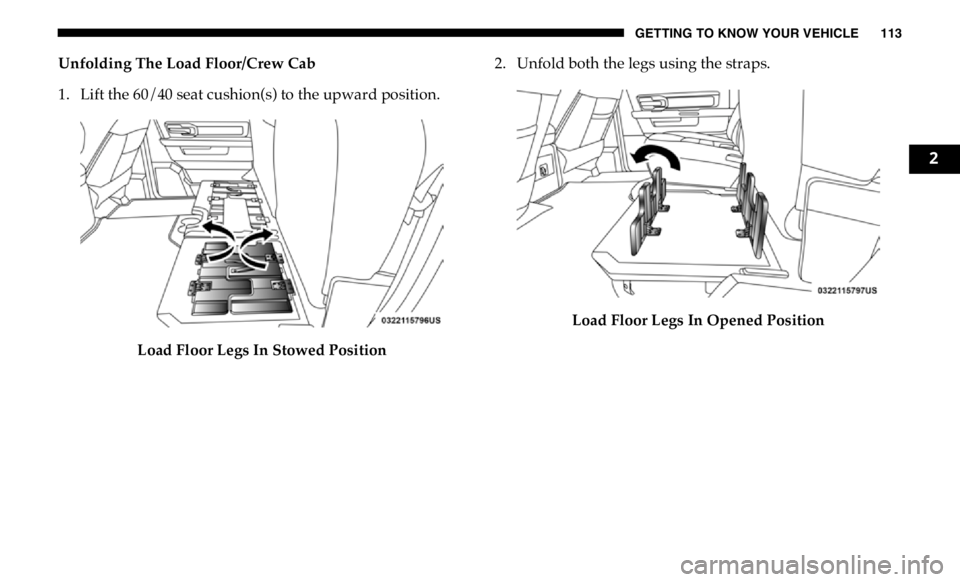
Unfolding The Load Floor/Crew Cab
1. Lift the 60/40 seat cushion(s) to the upward position.
Load Floor Legs In Stowed Position 2. Unfold both the legs using the straps.
Load Floor Legs In Opened Position 2
Page 121 of 607
GETTING TO KNOW YOUR VEHICLE 119
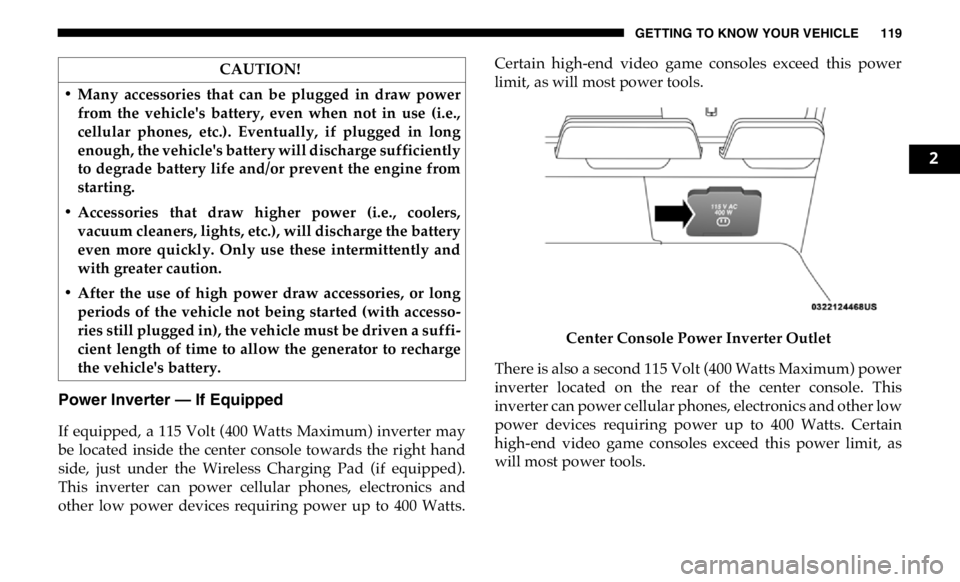
Power Inverter — If Equipped
If equipped, a 115 Volt (400 Watts Maximum) inverter may
be located inside the center console towards the right hand
side, just under the Wireless Charging Pad (if equipped).
This inverter can power cellular phones, electronics and
other low power devices requiring power up to 400 Watts. Certain high-end video game consoles exceed this power
limit, as will most power tools.
Center Console Power Inverter Outlet
There is also a second 115 Volt (400 Watts Maximum) power
inverter located on the rear of the center console. This
inverter can power cellular phones, electronics and other low
power devices requiring power up to 400 Watts. Certain
high-end video game consoles exceed this power limit, as
will most power tools.CAUTION!
• Many accessories that can be plugged in draw power
from the vehicle's battery, even when not in use (i.e.,
cellular phones, etc.). Eventually, if plugged in long
enough, the vehicle's battery will discharge sufficiently
to degrade battery life and/or prevent the engine from
starting.
• Accessories that draw higher power (i.e., coolers,
vacuum cleaners, lights, etc.), will discharge the battery
even more quickly. Only use these intermittently and
with greater caution.
• After the use of high power draw accessories, or long
periods of the vehicle not being started (with accesso -
ries still plugged in), the vehicle must be driven a suffi -
cient length of time to allow the generator to recharge
the vehicle's battery. 2
Page 127 of 607
GETTING TO KNOW YOUR INSTRUMENT PANEL 125
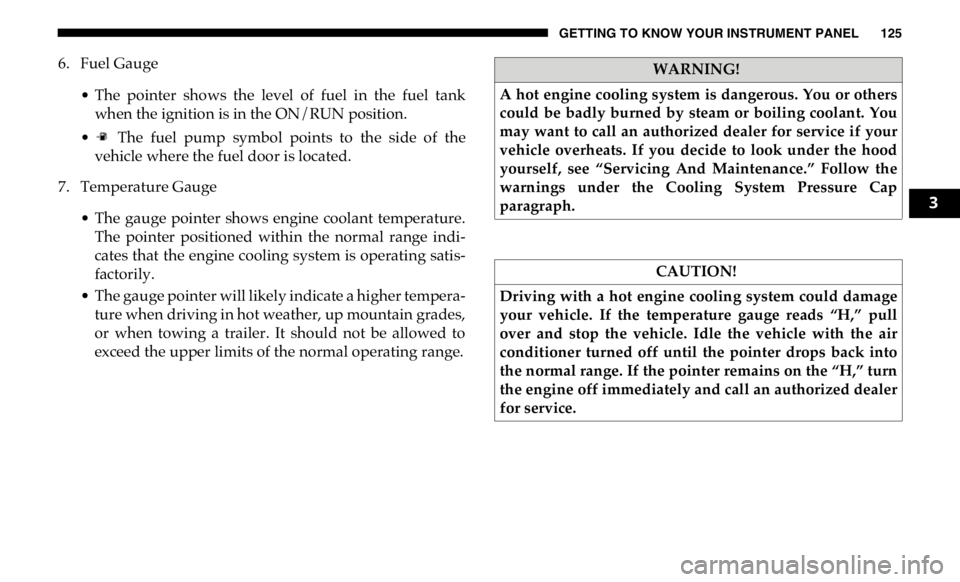
6. Fuel Gauge
• The pointer shows the level of fuel in the fuel tank
when the ignition is in the ON/RUN position.
• The fuel pump symbol points to the side of the
vehicle where the fuel door is located.
7. Temperature Gauge
• The gauge pointer shows engine coolant temperature.
The pointer positioned within the normal range indi -
cates that the engine cooling system is operating satis -
factorily.
• The gauge pointer will likely indicate a higher tempera -
ture when driving in hot weather, up mountain grades,
or when towing a trailer. It should not be allowed to
exceed the upper limits of the normal operating range. WARNING!
A hot engine cooling system is dangerous. You or others
could be badly burned by steam or boiling coolant. You
may want to call an authorized dealer for service if your
vehicle overheats. If you decide to look under the hood
yourself, see “Servicing And Maintenance.” Follow the
warnings under the Cooling System Pressure Cap
paragraph.
CAUTION!
Driving with a hot engine cooling system could damage
your vehicle. If the temperature gauge reads “H,” pull
over and stop the vehicle. Idle the vehicle with the air
conditioner turned off until the pointer drops back into
the normal range. If the pointer remains on the “H,” turn
the engine off immediately and call an authorized dealer
for service. 3
Page 129 of 607
GETTING TO KNOW YOUR INSTRUMENT PANEL 127
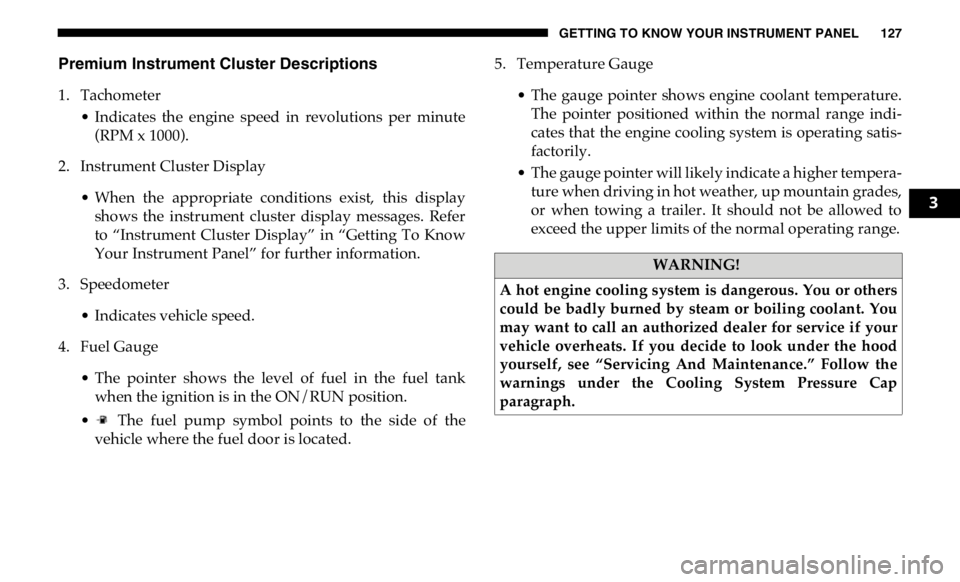
Premium Instrument Cluster Descriptions
1. Tachometer
• Indicates the engine speed in revolutions per minute
(RPM x 1000).
2. Instrument Cluster Display
• When the appropriate conditions exist, this display
shows the instrument cluster display messages. Refer
to “Instrument Cluster Display” in “Getting To Know
Your Instrument Panel” for further information.
3. Speedometer
• Indicates vehicle speed.
4. Fuel Gauge
• The pointer shows the level of fuel in the fuel tank
when the ignition is in the ON/RUN position.
• The fuel pump symbol points to the side of the
vehicle where the fuel door is located. 5. Temperature Gauge
• The gauge pointer shows engine coolant temperature.
The pointer positioned within the normal range indi -
cates that the engine cooling system is operating satis -
factorily.
• The gauge pointer will likely indicate a higher tempera -
ture when driving in hot weather, up mountain grades,
or when towing a trailer. It should not be allowed to
exceed the upper limits of the normal operating range.
WARNING!
A hot engine cooling system is dangerous. You or others
could be badly burned by steam or boiling coolant. You
may want to call an authorized dealer for service if your
vehicle overheats. If you decide to look under the hood
yourself, see “Servicing And Maintenance.” Follow the
warnings under the Cooling System Pressure Cap
paragraph. 3
Page 131 of 607
GETTING TO KNOW YOUR INSTRUMENT PANEL 129
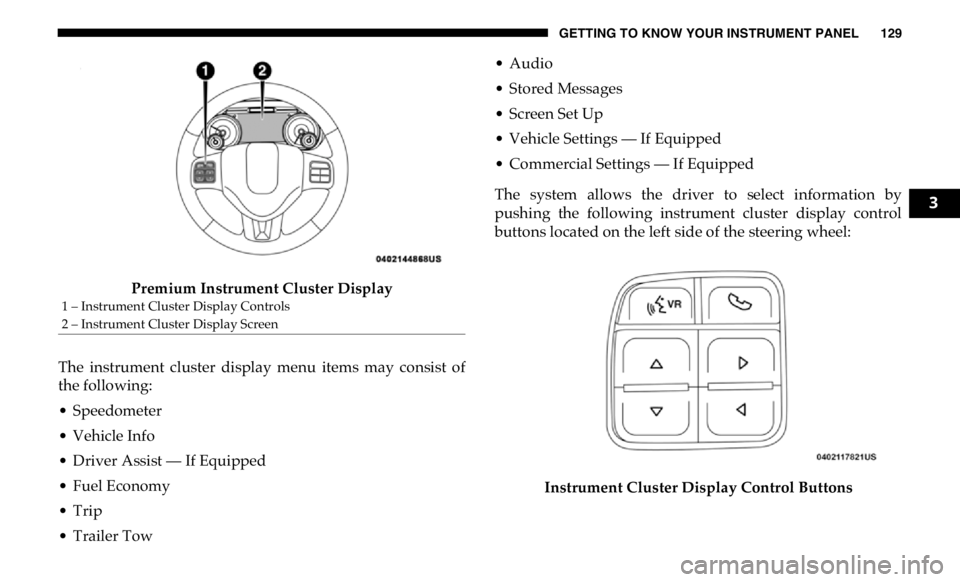
Premium Instrument Cluster Display
The instrument cluster display menu items may consist of
the following:
• Speedometer
• Vehicle Info
• Driver Assist — If Equipped
• Fuel Economy
• Trip
• Trailer Tow • Audio
• Stored Messages
• Screen Set Up
• Vehicle Settings — If Equipped
• Commercial Settings — If Equipped
The system allows the driver to select information by
pushing the following instrument cluster display control
buttons located on the left side of the steering wheel:
Instrument Cluster Display Control Buttons1 – Instrument Cluster Display Controls
2 – Instrument Cluster Display Screen 3
Page 136 of 607

134 GETTING TO KNOW YOUR INSTRUMENT PANEL
Trailer Tow
Push and release the up or down arrow button until the
Trailer Tow menu item is highlighted in the instrument
cluster display. Push and release the right arrow button and
the next screen will display the following trailer trip infor -
mation:
• Trip (trailer specific) Distance: Push and hold the right
arrow button to reset the distance.
• Trailer Brake
• Output
• Type
• Gain
• Trailer Tire Pressure — If Equipped
Audio
Push and release the up or down arrow button until the
Audio Menu icon/title is highlighted in the instrument
cluster display. This menu will display the audio source
information, including the Song name, Artist name, and
audio source with an accompanying graphic. Phone Call Status
When a call is incoming, a Phone Call Status pop-up will
display on the screen. The pop-up will remain until the
phone is answered or ignored.
NOTE:
The call status will temporarily replace the previous media
source information displayed on the screen. When the
pop-up is no longer displayed, the display will return to the
last used screen.
Stored Messages
Push and release the up or down arrow button until the
Messages Menu item is highlighted. This feature shows the
number of stored warning messages. Push and release the
right or left arrow buttons to cycle through stored messages.
Screen Setup Menu Item
Push and release the up or down arrow button until the
Screen Setup menu item is highlighted in the instrument
cluster display. Push and release the right arrow button to
enter the Screen Setup submenu. The Screen Setup feature
allows you to change what information is displayed in the
instrument cluster as well as the location that information is
displayed.
Page 137 of 607

GETTING TO KNOW YOUR INSTRUMENT PANEL 135
Current Gear
• Off (Default Setting)
• On
Odometer
• Unit Without Decimal (Default Setting)
• Unit With Decimal
Favorite Menu
• Speedometer
• Vehicle Info
• Driver Assist (Show/Hide) — If Equipped
• Fuel Economy (Show/Hide)
• Trip Info (Show/Hide)
• Trailer Tow (Show/Hide)
• Audio (Show/Hide)
• Messages
• Screen Setup
• Vehicle Settings — If Equipped
• Commercial Settings — If Equipped NOTE:
Menus with (Show/Hide) can push the OK button to choose
whether to show or hide this menu in the instrument cluster
display.
Upper Left
• None
• Compass (Default Setting) — If Equipped
• Outside Temp — If Equipped
• Time
• Range To Empty
• Average MPG
• Current MPG
• Trip A Distance
• Trip B Distance
• Trailer Trip — If Equipped
• Trailer Brake — If Equipped
• Oil Pressure — If Equipped
• Coolant Temperature — If Equipped
• Oil Temperature — If Equipped
• Battery Voltage — If Equipped 3