lock RAM CHASSIS CAB 2019 Owner's Manual
[x] Cancel search | Manufacturer: RAM, Model Year: 2019, Model line: CHASSIS CAB, Model: RAM CHASSIS CAB 2019Pages: 607, PDF Size: 12.68 MB
Page 40 of 607
38 GETTING TO KNOW YOUR VEHICLE
Child-Protection Door Lock
To provide a safer environment for children riding in the rear
seat, the rear doors (if equipped) of your vehicle have the
Child-Protection Door Lock system.
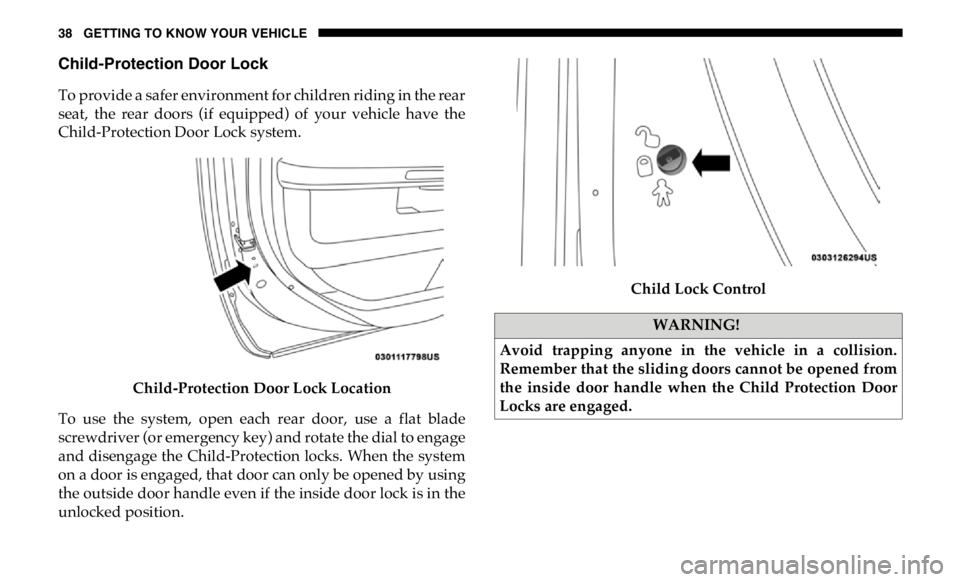
Child-Protection Door Lock Location
To use the system, open each rear door, use a flat blade
screwdriver (or emergency key) and rotate the dial to engage
and disengage the Child-Protection locks. When the system
on a door is engaged, that door can only be opened by using
the outside door handle even if the inside door lock is in the
unlocked position. Child Lock Control
WARNING!
Avoid trapping anyone in the vehicle in a collision.
Remember that the sliding doors cannot be opened from
the inside door handle when the Child Protection Door
Locks are engaged.
Page 41 of 607
GETTING TO KNOW YOUR VEHICLE 39
NOTE:
• After setting the Child-Protection Door Lock system,
always test the door from the inside to make certain it is in
the desired position.
• For emergency exit with the system engaged, move the
door lock switch to the unlock position, roll down the
window, and open the door with the outside door handle.
SEATS
Seats are a part of the Occupant Restraint System of the
vehicle. Manual Front Seat Adjustment
Manual Front Seat Forward/Rearward Adjustment
Both front seats are adjustable forward or rearward. The
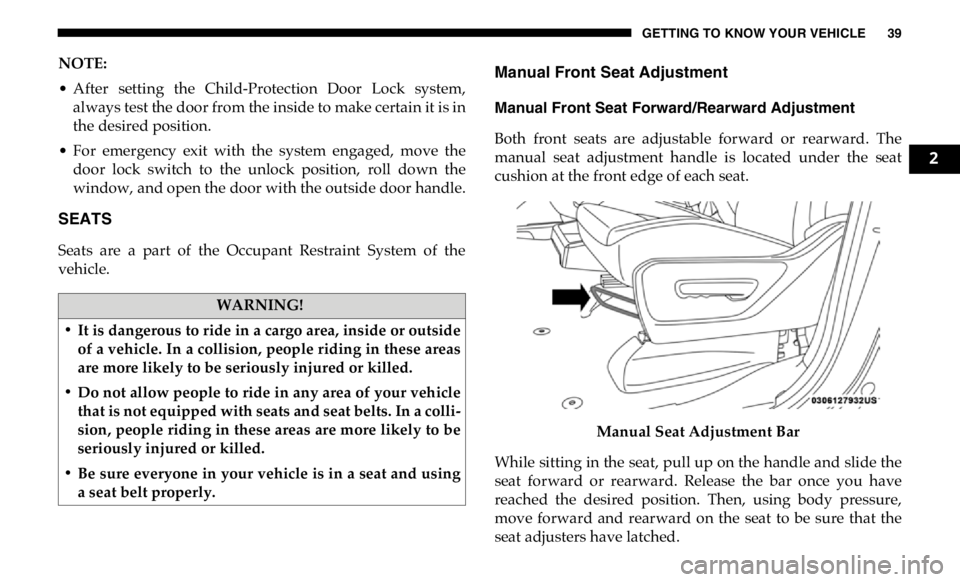
manual seat adjustment handle is located under the seat
cushion at the front edge of each seat.
Manual Seat Adjustment Bar
While sitting in the seat, pull up on the handle and slide the
seat forward or rearward. Release the bar once you have
reached the desired position. Then, using body pressure,
move forward and rearward on the seat to be sure that the
seat adjusters have latched.WARNING!
• It is dangerous to ride in a cargo area, inside or outside
of a vehicle. In a collision, people riding in these areas
are more likely to be seriously injured or killed.
• Do not allow people to ride in any area of your vehicle
that is not equipped with seats and seat belts. In a colli -
sion, people riding in these areas are more likely to be
seriously injured or killed.
• Be sure everyone in your vehicle is in a seat and using
a seat belt properly. 2
Page 46 of 607

44 GETTING TO KNOW YOUR VEHICLE
Power Lumbar — If Equipped
Vehicles equipped with power driver or passenger seats may
be also be equipped with power lumbar. The power lumbar
switch is located on the outboard side of the power seat.
Push the switch forward to increase the lumbar support.
Push the switch rearward to decrease the lumbar support.
Lumbar Control Switch
Driver Memory Seats — If Equipped
This feature allows the driver to store up to two different
memory profiles for easy recall through memory buttons.
Each memory profile contains desired position settings for the driver’s seat, side mirrors, adjustable pedals (if
equipped), and a set of desired radio station presets. Your
remote keyless entry key fob can also be programmed to
recall the same positions when the unlock button is pushed.
NOTE:
Your vehicle is equipped with two key fobs, one key fob can
be linked to memory position 1 and the other key fob can be
linked to memory position 2.
The driver memory seat buttons are located on the driver
door, next to the door handle.
Driver Memory Seat Buttons
Page 47 of 607

GETTING TO KNOW YOUR VEHICLE 45
Programming The Memory Feature
To create a new memory profile, perform the following:
1. Cycle the vehicle’s ignition to the ON/RUN position (do
not start the engine).
2. Adjust all memory profile settings to desired preferences
(i.e., driver’s seat, outside mirrors, adjustable pedals (if
equipped), and radio station presets).
3. Push and release the set (S) button on the memory switch.
4. Within five seconds, push and release either of the
memory buttons (1) or (2). The instrument cluster display
will show which memory position has been set.
NOTE:
Memory profiles can be set without the vehicle in PARK. Linking And Unlinking The Remote Keyless Entry Key
Fob To Memory
Your key fob can be programmed to recall one of two
pre-programmed memory profiles by pushing the unlock
button on the key fob.
NOTE:
Before programming your key fob you must select the
“Personal Settings Linked to Key Fob” feature through the
Uconnect Settings. Refer to “Uconnect Settings” in “Multi -
media” for further information.
To program your key fob, perform the following:
1. Cycle the vehicle’s ignition to the OFF position.
2. Select a desired memory profile 1 or 2.
NOTE:
If a memory profile has not already been set, refer to
"Programming The Memory Feature" in this section for
instructions on how to set a memory profile.
3. Once the profile has been recalled, push and release the
set (S) button on the memory switch. 2
Page 48 of 607

46 GETTING TO KNOW YOUR VEHICLE
4. Push and release button (1) or (2) accordingly. “Memory
Profile Set” (1 or 2) will display in the instrument cluster.
5. Push and release the lock button on the key fob within 10
seconds.
NOTE:
Your key fob can be unlinked to your memory settings by
pushing the set (S) button, and within 10 seconds, followed
by pushing the unlock button on the key fob.
Memory Position Recall
NOTE:
The vehicle speed must be lower than 5 mph (8 km/h) to
recall memory positions. If a recall is attempted when the
vehicle speed is greater than 5 mph (8 km/h), a message will
be displayed in the instrument cluster display.
Driver One Memory Position Recall
• To recall the memory settings for driver one using the
memory buttons on the door panel, push memory button (1).
• To recall the memory settings for driver one using the key
fob, push the unlock button on the key fob linked to
memory position 1. Driver Two Memory Position Recall
• To recall the memory setting for driver two using the memory
buttons on the door panel, push memory button (2).
• To recall the memory settings for driver two using the key
fob, push the unlock button on the key fob linked to
memory position 2.
A recall can be cancelled by pushing any of the memory
buttons during a recall (S, 1, or 2). When a recall is canceled,
the driver's seat and the power pedals (if equipped) stop
moving. A delay of one second will occur before another
recall can be selected.
Easy Entry/Exit Seat
This feature provides automatic driver’s seat positioning to
enhance driver mobility when entering and exiting the vehicle.
The distance the driver’s seat moves depends on where you
have the driver’s seat positioned when you remove the key
fob from the ignition.
• When you remove the key fob from the ignition, the
driver’s seat will move about 2.4 inches (60 mm) rearward
if the driver’s seat position is greater than or equal to
2.7 inches (67.7 mm) forward of the rear stop. The seat will
return to its previously set position when you place the
ignition into the ACC or RUN position.
Page 55 of 607

GETTING TO KNOW YOUR VEHICLE 53
Rear Head Restraint Removal
To remove the head restraint, push the adjustment button
and the release button while pulling upward on the whole
assembly. To reinstall the head restraint, put the head
restraint posts into the holes and adjust it to the appropriate
height.
NOTE:
To remove outboard restraints, the rear seat bottom must be
folded up. STEERING WHEEL
Tilt Steering Column
This feature allows you to tilt the steering column upward or
downward. The tilt lever is located on the steering column,
below the multifunction lever.
Pull the lever toward the steering wheel to unlock the
steering column. With one hand firmly on the steering
wheel, move the steering column up or down, as desired.
Release the lever to lock the steering column firmly in place.
Tilt Steering LeverWARNING!
• A loose head restraint thrown forward in a collision or
hard stop could cause serious injury or death to occu -
pants of the vehicle. Always securely stow removed
head restraints in a location outside the occupant
compartment.
• ALL the head restraints MUST be reinstalled in the
vehicle to properly protect the occupants. Follow the
re-installation instructions above prior to operating the
vehicle or occupying a seat. 2
Page 56 of 607

54 GETTING TO KNOW YOUR VEHICLE
Heated Steering Wheel — If Equipped
The steering wheel contains a heating element that helps
warm your hands in cold weather. The heated steering wheel
has only one temperature setting. Once the heated steering
wheel has been turned on, it will stay on until the operator
turns it off. The heated steering wheel may not turn on when
it is already warm.
The heated steering wheel control button is located on the
center instrument panel below the touchscreen, as well as
within the climate or controls screen of the touchscreen.
• Press the heated steering wheel button once to turn the
heating element on.
• Press the heated steering wheel button a second time to
turn the heating element off. NOTE:
The engine must be running for the heated steering wheel to
operate.
Vehicles Equipped With Remote Start
On models that are equipped with remote start, the heated
steering wheel can be programmed to come on during a
remote start.
This feature can be programmed through the Uconnect
system. Refer to “Uconnect Settings” in “Multimedia” for
further information.WARNING!
Do not adjust the steering column while driving.
Adjusting the steering column while driving or driving
with the steering column unlocked, could cause the
driver to lose control of the vehicle. Failure to follow this
warning may result in serious injury or death.
WARNING!
• Persons who are unable to feel pain to the skin because
of advanced age, chronic illness, diabetes, spinal cord
injury, medication, alcohol use, exhaustion, or other
physical conditions must exercise care when using the
steering wheel heater. It may cause burns even at low
temperatures, especially if used for long periods.
• Do not place anything on the steering wheel that insu -
lates against heat, such as a blanket or steering wheel
covers of any type and material. This may cause the
steering wheel heater to overheat.
Page 57 of 607

GETTING TO KNOW YOUR VEHICLE 55
DRIVER ADJUSTABLE PEDALS — IF EQUIPPED
The adjustable pedals system is designed to allow a greater
range of driver comfort for steering wheel tilt and seat posi -
tion. This feature allows the brake and accelerator pedals to
move toward or away from the driver to provide improved
position with the steering wheel.
The adjustable pedal switch is located to the left side of the
steering column.
Adjustable Pedals Switch
• The pedals can be adjusted with the ignition OFF.
• The pedals cannot be adjusted when the vehicle is in
REVERSE or when the Speed Control System is on. The
following messages will appear on vehicles equipped with
an instrument cluster display if the pedals are attempted to
be adjusted when the system is locked out: “Adjustable
Pedal Disabled — Cruise Control Engaged” or “Adjust -
able Pedal Disabled — Vehicle In Reverse”. 2
Page 60 of 607

58 GETTING TO KNOW YOUR VEHICLE
Automatic Dimming Mirror With Rear View Camera
Display — If Equipped
A single ball joint mirror is provided in the vehicle. It is a
twist on mirror that has a fixed position at the windshield.
The mirror installs on the windshield button with a counter -
clockwise rotation and requires no tools for mounting. The
mirror head can be adjusted up, down, left, and right for
various drivers. The mirror should be adjusted to center on
the view through the rear window.
This mirror automatically adjusts for headlight glare from
vehicles behind you.
When the vehicle is placed into reverse gear, a video display
illuminates to display the image generated by the rear view
camera (for the 3500, 4500, and 5500 Chassis Cab vehicles,
the Rear Backup Camera is shipped loose and not installed.
Please refer to the Ram Body Builders Guide for more infor -
mation). The auto dimming feature is also disabled to
improve rear view viewing. Automatic Dimming Mirror With Rear View Camera
Outside Mirrors
To receive maximum benefit, adjust the outside mirrors to
center on the adjacent lane of traffic with a slight overlap of
the view obtained on the inside mirror.
NOTE:
If your vehicle is equipped with puddle lamps under the
outside mirrors, they can be turned off through the Uconnect
display. For further information, refer to “Uconnect
Settings” in “Multimedia”.
Page 65 of 607

GETTING TO KNOW YOUR VEHICLE 63
Power Folding Outside Mirrors For Standard And
Trailer Tow — If Equipped
If equipped with power folding mirrors, they can be electri -
cally folded rearward and unfolded into the drive position.
The switch for the power folding mirrors is located between
the power mirror switches L (left) and R (right). Push the
switch once and the mirrors will fold in, push the switch a
second time and the mirrors will return to the normal
driving position.
If the mirror is manually folded after electrically cycled, a
potential extra button push is required to get the mirrors
back to the home position. If the mirror does not electrically
fold, check for ice or dirt build up at the pivot area which can
cause excessive drag. Power Folding Mirror Switch
Resetting The Power Folding Outside Mirrors
You may need to reset the power folding mirrors if the
following occurs:
• The mirrors are accidentally blocked while folding.
• The mirrors are accidentally manually folded/unfolded.
• The mirrors come out of the unfolded position.
• The mirrors shake and vibrate at normal driving speeds. 2