instrument panel RAM CHASSIS CAB 2020 Manual PDF
[x] Cancel search | Manufacturer: RAM, Model Year: 2020, Model line: CHASSIS CAB, Model: RAM CHASSIS CAB 2020Pages: 516, PDF Size: 16.57 MB
Page 203 of 516
STARTING AND OPERATING201
Diesel Particulate Filter (DPF) Manual
Regeneration - If Equipped
On equipped chassis cabs, a manual regenera -
tion can be enable through the instrument
cluster. The manual regeneration will allow the
DPF to complete a regeneration, lowering the
soot level without having to drive the vehicle.
The vehicle must be in park to access this
feature, and the fuel level must be over 12.5%
full. A message displaying the time left on the
regeneration will appear on the instrument
cluster, and the instrument cluster will display
the soot level. Refer to “Instrument Cluster
Display” in “Getting to Know Your Instrument
Panel” for further information.
ENGINE BLOCK HEATER — IF EQUIPPED
The engine block heater warms the engine, and
permits quicker starts in cold weather. Connect
the cord to a standard 110-115 Volt AC elec -
trical outlet with a grounded, three-wire exten -
sion cord.
Gas Engine Only
The engine block heater cord is routed through
the grille by the right front tow hook. It includes a removable cap that is secured by a
tethered strap. It also has a c-clip that is used
for storage when not in use for the Winter
months. During Winter months, remove the
heater cord wiring assembly from itself on the
c-clip.
The engine block heater must be plugged in at
least one hour to have an adequate warming
effect on the engine.
Diesel Engine Only
The engine block heater warms engine coolant
and permits quicker starts in cold weather.
Connect the heater cord to a ground-fault inter
-
rupter protected 110–115 Volt AC electrical
outlet with a grounded, three-wire extension
cord.
The engine block heater cord is routed under
the hood to the right side and can be located
just behind the grille near the headlamp. NOTE:
The engine block heater cord is a factory
installed option. If your vehicle is not equipped,
heater cords are available from an authorized
Mopar dealer.
The block heater must be plugged in at least
one hour to have an adequate warming effect
on the coolant.
NOTE:
The block heater will require 110 Volts AC and
6.5 Amps to activate the heater element.
Block Heater Usage
For ambient temperatures below 0°F (-18°C),
engine block heater usage is recommended.
For ambient temperatures below –20°F
(-29°C), engine block heater usage is required.
WARNING!
Remember to disconnect the engine block
heater cord before driving. Damage to the
110-115 Volt electrical cord could cause
electrocution.
WARNING!
Remember to disconnect the engine block
heater cord before driving. Damage to the
110-115 Volt electrical cord could cause
electrocution.5
2020_RAM_CHASSIS_CAB_OM_USA=GUID-6C67832B-7839-4CCF-BEFC-CDF988F949EA=1=en=.book Page 201
Page 206 of 516
204STARTING AND OPERATING
(Continued)
Automatic “Smart” Exhaust Brake
Automatic “Smart” Exhaust Brake technology
delivers smoother, less aggressive exhaust
braking characteristics during downhill
descents. Although it can apply full exhaust
braking force if needed, Automatic “Smart”
Exhaust Brake may not apply obvious braking if
the vehicle speed is not increasing. Automatic
“Smart” Exhaust Brake is intended to maintain
vehicle speed, while Full Exhaust Brake is
intended to reduce vehicle speed.
Automatic “Smart” Exhaust Brake can be
enabled by pushing the exhaust brake button
(on the center stack) again anytime after the
normal Full Exhaust Brake has been turned on.
The “Exhaust Brake Indicator” in the instrument
cluster display will change from Yellow to Green
when Automatic “Smart” Exhaust Brake is
enabled. Pushing the exhaust brake button
again will toggle the exhaust brake mode to off.
PARKING BRAKE
Before leaving the vehicle, make sure that the
parking brake is fully applied. Also, be certain to
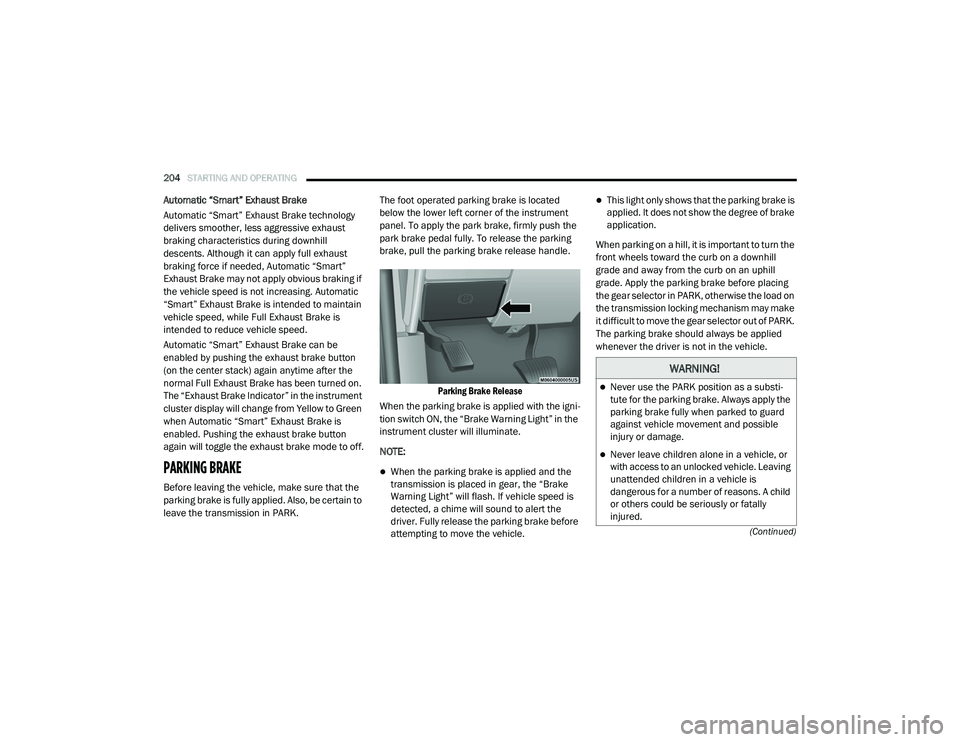
leave the transmission in PARK.The foot operated parking brake is located
below the lower left corner of the instrument
panel. To apply the park brake, firmly push the
park brake pedal fully. To release the parking
brake, pull the parking brake release handle.
Parking Brake Release
When the parking brake is applied with the igni -
tion switch ON, the “Brake Warning Light” in the
instrument cluster will illuminate.
NOTE:
When the parking brake is applied and the
transmission is placed in gear, the “Brake
Warning Light” will flash. If vehicle speed is
detected, a chime will sound to alert the
driver. Fully release the parking brake before
attempting to move the vehicle.
This light only shows that the parking brake is
applied. It does not show the degree of brake
application.
When parking on a hill, it is important to turn the
front wheels toward the curb on a downhill
grade and away from the curb on an uphill
grade. Apply the parking brake before placing
the gear selector in PARK, otherwise the load on
the transmission locking mechanism may make
it difficult to move the gear selector out of PARK.
The parking brake should always be applied
whenever the driver is not in the vehicle.
WARNING!
Never use the PARK position as a substi -
tute for the parking brake. Always apply the
parking brake fully when parked to guard
against vehicle movement and possible
injury or damage.
Never leave children alone in a vehicle, or
with access to an unlocked vehicle. Leaving
unattended children in a vehicle is
dangerous for a number of reasons. A child
or others could be seriously or fatally
injured.
2020_RAM_CHASSIS_CAB_OM_USA=GUID-6C67832B-7839-4CCF-BEFC-CDF988F949EA=1=en=.book Page 204
Page 215 of 516

STARTING AND OPERATING213
The “TOW/HAUL Indicator Light” will illuminate
in the instrument cluster to indicate that TOW/
HAUL mode has been activated. Pushing the
switch a second time restores normal opera -
tion. Normal operation is always the default at
engine start-up. If TOW/HAUL mode is desired,
the switch must be pushed each time the
engine is started.
Eight-Speed Automatic Transmission — If
Equipped
The transmission is controlled using a rotary
electronic gear selector located on the instru -
ment panel. The transmission gear range
(PRND) is displayed both above the gear
selector and in the instrument cluster. To select
a gear range, simply rotate the gear selector.
You must press the brake pedal to shift the transmission out of PARK (or NEUTRAL, when
the vehicle is stopped or moving at low speeds).
To shift past multiple gear ranges at once (such
as PARK to DRIVE), simply rotate the gear
selector to the appropriate detent. Select the
DRIVE range for normal driving.
NOTE:
In the event of a mismatch between the gear
selector position and the actual transmission
gear (for example, driver selects PARK while
driving), the position indicator will blink continu
-
ously until the selector is returned to the proper
position, or the requested shift can be
completed.
The electronically-controlled transmission
adapts its shift schedule based on driver inputs,
along with environmental and road conditions.
The transmission electronics are self-cali -
brating; therefore, the first few shifts on a new
vehicle may be somewhat abrupt. This is a
normal condition, and precision shifts will
develop within a few hundred miles (kilome -
ters).
Only shift from DRIVE to PARK or REVERSE
when the accelerator pedal is released and the
vehicle is stopped. Be sure to keep your foot on the brake pedal when shifting between these
gears.
The transmission gear selector has only PARK,
REVERSE, NEUTRAL, and DRIVE positions.
Manual downshifts can be made using the Elec
-
tronic Range Select (ERS) shift control. Pressing
the GEAR-/GEAR+ switches (on the steering
wheel) while in the DRIVE position will select the
highest available transmission gear, and will
display that gear limit in the instrument cluster
as 1, 2, 3, etc. Refer to “Electronic Range Select
(ERS) Operation” in this section for further infor -
mation. Some models will display both the
selected gear limit, and the actual current gear,
while in ERS mode.
Electronic Transmission Gear Selector
WARNING!
Do not use the “TOW/HAUL” feature when
driving in icy or slippery conditions. The
increased engine braking can cause the rear
wheels to slide, and the vehicle to swing
around with the possible loss of vehicle
control, which may cause an accident
possibly resulting in personal injury or death.
5
2020_RAM_CHASSIS_CAB_OM_USA=GUID-6C67832B-7839-4CCF-BEFC-CDF988F949EA=1=en=.book Page 213
Page 220 of 516

218STARTING AND OPERATING
When to Use TOW/HAUL Mode
When driving in hilly areas, towing a trailer,
carrying a heavy load, etc., and frequent trans -
mission shifting occurs, push the TOW/HAUL
switch to activate TOW/HAUL mode. This will
improve performance and reduce the potential
for transmission overheating or failure due to
excessive shifting.
TOW/HAUL Switch
The “TOW/HAUL Indicator Light” will illuminate
in the instrument cluster to indicate that TOW/
HAUL mode has been activated. Pushing the
switch a second time restores normal opera -
tion. Normal operation is always the default at
engine start-up. If TOW/HAUL mode is desired,
the switch must be pushed each time the
engine is started.
AUXILIARY SWITCHES — IF EQUIPPED
There can be up to six auxiliary switches located
in the lower switch bank of the instrument panel
which can be used to power various electronic
devices and PTO (Power Take Off) – If Equipped.
If Power Take Off is equipped, it will take the
place of the sixth Auxiliary switch. Connections
to the switches are found under the hood in the
connectors attached to the auxiliary Power
Distribution Center. You have the ability to configure the function
-
ality of the auxiliary switches via the instrument
cluster display. All switches can now be config -
ured for setting the switch type operation to
latching or momentary, power source of either
battery or ignition, and ability to hold last state
across key cycles.
NOTE:
Holding last state conditions are met when
switch type is set to latching and power source
is set to ignition.
For further information on using the auxiliary
switches, please refer to the Ram Body Builders
Guide by accessing www.rambodybuilder.com
and choosing the appropriate links.
FOUR-WHEEL DRIVE OPERATION — IF
EQUIPPED
Four-wheel drive trucks are equipped with
either a manually shifted transfer case or an
electronically shifted transfer case. Refer to the
operating instructions for your transfer case,
located in this section for further information.
WARNING!
Do not use the “TOW/HAUL” feature when
driving in icy or slippery conditions. The
increased engine braking can cause the rear
wheels to slide, and the vehicle to swing
around with the possible loss of vehicle
control, which may cause an accident
possibly resulting in personal injury or death.
2020_RAM_CHASSIS_CAB_OM_USA=GUID-6C67832B-7839-4CCF-BEFC-CDF988F949EA=1=en=.book Page 218
Page 224 of 516

222STARTING AND OPERATING
2WD Or 4WD HIGH To 4WD LOW
NOTE:
When shifting into or out of 4WD LOW some
gear noise may be heard. This noise is normal
and is not detrimental to the vehicle or occu -
pants.
Shifting can be performed with the vehicle
rolling 2 to 3 mph (3 to 5 km/h) or completely
stopped. You can use either of the following
procedures:
Preferred Procedure
1. With the engine running, slow the vehicle to 2 to 3 mph (3 to 5 km/h).
2. Shift the transmission into NEUTRAL.
3. While still rolling, push the desired position on the transfer case control switch.
4. After the desired position indicator light is on (not flashing), shift the transmission
back into gear. Alternate Procedure
1. Bring the vehicle to a complete stop.
2. With the ignition switch in the ON position
and the engine running, shift the transmis -
sion into NEUTRAL.
3. Push the desired position on the transfer case control switch.
4. After the desired position indicator light is on (not flashing), shift the transmission
back into gear.
NOTE:
If Steps 1 or 2 of either the Preferred or Alter -
nate Procedure are not satisfied prior to
attempting the shift, then the desired posi -
tion indicator light will flash continuously
while the original position indicator light is
on, until all requirements have been met.
The ignition switch must be in the ON position
for a shift to take place and for the position
indicator lights to be operable. If the ignition
switch is not in the ON position, the shift will
not take place and no position indicator lights
will be on or flashing.
Electronically Shifted Transfer Case (Six
Speed Transmisson) — If Equipped
The electronic shift transfer case is operated by
the 4WD Control Switch (Transfer Case Switch),
which is located on the instrument panel.
Four-Position/On-Demand Transfer Case
This electronically shifted transfer case
provides four mode positions:
Two-Wheel Drive High Range (2WD)
Four-Wheel Drive High Range (4WD HIGH)
Four-Wheel Drive Low Range (4WD LOW)
N (Neutral)
2020_RAM_CHASSIS_CAB_OM_USA=GUID-6C67832B-7839-4CCF-BEFC-CDF988F949EA=1=en=.book Page 222
Page 232 of 516
230STARTING AND OPERATING
SPEED CONTROL
When engaged, the Speed Control takes over
accelerator operations at speeds greater than
20 mph (32 km/h) for gasoline engines and
25 mph (40 km/h) for diesel engines.
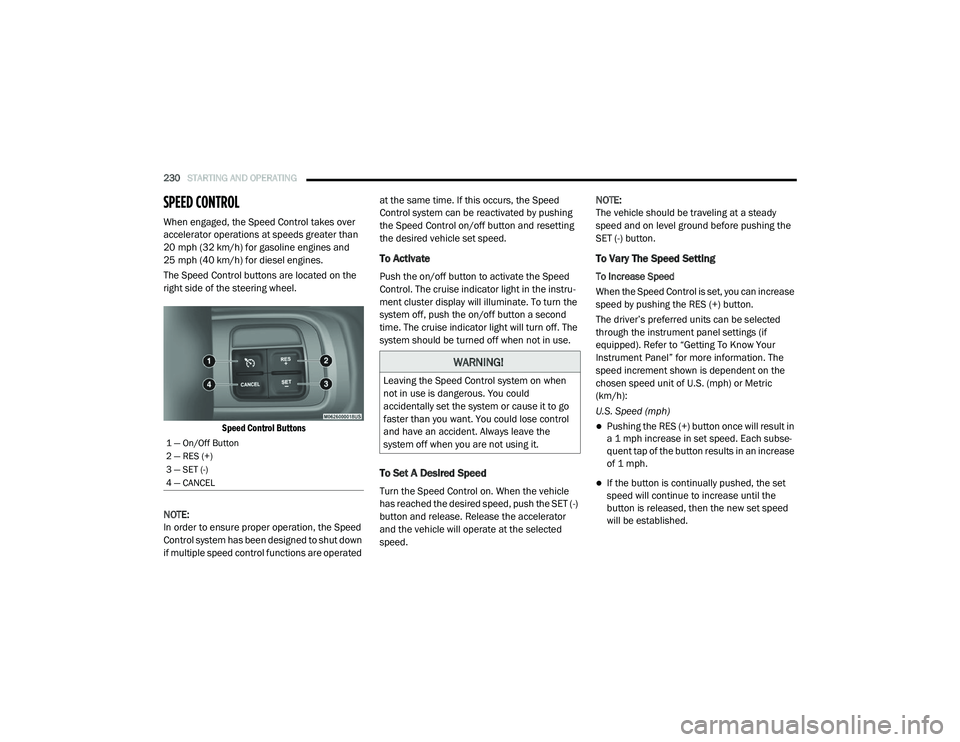
The Speed Control buttons are located on the
right side of the steering wheel.
Speed Control Buttons
NOTE:
In order to ensure proper operation, the Speed
Control system has been designed to shut down
if multiple speed control functions are operated at the same time. If this occurs, the Speed
Control system can be reactivated by pushing
the Speed Control on/off button and resetting
the desired vehicle set speed.
To Activate
Push the on/off button to activate the Speed
Control. The cruise indicator light in the instru
-
ment cluster display will illuminate. To turn the
system off, push the on/off button a second
time. The cruise indicator light will turn off. The
system should be turned off when not in use.
To Set A Desired Speed
Turn the Speed Control on. When the vehicle
has reached the desired speed, push the SET (-)
button and release. Release the accelerator
and the vehicle will operate at the selected
speed. NOTE:
The vehicle should be traveling at a steady
speed and on level ground before pushing the
SET (-) button.
To Vary The Speed Setting
To Increase Speed
When the Speed Control is set, you can increase
speed by pushing the RES (+) button.
The driver’s preferred units can be selected
through the instrument panel settings (if
equipped). Refer to “Getting To Know Your
Instrument Panel” for more information. The
speed increment shown is dependent on the
chosen speed unit of U.S. (mph) or Metric
(km/h):
U.S. Speed (mph)
Pushing the RES (+) button once will result in
a 1 mph increase in set speed. Each subse -
quent tap of the button results in an increase
of 1 mph.
If the button is continually pushed, the set
speed will continue to increase until the
button is released, then the new set speed
will be established.
1 — On/Off Button
2 — RES (+)
3 — SET (-)
4 — CANCEL
WARNING!
Leaving the Speed Control system on when
not in use is dangerous. You could
accidentally set the system or cause it to go
faster than you want. You could lose control
and have an accident. Always leave the
system off when you are not using it.
2020_RAM_CHASSIS_CAB_OM_USA=GUID-6C67832B-7839-4CCF-BEFC-CDF988F949EA=1=en=.book Page 230
Page 233 of 516
STARTING AND OPERATING231
Metric Speed (km/h)
Pushing the RES (+) button once will result in
a 1 km/h increase in set speed. Each subse -
quent tap of the button results in an increase
of 1 km/h.
If the button is continually pushed, the set
speed will continue to increase until the
button is released, then the new set speed
will be established.
To Decrease Speed
When the Speed Control is set, you can
decrease speed by pushing the SET (-) button.
The driver’s preferred units can be selected
through the instrument panel settings (if
equipped). Refer to “Getting To Know Your
Instrument Panel” for more information. The
speed decrement shown is dependent on the
chosen speed unit of U.S. (mph) or Metric
(km/h):
U.S. Speed (mph)
Pushing the SET (-) button once will result in
a 1 mph decrease in set speed. Each subse -
quent tap of the button results in a decrease
of 1 mph.
If the button is continually pushed, the set
speed will continue to decrease until the
button is released, then the new set speed
will be established.
Metric Speed (km/h)
Pushing the SET (-) button once will result in
a 1 km/h decrease in set speed. Each subse -
quent tap of the button results in a decrease
of 1 km/h.
If the button is continually pushed, the set
speed will continue to decrease until the
button is released, then the new set speed
will be established.
To Accelerate For Passing
Press the accelerator as you would normally.
When the pedal is released, the vehicle will
return to the set speed.
Using Speed Control On Hills
The transmission may downshift on hills to
maintain the vehicle set speed.
NOTE:
The Speed Control system maintains speed up
and down hills. A slight speed change on
moderate hills is normal. On steep hills, a greater speed loss or gain may
occur so it may be preferable to drive without
Speed Control.
To Resume Speed
To resume a previously set speed, push the RES
(+) button and release. Resume can be used at
any speed above 20 mph (32 km/h).
To Deactivate
A soft tap on the brake pedal, pushing the
CANCEL button, or normal brake pressure while
slowing the vehicle will deactivate the Speed
Control without erasing the set speed from
memory.
Pushing the on/off button, or placing the igni
-
tion in the OFF position, erases the set speed
from memory.
WARNING!
Speed Control can be dangerous where the
system cannot maintain a constant speed.
Your vehicle could go too fast for the
conditions, and you could lose control and
have an accident. Do not use Speed Control
in heavy traffic or on roads that are winding,
icy, snow-covered or slippery.
5
2020_RAM_CHASSIS_CAB_OM_USA=GUID-6C67832B-7839-4CCF-BEFC-CDF988F949EA=1=en=.book Page 231
Page 247 of 516

STARTING AND OPERATING245
To Vary The Speed Setting
To Increase Speed
When the Normal (Fixed Speed) Cruise Control
is set, you can increase speed by pushing the
RES (+) button.
The driver's preferred units can be selected
through the instrument panel settings. Refer to
”Instrument Cluster Display” in “Getting To
Know Your Instrument Panel” for more informa-
tion. The speed increment shown is dependent
on the speed of U.S. (mph) or Metric (km/h)
units:
U.S. Speed (mph)
Pushing the RES (+) button once will result in
a 1 mph increase in set speed. Each subse -
quent tap of the button results in an increase
of 1 mph.
If the button is continually pushed, the set
speed will continue to increase in 5 mph
increments until the button is released. The
increase in set speed is reflected in the
instrument cluster display. Metric Speed (km/h)
Pushing the RES (+) button once will result in
a 1 km/h increase in set speed. Each subse -
quent tap of the button results in an increase
of 1 km/h.
If the button is continually pushed, the set
speed will continue to increase in 10 km/h
increments until the button is released. The
increase in set speed is reflected in the
instrument cluster display.
To Decrease Speed
When the Normal (Fixed Speed) Cruise Control
is set, you can decrease speed by pushing the
SET (-) button.
The driver's preferred units can be selected
through the instrument panel settings. Refer to
”Instrument Cluster Display” in “Getting To
Know Your Instrument Panel” for more informa-
tion. The speed decrement shown is dependent
on the speed of U.S. (mph) or Metric (km/h)
units: U.S. Speed (mph)
Pushing the SET (-) button once will result in
a 1 mph decrease in set speed. Each subse -
quent tap of the button results in a decrease
of 1 mph.
If the button is continually pushed, the set
speed will continue to decrease in 5 mph
decrements until the button is released. The
decrease in set speed is reflected in the
instrument cluster display.
Metric Speed (km/h)
Pushing the SET (-) button once will result in
a 1 km/h decrease in set speed. Each subse -
quent tap of the button results in a decrease
of 1 km/h.
If the button is continually pushed, the set
speed will continue to decrease in 10 km/h
decrements until the button is released. The
decrease in set speed is reflected in the
instrument cluster display.
5
2020_RAM_CHASSIS_CAB_OM_USA=GUID-6C67832B-7839-4CCF-BEFC-CDF988F949EA=1=en=.book Page 245
Page 249 of 516

STARTING AND OPERATING247
ParkSense Warning Display
The ParkSense Warning screen is located within
the instrument cluster display. It provides visual
warnings to indicate the distance between the
rear fascia/bumper and the detected obstacle.
Refer to “Instrument Cluster Display” in
“Getting To Know Your Instrument Panel” for
further information.
ParkSense Display
When the vehicle is in REVERSE, the warning
display will turn on indicating the system status.
The system will indicate a detected obstacle by
showing a single arc in one or more of the rear
regions (left/center/right) based on the object’s
distance and location relative to the vehicle.
If an object is detected in one or more of the
rear regions, the display will show a single solid
arc in these regions and the system will produce
a tone. As the vehicle moves closer to the
object, the display will show the single arc
moving closer to the vehicle and the tone will
change from a single 1/2 second tone to slow,
to fast, to continuous.
Single 1/2 Second Tone
Slow Tone Slow Tone
Fast Tone
5
2020_RAM_CHASSIS_CAB_OM_USA=GUID-6C67832B-7839-4CCF-BEFC-CDF988F949EA=1=en=.book Page 247
Page 253 of 516

STARTING AND OPERATING251
ParkSense will retain the last system state
(enabled or disabled) from the last ignition cycle
when the ignition is changed to the ON/RUN
position.
ParkSense can be active only when the gear
selector is in REVERSE or DRIVE. If ParkSense is
enabled at one of these gear selector positions,
the system will remain active until the vehicle
speed is increased to approximately 7 mph
(11 km/h) or above. A warning will appear in the
instrument cluster display when the vehicle is in
REVERSE, indicating the vehicle is above Park -
Sense operating speed. The system will become
active again if the vehicle speed is decreased to
speeds less than approximately 6 mph
(9 km/h).
ParkSense Sensors
For the 3500, 4500 and 5500 Chassis Cab
vehicles, the rear ParkSense sensors are
shipped loose. Please refer to the Ram Body
Builder’s Guide for more information.
The four ParkSense sensors are to be located in
the rear fascia/bumper, and monitor the area
behind the vehicle that is within the sensors’
field of view. The sensors can detect obstacles from approxi
-
mately 18 inches (45 cm) up to 79 inches
(200 cm) from the rear fascia/bumper in the
horizontal direction, depending on the location,
type and orientation of the obstacle.
NOTE:
If equipped as a dually, the ParkSense system
has six rear sensors to assist in detection
around the dually flares.
The six ParkSense sensors, located in the front
fascia/bumper, monitor the area in front of the
vehicle that is within the sensors’ field of view.
The sensors can detect obstacles from approxi -
mately 12 inches (30 cm) up to 47 inches
(120 cm) from the front fascia/bumper in the
horizontal direction, depending on the location,
type and orientation of the obstacle.ParkSense Warning Display
The ParkSense Warning screen is located within
the instrument cluster display. It provides visual
warnings to indicate the distance between the
rear fascia/bumper and/or front fascia/bumper
and the detected obstacle. Refer to “Instrument
Cluster Display” in “Getting To Know Your
Instrument Panel” for further information.
ParkSense Display
The warning display will turn on indicating the
system status when the vehicle is in REVERSE
or when the vehicle is in DRIVE and an obstacle
has been detected.
The system will indicate a detected obstacle by
showing a single arc in one or more of the rear
regions (left/center/right) based on the
obstacle’s distance and location relative to the
vehicle.
Single 1/2 Second Tone
5
2020_RAM_CHASSIS_CAB_OM_USA=GUID-6C67832B-7839-4CCF-BEFC-CDF988F949EA=1=en=.book Page 251