fuel cap RAM CHASSIS CAB 2020 Owners Manual
[x] Cancel search | Manufacturer: RAM, Model Year: 2020, Model line: CHASSIS CAB, Model: RAM CHASSIS CAB 2020Pages: 516, PDF Size: 16.57 MB
Page 7 of 516
5
FOUR-WHEEL DRIVE OPERATION —
IF EQUIPPED ...................................................... 218 Electronically Shifted Transfer Case (Eight
Speed Transmission) — If Equipped ........219 Electronically Shifted Transfer Case
(Six Speed Transmisson) —
If Equipped ...............................................222 Manually Shifted Transfer Case —
If Equipped .................................................226
LIMITED-SLIP DIFFERENTIAL .......................... 228
POWER TAKE OFF (PTO) OPERATION — IF
EQUIPPED .......................................................... 228
POWER STEERING ............................................. 229
Hydraulic Power Steering ..........................229
SPEED CONTROL .............................................. 230
To Activate .................................................. 230To Set A Desired Speed .............................230To Vary The Speed Setting ........................ 230To Accelerate For Passing ........................ 231To Resume Speed......................................231
To Deactivate .............................................231
ADAPTIVE CRUISE CONTROL (ACC) —
IF EQUIPPED .................................................... 232
Adaptive Cruise Control (ACC)
Operation ....................................................233 Activating Adaptive Cruise
Control (ACC) .............................................. 234 To Activate/Deactivate .............................. 234
To Set A Desired ACC Speed ..................... 235To Cancel.................................................... 235To Turn Off.................................................. 235
To Resume ................................................. 236
To Vary The Speed Setting ........................ 236
Setting The Following Distance In ACC..... 237Overtake Aid............................................... 239ACC Operation At Stop............................... 239Adaptive Cruise Control (ACC) Menu ........ 239Display Warnings And Maintenance ........ 240Precautions While Driving With ACC......... 241
General Information .................................. 244Normal (Fixed Speed) Cruise
Control Mode ............................................. 244
PARKSENSE REAR PARK ASSIST —
IF EQUIPPED .....................................................246
ParkSense Sensors ................................... 246
ParkSense Warning Display ...................... 247
ParkSense Display ..................................... 247
Enabling And Disabling ParkSense .......... 249Service The ParkSense Rear Park Assist
System ........................................................ 249 Cleaning The ParkSense System.............. 249
ParkSense System Usage Precautions .... 249 PARKSENSE FRONT AND REAR
PARK ASSIST ................................................... 250
ParkSense Sensors ................................... 251
ParkSense Warning Display...................... 251
ParkSense Display..................................... 251
Enabling And Disabling Front And/Or Rear
ParkSense .................................................. 254 Service The ParkSense Front/Rear Park
Assist System ............................................. 254 Cleaning The ParkSense System.............. 254
ParkSense System Usage Precautions .... 254
LANESENSE — IF EQUIPPED ........................... 256
LaneSense Operation................................ 256
Turning LaneSense On Or Off ................... 256
LaneSense Warning Message .................. 257Changing LaneSense Status..................... 258
PARKVIEW REAR BACK UP CAMERA ............ 258
AUX Camera — If Equipped ...................... 261
SURROUND VIEW CAMERA SYSTEM —
IF EQUIPPED ..................................................... 261
AUX Camera — If Equipped ...................... 267
ENGINE RUNAWAY ............................................ 267
REFUELING THE VEHICLE — GAS ENGINE ...... 268 Loose Fuel Filler Cap Message ................ 268
2020_RAM_CHASSIS_CAB_OM_USA=GUID-6C67832B-7839-4CCF-BEFC-CDF988F949EA=1=en=.book Page 5
Page 8 of 516
6
REFUELING THE VEHICLE —
DIESEL ENGINE ................................................. 269 Fuel Filler Cap ............................................269
Avoid Using Contaminated Fuel ................269Bulk Fuel Storage — Diesel Fuel ...............269
Diesel Exhaust Fluid ..................................270Diesel Exhaust Fluid Storage ....................270
Adding Diesel Exhaust Fluid (DEF) ........... 271
VEHICLE LOADING .......................................... 273
Gross Vehicle Weight Rating (GVWR) ......273Payload .......................................................273Gross Axle Weight Rating (GAWR) ............273
Tire Size ......................................................273
Rim Size......................................................273
Inflation Pressure ......................................273
Curb Weight................................................273
Loading .......................................................273
TRAILER TOWING ............................................ 274
Common Towing Definitions .....................274Trailer Hitch Type and Maximum
Trailer Weight .............................................278 Trailer Towing Weights (Maximum Trailer
Weight Ratings) .......................................279 Trailer And Tongue Weight .......................279
Towing Requirements ...............................279
Towing Tips ................................................284 SNOWPLOW ....................................................... 286
Before Plowing ........................................... 286
Snowplow Prep Package Model
Availability .................................................. 286 Over The Road Operation With Snowplow
Attached ..................................................... 287 Operating Tips ............................................ 287General Maintenance................................ 287
RECREATIONAL TOWING (BEHIND
MOTORHOME, ETC.) .......................................... 288
Towing This Vehicle Behind Another
Vehicle ........................................................ 288 Recreational Towing — Two-Wheel Drive
Models ........................................................ 289 Recreational Towing — Four-Wheel Drive
Models ........................................................ 289
DRIVING TIPS ...................................................... 292
Driving On Slippery Surfaces ................... 292
Driving Through Water .............................. 292
IN CASE OF EMERGENCY
HAZARD WARNING FLASHERS .................... 294
ASSIST AND SOS SYSTEM — IF EQUIPPED..... 294General Information .................................. 299
BULB REPLACEMENT ......................................300
Replacement Bulbs .............................. 300
Replacing Exterior Bulbs ........................... 301
FUSES ..................................................................305
Power Distribution Center ......................... 306 JACKING AND TIRE CHANGING ...................... 314
4500/5500 Models .................................. 315
Preparations For Jacking .......................... 315
Jacking Instructions 4500 And
5500 Series ............................................... 315 To Stow The Flat Or Spare —
If Equipped ................................................ 318 Hub Caps/Wheel Covers —
If Equipped ............................................... 318
JUMP STARTING ............................................... 319
Preparations For Jump Start ..................... 320
Jump Starting Procedure .......................... 320
IF YOUR ENGINE OVERHEATS ......................... 321
GEAR SELECTOR OVERRIDE — 6–SPEED
TRANSMISSION ................................................ 322
MANUAL PARK RELEASE — 8 – SPEED
TRANSMISSION ................................................ 323
FREEING A STUCK VEHICLE ............................ 324
TOWING A DISABLED VEHICLE ...................... 326
Two-Wheel Drive Models ........................... 327
Four-Wheel Drive Models .......................... 327
Emergency Tow Hooks — If Equipped ...... 328
ENHANCED ACCIDENT RESPONSE SYSTEM
(EARS) ................................................................ 328
EVENT DATA RECORDER (EDR) ....................... 328
2020_RAM_CHASSIS_CAB_OM_USA=GUID-6C67832B-7839-4CCF-BEFC-CDF988F949EA=1=en=.book Page 6
Page 10 of 516
8
FUEL REQUIREMENTS — GAS ENGINE .......... 399 6.4L Engine ................................................399
Reformulated Gasoline ........................ 399Materials Added To Fuel .........................400
Gasoline/Oxygenate Blends ....................400
Do Not Use E-85 In Non-Flex
Fuel Vehicles ..............................................400 CNG And LP Fuel System
Modifications .............................................400 MMT In Gasoline ........................................401
Fuel System Cautions ................................401Carbon Monoxide Warnings ....................401
FUEL REQUIREMENTS – DIESEL ENGINE .. 402
Fuel Specifications ...................................402
Biodiesel Fuel Requirements ....................403
VEHICLE SPECIFCATIONS ................................. 404
FLUID CAPACITIES — GAS ENGINE ............... 405
FLUID CAPACITIES — DIESEL ENGINE ......... 405
FLUIDS AND LUBRICANTS — GAS ENGINE .... 407 Engine ........................................................ 407
Chassis .....................................................409
FLUIDS AND LUBRICANTS —
DIESEL ENGINE ................................................. 410
Engine ........................................................ 410
Chassis .......................................................412
MOPAR ACCESSORIES .................................... 413
Authentic Accessories By Mopar .............413
MULTIMEDIA
UCONNECT SYSTEMS .......................................414
CYBERSECURITY ............................................... 414
UCONNECT SETTINGS .......................................415 Uconnect 3 Settings .................................. 415Uconnect 4/4C/4C NAV Settings ............. 430Uconnect 4C NAV With 12-inch Display
Settings ...................................................... 449
SAFETY AND GENERAL INFORMATION ........... 467
Safety Guidelines....................................... 467
UCONNECT 3 WITH 5-INCH DISPLAY ..............468
Introduction................................................ 468
Radio Mode ................................................ 469
Media Mode ............................................... 472Phone Mode ............................................... 474
STEERING WHEEL AUDIO CONTROLS — IF
EQUIPPED ......................................................... 481
Radio Operation ......................................... 481
Media Mode ............................................... 481
IPOD®/USB/MP3 CONTROL —
IF EQUIPPED ....................................................481
RADIO OPERATION AND MOBILE PHONES ...483
Regulatory And Safety Information........... 484 VOICE RECOGNITION QUICK TIPS ................. 485
Introducing Uconnect ................................ 485
Get Started................................................. 485Basic Voice Commands ............................ 485Radio .......................................................... 486
Media ......................................................... 488Phone ......................................................... 489Voice Text Reply — If Equipped ................. 490
Climate (4C/4C NAV)................................. 491Navigation (4C NAV) .................................. 492
SiriusXM Guardian™ (4C/4C NAV) —
If Equipped ................................................. 492 Register (4C/4C NAV)................................ 493
Mobile App (4C/4C NAV) ........................... 493
SiriusXM® Travel Link (4C NAV) ............... 494Siri® Eyes Free — If Equipped ................. 495
Using Do Not Disturb ................................ 496
Android Auto™ — If Equipped .................. 496Apple CarPlay® — If Equipped ................. 497
General Information .................................. 498
Additional Information............................... 499
2020_RAM_CHASSIS_CAB_OM_USA=GUID-6C67832B-7839-4CCF-BEFC-CDF988F949EA=1=en=.book Page 8
Page 86 of 516

84GETTING TO KNOW YOUR INSTRUMENT PANEL
6. Fuel Gauge
The pointer shows the level of fuel in the
fuel tank when the ignition is in the ON/
RUN position.
The fuel pump symbol points
to the side of the vehicle where
the fuel door is located.
Refer to “Refueling The Vehicle — Gas
Engine” in “Starting And Operating” for
further information. 7. Temperature Gauge
The gauge pointer shows engine coolant
temperature. The pointer positioned
within the normal range indicates that
the engine cooling system is operating
satisfactorily.
The gauge pointer will likely indicate a higher temperature when driving in hot
weather, up mountain grades, or when
towing a trailer. It should not be allowed
to exceed the upper limits of the normal
operating range.
WARNING!
A hot engine cooling system is dangerous.
You or others could be badly burned by steam
or boiling coolant. You may want to call an
authorized dealer for service if your vehicle
overheats. If you decide to look under the
hood yourself, see “Servicing And
Maintenance.” Follow the warnings under the
Cooling System Pressure Cap paragraph.
CAUTION!
Driving with a hot engine cooling system
could damage your vehicle. If the
temperature gauge reads “H,” pull over and
stop the vehicle. Idle the vehicle with the air
conditioner turned off until the pointer drops
back into the normal range. If the pointer
remains on the “H,” turn the engine off
immediately and call an authorized dealer for
service.
2020_RAM_CHASSIS_CAB_OM_USA=GUID-6C67832B-7839-4CCF-BEFC-CDF988F949EA=1=en=.book Page 84
Page 88 of 516
86GETTING TO KNOW YOUR INSTRUMENT PANEL
Premium Instrument Cluster Descriptions
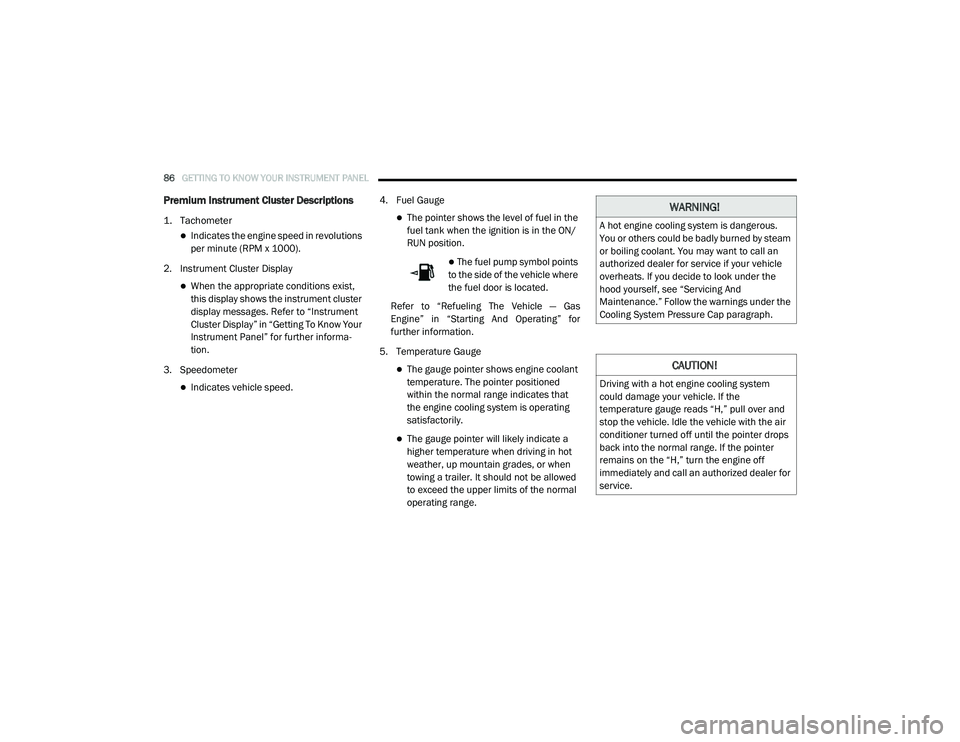
1. Tachometer
Indicates the engine speed in revolutions
per minute (RPM x 1000).
2. Instrument Cluster Display
When the appropriate conditions exist, this display shows the instrument cluster
display messages. Refer to “Instrument
Cluster Display” in “Getting To Know Your
Instrument Panel” for further informa -
tion.
3. Speedometer
Indicates vehicle speed. 4. Fuel Gauge
The pointer shows the level of fuel in the
fuel tank when the ignition is in the ON/
RUN position.
The fuel pump symbol points
to the side of the vehicle where
the fuel door is located.
Refer to “Refueling The Vehicle — Gas
Engine” in “Starting And Operating” for
further information.
5. Temperature Gauge
The gauge pointer shows engine coolant temperature. The pointer positioned
within the normal range indicates that
the engine cooling system is operating
satisfactorily.
The gauge pointer will likely indicate a higher temperature when driving in hot
weather, up mountain grades, or when
towing a trailer. It should not be allowed
to exceed the upper limits of the normal
operating range.
WARNING!
A hot engine cooling system is dangerous.
You or others could be badly burned by steam
or boiling coolant. You may want to call an
authorized dealer for service if your vehicle
overheats. If you decide to look under the
hood yourself, see “Servicing And
Maintenance.” Follow the warnings under the
Cooling System Pressure Cap paragraph.
CAUTION!
Driving with a hot engine cooling system
could damage your vehicle. If the
temperature gauge reads “H,” pull over and
stop the vehicle. Idle the vehicle with the air
conditioner turned off until the pointer drops
back into the normal range. If the pointer
remains on the “H,” turn the engine off
immediately and call an authorized dealer for
service.
2020_RAM_CHASSIS_CAB_OM_USA=GUID-6C67832B-7839-4CCF-BEFC-CDF988F949EA=1=en=.book Page 86
Page 93 of 516

GETTING TO KNOW YOUR INSTRUMENT PANEL91
Diesel INSTRUMENT CLUSTER
1. Tachometer
Indicates the engine speed in revolutions
per minute (RPM x 1000).
2. Instrument Cluster Display
When the appropriate conditions exist, this display shows the instrument cluster
display messages. Refer to “Instrument
Cluster Display” in “Getting To Know Your
Instrument Panel” for further informa -
tion.
3. Speedometer
Indicates vehicle speed.
4. Fuel Gauge
The pointer shows the level of fuel in the fuel tank when the ignition switch is in
the ON/RUN position.
The fuel pump symbol points
to the side of the vehicle where
the fuel filler door is located. Refer to “Refueling The Vehicle — Diesel
Engine” in “Starting And Operating” for
further information.
5. Diesel Exhaust Fluid (DEF) Gauge
The DEF Gauge displays the actual level of Diesel Exhaust Fluid in the DEF tank.
Diesel Exhaust Fluid (DEF) is required to
maintain normal vehicle operation and
emissions compliance. If something is
wrong with the gauge, a DEF Warning
Message or Malfunction Indicator Light
(MIL) will be displayed. More information
is available in the instrument cluster
display section under the heading of
Diesel Exhaust Fluid (DEF) Warning
Messages. NOTE:
The DEF tank on these vehicles is designed
with a large amount of full reserve. So the
level sensor will indicate a full reading even
before the tank is completely full. To put it
another way, there’s additional storage
capacity in the tank above the Full mark
that’s not represented in the gauge. You may
not see any movement in the reading – even
after driving up to 200 miles
(321 kilometers) in some cases.
The gauge may take up to five seconds to
update after adding a gallon or more of
Diesel Exhaust Fluid (DEF) to the DEF tank. If
you have a fault related to the DEF system,
the gauge may not update to the new level.
See an authorized dealer for service.
The DEF gauge may also not immediately
update after a refill if the temperature of the
DEF fluid is below 39°F (4°C). The DEF tank
heater will possibly warm up the DEF fluid
and allow the gauge to update after a period
of run time. Under very cold conditions, it is
possible that the gauge may not reflect the
new fill level for several drives.
3
2020_RAM_CHASSIS_CAB_OM_USA=GUID-6C67832B-7839-4CCF-BEFC-CDF988F949EA=1=en=.book Page 91
Page 107 of 516

GETTING TO KNOW YOUR INSTRUMENT PANEL105
Diesel Exhaust Fluid (DEF) Warning
Messages
There are four different messages which are
displayed if the vehicle detects that the DEF
system has been filled with a fluid other than
DEF, has experienced component failures, or
when tampering has been detected. The vehicle
may be limited to a maximum speed of 5 mph
(8 km/H) if the DEF system is not serviced
within less than 200 miles (322 km) of the fault
being detected.
When the DEF system needs to be serviced the
following warnings will display:
DEF Low Refill Soon — This message will
display when the low level is reached, during
vehicle start up, and with increased
frequency during vehicle operation. It will be
accompanied by a single chime. Approxi -
mately 5 gallons (19 Liters) of DEF is required
to refill the tank when this message is initially
displayed on pickup applications, and
approximately 7 gallons (26 Liters) are
required on chassis-cab applications.
Speed Limited to 5 MPH in XXX mi Refill DEF
— This message will continuously display if
the “DEF Low Refill Soon” message is
ignored, and the frequency of occurrence of
the chime will increase unless up to 2 gallons
(7.5 Liters) of DEF is added to the tank.
5 MPH Max Speed on Restart, Long Idle or
Refuel Refill DEF — This message will contin -
uously display when the counter reaches
zero, and will be accompanied by a periodic
chime.
The vehicle will only be capable of a
maximum speed of 5 mph upon the first of
the following conditions to occur:
If the vehicle is shutoff and restarted.
If the vehicle is idled for an extended
period of time, approximately one hour or
greater.
If the system detects that the level of fuel in the tank has increased.
Add a minimum of 2 gallons (7.5 Liters) of
DEF to the tank in order to avoid vehicle
operation at a maximum speed of 5 mph
(8 km/H). NOTE:
A minimum of 2 gallons (7.5 Liters) may be
required to restore normal vehicle operation.
Although the vehicle will start normally and can
be placed in gear after this message has been
initially displayed, extreme caution should be
utilized since the vehicle will only be capable of
maneuvering at a maximum speed of 5 mph
(8 km/H).
Diesel Exhaust Fluid (DEF) Fault Warning
Messages
There are five different messages which are
displayed if the vehicle detects that the DEF
system has been filled with a fluid other than
DEF, has experienced component failures, or
when tampering has been detected. The vehicle
may be limited to a maximum speed of 5 mph
(8 km/H) if the DEF system is not serviced
within less than 200 miles (322 km) of the fault
being detected.
When the DEF system needs to be serviced the
following warnings will display:
3
2020_RAM_CHASSIS_CAB_OM_USA=GUID-6C67832B-7839-4CCF-BEFC-CDF988F949EA=1=en=.book Page 105
Page 108 of 516

106GETTING TO KNOW YOUR INSTRUMENT PANEL
Service DEF System See Dealer — This
message will display when the fault is initially
detected, each time the vehicle is started,
and periodically during driving. The message
will be accompanied by a single chime. We
recommend you drive to the nearest autho -
rized dealer and have your vehicle serviced
as soon as possible.
5 MPH Max Speed in 150 mi Service DEF
System See Dealer — This message will
display if the DEF system has not been
serviced after the “Service DEF System – See
Dealer” message is displayed. This message
will continuously display until the mileage
counter reaches zero, and will be accompa -
nied by a periodic chime. The message will
continue to countdown until it reaches zero
unless the vehicle is serviced. We recom -
mend you drive to your nearest authorized
dealer and have your vehicle serviced imme -
diately.
NOTE:
Under some circumstances this mileage
counter may start with a value of less than
150 miles (241 km). For example, if recurring faults are detected in a time interval of less
than 40 hours, the counter may restart at the value where it stopped when a previous fault
was temporarily remedied, or at a minimum of
50 miles (80 km).
5 MPH Max Speed on Restart, Long Idle or
Refuel Service DEF See Dealer
— This
message will continuously display when the
mileage counter reaches zero, and will be
accompanied by a periodic chime.
The vehicle will only be capable of a
maximum speed of 5 mph upon the first of
the following conditions to occur:
If the vehicle is shutoff and restarted.
If the vehicle is idled for an extended
period of time, approximately one hour or
greater.
If the system detects that the level of fuel in the tank has increased.
5 MPH Max Speed Service DEF System See
Dealer — This message will continuously
display, and will be accompanied by a peri -
odic chime. Although the vehicle can be
started and placed in gear, the vehicle will
only operate at a maximum speed of 5 mph.
Your vehicle will require towing, see an
authorized dealer for service. NOTE:
When this message is displayed, the engine can
still be started. However, the vehicle will only
operate at a maximum speed of 5 mph.
Incorrect DEF Detected See Dealer
— This
message will display when the fault is initially
detected, each time the vehicle is started,
and periodically during driving. The message
will be accompanied by a single chime. We
recommend you drive to the nearest autho -
rized dealer and have your vehicle serviced
as soon as possible.
RAM Active Air System
Your vehicle is equipped with an advanced Ram
Active Air system that provides enhanced
performance, especially when towing under
demanding hot or high altitude conditions. If the
instrument cluster display displays the
message “Active Airbox Service Required See
Dealer”, vehicle performance may be reduced
until service is performed by an authorized RAM
dealer.
2020_RAM_CHASSIS_CAB_OM_USA=GUID-6C67832B-7839-4CCF-BEFC-CDF988F949EA=1=en=.book Page 106
Page 114 of 516

112GETTING TO KNOW YOUR INSTRUMENT PANEL
Engine Check/Malfunction Indicator Warning
Light (MIL)
The Engine Check/Malfunction Indi-
cator Light (MIL) is a part of an
Onboard Diagnostic System called
OBD II that monitors engine and auto -
matic transmission control systems. This
warning light will illuminate when the ignition is
in the ON/RUN position before engine start. If
the bulb does not come on when turning the
ignition switch from OFF to ON/RUN, have the
condition checked promptly.
Certain conditions, such as a loose or missing
gas cap, poor quality fuel, etc., may illuminate
the light after engine start. The vehicle should
be serviced if the light stays on through several
typical driving styles. In most situations, the
vehicle will drive normally and will not require
towing.
When the engine is running, the MIL may flash
to alert serious conditions that could lead to
immediate loss of power or severe catalytic
converter damage. The vehicle should be
serviced by an authorized dealer as soon as
possible if this occurs.
Electronic Stability Control (ESC) Active
Warning Light — If Equipped
This warning light will indicate when
the Electronic Stability Control system
is Active. The “ESC Indicator Light” in
the instrument cluster will come on
when the ignition is placed in the ON/RUN or
ACC/ON/RUN position, and when ESC is acti -vated. It should go out with the engine running.
If the “ESC Indicator Light” comes on continu
-
ously with the engine running, a malfunction
has been detected in the ESC system. If this
warning light remains on after several ignition
cycles, and the vehicle has been driven several
miles (kilometers) at speeds greater than
30 mph (48 km/h), see an authorized dealer as
soon as possible to have the problem diag -
nosed and corrected.
The “ESC OFF Indicator Light” and the “ESC
Indicator Light” come on momentarily each
time the ignition is placed in the ON/RUN or
ACC/ON/RUN position.
The ESC system will make buzzing or clicking
sounds when it is active. This is normal; the
sounds will stop when ESC becomes inactive.
This light will come on when the vehicle is in
an ESC event.
Electronic Stability Control (ESC) OFF
Warning Light — If Equipped
This warning light indicates the Elec -
tronic Stability Control (ESC) is off.
Each time the ignition is turned to ON/
RUN or ACC/ON/RUN, the ESC system
will be on, even if it was turned off previously.
WARNING!
A malfunctioning catalytic converter, as
referenced above, can reach higher
temperatures than in normal operating
conditions. This can cause a fire if you drive
slowly or park over flammable substances
such as dry plants, wood, cardboard, etc. This
could result in death or serious injury to the
driver, occupants or others.
CAUTION!
Prolonged driving with the Malfunction
Indicator Light (MIL) on could cause damage
to the vehicle control system. It also could
affect fuel economy and driveability. If the
MIL is flashing, severe catalytic converter
damage and power loss will soon occur.
Immediate service is required.
2020_RAM_CHASSIS_CAB_OM_USA=GUID-6C67832B-7839-4CCF-BEFC-CDF988F949EA=1=en=.book Page 112
Page 115 of 516

GETTING TO KNOW YOUR INSTRUMENT PANEL113
Low Washer Fluid Warning Light — If
Equipped
This warning light will illuminate when
the windshield washer fluid is low.
Refer to “Engine Compartment” in “Servicing
And Maintenance” for further information.
Low Fuel Warning Light
When the fuel level reaches approxi -
mately 3.2 gal (12 L) this light will turn
on, and remain on until fuel is added.
A single warning chime will sound with Low Fuel
Warning.
Low Coolant Level Warning Light
This telltale will turn on to indicate the
vehicle coolant level is low.
Refer to “Dealer Service” in “Servicing And
Maintenance” for further information.
Loose Fuel Filler Cap Warning Light — If
Equipped
This warning light will illuminate when
the fuel filler cap is loose. Properly
close the filler cap to disengage the light. If the light does not turn off, please see an
authorized dealer.
Tire Pressure Monitoring System (TPMS)
Warning Light — If Equipped
The warning light switches on and a
message is displayed to indicate that
the tire pressure is lower than the
recommended value and/or that slow
pressure loss is occurring. In these cases,
optimal tire duration and fuel consumption may
not be guaranteed.
Should one or more tires be in the condition
mentioned above, the display will show the indi -
cations corresponding to each tire.
Each tire, including the spare (if provided),
should be checked monthly when cold and
inflated to the inflation pressure recommended by the vehicle manufacturer on the vehicle
placard or tire inflation pressure label. If your
vehicle has tires of a different size than the size
indicated on the vehicle placard or tire inflation
pressure label, you should determine the
proper tire inflation pressure for those tires.
As an added safety feature, your vehicle has
been equipped with a Tire Pressure Monitoring
System (TPMS) that illuminates a low tire pres
-
sure telltale when one or more of your tires is
significantly under-inflated. Accordingly, when
the low tire pressure telltale illuminates, you
should stop and check your tires as soon as
possible, and inflate them to the proper pres -
sure. Driving on a significantly under-inflated
tire causes the tire to overheat and can lead to
tire failure. Under-inflation also reduces fuel
efficiency and tire tread life, and may affect the
vehicle’s handling and stopping ability.
Please note that the TPMS is not a substitute for
proper tire maintenance, and it is the driver’s
responsibility to maintain correct tire pressure,
even if under-inflation has not reached the level
to trigger illumination of the TPMS low tire pres -
sure telltale.
CAUTION!
Do not continue driving with one or more flat
tires as handling may be compromised. Stop
the vehicle, avoiding sharp braking and
steering. If a tire puncture occurs, repair
immediately using the dedicated tire repair
kit and contact an authorized dealer as soon
as possible.
3
2020_RAM_CHASSIS_CAB_OM_USA=GUID-6C67832B-7839-4CCF-BEFC-CDF988F949EA=1=en=.book Page 113