fuel RAM CHASSIS CAB 2021 User Guide
[x] Cancel search | Manufacturer: RAM, Model Year: 2021, Model line: CHASSIS CAB, Model: RAM CHASSIS CAB 2021Pages: 463, PDF Size: 21.5 MB
Page 84 of 463
82GETTING TO KNOW YOUR INSTRUMENT PANEL
6. Temperature Gauge
The gauge pointer shows engine coolant
temperature. The pointer positioned
within the normal range indicates that
the engine cooling system is operating
satisfactorily.
The gauge pointer will likely indicate a
higher temperature when driving in hot
weather, up mountain grades, or when
towing a trailer. It should not be allowed
to exceed the upper limits of the normal
operating range. 7. Fuel Gauge
The pointer shows the level of fuel in
the fuel tank when the ignition is in the
ON/RUN position.
The fuel pump symbol points
to the side of the vehicle where
the fuel door is located.
WARNING!
A hot engine cooling system is dangerous.
You or others could be badly burned by steam
or boiling coolant. It is recommended to call an
authorized dealer for service if your vehicle
overheats. If you decide to look under the hood
yourself, Follow the warnings under the Cooling
System Pressure Cap paragraph
Ú
page 383.
CAUTION!
Driving with a hot engine cooling system could
damage your vehicle. If the temperature gauge
reads “H,” pull over and stop the vehicle. Idle
the vehicle with the air conditioner turned off
until the pointer drops back into the normal
range. If the pointer remains on the “H,” turn
the engine off immediately and call an
authorized dealer for service.
21_DPF_OM_EN_USC_t.book Page 82
Page 86 of 463
84GETTING TO KNOW YOUR INSTRUMENT PANEL
PREMIUM INSTRUMENT CLUSTER
D
ESCRIPTIONS
1. Tachometer
Indicates the engine speed in revolutions
per minute (RPM x 1000).
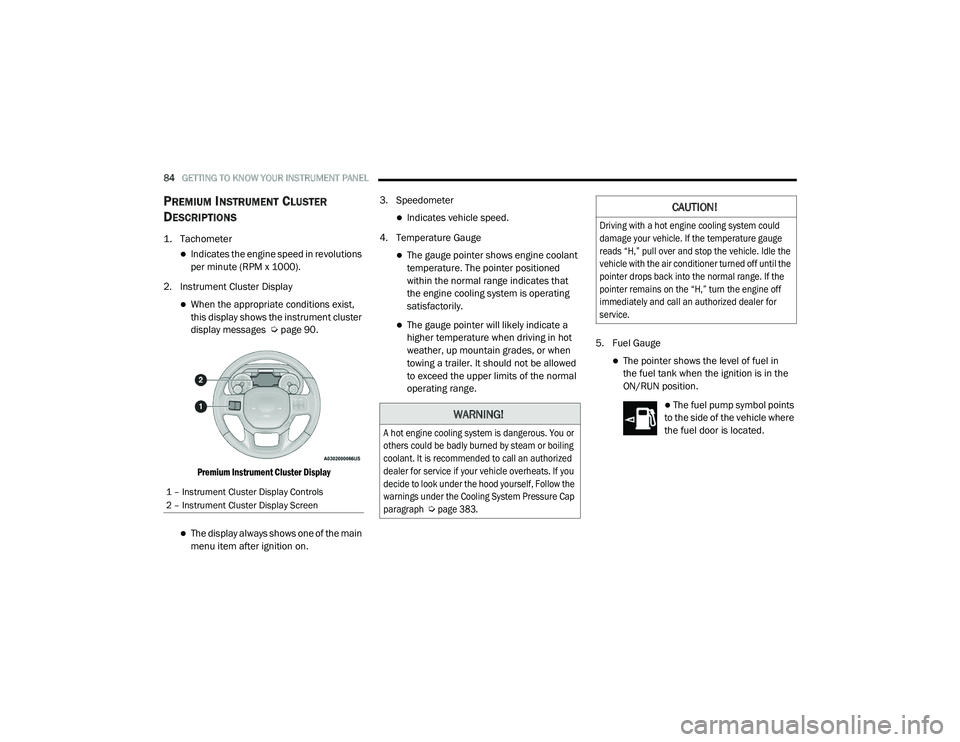
2. Instrument Cluster Display
When the appropriate conditions exist,
this display shows the instrument cluster
display messages Ú page 90.
Premium Instrument Cluster Display
The display always shows one of the main
menu item after ignition on. 3. Speedometer
Indicates vehicle speed.
4. Temperature Gauge
The gauge pointer shows engine coolant
temperature. The pointer positioned
within the normal range indicates that
the engine cooling system is operating
satisfactorily.
The gauge pointer will likely indicate a
higher temperature when driving in hot
weather, up mountain grades, or when
towing a trailer. It should not be allowed
to exceed the upper limits of the normal
operating range. 5. Fuel Gauge
The pointer shows the level of fuel in
the fuel tank when the ignition is in the
ON/RUN position.
The fuel pump symbol points
to the side of the vehicle where
the fuel door is located.
1 – Instrument Cluster Display Controls
2 – Instrument Cluster Display Screen
WARNING!
A hot engine cooling system is dangerous. You or
others could be badly burned by steam or boiling
coolant. It is recommended to call an authorized
dealer for service if your vehicle overheats. If you
decide to look under the hood yourself, Follow the
warnings under the Cooling System Pressure Cap
paragraph
Ú
page 383.
CAUTION!
Driving with a hot engine cooling system could
damage your vehicle. If the temperature gauge
reads “H,” pull over and stop the vehicle. Idle the
vehicle with the air conditioner turned off until the
pointer drops back into the normal range. If the
pointer remains on the “H,” turn the engine off
immediately and call an authorized dealer for
service.
21_DPF_OM_EN_USC_t.book Page 84
Page 89 of 463

GETTING TO KNOW YOUR INSTRUMENT PANEL87
4. Oil Pressure Gauge
The pointer should always indicate some
oil pressure when the engine is running.
A continuous high or low reading under
normal driving conditions may indicate a
lubrication system malfunction. Imme-
diate service should be obtained from an
authorized dealer.
5. Speedometer
Indicates vehicle speed. 6. Diesel Exhaust Fluid (DEF) Gauge
The DEF Gauge displays the actual level of
Diesel Exhaust Fluid in the DEF tank. DEF
is required to maintain normal vehicle
operation and emissions compliance. If
something is wrong with the gauge, a DEF
Warning Message or Malfunction Indicator
Light (MIL) will be displayed. More informa
-
tion is available in the instrument cluster
display section under the heading of DEF
Warning Messages.
7. Fuel Gauge
The pointer shows the level of fuel in the
fuel tank when the ignition switch is in
the ON/RUN position.
The fuel pump symbol points
to the side of the vehicle where
the fuel filler door is located. NOTE:
The gauge may take up to five seconds to
update after adding a gallon or more of DEF
to the DEF tank. If you have a fault related to
the DEF system, the gauge may not update to
the new level. See an authorized dealer for
service.
The DEF gauge may also not immediately
update after a refill if the temperature of the
DEF fluid is below 39°F (4°C). The DEF tank
heater will possibly warm up the DEF fluid
and allow the gauge to update after a period
of run time. Under very cold conditions, it is
possible that the gauge may not reflect the
new fill level for several drives.
3
21_DPF_OM_EN_USC_t.book Page 87
Page 91 of 463

GETTING TO KNOW YOUR INSTRUMENT PANEL89
DIESEL INSTRUMENT CLUSTER
1. Tachometer
Indicates the engine speed in revolutions
per minute (RPM x 1000).
2. Instrument Cluster Display
When the appropriate conditions exist,
this display shows the instrument cluster
display messages Ú page 90.
Premium Instrument Cluster Display
The display always shows one of the main
menu item after ignition on. 3. Speedometer
Indicates vehicle speed.
4. Diesel Exhaust Fluid (DEF) Gauge
The DEF Gauge displays the actual level
of Diesel Exhaust Fluid in the DEF tank.
DEF is required to maintain normal
vehicle operation and emissions compli -
ance. If something is wrong with the
gauge, a DEF Warning Message or
Malfunction Indicator Light (MIL) will be
displayed. More information is available
in the instrument cluster display section
under the heading of Diesel Exhaust
Fluid (DEF) Warning Messages.
5. Fuel Gauge
The pointer shows the level of fuel in the
fuel tank when the ignition switch is in
the ON/RUN position.
The fuel pump symbol points
to the side of the vehicle where
the fuel filler door is located. NOTE:
The DEF tank on these vehicles is designed
with a large amount of full reserve. So the
level sensor will indicate a full reading even
before the tank is completely full. To put it
another way, there’s additional storage
capacity in the tank above the Full mark
that’s not represented in the gauge. You may
not see any movement in the reading – even
after driving up to 200 miles (321 kilome
-
ters) in some cases.
The gauge may take up to five seconds to
update after adding a gallon or more of DEF
to the DEF tank. If you have a fault related to
the DEF system, the gauge may not update to
the new level. See an authorized dealer for
service.
The DEF gauge may also not immediately
update after a refill if the temperature of the
DEF fluid is below 39°F (4°C). The DEF tank
heater will possibly warm up the DEF fluid
and allow the gauge to update after a period
of run time. Under very cold conditions, it is
possible that the gauge may not reflect the
new fill level for several drives.
1 – Instrument Cluster Display Controls
2 – Instrument Cluster Display Screen
3
21_DPF_OM_EN_USC_t.book Page 89
Page 92 of 463

90GETTING TO KNOW YOUR INSTRUMENT PANEL
INSTRUMENT CLUSTER DISPLAY
Your vehicle is equipped with an instrument
cluster display, which offers useful information to
the driver. With the ignition in the OFF mode,
opening/closing of a door will activate the display
for viewing, and display the total miles, or
kilometers, in the odometer. Your instrument
cluster display is designed to display important
information about your vehicle’s systems and
features. Using a driver interactive display
located on the instrument panel, your instrument
cluster display can show you how systems are
working and give you warnings when they are not.
The steering wheel mounted controls allow you to
scroll through the main menus and submenus.
You can access the specific information you want
and make selections and adjustments.
INSTRUMENT CLUSTER DISPLAY
C
ONTROLS
The instrument cluster display features a driver
interactive display that is located in the
instrument cluster.
Base Instrument Cluster Display Premium Instrument Cluster Display
The instrument cluster display menu items may
consist of the following:
Speedometer
Vehicle Info
Off-Road — If Equipped
Driver Assist — If Equipped
Fuel Economy
Trip Info
1 – Instrument Cluster Display Controls
2 – Instrument Cluster Display Screen
1 – Instrument Cluster Display Controls
2 – Instrument Cluster Display Screen
21_DPF_OM_EN_USC_t.book Page 90
Page 94 of 463

92GETTING TO KNOW YOUR INSTRUMENT PANEL
4. Push and hold the right arrow button to
select “Reset”.
5. Push and release the down arrow button
to select “Yes,” then push and release the
right arrow button to reset the Oil Life to
100%.
6. Push and release the up arrow button to
exit the instrument cluster display screen.
Secondary Method Of Resetting Engine Oil Life
1. Without pressing the brake pedal, push the ENGINE START/STOP button and place the
ignition to the ON/RUN position (do not
start the engine).
2. Fully press the accelerator pedal, slowly, three times within ten seconds.
3. Without pushing the brake pedal, push the ENGINE START/STOP button once to return
the ignition to the OFF/LOCK position.
NOTE:
If the indicator message illuminates when
you start the vehicle, the oil change indicator
system did not reset. If necessary, repeat this
procedure.DISPLAY MENU ITEMS
Push and release the up or down arrow
button until the desired selectable menu icon is
highlighted in the instrument cluster display.
Speedometer
Push and release the up or down arrow
button until the speedometer menu item is
highlighted in the instrument cluster display.
Push and release the right arrow button to
cycle the display between mph and km/h.
Vehicle Info
Push and release the up or down arrow
button until the Vehicle Info menu item is
highlighted in the instrument cluster display.
Push and release the right arrow button to
enter the submenus items of Vehicle Info.
Follow the directional prompts to access or
reset any of the following Vehicle Info submenu
items:
Tire Pressure
Coolant Temperature
Transmission Temperature — If Equipped
Oil Temperature
Oil Pressure
Exhaust Brake — If Equipped
Boost Pressure — If Equipped
Diesel Particulate Filter (DPF) — If Equipped
Oil Life
Fuel Filter Life — If Equipped
Battery Voltage
Gauge Summary
Engine Hours
Off-Road
Push and release the up or down arrow
button until the Off-Road menu icon is displayed
in the instrument cluster display. Push and
release the left or right arrow button to
scroll through the information submenus.
Drivetrain
Front Wheel Angle: displays the graphical
and numerical value of calculated
average front wheel angle from the
steering wheel orientation.
21_DPF_OM_EN_USC_t.book Page 92
Page 96 of 463

94GETTING TO KNOW YOUR INSTRUMENT PANEL
Fuel Economy
Push and release the up or down arrow
button until the Fuel Economy menu item is
highlighted in the instrument cluster display.
Push and Hold the right arrow button to reset
Average Fuel Economy.
Current Fuel Economy Gauge
Average Fuel Economy Value
Range To Empty
Fuel Tank Levels — If Equipped
Trip A/Trip B
Push and release the up or down arrow
button until the Trip menu item is highlighted
in the instrument cluster display. Push and
release the right arrow button to enter the
submenus of Trip A and Trip B. The Trip A or Trip
B information will display the following:
Distance
Average Fuel Economy
Elapsed Time
Push and hold right arrow button to reset all
information.
Trailer Tow
Push and release the up or down arrow
button until the Trailer Tow menu item is
highlighted in the instrument cluster display.
Push and release the right or left arrow
button to cycle through the following trailer tow
information:
Trip (trailer specific) Distance: Push and hold
the OK button to reset the distance.
Integrated Trailer Brake Module (ITBM):
Braking Output
Trailer Type
ITBM Gain
Trailer Light Check: Push and hold the
OK button to begin the Trailer Light Test
sequence Ú page 209.
Trailer Tire Pressure Monitoring: The Instru-
ment Cluster Display will display the Trailer
Tire Pressure for a connected trailer with
sensors that match the active trailer profile.
When a low tire is present, the low tire value
will be displayed in red, and the affected low tire will have a red glow. “Trailer Tire Low“ will
be displayed on the center bottom of the
Instrument Cluster Display screen.
Audio
Push and release the
up or down arrow
button until the Audio Menu icon/title is
highlighted in the instrument cluster display.
This menu will display the audio source
information, including the Song name, Artist
name, and audio source with an accompanying
graphic.
Phone Call Status
When a call is incoming, a Phone Call Status
pop-up will display on the screen. The pop-up
will remain until the phone is answered or
ignored.
NOTE:
The call status will temporarily replace the
previous media source information displayed
on the screen. When the pop-up is no longer
displayed, the display will return to the last used
screen.
21_DPF_OM_EN_USC_t.book Page 94
Page 97 of 463
GETTING TO KNOW YOUR INSTRUMENT PANEL95
Stored Messages
Push and release the up or down arrow
button until the Messages Menu item is
highlighted. This feature shows the number of
stored warning messages. Push and release the
right or left arrow button to cycle through
stored messages.
Screen Setup Menu Item
Push and release the up or down arrow
button until the Screen Setup menu item is
highlighted in the instrument cluster display.
Push and release the right arrow button to
enter the Screen Setup submenu. The Screen
Setup feature allows you to change what
information is displayed in the instrument
cluster as well as the location that information
is displayed.
Current Gear — If Equipped
Off
On
Odometer
Unit Without Decimal
Unit With Decimal Favorite Menu
Speedometer
Vehicle Info
Driver Assist (Show/Hide) — If Equipped
Fuel Economy (Show/Hide)
Trip Info (Show/Hide)
Trailer Tow (Show/Hide)
Audio (Show/Hide)
Messages
Screen Setup
Vehicle Settings — If Equipped
Commercial Settings — If Equipped
NOTE:
Menus with (Show/Hide) can push the right
arrow button to choose whether to show or hide
this menu in the instrument cluster display. Upper Left — If Equipped
None
Compass — If Equipped
Outside Temp — If Equipped
Time
Range To Empty
Average Econ
Current Econ
Trip A Distance
Trip B Distance
Trailer Trip — If Equipped
Trailer Brake — If Equipped
Oil Pressure — If Equipped
Coolant Temperature — If Equipped
Oil Temperature — If Equipped
Battery Voltage — If Equipped
Transmission Temperature — If Equipped
3
21_DPF_OM_EN_USC_t.book Page 95
Page 98 of 463

96GETTING TO KNOW YOUR INSTRUMENT PANEL
Oil Life — If Equipped
Exhaust Brake — If Equipped
Turbo Boost — If Equipped
Fuel Filter Life — If Equipped
Center
None
Compass
Outside Temp
Time
Range To Empty
Average Econ
Current Econ
Trip A Distance
Trip B Distance
Trailer Trip — If Equipped
Audio
Speedometer
Menu Title Upper Right
None
Compass — If Equipped
Outside Temp
Time
Range To Empty
Average Econ
Current Econ
Trip A Distance
Trip B Distance
Trailer Trip — If Equipped
Trailer Brake — If Equipped
Oil Pressure — If Equipped
Coolant Temperature — If Equipped
Oil Temperature — If Equipped
Battery Voltage — If Equipped
Transmission Temperature — If Equipped
Oil Life — If Equipped
Exhaust Brake — If Equipped
Turbo Boost — If Equipped
Fuel Filter Life — If Equipped
Left Side — If Equipped
None
Range
Average Econ
Menu Icon
Coolant Temperature
Oil Temperature
Transmission Temperature
Oil Life
Fuel Filter Life — If Equipped
21_DPF_OM_EN_USC_t.book Page 96
Page 99 of 463

GETTING TO KNOW YOUR INSTRUMENT PANEL97
Right Side — If Equipped
None
Range
Average Econ
Menu Icon
Coolant Temperature
Oil Temperature
Transmission Temperature
Oil Life
Fuel Filter Life — If Equipped
Lower Left — If Equipped
None
Compass
Outside Temp
Time
Range To Empty
Average Econ
Current Econ
Trip A Distance
Trip B Distance
Trailer Trip
Trailer Brake
Oil Pressure
Coolant Temperature
Oil Temperature
Battery Voltage
Transmission Temperature
Oil Life
Exhaust Brake — If Equipped
Turbo Boost — If Equipped
Fuel Filter Life — If Equipped
Lower Right — If Equipped
None
Compass
Outside Temp
Time
Range To Empty
Average Econ
Current Econ
Trip A Distance
Trip B Distance
Trailer Trip
Trailer Brake
Oil Pressure
Coolant Temperature
Oil Temperature
Battery Voltage
Transmission Temperature
Oil Life
Exhaust Brake — If Equipped
Turbo Boost — If Equipped
Fuel Filter Life — If Equipped
Restore Defaults
Cancel
Restore
3
21_DPF_OM_EN_USC_t.book Page 97