automatic transmission RAM CHASSIS CAB 2021 Owner's Manual
[x] Cancel search | Manufacturer: RAM, Model Year: 2021, Model line: CHASSIS CAB, Model: RAM CHASSIS CAB 2021Pages: 463, PDF Size: 21.5 MB
Page 146 of 463
144STARTING AND OPERATING
The following indicators should be used to
ensure that you have properly engaged the
transmission into the PARK position:
Look at the transmission gear position
display and verify that it indicates the PARK
position (P), and is not blinking.
With brake pedal released, verify that the
gear selector will not move out of PARK.
REVERSE (R)
This range is for moving the vehicle backward.
Shift into REVERSE only after the vehicle has
come to a complete stop.
NEUTRAL (N)
Use this range when the vehicle is standing for
prolonged periods with the engine running. Apply
the parking brake and shift the transmission into
PARK if you must exit the vehicle.
DRIVE (D)
This range should be used for most city and
highway driving. It provides the smoothest
upshifts and downshifts, and the best fuel
economy. The transmission automatically
upshifts through all forward gears.When frequent transmission shifting occurs
(such as when operating the vehicle under
heavy loading conditions, in hilly terrain,
traveling into strong head winds, or while towing
a heavy trailer), select TOW/HAUL mode or use
the Electronic Range Select (ERS) shift control
to select a lower gear range
Úpage 145. Under
these conditions, using a lower gear range will
improve performance and extend transmission
life by reducing excessive shifting and heat
build-up.
During extremely cold temperatures
(-22°F [-30°C] or below), transmission
operation may be modified depending on
engine and transmission temperature as
well as vehicle speed. Normal operation will
resume once the transmission temperature
has risen to a suitable level.
WARNING!
Do not coast in NEUTRAL and never turn off the
ignition to coast down a hill. These are unsafe
practices that limit your response to changing
traffic or road conditions. You might lose
control of the vehicle and have a collision.
CAUTION!
Towing the vehicle, coasting, or driving for any
other reason with the transmission in NEUTRAL
can cause severe transmission damage.
For Towing A Disabled Vehicle Ú page 350.
For Recreational Towing Ú page 215.
21_DPF_OM_EN_USC_t.book Page 144
Page 147 of 463

STARTING AND OPERATING145
Transmission Limp Home Mode
Transmission function is monitored
electronically for abnormal conditions.
If a condition is detected that could result in
transmission damage, Transmission Limp
Home Mode is activated. In this mode, the
transmission may operate only in certain gears,
or may not shift at all. Vehicle performance may
be severely degraded and the engine may stall.
In some situations, the transmission may not
re-engage if the engine is turned off and
restarted. The Malfunction Indicator Light (MIL)
may be illuminated. A message in the
instrument cluster will inform the driver of the
more serious conditions, and indicate what
actions may be necessary.
In the event of a momentary problem, the
transmission can be reset to regain all forward
gears by performing the following steps:
NOTE:
In cases where the instrument cluster message
indicates the transmission may not re-engage
after engine shutdown, perform this procedure
only in a desired location (preferably, at an
authorized dealer).
1. Stop the vehicle.
2. Shift the transmission into PARK, if
possible. If not, shift the transmission to
NEUTRAL.
3. Push and hold the ignition switch until the engine turns off.
4. Wait approximately 30 seconds.
5. Restart the engine.
6. Shift into the desired gear range. If the problem is no longer detected, the
transmission will return to normal operation.
NOTE:
Even if the transmission can be reset, we
recommend that you visit an authorized dealer
at your earliest possible convenience. An autho -
rized dealer has diagnostic equipment to
assess the condition of your transmission.
If the transmission cannot be reset, authorized
dealer service is required.
Electronic Range Select (ERS) Operation
The ERS shift control allows the driver to
limit the highest available gear when the
transmission is in DRIVE. For example, if you set
the transmission gear limit to FOURTH gear, the
transmission will not shift above FOURTH gear
(except to prevent engine overspeed), but will
shift through the lower gears normally.
You can switch between DRIVE and ERS mode at
any vehicle speed. When the transmission gear
selector is in DRIVE, the transmission will operate
automatically, shifting between all available
gears. Tapping the GEAR – switch (on the
steering wheel) will activate ERS mode, display
the current gear in the instrument cluster, and
set that gear as the top available gear. Once in
ERS mode, tapping the GEAR – or GEAR + switch
will change the top available gear.
4
21_DPF_OM_EN_USC_t.book Page 145
Page 148 of 463

146STARTING AND OPERATING
ERS Control
To exit ERS mode, simply push and hold the
GEAR + switch until the gear limit display
disappears from the instrument cluster.
When to Use TOW/HAUL Mode
When driving in hilly areas, towing a trailer, carrying
a heavy load, etc., and frequent transmission
shifting occurs, push the TOW/HAUL switch to
activate TOW/HAUL mode. This will improve
performance and reduce the potential for
transmission overheating or failure due to
excessive shifting.
TOW/HAUL Switch
The “TOW/HAUL Indicator Light” will illuminate in
the instrument cluster to indicate that TOW/HAUL
mode has been activated. Pushing the switch a
second time restores normal operation. Normal
operation is always the default at engine start-up.
If TOW/HAUL mode is desired, the switch must be
pushed each time the engine is started.
SIX-SPEED AUTOMATIC
T
RANSMISSION — IF EQUIPPED
Chassis Cab models may use either the
AS66RC or AS69RC transmission (which are
equipped with a Power Take-Off (PTO) access
cover on the side of the transmission case).
The transmission gear position display
(located in the instrument cluster) indicates the
transmission gear range. The gear selector is
mounted on the right side of the steering column.
You must press the brake pedal to move the gear
selector out of PARK
Ú
page 141. Pull the gear
selector toward you when shifting into REVERSE
or PARK, or when shifting out of PARK.
1 — GEAR + Switch
2 — GEAR – Switch
WARNING!
Do not downshift for additional engine
braking on a slippery surface. The drive
wheels could lose their grip and the vehicle
could skid, causing a collision or personal
injury.
WARNING!
Do not use the TOW/HAUL feature when driving
in icy or slippery conditions. The increased
engine braking can cause the rear wheels to
slide, and the vehicle to swing around with the
possible loss of vehicle control, which may
cause an accident possibly resulting in
personal injury or death.
21_DPF_OM_EN_USC_t.book Page 146
Page 151 of 463
STARTING AND OPERATING149
REVERSE (R)
This range is for moving the vehicle backward.
Shift into REVERSE only after the vehicle has
come to a complete stop.
NEUTRAL (N)
Use this range when the vehicle is standing
for prolonged periods with the engine running.
The engine may be started in this range. Apply
the parking brake and shift the transmission
into PARK if you must exit the vehicle. DRIVE (D)
This range should be used for most city and
highway driving. It provides the smoothest
upshifts and downshifts, and the best fuel
economy. The transmission automatically
upshifts through all forward gears.
When frequent transmission shifting occurs
(such as when operating the vehicle under
heavy loading conditions, in hilly terrain,
traveling into strong head winds, or while towing
a heavy trailer), select TOW/HAUL mode or use
the Electronic Range Select (ERS) shift control
to select a lower gear range
Úpage 150. Under
these conditions, using a lower gear range will
improve performance and extend transmission
life by reducing excessive shifting and heat
buildup.
If the transmission temperature exceeds normal
operating limits, the powertrain controller will
modify the transmission shift schedule and
expand the range of torque converter clutch
engagement. This is done to prevent
transmission damage due to overheating.
If the transmission becomes extremely hot or is
in danger of overheating, the “Transmission
Temperature Warning Light” may illuminate and
the transmission may operate differently until
the transmission cools down.
NOTE:
Use caution when operating a heavily loaded
vehicle at low speeds (such as towing a trailer
up a steep grade, or in stop-and-go traffic)
during hot weather. In these conditions, torque
converter slip can impose a significant addi
-
tional heat load on the cooling system. Down -
shifting the transmission to the lowest possible
gear (when climbing a grade), or shifting to
NEUTRAL (when stopped in heavy traffic) can
help to reduce this excess heat generation.
During cold temperatures, transmission
operation may be modified depending on
engine and transmission temperature as well
as vehicle speed. This feature improves
warm-up time of the engine and transmission to
achieve maximum efficiency. Engagement of
the torque converter clutch is inhibited until the
transmission fluid is warm Ú page 151.
WARNING!
Do not coast in NEUTRAL and never turn off the
ignition to coast down a hill. These are unsafe
practices that limit your response to changing
traffic or road conditions. You might lose
control of the vehicle and have a collision.
CAUTION!
Towing the vehicle, coasting, or driving for any
other reason with the transmission in NEUTRAL
can cause severe transmission damage.
For Towing A Disabled Vehicle Ú page 350.
For Recreational Towing Ú page 215.
4
21_DPF_OM_EN_USC_t.book Page 149
Page 152 of 463

150STARTING AND OPERATING
On trucks with AS66RC or AS69RC
transmission, FIFTH and SIXTH gears may
be inhibited briefly on cold starts below
41°F (5°C), and during very cold temperatures
(-4°F [-20°C] or below), operation may briefly
be limited to third gear only. During this
condition, the ability of the vehicle to accelerate
under heavily loaded conditions may be
reduced. In all cases, normal operation will
resume once the transmission temperature has
risen to a suitable level.
Transmission Limp Home Mode
Transmission function is monitored
electronically for abnormal conditions.
If a condition is detected that could result in
transmission damage, Transmission Limp
Home Mode is activated. In this mode, the
transmission remains in THIRD gear regardless
of which forward gear is selected. If an
AS66RC/AS69RC equipped truck enters Limp
Home Mode at highway speeds, it will initially
engage FIFTH gear, until the vehicle slows to
a speed where THIRD gear can be engaged.
PARK, REVERSE, and NEUTRAL will continue to
operate. The Malfunction Indicator Light (MIL)
may be illuminated. Limp Home Mode allows the vehicle to be driven to an authorized dealer
for service without damaging the transmission.
In the event of a momentary problem, the
transmission can be reset to regain all forward
gears by performing the following steps:
1. Stop the vehicle.
2. Shift the transmission into PARK.
3. Turn the ignition to the OFF position.
4. Wait approximately 10 seconds.
5. Restart the engine.
6. Shift into the desired gear range. If the
problem is no longer detected, the
transmission will return to normal operation.
NOTE:
Even if the transmission can be reset, we
recommend that you visit an authorized dealer
at your earliest possible convenience. An autho -
rized dealer has diagnostic equipment to
assess the condition of your transmission.
If the transmission cannot be reset, authorized
dealer service is required.
Electronic Range Select (ERS) Operation
The ERS shift control allows the driver to
limit the highest available gear when the
transmission is in DRIVE. For example, if you set
the transmission gear limit to FOURTH gear, the
transmission will not shift above FOURTH gear,
but will shift through the lower gears normally.
You can switch between DRIVE and ERS mode
at any vehicle speed. When the gear selector is
in the DRIVE position, the transmission will
operate automatically, shifting between all
available gears. Tapping the ERS (-) switch will
activate ERS mode, display the current gear in
the instrument cluster, and set that gear as the
top available gear. Once in ERS mode, tapping
(-) or (+) will change the top available gear.
21_DPF_OM_EN_USC_t.book Page 150
Page 153 of 463
STARTING AND OPERATING151
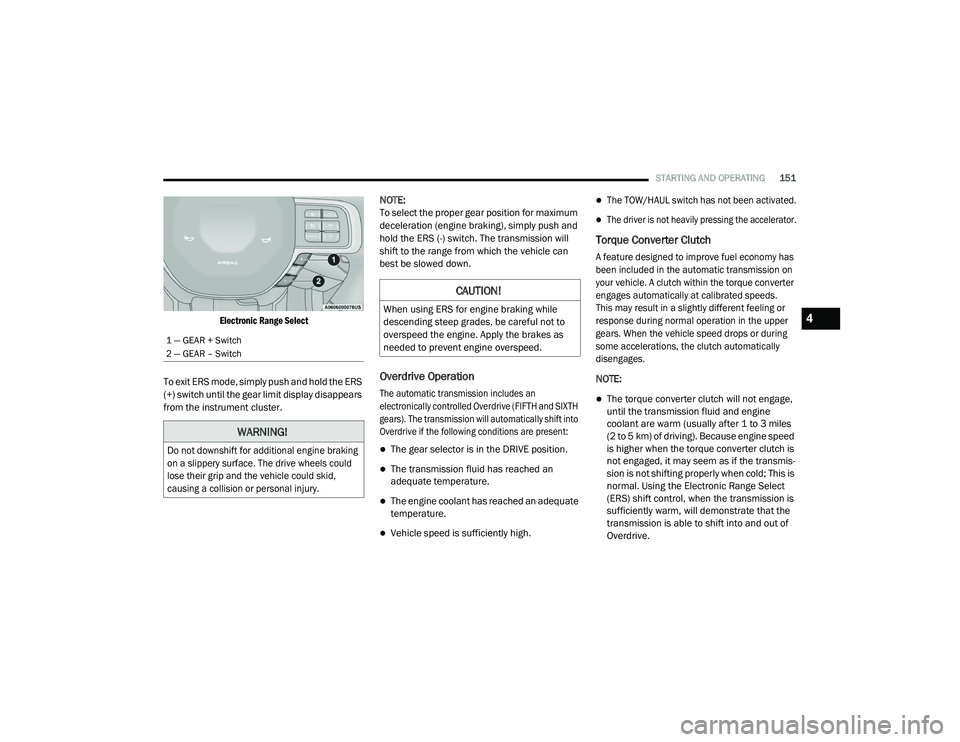
Electronic Range Select
To exit ERS mode, simply push and hold the ERS
(+) switch until the gear limit display disappears
from the instrument cluster. NOTE:
To select the proper gear position for maximum
deceleration (engine braking), simply push and
hold the ERS (-) switch. The transmission will
shift to the range from which the vehicle can
best be slowed down.
Overdrive Operation
The automatic transmission includes an
electronically controlled Overdrive (FIFTH and SIXTH
gears). The transmission will automatically shift into
Overdrive if the following conditions are present:
The gear selector is in the DRIVE position.
The transmission fluid has reached an
adequate temperature.
The engine coolant has reached an adequate
temperature.
Vehicle speed is sufficiently high.
The TOW/HAUL switch has not been activated.
The driver is not heavily pressing the accelerator.
Torque Converter Clutch
A feature designed to improve fuel economy has
been included in the automatic transmission on
your vehicle. A clutch within the torque converter
engages automatically at calibrated speeds.
This may result in a slightly different feeling or
response during normal operation in the upper
gears. When the vehicle speed drops or during
some accelerations, the clutch automatically
disengages.
NOTE:
The torque converter clutch will not engage,
until the transmission fluid and engine
coolant are warm (usually after 1 to 3 miles
(2 to 5 km) of driving). Because engine speed
is higher when the torque converter clutch is
not engaged, it may seem as if the transmis
-
sion is not shifting properly when cold; This is
normal. Using the Electronic Range Select
(ERS) shift control, when the transmission is
sufficiently warm, will demonstrate that the
transmission is able to shift into and out of
Overdrive.
1 — GEAR + Switch
2 — GEAR – Switch
WARNING!
Do not downshift for additional engine braking
on a slippery surface. The drive wheels could
lose their grip and the vehicle could skid,
causing a collision or personal injury.
CAUTION!
When using ERS for engine braking while
descending steep grades, be careful not to
overspeed the engine. Apply the brakes as
needed to prevent engine overspeed.4
21_DPF_OM_EN_USC_t.book Page 151
Page 154 of 463
152STARTING AND OPERATING
If the vehicle has not been driven for several
days, the first few seconds of operation after
shifting the transmission into gear may seem
sluggish. This is due to the fluid partially
draining from the torque converter into the
transmission. This condition is normal and
will not cause damage to the transmission.
The torque converter will refill within
five seconds after starting the engine.
When To Use TOW/HAUL Mode
When driving in hilly areas, towing a trailer,
carrying a heavy load, etc., and frequent
transmission shifting occurs, push the
TOW/HAUL switch to activate TOW/HAUL mode.
This will improve performance and reduce the
potential for transmission overheating or failure
due to excessive shifting. When operating in
TOW/HAUL mode, transmission upshifts are
delayed, and the transmission will automatically
downshift (for engine braking) when the throttle
is closed and/or during steady braking
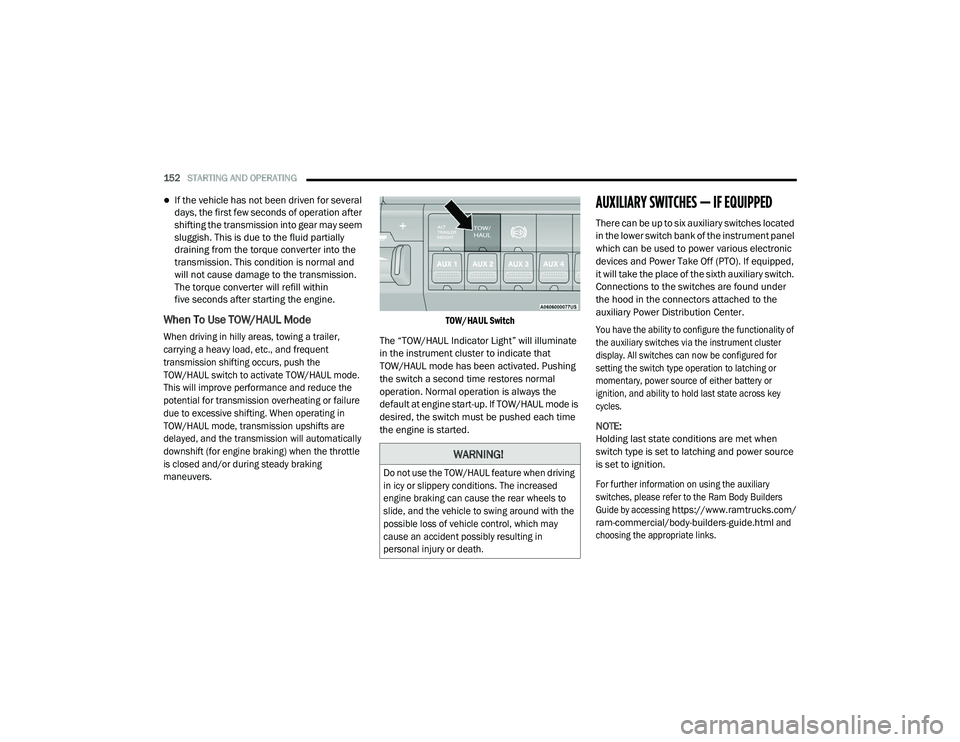
maneuvers. TOW/HAUL Switch
The “TOW/HAUL Indicator Light” will illuminate
in the instrument cluster to indicate that
TOW/HAUL mode has been activated. Pushing
the switch a second time restores normal
operation. Normal operation is always the
default at engine start-up. If TOW/HAUL mode is
desired, the switch must be pushed each time
the engine is started.
AUXILIARY SWITCHES — IF EQUIPPED
There can be up to six auxiliary switches located
in the lower switch bank of the instrument panel
which can be used to power various electronic
devices and Power Take Off (PTO). If equipped,
it will take the place of the sixth auxiliary switch.
Connections to the switches are found under
the hood in the connectors attached to the
auxiliary Power Distribution Center.
You have the ability to configure the functionality of
the auxiliary switches via the instrument cluster
display. All switches can now be configured for
setting the switch type operation to latching or
momentary, power source of either battery or
ignition, and ability to hold last state across key
cycles.
NOTE:
Holding last state conditions are met when
switch type is set to latching and power source
is set to ignition.
For further information on using the auxiliary
switches, please refer to the Ram Body Builders
Guide by accessing
https://www.ramtrucks.com/
ram-commercial/body-builders-guide.html
and
choosing the appropriate links.
WARNING!
Do not use the TOW/HAUL feature when driving
in icy or slippery conditions. The increased
engine braking can cause the rear wheels to
slide, and the vehicle to swing around with the
possible loss of vehicle control, which may
cause an accident possibly resulting in
personal injury or death.
21_DPF_OM_EN_USC_t.book Page 152
Page 164 of 463

162STARTING AND OPERATING
NOTE:
Pausing in transfer case N (Neutral) in vehi -
cles equipped with an automatic transmis -
sion may require shutting the engine OFF to
avoid gear clash while completing the shift. If
difficulty occurs, shift the transmission into
Neutral, hold your foot on the brake, and turn
the engine OFF. Complete the range shift to
the desired mode.
Shifting into or out of 4L is possible with the
vehicle completely stopped, however difficulty
may occur due to the mating clutch teeth not
being properly aligned. Several attempts may
be required for clutch teeth alignment and
shift completion to occur. The preferred
method is with the vehicle rolling 2 to 3 mph
(3 to 5 km/h). Avoid attempting to engage or
disengage 4L with the vehicle moving faster
than 2 to 3 mph (3 to 5 km/h).
Do not attempt to shift into or out of 4L while
the transmission is in gear.
Transfer Case Position Indicator Light
The “Transfer Case Position Indicator Light” in
the instrument cluster is used to alert the driver
that the front axle is fully engaged and all four
wheels are driving.
LIMITED-SLIP DIFFERENTIAL
The limited-slip differential provides additional
traction on snow, ice, mud, sand and gravel,
particularly when there is a difference between
the traction characteristics of the surface under
the right and left rear wheels. During normal
driving and cornering, the limited-slip unit
performs similarly to a conventional differential.
On slippery surfaces, however, the differential
delivers more of the driving effort to the rear
wheel having the better traction.
The limited-slip differential is especially helpful
during slippery driving conditions. With both rear
wheels on a slippery surface, a slight application
of the accelerator will supply maximum traction.
When starting with only one rear wheel on an
excessively slippery surface, slight momentary
application of the parking brake may be
necessary to gain maximum traction.
Care should be taken to avoid sudden
accelerations when both rear wheels are on a
slippery surface. This could cause both rear
wheels to spin, and allow the vehicle to slide
sideways on the crowned surface of a road or in
a turn.
WARNING!
On vehicles equipped with a limited-slip
differential never run the engine with one rear
wheel off the ground since the vehicle may
drive through the rear wheel remaining on the
ground. You could lose control of the vehicle.
21_DPF_OM_EN_USC_t.book Page 162
Page 165 of 463
STARTING AND OPERATING163
POWER TAKE OFF (PTO) OPERATION — IF
EQUIPPED
This vehicle when equipped with PTO Prep and
the AS66RC/AS69RC automatic six-speed, will
allow for an aftermarket upfit with a transmission
driven PTO (power take off). The customer will
have the ability to operate the PTO in either
a “stationary”, “mobile” or “remote” mode.
The vehicles will be factory set to the “stationary”
mode. To select a different mode, or to change
any other PTO setting, you will need to enter the
commercial vehicle menu on the instrument
cluster screen. Details of the PTO selection
modes and further PTO information is available
at the Ram Truck Bodybuilders web site:
https://
www.ramtrucks.com/ram-commercial/
body-builders-guide.html
POWER STEERING
HYDRAULIC POWER STEERING
The standard power steering system will give
you good vehicle response and increased ease
of maneuverability in tight spaces. The system
will provide mechanical steering capability if
power assist is lost.
If for some reason the power assist is interrupted,
it will still be possible to steer your vehicle. Under
these conditions, you will observe a substantial
increase in steering effort, especially at very low
vehicle speeds and during parking maneuvers.
NOTE:
Increased noise levels at the end of the
steering wheel travel are considered normal
and do not indicate that there is a problem
with the power steering system.
Upon initial start-up in cold weather, the
power steering pump may make noise for a
short amount of time. This is due to the cold,
thick fluid in the steering system. This noise
should be considered normal, and it does not
in any way damage the steering system.
Power Steering Fluid Check
Checking the power steering fluid level at a
defined service interval is not required. The fluid
should only be checked if a leak is suspected,
abnormal noises are apparent, and/or the
system is not functioning as anticipated. Check
fluid level when the engine is cold and off.
Coordinate inspection efforts through an
authorized dealer.
CAUTION!
Prolonged operation of the steering system
at the end of the steering wheel travel will
increase the steering fluid temperature and it
should be avoided when possible. Damage to
the power steering pump may occur.
WARNING!
Fluid level should be checked on a level
surface and with the engine off to prevent
injury from moving parts and to ensure
accurate fluid level reading. Do not overfill.
Use only manufacturer's recommended
power steering fluid.
4
21_DPF_OM_EN_USC_t.book Page 163
Page 170 of 463
168STARTING AND OPERATING
Adaptive Cruise Control (ACC) Menu
The instrument cluster display will show the
current ACC system settings. The information it
displays depends on ACC system status.
Push the ACC on/off button until one of the
following appears in the instrument cluster
display:
Adaptive Cruise Control Off
When ACC is deactivated, the display will read
“Adaptive Cruise Control Off.”
Adaptive Cruise Control Ready
When ACC is activated, but the vehicle speed
setting has not been selected, the display will
read “Adaptive Cruise Control Ready.”
Adaptive Cruise Control Set
When the RES (+) or the SET(-) button is pushed,
the display will read “ACC SET.”
When ACC is set, the set speed will show in the
instrument cluster display.
The ACC screen may display once again if any of
the following ACC activity occurs:
System Cancel
Driver Override
System Off
ACC Proximity Warning
ACC Unavailable Warning
The instrument cluster display will return to the
last display selected after five seconds of no
ACC display activity.
Activating Adaptive Cruise Control (ACC)
The minimum set speed for the ACC system is
20 mph (32 km/h).
When the system is turned on and in the ready
state, the instrument cluster display will read
“ACC Ready.”
When the system is off, the instrument cluster
display will read “Adaptive Cruise Control (ACC)
Off.”
NOTE:
You cannot engage ACC under the following
conditions:
When in 4WD Low
When brakes are applied
When the parking brake is applied
When the automatic transmission is in PARK,
REVERSE or NEUTRAL
When the vehicle speed is below the
minimum speed range
When the brakes are overheated
When the driver’s door is open at low speeds
When the driver’s seat belt is unbuckled at
low speed
Electronic Stability Control (ESC) Full Off
mode is active
To Activate/Deactivate
Push and release the Adaptive Cruise Control
(ACC) on/off button. The ACC menu in the
instrument cluster displays “ACC Ready.”
To turn the system off, push and release the
Adaptive Cruise Control (ACC) on/off button
again. At this time, the system will turn off
and the instrument cluster display will show
“Adaptive Cruise Control (ACC) Off.”
21_DPF_OM_EN_USC_t.book Page 168