driver RAM CHASSIS CAB 2023 User Guide
[x] Cancel search | Manufacturer: RAM, Model Year: 2023, Model line: CHASSIS CAB, Model: RAM CHASSIS CAB 2023Pages: 444, PDF Size: 20.51 MB
Page 27 of 444
GETTING TO KNOW YOUR VEHICLE25
The driver’s door will unlock automatically if the
key fob is detected inside the vehicle when the
door lock button on the front door panel is used to
lock the door. This will occur for two attempts.
Upon the third attempt, the doors will lock even if
the key fob is inside.
NOTE:If the key fob is located next to a mobile phone,
laptop, or other electronic device, the wireless
signal may get blocked, and the driver’s door may
not unlock automatically.
If the door lock switch is pushed while the ignition
is in ACC or ON/RUN and the driver's door is open,
the doors will not lock.
KEYLESS ENTER ‘N GO™ — PASSIVE
E
NTRY (IF EQUIPPED)
The Passive Entry system is an enhancement to
the vehicle’s Remote Keyless Entry system and a
feature of Keyless Enter ‘n Go™. This feature
allows you to lock and unlock the vehicle’s door(s)
without having to push the key fob lock or unlock
buttons.
NOTE:
Passive Entry may be programmed on/off within
Uconnect Settings Ú page 199.
If wearing gloves, if it has been raining/snowing,
or if there is salt/dirt covering the Passive Entry
door handle, the unlock sensitivity can be
affected, resulting in a slower response time.
The doors may unlock when water is sprayed on
the Passive Entry door handles if the key fob is
located outside of the vehicle within 5 ft (1.5 m)
of the handle.
If the vehicle is unlocked by Passive Entry and
no door is opened within 60 seconds, the
vehicle will relock and if equipped will arm the
security alarm.
The Vehicle Security system can be armed/
disarmed by pushing the Passive Entry key fob
lock/unlock buttons (if equipped).
The key fob may not be detected by the vehicle
Passive Entry system if it is located next to a
mobile phone, laptop or other electronic device;
these devices may block the key fob's wireless
signal and prevent the Passive Entry door
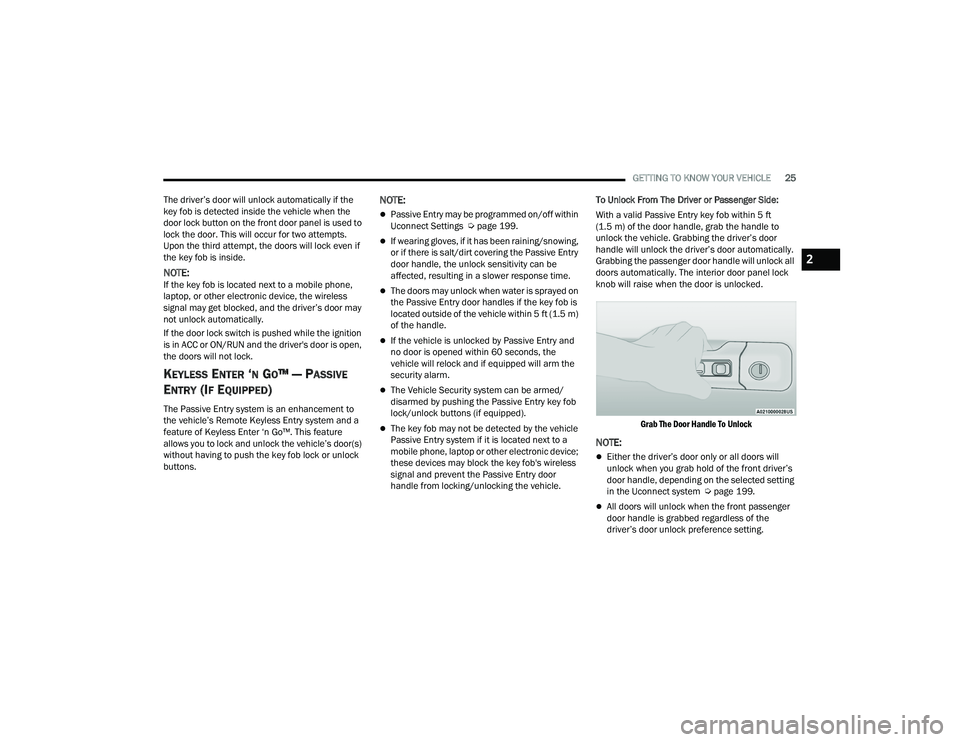
handle from locking/unlocking the vehicle. To Unlock From The Driver or Passenger Side:
With a valid Passive Entry key fob within 5 ft
(1.5 m) of the door handle, grab the handle to
unlock the vehicle. Grabbing the driver’s door
handle will unlock the driver’s door automatically.
Grabbing the passenger door handle will unlock all
doors automatically. The interior door panel lock
knob will raise when the door is unlocked.
Grab The Door Handle To Unlock
NOTE:
Either the driver’s door only or all doors will
unlock when you grab hold of the front driver’s
door handle, depending on the selected setting
in the Uconnect system Ú page 199.
All doors will unlock when the front passenger
door handle is grabbed regardless of the
driver’s door unlock preference setting.
2
23_DPF_OM_EN_USC_t.book Page 25
Page 28 of 444

26GETTING TO KNOW YOUR VEHICLE
Preventing Inadvertent Locking Of Passive Entry
Key Fob In Vehicle:
To minimize the possibility of unintentionally
locking a Passive Entry key fob inside your vehicle,
the Passive Entry system is equipped with an
automatic door unlock feature which will function if
the ignition switch is in the OFF position.
If one of the vehicle doors is open and the door
panel switch is used to lock the vehicle, once all
open doors have been closed the vehicle checks
the inside and outside of the vehicle for any valid
Passive Entry key fobs. If one of the vehicle's
Passive Entry key fobs is detected inside the
vehicle, and no other valid Passive Entry key fobs
are detected outside the vehicle, the Passive Entry
system automatically unlocks all vehicle doors and
chirps the horn three times (on the third attempt
ALL doors will lock and the Passive Entry key fob
can be locked in the vehicle).
To Lock The Vehicle’s Doors:
With one of the vehicle’s Passive Entry key fobs
within 5 ft (1.5 m) of the driver or passenger front
door handles, push the door handle lock button to
lock all doors.
Push The Door Handle Button To Lock
Do NOT grab the door handle when pushing the
door handle lock button. This could unlock the
door(s).
Do NOT Grab The Door Handle When Locking
NOTE:
After pushing the door handle lock button, you
must wait two seconds before you can lock or
unlock the doors, using either Passive Entry
door handle. This is done to allow you to check
if the vehicle is locked by pulling the door
handle, without the vehicle unlocking.
The Passive Entry system depends on a key fob
that is not fully discharged of its coin battery
capacity.
When the key fob battery is low, the instrument
cluster will display a message indicating that the
key fob battery is low Ú page 15.
The vehicle doors can also be locked by using the
key fob lock button or the lock button located on
the vehicle’s interior door panel Ú page 427.
AUTOMATIC UNLOCK DOORS ON EXIT —
I
F EQUIPPED
The doors will unlock automatically on vehicles
with power door locks after the following sequence
of actions:
1. The Automatic Unlock Doors On Exit feature is
enabled.
2. All doors are closed.
3. The gear selector was not in PARK, then is placed in PARK.
4. Any door is opened.
23_DPF_OM_EN_USC_t.book Page 26
Page 29 of 444

GETTING TO KNOW YOUR VEHICLE27
AUTOMATIC DOOR LOCKS —
I
F EQUIPPED
The auto door lock feature default condition is
enabled. When enabled, the door locks will lock
automatically when the vehicle's speed exceeds
15 mph (24 km/h). The auto door lock feature is
enabled/disabled in the Uconnect Settings
Ú page 199.
CHILD-PROTECTION DOOR LOCK —
I
F EQUIPPED
To provide a safer environment for children riding
in the rear seat, the rear doors (if equipped) of your
vehicle have the Child-Protection Door Lock
system.
To use the system, open each rear door, use a flat
blade screwdriver (or emergency key) and rotate
the dial to engage and disengage the
Child-Protection locks. When the system on a door
is engaged, that door can only be opened by using
the outside door handle even if the inside door lock
is in the unlocked position.
Child Lock Control
NOTE:
After setting the Child-Protection Door Lock
system, always test the door from the inside to
make certain it is in the desired position.
For emergency exit with the system engaged,
move the door lock switch to the unlock posi
-
tion, lower the window, and open the door with
the outside door handle.
STEERING WHEEL
TILT STEERING COLUMN
This feature allows you to tilt the steering column
upward or downward. The tilt lever is located on
the steering column, below the multifunction lever.
Pull the lever toward the steering wheel to unlock
the steering column. With one hand firmly on the
steering wheel, move the steering column up or
down, as desired. Release the lever to lock the
steering column firmly in place.
Tilt Steering Lever
WARNING!
Avoid trapping anyone in the vehicle in a
collision. Remember that the rear doors cannot
be opened from the inside door handle when the
Child Protection Door Locks are engaged.
2
23_DPF_OM_EN_USC_t.book Page 27
Page 30 of 444
28GETTING TO KNOW YOUR VEHICLE
HEATED STEERING WHEEL —
I
F EQUIPPED
The steering wheel contains a heating
element that helps warm your hands in
cold weather. The heated steering wheel
has only one temperature setting. Once
the heated steering wheel has been turned on, it
will stay on until the operator turns it off. The
heated steering wheel may not turn on when it is
already warm.
The heated steering wheel button is located on the
center of the instrument panel below the radio
screen, or within the climate or comfort screen of
the touchscreen.
NOTE:If the vehicle is equipped with a 12-inch radio,
there will only be control buttons through the
touchscreen.
Press the heated steering wheel button once to
turn the heating element on.
Press the heated steering wheel button a
second time to turn the heating element off.
NOTE:The engine must be running for the heated
steering wheel to operate.
For information on use with the Remote Start
system, see Ú page 21.
UCONNECT VOICE RECOGNITION —
IF EQUIPPED
INTRODUCING VOICE RECOGNITION
Start using Uconnect Voice Recognition with these
helpful quick tips. It provides the key Voice
Commands and tips you need to know to control
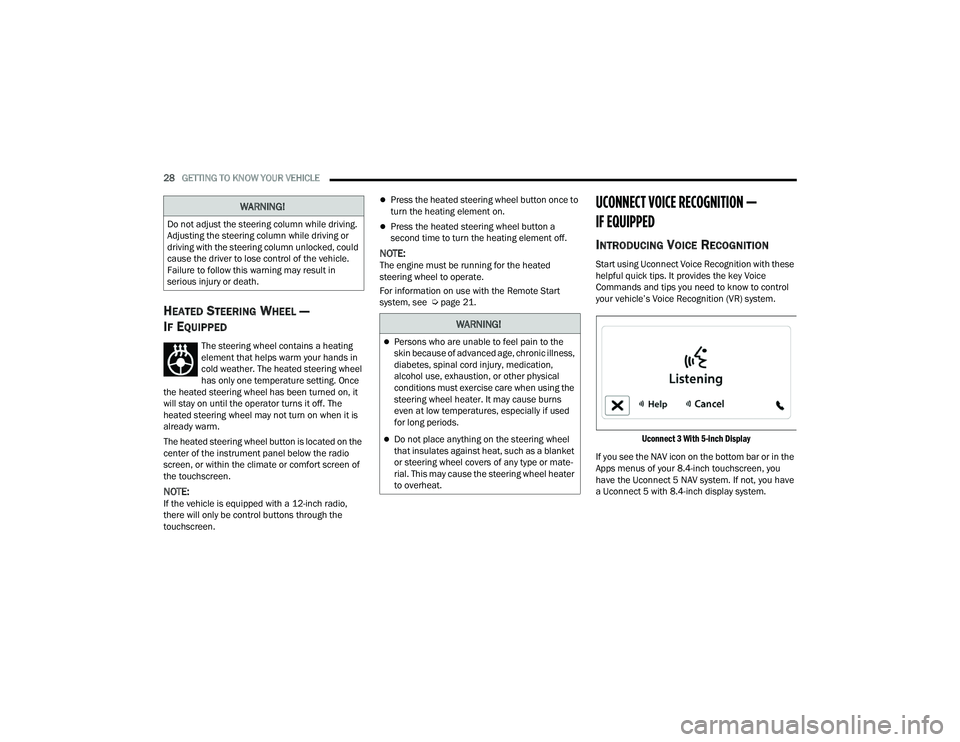
your vehicle’s Voice Recognition (VR) system.
Uconnect 3 With 5-inch Display
If you see the NAV icon on the bottom bar or in the
Apps menus of your 8.4-inch touchscreen, you
have the Uconnect 5 NAV system. If not, you have
a Uconnect 5 with 8.4-inch display system.
WARNING!
Do not adjust the steering column while driving.
Adjusting the steering column while driving or
driving with the steering column unlocked, could
cause the driver to lose control of the vehicle.
Failure to follow this warning may result in
serious injury or death.
WARNING!
Persons who are unable to feel pain to the
skin because of advanced age, chronic illness,
diabetes, spinal cord injury, medication,
alcohol use, exhaustion, or other physical
conditions must exercise care when using the
steering wheel heater. It may cause burns
even at low temperatures, especially if used
for long periods.
Do not place anything on the steering wheel
that insulates against heat, such as a blanket
or steering wheel covers of any type or mate -
rial. This may cause the steering wheel heater
to overheat.
23_DPF_OM_EN_USC_t.book Page 28
Page 32 of 444
30GETTING TO KNOW YOUR VEHICLE
ADDITIONAL INFORMATION
© 2022 FCA US LLC. All rights reserved. Mopar and
Uconnect are registered trademarks and Mopar
Owner Connect is a trademark of FCA US LLC.
SiriusXM® and all related marks and logos are
trademarks of SiriusXM® Radio Inc.
Uconnect System Support:
US residents visit www.DriveUconnect.com or
call: 1-877-855-8400 (24 hours a day 7 days a
week)
Canadian residents visit www.DriveUcon -
nect.ca or call: 1-800-465-2001 (English) or
1-800-387-9983 (French)
SiriusXM Guardian™ services support:
US residents visit www.driveuconnect.com/
sirius-xm-guardian or call: 1-844-796-4827
Canadian residents visit https://www.driveu -
connect.ca/en/sirius-xm-guardian or call:
1-877-324-9091
DRIVER MEMORY SETTINGS — IF EQUIPPED
This feature allows the driver to save up to two
different memory profiles for easy recall through a
memory switch. Each memory profile saves
desired position settings for the following features:
Driver seat position
Easy Entry/Exit seat operation (if equipped)
Side mirrors
Adjustable pedals (if equipped)
A set of desired radio station presets
NOTE:
If equipped with power convex mirrors, these
mirror positions will not set as part of a memory
profile.
Your vehicle is equipped with two key fobs, each
can be linked to either memory position 1 or 2.
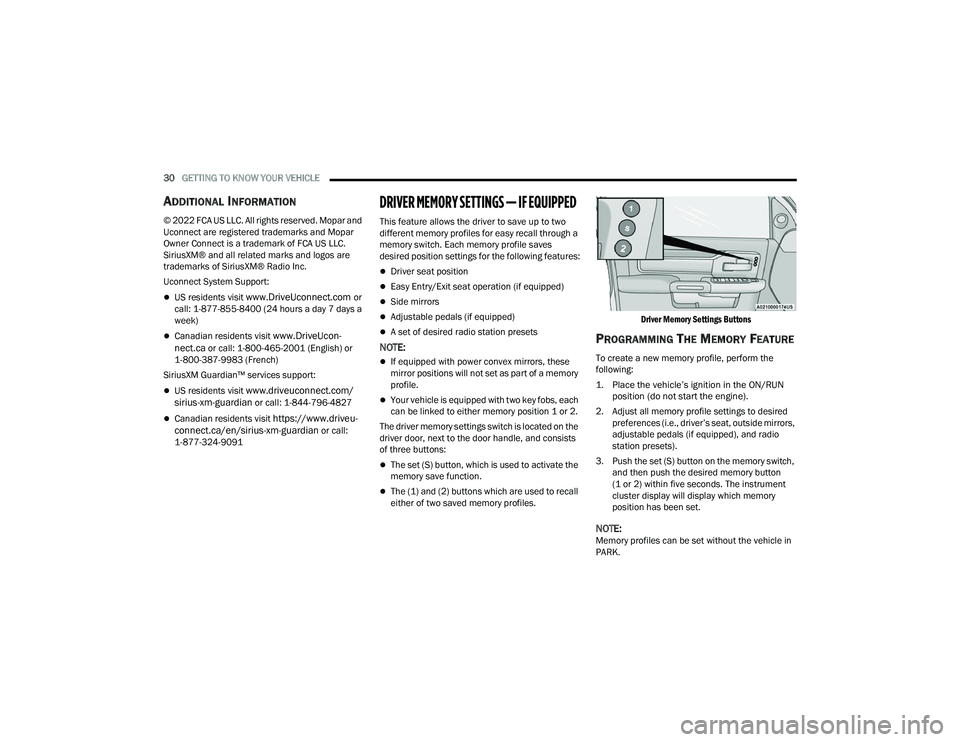
The driver memory settings switch is located on the
driver door, next to the door handle, and consists
of three buttons:
The set (S) button, which is used to activate the
memory save function.
The (1) and (2) buttons which are used to recall
either of two saved memory profiles.
Driver Memory Settings Buttons
PROGRAMMING THE MEMORY FEATURE
To create a new memory profile, perform the
following:
1. Place the vehicle’s ignition in the ON/RUN
position (do not start the engine).
2. Adjust all memory profile settings to desired preferences (i.e., driver’s seat, outside mirrors,
adjustable pedals (if equipped), and radio
station presets).
3. Push the set (S) button on the memory switch, and then push the desired memory button
(1 or 2) within five seconds. The instrument
cluster display will display which memory
position has been set.
NOTE:Memory profiles can be set without the vehicle in
PARK.
23_DPF_OM_EN_USC_t.book Page 30
Page 33 of 444
GETTING TO KNOW YOUR VEHICLE31
LINKING AND UNLINKING THE REMOTE
K
EYLESS ENTRY KEY FOB TO MEMORY
Your key fob can be programmed to recall one of
two saved memory profiles.
NOTE:Before programming your key fob you must select
the “Personal Settings Linked to Key Fob” feature
through the Uconnect Settings Ú page 199.
To program your key fob, perform the following:
1. Place the vehicle’s ignition in the OFF position.
2. Select a desired memory profile 1 or 2.
3. Once the profile has been recalled, push and release the set (S) button on the memory
switch.
4. Push and release button (1) or (2) accordingly. “Memory Profile Set” (1 or 2) will display in the
instrument cluster.
5. Push and release the lock button on the key fob within 10 seconds.
NOTE:Your key fob can be unlinked from your memory
settings by pushing the set (S) button, and within
10 seconds, pushing the unlock button on the key
fob.
MEMORY POSITION RECALL
NOTE:The vehicle speed must be lower than 5 mph
(8 km/h) to recall memory positions. If a recall is
attempted when the vehicle speed is greater than
5 mph (8 km/h), a message will be displayed in the
instrument cluster display.
To recall the memory settings for driver one or two,
push the desired memory button number (1 or 2)
or the unlock button on the key fob linked to the
desired memory position.
A recall can be canceled by pushing any of the
memory buttons during a recall (S, 1, or 2). When
a recall is canceled, the driver's seat and the
adjustable pedals (if equipped) stop moving. A
delay of one second will occur before another
recall can be selected.
SEATS
Seats are a part of the Occupant Restraint system
of the vehicle.
WARNING!
It is dangerous to ride in a cargo area, inside
or outside of a vehicle. In a collision, people
riding in these areas are more likely to be seri -
ously injured or killed.
Do not allow people to ride in any area of your
vehicle that is not equipped with seats and
seat belts. In a collision, people riding in these
areas are more likely to be seriously injured or
killed.
Be sure everyone in your vehicle is in a seat
and using a seat belt properly.
2
23_DPF_OM_EN_USC_t.book Page 31
Page 35 of 444

GETTING TO KNOW YOUR VEHICLE33
POWER ADJUSTMENT (FRONT SEATS) —
I
F EQUIPPED
Some models may be equipped with eight-way
power driver and passenger seats. The power seat
switches are located on the outboard side of the
driver and passenger seat cushions. There are two
power seat switches that are used to control the
movement of the seat cushion and the seatback.
Power Seat Switches
Adjusting The Seat Forward Or Rearward
The seat can be adjusted both forward and
rearward by using the power seat switch. The seat
will move in the direction of the switch. Release the
switch when the desired position has been
reached.
Adjusting The Seat Up Or Down
The height of the seats can be adjusted up or down
by using the power seat switch. The seat will move
in the direction of the switch. Release the switch
when the desired position has been reached.
Tilting The Seat Up Or Down
The angle of the seat cushion can be adjusted up
or down using the power seat switch. The front of
the seat cushion will move in the direction of the
switch. Release the switch when the desired
position has been reached.
Reclining The Seatback
The angle of the seatback can be adjusted forward
or rearward by using the power seat switch. The
seat will move in the direction of the switch.
Release the switch when the desired position is
reached.
1 — Power Seat Switch
2 — Power Seatback Switch
WARNING!
Adjusting a seat while driving may be
dangerous. Moving a seat while driving could
result in loss of control which could cause a
collision and serious injury or death.
Seats should be adjusted before fastening the
seat belts and while the vehicle is parked.
Serious injury or death could result from a
poorly adjusted seat belt.
Do not ride with the seatback reclined so that
the shoulder belt is no longer resting against
your chest. In a collision you could slide under
the seat belt, which could result in serious
injury or death.
CAUTION!
Do not place any article under a power seat or
impede its ability to move as it may cause
damage to the seat controls. Seat travel may
become limited if movement is stopped by an
obstruction in the seat’s path.
2
23_DPF_OM_EN_USC_t.book Page 33
Page 36 of 444

34GETTING TO KNOW YOUR VEHICLE
Power Lumbar — If Equipped
Vehicles equipped with power driver or passenger
seats may also be equipped with power lumbar.
The power lumbar switch is located on the
outboard side of the power seat. Push the switch
forward to increase the lumbar support. Push the
switch rearward to decrease the lumbar support.
Lumbar Control Switch
Easy Entry/Exit Seat — If Equipped
This feature provides automatic driver’s seat
positioning to enhance driver mobility when
entering and exiting the vehicle.
The distance the driver’s seat moves depends on
where you have the driver’s seat positioned when
you place the vehicle’s ignition in the OFF position.
When you place the vehicle’s ignition in the OFF
position, the driver’s seat will move about
2.4 inches (6 cm) rearward if the driver’s seat position is greater than or equal to 2.7 inches
(6.77 cm) forward of the rear stop. The seat will
return to its previously set position when you
place the ignition into the ACC or ON/RUN posi
-
tion.
When you remove the key fob from the ignition,
the driver’s seat will move to a position
0.3 inches (0.77 cm) forward of the rear stop if
the driver’s seat position is between 0.9 inches
and 2.7 inches (2.27 cm and 6.77 cm) forward
of the rear stop. The seat will return to its previ -
ously set position when you place the ignition to
the ACC or ON/RUN position.
The Easy Entry/Easy Exit feature is disabled
when the driver’s seat position is less than
0.9 inches (2.27 cm) forward of the rear stop. At
this position, there is no benefit to the driver by
moving the seat for Easy Exit or Easy Entry.
When enabled in Uconnect Settings, Easy Entry
and Easy Exit positions are stored in each memory
setting profile Ú page 30.
NOTE:The Easy Entry/Exit feature is enabled or disabled
through the programmable features in the
Uconnect system Ú page 199.
HEATED SEATS — IF EQUIPPED
On some models, the front and rear seats may be
equipped with heaters located in the seat cushions
and seatbacks.
WARNING!
Persons who are unable to feel pain to the
skin because of advanced age, chronic illness,
diabetes, spinal cord injury, medication,
alcohol use, exhaustion or other physical
condition must exercise care when using the
seat heater. It may cause burns even at low
temperatures, especially if used for long
periods of time.
Do not place anything on the seat or seatback
that insulates against heat, such as a blanket
or cushion. This may cause the seat heater to
overheat. Sitting in a seat that has been over -
heated could cause serious burns due to the
increased surface temperature of the seat.
23_DPF_OM_EN_USC_t.book Page 34
Page 37 of 444
GETTING TO KNOW YOUR VEHICLE35
Front Heated Seats
The heated seats control buttons are
located on the center instrument panel
below the touchscreen, and are also
located within the Climate or Comfort
screen of the touchscreen.
NOTE:If the vehicle is equipped with a 12-inch radio,
there will only be control buttons through the
touchscreen.
Press the heated seat button once to turn the HI
setting on.
Press the heated seat button a second time to
turn the MED setting on.
Press the heated seat button a third time to turn
the LO setting on.
Press the heated seat button a fourth time to
turn the heating elements off.
NOTE:
The engine must be running for the heated
seats to operate.
The level of heat selected will stay on until the
operator changes it.
For information on use with the Remote Start
system, see Ú page 21.
Rear Heated Seats
On some models, the two outboard rear
seats are equipped with heated seats.
The heated seat switches for these seats
are located on the rear of the center
console.
There are two heated seat switches that allow the
rear passengers to operate the seats
independently. You can choose from HI, MED, LO,
or OFF heat settings. Amber indicator lights in each
switch indicate the level of heat in use.
Push the heated seat button once to turn the HI
setting on.
Push the heated seat button a second time to
turn the MED setting on.
Push the heated seat button a third time to turn
the LO setting on.
Push the heated seat button a fourth time to
turn the heating elements off.
NOTE:
The level of heat selected will stay on until the
operator changes it.
Once a heat setting is selected, heat will be felt
within two to five minutes.
The engine must be running for the heated
seats to operate.
VENTILATED SEATS — IF EQUIPPED
Front Ventilated Seats
Located in the seat cushion are small
fans that draw the air from the passenger
compartment and move air through fine
perforations in the seat cover to help
keep the driver and front passenger cooler in
higher ambient temperatures. The fans operate at
three speeds: HI, MED and LO.
The front ventilated seats control buttons are
located on the center instrument panel below the
touchscreen, and are also located within the
Climate or Comfort screen of the touchscreen.
NOTE:If the vehicle is equipped with a 12-inch radio,
there will only be control buttons through the
touchscreen.
Press the ventilated seat button once to choose
HI.
Press the ventilated seat button a second time
to choose MED.
Press the ventilated seat button a third time to
choose LO.
Press the ventilated seat button a fourth time to
turn the ventilation off.
2
23_DPF_OM_EN_USC_t.book Page 35
Page 38 of 444

36GETTING TO KNOW YOUR VEHICLE
NOTE:The engine must be running for the ventilated
seats to operate.
For information on use with the Remote Start
system, see Úpage 21.
HEAD RESTRAINTS
Head restraints are designed to reduce the risk of
injury by restricting head movement in the event of
a rear impact. Head restraints should be adjusted
so that the top of the head restraint is located
above the top of your ear.
NOTE:Do not reverse the head restraints (making the
rear of the head restraint face forward) in an
attempt to gain additional clearance to the back of
your head.
Front Head Restraints
Four-Way Head Restraints — If Equipped
Your vehicle may be equipped with front four-way
driver and passenger head restraints.
To raise the head restraint, pull upward on the
head restraint. To lower the head restraint, push
the adjustment button, located at the base of the
head restraint, and push downward on the head
restraint.
To adjust the head restraint forward, pull the top of
the head restraint toward the front of the vehicle
as desired and release. To adjust the head
restraint rearward, pull the top of the head
restraint to the forward most position and release.
The head restraint will return to the rear most
position.
Forward Adjustment
NOTE:Four-way head restraints have seven tilt/locking
positions. When pulling fully forward, the head
restraint will spring back to the untilted, rearward
most position when released.
Two-Way Head Restraints — If Equipped
Your vehicle may be equipped with front two-way
driver and passenger head restraints.
To raise the head restraint, pull upward on the
head restraint. To lower the head restraint, push
the adjustment button, located at the base of head
restraint, and push downward on the head
restraint.
Head Restraint Adjustment Button Location
NOTE:If your vehicle is equipped with a front bench seat,
the center head restraint is not adjustable or
removable.
WARNING!
All occupants, including the driver, should not
operate a vehicle or sit in a vehicle’s seat until
the head restraints are placed in their proper
positions in order to minimize the risk of neck
injury in the event of a crash.
Head restraints should never be adjusted
while the vehicle is in motion. Driving a vehicle
with the head restraints improperly adjusted
or removed could cause serious injury or
death in the event of a collision.
23_DPF_OM_EN_USC_t.book Page 36