driver RAM CHASSIS CAB 2023 Owner's Manual
[x] Cancel search | Manufacturer: RAM, Model Year: 2023, Model line: CHASSIS CAB, Model: RAM CHASSIS CAB 2023Pages: 444, PDF Size: 20.51 MB
Page 39 of 444
GETTING TO KNOW YOUR VEHICLE37
Front Head Restraint Removal
Two-Way Head Restraints — If Equipped
To remove the head restraint, push the adjustment
button and the release button while pulling upward
on the whole assembly. To reinstall the head
restraint, put the head restraint posts into the
holes and adjust it to the appropriate height.
Four-Way Head Restraints — If Equipped
The head restraints should only be removed by
qualified technicians, for service purposes only. If
either of the head restraints require removal, see
an authorized dealer.
Rear Head Restraints
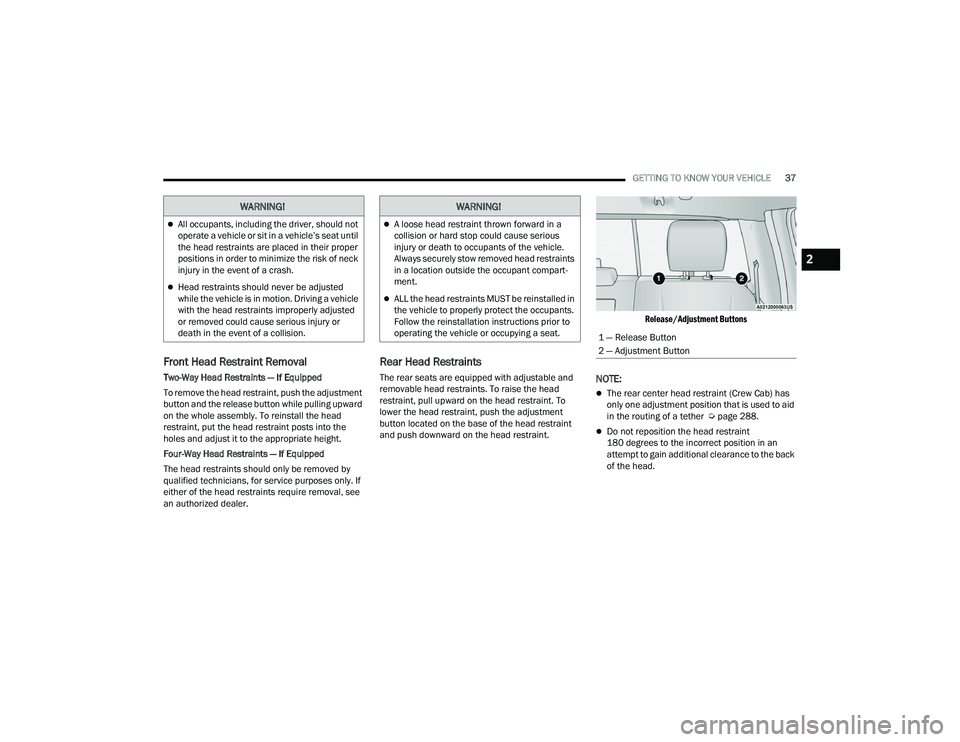
The rear seats are equipped with adjustable and
removable head restraints. To raise the head
restraint, pull upward on the head restraint. To
lower the head restraint, push the adjustment
button located on the base of the head restraint
and push downward on the head restraint.
Release/Adjustment Buttons
NOTE:
The rear center head restraint (Crew Cab) has
only one adjustment position that is used to aid
in the routing of a tether Ú
page 288.
Do not reposition the head restraint
180 degrees to the incorrect position in an
attempt to gain additional clearance to the back
of the head.
WARNING!
All occupants, including the driver, should not
operate a vehicle or sit in a vehicle’s seat until
the head restraints are placed in their proper
positions in order to minimize the risk of neck
injury in the event of a crash.
Head restraints should never be adjusted
while the vehicle is in motion. Driving a vehicle
with the head restraints improperly adjusted
or removed could cause serious injury or
death in the event of a collision.
WARNING!
A loose head restraint thrown forward in a
collision or hard stop could cause serious
injury or death to occupants of the vehicle.
Always securely stow removed head restraints
in a location outside the occupant compart -
ment.
ALL the head restraints MUST be reinstalled in
the vehicle to properly protect the occupants.
Follow the reinstallation instructions prior to
operating the vehicle or occupying a seat.
1 — Release Button
2 — Adjustment Button
2
23_DPF_OM_EN_USC_t.book Page 37
Page 40 of 444

38GETTING TO KNOW YOUR VEHICLE
Rear Head Restraint Removal
To remove the head restraint, push the adjustment
button and the release button while pulling upward
on the whole assembly. To reinstall the head
restraint, put the head restraint posts into the
holes and adjust it to the appropriate height.
NOTE:To remove outboard restraints, the rear seat
bottom must be folded up.
DRIVER ADJUSTABLE PEDALS —
IF EQUIPPED
The adjustable pedals system is designed to allow
a greater range of driver comfort for steering wheel
tilt and seat position. This feature allows the brake
and accelerator pedals to move toward or away
from the driver to provide improved position with
the steering wheel.
The adjustable pedal switch is located to the left
side of the steering column.
Adjustable Pedals Switch
The pedals can be adjusted with the ignition in the
OFF position.
The pedals
cannot be adjusted when the vehicle is
in REVERSE or when the Cruise Control system is
on. If there is an attempt to adjust the pedals when
the system is locked out, the following messages
will appear (on vehicles equipped with an
instrument cluster display):
Adjustable Pedal Disabled — Cruise Control
Engaged
Adjustable Pedal Disabled — Vehicle In Reverse
NOTE:
Always adjust the pedals to a position that
allows full movement of the pedal.
Further small adjustments may be necessary to
find the best possible seat/pedal position.
For vehicles equipped with Driver Memory
Settings, you can use your remote keyless entry
key fob or the memory switch on the driver’s
door trim panel to return the adjustable pedals
to saved positions Ú page 30.
WARNING!
A loose head restraint thrown forward in a
collision or hard stop could cause serious
injury or death to occupants of the vehicle.
Always securely stow removed head restraints
in a location outside the occupant compart -
ment.
ALL the head restraints MUST be reinstalled in
the vehicle to properly protect the occupants.
Follow the reinstallation instructions prior to
operating the vehicle or occupying a seat.
WARNING!
Do not adjust the pedals while the vehicle is
moving. You could lose control and have an
accident. Always adjust the pedals while the
vehicle is parked.
23_DPF_OM_EN_USC_t.book Page 38
Page 41 of 444
GETTING TO KNOW YOUR VEHICLE39
MIRRORS
INSIDE REARVIEW MIRROR
Manual Mirror — If Equipped
The mirror head can be adjusted up, down, left,
and right. The mirror should be adjusted to center
on the view through the rear window.
Headlight glare from vehicles behind you can be
reduced by moving the small control under the
mirror to the night position (toward the rear of the
vehicle). The mirror should be adjusted while set in
the day position (toward the windshield).
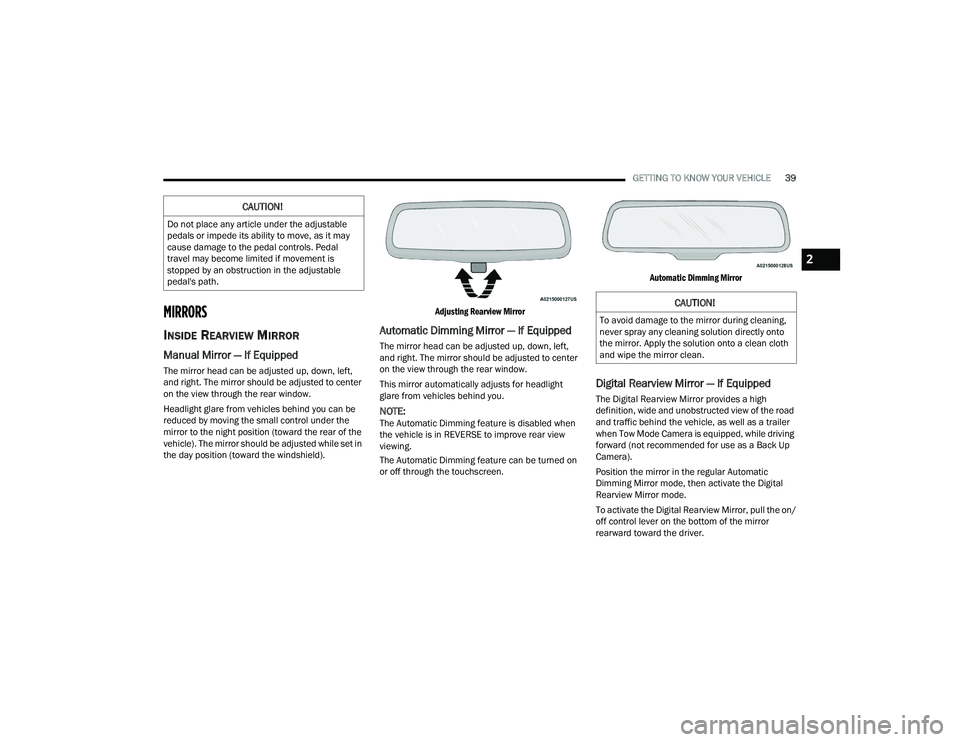
Adjusting Rearview Mirror
Automatic Dimming Mirror — If Equipped
The mirror head can be adjusted up, down, left,
and right. The mirror should be adjusted to center
on the view through the rear window.
This mirror automatically adjusts for headlight
glare from vehicles behind you.
NOTE:The Automatic Dimming feature is disabled when
the vehicle is in REVERSE to improve rear view
viewing.
The Automatic Dimming feature can be turned on
or off through the touchscreen.
Automatic Dimming Mirror
Digital Rearview Mirror — If Equipped
The Digital Rearview Mirror provides a high
definition, wide and unobstructed view of the road
and traffic behind the vehicle, as well as a trailer
when Tow Mode Camera is equipped, while driving
forward (not recommended for use as a Back Up
Camera).
Position the mirror in the regular Automatic
Dimming Mirror mode, then activate the Digital
Rearview Mirror mode.
To activate the Digital Rearview Mirror, pull the on/
off control lever on the bottom of the mirror
rearward toward the driver.
CAUTION!
Do not place any article under the adjustable
pedals or impede its ability to move, as it may
cause damage to the pedal controls. Pedal
travel may become limited if movement is
stopped by an obstruction in the adjustable
pedal's path.
CAUTION!
To avoid damage to the mirror during cleaning,
never spray any cleaning solution directly onto
the mirror. Apply the solution onto a clean cloth
and wipe the mirror clean.
2
23_DPF_OM_EN_USC_t.book Page 39
Page 44 of 444
42GETTING TO KNOW YOUR VEHICLE
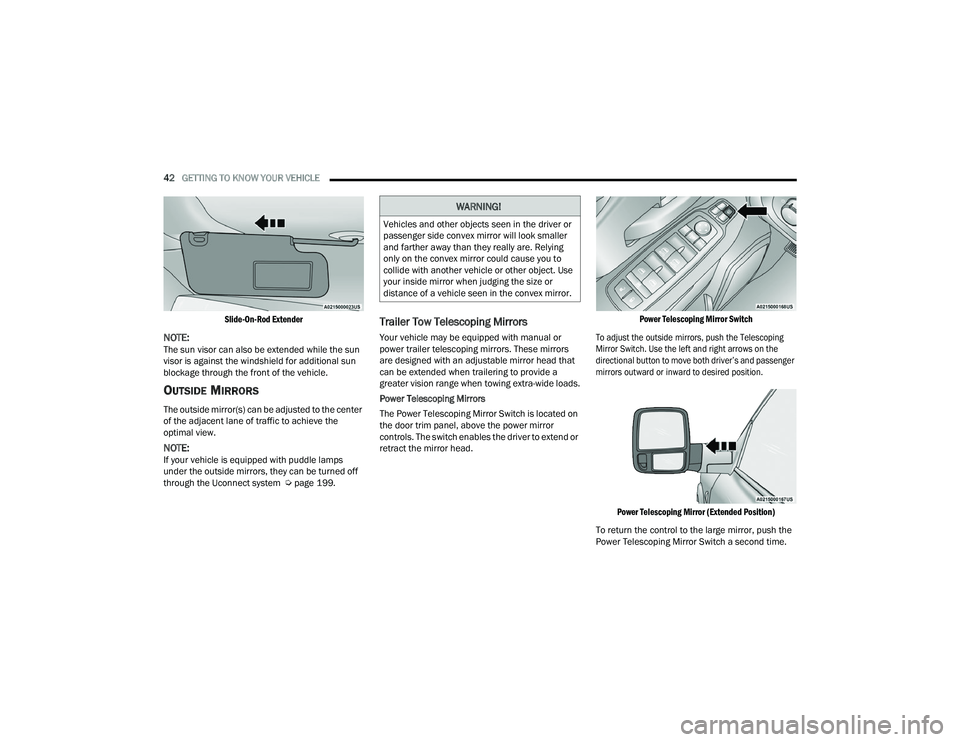
Slide-On-Rod Extender
NOTE:The sun visor can also be extended while the sun
visor is against the windshield for additional sun
blockage through the front of the vehicle.
OUTSIDE MIRRORS
The outside mirror(s) can be adjusted to the center
of the adjacent lane of traffic to achieve the
optimal view.
NOTE:If your vehicle is equipped with puddle lamps
under the outside mirrors, they can be turned off
through the Uconnect system Ú page 199.
Trailer Tow Telescoping Mirrors
Your vehicle may be equipped with manual or
power trailer telescoping mirrors. These mirrors
are designed with an adjustable mirror head that
can be extended when trailering to provide a
greater vision range when towing extra-wide loads.
Power Telescoping Mirrors
The Power Telescoping Mirror Switch is located on
the door trim panel, above the power mirror
controls. The switch enables the driver to extend or
retract the mirror head.
Power Telescoping Mirror Switch
To adjust the outside mirrors, push the Telescoping
Mirror Switch. Use the left and right arrows on the
directional button to move both driver’s and passenger
mirrors outward or inward to desired position.
Power Telescoping Mirror (Extended Position)
To return the control to the large mirror, push the
Power Telescoping Mirror Switch a second time.
WARNING!
Vehicles and other objects seen in the driver or
passenger side convex mirror will look smaller
and farther away than they really are. Relying
only on the convex mirror could cause you to
collide with another vehicle or other object. Use
your inside mirror when judging the size or
distance of a vehicle seen in the convex mirror.
23_DPF_OM_EN_USC_t.book Page 42
Page 45 of 444
GETTING TO KNOW YOUR VEHICLE43
Manual Telescoping Mirrors
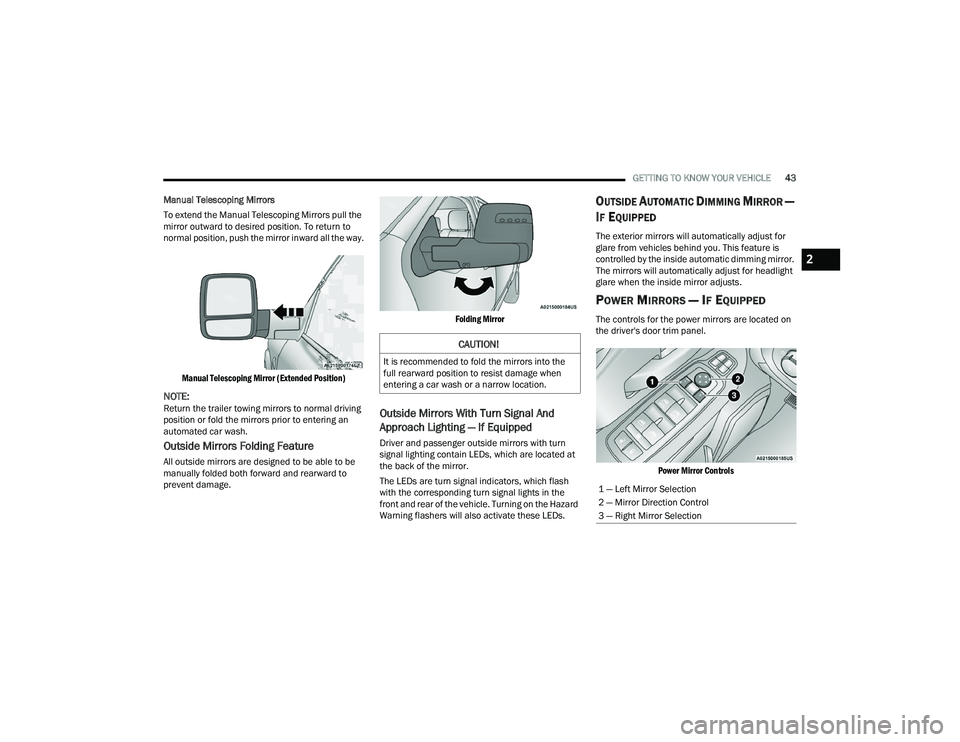
To extend the Manual Telescoping Mirrors pull the
mirror outward to desired position. To return to
normal position, push the mirror inward all the way.
Manual Telescoping Mirror (Extended Position)
NOTE:Return the trailer towing mirrors to normal driving
position or fold the mirrors prior to entering an
automated car wash.
Outside Mirrors Folding Feature
All outside mirrors are designed to be able to be
manually folded both forward and rearward to
prevent damage.
Folding Mirror
Outside Mirrors With Turn Signal And
Approach Lighting — If Equipped
Driver and passenger outside mirrors with turn
signal lighting contain LEDs, which are located at
the back of the mirror.
The LEDs are turn signal indicators, which flash
with the corresponding turn signal lights in the
front and rear of the vehicle. Turning on the Hazard
Warning flashers will also activate these LEDs.
OUTSIDE AUTOMATIC DIMMING MIRROR —
I
F EQUIPPED
The exterior mirrors will automatically adjust for
glare from vehicles behind you. This feature is
controlled by the inside automatic dimming mirror.
The mirrors will automatically adjust for headlight
glare when the inside mirror adjusts.
POWER MIRRORS — IF EQUIPPED
The controls for the power mirrors are located on
the driver's door trim panel.
Power Mirror Controls
CAUTION!
It is recommended to fold the mirrors into the
full rearward position to resist damage when
entering a car wash or a narrow location.
1 — Left Mirror Selection
2 — Mirror Direction Control
3 — Right Mirror Selection
2
23_DPF_OM_EN_USC_t.book Page 43
Page 47 of 444
GETTING TO KNOW YOUR VEHICLE45
The exterior mirrors will auto-fold in the following
situations after the ignition is placed in the OFF
position:
Pushing the lock button on the door panel
before the door is opened.
NOTE:If the doors are already locked, push the lock
button again.
Opening the door, then pushing the lock button
on the door panel, followed by closing the door.
After exiting the vehicle, close the doors then
push the lock button on the key fob.
After exiting the vehicle, close the doors then
touch the lock icon on the Passive Entry door
handle.
If the exterior mirrors were folded automatically,
they will unfold when the ignition is placed in the
ON/RUN position.
NOTE:If the mirrors were folded manually, by using the
power folding mirror switch on the driver’s door
panel, they will not automatically unfold.
POWER CONVEX MIRROR SWITCH —
I
F EQUIPPED
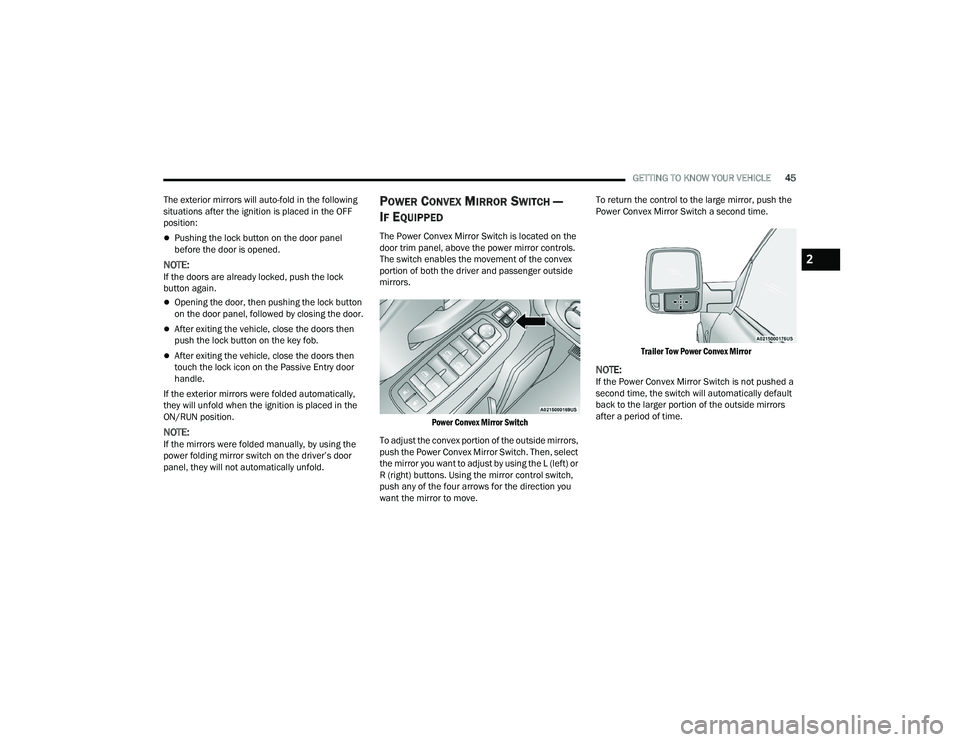
The Power Convex Mirror Switch is located on the
door trim panel, above the power mirror controls.
The switch enables the movement of the convex
portion of both the driver and passenger outside
mirrors.
Power Convex Mirror Switch
To adjust the convex portion of the outside mirrors,
push the Power Convex Mirror Switch. Then, select
the mirror you want to adjust by using the L (left) or
R (right) buttons. Using the mirror control switch,
push any of the four arrows for the direction you
want the mirror to move. To return the control to the large mirror, push the
Power Convex Mirror Switch a second time.
Trailer Tow Power Convex Mirror
NOTE:If the Power Convex Mirror Switch is not pushed a
second time, the switch will automatically default
back to the larger portion of the outside mirrors
after a period of time.
2
23_DPF_OM_EN_USC_t.book Page 45
Page 48 of 444

46GETTING TO KNOW YOUR VEHICLE
FORWARD UTILITY LIGHTS AND REAR
G
UIDANCE LIGHTS — IF EQUIPPED
The forward utility lights and reverse guidance
lights switches are located on the drivers door trim
panel, above the power mirror controls. These
switches enable the forward or reverse lights
located on the driver and passenger outside
mirrors.
Forward and Reverse Light Switches
When either button is pressed the corresponding
light on the outside mirror will remain on for ten
minutes. The vehicle must be in the ON/RUN or
ACC position. When the light is active, the switch on
the door panel will illuminate. Pushing the switch a
second time will turn the lights off.
Forward Utility Light
Reverse Guidance Light
When the lights are activated using the switch on
the door panel , the reverse guidance lights will
illuminate when the vehicle transmission is in
PARK, NEUTRAL, or REVERSE and the forward
utility lights will illuminate in all ignition positions.
The rear guidance lights will turn off when the
vehicle transmission is placed in DRIVE. The rear guidance lights will also illuminate when
the cargo light switch is pressed on the headlight
switch panel. This feature is programmable
through the Uconnect system Ú
page 199.
HEATED MIRRORS — IF EQUIPPED
These mirrors are heated to melt frost or
ice. This feature will be activated
whenever you turn on the rear window
defroster (if equipped) Úpage 58.
TILT SIDE MIRRORS IN REVERSE —
I
F EQUIPPED
This feature provides automatic outside mirror
positioning which will assist with the driver’s
ground visibility. The outside mirrors will move
slightly downward from the present position when
the vehicle is shifted into REVERSE. The outside
mirrors will then return to the original position
when the vehicle is shifted out of REVERSE. If the
vehicle is equipped with Driver Memory Settings,
this feature will be linked to the programmable
settings.
NOTE:The Tilt Side Mirrors In Reverse feature can be
turned on and off using the Uconnect system
Ú page 199.
23_DPF_OM_EN_USC_t.book Page 46
Page 56 of 444

54GETTING TO KNOW YOUR VEHICLE
LIGHTS-ON REMINDER
If the headlights, parking lights, or cargo lights are
left on after the ignition is placed in the OFF
position, a chime will sound and a message will
appear in the instrument cluster display when the
driver’s door is opened.
FRONT FOG LIGHTS — IF EQUIPPED
To activate the front fog lights, turn on the parking
lights or low beam headlights and push the fog
light switch located within the headlight switch.
Pushing the fog light switch a second time will turn
the front fog lights off.
Fog Light Switch Fog Light Switch (Vehicles Sold In Canada Only)
TURN SIGNALS
Move the multifunction lever up or down to
activate the turn signals. The arrows on each side
of the instrument cluster flash to show proper
operation.
NOTE:If either light remains on and does not flash, or
there is a very fast flash rate, check for a defective
outside light bulb.
LANE CHANGE ASSIST — IF EQUIPPED
Lightly push the multifunction lever up or down, without
moving beyond the detent, and the turn signal will flash
three times then automatically turn off.
NOTE:For information on Turn Signal Activated Blind Spot
Assist, see Ú
page 166
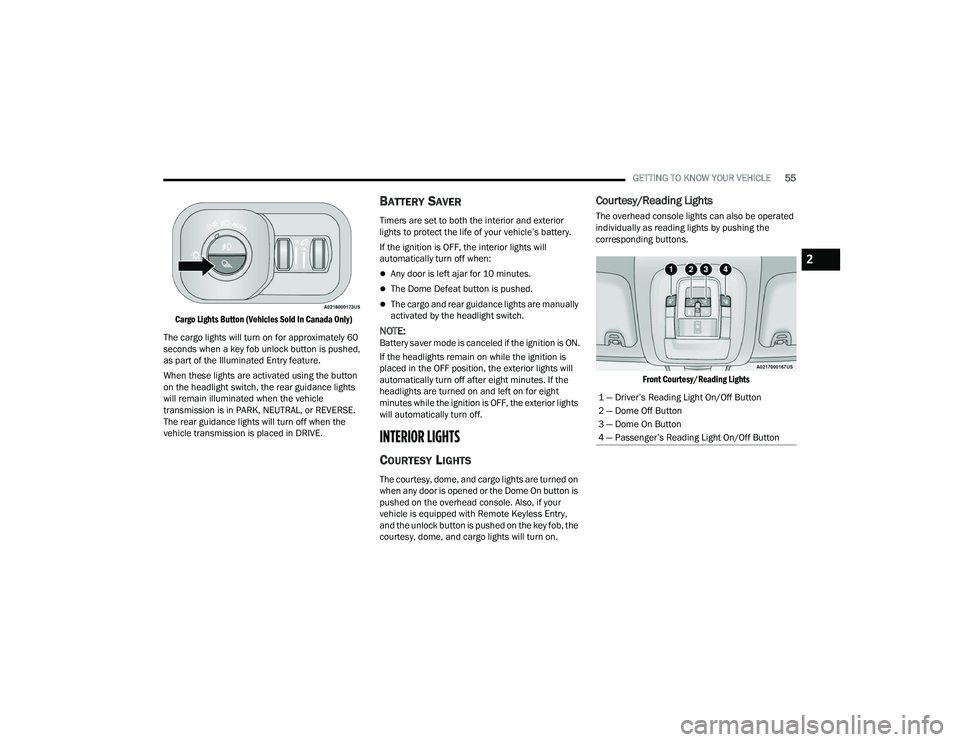
CARGO LIGHTS/REAR GUIDANCE
L
IGHTS — IF EQUIPPED
The cargo lights (if equipped) and rear guidance
lights (if equipped) are turned on by pushing the
cargo lights button located on the lower half of the
headlight switch.
Cargo Lights Button On Headlight Switch
23_DPF_OM_EN_USC_t.book Page 54
Page 57 of 444
GETTING TO KNOW YOUR VEHICLE55
Cargo Lights Button (Vehicles Sold In Canada Only)
The cargo lights will turn on for approximately 60
seconds when a key fob unlock button is pushed,
as part of the Illuminated Entry feature.
When these lights are activated using the button
on the headlight switch, the rear guidance lights
will remain illuminated when the vehicle
transmission is in PARK, NEUTRAL, or REVERSE.
The rear guidance lights will turn off when the
vehicle transmission is placed in DRIVE.
BATTERY SAVER
Timers are set to both the interior and exterior
lights to protect the life of your vehicle’s battery.
If the ignition is OFF, the interior lights will
automatically turn off when:
Any door is left ajar for 10 minutes.
The Dome Defeat button is pushed.
The cargo and rear guidance lights are manually
activated by the headlight switch.
NOTE:Battery saver mode is canceled if the ignition is ON.
If the headlights remain on while the ignition is
placed in the OFF position, the exterior lights will
automatically turn off after eight minutes. If the
headlights are turned on and left on for eight
minutes while the ignition is OFF, the exterior lights
will automatically turn off.
INTERIOR LIGHTS
COURTESY LIGHTS
The courtesy, dome, and cargo lights are turned on
when any door is opened or the Dome On button is
pushed on the overhead console. Also, if your
vehicle is equipped with Remote Keyless Entry,
and the unlock button is pushed on the key fob, the
courtesy, dome, and cargo lights will turn on.
Courtesy/Reading Lights
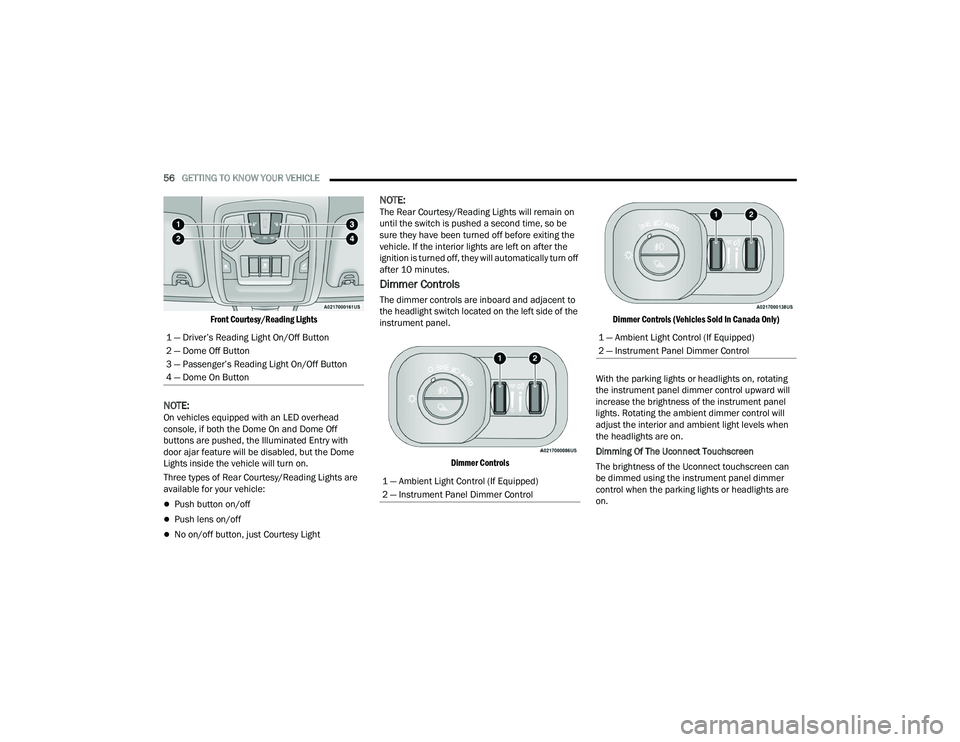
The overhead console lights can also be operated
individually as reading lights by pushing the
corresponding buttons.
Front Courtesy/Reading Lights
1 — Driver’s Reading Light On/Off Button
2 — Dome Off Button
3 — Dome On Button
4 — Passenger’s Reading Light On/Off Button
2
23_DPF_OM_EN_USC_t.book Page 55
Page 58 of 444
56GETTING TO KNOW YOUR VEHICLE
Front Courtesy/Reading Lights
NOTE:On vehicles equipped with an LED overhead
console, if both the Dome On and Dome Off
buttons are pushed, the Illuminated Entry with
door ajar feature will be disabled, but the Dome
Lights inside the vehicle will turn on.
Three types of Rear Courtesy/Reading Lights are
available for your vehicle:
Push button on/off
Push lens on/off
No on/off button, just Courtesy Light
NOTE:The Rear Courtesy/Reading Lights will remain on
until the switch is pushed a second time, so be
sure they have been turned off before exiting the
vehicle. If the interior lights are left on after the
ignition is turned off, they will automatically turn off
after 10 minutes.
Dimmer Controls
The dimmer controls are inboard and adjacent to
the headlight switch located on the left side of the
instrument panel.
Dimmer Controls Dimmer Controls (Vehicles Sold In Canada Only)
With the parking lights or headlights on, rotating
the instrument panel dimmer control upward will
increase the brightness of the instrument panel
lights. Rotating the ambient dimmer control will
adjust the interior and ambient light levels when
the headlights are on.
Dimming Of The Uconnect Touchscreen
The brightness of the Uconnect touchscreen can
be dimmed using the instrument panel dimmer
control when the parking lights or headlights are
on.
1 — Driver’s Reading Light On/Off Button
2 — Dome Off Button
3 — Passenger’s Reading Light On/Off Button
4 — Dome On Button
1 — Ambient Light Control (If Equipped)
2 — Instrument Panel Dimmer Control
1 — Ambient Light Control (If Equipped)
2 — Instrument Panel Dimmer Control
23_DPF_OM_EN_USC_t.book Page 56