key battery RAM CHASSIS CAB 2023 User Guide
[x] Cancel search | Manufacturer: RAM, Model Year: 2023, Model line: CHASSIS CAB, Model: RAM CHASSIS CAB 2023Pages: 444, PDF Size: 20.51 MB
Page 57 of 444
GETTING TO KNOW YOUR VEHICLE55
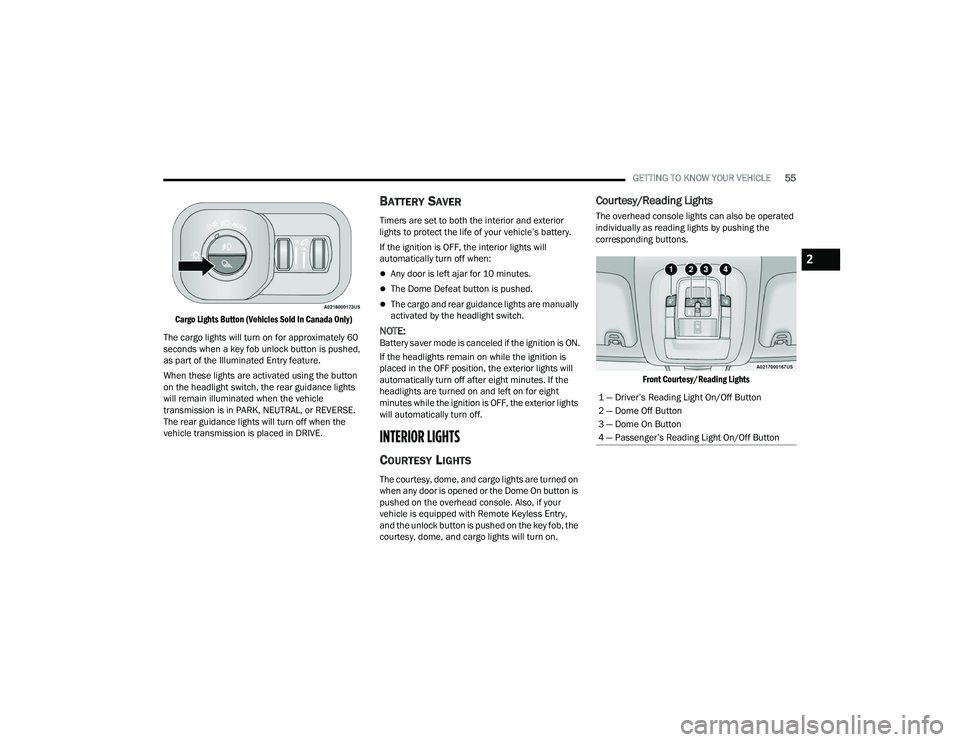
Cargo Lights Button (Vehicles Sold In Canada Only)
The cargo lights will turn on for approximately 60
seconds when a key fob unlock button is pushed,
as part of the Illuminated Entry feature.
When these lights are activated using the button
on the headlight switch, the rear guidance lights
will remain illuminated when the vehicle
transmission is in PARK, NEUTRAL, or REVERSE.
The rear guidance lights will turn off when the
vehicle transmission is placed in DRIVE.
BATTERY SAVER
Timers are set to both the interior and exterior
lights to protect the life of your vehicle’s battery.
If the ignition is OFF, the interior lights will
automatically turn off when:
Any door is left ajar for 10 minutes.
The Dome Defeat button is pushed.
The cargo and rear guidance lights are manually
activated by the headlight switch.
NOTE:Battery saver mode is canceled if the ignition is ON.
If the headlights remain on while the ignition is
placed in the OFF position, the exterior lights will
automatically turn off after eight minutes. If the
headlights are turned on and left on for eight
minutes while the ignition is OFF, the exterior lights
will automatically turn off.
INTERIOR LIGHTS
COURTESY LIGHTS
The courtesy, dome, and cargo lights are turned on
when any door is opened or the Dome On button is
pushed on the overhead console. Also, if your
vehicle is equipped with Remote Keyless Entry,
and the unlock button is pushed on the key fob, the
courtesy, dome, and cargo lights will turn on.
Courtesy/Reading Lights
The overhead console lights can also be operated
individually as reading lights by pushing the
corresponding buttons.
Front Courtesy/Reading Lights
1 — Driver’s Reading Light On/Off Button
2 — Dome Off Button
3 — Dome On Button
4 — Passenger’s Reading Light On/Off Button
2
23_DPF_OM_EN_USC_t.book Page 55
Page 73 of 444
GETTING TO KNOW YOUR VEHICLE71
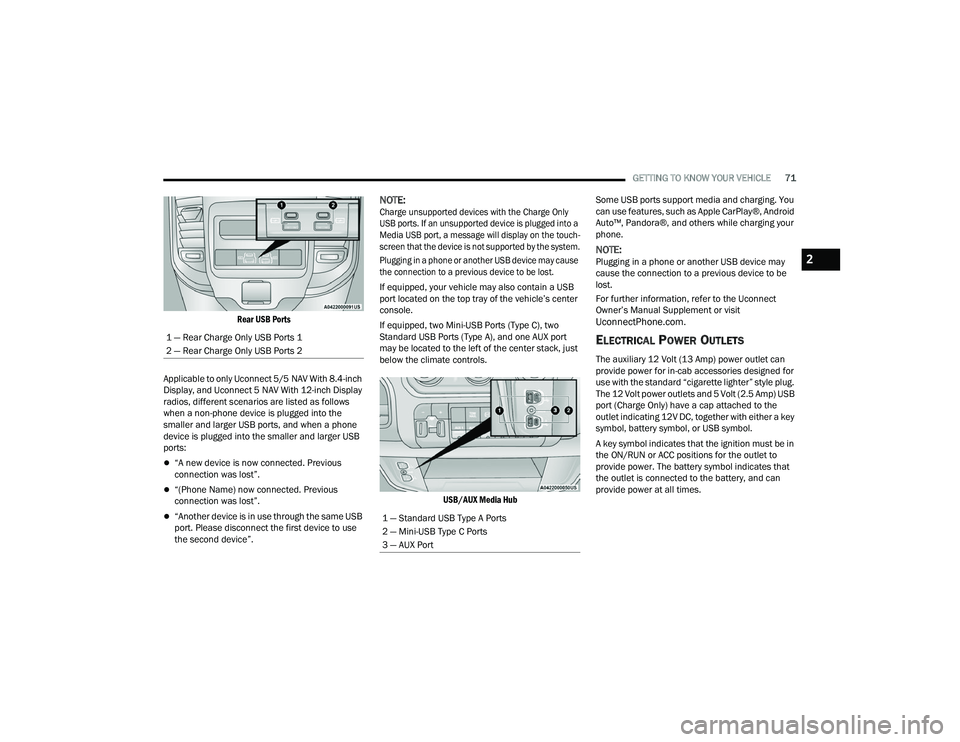
Rear USB Ports
Applicable to only Uconnect 5/5 NAV With 8.4-inch
Display, and Uconnect 5 NAV With 12-inch Display
radios, different scenarios are listed as follows
when a non-phone device is plugged into the
smaller and larger USB ports, and when a phone
device is plugged into the smaller and larger USB
ports:
“A new device is now connected. Previous
connection was lost”.
“(Phone Name) now connected. Previous
connection was lost”.
“Another device is in use through the same USB
port. Please disconnect the first device to use
the second device”.
NOTE:
Charge unsupported devices with the Charge Only
USB ports. If an unsupported device is plugged into a
Media USB port, a message will display on the touch -
screen that the device is not supported by the system.
Plugging in a phone or another USB device may cause
the connection to a previous device to be lost.
If equipped, your vehicle may also contain a USB
port located on the top tray of the vehicle’s center
console.
If equipped, two Mini-USB Ports (Type C), two
Standard USB Ports (Type A), and one AUX port
may be located to the left of the center stack, just
below the climate controls.
USB/AUX Media Hub
Some USB ports support media and charging. You
can use features, such as Apple CarPlay®, Android
Auto™, Pandora®, and others while charging your
phone.
NOTE:Plugging in a phone or another USB device may
cause the connection to a previous device to be
lost.
For further information, refer to the Uconnect
Owner’s Manual Supplement or visit
UconnectPhone.com.
ELECTRICAL POWER OUTLETS
The auxiliary 12 Volt (13 Amp) power outlet can
provide power for in-cab accessories designed for
use with the standard “cigarette lighter” style plug.
The 12 Volt power outlets and 5 Volt (2.5 Amp) USB
port (Charge Only) have a cap attached to the
outlet indicating 12V DC, together with either a key
symbol, battery symbol, or USB symbol.
A key symbol indicates that the ignition must be in
the ON/RUN or ACC positions for the outlet to
provide power. The battery symbol indicates that
the outlet is connected to the battery, and can
provide power at all times.
1 — Rear Charge Only USB Ports 1
2 — Rear Charge Only USB Ports 2
1 — Standard USB Type A Ports
2 — Mini-USB Type C Ports
3 — AUX Port
2
23_DPF_OM_EN_USC_t.book Page 71
Page 98 of 444
96GETTING TO KNOW YOUR INSTRUMENT PANEL
NOTE:Trailer connection status is remembered after the
key cycle. If the trailer connection status has not
changed, no pop-up will appear in your Instrument
Cluster Display.
Audio
Push and release the up or down arrow
button until the Audio Menu icon/title is
highlighted in the instrument cluster display. This
menu will display the audio source information,
including the Song name, Artist name, and audio
source with an accompanying graphic.
Phone Call Status
When a call is incoming, a Phone Call Status
pop-up will display on the screen. The pop-up will
remain until the phone is answered or ignored.
NOTE:The call status will temporarily replace the
previous media source information displayed on
the screen. When the pop-up is no longer
displayed, the display will return to the last used
screen.
Stored Messages
Push and release the up or down arrow
button until the Messages Menu item is
highlighted. This feature shows the number of
stored warning messages. Push and release the
right or left arrow button to cycle through
stored messages.
Settings — If Equipped
Personal Settings allows the driver to set and recall
features when the transmission is in PARK.
Push and release the up or down arrow
button until Settings displays in the instrument
cluster display.
Follow the prompts to display and set any of the
following Vehicle Settings.
NOTE:Your vehicle may be equipped with the following
settings.
If equipped with a base radio (Non-Touch -
screen) Vehicle Settings will be included in the
instrument cluster display.
If equipped with a Touchscreen radio, the
Vehicle Settings will be included in the radio
head unit.
BASE AND MIDLINE CLUSTER
Upper Left or Right
None Time Current Econ
Compass Range Trip A Distance
Outside Temp Average Econ Trip B Distance
Trailer Trip –
If Equipped Trailer Brake Oil Pressure
Coolant Temp Oil Temp Battery
Voltage
Trans Temp Oil Life
Exhaust Brake –
If Equipped
Boost
Pressure –
If Equipped
Fuel Filter Life –
If Equipped
Upper Center
None Compass Outside Temp
Time Range To
EmptyAverage Econ
Current Econ Trip A Distance Trip B Distance
Trailer Trip Audio (show/
hide)Speedometer
Menu Title
23_DPF_OM_EN_USC_t.book Page 96
Page 118 of 444

116STARTING AND OPERATING
(Continued)
Extended Park Starting
NOTE:Extended Park condition occurs when the vehicle
has not been started or driven for at least 30 days.
1. Install a battery charger or jumper cables to the battery to ensure a full battery charge
during the crank cycle.
2. Place the ignition to the START position and release it when the engine starts. For Keyless
Enter ‘n Go ignition systems, press and hold
the brake pedal while pushing the ENGINE
START/STOP button once.
3. If the engine fails to start within 10 seconds, wait 10 to 15 seconds to allow the starter to
cool, then repeat the Extended Park Starting
procedure.
4. If the engine fails to start after eight attempts, allow the starter to cool for at least
10 minutes, then repeat the Extended Park
Starting procedure.
If Engine Fails To Start
If the engine fails to start after you have followed
the “Normal Starting” procedure and the vehicle
has not experienced an Extended Park condition
as defined previously, it may be flooded. Push the
accelerator pedal all the way to the floor and hold
it there while the engine is cranking. This should
clear any excess fuel in case the engine is flooded.
The starter motor will engage automatically, run for
10 seconds, and then disengage. Once this occurs,
release the accelerator pedal and the brake pedal,
wait 10 to 15 seconds, then repeat the “Normal
Starting” procedure.
If the engine has been flooded, it may start to run,
but not have enough power to continue running
when the ignition button/key is released. If this
occurs, continue cranking with the accelerator
pedal pushed all the way to the floor. Release the
accelerator pedal and the ignition button/key once
the engine is running smoothly.
If the engine shows no sign of starting after a 10
second period of engine cranking with the
accelerator pedal held to the floor, wait 10 to 15
seconds, then repeat the “Normal Starting”
procedure.
CAUTION!
To prevent damage to the starter, do not crank
continuously for more than 10 seconds at a
time. Wait 10 to 15 seconds before trying again.
WARNING!
Never pour fuel or other flammable liquid into
the throttle body air inlet opening in an
attempt to start the vehicle. This could result
in flash fire causing serious personal injury.
Do not attempt to push or tow your vehicle to
get it started. Vehicles equipped with an auto-
matic transmission cannot be started this
way. Unburned fuel could enter the catalytic
converter and once the engine has started,
ignite and damage the converter and vehicle.
If the vehicle has a discharged battery,
booster cables may be used to obtain a start
from a booster battery or the battery in
another vehicle. This type of start can be
dangerous if done improperly Ú page 334.
CAUTION!
To prevent damage to the starter, do not crank
the engine for more than 10 seconds at a time.
Wait 10 to 15 seconds before trying again.
WARNING!
23_DPF_OM_EN_USC_t.book Page 116
Page 123 of 444

STARTING AND OPERATING121
(Continued)
STARTING PROCEDURE — ENGINE
M
ANIFOLD AIR TEMPERATURE BELOW
0°F (-18°C)
In extremely cold weather below 0°F (-18°C) it
may be beneficial to cycle the intake air heater
twice before attempting to start the engine. This
can be accomplished by turning the ignition to OFF
position for at least five seconds and then back to
the ON/RUN position after the Wait To Start
Indicator Light has turned off, but before the
engine is started. However, excessive cycling of the
intake air heater will result in damage to the heater
elements or reduced battery voltage.
NOTE:If multiple pre-heat cycles are used before starting,
additional engine run time may be required to
maintain battery state of charge at a satisfactory
level.
1. If the engine stalls after the initial start, the
ignition must be turned to the OFF position for
at least five seconds and then to the ON/RUN
position to recycle the intake air heater.
NOTE:Excessive white smoke and poor engine perfor -
mance will result if intake air heater is not recycled.
2. Heat generated by the intake air heater dissipates rapidly in a cold engine. If more than
two minutes pass between the time the Wait To Start Indicator Light turns off and the
engine is started, recycle the intake air heater
by turning the ignition switch to the OFF
position for at least five seconds and then
back to the ON/RUN position.
3. If the vehicle is driven and vehicle speed exceeds 19 mph (31 km/h) before the intake
air heater post-heat (after start) cycle is
complete, the intake air heater will shut off.
4. If the engine is cranked for more than 10 seconds, the post-heat cycle will turn off.
NOTE:
Engine idle speed will automatically increase to
1,000 RPM and engage the Variable Geometry
Turbocharger at low coolant temperatures to
improve engine warm-up.
When a diesel engine is allowed to run out of
fuel or the fuel gels at low temperatures, air is
pulled into the fuel system. If your engine has
run out of fuel Ú page 363.
If the engine stalls, or if the ignition switch is left
on for more than two minutes after the Wait To
Start Indicator Light goes out, reset the intake
air heater by turning the ignition switch to the
OFF position for at least five seconds and then
back to the ON/RUN position. Repeat steps 1
through 5 of “Starting Procedure – Engine Mani -
fold Air Temperature 0°F to 60°F (-18°C to
19°C).”
STARTING FLUIDS
The engine is equipped with an automatic electric
air preheating system. If the instructions in this
manual are followed, the engine should start in all
conditions.
WARNING!
Starting fluids or flammable liquids must never
be used in the Cummins® diesel engine (see
Warning label). Never pour diesel fuel,
flammable liquid, starting fluids (ether) into the
air cleaner canister, air intake piping, or
turbocharger inlet in an attempt to start the
vehicle. This could result in a flash fire and
explosion causing serious personal injury and
engine damage.
WARNING!
Do not leave children or animals inside parked
vehicles in hot weather. Interior heat build-up
may cause serious injury or death.
When leaving the vehicle, always remove the
key fob and lock your vehicle.
4
23_DPF_OM_EN_USC_t.book Page 121
Page 141 of 444

STARTING AND OPERATING139
The TOW/HAUL Indicator Light will illuminate in the
instrument cluster to indicate that TOW/HAUL
mode has been activated. Pushing the switch a
second time restores normal operation. Normal
operation is always the default at engine start-up.
If TOW/HAUL mode is desired, the switch must be
pushed each time the engine is started.
Torque Converter Clutch
A feature designed to improve fuel economy has
been included in the automatic transmission on
your vehicle. A clutch within the torque converter
engages automatically at calibrated speeds. This
may result in a slightly different feeling or response
during normal operation in the upper gears. When
the vehicle speed drops or during some
accelerations, the clutch automatically
disengages.
NOTE:
The torque converter clutch will not engage,
until the transmission fluid and engine coolant
are warm (usually after 1 to 3 miles (2 to 5 km)
of driving). Because engine speed is higher
when the torque converter clutch is not
engaged, it may seem as if the transmission is
not shifting properly when cold; this is normal.
Using the Electronic Range Select (ERS) shift
control, when the transmission is sufficiently
warm, will demonstrate that the transmission is
able to shift into and out of Overdrive.
If the vehicle has not been driven for several
days, the first few seconds of operation after
shifting the transmission into gear may seem
sluggish. This is due to the fluid partially
draining from the torque converter into the
transmission. This condition is normal and will
not cause damage to the transmission. The
torque converter will refill within five seconds
after starting the engine.
AUXILIARY SWITCHES — IF EQUIPPED
There can be up to six auxiliary switches located in
the lower switch bank of the instrument panel
which can be used to power various electronic
devices and Power Take Off (PTO). If equipped, it
will take the place of the sixth auxiliary switch.
Connections to the switches are found under the
hood in the connectors attached to the auxiliary
Power Distribution Center.
You have the ability to configure the functionality of
the auxiliary switches via the instrument cluster
display. All switches can now be configured for
setting the switch type operation to latching or
momentary, power source of either battery or
ignition, and ability to hold last state across key
cycles.
NOTE:Holding last state conditions are met when switch
type is set to latching and power source is set to
ignition.
For further information on using the auxiliary
switches, please refer to the Ram Body Builder’s
Guide by accessing
https://
www.ramtrucks.com/ram-commercial/
body-builders-guide.html
and choosing the
appropriate links.
WARNING!
Do not use the TOW/HAUL feature when driving
in icy or slippery conditions. The increased
engine braking can cause the rear wheels to
slide, and the vehicle to swing around with the
possible loss of vehicle control, which may
cause an accident possibly resulting in personal
injury or death.4
23_DPF_OM_EN_USC_t.book Page 139
Page 193 of 444
STARTING AND OPERATING191
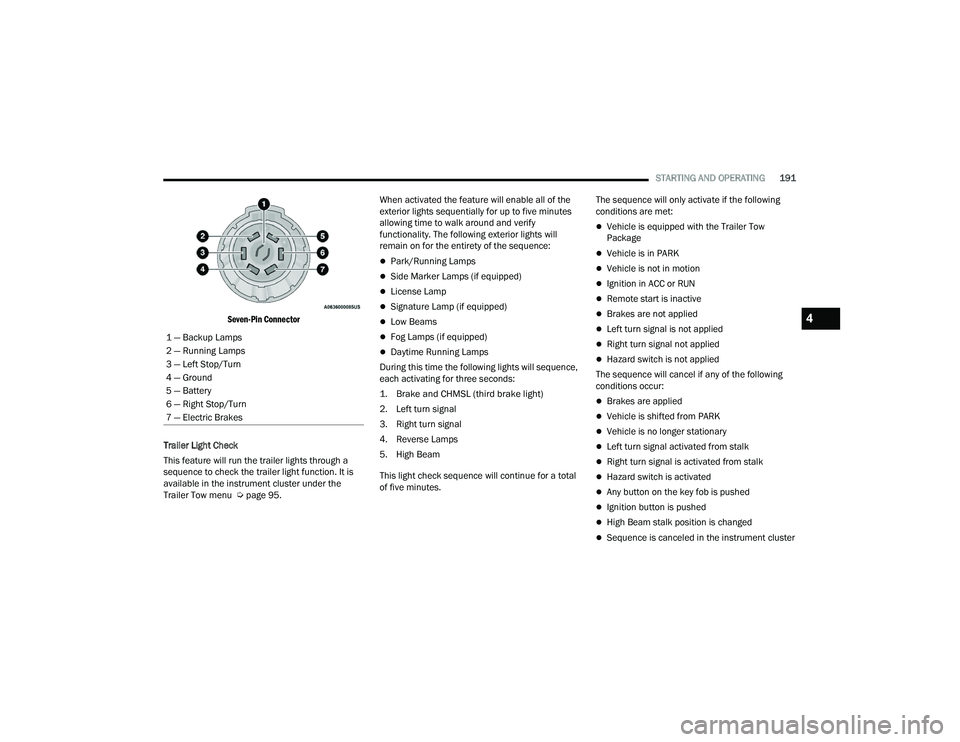
Seven-Pin Connector
Trailer Light Check
This feature will run the trailer lights through a
sequence to check the trailer light function. It is
available in the instrument cluster under the
Trailer Tow menu Ú page 95. When activated the feature will enable all of the
exterior lights sequentially for up to five minutes
allowing time to walk around and verify
functionality. The following exterior lights will
remain on for the entirety of the sequence:
Park/Running Lamps
Side Marker Lamps (if equipped)
License Lamp
Signature Lamp (if equipped)
Low Beams
Fog Lamps (if equipped)
Daytime Running Lamps
During this time the following lights will sequence,
each activating for three seconds:
1. Brake and CHMSL (third brake light)
2. Left turn signal
3. Right turn signal
4. Reverse Lamps
5. High Beam
This light check sequence will continue for a total
of five minutes. The sequence will only activate if the following
conditions are met:
Vehicle is equipped with the Trailer Tow
Package
Vehicle is in PARK
Vehicle is not in motion
Ignition in ACC or RUN
Remote start is inactive
Brakes are not applied
Left turn signal is not applied
Right turn signal not applied
Hazard switch is not applied
The sequence will cancel if any of the following
conditions occur:
Brakes are applied
Vehicle is shifted from PARK
Vehicle is no longer stationary
Left turn signal activated from stalk
Right turn signal is activated from stalk
Hazard switch is activated
Any button on the key fob is pushed
Ignition button is pushed
High Beam stalk position is changed
Sequence is canceled in the instrument cluster
1 — Backup Lamps
2 — Running Lamps
3 — Left Stop/Turn
4 — Ground
5 — Battery
6 — Right Stop/Turn
7 — Electric Brakes
4
23_DPF_OM_EN_USC_t.book Page 191
Page 250 of 444
248MULTIMEDIA
NOTE:Certain SiriusXM Guardian™ connected services
are dependent on an operational Uconnect
system, cellular network availability that is
compatible with the device in your vehicle, and
GPS network availability. Not all features of
SiriusXM Guardian™ are available everywhere at
all times, particularly in remote or enclosed areas.
How It Works
1. Push the SOS Call button; the indicator light will turn green indicating a call has been
placed.
NOTE:
In case the SOS Call button is accidentally
pushed, there is a 10-second delay before
the SOS call is placed. The system will
verbally alert you that a call is about to be
made. To cancel the SOS Call connection,
push the SOS Call button on the rearview
mirror or overhead console or press the
Cancel button on the touchscreen within 10
seconds.
During an SOS Call, the Bluetooth®-paired
phone is disconnected so incoming or
outgoing calls will go through your mobile
device versus the hands-free system which
is not available due to the SOS Call. 2. Once a connection between the vehicle and a
SiriusXM Guardian™ Customer Care agent is
made, the agent will stay on the line with you.
NOTE:Calls between the vehicle occupants and the
SiriusXM Guardian™ Customer Care center may be
recorded or monitored for quality assurance
purposes. Through your enrollment in and use of
the SiriusXM Guardian™ connected services, you
consent to being recorded.
SOS Call System Limitations
Vehicles that have been purchased in the US and
that travel into Mexico and Canada may have
limited services. In particular, responses to SOS
calls or other emergency services may be
unavailable or very limited. Vehicles purchased
outside the United States and Canada are unable
to receive SiriusXM Guardian™ connected
services. If the SOS Call system detects a malfunction, any
of the following may occur at the time the
malfunction is detected:The light will continuously be illuminated red.
The screen will display the following message
“Vehicle phone requires service. Please contact
your dealer.”
An in-vehicle audio message will state “Vehicle
phone requires service. Please contact your
dealer.”
Even if the SOS Call system is fully functional,
factors beyond FCA US LLC’s control may prevent
or stop SOS Call system operation. These include,
but are not limited to, the following factors:
The ignition key is in OFF position.
The vehicle’s electrical systems are not intact.
The vehicle battery loses power or becomes
disconnected during a vehicle crash.
The SOS Call system software and/or hardware
is damaged during a vehicle crash.
LTE (voice/data) or 4G (data) coverage and/or
GPS signals are unavailable or obstructed.
Network congestion.
Weather conditions.
Buildings, structures, geographic terrain, or
tunnels.
23_DPF_OM_EN_USC_t.book Page 248
Page 254 of 444
252MULTIMEDIA
Remote Vehicle Start
Description
The Remote Vehicle Start feature provides you with
the ability to start the engine on your vehicle
without the keys and from virtually any distance.
Once started, the preset climate controls in your
vehicle can warm up or cool down the interior.
You can also send a command to turn off an
engine that has been started using Remote Vehicle
Start. After 15 minutes, if you have not entered
your vehicle with the key, the engine will shut off
automatically.
This remote function requires your vehicle to be
equipped with a factory-installed Remote Start
system.
You can set up push notifications every time a
command is sent to activate or cancel Remote
Start.
Working Vehicle Conditions
The vehicle must be off or in ACC mode.
The vehicle has been started with the key fob
within the last 14 days.
The vehicle must be in PARK or at a standstill.
The vehicle’s security system has been armed
and not triggered since the last vehicle start.
The doors, hood, and trunk/liftgate are closed.
The vehicle’s check engine light must be off.
The vehicle must have at least a quarter tank of
fuel, along with oil and battery power.
The vehicle’s hazard lights must be off.
If equipped, the vehicle must have an automatic
transmission.
The vehicle must be in an open area with cell
tower reception.
Your mobile device must have a cellular or Wi-Fi
connection.
If the Panic button has been pressed, the
vehicle must be started at least once after
alarming the system.
NOTE:The SiriusXM Guardian™ Customer Care agents
are not authorized for Remote Vehicle Start
services. Contact the Uconnect Care Team for
assistance.
Remote Horn & Lights
Description
It is easy to locate a vehicle in a dark, crowded or
noisy parking area by activating the horn and
lights. It may also help if you need to draw attention
to your vehicle for any reason.
If you want, you can set up push notifications every
time a command is sent to turn on the horn and
lights. Working Vehicle Conditions
The vehicle must in PARK or at a standstill.
The vehicle must be in an open area with cell
tower reception.
Your mobile device must have a cellular or Wi-Fi
connection.
NOTE:The Remote Horn & Lights feature is designed to
be loud and get noticed. Please keep in mind the
surroundings when using this feature. You are
responsible for compliance with local laws, rules
and ordinances in the location of your vehicle
when using Remote Horn & Lights.
Assist — If Equipped
Description
Vehicles equipped with the SiriusXM Guardian™
connected services feature may contain an ASSIST
button in the vehicle. Once your SiriusXM
Guardian™ connected services have been
activated, the ASSIST button can connect you
directly to the Customer Care call center (if
equipped). You will be directed to one of the
following four services:
Roadside Assistance
— If you get a flat tire or
need a tow, you’ll be connected to someone
who can help anytime.
23_DPF_OM_EN_USC_t.book Page 252
Page 305 of 444

SAFETY303
(Continued)
Turn on the interior lights, which remain on as
long as the battery has power or for 15 minutes
from the intervention of the Enhanced Accident
Response System.
Unlock the power door locks.
Your vehicle may also be designed to perform any
of these other functions in response to the
Enhanced Accident Response System:
Turn off the Fuel Filter Heater, Turn off the HVAC
Blower Motor, Close the HVAC Circulation Door
Cut off battery power to the:
Engine
Electric Motor (if equipped)
Electric power steering
Brake booster
Electric park brake
Automatic transmission gear selector
Horn
Front wiper
NOTE:After an accident, remember to cycle the ignition to
the STOP (OFF/LOCK) position and remove the key
from the ignition switch to avoid draining the
battery. Carefully check the vehicle for fuel leaks in
the engine compartment and on the ground near
the engine compartment and fuel tank before
resetting the system and starting the engine. If
there are no fuel leaks or damage to the vehicle
electrical devices (e.g. headlights) after an
accident, reset the system by following the
procedure described below. If you have any doubt,
contact an authorized dealer.
Enhanced Accident Response System
Reset Procedure
In order to reset the Enhanced Accident Response
System functions after an event, the ignition switch
must be changed from ignition START or ON/RUN
to ignition OFF. Carefully check the vehicle for fuel
leaks in the engine compartment and on the
ground near the engine compartment and fuel
tank before resetting the system and starting the
engine. After an accident, if the vehicle will not start after
performing the reset procedure, the vehicle must
be towed to an authorized dealer to be inspected
and to have the Enhanced Accident Response
System reset.
Maintaining Your Air Bag System
WARNING!
Modifications to any part of the air bag system
could cause it to fail when you need it. You
could be injured if the air bag system is not
there to protect you. Do not modify the compo
-
nents or wiring, including adding any kind of
badges or stickers to the steering wheel hub
trim cover or the upper passenger side of the
instrument panel. Do not modify the front
fascia/bumper, vehicle body structure, or add
aftermarket side steps or running boards.
It is dangerous to try to repair any part of the
air bag system yourself. Be sure to tell anyone
who works on your vehicle that it has an air
bag system.
6
23_DPF_OM_EN_USC_t.book Page 303