trailer RAM CHASSIS CAB 2023 Owner's Guide
[x] Cancel search | Manufacturer: RAM, Model Year: 2023, Model line: CHASSIS CAB, Model: RAM CHASSIS CAB 2023Pages: 444, PDF Size: 20.51 MB
Page 155 of 444

STARTING AND OPERATING153
button will result in turning on (changing to) Fixed
Speed Cruise Control mode.
If ACC is set when the vehicle speed is below
20 mph (32 km/h), the set speed will default to
20 mph (32 km/h).
NOTE:Fixed Speed Cruise Control cannot be set below
20 mph (32 km/h).
If either system is set when the vehicle speed is
above 20 mph (32 km/h), the set speed shall be
the current speed of the vehicle.
NOTE:
Keeping your foot on the accelerator pedal can
cause the vehicle to continue to accelerate
beyond the set speed. If this occurs, the
message “ACC DRIVER OVERRIDE” will display
in the instrument cluster display.
If you continue to accelerate beyond the set
speed while ACC is enabled, the system will not
control the distance between your vehicle and
the vehicle ahead. The vehicle speed will only be
determined by the position of the accelerator
pedal.
To Cancel
The following conditions cancel the ACC or Fixed
Speed Cruise Control systems:
The brake pedal is applied
The CANC (cancel) button is pushed
The Anti-Lock Brake System (ABS) activates
The trailer brake is applied manually (if
equipped)
The gear selector is removed from the DRIVE
position
The Electronic Stability Control/Traction Control
System (ESC/TCS) activates
The vehicle parking brake is applied
The Trailer Sway Control (TSC) activates
The driver switches ESC to Full Off mode
The braking temperature exceeds normal range
(overheated) The following conditions will only cancel the ACC
system:
Driver seat belt is unbuckled at low speeds
Driver door is opened at low speeds
To Turn Off
The system will turn off and clear the set speed in
memory if:
The Adaptive Cruise Control (ACC) on/off button
is pushed
The Fixed Speed Cruise Control on/off button is
pushed
The ignition is placed in the OFF position
4WD Low is engaged
To Resume
If there is a set speed in memory, push the RES
(resume) button and then remove your foot from
the accelerator pedal. The instrument cluster
display will show the last set speed.
Resume can be used at any speed above 20 mph
(32 km/h) when only Fixed Speed Cruise Control is
being used.
Resume can be used at any speed above 0 mph
(0 km/h) when ACC is active.
WARNING!
In Fixed Speed Cruise Control mode, the system
will not react to vehicles ahead. In addition, the
proximity warning does not activate and no
alarm will sound even if you are too close to the
vehicle ahead since neither the presence of the
vehicle ahead nor the vehicle-to-vehicle distance
is detected. Be sure to maintain a safe distance
between your vehicle and the vehicle ahead.
Always be aware which mode is selected.
4
23_DPF_OM_EN_USC_t.book Page 153
Page 157 of 444

STARTING AND OPERATING155
Distance Settings
To increase the distance setting, push the
Distance Increase button and release. Each time
the button is pushed, the distance setting
increases by one bar (longer).
To decrease the distance setting, push the
Distance Decrease button and release. Each time
the button is pushed, the distance setting
decreases by one bar (shorter).
If there is no vehicle ahead, the vehicle will
maintain the set speed. If a slower moving vehicle
is detected in the same lane, the instrument
cluster displays the ACC Set With Target Detected Indicator Light, and the system adjusts vehicle
speed automatically to maintain the distance
setting, regardless of the set speed.
NOTE:If the vehicles Integrated Trailer Brake Module
(ITBM) detects a trailer is connected to the vehicle,
and ACC is enabled, the system will increase the
distance to the longest distance setting (four bars)
by default.
The vehicle will then maintain the set distance
until:
The vehicle ahead accelerates to a speed above
the set speed.
The vehicle ahead moves out of your lane or
view of the sensor.
The distance setting is changed.
The system disengages.
The maximum braking applied by ACC is limited;
however, the driver can always apply the brakes
manually, if necessary.
NOTE:The brake lights will illuminate whenever the ACC
system applies the brakes.
A Proximity Warning will alert the driver if ACC
predicts that its maximum braking level is not
sufficient to maintain the set distance. If this
occurs, a visual alert “BRAKE!” will flash in the
instrument cluster display and a chime will sound while ACC continues to apply its maximum braking
capacity.
NOTE:The “BRAKE!” screen in the instrument cluster
display is a warning for the driver to take action
and does not mean that the Forward Collision
Warning system is applying the brakes autono-
mously.
Overtake Aid
When driving with ACC engaged and following a
vehicle, the system will provide an additional
acceleration up to the ACC set speed to assist in
passing the vehicle. This additional acceleration is
triggered when the driver utilizes the left turn
signal and will only be active when passing on the
left hand side.
ACC Operation At Stop
If the ACC system brings your vehicle to a standstill
while following a vehicle ahead, your vehicle will
resume motion, without any driver interaction, if
the vehicle ahead starts moving within two
seconds of your vehicle coming to a standstill.
If the vehicle in front does not start moving within
two seconds of your vehicle coming to a standstill,
the ACC with Stop system will cancel and the
brakes will release. A cancel message will display
on the instrument cluster display and produce a
warning chime. The driver must now manually
operate the vehicle’s accelerator and brakes.
1 — Longest Distance Setting (Four Bars)
2 — Medium Distance Setting (Two Bars)
3 — Long Distance Setting (Three Bars)
4 — Short Distance Setting (One Bar)
4
23_DPF_OM_EN_USC_t.book Page 155
Page 159 of 444
STARTING AND OPERATING157
This message can sometimes be displayed while
driving in adverse weather conditions. The ACC/
FCW system will recover after the vehicle has left
these areas. Under rare conditions, when the
camera is not tracking any vehicles or objects in its
path this warning may temporarily occur.
If weather conditions are not a factor, the driver
should examine the windshield and the camera
located on the back side of the inside rearview
mirror. They may require cleaning or removal of an
obstruction.
When the condition that created limited
functionality is no longer present, the system will
return to full functionality.
NOTE:If the “ACC/FCW Limited Functionality Clean Front
Windshield” message occurs frequently (e.g. more
than once on every trip) without any snow, rain,
mud, or other obstruction, have the windshield and
forward facing camera inspected at an authorized
dealer.
SERVICE ACC/FCW WARNING
If the system turns off, and the instrument cluster
displays “ACC/FCW Unavailable Service Required”
or “Cruise/FCW Unavailable Service Required”,
there may be an internal system fault or a
temporary malfunction that limits ACC
functionality. Although the vehicle is still drivable
under normal conditions, ACC will be temporarily unavailable. If this occurs, try activating ACC again
later, following an ignition cycle. If the problem
persists, see an authorized dealer.
Precautions While Driving With ACC
NOTE:
Aftermarket add-ons such as snowplows, lift
kits, and brush/grille bars can hinder module
performance. Ensure the radar/camera has no
obstructions in the field of view.
Height modifications can limit module perfor
-
mance and functionality.
Do not put stickers or easy passes over the
camera/radar field of view.
Any modifications to the vehicle that may
obstruct the field of view of the radar/camera
are not recommended.
In certain driving situations, ACC may have
detection issues. In these cases, ACC may brake
late or unexpectedly. The driver needs to stay alert
and may need to intervene. The following are
examples of these types of situations:
TOWING A TRAILER
ACC while towing a trailer is recommended only
with an Integrated Trailer Brake Controller.
Aftermarket trailer brake controllers will not
activate the trailer brakes when ACC is braking.
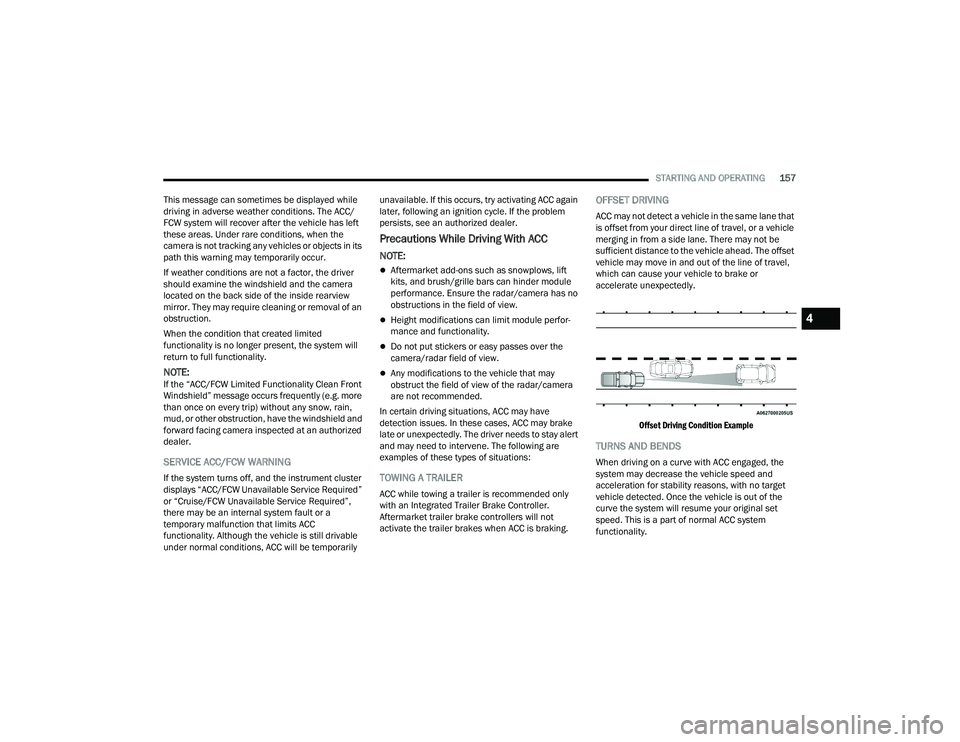
OFFSET DRIVING
ACC may not detect a vehicle in the same lane that
is offset from your direct line of travel, or a vehicle
merging in from a side lane. There may not be
sufficient distance to the vehicle ahead. The offset
vehicle may move in and out of the line of travel,
which can cause your vehicle to brake or
accelerate unexpectedly.
Offset Driving Condition Example
TURNS AND BENDS
When driving on a curve with ACC engaged, the
system may decrease the vehicle speed and
acceleration for stability reasons, with no target
vehicle detected. Once the vehicle is out of the
curve the system will resume your original set
speed. This is a part of normal ACC system
functionality.
4
23_DPF_OM_EN_USC_t.book Page 157
Page 165 of 444
STARTING AND OPERATING163
When you move the gear selector to the
REVERSE position and Front or Rear ParkSense
is turned off, the instrument cluster display will
show "Off" on the vehicle graphic arcs. This
vehicle graphic will be displayed for as long as
the vehicle is in REVERSE.
ParkSense, when on, will reduce the volume of
the radio when it is sounding a tone.
Clean the ParkSense sensors regularly, taking
care not to scratch or damage them. The
sensors must not be covered with ice, snow,
slush, mud, dirt or debris. Failure to do so can
result in the system not working properly. The
ParkSense system might not detect an obstacle
behind or in front of the fascia/bumper, or it
could provide a false indication that an obstacle
is behind or in front of the fascia/bumper.
Use the ParkSense switch to turn the ParkSense
system off if obstacles such as bicycle carriers,
trailer hitches, etc. are placed within 18 inches
(45 cm) of the rear fascia/bumper. Failure to do
so can result in the system misinterpreting a
close obstacle as a sensor problem, causing the
“Front/Rear ParkSense Unavailable Service
Required” message to appear in the instrument
cluster display.
LANESENSE — IF EQUIPPED
LANESENSE OPERATION
The LaneSense system is operational at speeds
above 37 mph (60 km/h) and below 112 mph
(180 km/h). It uses a forward looking camera to
detect lane markings and measure vehicle
position within the lane boundaries.
When both lane markings are detected and the
driver drifts out of the lane (no turn signal has been
applied) OR the driver departs the lane on the
opposite side of the applied turn signal (if the left
turn signal is applied and the vehicle departs to the
right), the LaneSense system provides a haptic
WARNING!
Drivers must be careful when backing up even
when using ParkSense. Always check carefully
behind your vehicle, look behind you, and be
sure to check for pedestrians, animals, other
vehicles, obstructions, and blind spots before
backing up. You are responsible for safety and
must continue to pay attention to your
surroundings. Failure to do so can result in
serious injury or death.
Before using ParkSense, it is strongly recom -
mended that the ball mount and hitch ball
assembly be disconnected from the vehicle
when the vehicle is not used for towing.
Failure to do so can result in injury or damage
to vehicles or obstacles because the hitch ball
will be much closer to the obstacle than the
rear fascia when the vehicle sounds the
continuous tone. Also, the sensors could
detect the ball mount and hitch ball assembly,
depending on its size and shape, giving a false
indication that an obstacle is behind the
vehicle.
CAUTION!
ParkSense is only a parking aid and it is
unable to recognize every obstacle, including
small obstacles. Parking curbs might be
temporarily detected or not detected at all.
Obstacles located above or below the sensors
will not be detected when they are in close
proximity.
The vehicle must be driven slowly when using
ParkSense in order to be able to stop in time
when an obstacle is detected. It is recom -
mended that the driver looks over his/her
shoulder when using ParkSense.4
23_DPF_OM_EN_USC_t.book Page 163
Page 168 of 444
166STARTING AND OPERATING
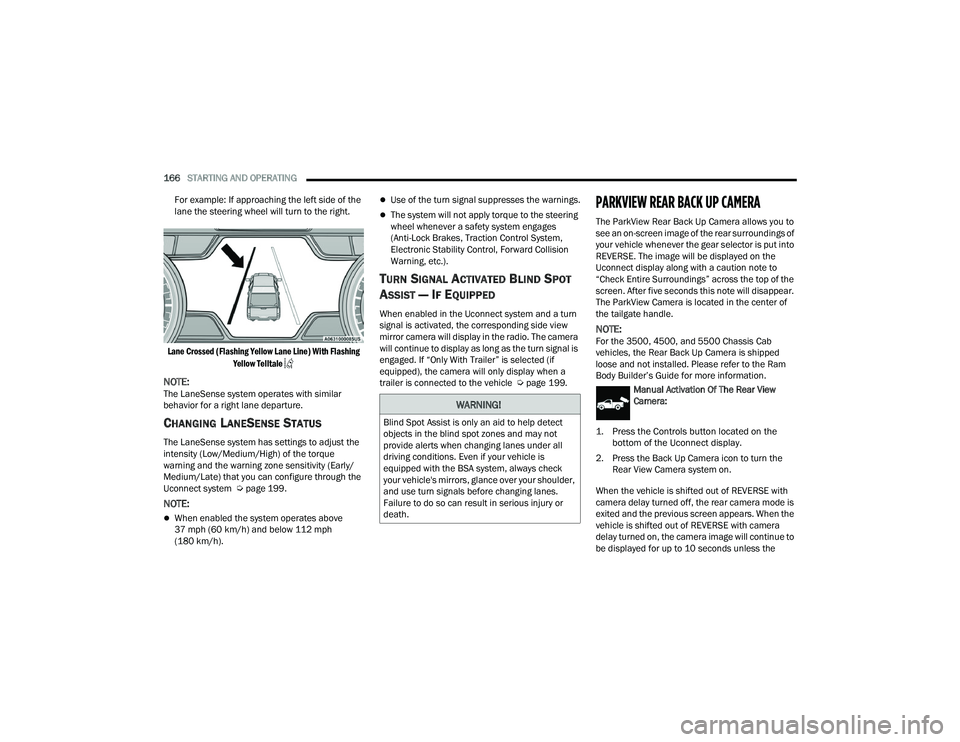
For example: If approaching the left side of the
lane the steering wheel will turn to the right.
Lane Crossed (Flashing Yellow Lane Line) With Flashing Yellow Telltale
NOTE:The LaneSense system operates with similar
behavior for a right lane departure.
CHANGING LANESENSE STATUS
The LaneSense system has settings to adjust the
intensity (Low/Medium/High) of the torque
warning and the warning zone sensitivity (Early/
Medium/Late) that you can configure through the
Uconnect system Ú page 199.
NOTE:
When enabled the system operates above
37 mph (60 km/h) and below 112 mph
(180 km/h).
Use of the turn signal suppresses the warnings.
The system will not apply torque to the steering
wheel whenever a safety system engages
(Anti-Lock Brakes, Traction Control System,
Electronic Stability Control, Forward Collision
Warning, etc.).
TURN SIGNAL ACTIVATED BLIND SPOT
A
SSIST — IF EQUIPPED
When enabled in the Uconnect system and a turn
signal is activated, the corresponding side view
mirror camera will display in the radio. The camera
will continue to display as long as the turn signal is
engaged. If “Only With Trailer” is selected (if
equipped), the camera will only display when a
trailer is connected to the vehicle Ú page 199.
PARKVIEW REAR BACK UP CAMERA
The ParkView Rear Back Up Camera allows you to
see an on-screen image of the rear surroundings of
your vehicle whenever the gear selector is put into
REVERSE. The image will be displayed on the
Uconnect display along with a caution note to
“Check Entire Surroundings” across the top of the
screen. After five seconds this note will disappear.
The ParkView Camera is located in the center of
the tailgate handle.
NOTE:For the 3500, 4500, and 5500 Chassis Cab
vehicles, the Rear Back Up Camera is shipped
loose and not installed. Please refer to the Ram
Body Builder’s Guide for more information.
Manual Activation Of The Rear View
Camera:
1. Press the Controls button located on the bottom of the Uconnect display.
2. Press the Back Up Camera icon to turn the Rear View Camera system on.
When the vehicle is shifted out of REVERSE with
camera delay turned off, the rear camera mode is
exited and the previous screen appears. When the
vehicle is shifted out of REVERSE with camera
delay turned on, the camera image will continue to
be displayed for up to 10 seconds unless the
WARNING!
Blind Spot Assist is only an aid to help detect
objects in the blind spot zones and may not
provide alerts when changing lanes under all
driving conditions. Even if your vehicle is
equipped with the BSA system, always check
your vehicle's mirrors, glance over your shoulder,
and use turn signals before changing lanes.
Failure to do so can result in serious injury or
death.
23_DPF_OM_EN_USC_t.book Page 166
Page 171 of 444
STARTING AND OPERATING169
If the camera delay is turned off, the camera image
will close and display the previous screen after
shifting out of REVERSE.
If active guidelines are enabled, the lines are
overlaid on the image in the Rear View to illustrate
the width of the vehicle. The view will also include
the side view mirrors and its projected back up
path based on the steering wheel position.
There are different colored zones to indicate the
distance to the rear of the vehicle. Refer to the
chart below:
Modes Of Operation
Standard Rear View can be manually activated by
selecting “Back Up Camera” through the Controls
menu within the Uconnect system.
Top View
The Top View will show in the Uconnect system with
Rear View and Front View in a split screen display.
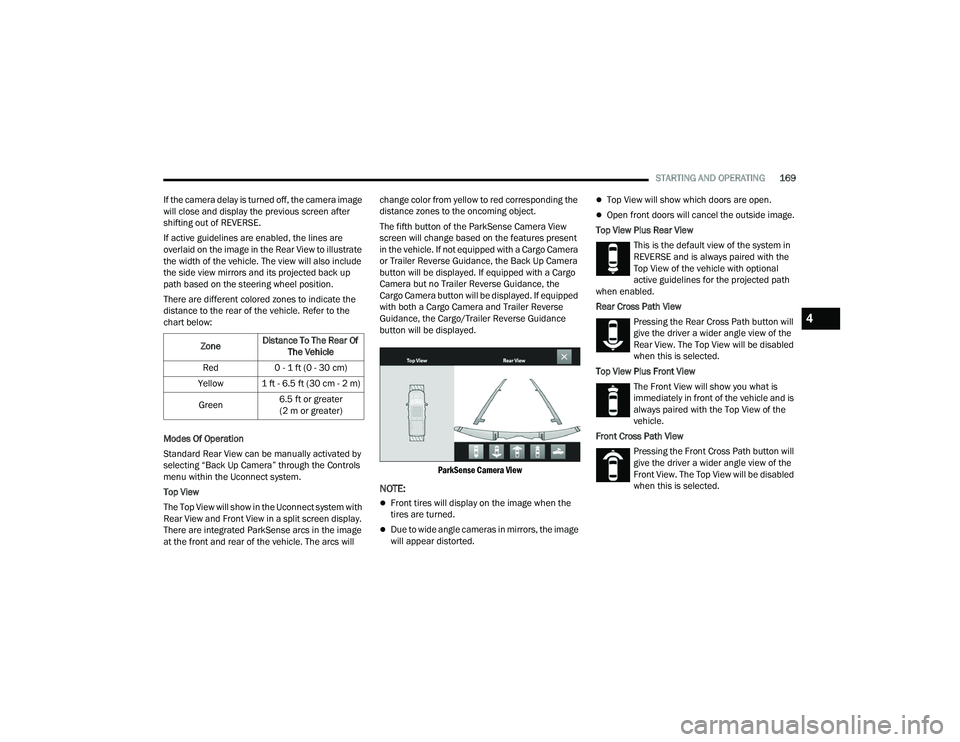
There are integrated ParkSense arcs in the image
at the front and rear of the vehicle. The arcs will change color from yellow to red corresponding the
distance zones to the oncoming object.
The fifth button of the ParkSense Camera View
screen will change based on the features present
in the vehicle. If not equipped with a Cargo Camera
or Trailer Reverse Guidance, the Back Up Camera
button will be displayed. If equipped with a Cargo
Camera but no Trailer Reverse Guidance, the
Cargo Camera button will be displayed. If equipped
with both a Cargo Camera and Trailer Reverse
Guidance, the Cargo/Trailer Reverse Guidance
button will be displayed.
ParkSense Camera View
NOTE:
Front tires will display on the image when the
tires are turned.
Due to wide angle cameras in mirrors, the image
will appear distorted.
Top View will show which doors are open.
Open front doors will cancel the outside image.
Top View Plus Rear View This is the default view of the system in
REVERSE and is always paired with the
Top View of the vehicle with optional
active guidelines for the projected path
when enabled.
Rear Cross Path View
Pressing the Rear Cross Path button will
give the driver a wider angle view of the
Rear View. The Top View will be disabled
when this is selected.
Top View Plus Front View The Front View will show you what is
immediately in front of the vehicle and is
always paired with the Top View of the
vehicle.
Front Cross Path View Pressing the Front Cross Path button will
give the driver a wider angle view of the
Front View. The Top View will be disabled
when this is selected.
Zone
Distance To The Rear Of
The Vehicle
Red 0 - 1 ft (0 - 30 cm)
Yellow 1 ft - 6.5 ft (30 cm - 2 m)
Green 6.5 ft or greater
(2 m or greater)
4
23_DPF_OM_EN_USC_t.book Page 169
Page 172 of 444
170STARTING AND OPERATING
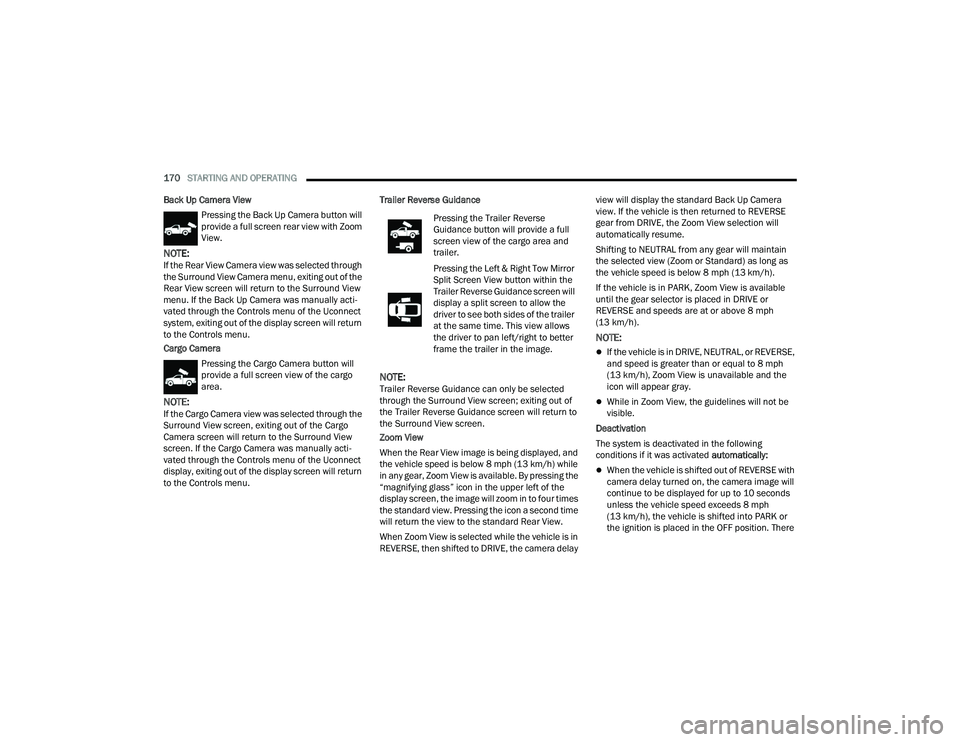
Back Up Camera View Pressing the Back Up Camera button will
provide a full screen rear view with Zoom
View.
NOTE:If the Rear View Camera view was selected through
the Surround View Camera menu, exiting out of the
Rear View screen will return to the Surround View
menu. If the Back Up Camera was manually acti -
vated through the Controls menu of the Uconnect
system, exiting out of the display screen will return
to the Controls menu.
Cargo Camera
Pressing the Cargo Camera button will
provide a full screen view of the cargo
area.
NOTE:If the Cargo Camera view was selected through the
Surround View screen, exiting out of the Cargo
Camera screen will return to the Surround View
screen. If the Cargo Camera was manually acti -
vated through the Controls menu of the Uconnect
display, exiting out of the display screen will return
to the Controls menu. Trailer Reverse Guidance
NOTE:Trailer Reverse Guidance can only be selected
through the Surround View screen; exiting out of
the Trailer Reverse Guidance screen will return to
the Surround View screen.
Zoom View
When the Rear View image is being displayed, and
the vehicle speed is below 8 mph (13 km/h) while
in any gear, Zoom View is available. By pressing the
“magnifying glass” icon in the upper left of the
display screen, the image will zoom in to four times
the standard view. Pressing the icon a second time
will return the view to the standard Rear View.
When Zoom View is selected while the vehicle is in
REVERSE, then shifted to DRIVE, the camera delay view will display the standard Back Up Camera
view. If the vehicle is then returned to REVERSE
gear from DRIVE, the Zoom View selection will
automatically resume.
Shifting to NEUTRAL from any gear will maintain
the selected view (Zoom or Standard) as long as
the vehicle speed is below 8 mph (13 km/h).
If the vehicle is in PARK, Zoom View is available
until the gear selector is placed in DRIVE or
REVERSE and speeds are at or above 8 mph
(13 km/h).
NOTE:
If the vehicle is in DRIVE, NEUTRAL, or REVERSE,
and speed is greater than or equal to 8 mph
(13 km/h), Zoom View is unavailable and the
icon will appear gray.
While in Zoom View, the guidelines will not be
visible.
Deactivation
The system is deactivated in the following
conditions if it was activated automatically:
When the vehicle is shifted out of REVERSE with
camera delay turned on, the camera image will
continue to be displayed for up to 10 seconds
unless the vehicle speed exceeds 8 mph
(13 km/h), the vehicle is shifted into PARK or
the ignition is placed in the OFF position. There
Pressing the Trailer Reverse
Guidance button will provide a full
screen view of the cargo area and
trailer.
Pressing the Left & Right Tow Mirror
Split Screen View button within the
Trailer Reverse Guidance screen will
display a split screen to allow the
driver to see both sides of the trailer
at the same time. This view allows
the driver to pan left/right to better
frame the trailer in the image.
23_DPF_OM_EN_USC_t.book Page 170
Page 174 of 444
172STARTING AND OPERATING
Deactivation
The Forward Facing Camera is deactivated in the
following conditions:
The vehicle exceeds 8 mph (13 km/h), except
when vehicle is in 4WD Low
The touchscreen X button on the display is
pressed.
The vehicle is shifted into PARK.
The ignition is placed in the OFF position.
NOTE:If the vehicle is in 4WD Low, the Forward Facing
Camera image will be displayed until the X button
is pressed or the ignition is placed in the OFF
position.
Trailer Reverse Guidance — If Equipped
The Trailer Reverse Guidance feature assists the
driver in backing up a trailer by providing
adjustable camera views of the trailer and
surrounding area. The cameras are mounted on
the side mirrors and the images will be displayed
side-by-side on the touchscreen. Left and right
camera images are swapped and mirrored on the
touchscreen to show the equivalent area behind
the vehicle as though the driver is using the side
mirrors. Activation
The Trailer Reverse Guidance feature can be
activated by pressing the Trailer Reverse Guidance
button on the Back Up/Cargo Camera Display.
Deactivation
When the vehicle is shifted out of REVERSE with
camera delay turned on, the camera image will
continue to be displayed for up to 10 seconds unless
the vehicle speed exceeds 8 mph (13 km/h), the
vehicle is shifted into PARK or the ignition is placed
in the OFF position. There is a touchscreen X button
to disable the display of the camera image.
If Trailer Reverse Guidance is selected through
manually activated Surround View, Back Up
Camera, or Cargo Camera, the following
deactivation conditions apply:
The touchscreen X button on the display is
pressed
The ignition is placed in the OFF position
The vehicle speed is over 8 mph (13 km/h) for
10 seconds
Blind Spot Assist Cameras — If Equipped
There are cameras located in the exterior mirrors
to assist in blind spot detection by providing a wide
camera view of the side of the vehicle selected.
The blind spot cameras will work in the ON/RUN or
ignition ON position. Press the X or More Cams
button to exit the screen. The Blind Spot Cameras can also be activated with Turn Signal
engagement, see Ú
page 166 for more
information.
Activation
Press the Driver Blind Spot or Passenger Blind
Spot buttons by locating the Vehicle screen, then
Cameras screen.
Driver Blind Spot
Pressing the Driver’s Blind Spot button
will provide a full screen view of the
driver’s outside mirror camera.
Passenger Blind Spot Pressing the Passenger’s Blind Spot
button will provide a full screen view of
the passenger’s outside mirror camera.
WARNING!
Drivers must be careful when backing up even
when using the Surround View Camera. Always
check carefully behind your vehicle, and be sure
to check for pedestrians, animals, other
vehicles, obstructions, or blind spots before
backing up. You are responsible for the safety of
your surroundings and must continue to pay
attention while backing up. Failure to do so can
result in serious injury or death.
23_DPF_OM_EN_USC_t.book Page 172
Page 175 of 444
STARTING AND OPERATING173
NOTE:If the vehicle is not equipped with a Pickup Box:
The bottom wedge of the Top View will be
displayed in black.
The Rear Cross Path button will be grayed out.
The guidelines will not be overlaid on Top View/
Rear View and Full Screen of Rear View.
Black video will be displayed for the right side of
the Top and Rear View, and full screen of the
Rear View when the Rear View Camera is not
connected. To access all camera options when the vehicle is in
REVERSE, select the More Cams button on the
Surround View screen.
For information on Auxiliary Cameras (if equipped),
see Ú
page 176.
TRAILER CAMERAS — IF EQUIPPED
TRAILER SURROUND VIEW CAMERA
S
YSTEM — IF EQUIPPED
The Trailer Surround View Camera system allows
you to see an on-screen image of the surroundings
and the Top View of a trailer using four mountable
cameras. This occurs whenever the More Cams
button is selected, or when enabled through the
Uconnect system. The image will be displayed on
the Uconnect display along with a caution note
“Check Entire Surroundings”. After five seconds,
this note will disappear.
NOTE:
Trailer Surround View Camera kit is only avail -
able for vehicles equipped with the Surround
View Camera system.
The Trailer Surround View Camera system has
programmable settings that may be selected
through the Uconnect system Ú page 199.Set Up
The Trailer Surround View Camera system includes
an installation kit with a Trailer Surround View
Module and four Trailer Surround View Cameras
that must be installed on your trailer prior to
connecting to your vehicle. See the installation
instructions included with the Trailer Surround
View installation kit for more information. Once the
Trailer Surround View Module and cameras are
installed and the trailer is connected to the vehicle
via the 12-way connector, the Trailer Surround
View Camera settings can be accessed. The Trailer
Surround View Camera settings can be accessed
through Uconnect Settings by pressing the Trailer
button in the Trailer Settings or the Camera
Settings. The system requires input of the trailer
dimensions prior to use of the system.
NOTE:
If a trailer is connected but the trailer dimen
-
sions have not been entered in the Trailer
Surround settings page, the system will default
to the settings page.
If a trailer is not connected and any button is
selected, a message will appear: “Connect
Trailer Equipped With Trailer Surround View
System”.
CAUTION!
To avoid vehicle damage, Surround View
should only be used as a parking aid. The
Surround View camera is unable to view every
obstacle or object in your drive path.
To avoid vehicle damage, the vehicle must be
driven slowly when using Surround View to be
able to stop in time when an obstacle is seen.
It is recommended that the driver look
frequently over his/her shoulder when using
Surround View.
4
23_DPF_OM_EN_USC_t.book Page 173
Page 176 of 444
174STARTING AND OPERATING
Inputting Trailer Values
For the Trailer Surround View Camera system to
function, all fields must be entered. When a value
is needed the screen will display “Required”.
When the Trailer Type button is selected two
options are available: Conventional or Gooseneck/
5th Wheel.
Activation
The Trailer Surround Camera can be activated
through the Uconnect system when the vehicle is
in PARK, NEUTRAL, or DRIVE.
When the vehicle is shifted into REVERSE,
Surround View Camera showing the Top View and
Back Up Camera is the default view of the system.
Press the More Cams button and then press the
Trailer tab to access the Trailer Cameras. Press Trailer Surround Camera button to access Top
View and Rear View of the trailer.
If the camera delay is turned on, the camera image
will display for up to 10 seconds after shifting out
of REVERSE. The camera image will not display for
10 seconds if the vehicle speed exceeds 8 mph
(13 km/h), the vehicle is shifted into PARK, or the
ignition is placed in the OFF position. The
touchscreen X button disables the display of the
camera image.
If the camera delay is turned off, the camera image
will close and display the previous screen after
shifting out of REVERSE.
Modes Of Operation
The Trailer Surround View Camera system offers
two different camera displays:
Top View split screen with one selected
mounted camera
Full screen view of a selected mounted camera
Press the More Cams button on the Surround View
screen and select the Trailer tab to access the
Trailer Cameras. Press Trailer Surround Camera
button to access the default Top View and Rear
View of the trailer.
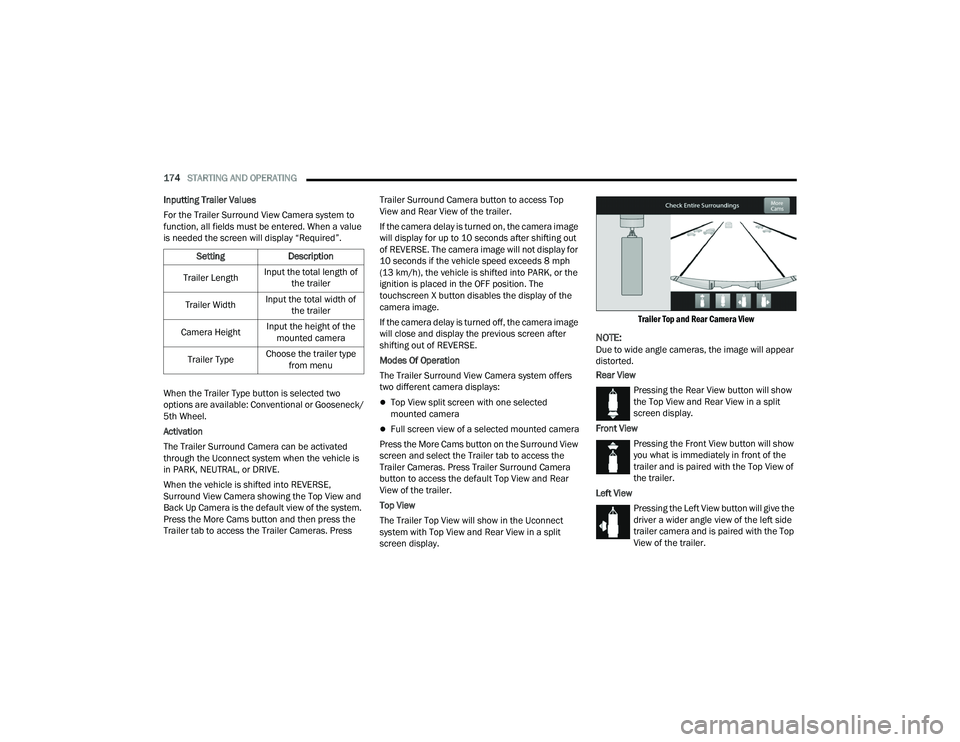
Top View
The Trailer Top View will show in the Uconnect
system with Top View and Rear View in a split
screen display.
Trailer Top and Rear Camera View
NOTE:Due to wide angle cameras, the image will appear
distorted.
Rear View
Pressing the Rear View button will show
the Top View and Rear View in a split
screen display.
Front View Pressing the Front View button will show
you what is immediately in front of the
trailer and is paired with the Top View of
the trailer.
Left View Pressing the Left View button will give the
driver a wider angle view of the left side
trailer camera and is paired with the Top
View of the trailer.
Setting
Description
Trailer Length Input the total length of
the trailer
Trailer Width Input the total width of
the trailer
Camera Height Input the height of the
mounted camera
Trailer Type Choose the trailer type
from menu
23_DPF_OM_EN_USC_t.book Page 174