ad blue RAM CHASSIS CAB 2023 Owners Manual
[x] Cancel search | Manufacturer: RAM, Model Year: 2023, Model line: CHASSIS CAB, Model: RAM CHASSIS CAB 2023Pages: 444, PDF Size: 20.51 MB
Page 6 of 444
4
GETTING TO KNOW YOUR
INSTRUMENT PANEL
MIDLINE INSTRUMENT CLUSTER — GASOLINE.....78
Midline Instrument Cluster Descriptions ........79
HIGHLINE INSTRUMENT CLUSTER — GASOLINE...80
Highline Instrument Cluster Descriptions.......81
PREMIUM INSTRUMENT CLUSTER — GASOLINE ..82
Premium Instrument Cluster Descriptions —
Gasoline ............................................................83
BASE INSTRUMENT CLUSTER — DIESEL ........... 84
Diesel Instrument Cluster ...............................85
MIDLINE INSTRUMENT CLUSTER — DIESEL ...... 86
Diesel Instrument Cluster ...............................87
PREMIUM INSTRUMENT CLUSTER — DIESEL .... 88
Premium Instrument Cluster Descriptions —
Diesel ................................................................89
INSTRUMENT CLUSTER DISPLAY ........................ 89
Instrument Cluster Display Location and
Controls .............................................................90
Oil Life Reset ....................................................92
Display Menu Items .........................................93
Diesel Messages And Warnings ......................98
Battery Saver On/Battery Saver Mode
Message — Electrical Load Reduction
Actions — If Equipped ................................... 101 WARNING LIGHTS AND MESSAGES ................. 102
Red Warning Lights ....................................... 103
Yellow Warning Lights ................................... 105Yellow Indicator Lights .................................. 108
Green Indicator Lights .................................. 109
White Indicator Lights ................................... 110Blue Indicator Lights ..................................... 111
ONBOARD DIAGNOSTIC SYSTEM — OBD II ..... 111
Onboard Diagnostic System
(OBD II) Cybersecurity ................................... 111
EMISSIONS INSPECTION AND MAINTENANCE
PROGRAMS.......................................................... 112
STARTING AND OPERATING
STARTING THE ENGINE— GASOLINE ENGINE.. 113
Automatic Transmission ............................... 113
AutoPark — Rotary Shifter and 8-Speed
Transmission Only ......................................... 113
Tip Start Feature .......................................... 115
Keyless Enter ‘n Go™ — Ignition................... 115Normal Starting Using ENGINE START/STOP
Button ........................................................... 115
Cold Weather Operation
(Below –22°F Or −30°C) ............................ 117
After Starting ................................................. 117 STARTING THE ENGINE — DIESEL ENGINE....... 117
Automatic Transmission ............................... 117
Keyless Enter ‘n Go™ — Ignition .................. 117
Extreme Cold Weather .................................. 119Normal Starting Procedure — Engine Manifold
Air Temperature Above 66°F (19°C) .......... 119
Starting Procedure — Engine Manifold
Air Temperature 0°F To 66°F
(–18°C to 19°C) ........................................... 120
Starting Procedure — Engine Manifold Air
Temperature Below 0°F (-18°C) ................. 121
Starting Fluids ............................................... 121
NORMAL OPERATION — DIESEL ENGINE ......... 122
Cold Weather Precautions ............................ 122
Engine Idling ................................................. 124
Noise .............................................................. 124
Stopping The Engine ..................................... 125Idle Shutdown ............................................... 125Programmable Maximum Vehicle Speed .... 126
Operating Precautions .................................. 126Cooling System Tips ...................................... 126
Diesel Particulate Filter (DPF) Manual
Regeneration — If Equipped ......................... 127
ENGINE BLOCK HEATER — IF EQUIPPED .......... 127
ENGINE BREAK-IN RECOMMENDATIONS—
GASOLINE ENGINE .............................................. 127
23_DPF_OM_EN_USC_t.book Page 4
Page 16 of 444

14 Green Indicator Lights
Adaptive Cruise Control (ACC) Set With Target Indicator Light Úpage 109
Adaptive Cruise Control (ACC) Set With No Target Detected Indicator Light
Ú page 110
Automatic Diesel Exhaust Brake Indicator Light Úpage 110
Cruise Control Set Indicator Light Úpage 110
ECO Mode Indicator Light Úpage 110
Front Fog Indicator Light Úpage 110
LaneSense Indicator Light Úpage 110
Parking/Headlights On Indicator Light Úpage 110
Turn Signal Indicator Lights
Úpage 110
White Indicator Lights
Adaptive Cruise Control (ACC) Ready Indicator Light Úpage 110
Cruise Control Ready Indicator Light Úpage 110
LaneSense Indicator Light Úpage 110
Set Speed Display Indicator Light Úpage 110
Blue Indicator Lights High Beam Indicator Light Úpage 111
Green Indicator Lights
23_DPF_OM_EN_USC_t.book Page 14
Page 62 of 444
60GETTING TO KNOW YOUR VEHICLE
Auto Button
Set your desired temperature and press
AUTO. AUTO will achieve and maintain
your desired temperature by
automatically adjusting the blower speed
and air distribution. A/C may be active during AUTO
operation to improve performance. AUTO mode is
highly recommended for efficiency.
You can turn AUTO on in one of two ways:
Press and release this button on the touchscreen.
Push the button on the faceplate.
Toggling this function will cause the system to
switch between manual mode and automatic
mode Ú page 64.
Front Defrost Button
Press and release the Front Defrost
button on the touchscreen, or push and
release the button on the faceplate, to
change the current airflow setting to
Defrost mode. The Front Defrost indicator
illuminates when Front Defrost is on. Air comes
from the windshield and side window demist
outlets. When the defrost button is selected, the
blower level may increase. Use Defrost mode with
maximum temperature settings for best
windshield and side window defrosting and
defogging. When toggling the front defrost mode
button, the climate system will return to the
previous setting.
Rear Defrost Button
Press and release the Rear Defrost
button on the touchscreen, or push and
release the button on the faceplate, to
turn on the rear window defroster and the
heated outside mirrors (if equipped). The Rear
Defrost indicator illuminates when the rear window
defroster is on. The rear window defroster
automatically turns off after 10 minutes.
Driver And Passenger Temperature Up And
Down Buttons
These buttons provide the driver and passenger
with independent temperature control.
Push the red button (or rotate knob if
equipped) on the faceplate or
touchscreen, or press and slide the
temperature bar towards the red arrow
button on the touchscreen for warmer
temperature settings.
Push the blue button (or rotate knob if
equipped) on the faceplate or
touchscreen, or press and slide the
temperature bar towards the blue arrow
button on the touchscreen for cooler temperature
settings.
NOTE:
The numbers within the temperature display will
only appear if the system is equipped with an
automatic climate control system.
Up and down buttons are only available on vehi -
cles equipped with a 12-inch display.
CAUTION!
Failure to follow these cautions can cause
damage to the heating elements:
Use care when washing the inside of the rear
window. Do not use abrasive window cleaners
on the interior surface of the window. Use a
soft cloth and a mild washing solution, wiping
parallel to the heating elements. Labels can
be peeled off after soaking with warm water.
Do not use scrapers, sharp instruments, or
abrasive window cleaners on the interior
surface of the window.
Keep all objects a safe distance from the
window.
23_DPF_OM_EN_USC_t.book Page 60
Page 76 of 444

74GETTING TO KNOW YOUR VEHICLE
WIRELESS CHARGING PAD —
I
F EQUIPPED
Wireless Charging Pad
Your vehicle may be equipped with a 15W 3A Qi
wireless charging pad located inside of the center
console. This charging pad is designed to
wirelessly charge your Qi enabled mobile phone. Qi
is a standard that uses magnetic induction to
transfer power to your mobile device.
Your mobile phone must be designed for Qi
wireless charging. If the phone is not equipped
with Qi wireless charging functionality, an
aftermarket sleeve or a specialized back plate can
be purchased from your mobile phone provider or
a local electronics retailer. Please see your
phone’s owner’s manual for further information. The wireless charging pad is equipped with an
anti-slip mat to hold your mobile phone in place
and an LED indicator light.
LED Indicator Status:
No Light: Charging pad is idle or searching for a
device.
Blue Light: Device is detected, and is charging.
Red Light/Flashing: Internal error, or foreign
object is detected.
NOTE:
The ignition must be in the ON/RUN or START
position and all vehicle doors must be closed for
the wireless charging pad to operate.
Using a phone case may interfere with wireless
charging.
WINDOWS
POWER WINDOWS — IF EQUIPPED
The window controls on the driver's door control all
the door windows.
Power Window Switches
The passenger door windows can also be operated
by using the single window controls on the
passenger door trim panel. The window controls
will operate only when the ignition is in the ACC or
ON/RUN position.
To open the window part way (manually), push the
window switch down briefly and release.
CAUTION!
The key fob should not be placed on the
charging pad or within 6 inches (15 cm) of it.
Doing so can cause excessive heat buildup and
damage to the fob. Placing the fob in close
proximity of the charging pad blocks the fob from
being detected by the vehicle and prevents the
vehicle from starting.
23_DPF_OM_EN_USC_t.book Page 74
Page 113 of 444

GETTING TO KNOW YOUR INSTRUMENT PANEL111
BLUE INDICATOR LIGHTS
High Beam Indicator Light
This indicator light will illuminate to
indicate that the high beam headlights
are on. With the low beams activated,
push the multifunction lever forward
(toward the front of the vehicle) to turn on the high
beams. Pull the multifunction lever rearward
(toward the rear of the vehicle) to turn off the high
beams. If the high beams are off, pull the lever
toward you for a temporary high beam on, "flash to
pass" scenario.
ONBOARD DIAGNOSTIC SYSTEM — OBD II
Your vehicle is equipped with a sophisticated
Onboard Diagnostic system called OBD II. This
system monitors the performance of the
emissions, engine, and transmission control
systems. When these systems are operating
properly, your vehicle will provide excellent
performance and fuel economy, as well as engine
emissions well within current government
regulations. If any of these systems require service, the OBD II
system will turn on the Malfunction Indicator Light
(MIL). It will also store diagnostic codes and other
information to assist your service technician in
making repairs. Although your vehicle will usually
be drivable and not need towing, see an authorized
dealer for service as soon as possible.
ONBOARD DIAGNOSTIC SYSTEM
(OBD II) C
YBERSECURITY
Your vehicle is required to have an OBD II and a
connection port to allow access to information
related to the performance of your emissions
controls. Authorized service technicians may need
to access this information to assist with the
diagnosis and service of your vehicle and
emissions system Ú page 199.
CAUTION!
Prolonged driving with the MIL on could cause
further damage to the emission control
system. It could also affect fuel economy and
driveability. The vehicle must be serviced
before any emissions tests can be performed.
If the MIL is flashing while the vehicle is
running, severe catalytic converter damage
and power loss will soon occur. Immediate
service is required.
WARNING!
ONLY an authorized service technician should
connect equipment to the OBD II connection
port in order to read the VIN, diagnose, or
service your vehicle.
If unauthorized equipment is connected to the
OBD II connection port, such as a
driver-behavior tracking device, it may:
Be possible that vehicle systems,
including safety related systems, could be
impaired or a loss of vehicle control could
occur that may result in an accident
involving serious injury or death.
Access, or allow others to access, infor -
mation stored in your vehicle systems,
including personal information.
3
23_DPF_OM_EN_USC_t.book Page 111
Page 178 of 444
176STARTING AND OPERATING
(Continued)
AUX CAMERA — IF EQUIPPED
Your vehicle may be equipped with one or two AUX
Cameras, which display a rearview image from the
trailer on the touchscreen.
NOTE:Two Aux Cameras are only available on vehicles
with NAV equipped radios if the vehicle is not
equipped with a Center High Mounted Stop Lamp
(CHMSL) and Surround View Camera system.
Activation
The AUX Camera is activated by first pressing the
Backup Camera or Cargo Camera (if equipped)
button on the touchscreen, followed by the AUX
button located in the upper left corner of the rearview display. On vehicles with Surround View
Camera (if equipped), the AUX Camera can be
activated when the vehicle is in REVERSE by first
pressing the More Cams button in the Surround
view screen, followed by the AUX tab. The AUX
camera can also be activated when the vehicle is
in REVERSE by pressing the AUX button.
If equipped with two AUX Cameras, you can switch
between each camera by pressing the AUX 1 or
AUX 2 buttons on the Trailer Camera display.
Deactivation
The AUX Camera is deactivated by pressing the
touchscreen X button in the upper right corner of
the touchscreen. This will return the display back
to the previously displayed screen.
NOTE:
If the AUX button is pressed and no AUX Camera
is connected, the touchscreen will display a blue
screen along with the message “Camera
System Unavailable.” The screen can be exited
out by pressing the touchscreen X button in the upper right hand corner. This will return the
display back to the previously displayed screen.
Zoom View is not available with the AUX Camera
feature.
The display will always default to the Trailer
Camera display AUX 1.
ENGINE RUNAWAY
Diesel engine runaway is a rare condition affecting
diesel engines, where the engine consumes its
own lubrication oil and runs at higher and higher
RPM until it overspeeds to a point where it destroys
itself due to either mechanical failure or engine
seizure through lack of lubrication.
CAUTION!
To avoid vehicle damage, Trailer Surround
View should only be used as a parking aid. The
Trailer Surround View Camera is unable to
view every obstacle or object in your drive
path.
To avoid vehicle damage, the vehicle must be
driven slowly when using Trailer Surround
View to be able to stop in time when an
obstacle is seen. It is recommended that the
driver look frequently over his/her shoulder
when using Trailer Surround View.
AUX 1 Camera Button
AUX 2 Camera Button
WARNING!
In case of engine runaway due to flammable
fumes from fuel spills or turbocharger oil leaks
being sucked into the engine, do the following to
help avoid personal injury and/or vehicle
damage:
Turn the ignition switch to the OFF position.
Using a CO2 or dry chemical type fire extin
-
guisher, direct the spray from the fire extin -
guisher into the grille on the passenger side so
that the spray enters the engine air intake.
23_DPF_OM_EN_USC_t.book Page 176
Page 211 of 444
MULTIMEDIA209
Phone/Bluetooth®
Voice
When the Phone/Bluetooth® button is pressed on the touchscreen, the system displays the options related to Bluetooth® connectivity from an external audio
device or smartphone. The list of paired audio devices or smartphones can be accessed from this menu.
NOTE:Depending on the vehicle’s options, feature settings may vary.
Setting Name Description
Device Manager This setting will open the Device Manager main screen.
Do Not Disturb All This setting will open the Do Not Disturb All settings menu. The available
options are “On” and “Off”.
Enable Two Active Phones This setting will enable or disable two active phones within the vehicle. The
setting options are “On” and “Off”.
Phone Pop-Ups Displayed In Cluster This setting will display incoming calls in the Instrument Cluster Display.
When the Voice button is pressed on the touchscreen, the system displays the options related to the vehicle’s Voice Recognition feature.
NOTE:Depending on the vehicle’s options, feature settings may vary.
Setting NameDescription
Voice Options This setting will allow you to change the system’s voice to either “Male” or
“Female”.
Wake Up Word This setting will allow you to set the system’s “Wake Up” word. The available
options are “Off”, “Hey, Uconnect”, and “Hey, Ram”.
5
23_DPF_OM_EN_USC_t.book Page 209
Page 222 of 444

220MULTIMEDIA
Reset
When the Reset button is pressed on the touchscreen, the system displays the options related to resetting the Uconnect system back to its default settings.
These settings can clear personal data and reset selected settings from other menus.
NOTE:Depending on the vehicle’s options, feature settings may vary.
Setting Name Description
Restart Radio This setting will reboot the radio.
Reset Apps Drawer To Default Order This setting will return the apps drawer to the default order. The available
options are “Yes” and “Cancel”. The X button can also be pressed to cancel
the screen.
Restore Settings to Default This setting will return all the previously changed settings to their factory
defaults.
Clear Personal Data This setting will display a pop-up that gives you the option to clear all personal
data from the system, including Bluetooth® devices and presets.
Reset Wi-Fi Password For Projection This setting will allow you to reset the vehicle’s Wi-Fi password for smartphone
projection. The available options are “Yes” and “Cancel”. The X button can
also be pressed to cancel the screen.
Reset Performance Values This setting will reset the performance values for your vehicle.
Factory Reset This setting will restore the radio to its factory default settings.
23_DPF_OM_EN_USC_t.book Page 220
Page 226 of 444
224MULTIMEDIA
UCONNECT MODES
STEERING WHEEL AUDIO CONTROLS
The remote sound system controls are located on
the rear surface of the steering wheel at the three
and nine o’clock positions.
Remote Sound System Controls
The right-hand control is a rocker-type switch with
a push button in the center and controls the
volume and mode of the sound system. Pushing
the top of the rocker switch will increase the
volume, and pushing the bottom of the rocker
switch will decrease the volume. Pushing the right-hand control’s center button will
make the radio switch between the various modes
available (AM/FM/SXM or Media, etc.).
The left-hand control is a rocker-type switch with a
push button in the center. The function of the
left-hand control is different depending on which
mode you are in.
The following describes the left-hand control
operation in each mode:
Radio Operation
Pushing the top of the switch will Seek Up for the
next available station and pushing the bottom of
the switch will Seek Down for the next available
station.
The button located in the center of the left-hand
control will tune to the next preset station that you
have programmed in the radio presets.
Media Mode
Pushing the top of the switch skips to the next
track on the selected media (AUX/USB/
Bluetooth®). Pushing the switch up twice will go
forward two tracks. Pushing the bottom switch
goes to the beginning of the current track, or the
beginning of the previous track if it is within eight
seconds after the current track begins to play.
Double pressing the bottom button switch will skip
to the previous track if it is after eight seconds into
the current track.
RADIO MODE
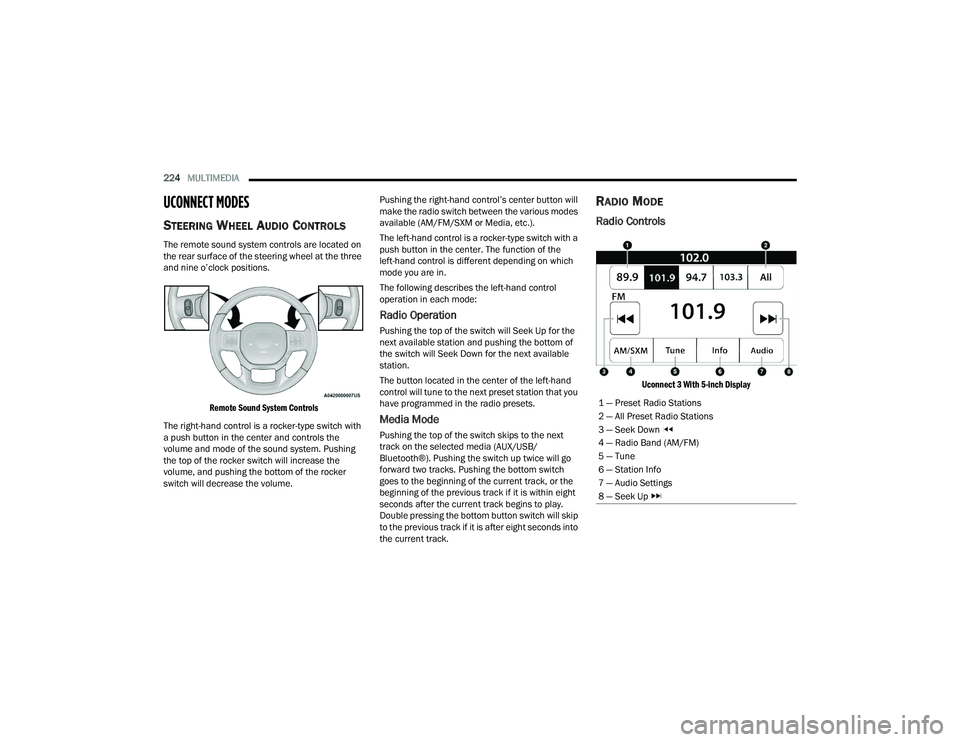
Radio Controls
Uconnect 3 With 5-inch Display
1 — Preset Radio Stations
2 — All Preset Radio Stations
3 — Seek Down
4 — Radio Band (AM/FM)
5 — Tune
6 — Station Info
7 — Audio Settings
8 — Seek Up
23_DPF_OM_EN_USC_t.book Page 224
Page 234 of 444
232MULTIMEDIA
MEDIA MODE
Operating Media Mode
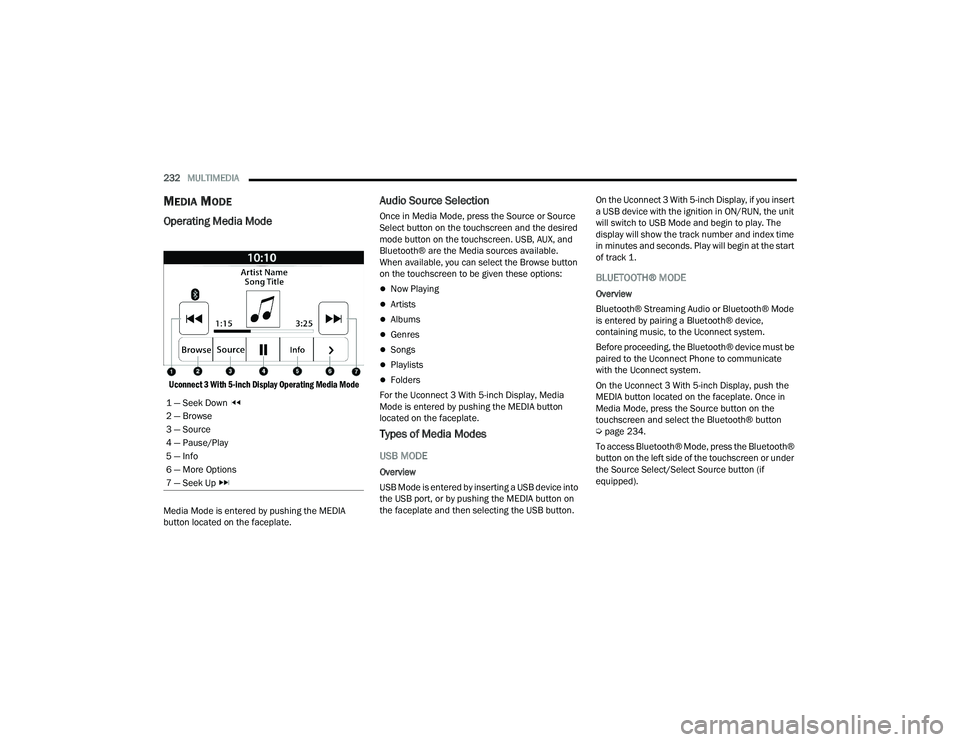
Uconnect 3 With 5-inch Display Operating Media Mode
Media Mode is entered by pushing the MEDIA
button located on the faceplate.
Audio Source Selection
Once in Media Mode, press the Source or Source
Select button on the touchscreen and the desired
mode button on the touchscreen. USB, AUX, and
Bluetooth® are the Media sources available.
When available, you can select the Browse button
on the touchscreen to be given these options:
Now Playing
Artists
Albums
Genres
Songs
Playlists
Folders
For the Uconnect 3 With 5-inch Display, Media
Mode is entered by pushing the MEDIA button
located on the faceplate.
Types of Media Modes
USB MODE
Overview
USB Mode is entered by inserting a USB device into
the USB port, or by pushing the MEDIA button on
the faceplate and then selecting the USB button. On the Uconnect 3 With 5-inch Display, if you insert
a USB device with the ignition in ON/RUN, the unit
will switch to USB Mode and begin to play. The
display will show the track number and index time
in minutes and seconds. Play will begin at the start
of track 1.
BLUETOOTH® MODE
Overview
Bluetooth® Streaming Audio or Bluetooth® Mode
is entered by pairing a Bluetooth® device,
containing music, to the Uconnect system.
Before proceeding, the Bluetooth® device must be
paired to the Uconnect Phone to communicate
with the Uconnect system.
On the Uconnect 3 With 5-inch Display, push the
MEDIA button located on the faceplate. Once in
Media Mode, press the Source button on the
touchscreen and select the Bluetooth® button
Ú
page 234.
To access Bluetooth® Mode, press the Bluetooth®
button on the left side of the touchscreen or under
the Source Select/Select Source button (if
equipped).
1 — Seek Down
2 — Browse
3 — Source
4 — Pause/Play
5 — Info
6 — More Options
7 — Seek Up
23_DPF_OM_EN_USC_t.book Page 232