horn RAM CHASSIS CAB 2023 Owners Manual
[x] Cancel search | Manufacturer: RAM, Model Year: 2023, Model line: CHASSIS CAB, Model: RAM CHASSIS CAB 2023Pages: 444, PDF Size: 20.51 MB
Page 8 of 444
6
RECREATIONAL TOWING
(BEHIND MOTORHOME) ..................................... 194
Towing This Vehicle Behind Another Vehicle ...194
Recreational Towing — Two-Wheel
Drive Models.................................................. 195
Recreational Towing — Four-Wheel
Drive Models.................................................. 195
DRIVING TIPS ....................................................... 197
Driving On Slippery Surfaces ....................... 197
Driving Through Water ................................. 198
MULTIMEDIA
UCONNECT SYSTEMS ......................................... 199
CYBERSECURITY ................................................. 199
UCONNECT SETTINGS ........................................ 199Customer Programmable Features .............. 200
UCONNECT INTRODUCTION................................ 221
System Overview .......................................... 221
Safety And General Information ................... 223
UCONNECT MODES ............................................. 224
Steering Wheel Audio Controls ..................... 224
Radio Mode .................................................. 224
Media Mode .................................................. 232
Phone Mode ................................................. 234 CONNECTED VEHICLE SERVICES —
IF EQUIPPED ....................................................... 244
Is My Vehicle Connected?............................. 244
Introduction To Connected Vehicle
Services ........................................................ 244Getting Started With Connected Vehicle
Services ........................................................ 246Using SiriusXM Guardian™ .......................... 247
Manage My SiriusXM Guardian™ Account .. 258
CONNECTED SERVICES FAQS .......................... 258
Connected Services SOS FAQs —
If Equipped .................................................... 259
Connected Services Remote Door Lock/
Unlock FAQs .................................................. 259
Connected Services Roadside Assistance
FAQs .............................................................. 259
Connected Services Send & Go FAQs —
If Equipped .................................................... 259
Connected Services Vehicle Finder FAQs ... 260
Connected Services Stolen Vehicle Assistance
FAQs — If Equipped ...................................... 260
Connected Services Remote Vehicle
Start FAQs ..................................................... 260Connected Services Remote Horn &
Lights FAQs .................................................... 261
Connected Services Account FAQs —
If Equipped..................................................... 261Data Collection & Privacy ............................. 263
RADIO OPERATION AND MOBILE PHONES ..... 263
Regulatory And Safety Information .............. 264 OFF-ROAD PAGES — IF EQUIPPED .................... 264
Off-Road Pages Status Bar ........................... 265
Vehicle Dynamics .......................................... 266Accessory Gauge ........................................... 267
Pitch & Roll .................................................... 268
Suspension .................................................... 269
Forward Facing Camera................................ 269
SAFETY
SAFETY FEATURES .............................................. 270
Anti-Lock Brake System (ABS) ..................... 270Rear Seat Reminder Alert (RSRA) ................ 271Electronic Brake Control (EBC) System ....... 271
AUXILIARY DRIVING SYSTEMS .......................... 277
Blind Spot Assist Cameras —
If Equipped .................................................... 277
Forward Collision Warning (FCW) With
Mitigation — If Equipped ............................... 278
Tire Pressure Monitoring System (TPMS) ... 280
OCCUPANT RESTRAINT SYSTEMS ................... 288
Occupant Restraint Systems Features ....... 288
Important Safety Precautions ...................... 288
Seat Belt Systems ........................................ 289
Supplemental Restraint Systems (SRS) ...... 296Child Restraints ............................................. 305
23_DPF_OM_EN_USC_t.book Page 6
Page 17 of 444
15
GETTING TO KNOW YOUR VEHICLE
KEYS
KEY FOB
Your vehicle is equipped with a key fob which
supports Remote Keyless Entry (RKE) (if equipped)
and Keyless Enter ‘n Go™ (if equipped).
If the vehicle is equipped with remote power door
locks, the key fob allows you to lock or unlock all
doors, as well as activate the Panic Alarm, from
distances up to approximately 66 ft (20 m). The
key fob does not need to be pointed at the vehicle
to activate the system.
NOTE:
The key fob’s wireless signal may be blocked if
the key fob is located next to a mobile phone,
laptop, or other electronic device. This may
result in poor performance.
The key fob should not be placed next to the
wireless charging pad (if equipped).
In the ON/RUN position, all key fob buttons will
work until the vehicle reaches 2 mph (4 km/h).
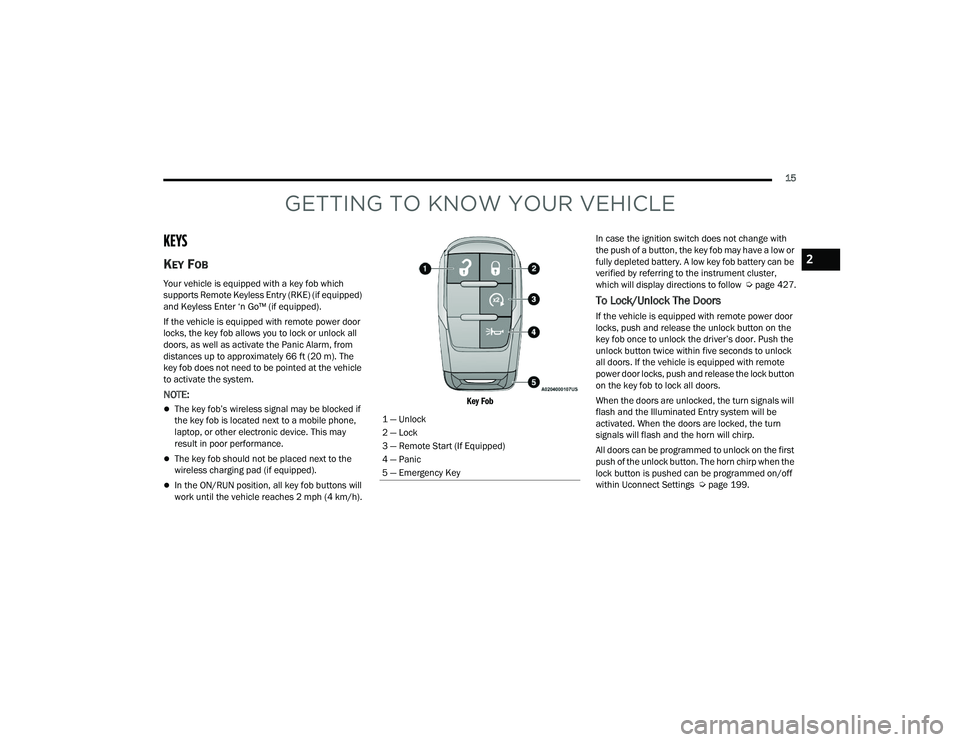
Key Fob
In case the ignition switch does not change with
the push of a button, the key fob may have a low or
fully depleted battery. A low key fob battery can be
verified by referring to the instrument cluster,
which will display directions to follow
Úpage 427.
To Lock/Unlock The Doors
If the vehicle is equipped with remote power door
locks, push and release the unlock button on the
key fob once to unlock the driver’s door. Push the
unlock button twice within five seconds to unlock
all doors. If the vehicle is equipped with remote
power door locks, push and release the lock button
on the key fob to lock all doors.
When the doors are unlocked, the turn signals will
flash and the Illuminated Entry system will be
activated. When the doors are locked, the turn
signals will flash and the horn will chirp.
All doors can be programmed to unlock on the first
push of the unlock button. The horn chirp when the
lock button is pushed can be programmed on/off
within Uconnect Settings Ú page 199.
1 — Unlock
2 — Lock
3 — Remote Start (If Equipped)
4 — Panic
5 — Emergency Key
2
23_DPF_OM_EN_USC_t.book Page 15
Page 18 of 444

16GETTING TO KNOW YOUR VEHICLE
Using The Panic Feature
To turn the Panic feature on or off, push the Panic
button on the key fob. When the Panic feature is
activated, the turn signals will flash, the horn may
pulse on and off (if equipped with horn alarm), and
the interior lights will turn on.
The Panic feature will stay on for three minutes
unless you turn it off by either pushing the Panic
button a second time or driving the vehicle at a
speed of 15 mph (24 km/h) or greater.
NOTE:
The interior lights will turn off if you place the
ignition in the ON/RUN position while the Panic
feature is activated. However, the exterior lights
and horn (if equipped with horn alarm) will
remain on.
You may need to be less than 35 ft (11 m) from
the vehicle when using the key fob to turn off the
Panic feature due to the radio frequency noises
emitted by the system.
Key Left Vehicle Feature
If a valid key fob is no longer detected inside the
vehicle while the vehicle’s ignition system is in the
ON/RUN or START position, the message “Key Fob
Has Left The Vehicle” will be shown in the
instrument cluster display along with an interior
chime. An exterior audible and visual alert will also
be activated to warn the driver. The vehicle’s horn will rapidly chirp three times
along with a single flash of the vehicle’s exterior
lights.
NOTE:
The doors have to be open and then closed in
order for the vehicle to detect a key fob; the Key
Left Vehicle feature will not activate until all of
the doors are closed.
These alerts will not be activated in situations
where the vehicle’s engine is left running with
the key fob inside.
Replacing The Battery In The Key Fob
The replacement battery model is one CR2032
battery.
NOTE:
Customers are recommended to use a battery
obtained from Mopar®. Aftermarket coin
battery dimensions may not meet the original
OEM coin battery dimensions.
Perchlorate Material — special handling may
apply. See www.dtsc.ca.gov/hazard
-
ouswaste/perchlorate for further information.
Do not touch the battery terminals that are on
the back housing or the printed circuit board.
1. Remove the emergency key (1) by pushing
and holding the release button (2) located on
the side of the key fob while pulling the
emergency key out with your other hand.
Emergency Key Removal
2. Hold the key fob with the button side facing down, and locate the small rectangular gap on
the left side between the housing and the back
cover of the key fob. Use a small screwdriver
(or similar tool) to pry open the left side of the
fob cover while applying pressure until the
cover snaps open.
1 — Emergency Key
2 — Emergency Key Release Button
23_DPF_OM_EN_USC_t.book Page 16
Page 22 of 444

20GETTING TO KNOW YOUR VEHICLE
NOTE:
The key fob may not be detected by the vehicle
Keyless Enter ‘n Go™ system if it is located next
to a mobile phone, laptop or other electronic
device; these devices may block the key fob’s
wireless signal and prevent the Keyless Enter ‘n
Go™ system from starting the vehicle.
For more information on the engine starting
procedure, see Úpage 113.
REMOTE START — IF EQUIPPED
(GASOLINE)
This system uses the key fob to start the
engine conveniently from outside the
vehicle while still maintaining security.
The system has a range of approximately
300 ft (91 m).
Remote Start is used to defrost windows in cold
weather, and to reach a comfortable climate in all
ambient conditions before the driver enters the
vehicle.
NOTE:Obstructions between the vehicle and the key fob
may reduce this range Ú page 427.
HOW TO USE REMOTE START
Push and release the Remote Start button on the
key fob twice within five seconds. The parking
lights will flash, vehicle doors will lock, and the
horn will chirp twice (if programmed). Once the
vehicle has started, the engine will run for
15 minutes.
Pushing the Remote Start button a third time shuts
the engine off.
To drive the vehicle, push the unlock button, and
place the ignition in the ON/RUN position.
NOTE:
With Remote Start, the engine will only run for
15 minutes.
Remote Start can only be used twice.
If an engine fault is present or fuel level is low,
the vehicle will start and then shut down in 10
seconds.
The parking lights will turn on and remain on
during Remote Start mode.
For security, power window operation is
disabled when the vehicle is in the Remote Start
mode.
The ignition must be placed in the ON/RUN posi -
tion before the Remote Start sequence can be
repeated for a third cycle.
If your power door locks were unlocked, Remote
Start will automatically lock the doors.
All of the following conditions must be met before
the engine will remote start:
Gear selector in PARK
Doors closed
Hood closed
Hazard switch off
Brake switch inactive (brake pedal not pressed)
Battery at an acceptable charge level
Panic button not pushed
Fuel meets minimum requirement
System not disabled from previous Remote
Start event
WARNING!
Do not start or run an engine in a closed garage
or confined area. Exhaust gas contains carbon
monoxide (CO) which is odorless and colorless.
Carbon monoxide is poisonous and can cause
serious injury or death when inhaled.
Keep key fobs away from children. Operation
of the Remote Start system, windows, door
locks or other controls could cause serious
injury or death.
23_DPF_OM_EN_USC_t.book Page 20
Page 24 of 444

22GETTING TO KNOW YOUR VEHICLE
(Continued)
REMOTE START WINDSHIELD WIPER
D
E-ICER ACTIVATION — IF EQUIPPED
When Remote Start is active and the outside
ambient temperature is less than 33°F (0.6°C),
the Windshield Wiper De-Icer will activate. Exiting
Remote Start will resume its previous operation. If
the Windshield Wiper De-Icer was active, the timer
and operation will continue.
REMOTE START ABORT MESSAGE
One of the following messages will display in the
instrument cluster display if the vehicle fails to
remote start or exits Remote Start prematurely:
Remote Start Canceled — Door Open
Remote Start Canceled — Hood Open
Remote Start Canceled — Fuel Low
Remote Start Canceled — System Fault
Remote Start Disabled — Start Vehicle to Reset
The instrument cluster display message stays
active until the ignition is placed in the ON/RUN
position.
REMOTE START — IF EQUIPPED (DIESEL)
This system uses the key fob to start the
engine conveniently from outside the
vehicle while still maintaining security. The system has a range of approximately 300 ft
(91 m).
Remote Start is used to defrost windows in cold
weather, and to reach a comfortable climate in all
ambient conditions before the driver enters the
vehicle.
NOTE:
Obstructions between the vehicle and the key
fob may reduce this range.
The Remote Start system will wait for the Wait
To Start Light
Úpage 109 to extinguish before
cranking the engine. This allows time for the
intake heater to preheat the incoming air, and is
normal operation in cold weather Ú page 427.
HOW TO USE REMOTE START
Push and release the Remote Start button on the
key fob twice within five seconds. The vehicle
doors will lock, the parking lights will flash, and the
horn will chirp twice (if programmed). Then, the
engine will start, and the vehicle will remain in the
Remote Start mode for a 15 minute cycle.
Pushing the Remote Start button a third time shuts
the engine off.
To drive the vehicle, push the unlock button, and
place the ignition in the ON/RUN position. All of the following conditions must be met before
the engine will remote start:
Gear selector in PARK
Doors closed
Hood closed
Hazard switch off
Brake switch inactive (brake pedal not pressed)
Battery at an acceptable charge level
Panic button not pushed
Fuel meets minimum requirement
Water In Fuel Indicator Light is not illuminated
Wait To Start Light is not illuminated
Malfunction Indicator Light (MIL) is not illumi
-
nated
For additional functions of the Remote Start
system, see Ú page 21.
WARNING!
Do not start or run an engine in a closed
garage or confined area. Exhaust gas contains
carbon monoxide (CO) which is odorless and
colorless. Carbon monoxide is poisonous and
can cause serious injury or death when
inhaled.
23_DPF_OM_EN_USC_t.book Page 22
Page 25 of 444

GETTING TO KNOW YOUR VEHICLE23
VEHICLE SECURITY SYSTEM — IF EQUIPPED
The Vehicle Security system monitors the vehicle
doors and ignition for unauthorized operation.
When the Vehicle Security system is activated,
interior switches for door locks are disabled. If
something triggers the alarm, the Vehicle Security
system will provide the following audible and
visible signals:
The horn will pulse
The turn signals will flash
The Vehicle Security Light in the instrument
cluster will flash
TO ARM THE SYSTEM
Follow these steps to arm the Vehicle Security
system:
1. Make sure the vehicle’s ignition is placed in
the OFF position.
For vehicles equipped with Keyless Entry,
make sure the vehicle’s keyless ignition
system is OFF. 2. Perform one of the following methods to lock
the vehicle:
Push the lock button on the interior power
door lock switch with the driver and/or
passenger door open.
Push the lock button on the exterior Passive
Entry door handle with a valid key fob avail -
able in the same exterior zone Ú page 25.
Push the lock button on the key fob.
3. If any doors are open, close them.
The Vehicle Security system will set when you use
the power door locks, or use the key fob to lock the
doors. After all the doors are locked and closed,
the Vehicle Security Light, in the instrument panel
cluster, will flash rapidly for about 16 seconds to
indicate that the alarm is being set. After the alarm
is set, the Vehicle Security Light will flash at a
slower rate to indicate that the system is armed.
TO DISARM THE SYSTEM
The Vehicle Security system can be disarmed using
any of the following methods:
1. Push the unlock button on the key fob.
2. Grab the Passive Entry door handle with a valid key fob within 5 ft (1.5 m) of the Passive Entry
door handle (if equipped) Ú page 25.
3. Cycle the ignition out of the OFF position. The Vehicle Security system is designed to protect
your vehicle. However, you can create conditions
where the system will give you a false alarm. If one
of the previously described arming sequences has
occurred, the Vehicle Security system will arm
regardless of whether you are in the vehicle or not.
If you remain in the vehicle and open a door, the
alarm will sound. If this occurs, disarm the Vehicle
Security system.
If the Vehicle Security system is armed and the
battery becomes disconnected, the Vehicle
Security system will remain armed when the
battery is reconnected; the exterior lights will flash,
and the horn will sound. If this occurs, disarm the
Vehicle Security system.
REARMING OF THE SYSTEM
If something triggers the alarm, and no action is
taken to disarm it, the Vehicle Security system will
turn the horn off after a 29 second cycle (with five
seconds between cycles and up to eight cycles if
the trigger remains active), and then rearm itself.
SECURITY SYSTEM MANUAL OVERRIDE
The Vehicle Security system will not arm if you lock
the doors using the manual door lock.
Keep key fobs away from children. Operation
of the Remote Start system, windows, door
locks or other controls could cause serious
injury or death.
WARNING!
2
23_DPF_OM_EN_USC_t.book Page 23
Page 28 of 444

26GETTING TO KNOW YOUR VEHICLE
Preventing Inadvertent Locking Of Passive Entry
Key Fob In Vehicle:
To minimize the possibility of unintentionally
locking a Passive Entry key fob inside your vehicle,
the Passive Entry system is equipped with an
automatic door unlock feature which will function if
the ignition switch is in the OFF position.
If one of the vehicle doors is open and the door
panel switch is used to lock the vehicle, once all
open doors have been closed the vehicle checks
the inside and outside of the vehicle for any valid
Passive Entry key fobs. If one of the vehicle's
Passive Entry key fobs is detected inside the
vehicle, and no other valid Passive Entry key fobs
are detected outside the vehicle, the Passive Entry
system automatically unlocks all vehicle doors and
chirps the horn three times (on the third attempt
ALL doors will lock and the Passive Entry key fob
can be locked in the vehicle).
To Lock The Vehicle’s Doors:
With one of the vehicle’s Passive Entry key fobs
within 5 ft (1.5 m) of the driver or passenger front
door handles, push the door handle lock button to
lock all doors.
Push The Door Handle Button To Lock
Do NOT grab the door handle when pushing the
door handle lock button. This could unlock the
door(s).
Do NOT Grab The Door Handle When Locking
NOTE:
After pushing the door handle lock button, you
must wait two seconds before you can lock or
unlock the doors, using either Passive Entry
door handle. This is done to allow you to check
if the vehicle is locked by pulling the door
handle, without the vehicle unlocking.
The Passive Entry system depends on a key fob
that is not fully discharged of its coin battery
capacity.
When the key fob battery is low, the instrument
cluster will display a message indicating that the
key fob battery is low Ú page 15.
The vehicle doors can also be locked by using the
key fob lock button or the lock button located on
the vehicle’s interior door panel Ú page 427.
AUTOMATIC UNLOCK DOORS ON EXIT —
I
F EQUIPPED
The doors will unlock automatically on vehicles
with power door locks after the following sequence
of actions:
1. The Automatic Unlock Doors On Exit feature is
enabled.
2. All doors are closed.
3. The gear selector was not in PARK, then is placed in PARK.
4. Any door is opened.
23_DPF_OM_EN_USC_t.book Page 26
Page 216 of 444
214MULTIMEDIA
Doors & Locks
When the Doors & Locks button is pressed on the touchscreen, the system displays the options related to locking and unlocking the vehicle’s doors.
NOTE:Depending on the vehicle’s options, feature settings may vary.
Setting Name Description
Auto Door Locks This setting will allow you to change if the doors lock automatically when the
vehicle reaches 15 mph (24 km/h).
Auto Unlock On Exit This setting will unlock the doors when any of the doors are opened from the
inside.
Flash Lights With Lock This setting will allow you to turn the flashing of the lights when the Lock
button is pushed on the key fob on or off.
Sound Horn With Lock
This setting will sound the horn when the Lock button is pushed on the key fob.
The “Off” setting will not sound the horn when the Lock button is pushed. The “1st
Press” setting will sound the horn when the Lock button is pushed once. The “2nd
Press” setting will sound the horn when the Lock button is pushed twice.
Sound Horn With Remote Start This setting will sound the horn when the remote start is activated from the
key fob.
Remote Door Unlock, Door Lock/1st Press Of Key Fob Unlocks This setting will change how many pushes of the Unlock button on the key fob
are needed to unlock all the doors. The “Driver Door” setting will only unlock
the driver door on the first push on the Unlock button. The “All Doors” setting
will unlock all doors with only one push of the Unlock button.
Passive Entry This setting will allow you to turn the Passive Entry feature (Keyless
Enter ‘n Go™) on or off.
Personal Settings Linked To Key Fob This setting will recall preset radio stations and driver seat position that have
been linked to the key fob.
23_DPF_OM_EN_USC_t.book Page 214
Page 248 of 444
246MULTIMEDIA
GETTING STARTED WITH CONNECTED
V
EHICLE SERVICES
Download The Vehicle Branded App
Once you have activated your services, you’re only
a few steps away from using connected services.
Download the Vehicle Branded App to your
mobile device.
Use your Owner Account login and password to
open the app and then set up a PIN.
For customers in the United States, if your
vehicle is not registered at the dealership, you
will have to call the Customer Care call center
from inside your vehicle, or press the in-vehicle
registration button. From there, you will be able
to register your vehicle and add your vehicle’s
VIN to your account.
For customers in Canada, register your account
via your vehicle.
a. Press the Apps button in the bottom menu bar.
b. Press the Activate Services button from the apps list.
c. Enter your email and press “OK”. A confir -
mation email will be sent to the provided
email address.
d. Press “Continue Activation” from the confir -
mation email. It may take a short time
before remote services will be available, but
you will be able to log into the Vehicle
Branded App and the Owner’s Site.
Once on the Remote screen and you have set up
your four-digit PIN, you can begin using Remote
Door Lock/Unlock, Remote Vehicle Start, and
activate your horn and lights remotely, if
equipped.
Press the Location button on the bottom menu
bar of the app to bring up a map to locate your
vehicle or send a location to your Mobile Naviga -
tion, if equipped.
Press the Settings side menu in the upper left
corner of the app to bring up app settings and
access the Assist Call Centers.
Using Your Owner’s Site
Your Owner’s Site website https://
www.mopar.com/en-us.html (US Residents), or www.mopar.ca (Canadian Residents) provides
you with all the information you need, all in one
place. You can track your service history, find
recommended accessories for your vehicle, watch
videos about your vehicle's features, and easily
access your manuals. It is also where you can
manage your SiriusXM Guardian™ account. This
section will familiarize you with the key elements of
the website that will help you get the most of your
SiriusXM Guardian™ connected services.
For customers in the United States, press the Sign
In/Register button and enter your email address
and password.
For customers in Canada, press the My Vehicle
button. Select from “Dashboard”, “Vehicle Health
Report”, and “Recalls”. The website will then
prompt you to log in using your email address and
password.
23_DPF_OM_EN_USC_t.book Page 246
Page 249 of 444
MULTIMEDIA247
Edit/Edit Profile:
To manage the details of your SiriusXM
Guardian™ account, such as your contact infor -
mation, password and SiriusXM Guardian™ PIN,
click on the Edit/Edit Profile button to access
the details of your account.
Connected Services Status:
This statement will indicate your SiriusXM
Guardian™-equipped vehicle.
Remote Commands:
For vehicles with an active SiriusXM Guardian™
subscription, press one of these icons and enter
your four-digit SiriusXM Guardian™ Security PIN
to remotely start (if equipped), lock/unlock
doors or sound the horn and flash the lights.
Editing Your Notifications
Notifications are an important element of your
SiriusXM Guardian™ account. For example, any
time you use your remote services (such as
Remote Door Unlock), you can elect to receive a
text message, push notification, and/or E-mail to
notify you of the event. To set up the notifications,
please follow these instructions.
1. Log on to your Owner’s Account at
https://
www.mopar.com/en-us.html (US Residents)
and select “Dashboard”, or www.mopar.ca
(Canadian Residents), select “My Vehicle”
and then “Dashboard”.
2. Click the Edit/Edit Profile button.
3. Once there, select “SiriusXM Guardian™” where you can edit Notification Preferences.
4. You can enter a mobile phone and/or email address to notify you, and you can customize
the types of messages.
USING SIRIUSXM GUARDIAN™
SOS Call — If Equipped
Access To Emergency Services At The Push Of A
Button
SiriusXM Guardian™ In-Vehicle Assistance
Features
With SiriusXM Guardian™, your vehicle has
onboard assistance features located on the
rearview mirror or overhead console designed to
enhance your driving experience if you should ever
need assistance or support.
Description
SOS Call offers a convenient way to get in contact
with a SiriusXM Guardian™ Customer Care agent
in the event of an emergency. When the
connection between the vehicle and the live agent
is made, your vehicle will automatically transmit
location information. In the event of a minor
collision, medical or any other emergency, press
the SOS button to be connected to a call center
agent who can send emergency assistance to your
vehicle’s location.
WARNING!
Some SiriusXM Guardian™ connected services,
including SOS Call and Roadside Assistance
Call, will NOT work without a network connection
compatible with your device.
Center Light Status Description
Off No call activated
Green Active call in progress Red System error
5
23_DPF_OM_EN_USC_t.book Page 247