light Ram ProMaster 2019 Repair Manual
[x] Cancel search | Manufacturer: RAM, Model Year: 2019, Model line: ProMaster, Model: Ram ProMaster 2019Pages: 332, PDF Size: 3.66 MB
Page 158 of 332
While audible signals are emitted, the audio system is not
muted.
The audible signal is turned off immediately if the distance
increases. The tone cycle remains constant if the distance
measured by the inner sensors is constant. If this condition
occurs for the external sensors, the signal is turned off after
three seconds (stopping warnings during maneuvers par-
allel to walls).
ParkSense Rear Park Assist Failure Indications
A malfunction of the ParkSense Rear Park Assist sensors or
system is indicated, during REVERSE gear engagement, by
the instrument panel warning icon.The warning icon is illuminated and a message is
displayed in the instrument cluster display (if
equipped). Refer to “Warning Lights And Mes-
sages” in “Getting To Know Your Instrument
Panel” for further information.
The sensors and wiring are tested continuously when the
ignition is in the ON/RUN position. Failures are indicated
immediately if they occur when the system is ON.
Even if the system is able to identify that a specific sensor
is in failure condition, the instrument cluster display shall
indicate that the ParkSense Rear Park Assist system is unavailable, without reference to the sensor in failure
condition. If even a single sensor fails, the entire system
must be disabled. The system is turned off automatically.
Cleaning The ParkSense System
Clean the Rear Park Assist sensors with water, car wash
soap and a soft cloth. Do not use rough or hard cloths. In
washing stations, clean sensors quickly keeping the vapor
jet/high pressure washing nozzles at least 4 inches (10 cm)
from the sensors. Do not scratch or poke the sensors.
Otherwise, you could damage the sensors.
ParkSense Rear Park Assist System Usage
Precautions
NOTE:
•
Ensure that the outer surface and the underside of the
rear bumper is clean and clear of snow, ice, mud, dirt or
other obstruction to keep the Rear Park Assist system
operating properly.
• Jackhammers, large trucks, and other vibrations could
affect the performance of Rear Park Assist.
• Clean the Rear Park Assist sensors regularly, taking care
not to scratch or damage them. The sensors must not be
covered with ice, snow, slush, mud, dirt or debris.
156 STARTING AND OPERATING
Page 160 of 332
If it’s necessary to keep the ball mount and hitch ball
assembly mounted for a long period, it is possible to filter
out the ball mount and hitch ball assembly presence in
sensor field of view. The filtering operation must be
performed only by an authorized dealer.
PARKVIEW REAR BACK UP CAMERA
Your vehicle is equipped with the ParkView Rear Back Up
Camera that allows you to see an on-screen image of the
rear surroundings of your vehicle whenever the gear
selector is put into REVERSE and/or when the rear doors
are opened. The image will be displayed on the touch-
screen display along with a caution note to “check entire
surroundings” across the top of the screen. After five
seconds this note will disappear. The ParkView Rear Back
Up Camera is located on the top rear of the vehicle below
the center light.When the vehicle is shifted out of REVERSE and/or when
the rear doors are closed, the rear camera mode is exited
and the navigation or audio screen appears again.
Rear Back Up Camera Location
158 STARTING AND OPERATING
Page 162 of 332
REFUELING THE VEHICLE
The gas cap is located behind the fuel filler door on the left
side of the vehicle. If the gas cap is lost or damaged, be sure
the replacement cap is for use with this vehicle.
WARNING!
•Never have any smoking materials lit in or near the
vehicle when the fuel door is open or the tank is
being filled.
(Continued)
WARNING! (Continued)
•Never add fuel when the engine is running. This is
in violation of most state and federal fire regulations
and may cause the “Malfunction Indicator Light” to
turn on.
• A fire may result if fuel is pumped into a portable
container that is inside of a vehicle. You could be
burned. Always place fuel containers on the ground
while filling.
CAUTION!
• Damage to the fuel system or emissions control
system could result from using an improper fuel
tank filler tube cap.
• A poorly fitting fuel filler cap could let impurities
into the fuel system.
• A poorly fitting fuel filler cap may cause the “Mal-
function Indicator Light (MIL)” to turn on.
• To avoid fuel spillage and overfilling, do not “top
off” the fuel tank after filling. When the fuel nozzle
“clicks” or shuts off, the fuel tank is full.
Fuel Filler Cap
160 STARTING AND OPERATING
Page 168 of 332
Trailer Hitch Classification
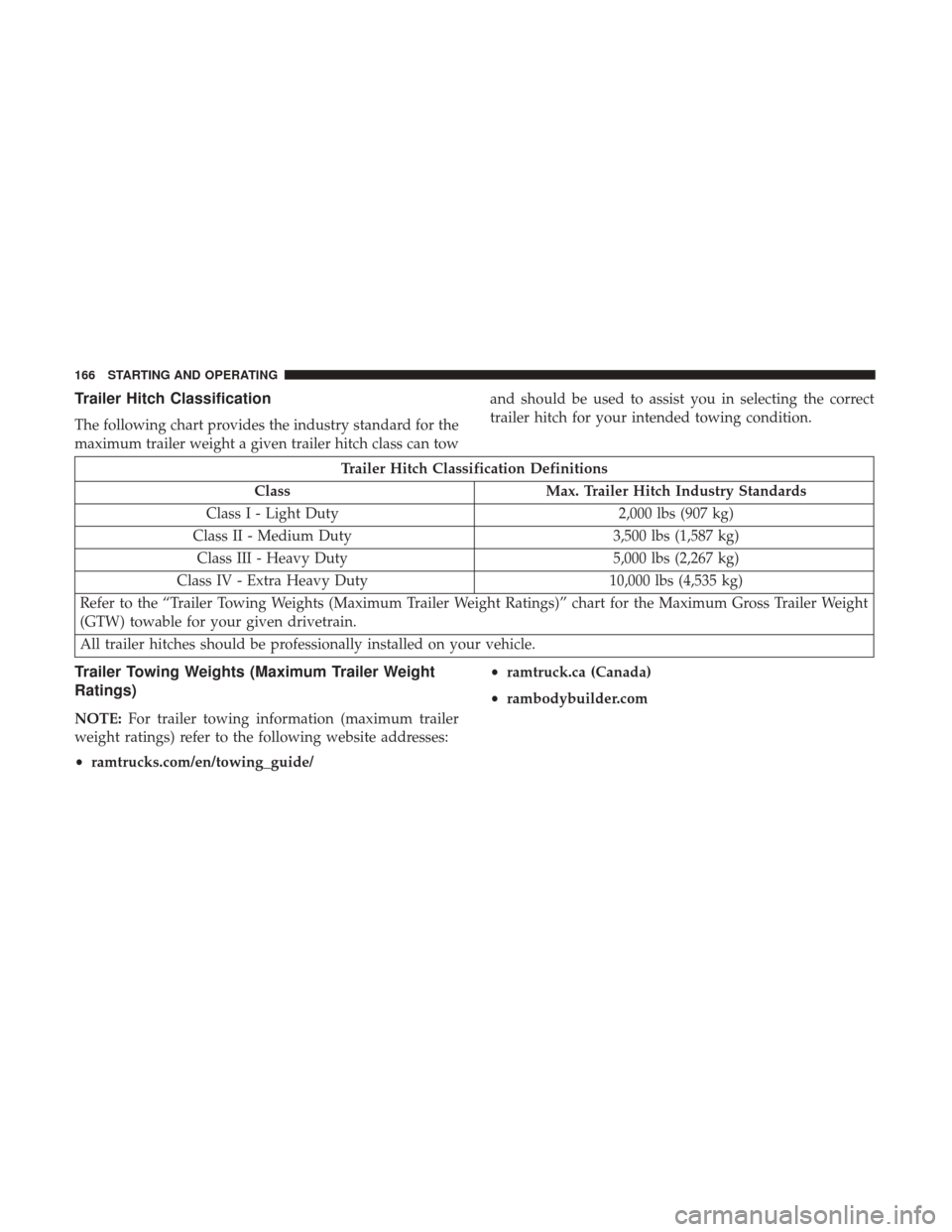
The following chart provides the industry standard for the
maximum trailer weight a given trailer hitch class can towand should be used to assist you in selecting the correct
trailer hitch for your intended towing condition.
Trailer Hitch Classification Definitions
Class Max. Trailer Hitch Industry Standards
Class I - Light Duty 2,000 lbs (907 kg)
Class II - Medium Duty 3,500 lbs (1,587 kg)
Class III - Heavy Duty 5,000 lbs (2,267 kg)
Class IV - Extra Heavy Duty 10,000 lbs (4,535 kg)
Refer to the “Trailer Towing Weights (Maximum Trailer Weight Ratings)” chart for the Maximum Gross Trailer Weight
(GTW) towable for your given drivetrain.
All trailer hitches should be professionally installed on your vehicle.
Trailer Towing Weights (Maximum Trailer Weight
Ratings)
NOTE: For trailer towing information (maximum trailer
weight ratings) refer to the following website addresses:
• ramtrucks.com/en/towing_guide/ •
ramtruck.ca (Canada)
• rambodybuilder.com
166 STARTING AND OPERATING
Page 172 of 332
WARNING!
•Do not connect trailer brakes to your vehicle’s hy-
draulic brake lines. It can overload your brake sys-
tem and cause it to fail. You might not have brakes
when you need them and could have an accident.
• Towing any trailer will increase your stopping dis-
tance. When towing, you should allow for additional
space between your vehicle and the vehicle in front
of you. Failure to do so could result in an accident.
CAUTION!
If the trailer weighs more than 1,000 lbs (453 kg)
loaded, it should have its own brakes and they should
be of adequate capacity. Failure to do this could lead to
accelerated brake lining wear, higher brake pedal
effort, and longer stopping distances.
Towing Requirements — Trailer Lights And Wiring
Whenever you pull a trailer, regardless of the trailer size,
stoplights and turn signals on the trailer are required for
motoring safety. The Trailer Tow Package may include a four- and seven-pin
wiring harness. Use a factory approved trailer harness and
connector.
NOTE:
Do not cut or splice wiring into the vehicle’s wiring
harness.
The electrical connections are all complete to the vehicle
but you must mate the harness to a trailer connector. Refer
to the following illustrations.
Trailer Electrical Connector Location
1 — Four-Pin Connector Location
2 — Seven-Pin Connector Location
170 STARTING AND OPERATING
Page 174 of 332
Automatic Transmission
The DRIVE range can be selected when towing. The
transmission controls include a drive strategy to avoid
frequent shifting when towing. However, if frequent shift-
ing does occur while in DRIVE, select TOW/HAUL mode
or select a lower gear range (using the Electronic Range
Select (ERS) shift control).
NOTE:Using TOW/HAUL mode or selecting a lower
gear range (using the ERS shift control) while operating the
vehicle under heavy loading conditions will improve per-
formance and extend transmission life by reducing exces-
sive shifting and heat build up. This action will also
provide better engine braking.
When towing a loaded trailer up steep grades at low
speeds, holding your vehicle in first gear (using the ERS
shift control) can help to avoid transmission overheating.
Tow/Haul Mode
To reduce potential for automatic transmission overheat-
ing, activate TOW/HAUL mode when driving in hilly
areas, or select a lower gear range (using the Electronic
Range Select (ERS) shift control) on more severe grades.
Speed Control — If Equipped
• Do not use on hilly terrain or with heavy loads.
• When using the speed control, if you experience speed
drops greater than 10 mph (16 km/h), disengage until
you can get back to cruising speed.
• Use speed control in flat terrain and with light loads to
maximize fuel efficiency.
Cooling System
To reduce potential for engine and transmission overheat-
ing, take the following actions:
City Driving
• In city traffic — while stopped, place the transmission in
NEUTRAL, but do not increase engine idle speed.
Highway Driving
• Reduce speed.
• Temporarily turn off air conditioning.
172 STARTING AND OPERATING
Page 177 of 332
Driving Through Water
Driving through water more than a few inches/centimeters
deep will require extra caution to ensure safety and pre-
vent damage to your vehicle.
Flowing/Rising Water
WARNING!
Do not drive on or across a road or path where water is
flowing and/or rising (as in storm run-off). Flowing
water can wear away the road or path’s surface and
cause your vehicle to sink into deeper water. Further-
more, flowing and/or rising water can carry your ve-
hicle away swiftly. Failure to follow this warning may
result in injuries that are serious or fatal to you, your
passengers, and others around you.
Shallow Standing Water
Although your vehicle is capable of driving through shal-
low standing water, consider the following Cautions and
Warnings before doing so.
WARNING!
•Driving through standing water limits your vehicle’s
traction capabilities. Do not exceed 5 mph (8 km/h)
when driving through standing water.
• Driving through standing water limits your vehicle’s
braking capabilities, which increases stopping dis-
tances. Therefore, after driving through standing
water, drive slowly and lightly press on the brake
pedal several times to dry the brakes.
• Failure to follow these warnings may result in inju-
ries that are serious or fatal to you, your passengers,
and others around you.
6
STARTING AND OPERATING 175
Page 187 of 332
2. Using a suitable tool, flex the housing to lift the lightpod cover away from the unit.
3. Remove and replace the bulbs as needed. 4. Close the housing cover making sure it snaps together
properly and connect the lamp.
5. Install overhead console into place making sure to seat the assembly’s forward end first and then snapping it
flush so that the tension spring is fully seating in the
housing.
Dome Lamp Light Pod Cover
Dome Lamp Light Bulbs
7
IN CASE OF EMERGENCY 185
Page 193 of 332
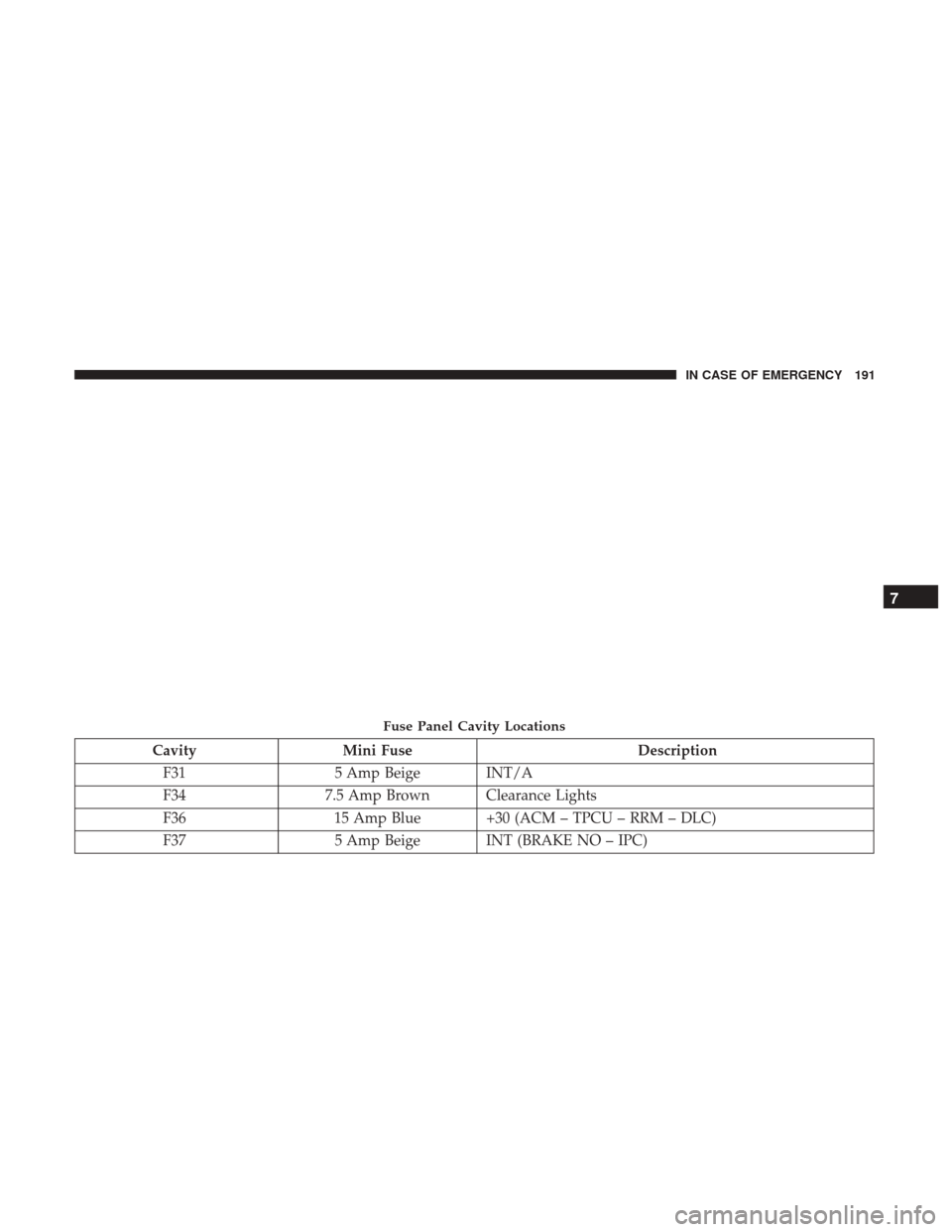
CavityMini Fuse Description
F31 5 Amp Beige INT/A
F34 7.5 Amp Brown Clearance Lights
F36 15 Amp Blue +30 (ACM – TPCU – RRM – DLC)
F37 5 Amp Beige INT (BRAKE NO – IPC)
Fuse Panel Cavity Locations
7
IN CASE OF EMERGENCY 191
Page 206 of 332
3. Place the wrench handle and lug bolt adapter on the jackscrew and turn to the right until the jack head is
properly engaged in the described location. Do not raise
the vehicle until you are sure the jack is securely
engaged.
4. Raise the vehicle by turning the jack screw to the right, using the wrench handle and lug bolt adapter. Raise the
vehicle only until the tire just clears the surface and
enough clearance is obtained to install the spare tire.
Minimum tire lift provides maximum stability.
WARNING!
Raising the vehicle higher than necessary can make the
vehicle less stable. It could slip off the jack and hurt
someone near it. Raise the vehicle only enough to
remove the tire.
5. Remove the wheel lug bolts. For vehicles with wheel covers, remove the cover from the wheel by hand. Do
not pry the wheel cover off. Then pull the wheel off the
hub.
6. Install the spare tire. Lightly tighten the wheel lug bolts.WARNING!
To avoid the risk of forcing the vehicle off the jack, do
not tighten the wheel nuts fully until the vehicle has
been lowered. Failure to follow this warning may
result in serious injury.
Mounting Spare Tire
204 IN CASE OF EMERGENCY