ABS RAM PROMASTER 2021 Owners Manual
[x] Cancel search | Manufacturer: RAM, Model Year: 2021, Model line: PROMASTER, Model: RAM PROMASTER 2021Pages: 288, PDF Size: 15.22 MB
Page 6 of 288
4
DRIVING TIPS ........................................................86 Driving On Slippery Surfaces ...................... 86
Driving Through Water ................................ 86
MULTIMEDIA
UCONNECT SYSTEMS ..........................................88
CYBERSECURITY ..................................................88UCONNECT SETTINGS ..........................................89 Uconnect 3/3 NAV Settings ........................ 90
UCONNECT INTRODUCTION.................................98
Identifying Your Radio ................................. 98
Safety And General Information ...............100
UCONNECT MODES ........................................... 101
Radio Mode ................................................101
Media Mode ...............................................109Phone Mode ..............................................112
NAVIGATION MODE — IF EQUIPPED ................ 124
Operating Navigation Mode —
If Equipped .................................................124
STEERING WHEEL AUDIO CONTROLS ........... 146
Radio Operation .........................................146
Player Operation ........................................146
RAM TELEMATICS - IF EQUIPPED .................... 146
Ram Telematics General Information ......147
RADIO OPERATION AND MOBILE PHONES ... 148
Regulatory And Safety Information........... 148
SAFETY
SAFETY FEATURES .............................................149Anti-Lock Brake System (ABS) .................. 149Electronic Brake Control (EBC) System ... 150
AUXILIARY DRIVING SYSTEMS.........................155
Blind Spot Monitoring (BSM) —
If Equipped ................................................ 155 Forward Collision Warning (FCW) With
Mitigation — If Equipped............................ 159 Tire Pressure Monitoring
System (TPMS) ........................................... 161
OCCUPANT RESTRAINT SYSTEMS .................. 164
Occupant Restraint Systems Features .... 164
Important Safety Precautions ................... 164
Seat Belt Systems ..................................... 165
Supplemental Restraint
Systems (SRS)............................................ 172 Child Restraints ......................................... 181
SAFETY TIPS ...................................................... 186
Transporting Passengers .......................... 186Transporting Pets ..................................... 187
Safety Checks You Should Make Inside
The Vehicle ................................................ 187 Periodic Safety Checks You Should
Make Outside The Vehicle ........................ 188 Exhaust Gas ............................................... 189Carbon Monoxide Warnings ...................... 189
IN CASE OF EMERGENCY
HAZARD WARNING FLASHERS ....................... 190
JACKING AND TIRE CHANGING ....................... 190 Preparations For Jacking .......................... 191
Jack Location ............................................. 191
Spare Tire Removal ................................... 193
Jacking Instructions................................... 194
Wheel Covers ............................................. 197
TIRE SERVICE KIT — IF EQUIPPED ................... 197
Tire Service Kit Storage............................. 198
Tire Service Kit Components And
Operation ................................................... 198 Tire Service Kit Usage Precautions .......... 198Sealing A Tire With Tire Service Kit .......... 200
JUMP STARTING ................................................ 203
Preparations For Jump Start ..................... 203
Jump Starting Procedure .......................... 204
Battery Location ........................................ 206
IF YOUR ENGINE OVERHEATS ......................... 206
GEAR SELECTOR OVERRIDE ........................... 207
FREEING A STUCK VEHICLE ............................ 208
TOWING A DISABLED VEHICLE ........................ 209
Automatic Transmission............................ 210
ENHANCED ACCIDENT RESPONSE
SYSTEM (EARS).................................................. 210
EVENT DATA RECORDER (EDR) ....................... 210
21_VF_OM_EN_USC_t.book Page 4
Page 11 of 288
9
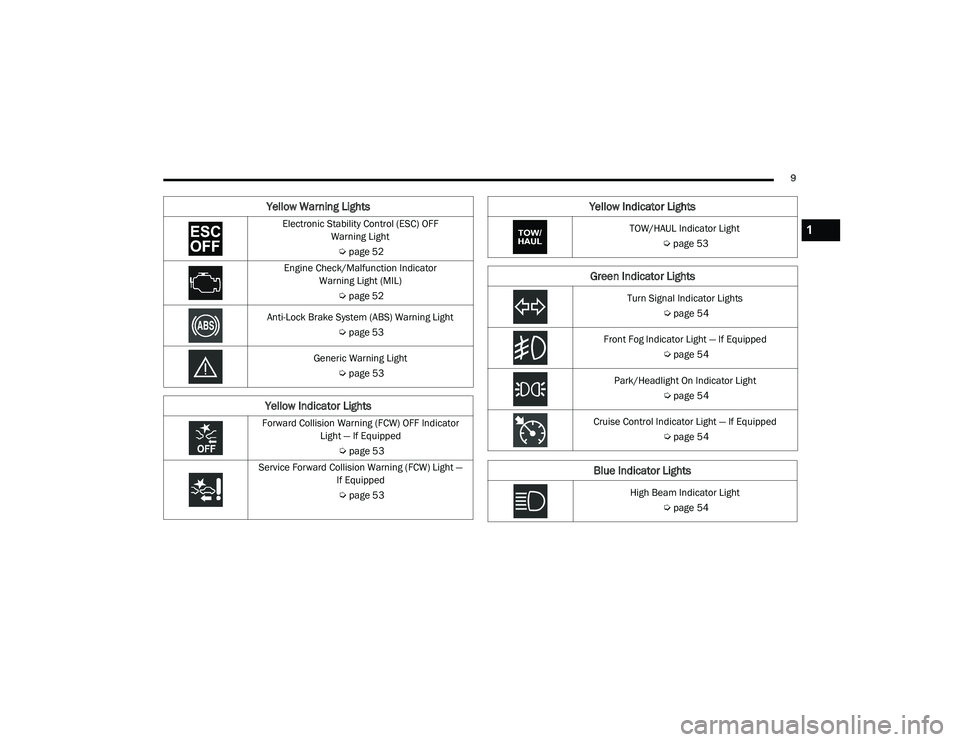
Electronic Stability Control (ESC) OFF Warning Light
Ú page 52
Engine Check/Malfunction Indicator Warning Light (MIL)
Úpage 52
Anti-Lock Brake System (ABS) Warning Light Úpage 53
Generic Warning Light Úpage 53
Yellow Indicator Lights
Forward Collision Warning (FCW) OFF Indicator
Light — If Equipped
Úpage 53
Service Forward Collision Warning (FCW) Light — If Equipped
Ú page 53
Yellow Warning Lights
TOW/HAUL Indicator Light Úpage 53
Green Indicator Lights
Turn Signal Indicator Lights
Úpage 54
Front Fog Indicator Light — If Equipped Úpage 54
Park/Headlight On Indicator Light Úpage 54
Cruise Control Indicator Light — If Equipped Úpage 54
Blue Indicator Lights
High Beam Indicator Light
Úpage 54
Yellow Indicator Lights
1
21_VF_OM_EN_USC_t.book Page 9
Page 20 of 288
18GETTING TO KNOW YOUR VEHICLE
Lumbar Support — If Equipped
This feature allows you to increase or decrease
the amount of lumbar support. The lumbar
control knob is located on the rear upper
outboard side of the driver's seatback. Rotate
the control forward to increase and rearward to
decrease the desired amount of lumbar
support.
Suspension Seat — If Equipped
The seat is equipped with a mechanical spring
system and hydraulic shock absorber to ensure
maximum comfort and safety. The system of
springs also effectively absorbs impact from
uneven road surfaces. Damper Weight Adjustment
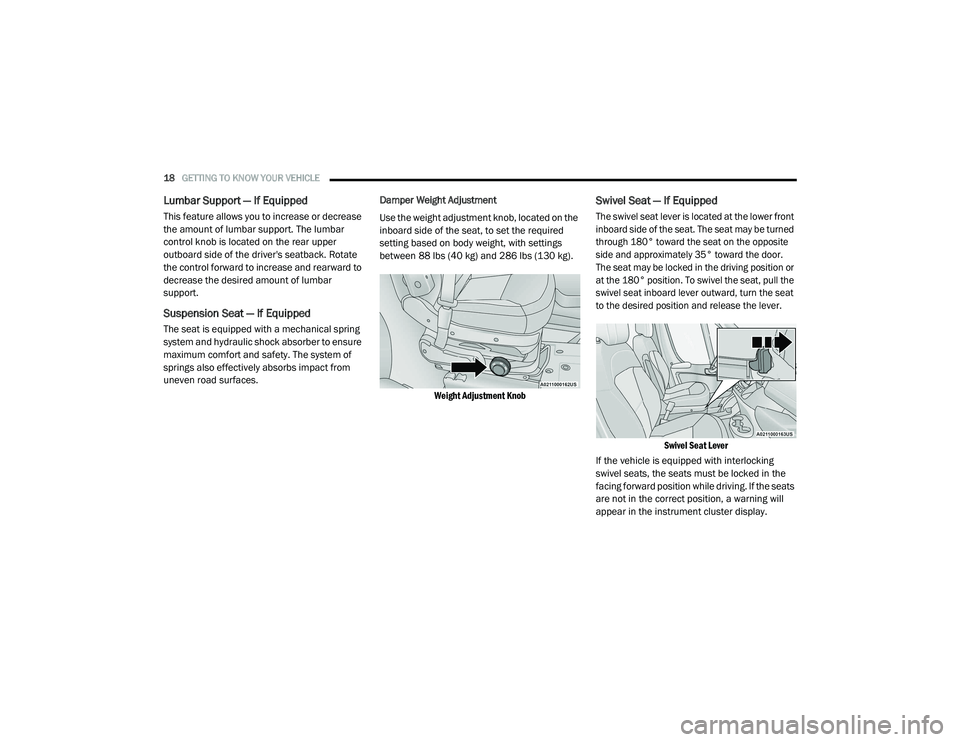
Use the weight adjustment knob, located on the
inboard side of the seat, to set the required
setting based on body weight, with settings
between 88 lbs (40 kg) and 286 lbs (130 kg).
Weight Adjustment Knob
Swivel Seat — If Equipped
The swivel seat lever is located at the lower front
inboard side of the seat. The seat may be turned
through 180° toward the seat on the opposite
side and approximately 35° toward the door.
The seat may be locked in the driving position or
at the 180° position. To swivel the seat, pull the
swivel seat inboard lever outward, turn the seat
to the desired position and release the lever.
Swivel Seat Lever
If the vehicle is equipped with interlocking
swivel seats, the seats must be locked in the
facing forward position while driving. If the seats
are not in the correct position, a warning will
appear in the instrument cluster display.
21_VF_OM_EN_USC_t.book Page 18
Page 51 of 288
GETTING TO KNOW YOUR INSTRUMENT PANEL49
Door Open Warning Light
This indicator will illuminate when one
or more door(s) are not fully closed.
NOTE:
If the vehicle is moving and a door is opened,
there will also be a single chime.
Electronic Throttle Control Warning Light
This warning light will illuminate to
inform of a problem with the
Electronic Throttle Control (ETC)
system. If a problem is detected while
the vehicle is running, the light will either stay
on or flash depending on the nature of the
problem. Cycle the ignition when the vehicle is
safely and completely stopped and the
transmission is placed in the PARK (P) position.
The light should turn off. If the light remains on
with the vehicle running, your vehicle will
usually be drivable; however, see an authorized
dealer for service as soon as possible.
If the light continues to flash when the vehicle is
running, immediate service is required and you
may experience reduced performance, an
elevated/rough idle, or engine stall and your
vehicle may require towing. The light will come on when the ignition is placed in the ON/RUN or
MAR/ON/RUN position and remain on briefly as
a bulb check. If the light does not come on
during starting, have the system checked by an
authorized dealer.
Transmission Fault Warning Light
This light will illuminate (together with
a message in the instrument cluster
display and a buzzer) to indicate a
transmission fault. Contact an
authorized dealer if the message remains after
restarting the engine.
Engine Temperature Warning Light
This light warns of an overheated
engine condition. If the engine
coolant temperature is too high, this
indicator will illuminate and a single
chime will sound.
If the light turns on while driving, safely pull over
and stop the vehicle. If the Air Conditioning (A/C)
system is on, turn it off. Also, shift the
transmission into NEUTRAL and idle the vehicle.
If the temperature reading does not return to
normal, turn the engine off immediately and call
for service
Ú
page 206.
Brake Warning Light
This warning light monitors various
brake functions, including brake fluid
level and parking brake application. If
the brake light turns on it may
indicate that the parking brake is applied, that
the brake fluid level is low, or that there is a
problem with the Anti-Lock Brake System
reservoir.
If the light remains on when the parking brake
has been disengaged, and the fluid level is at
the full mark on the master cylinder reservoir, it
indicates a possible brake hydraulic system
malfunction or that a problem with the Brake
Booster has been detected by the Anti-Lock
Brake System (ABS) / Electronic Stability
Control (ESC) system. In this case, the light will
remain on until the condition has been
corrected. If the problem is related to the brake
booster, the ABS pump will run when applying
the brake, and a brake pedal pulsation may be
felt during each stop.
The dual brake system provides a reserve
braking capacity in the event of a failure to a
portion of the hydraulic system. A leak in either
half of the dual brake system is indicated by the
3
21_VF_OM_EN_USC_t.book Page 49
Page 52 of 288
50GETTING TO KNOW YOUR INSTRUMENT PANEL
Brake Warning Light, which will turn on when
the brake fluid level in the master cylinder has
dropped below a specified level.
The light will remain on until the cause is
corrected.
NOTE:
The light may flash momentarily during sharp
cornering maneuvers, which change fluid level
conditions. The vehicle should have service
performed, and the brake fluid level checked.
If brake failure is indicated, immediate repair is
necessary.
Vehicles equipped with the Anti-Lock Brake
System (ABS) are also equipped with Electronic
Brake Force Distribution (EBD). In the event of
an EBD failure, the Brake Warning Light will turn
on along with the ABS Light. Immediate repair to
the ABS system is required. Operation of the Brake Warning Light can be
checked by turning the ignition switch from the
OFF position to the ON/RUN position. The light
should illuminate for approximately two
seconds. The light should then turn off unless
the parking brake is applied or a brake fault is
detected. If the light does not illuminate, have
the light inspected by an authorized dealer.
The light also will turn on when the parking
brake is applied with the ignition switch in the
ON/RUN position.
NOTE:
This light shows only that the parking brake is
applied. It does not show the degree of brake
application.
Oil Pressure Warning Light
This warning light will illuminate to
indicate low engine oil pressure. If the
light turns on while driving, stop the
vehicle, shut off the engine as soon as
possible, and contact an authorized dealer. A
chime will sound when this light turns on.
Do not operate the vehicle until the cause is
corrected. This light does not indicate how
much oil is in the engine. The engine oil level
must be checked under the hood.
Vehicle Security Warning Light — If
Equipped
This light will flash at a fast rate for
approximately 15 seconds when the
vehicle security system is arming, and
then will flash slowly until the vehicle
is disarmed.
YELLOW WARNING LIGHTS
Immobilizer Fail / VPS Electrical Alarm
Indicator Light
This telltale will illuminate when the
vehicle security system system has
detected an attempt to break into the
vehicle.
NOTE:
After cycling the ignition to the ON/RUN posi -
tion, the Vehicle Security Warning Light could
illuminate if a problem with the system is
detected. This condition will result in the engine
being shut off after two seconds.
WARNING!
Driving a vehicle with the red brake light on is
dangerous. Part of the brake system may
have failed. It will take longer to stop the
vehicle. You could have a collision. Have the
vehicle checked immediately.
21_VF_OM_EN_USC_t.book Page 50
Page 55 of 288
GETTING TO KNOW YOUR INSTRUMENT PANEL53
Anti-Lock Brake System (ABS) Warning
Light
This light monitors the ABS. The light
will turn on when the ignition is placed
in the ON/RUN or MAR/ON/RUN
position and may stay on for as long
as four seconds. If the ABS light remains on or turns on while
driving, then the Anti-Lock portion of the brake
system is not functioning and service is
required. However, the conventional brake
system will continue to operate normally if the
brake warning light is not on.
If the ABS light is on, the brake system should
be serviced as soon as possible to restore the
benefits of Anti-Lock Brakes. If the ABS light
does not turn on when the ignition is placed in
the ON/RUN or MAR/ON/RUN position, have
the light inspected by an authorized dealer.
Generic Warning Light
The Generic Warning Light will
illuminate if any of the following
conditions occur: Engine Oil Pressure
Sensor Failure, External Light Failure,
Fuel Cut-Off intervention or fail, Parking Sensor
Failure, Dynamic Steering Torque System
Failure.
The telltale will remain on fixed in case of swivel
seat failure and on blinking in case of Air Bag
Warning Light Failure. Contact an authorized
dealer immediately for service.
YELLOW INDICATOR LIGHTS
Forward Collision Warning Off Indicator
Light — If Equipped
This indicator light illuminates to
indicate that Forward Collision
Warning is off.
Service Forward Collision Warning (FCW)
Light — If Equipped
This warning light will illuminate to
indicate a fault in the FCW System.
Contact an authorized dealer for service.
TOW/HAUL Indicator Light
This indicator light will illuminate
when TOW/HAUL mode is selected
Ú page 78.
WARNING!
A malfunctioning catalytic converter, as
referenced above, can reach higher
temperatures than in normal operating
conditions. This can cause a fire if you drive
slowly or park over flammable substances
such as dry plants, wood, cardboard, etc. This
could result in death or serious injury to the
driver, occupants or others.
CAUTION!
Prolonged driving with the Malfunction
Indicator Light (MIL) on could cause damage
to the vehicle control system. It also could
affect fuel economy and driveability. If the
MIL is flashing, severe catalytic converter
damage and power loss will soon occur.
Immediate service is required.
3
21_VF_OM_EN_USC_t.book Page 53
Page 108 of 288
106MULTIMEDIA
Favorites
Press the Favorites button on the touchscreen
to activate the favorites menu, which will time
out within 20 seconds in absence of user
interaction.
You can exit the Favorites Menu by a press of
the X button.
The favorites feature enables you to set a
favorite artist or song that is currently playing.
The radio then uses this information to alert you
when either the favorite artist or song is being
played at any time by any of the SiriusXM®
Channels.
The maximum number of favorites that can be
stored in the Radio is 50.
Favorite Artist: While the song is playing, to set
a favorite artist, press the Favorites button on
the touchscreen and then the Favorite Artist
button on the touchscreen.
Favorite Song: While the song is playing, to set
a favorite song, press the Favorites button on
the touchscreen and then the Favorite Song
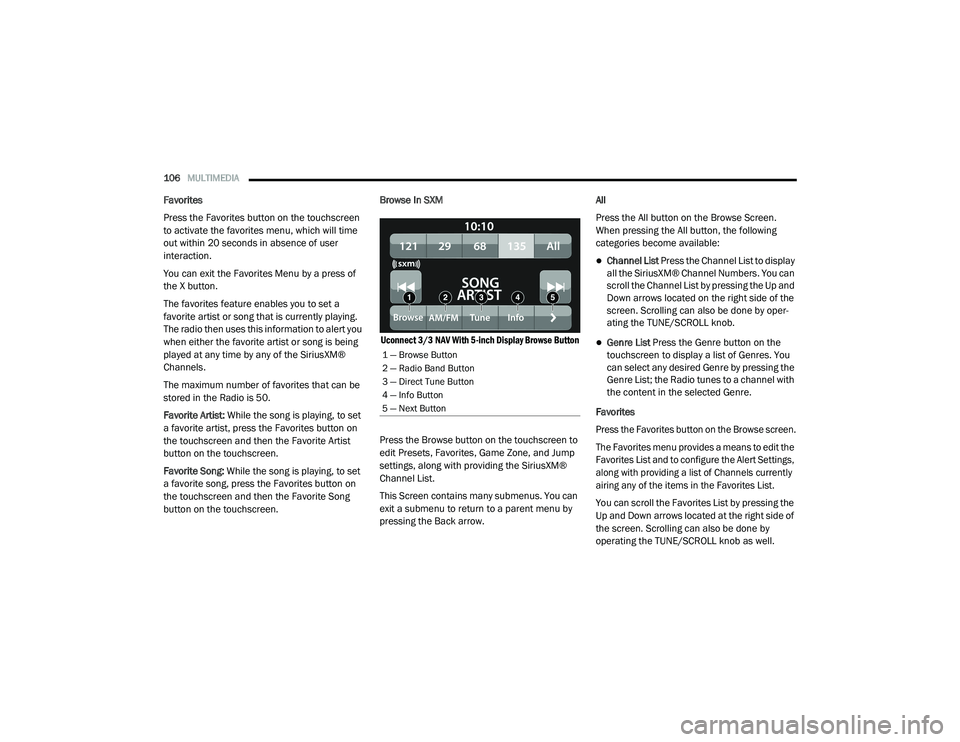
button on the touchscreen. Browse In SXM
Uconnect 3/3 NAV With 5-inch Display Browse Button
Press the Browse button on the touchscreen to
edit Presets, Favorites, Game Zone, and Jump
settings, along with providing the SiriusXM®
Channel List.
This Screen contains many submenus. You can
exit a submenu to return to a parent menu by
pressing the Back arrow. All
Press the All button on the Browse Screen.
When pressing the All button, the following
categories become available:
Channel List Press the Channel List to display
all the SiriusXM® Channel Numbers. You can
scroll the Channel List by pressing the Up and
Down arrows located on the right side of the
screen. Scrolling can also be done by oper
-
ating the TUNE/SCROLL knob.
Genre List Press the Genre button on the
touchscreen to display a list of Genres. You
can select any desired Genre by pressing the
Genre List; the Radio tunes to a channel with
the content in the selected Genre.
Favorites
Press the Favorites button on the Browse screen.
The Favorites menu provides a means to edit the
Favorites List and to configure the Alert Settings,
along with providing a list of Channels currently
airing any of the items in the Favorites List.
You can scroll the Favorites List by pressing the
Up and Down arrows located at the right side of
the screen. Scrolling can also be done by
operating the TUNE/SCROLL knob as well.
1 — Browse Button
2 — Radio Band Button
3 — Direct Tune Button
4 — Info Button
5 — Next Button
21_VF_OM_EN_USC_t.book Page 106
Page 151 of 288

149
(Continued)
SAFETY
SAFETY FEATURES
ANTI-LOCK BRAKE SYSTEM (ABS)
The ABS is designed to aid the driver in
maintaining vehicle control under adverse
braking conditions. The system operates with a
separate computer to modulate hydraulic
pressure, to prevent wheel lock-up and to help
avoid skidding on slippery surfaces.
The system's pump motor runs during an ABS
stop to provide regulated hydraulic pressure.
The pump motor makes a low humming noise
during operation, which is normal.
The ABS includes an amber ABS Warning Light.
When the light is illuminated, the ABS is not
functioning. The system reverts to standard
non-anti-lock brakes. Placing the ignition in the
OFF mode and to the ON mode again may reset
the ABS if the fault detected was only
momentary.When you are in a severe braking condition
involving the use of the ABS, you will experience
some pedal drop as the vehicle comes to a stop.
This is the result of the system reverting to the
base brake system.
Engagement of the ABS may be accompanied
by a pulsing sensation. You may also hear a
clicking noise. These occurrences are normal
and indicate that the system is functioning
properly.
WARNING!
The ABS contains sophisticated electronic
equipment that may be susceptible to inter
-
ference caused by improperly installed or
high output radio transmitting equipment.
This interference can cause possible loss of
anti-lock braking capability. Installation of
such equipment should be performed by
qualified professionals.
Pumping of the Anti-Lock Brakes will
diminish their effectiveness and may lead
to a collision. Pumping makes the stopping
distance longer. Just press firmly on your
brake pedal when you need to slow down or
stop.
The ABS cannot prevent the natural laws of
physics from acting on the vehicle, nor can
it increase braking or steering efficiency
beyond that afforded by the condition of the
vehicle brakes and tires or the traction
afforded.
The ABS cannot prevent collisions,
including those resulting from excessive
speed in turns, following another vehicle
too closely, or hydroplaning.
The capabilities of an ABS equipped vehicle
must never be exploited in a reckless or
dangerous manner that could jeopardize
the user’s safety or the safety of others.
WARNING! (Continued)
6
21_VF_OM_EN_USC_t.book Page 149
Page 152 of 288
150SAFETY
ELECTRONIC BRAKE CONTROL (EBC)
S
YSTEM
Your vehicle is equipped with an advanced
Electronic Brake Control (EBC) system that
includes the Brake Assist System (BAS) and
Electronic Stability Control (ESC), Hill Start
Assist (HSA), Traction Control System (TCS), and
Trailer Sway Control (TSC). These systems
complement the Anti-Lock Brake System (ABS)
by optimizing the vehicle braking capability
during emergency braking maneuvers.
Brake Assist System (BAS)
The BAS is designed to optimize the vehicle’s
braking capability during emergency braking
maneuvers. The system detects an emergency
braking situation by sensing the rate and
amount of brake application and then applies
optimum pressure to the brakes. This can help
reduce braking distances. The BAS
complements the Anti-Lock Brake System
(ABS). Applying the brakes very quickly results
in the best BAS assistance. To receive the
benefit of the system, you must apply
continuous braking pressure during the
stopping sequence (do not “pump” the brakes). Do not reduce brake pedal pressure unless
braking is no longer desired. Once the brake
pedal is released, the BAS is deactivated.
Crosswind Assist (CWA)
CWA helps keep your vehicle from drifting out of
its lane due to unexpected crosswinds by
means of targeted braking of individual wheels.
The system will provide automatic stability
assistance to counteract the effect of strong
side wind. If a strong lateral wind is detected,
front and rear brakes on the affected side are applied, creating a steering effect that mitigates
the cross wind influence. During system
intervention, the driver should perceive the
natural stable handling feel of the vehicle.
Crosswind Assist will activate automatically
when the vehicle reaches speeds above
approximately 43 mph (70 km/h). When the
system is activated, the ESC Warning Light in
the instrument cluster will blink to warn the
driver.
Electronic Stability Control (ESC)
ESC enhances directional control and stability
of the vehicle under various driving conditions.
ESC corrects for over/under steering of the
vehicle by applying the brake of the appropriate
wheel(s) to counteract the above conditions.
Engine power may also be reduced to help the
vehicle maintain the desired path.
Oversteer – when the vehicle is turning more
than appropriate for the steering wheel
position.
Understeer – when the vehicle is turning less
than appropriate for the steering wheel
position.
WARNING!
The Brake Assist System (BAS) cannot
prevent the natural laws of physics from
acting on the vehicle, nor can it increase the
traction afforded by prevailing road
conditions. BAS cannot prevent collisions,
including those resulting from excessive
speed in turns, driving on very slippery
surfaces, or hydroplaning. The capabilities of
a BAS-equipped vehicle must never be
exploited in a reckless or dangerous manner,
which could jeopardize the user's safety or
the safety of others.
21_VF_OM_EN_USC_t.book Page 150
Page 177 of 288

SAFETY175
Front Air Bag Operation
Front Air Bags are designed to provide
additional protection by supplementing the seat
belts. Front air bags are not expected to reduce
the risk of injury in rear, side, or rollover
collisions. The front air bags will not deploy in all
frontal collisions, including some that may
produce substantial vehicle damage — for
example, some pole collisions, truck
underrides, and angle offset collisions.
On the other hand, depending on the type and
location of impact, front air bags may deploy in
crashes with little vehicle front-end damage but
that produce a severe initial deceleration.
Because air bag sensors measure vehicle
deceleration over time, vehicle speed and
damage by themselves are not good indicators of
whether or not an air bag should have deployed.
Seat belts are necessary for your protection in
all collisions, and also are needed to help keep
you in position, away from an inflating air bag.
When the Occupant Restraint Controller (ORC)
detects a collision requiring the front air bags, it
signals the inflator units. A large quantity of
non-toxic gas is generated to inflate the front
air bags. The steering wheel hub trim cover and the
upper passenger side of the instrument panel
separate and fold out of the way as the air bags
inflate to their full size. The front air bags fully
inflate in less time than it takes to blink your
eyes. The front air bags then quickly deflate
while helping to restrain the driver and front
passenger.
Supplemental Side Air Bags
Supplemental Seat-Mounted Side Air Bags
(SABs)
This vehicle is equipped with Supplemental
Seat-Mounted Side Air Bags (SABs).
Supplemental Seat-Mounted Side Air Bags
(SABs) are located in the outboard side of the
front seats. The SABs are marked with “SRS
AIRBAG” or “AIRBAG” on a label or on the seat
trim on the outboard side of the seats.
The SABs may help to reduce the risk of
occupant injury during certain side impacts, in
addition to the injury reduction potential
provided by the seat belts and body structure.
Front Supplemental Seat-Mounted Side Air Bag Label
When the SAB deploys, it opens the seam on
the outboard side of the seatback’s trim cover.
The inflating SAB deploys through the seat
seam into the space between the occupant and
the door. The SAB moves at a very high speed
and with such a high force that it could injure
occupants if they are not seated properly, or if
items are positioned in the area where the SAB
inflates. Children are at an even greater risk of
injury from a deploying air bag.
WARNING!
Do not use accessory seat covers or place
objects between you and the Side Air Bags;
the performance could be adversely affected
and/or objects could be pushed into you,
causing serious injury.
6
21_VF_OM_EN_USC_t.book Page 175