radio RAM PROMASTER 2022 User Guide
[x] Cancel search | Manufacturer: RAM, Model Year: 2022, Model line: PROMASTER, Model: RAM PROMASTER 2022Pages: 268, PDF Size: 13.26 MB
Page 101 of 268
STARTING AND OPERATING99
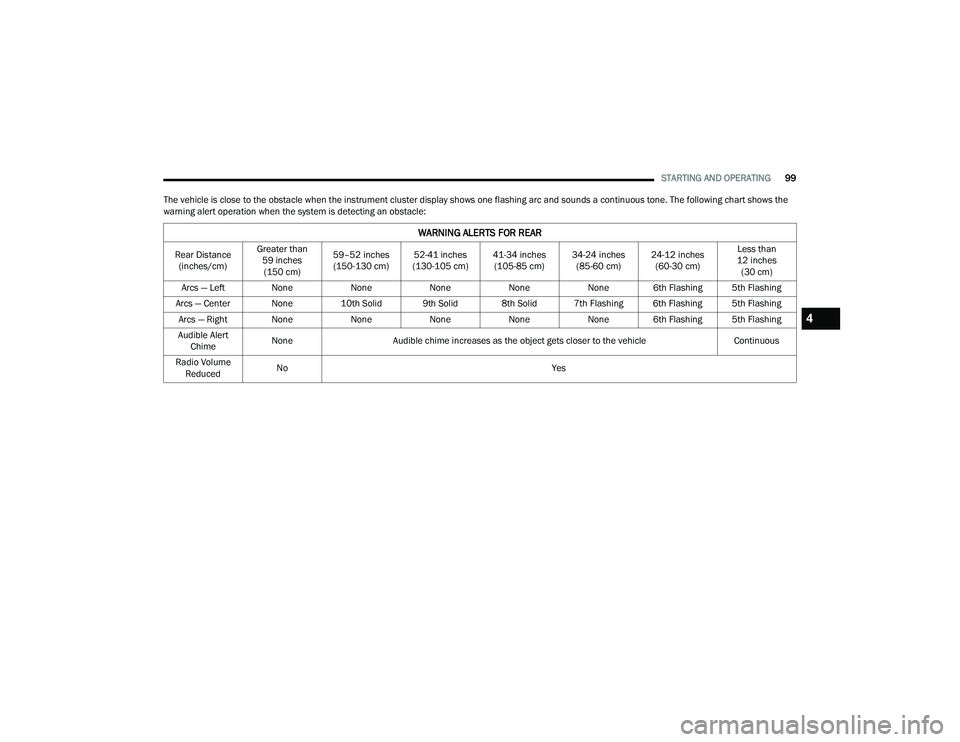
The vehicle is close to the obstacle when the instrument cluster display shows one flashing arc and sounds a continuous tone. The following chart shows the
warning alert operation when the system is detecting an obstacle:
WARNING ALERTS FOR REAR
Rear Distance (inches/cm) Greater than
59 inches (150 cm) 59–52 inches
(150-130 cm) 52-41 inches
(130-105 cm) 41-34 inches
(105-85 cm) 34-24 inches
(85-60 cm) 24-12 inches
(60-30 cm) Less than
12 inches (30 cm)
Arcs — Left None NoneNoneNoneNone 6th Flashing 5th Flashing
Arcs — Center None 10th Solid 9th Solid 8th Solid 7th Flashing 6th Flashing 5th Flashing
Arcs — Right None NoneNoneNoneNone 6th Flashing 5th Flashing
Audible Alert Chime None
Audible chime increases as the object gets closer to the vehicle Continuous
Radio Volume Reduced No
Yes
4
22_VF_OM_EN_USC_t.book Page 99
Page 102 of 268

100STARTING AND OPERATING
NOTE:ParkSense will reduce the volume of the radio, if
on, when the system is sounding an audible tone.
Front Park Assist Audible Alerts
ParkSense will turn off the Front Park Assist
audible alert (chime) after approximately three
seconds when an obstacle has been detected, the
vehicle is stationary, and brake pedal is applied.
Adjustable Chime Volume Settings
Front and Rear chime volume settings can be
selected from the Uconnect system Ú page 120.
The chime volume settings include low, medium,
and high.
ParkSense will retain its last known configuration
state through ignition cycles.ENABLING AND DISABLING PARKSENSE
ParkSense can be enabled and disabled with
the ParkSense switch, located on the switch
panel below the Uconnect display.
When the ParkSense switch is pushed to disable
the system, the instrument cluster display
Ú page 55 will show the “ParkSense Disabled”
message for approximately five seconds.
The ParkSense switch LED will be on when
ParkSense is disabled or requires service.
The ParkSense switch LED will be off when the
system is enabled. If the ParkSense switch is
pushed, and requires service, the ParkSense
switch LED will blink momentarily, and then the
LED will be on.
SERVICE THE PARKSENSE PARK ASSIST
S
YSTEM
When the ParkSense System has detected a faulted
condition, the instrument cluster display will actuate a
single chime, and it will show the "PARKSENSE
UNAVAILABLE WIPE REAR SENSORS", "PARKSENSE
UNAVAILABLE WIPE FRONT SENSORS", or the
"PARKSENSE UNAVAILABLE SERVICE REQUIRED"
message for five seconds. Under this condition,
ParkSense will not operate.
If "PARKSENSE UNAVAILABLE WIPE REAR
SENSORS" or "PARKSENSE UNAVAILABLE WIPE
FRONT SENSORS" appears in the instrument
cluster display make sure the outer surface and
the underside of the rear fascia/bumper and/or
WARNING ALERTS FOR FRONT
Front Distance
(inches/cm) Greater than
39 inches (100 cm) 39-32 inches
(100-80 cm) 32-24 inches
(80-60 cm) 24-12 inches
(60-30 cm) Less than 12 inches
(30 cm)
Arcs — Left NoneNoneNone3rd Flashing 4th Flashing
Arcs — Center None1st Solid2nd Flashing 3rd Flashing4th Flashing
Arcs — Right NoneNoneNone3rd Flashing 4th Flashing
Audible Alert Chime NoneAudible chime increases as the object gets close to the vehicle Continuous
Radio Volume Reduced No
Yes Yes Yes
22_VF_OM_EN_USC_t.book Page 100
Page 103 of 268

STARTING AND OPERATING101
front fascia/bumper is clean and clear of snow,
ice, mud, dirt or other obstruction and then cycle
the ignition. If the message continues to appear
see an authorized dealer.
If the "PARKSENSE UNAVAILABLE SERVICE
REQUIRED" message appears in the instrument
cluster display, see an authorized dealer.
PARKSENSE PARK ASSIST FAILURE
I
NDICATIONS
A malfunction of the ParkSense Park Assist
sensors or system is indicated, during REVERSE
gear engagement, by the instrument panel
warning icon.
The warning icon is illuminated and a
message is displayed in the instrument
cluster display (if equipped) Ú page 59.
The sensors and wiring are tested continuously
when the ignition is in the ON/RUN position.
Failures are indicated immediately if they occur
when the system is on.
Even if the system is able to identify that a specific
sensor is in failure condition, the instrument
cluster display shall indicate that the ParkSense
Park Assist system is unavailable, without
reference to the sensor in failure condition. If even
a single sensor fails, the entire system must be
disabled. The system is turned off automatically.
CLEANING THE PARKSENSE SYSTEM
Clean the ParkSense sensors with water, car wash
soap and a soft cloth. Do not use rough or hard
cloths. Do not scratch or poke the sensors.
Otherwise, you could damage the sensors.
PARKSENSE PARK ASSIST SYSTEM
U
SAGE PRECAUTIONS
NOTE:
Ensure that the front and rear fascia/bumper
are free of snow, ice, mud, dirt and debris to
keep the ParkSense system operating properly.
Construction equipment, large trucks, and other
vibrations could affect the performance of
ParkSense.
When you turn ParkSense off, the instrument
cluster display will read “PARKSENSE OFF.”
Furthermore, once you turn ParkSense off, it
remains off until you turn it on again, even if you
cycle the ignition key.
ParkSense, when on, will reduce the volume of
the radio when it is sounding a tone.
Clean the ParkSense sensors regularly, taking
care not to scratch or damage them. The sensors
must not be covered with ice, snow, slush, mud,
dirt or debris. Failure to do so can result in the
system not working properly. The ParkSense system might not detect an obstacle behind or in
front of the fascia/bumper, or it could provide a
false indication that an obstacle is behind or in
front of the fascia/bumper.
Use the ParkSense switch to turn the ParkSense
system off if objects such as bicycle carriers,
etc. are placed within 12 inches (30 cm) from
the rear fascia/bumper. Failure to do so can
result in the system misinterpreting a close
object as a sensor problem, causing the
“PARKSENSE UNAVAILABLE SERVICE
REQUIRED” message to be displayed in
the instrument cluster display.
NOTE:If any objects are attached to the bumper within a
6.5 ft (2 m) field of view, they will interfere and
cause false alerts and possibly blockage.
There may be a delay in the object detection
rate if the object is moving.
The operation of the rear sensors is automati
-
cally deactivated when the trailer's electric plug
is inserted in the vehicle's tow hook socket,
while the front sensors stay active and can
provide acoustic and visual warnings. The rear
sensors are automatically reactivated when the
trailer's cable plug is removed.
4
22_VF_OM_EN_USC_t.book Page 101
Page 107 of 268

STARTING AND OPERATING105
CHANGING LANESENSE STATUS
The LaneSense system has settings to adjust the
intensity of the torque warning and the warning zone
sensitivity (Early/Medium/Late) that you can configure
through the Uconnect system
Ú
page 120.
NOTE:
When enabled the system operates above
37 mph (60 km/h) and below 112 mph
(180 km/h).
The warnings are disabled with use of the turn
signal.
The system will not apply torque to the steering
wheel whenever a safety system engages
(Anti-Lock Brakes, Traction Control System,
Electronic Stability Control, Forward Collision
Warning, etc.).
PARKVIEW REAR BACK UP CAMERA
Your vehicle is equipped with the ParkView Rear Back
Up Camera that allows you to see an on-screen image
of the rear surroundings of your vehicle whenever the
gear selector is put into REVERSE and/or when the rear
doors are opened. The image will be displayed on the
touchscreen display along with a caution note to
“Check Entire Surroundings” across the top of the
screen. After five seconds this note will disappear. The ParkView Rear Back Up Camera is located on the
top rear of the vehicle below the center light.
Rear Back Up Camera Location
When the vehicle is shifted out of REVERSE and/or
when the rear doors are closed, the rear camera
mode is exited and the previous screen appears.
When engaged in the REVERSE gear, with the “Camera
Delay” turned on, the camera image will continue to be
displayed for up to 10 seconds after switching out of
the REVERSE position, unless the speed of the vehicle
does not exceed 8 mph (13 km/h), or that the gear is
placed in the NEUTRAL or PARK position. When the
gear is no longer in the REVERSE position, on the radio
display, together to the images behind it, a deactivation
button of the image displays on the camera screen, if
“Camera Delay” is active.
NOTE:The image displayed on the display may appear
slightly deformed.
When displayed, static grid lines will illustrate the
width of the vehicle and will show separate zones
that will help indicate the distance to the rear of
the vehicle. The following table shows the
approximate distances for each zone:
Zone Distance To The Rear Of The Vehicle Red 0 - 1 ft (0 - 30 cm)
Yellow 1 ft - 3 ft (30 cm - 1 m) Green 3 ft or greater (1 m or greater)
WARNING!
Drivers must be careful when backing up even
when using the Rear Back Up Camera. Always
check carefully behind your vehicle, and be
sure to check for pedestrians, animals, other
vehicles, obstructions, or blind spots before
backing up. You are responsible for the safety of
your surroundings and must continue to pay
attention while backing up. Failure to do so can
result in serious injury or death.
4
22_VF_OM_EN_USC_t.book Page 105
Page 122 of 268
120MULTIMEDIA
UCONNECT SETTINGS
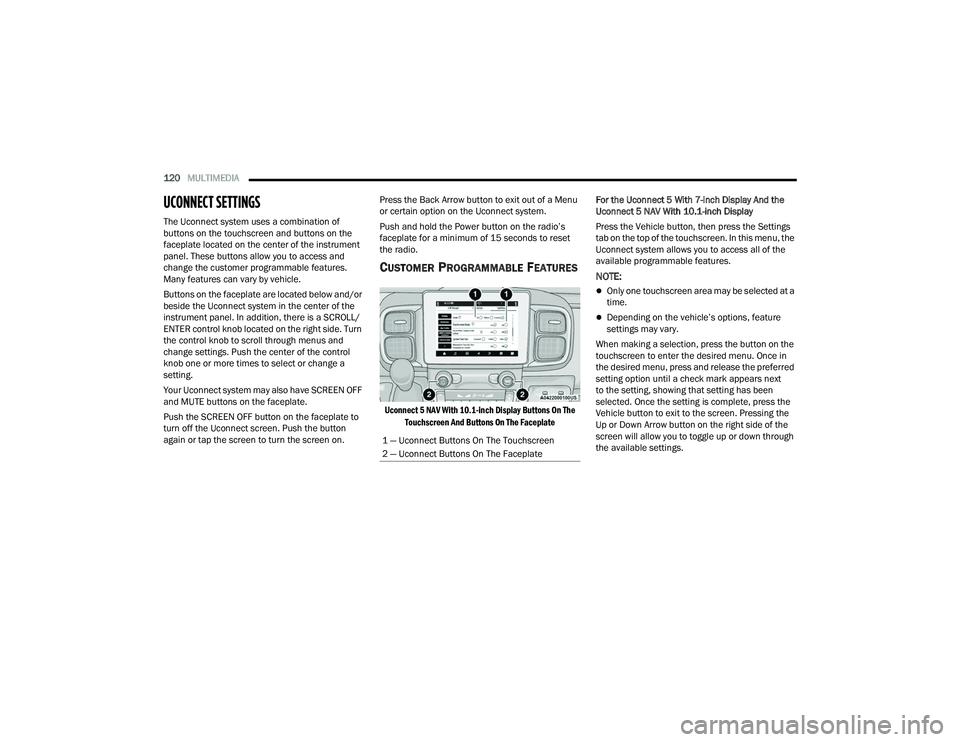
The Uconnect system uses a combination of
buttons on the touchscreen and buttons on the
faceplate located on the center of the instrument
panel. These buttons allow you to access and
change the customer programmable features.
Many features can vary by vehicle.
Buttons on the faceplate are located below and/or
beside the Uconnect system in the center of the
instrument panel. In addition, there is a SCROLL/
ENTER control knob located on the right side. Turn
the control knob to scroll through menus and
change settings. Push the center of the control
knob one or more times to select or change a
setting.
Your Uconnect system may also have SCREEN OFF
and MUTE buttons on the faceplate.
Push the SCREEN OFF button on the faceplate to
turn off the Uconnect screen. Push the button
again or tap the screen to turn the screen on. Press the Back Arrow button to exit out of a Menu
or certain option on the Uconnect system.
Push and hold the Power button on the radio’s
faceplate for a minimum of 15 seconds to reset
the radio.
CUSTOMER PROGRAMMABLE FEATURES
Uconnect 5 NAV With 10.1-inch Display Buttons On The
Touchscreen And Buttons On The Faceplate
For the Uconnect 5 With 7-inch Display And the
Uconnect 5 NAV With 10.1-inch Display
Press the Vehicle button, then press the Settings
tab on the top of the touchscreen. In this menu, the
Uconnect system allows you to access all of the
available programmable features.
NOTE:
Only one touchscreen area may be selected at a
time.
Depending on the vehicle’s options, feature
settings may vary.
When making a selection, press the button on the
touchscreen to enter the desired menu. Once in
the desired menu, press and release the preferred
setting option until a check mark appears next
to the setting, showing that setting has been
selected. Once the setting is complete, press the
Vehicle button to exit to the screen. Pressing the
Up or Down Arrow button on the right side of the
screen will allow you to toggle up or down through
the available settings.
1 — Uconnect Buttons On The Touchscreen
2 — Uconnect Buttons On The Faceplate
22_VF_OM_EN_USC_t.book Page 120
Page 123 of 268
MULTIMEDIA121
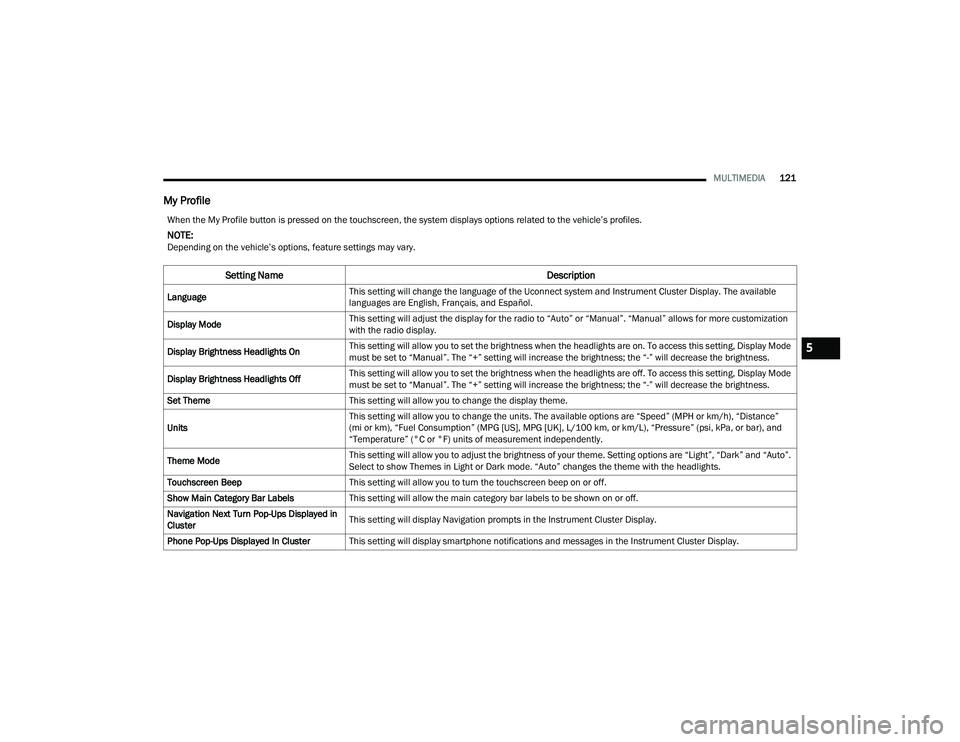
My Profile
When the My Profile button is pressed on the touchscreen, the system displays options related to the vehicle’s profiles.
NOTE:Depending on the vehicle’s options, feature settings may vary.
Setting Name Description
LanguageThis setting will change the language of the Uconnect system and Instrument Cluster Display. The available
languages are English, Français, and Español.
Display Mode This setting will adjust the display for the radio to “Auto” or “Manual”. “Manual” allows for more customization
with the radio display.
Display Brightness Headlights On This setting will allow you to set the brightness when the headlights are on. To access this setting, Display Mode
must be set to “Manual”. The “+” setting will increase the brightness; the “-” will decrease the brightness.
Display Brightness Headlights Off This setting will allow you to set the brightness when the headlights are off. To access this setting, Display Mode
must be set to “Manual”. The “+” setting will increase the brightness; the “-” will decrease the brightness.
Set Theme This setting will allow you to change the display theme.
Units This setting will allow you to change the units. The available options are “Speed” (MPH or km/h), “Distance”
(mi or km), “Fuel Consumption” (MPG [US], MPG [UK], L/100 km, or km/L), “Pressure” (psi, kPa, or bar), and
“Temperature” (°C or °F) units of measurement independently.
Theme Mode This setting will allow you to adjust the brightness of your theme. Setting options are “Light”, “Dark” and “Auto”.
Select to show Themes in Light or Dark mode. “Auto” changes the theme with the headlights.
Touchscreen Beep This setting will allow you to turn the touchscreen beep on or off.
Show Main Category Bar Labels This setting will allow the main category bar labels to be shown on or off.
Navigation Next Turn Pop-Ups Displayed in
Cluster This setting will display Navigation prompts in the Instrument Cluster Display.
Phone Pop-Ups Displayed In Cluster This setting will display smartphone notifications and messages in the Instrument Cluster Display.
5
22_VF_OM_EN_USC_t.book Page 121
Page 124 of 268
122MULTIMEDIA
Time Format This setting will allow you to set the time format (AM/PM). Sync Time With GPS must be “Off” for this setting to
be available. The “12 hrs” setting will set the time to a 12-hour format. The “24 hrs” setting will set the time to a
24-hour format.
Voice Options This setting will allow you to change the voice options for the radio to “Male” or “Female”.
Wake Up Word This setting will allow you to set the system “Wake Up” word. The available options are “Off”, “Hey, Uconnect”,
and “Hey, Ram”.
Voice Barge-in This setting will allow Voice Barge-in to be turned on or off. For more information about Voice Barge-in, refer to
your Uconnect Owner’s Manual Supplement.
Show Command List This setting will allow the Command List on the Voice Recognition window to be shown on or off.
Radio Off Delay This setting will keep certain electrical features running after the engine is turned off. When any door is opened,
the electronics will deactivate. The available settings are “0 sec”, “45 sec”, “5 min”, and “10 min”.
Radio Off With Door This setting will allow you to determine if the radio shuts off when any of the doors are opened.
App Drawer Favoriting Pop-ups This setting will allow you to favorite app drawer pop-ups with “On” and “Off” options.
App Drawer Unfavoritings Pop-ups This setting will allow you to unfavorite app drawer pop-ups with “On” and “Off” options.
New Text Message Pop-ups This setting will allow you to have pop-up notifications for new text messages. Setting options are “On” and “Off”.
Missed Calls Message This setting will allow you to have pop-up notifications for missed calls. Setting options are “On” and “Off”.
Navigation Pop-ups This setting will allow you to have pop-up notifications for Navigation. Setting options are “On” and “Off”.
Navigation Settings This setting will redirect to the list of Navigation settings. Refer to your Uconnect Owner’s Manual Supplement
for further information.
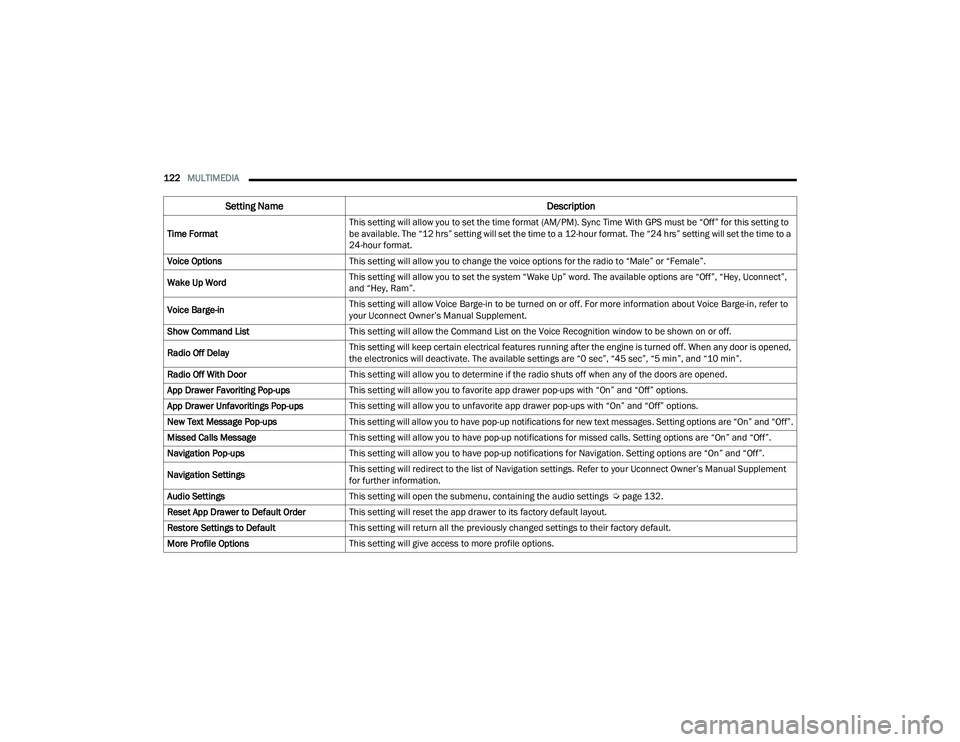
Audio Settings This setting will open the submenu, containing the audio settings Ú page 132.
Reset App Drawer to Default Order This setting will reset the app drawer to its factory default layout.
Restore Settings to Default This setting will return all the previously changed settings to their factory default.
More Profile Options This setting will give access to more profile options.
Setting Name Description
22_VF_OM_EN_USC_t.book Page 122
Page 128 of 268
126MULTIMEDIA
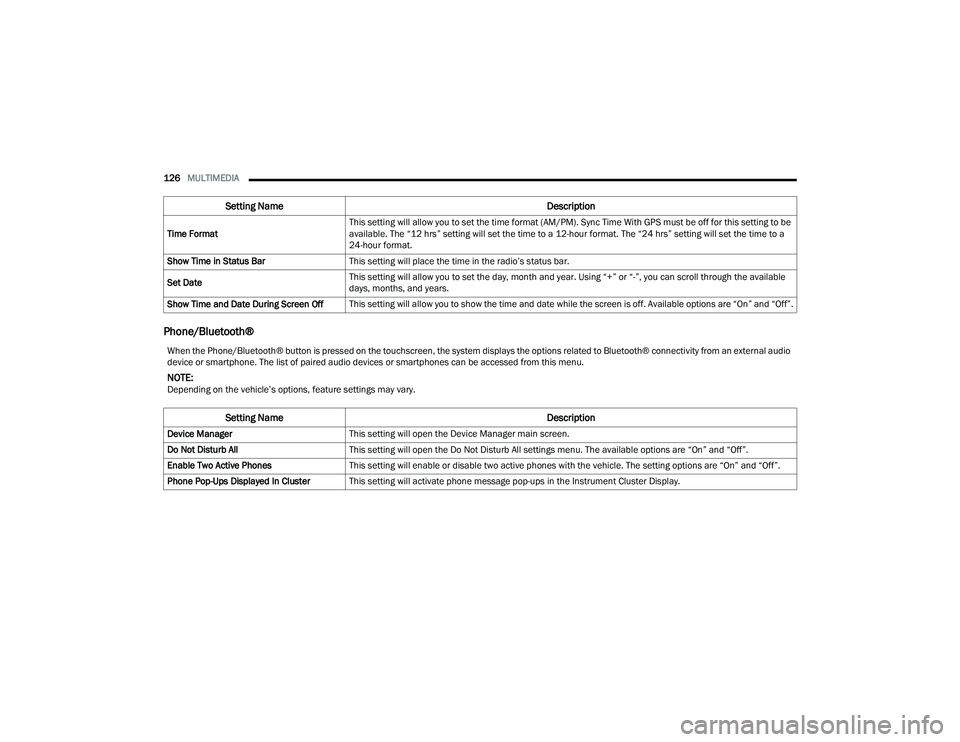
Phone/Bluetooth®
Time Format This setting will allow you to set the time format (AM/PM). Sync Time With GPS must be off for this setting to be
available. The “12 hrs” setting will set the time to a 12-hour format. The “24 hrs” setting will set the time to a
24-hour format.
Show Time in Status Bar This setting will place the time in the radio’s status bar.
Set Date This setting will allow you to set the day, month and year. Using “+” or “-”, you can scroll through the available
days, months, and years.
Show Time and Date During Screen Off This setting will allow you to show the time and date while the screen is off. Available options are “On” and “Off”.
Setting Name Description
When the Phone/Bluetooth® button is pressed on the touchscreen, the system displays the options related to Bluetooth® connectivity from an external audio
device or smartphone. The list of paired audio devices or smartphones can be accessed from this menu.
NOTE:Depending on the vehicle’s options, feature settings may vary.
Setting NameDescription
Device ManagerThis setting will open the Device Manager main screen.
Do Not Disturb All This setting will open the Do Not Disturb All settings menu. The available options are “On” and “Off”.
Enable Two Active Phones This setting will enable or disable two active phones with the vehicle. The setting options are “On” and “Off”.
Phone Pop-Ups Displayed In Cluster This setting will activate phone message pop-ups in the Instrument Cluster Display.
22_VF_OM_EN_USC_t.book Page 126
Page 133 of 268

MULTIMEDIA131
Key Off Options
Sound Horn With Lock This setting will sound the horn when the Lock button is pushed on the key fob. The “Off” setting will not sound
the horn when the Lock button is pushed. The “1st Press” setting will sound the horn when the Lock button is
pushed once. The “2nd Press” setting will sound the horn when the Lock button is pushed twice.
Sound Horn With Remote Start This setting will sound the horn when the remote start is activated from the key fob.
Remote Door Unlock, Door Lock/1st Press
Of Key Fob Unlocks This setting will change how many pushes of the Unlock button on the key fob are needed to unlock all the
doors. The “Driver Door” setting will only unlock the driver door on the first push on the Unlock button.
The “All Doors” setting will unlock all doors with only one push of the Unlock button.
Passive Entry
This setting will allow you to turn the Passive Entry feature (Keyless Enter ‘n Go™) between “Off”, “All”, or “Approach”.
Setting Name Description
When the Key Off Options Options button is pressed on the touchscreen, the system displays the options related to vehicle shutoff. These settings will only
activate when the ignition is set to OFF.
NOTE:Depending on the vehicle’s options, feature settings may vary.
Setting NameDescription
Radio Off DelayThis setting will keep the radio on for the selected amount of time after vehicle shut off. The available options
are “0 min”, or “20 min”.
Radio Off with Door This setting will keep the radio on when a door is opened or until the Radio Off Delay time is reached.
The available settings are “On” and “Off”.
5
22_VF_OM_EN_USC_t.book Page 131
Page 134 of 268
132MULTIMEDIA
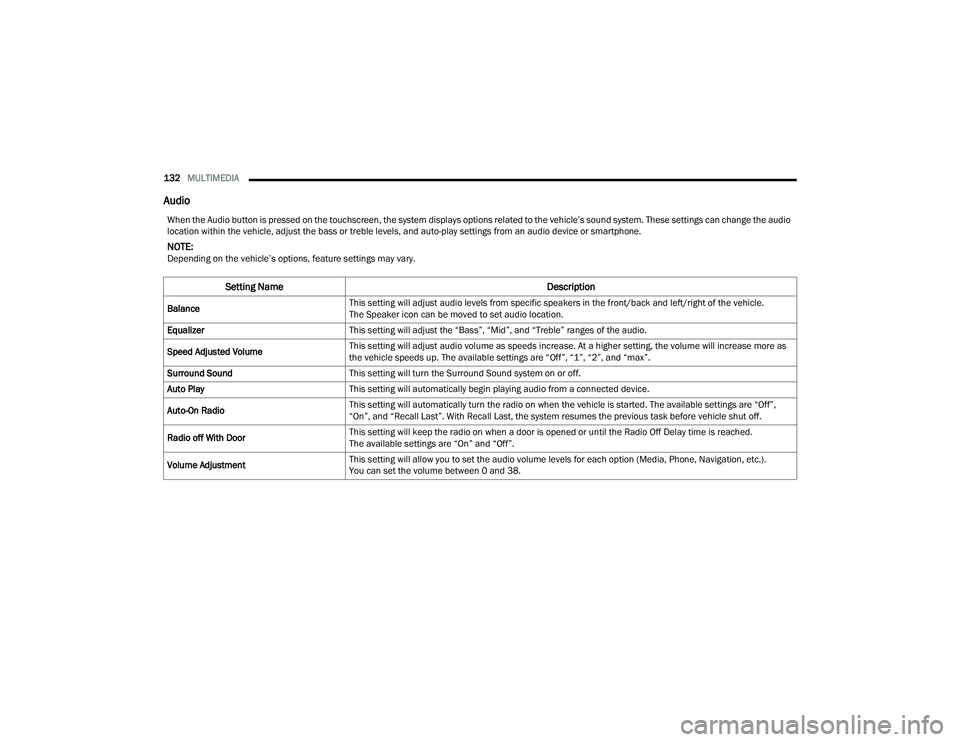
Audio
When the Audio button is pressed on the touchscreen, the system displays options related to the vehicle’s sound system. These settings can change the audio
location within the vehicle, adjust the bass or treble levels, and auto-play settings from an audio device or smartphone.
NOTE:Depending on the vehicle’s options, feature settings may vary.
Setting Name Description
BalanceThis setting will adjust audio levels from specific speakers in the front/back and left/right of the vehicle.
The Speaker icon can be moved to set audio location.
Equalizer This setting will adjust the “Bass”, “Mid”, and “Treble” ranges of the audio.
Speed Adjusted Volume This setting will adjust audio volume as speeds increase. At a higher setting, the volume will increase more as
the vehicle speeds up. The available settings are “Off”, “1”, “2”, and “max”.
Surround Sound This setting will turn the Surround Sound system on or off.
Auto Play This setting will automatically begin playing audio from a connected device.
Auto-On Radio This setting will automatically turn the radio on when the vehicle is started. The available settings are “Off”,
“On”, and “Recall Last”. With Recall Last, the system resumes the previous task before vehicle shut off.
Radio off With Door This setting will keep the radio on when a door is opened or until the Radio Off Delay time is reached.
The available settings are “On” and “Off”.
Volume Adjustment This setting will allow you to set the audio volume levels for each option (Media, Phone, Navigation, etc.).
You can set the volume between 0 and 38.
22_VF_OM_EN_USC_t.book Page 132