turn signal RAM PROMASTER 2022 User Guide
[x] Cancel search | Manufacturer: RAM, Model Year: 2022, Model line: PROMASTER, Model: RAM PROMASTER 2022Pages: 268, PDF Size: 13.26 MB
Page 65 of 268

GETTING TO KNOW YOUR INSTRUMENT PANEL63
Engine Check/Malfunction Indicator (MIL)
Warning Light
The Engine Check/Malfunction Indicator
Light (MIL) is a part of an Onboard
Diagnostic System called OBD II that
monitors engine and automatic
transmission control systems. This warning light
will illuminate when the ignition is in the ON/RUN
position before engine start. If the bulb does not
come on when turning the ignition switch from OFF
to ON/RUN, have the condition checked promptly.
Certain conditions, such as a loose or missing gas
cap, poor quality fuel, etc., may illuminate the light
after engine start. The vehicle should be serviced if
the light stays on through several typical driving
styles. In most situations, the vehicle will drive
normally and will not require towing.
When the engine is running, the MIL may flash to
alert serious conditions that could lead to immediate
loss of power or severe catalytic converter damage.
The vehicle should be serviced by an authorized dealer
as soon as possible if this occurs.
Service Active Lane Management Warning
Light — If Equipped
This warning light will illuminate when the
Active Lane Management system is not
operating and requires service. Please
see an authorized dealer.
Service Forward Collision Warning (FCW)
Light — If Equipped
This warning light will illuminate to
indicate a fault in the FCW System.
Contact an authorized dealer for service.
Service Required/Call For Service Warning
Light
This warning light will illuminate when
service is needed. A pop-up will appear in
the display to signal the need for service.
Contact an authorized dealer as soon as
possible.
Tire Pressure Monitoring System (TPMS)
Warning Light
The warning light switches on and a message
is displayed to indicate that the tire pressure
is lower than the recommended value and/
or that slow pressure loss is occurring. In
these cases, optimal tire duration and fuel
consumption may not be guaranteed.
Should one or more tires be in the condition
mentioned above, the display will show the
indications corresponding to each tire.
WARNING!
A malfunctioning catalytic converter, as referenced
above, can reach higher temperatures than in
normal operating conditions. This can cause a fire if
you drive slowly or park over flammable substances
such as dry plants, wood, cardboard, etc. This could
result in death or serious injury to the driver,
occupants or others.
CAUTION!
Prolonged driving with the Malfunction Indicator
Light (MIL) on could cause damage to the vehicle
control system. It also could affect fuel economy and
driveability. If the MIL is flashing, severe catalytic
converter damage and power loss will soon occur.
Immediate service is required.
3
22_VF_OM_EN_USC_t.book Page 63
Page 67 of 268

GETTING TO KNOW YOUR INSTRUMENT PANEL65
Transmission Temperature Warning Light
This warning light will illuminate to warn
of a high transmission fluid temperature.
This may occur with strenuous usage
such as trailer towing. If this light turns
on, stop the vehicle and run the engine at idle or
slightly faster, with the transmission in PARK (P) or
NEUTRAL (N), until the light turns off. Once the light
turns off, you may continue to drive normally.
YELLOW INDICATOR LIGHTS
Forward Collision Warning (FCW) OFF
Indicator Light — If Equipped
This indicator light will illuminate when
you switch FCW off or when driving
conditions obscure the sensor with snow,
heavy rain, or sun.
TOW/HAUL Indicator Light
This indicator light will illuminate when
TOW/HAUL mode is selected
Ú
page 110.
Keyless System Failure Light
The telltale will illuminate in the event of
keyless system failure.
Contact an authorized dealer as soon as possible.
Rain Sensor Failure Light
The telltale will illuminate in the case of
failure of the automatic windshield wiper.
Contact an authorized dealer as soon as
possible.
Exterior Lights Failure Light
The telltale will illuminate to indicate a
failure on the following lights: Daytime
Running Lights (DRLs) / parking lights /
trailer turn signal indicators (if present) /
trailer lights (if present) / side lights / turn signal
indicators / rear fog light / reversing light / brake
lights / license plate lights.
The failure may be caused by a blown bulb, a blown
protection fuse, or an interruption of the electrical
connection. Replace the bulb or the relevant fuse.
Contact an authorized dealer.
Fuel Cutoff Failure Light — If Equipped
This light will illuminate if there is a fuel
cutoff failure. If this light illuminates, take
it to an authorized dealer and have them
inspect it.
GREEN INDICATOR LIGHTS
Active Lane Management Indicator Light —
If Equipped
The Active Lane Management indicator light
illuminates solid green when both lane
markings have been detected and the
system is “armed” and ready to provide
visual and torque warnings if an unintentional lane
departure occurs
Ú
page 102.
WARNING!
If you continue operating the vehicle when the
Transmission Temperature Warning Light is
illuminated you could cause the fluid to boil over,
come in contact with hot engine or exhaust
components and cause a fire.
CAUTION!
Continuous driving with the Transmission
Temperature Warning Light illuminated will
eventually cause severe transmission damage
or transmission failure.
3
22_VF_OM_EN_USC_t.book Page 65
Page 68 of 268
66GETTING TO KNOW YOUR INSTRUMENT PANEL
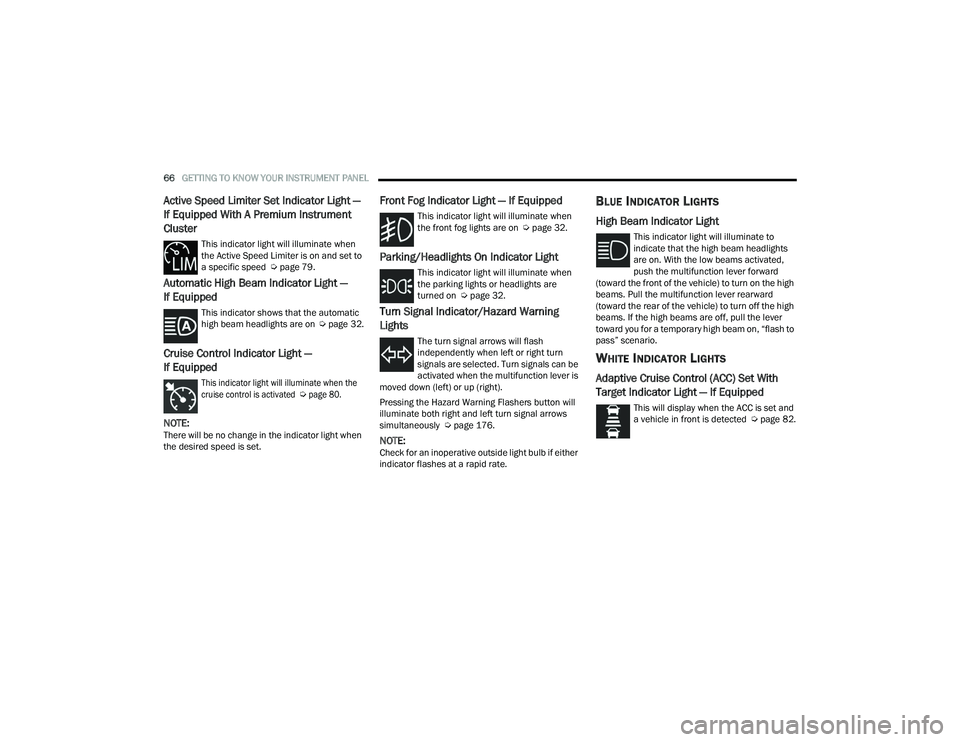
Active Speed Limiter Set Indicator Light —
If Equipped With A Premium Instrument
Cluster
This indicator light will illuminate when
the Active Speed Limiter is on and set to
a specific speed Úpage 79.
Automatic High Beam Indicator Light —
If Equipped
This indicator shows that the automatic
high beam headlights are on Úpage 32.
Cruise Control Indicator Light —
If Equipped
This indicator light will illuminate when the
cruise control is activated
Ú
page 80.
NOTE:There will be no change in the indicator light when
the desired speed is set.
Front Fog Indicator Light — If Equipped
This indicator light will illuminate when
the front fog lights are on Ú page 32.
Parking/Headlights On Indicator Light
This indicator light will illuminate when
the parking lights or headlights are
turned on Úpage 32.
Turn Signal Indicator/Hazard Warning
Lights
The turn signal arrows will flash
independently when left or right turn
signals are selected. Turn signals can be
activated when the multifunction lever is
moved down (left) or up (right).
Pressing the Hazard Warning Flashers button will
illuminate both right and left turn signal arrows
simultaneously Ú page 176.
NOTE:Check for an inoperative outside light bulb if either
indicator flashes at a rapid rate.
BLUE INDICATOR LIGHTS
High Beam Indicator Light
This indicator light will illuminate to
indicate that the high beam headlights
are on. With the low beams activated,
push the multifunction lever forward
(toward the front of the vehicle) to turn on the high
beams. Pull the multifunction lever rearward
(toward the rear of the vehicle) to turn off the high
beams. If the high beams are off, pull the lever
toward you for a temporary high beam on, “flash to
pass” scenario.
WHITE INDICATOR LIGHTS
Adaptive Cruise Control (ACC) Set With
Target Indicator Light — If Equipped
This will display when the ACC is set and
a vehicle in front is detected Ú page 82.
22_VF_OM_EN_USC_t.book Page 66
Page 81 of 268
STARTING AND OPERATING79
ACTIVE SPEED LIMITER — IF EQUIPPED
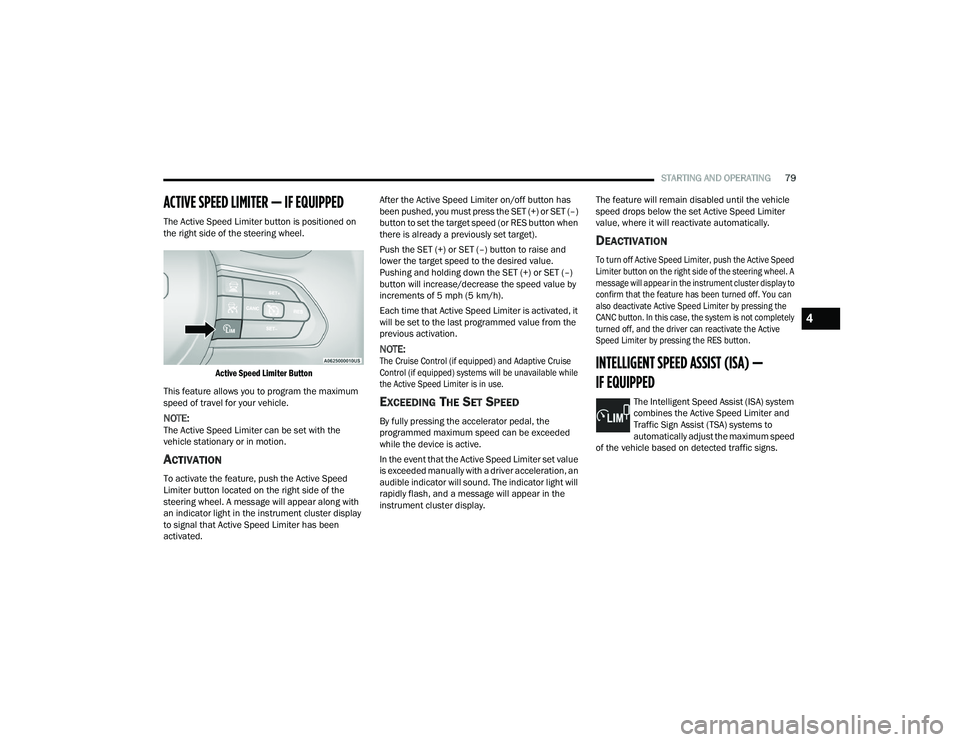
The Active Speed Limiter button is positioned on
the right side of the steering wheel.
Active Speed Limiter Button
This feature allows you to program the maximum
speed of travel for your vehicle.
NOTE:The Active Speed Limiter can be set with the
vehicle stationary or in motion.
ACTIVATION
To activate the feature, push the Active Speed
Limiter button located on the right side of the
steering wheel. A message will appear along with
an indicator light in the instrument cluster display
to signal that Active Speed Limiter has been
activated. After the Active Speed Limiter on/off button has
been pushed, you must press the SET (+) or SET (–)
button to set the target speed (or RES button when
there is already a previously set target).
Push the SET (+) or SET (–) button to raise and
lower the target speed to the desired value.
Pushing and holding down the SET (+) or SET (–)
button will increase/decrease the speed value by
increments of 5 mph (5 km/h).
Each time that Active Speed Limiter is activated, it
will be set to the last programmed value from the
previous activation.
NOTE:
The Cruise Control (if equipped) and Adaptive Cruise
Control (if equipped) systems will be unavailable while
the Active Speed Limiter is in use.
EXCEEDING THE SET SPEED
By fully pressing the accelerator pedal, the
programmed maximum speed can be exceeded
while the device is active.
In the event that the Active Speed Limiter set value
is exceeded manually with a driver acceleration, an
audible indicator will sound. The indicator light will
rapidly flash, and a message will appear in the
instrument cluster display. The feature will remain disabled until the vehicle
speed drops below the set Active Speed Limiter
value, where it will reactivate automatically.
DEACTIVATION
To turn off Active Speed Limiter, push the Active Speed
Limiter button on the right side of the steering wheel. A
message will appear in the instrument cluster display to
confirm that the feature has been turned off. You can
also deactivate Active Speed Limiter by pressing the
CANC button. In this case, the system is not completely
turned off, and the driver can reactivate the Active
Speed Limiter by pressing the RES button.
INTELLIGENT SPEED ASSIST (ISA) —
IF EQUIPPED
The Intelligent Speed Assist (ISA) system
combines the Active Speed Limiter and
Traffic Sign Assist (TSA) systems to
automatically adjust the maximum speed
of the vehicle based on detected traffic signs.
4
22_VF_OM_EN_USC_t.book Page 79
Page 82 of 268
80STARTING AND OPERATING
ACTIVATION
To activate the feature, make sure the Traffic Sign
Assist (TSA) system is enabled within Uconnect
Settings Úpage 120, then push the Active Speed
Limiter button located on the right side of the
steering wheel. The message “Ready” will appear
along with a white indicator light in the instrument
cluster display to signal that the system has been
activated.
While the system is in the “Ready” state, the driver
must press the SET (+), SET (–), or RES button to
engage the system. When the system is fully
engaged and detects the current speed limit using
the TSA system, the message in the instrument
cluster display will indicate the new detected
speed limit by suggesting the driver to press "RES"
to accept it.
If the detected speed sign is greater then the
current set speed, an up arrow will be displayed
too. If the detected speed sign is lower then the
current set speed, a down arrow will be displayed
instead. If the driver accepts the new suggested
speed sign, the indicator light will change to green.
Pushing the SET (+) or SET (–) button on the right
of the steering wheel will raise and lower the set
speed to a desired value above or below the set ISA
speed. Pushing and holding down the SET (+) or
SET (–) button will increase/decrease the speed
value by increments of 5 mph (5 km/h).
NOTE:The Cruise Control (if equipped) and Adaptive
Cruise Control (if equipped) systems will be
unavailable while the ISA system is in use.
EXCEEDING THE SET SPEED
By fully pressing the accelerator pedal, the
maximum set speed can be exceeded while the
system is active.
When the maximum set speed is exceeded, the
green indicator light will blink and the instrument
cluster display will show an override message for
five seconds, or until the accelerator pedal is
released.
DEACTIVATION
To turn off the Intelligent Speed Assist system,
push the Active Speed Limiter button on the right
side of the steering wheel. A message will appear
in the instrument cluster display to confirm that the
feature has been turned off. The Intelligent Speed
Assist system can also be deactivated by pressing
the CANC button. In this case, the ISA system is
not completely turned off, and the driver can
reactivate the system by pressing the RES button.
CRUISE CONTROL SYSTEMS — IF EQUIPPED
Your vehicle may be equipped with the Cruise
Control system, or the Adaptive Cruise Control
(ACC) system:
Cruise Control will keep your vehicle at a
constant preset speed.
Adaptive Cruise Control (ACC) will adjust the
vehicle speed up to the preset speed to main -
tain a distance with the vehicle ahead.
NOTE:
In vehicles equipped with ACC, if ACC is not
enabled, Fixed Speed Cruise Control will not
detect vehicles directly ahead of you. Always be
aware of the feature selected.
Only one Cruise Control feature can operate at a
time. For example, if Fixed Speed Cruise Control
is enabled, Adaptive Cruise Control will be
unavailable, and vice versa.
CRUISE CONTROL
When engaged, the Cruise Control takes over
accelerator operations at speeds greater than
25 mph (40 km/h) up to the maximum speed of
100 mph (160 km/h).
The Cruise Control buttons are located on the right
side of the steering wheel.
22_VF_OM_EN_USC_t.book Page 80
Page 89 of 268

STARTING AND OPERATING87
Distance Settings
To adjust the distance setting, push the Distance
Setting Button and release. Each time the button is
pushed, the distance setting decreases by one bar
(longer). Once the longest setting is reached, if the
button is pushed again it will be set to the shortest
setting available.
If a slower moving vehicle is detected in the same
lane, the instrument cluster display will show the
ACC Set With Target Detected Light. The system
will then adjust vehicle speed automatically to
maintain the distance setting, regardless of the
set speed.
The vehicle will then maintain the set distance until:
The vehicle ahead accelerates to a speed above
the set speed.
The vehicle ahead moves out of your lane or
view of the sensor.
The distance setting is changed.
The system disengages Ú
page 84.
The maximum braking applied by ACC is limited;
however, the driver can always apply the brakes
manually, if necessary.
NOTE:The brake lights will illuminate whenever the ACC
system applies the brakes.
A Proximity Warning will alert the driver if ACC
predicts that its maximum braking level is not
sufficient to maintain the set distance. If this
occurs, a visual alert “BRAKE!” will flash in the
instrument cluster display and a chime will sound
while ACC continues to apply its maximum braking
force.
NOTE:The “BRAKE!” screen in the instrument cluster
display is a warning for the driver to take action
and does not necessarily mean that the Forward
Collision Warning system is applying the brakes
autonomously.
Overtake Aid
When driving with Adaptive Cruise Control (ACC)
engaged and following a vehicle, the system will
provide an additional acceleration up to the ACC
set speed to assist in passing the vehicle. This
additional acceleration is triggered when the driver
utilizes the left turn signal and will only be active
when passing on the left hand side.
ACC Operation At Stop
In the event that the ACC system brings your
vehicle to a standstill while following a vehicle in
front, if the vehicle in front starts moving within two
seconds of your vehicle coming to a standstill, your
vehicle will resume motion without the need for
any driver action.
If the vehicle in front does not start moving within
two seconds of your vehicle coming to a standstill,
the driver will either have to push the RES (resume)
button, or apply the accelerator pedal to reengage
the ACC to the existing set speed.
NOTE:After the ACC system holds your vehicle at a stand -
still for approximately three consecutive minutes,
the parking brake will be activated, and the ACC
system will be cancelled.
While ACC is holding your vehicle at a standstill, if
the driver seat belt is unbuckled or the driver door
is opened, the parking brake will be activated, and
the ACC system will be cancelled.
1 — Longest Distance Setting (Four Bars)
2 — Medium Distance Setting (Two Bars)
3 — Long Distance Setting (Three Bars)
4 — Short Distance Setting (One Bar)
4
22_VF_OM_EN_USC_t.book Page 87
Page 93 of 268
STARTING AND OPERATING91
TRAFFIC SIGN ASSIST SYSTEM —
IF EQUIPPED
The Traffic Sign Assist (TSA) system uses a camera
mounted on the windshield, as well as map data
when the vehicle is equipped with Navigation, to
detect recognizable road signs such as:
Speed limits
School zones
No passing zones
NOTE:
The TSA system will automatically display the
road sign detected in the unit of measurement
(mph or km/h) selected within Uconnect
Settings or within the instrument cluster display.
If no speed limit signs are detected, the system
will revert to the speed limit signs that are
stored in the Navigation system.
The system always checks the traffic signs indi -
cating the current speed limit signs. The system
is able to recognize and display up to two
different road signs in the instrument cluster
display.
ACTIVATION/DEACTIVATION
The TSA System can be enabled/disabled within
the Uconnect system through the Safety/Driver
Assistance menu. System ON is signaled by road
signs shown on the instrument cluster display.
NOTE:Even if the system is OFF, the speed limit sign will
be displayed when the driver selects it in the HOME
screen.
TRAFFIC SIGN ASSIST MODES
TSA has three selectable modes of operation that
are available through the Uconnect system.
Visual
When Visual is selected, the system will alert the
driver when the current speed of the vehicle
exceeds the detected speed limit by showing a
graphic in the instrument cluster display.
Visual + Chime
When Visual + Chime is selected, the system will
alert the driver when the current speed of the vehicle
exceeds the detected speed limit by showing a
graphic in the instrument cluster display, and by
sounding an audible alert. The audible alert will last
for 10 seconds, and the visual alert will remain on as
long as the vehicle is exceeding the speed limit.
TSA Off
When the TSA system is turned off, the system will
not show any traffic signs (unless selected in the
HOME screen, which will show detected speed
limit signs), and no alerts will be issued to the
driver.
INDICATIONS ON THE DISPLAY
Detected traffic signs are shown in the instrument
cluster display, and can display any combination of
signs at one time (e.g. speed limit, speed limit and
supplemental info, and “Do Not Pass” signs)
depending on what information is available.
When a newly detected speed limit is higher than
the current speed limit, the display will update
along with an “up” arrow.
When a newly detected speed limit is lower than
the current speed limit, the display will update
along with a “down” arrow.
4
22_VF_OM_EN_USC_t.book Page 91
Page 96 of 268

94STARTING AND OPERATING
NOTE:Along with the color change of the steering wheel
image, the “glow” effect of the instrument cluster
display will also change to green when ADA is
engaged.
System Engagement Conditions
The following conditions must be met before the
system will engage:
Active Driving Assist system is enabled
ACC is engaged
System detects visible lane markings
Vehicle is traveling below 93 mph (150 km/h)
Vehicle is centered in lane
Turn signal is not activated
Vehicle is not in a tight curve
Driver has hands on steering wheel
NOTE:For the system to detect the driver’s hands on the
steering wheel, the wheel must be gripped on the
outside. Gripping the inside areas of the steering
wheel will not satisfy the hands-on condition to
engage the system.
Do Not Grip Inside Of Steering Wheel
System Deactivation
The system will be deactivated in any of the
following situations:
If the system has detected driver inattentive -
ness, and has gone through all escalation warn -
ings after hands are no longer detected on the
steering wheel
If lane markings are no longer detected
If the Active Driving Assist on/off button is
pushed again (ADA will turn off)
If a turn signal is used
If the driver applies torque to the steering wheel
If the vehicle speed exceeds 93 mph (150 km/h)
If the ACC system is deactivated
If the Forward Collision Warning (FCW) system
becomes active and is providing warnings/braking
NOTE:
Pushing the Active Driving Assist on/off button
will turn the system off. All other deactivation
conditions will place the system back into the
“enabled” state with the steering wheel indi -
cator displayed in grey until all engagement
conditions are met again.
When the system is deactivated, the system
status indicator lights will turn off, Active Lane
Management will return to its previous state,
and ACC will disable.
INDICATIONS ON THE DISPLAY
The Active Driving Assist system status can always
be viewed in the instrument cluster display, and
status changes are shown by changes in color of
the system’s indicator lights.
As the system detects driver inattentiveness as
previously described Ú page 92, the system
status indicator lights will change from green, to
yellow, to red, while the steering wheel icon on
the display moves up the screen to the center.
The following indicators will change in color as
warnings to the driver escalate:
Active Driving Assist Indicator (steering wheel
icon in the instrument cluster display)
Glow effect of the instrument cluster display
22_VF_OM_EN_USC_t.book Page 94
Page 104 of 268

102STARTING AND OPERATING
If it is necessary to keep the ball mount and hitch
ball assembly mounted for a long period, it is
possible to filter out the ball mount and hitch ball
assembly presence in the sensor field of view.
The filtering operation must be performed only by
an authorized dealer.
LANESENSE — IF EQUIPPED
LANESENSE OPERATION
The LaneSense system is operational at speeds above
37 mph (60 km/h) and below 112 mph (180 km/h).
The LaneSense system uses a forward looking camera
to detect lane markings and measure vehicle position
within the lane boundaries.
When both lane markings are detected and the
driver drifts out of the lane (no turn signal applied),
the LaneSense system provides a haptic warning
in the form of torque applied to the steering wheel,
as well as a visual warning in the instrument
cluster display, to prompt the driver to remain
within the lane boundaries.
The driver may manually override the haptic
warning by applying force to the steering wheel at
any time.
When only a single lane marking is detected and the
driver drifts across the lane marking (no turn signal
applied), the LaneSense system provides a visual
warning through the instrument cluster display to
prompt the driver to remain within the lane.
WARNING!
Drivers must be careful when backing up even
when using ParkSense. Always check carefully
behind your vehicle, look behind you, and be
sure to check for pedestrians, animals, other
vehicles, obstructions, and blind spots before
backing up. You are responsible for safety and
must continue to pay attention to your
surroundings. Failure to do so can result in
serious injury or death.
Before using ParkSense, it is strongly recom -
mended that the ball mount and hitch ball
assembly be disconnected from the vehicle
when the vehicle is not used for towing. Failure
to do so can result in injury or damage to vehi -
cles or obstacles because the hitch ball will be
much closer to the obstacle than the rear fascia
when the vehicle sounds the continuous tone.
Also, the sensors could detect the ball mount
and hitch ball assembly, depending on its size
and shape, giving a false indication that an
obstacle is behind the vehicle.
CAUTION!
ParkSense is only a parking aid and it is unable to
recognize every obstacle, including small obsta -
cles. Parking curbs might be temporarily detected
or not detected at all. Obstacles located above or
below the sensors will not be detected when they
are in close proximity.
The vehicle must be driven slowly when using
ParkSense in order to be able to stop in time
when an obstacle is detected. It is recom -
mended that the driver looks over his/her
shoulder when using ParkSense.
22_VF_OM_EN_USC_t.book Page 102
Page 107 of 268

STARTING AND OPERATING105
CHANGING LANESENSE STATUS
The LaneSense system has settings to adjust the
intensity of the torque warning and the warning zone
sensitivity (Early/Medium/Late) that you can configure
through the Uconnect system
Ú
page 120.
NOTE:
When enabled the system operates above
37 mph (60 km/h) and below 112 mph
(180 km/h).
The warnings are disabled with use of the turn
signal.
The system will not apply torque to the steering
wheel whenever a safety system engages
(Anti-Lock Brakes, Traction Control System,
Electronic Stability Control, Forward Collision
Warning, etc.).
PARKVIEW REAR BACK UP CAMERA
Your vehicle is equipped with the ParkView Rear Back
Up Camera that allows you to see an on-screen image
of the rear surroundings of your vehicle whenever the
gear selector is put into REVERSE and/or when the rear
doors are opened. The image will be displayed on the
touchscreen display along with a caution note to
“Check Entire Surroundings” across the top of the
screen. After five seconds this note will disappear. The ParkView Rear Back Up Camera is located on the
top rear of the vehicle below the center light.
Rear Back Up Camera Location
When the vehicle is shifted out of REVERSE and/or
when the rear doors are closed, the rear camera
mode is exited and the previous screen appears.
When engaged in the REVERSE gear, with the “Camera
Delay” turned on, the camera image will continue to be
displayed for up to 10 seconds after switching out of
the REVERSE position, unless the speed of the vehicle
does not exceed 8 mph (13 km/h), or that the gear is
placed in the NEUTRAL or PARK position. When the
gear is no longer in the REVERSE position, on the radio
display, together to the images behind it, a deactivation
button of the image displays on the camera screen, if
“Camera Delay” is active.
NOTE:The image displayed on the display may appear
slightly deformed.
When displayed, static grid lines will illustrate the
width of the vehicle and will show separate zones
that will help indicate the distance to the rear of
the vehicle. The following table shows the
approximate distances for each zone:
Zone Distance To The Rear Of The Vehicle Red 0 - 1 ft (0 - 30 cm)
Yellow 1 ft - 3 ft (30 cm - 1 m) Green 3 ft or greater (1 m or greater)
WARNING!
Drivers must be careful when backing up even
when using the Rear Back Up Camera. Always
check carefully behind your vehicle, and be
sure to check for pedestrians, animals, other
vehicles, obstructions, or blind spots before
backing up. You are responsible for the safety of
your surroundings and must continue to pay
attention while backing up. Failure to do so can
result in serious injury or death.
4
22_VF_OM_EN_USC_t.book Page 105