ignition RAM PROMASTER 2022 Workshop Manual
[x] Cancel search | Manufacturer: RAM, Model Year: 2022, Model line: PROMASTER, Model: RAM PROMASTER 2022Pages: 268, PDF Size: 13.26 MB
Page 142 of 268

140SAFETY
ESC Activation/Malfunction Indicator Light
And ESC OFF Indicator Light
The ESC Activation/Malfunction Indicator
Light in the instrument cluster will come
on when the ignition is turned to the ON
mode. It should go out with the engine
running. If the ESC Activation/Malfunction Indicator
Light comes on continuously with the engine
running, a malfunction has been detected in the ESC
system. If this light remains on after several ignition
cycles, and the vehicle has been driven several
miles (kilometers) at speeds greater than 30 mph
(48 km/h), see an authorized dealer as soon as
possible to have the problem diagnosed and
corrected.
The ESC Activation/Malfunction Indicator Light
starts to flash as soon as the tires lose traction and
the ESC system becomes active. The ESC Activation/
Malfunction Indicator Light also flashes when TCS is
active. If the ESC Activation/Malfunction Indicator
Light begins to flash during acceleration, ease up
on the accelerator and apply as little throttle as
possible. Be sure to adapt your speed and driving to
the prevailing road conditions.
The ESC OFF Indicator Light indicates
that the Electronic Stability Control (ESC)
is in a reduced mode.
NOTE:
The ESC Activation/Malfunction Indicator Light
and the ESC OFF Indicator Light come on
momentarily each time the ignition switch is
placed in the ON position.
Each time the ignition is placed in the ON posi -
tion, the ESC system will be on even if it was
turned off previously.
The ESC system will make buzzing or clicking
sounds when it is active. This is normal; the
sounds will stop when ESC becomes inactive
following the maneuver that caused the ESC
activation.
Hill Start Assist (HSA)
The HSA system is designed to assist the driver
when starting a vehicle from a stop on a hill. HSA
will maintain the level of brake pressure the driver
applied for a short period of time after the driver
takes their foot off of the brake pedal. If the driver
does not apply the throttle during this short period
of time, the system will release brake pressure and
the vehicle will roll down the hill. The system will
release brake pressure in proportion to the
amount of throttle applied as the vehicle starts
to move in the intended direction of travel.
HSA Activation Criteria
The following criteria must be met in order for HSA
to activate:
The vehicle must be stopped.
The vehicle must be on a 6% (approximate)
grade or greater hill.
Gear selection matches vehicle uphill direction
(i.e., vehicle facing uphill is in forward gear;
vehicle backing uphill is in REVERSE gear).
HSA will work in REVERSE and all forward gears
when the activation criteria have been met.
The system will not activate if the vehicle is placed
in NEUTRAL or PARK.
WARNING!
There may be situations on minor hills with a
loaded vehicle, or while pulling a trailer, when
the system will not activate and slight rolling may
occur. This could cause a collision with another
vehicle or object. Always remember the driver is
responsible for braking the vehicle.
22_VF_OM_EN_USC_t.book Page 140
Page 144 of 268
142SAFETY
AUXILIARY DRIVING SYSTEMS
BLIND SPOT MONITORING (BSM) —
I
F EQUIPPED
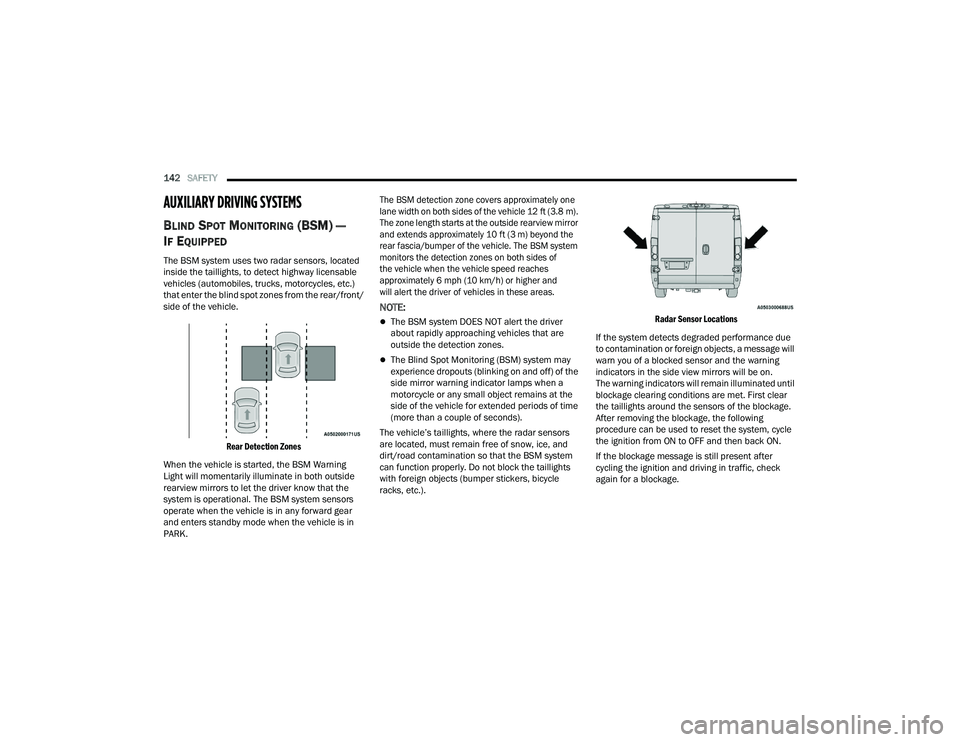
The BSM system uses two radar sensors, located
inside the taillights, to detect highway licensable
vehicles (automobiles, trucks, motorcycles, etc.)
that enter the blind spot zones from the rear/front/
side of the vehicle.
Rear Detection Zones
When the vehicle is started, the BSM Warning
Light will momentarily illuminate in both outside
rearview mirrors to let the driver know that the
system is operational. The BSM system sensors
operate when the vehicle is in any forward gear
and enters standby mode when the vehicle is in
PARK.
The BSM detection zone covers approximately one
lane width on both sides of the vehicle 12 ft (3.8 m).
The zone length starts at the outside rearview mirror
and extends approximately 10 ft (3 m) beyond the
rear fascia/bumper of the vehicle. The BSM system
monitors the detection zones on both sides of
the vehicle when the vehicle speed reaches
approximately 6 mph (10 km/h) or higher and
will alert the driver of vehicles in these areas.
NOTE:
The BSM system DOES NOT alert the driver
about rapidly approaching vehicles that are
outside the detection zones.
The Blind Spot Monitoring (BSM) system may
experience dropouts (blinking on and off) of the
side mirror warning indicator lamps when a
motorcycle or any small object remains at the
side of the vehicle for extended periods of time
(more than a couple of seconds).
The vehicle’s taillights, where the radar sensors
are located, must remain free of snow, ice, and
dirt/road contamination so that the BSM system
can function properly. Do not block the taillights
with foreign objects (bumper stickers, bicycle
racks, etc.).
Radar Sensor Locations
If the system detects degraded performance due
to contamination or foreign objects, a message will
warn you of a blocked sensor and the warning
indicators in the side view mirrors will be on.
The warning indicators will remain illuminated until
blockage clearing conditions are met. First clear
the taillights around the sensors of the blockage.
After removing the blockage, the following
procedure can be used to reset the system, cycle
the ignition from ON to OFF and then back ON.
If the blockage message is still present after
cycling the ignition and driving in traffic, check
again for a blockage.
22_VF_OM_EN_USC_t.book Page 142
Page 148 of 268

146SAFETY
Trailer Merge Assist — If Equipped
Trailer Merge Assist is a function of the Blind Spot
Monitoring (BSM) system that extends the blind
spot zone to work while pulling a trailer.
NOTE:When Trailer Merge Assist is activated, Rear Cross
Path is disabled.
Trailer Merge Assist consists of three sub
functions:
Automatic Trailer Detection
Trailer Length Detection
Trailer Merge Warning
Blind Spot Zones With Trailer Merge Assist
Automatic Trailer Detection
There are two modes of operation for the detection
of the trailer length:
Automatic Mode
— When “Auto Mode” is
selected, the system will use the blind spot
sensors to automatically determine the pres -
ence and length of a trailer. The presence of a
trailer will be detected using the blind spot radar
within 90 seconds of forward movement of the
vehicle. The vehicle must be moving above
6 mph (10 km/h) to activate the feature. Once
the trailer has been detected, the system will
default to the maximum blind spot zone until the
length has been verified. You will see “Auto” in
the instrument panel cluster .
Maximum Mode — When “Max Mode” is
selected, the system will default to the maximum
blind spot zone regardless of what size trailer is
attached .
NOTE:Selected setting is stored when the ignition is
placed in the OFF position. To change this setting,
it must be selected through the Uconnect Settings
Ú page 120. Trailer Length Detection
Once the trailer presence has been established,
the trailer length will be established (by making
a 90 degree turn) and then the trailer length
category (example 10-20 ft (3 m to 6 m)) will be
displayed. This can take up to 30 seconds after
completing the turn.
NOTE:During the same ignition cycle, if the vehicle is at a
standstill for a minimum of 90 seconds, a new
“trailer detection request” is enabled by the
system once the vehicle resumes motion.
The maximum trailer length supported by the
Trailer Merge Assist feature is 39.5 ft (12 m).
Trailer length is considered the forward most
portion of the trailer hitch to the rearward most
portion of the body, fascia/bumper, or ramp of the
trailer.
The maximum width supported by the Trailer
Merge Assist feature is 8.5 ft (2.59 m). Trailer
width is measured at the widest portion of the
trailer and may include wheels, tires, finders,
or rails.
1 — Vehicle
2 — Trailer
22_VF_OM_EN_USC_t.book Page 146
Page 149 of 268

SAFETY147
NOTE:The ability to detect a trailer may be degraded in
crowded or busy environments. Busy parking lots,
narrow areas surrounded with trees, or any other
crowded area may prevent the radar sensors
from being able to adequately detect the trailer.
The system will try to detect a trailer at every
ignition cycle or 90 seconds of standstill.
Trailer Length Detection
Trailer length will be identified and placed into one
of the following categories:
Trailer length up to 10 ft (3 m) — Blind spot zone
will be adjusted to 10 ft (3 m) .
Trailer length between 10 ft to 20 ft
(3 m to 6 m) — Blind spot zone will be adjusted
to 20 ft (6 m)
.
Trailer length between 20 ft to 30 ft (6 m to
9 m) — Blind spot zone will be adjusted to 30 ft
(9 m) .
Trailer length between 30 ft and 39.5 ft (9 m to
12 m) — Blind spot zone will be adjusted to Max
distance .
NOTE:Trailer length is determined within +/- 3 ft (1 m) of
actual length. Trailers that are the same size as the
category limit, 10/20/30 ft (3/6/9 m), could be
subject to being placed in the category above or
below the correct one.
Trailer Merge Warning
Trailer Merge Warning is the extension of the blind
spot function to cover the length of the trailer, plus
a safety margin, to warn the driver when there is a
vehicle in the adjacent lane. The driver is alerted by
the illumination of the BSM warning light located in
the outside mirror on the side the other vehicle is
detected on. In addition, an audible (chime) alert
will be heard and radio volume will be reduced
Ú page 145.
NOTE:
The Trailer Merge Alert system DOES NOT alert
the driver about rapidly approaching vehicles
that are outside the detection zones.
The Blind Spot Monitoring (BSM) system may
experience drop outs (blinking on and off) of the
side mirror warning indicator lamps when a
motorcycle or any small object remains at the
side of the vehicle for extended periods of time
(more than a couple of seconds).
Crowded areas such as parking lots, neighbor -
hoods, etc. may lead to an increased amount of
false alerts. This is normal operation.
1 — Trailer Length
2 — Trailer Hitch
3 — Trailer Width
WARNING!
The Blind Spot Monitoring system is only an aid
to help detect objects in the blind spot zones.
The BSM system is not designed to detect
pedestrians, bicyclists, or animals. Even if your
vehicle is equipped with the BSM system, always
check your vehicle’s mirrors, glance over your
shoulder, and use your turn signal before
changing lanes. Failure to do so can result in
serious injury or death.6
22_VF_OM_EN_USC_t.book Page 147
Page 151 of 268

SAFETY149
Turning FCW On Or Off
The FCW button is located in the Uconnect display
in the control settings Ú page 120.
To turn the FCW system on, press the forward
collision button once.
To turn the FCW system off, press the forward
collision button once.
NOTE:
Changing the FCW status to “Off” deactivates
the system, so no warning or active braking will
be available in case of a possible collision.
Changing the FCW status to “Only Warning”
prevents the system from providing limited
active braking, or additional brake support if the
driver is not braking adequately in the event of
a potential frontal collision, but maintains the
audible and visual warnings.
When FCW status is set to “Warning and
Braking”, this allows the system to warn the
driver of a possible collision with the vehicle in
front using audible/visual warnings and it
applies autonomous braking.
The FCW system state is kept in memory from
one ignition position to the next. If the system is
turned off, it will maintain its status in the next
key cycle.
FCW Braking Status And Sensitivity
The FCW Sensitivity and Active Braking status are
programmable through the Uconnect system
Úpage 120.
Far
When the sensitivity of FCW is set to the
“Far” setting and the system status is “Only
Warning”, this allows the system to warn the
driver of a possible more distant collision
with the vehicle in front using audible/
visual warnings.
More cautious drivers that do not mind
frequent warnings may prefer this setting.
NOTE:The “Far” setting may result in a greater
number of FCW possible collision warnings
experienced.
Medium
When the sensitivity of FCW is set to the
“Medium” setting and the system status is
“Only Warning”, this allows the system to
warn the driver of a possible collision with
the vehicle in front using audible/visual
warnings.
Near
When the sensitivity of FCW is set to the
“Near” setting and the system status is
“Only Warning”, this allows the system to
warn the driver of a possible closer collision
with the vehicle in front using audible/
visual warnings.
This setting provides less reaction time than
the “Far” and “Medium” settings, which
allows for a more dynamic driving experi -
ence.
More dynamic or aggressive drivers that
want to avoid frequent warnings may prefer
this setting.
NOTE:The “Near” setting may result in a lesser number of
FCW possible collision warnings experienced.
WARNING!
Forward Collision Warning (FCW) is not intended
to avoid a collision on its own, nor can FCW
detect every type of potential collision. The driver
has the responsibility to avoid a collision by
controlling the vehicle via braking and steering.
Failure to follow this warning could lead to
serious injury or death.
6
22_VF_OM_EN_USC_t.book Page 149
Page 155 of 268

SAFETY153
as part of the valve stem, transmit tire pressure
readings to the receiver module.
NOTE:It is particularly important for you to check the tire
pressure in all of the tires on your vehicle regularly
and to maintain the proper pressure.
The TPMS consists of the following components:
Receiver module
Four Tire Pressure Monitoring System sensors
Tire Pressure Monitoring System Warning Light
Tire Pressure Monitoring System Low
Pressure Warnings
The Tire Pressure Monitoring System Warning Light
will illuminate in the instrument cluster, an audible
chime will be activated, and the “Check tire
pressure” message will display when one or more of
the four active road tire pressures are low. Should
this occur, you should stop as soon as possible,
check the inflation pressure of each tire on your
vehicle, and inflate each tire to the vehicle’s
recommended cold placard pressure value. The
system will automatically update and the Tire
Pressure Monitoring System Warning Light will
extinguish once the updated tire pressures have
been received. The vehicle may need to be driven
for up to 20 minutes above 15 mph (24 km/h) to
receive this information.
Check TPMS Warnings
The Tire Pressure Monitoring System Warning Light
will flash on and off for 75 seconds and remain on
solid when a system fault is detected, an audible
chime will be activated and the “Tire Pressure
Monitoring Unavailable” message will display.
If the ignition key is cycled, this sequence will
repeat providing the system fault still exists. The
TPMS Warning Light will turn off when the fault
condition no longer exists. A system fault can occur
with any of the following scenarios:
Jamming due to electronic devices or driving
next to facilities emitting the same radio
frequencies as the TPMS sensors
Installing some form of aftermarket window
tinting that affects radio wave signals
Snow or ice around the wheels or wheel housings
Using tire chains on the vehicle
Using wheels/tires not equipped with TPMS
sensors
NOTE:Your vehicle is equipped with a regular size spare
wheel.
1. The spare tire does not have a TPMS sensor.
Therefore, the TPMS will not monitor the
pressure in the spare tire.
2. If a spare tire not equipped with the Tire Pressure Monitoring System sensor is used,
the TPMS Warning Light will turn on, flashing
for 75 seconds and then remaining solid for
each subsequent ignition key cycle.
3. Once you repair or replace the original road tire and reinstall it on the vehicle in place of the
spare tire, the TPMS will update automatically
and the Tire Pressure Monitoring System
Warning Light will extinguish once the updated
tire pressures have been received. The vehicle
may need to be driven for up to 20 minutes
above 15 mph (24 km/h) to receive this
information.
NOTE:For correct Tire Pressure Monitoring System
behavior, please wait for about 20 minutes in
key-off during each tire substitution.
6
22_VF_OM_EN_USC_t.book Page 153
Page 157 of 268

SAFETY155
(Continued)
Enhanced Seat Belt Use Reminder System
(BeltAlert)
Driver And Passenger BeltAlert — If Equipped BeltAlert is a feature intended to remind
the driver and outboard front seat
passenger (if equipped with outboard
front passenger seat BeltAlert) to buckle
their seat belts. The BeltAlert feature is active
whenever the ignition switch is in the AVV (START)
or MAR (ACC/ON/RUN) position.
Initial Indication
If the driver is unbuckled when the ignition switch
is first in the AVV (START) or MAR (ACC/ON/RUN)
position, a chime will signal for a few seconds.
If the driver or outboard front seat passenger
(if equipped with outboard front passenger seat
BeltAlert) is unbuckled when the ignition switch is
first in the AVV (START) or MAR (ACC/ON/RUN)
position the Seat Belt Reminder Light will turn on
and remain on until both outboard front seat belts
are buckled. The outboard front passenger seat
BeltAlert is not active when an outboard front
passenger seat is unoccupied.
BeltAlert Warning Sequence
The BeltAlert warning sequence is activated when
the vehicle is moving above a specified vehicle
speed range and the driver or outboard front seat
passenger is unbuckled (if equipped with outboard
front passenger seat BeltAlert) (the outboard front passenger seat BeltAlert is not active when the
outboard front passenger seat is unoccupied).
The BeltAlert warning sequence starts by blinking
the Seat Belt Reminder Light and sounding an
intermittent chime. Once the BeltAlert warning
sequence has completed, the Seat Belt Reminder
Light will remain on until the seat belts are
buckled. The BeltAlert warning sequence may
repeat based on vehicle speed until the driver
and occupied outboard front seat passenger seat
belts are buckled. The driver should instruct all
occupants to buckle their seat belts.
Change Of Status
If the driver or outboard front seat passenger
(if equipped with outboard front passenger seat
BeltAlert) unbuckles their seat belt while the
vehicle is traveling, the BeltAlert warning sequence
will begin until the seat belts are buckled again.
The outboard front passenger seat BeltAlert is not
active when the outboard front passenger seat is
unoccupied. BeltAlert may be triggered when an
animal or other items are placed on the outboard
front passenger seat or when the seat is folded flat
(if equipped). It is recommended that pets be
restrained in the rear seat (if equipped) in pet
harnesses or pet carriers that are secured by seat
belts, and cargo is properly stowed.
BeltAlert can be activated or deactivated by
an authorized dealer. FCA US LLC does not
recommend deactivating BeltAlert.
NOTE:If BeltAlert has been deactivated and the driver or
outboard front seat passenger (if equipped with
outboard front passenger seat BeltAlert) is
unbuckled the Seat Belt Reminder Light will turn
on and remain on until the driver and outboard
front seat passenger seat belts are buckled.
Lap/Shoulder Belts
All seating positions in your vehicle are equipped
with lap/shoulder belts.
The seat belt webbing retractor will lock only during
very sudden stops or collisions. This feature allows
the shoulder part of the seat belt to move freely
with you under normal conditions. However, in a
collision the seat belt will lock and reduce your risk
of striking the inside of the vehicle or being thrown
out of the vehicle.
WARNING!
Relying on the air bags alone could lead to
more severe injuries in a collision. The air
bags work with your seat belt to restrain you
properly. In some collisions, the air bags won’t
deploy at all. Always wear your seat belt even
though you have air bags.
6
22_VF_OM_EN_USC_t.book Page 155
Page 163 of 268

SAFETY161
SUPPLEMENTAL RESTRAINT SYSTEMS
(SRS)
Some of the safety features described in this
section may be standard equipment on some
models, or may be optional equipment on others.
If you are not sure, ask an authorized dealer.
The air bag system must be ready to protect you in a
collision. The Occupant Restraint Controller (ORC)
monitors the internal circuits and interconnecting
wiring associated with the electrical Air Bag System
Components. Your vehicle may be equipped with the
following Air Bag System Components:
Air Bag System Components
Occupant Restraint Controller (ORC)
Air Bag Warning Light
Steering Wheel and Column
Instrument Panel
Driver and Front Passenger Air Bags
Seat Belt Buckle Switch
Supplemental Side Air Bags
Front and Side Impact Sensors
Seat Belt Pretensioners
Air Bag Warning Light
The Occupant Restraint Controller (ORC)
monitors the readiness of the electronic
parts of the air bag system whenever the
ignition switch is in the AVV (START) or
MAR (ACC/ON/RUN) position. If the ignition switch
is in the STOP (OFF/LOCK) position the air bag
system is not on and the air bags will not inflate.
The ORC contains a backup power supply system
that may deploy the air bag system even if the
battery loses power or it becomes disconnected
prior to deployment.
The ORC turns on the Air Bag Warning Light in the
instrument panel for approximately four to eight
seconds for a self-check when the ignition switch is
in the MAR (ACC/ON/RUN) position. After the
self-check, the Air Bag Warning Light will turn off.
If the ORC detects a malfunction in any part of the
system, it turns on the Air Bag Warning Light, either
momentarily or continuously. A single chime will
sound to alert you if the light comes on again after
initial startup.
The ORC also includes diagnostics that will
illuminate the instrument panel Air Bag Warning
Light if a malfunction is detected that could affect
the air bag system. The diagnostics also record the
nature of the malfunction. While the air bag system
is designed to be maintenance free, if any of the following occurs, have an authorized dealer
service the air bag system immediately.The Air Bag Warning Light does not come on
during the four to eight seconds when the igni
-
tion switch is first in the MAR (ACC/ON/RUN)
position.
The Air Bag Warning Light remains on after the
four to eight-second interval.
The Air Bag Warning Light comes on intermit -
tently or remains on while driving.
NOTE:If the speedometer, tachometer, or any engine
related gauges are not working, the Occupant
Restraint Controller (ORC) may also be disabled.
In this condition the air bags may not be ready to
inflate for your protection. Have an authorized
dealer service the air bag system immediately.
WARNING!
Ignoring the Air Bag Warning Light in your
instrument panel could mean you won’t have the
air bag system to protect you in a collision. If the
light does not come on as a bulb check when the
ignition is first turned on, stays on after you start
the vehicle, or if it comes on as you drive, have
an authorized dealer service the air bag system
immediately.
6
22_VF_OM_EN_USC_t.book Page 161
Page 168 of 268

166SAFETY
If you do have a collision which deploys the air
bags, any or all of the following may occur:
The air bag material may sometimes cause abra -
sions and/or skin reddening to the occupants as
the air bags deploy and unfold. The abrasions are
similar to friction rope burns or those you might
get sliding along a carpet or gymnasium floor.
They are not caused by contact with chemicals.
They are not permanent and normally heal
quickly. However, if you haven’t healed signifi -
cantly within a few days, or if you have any blis -
tering, see your doctor immediately.
As the air bags deflate, you may see some
smoke-like particles. The particles are a normal
by-product of the process that generates the
non-toxic gas used for air bag inflation. These
airborne particles may irritate the skin, eyes,
nose, or throat. If you have skin or eye irritation,
rinse the area with cool water. For nose or throat
irritation, move to fresh air. If the irritation
continues, see your doctor. If these particles
settle on your clothing, follow the garment
manufacturer’s instructions for cleaning.
Do not drive your vehicle after the air bags have
deployed. If you are involved in another collision,
the air bags will not be in place to protect you.
NOTE:
Air bag covers may not be obvious in the interior
trim, but they will open during air bag deployment.
After any collision, the vehicle should be taken
to an authorized dealer immediately.
Fuel Cut Off Switch
Your vehicle is equipped with a Fuel Cut Off switch.
In the event of an accident, if the communication
network remains intact, and the power remains
intact, depending on the nature of the event, the
Fuel Cut Off Switch may perform the following
functions:
Cut off fuel to the engine and turn off the
engine.
Flash hazard lights as long as the battery has
power or until the hazard light button is pressed.
The hazard lights can be deactivated by
pressing the hazard light button.
Turn on the interior lights, which remain on as
long as the battery has power.
Unlock the power door locks.
NOTE:
After an accident, remember to cycle the ignition to
the STOP (OFF/LOCK) position and remove the key
from the ignition switch to avoid draining the battery.
Carefully check the vehicle for fuel leaks in the
engine compartment and on the ground near the
engine compartment and fuel tank before resetting
the system and starting the engine. If there are no
fuel leaks or damage to the vehicle electrical devices
(e.g. headlights) after an accident, reset the Fuel Cut
Off Switch by following the procedure described
below. If you have any doubt, contact an authorized
dealer.
WARNING!
Deployed air bags and seat belt pretensioners
cannot protect you in another collision. Have the air
bags, seat belt pretensioners, and the seat belt
retractor assemblies replaced by an authorized
dealer immediately. Also, have the Occupant
Restraint Controller System serviced as well.
22_VF_OM_EN_USC_t.book Page 166
Page 175 of 268

SAFETY173
(Continued)
TRANSPORTING PETS
Air Bags deploying in the front seat could harm
your pet. An unrestrained pet will be thrown about
and possibly injured, or injure a passenger during
panic braking or in a collision.
Pets should be restrained in the rear seat (if equipped)
in pet harnesses or pet carriers that are secured by
seat belts.
CONNECTED VEHICLES
Privacy of any wireless and wired communications
cannot be assured. Third parties may unlawfully
intercept information and private communications
without your consent. For further information, refer to
“Data Collection & Privacy” in your Uconnect Owner’s
Manual Supplement or “Onboard Diagnostic System
(OBD II) Cybersecurity”
Ú
page 119.
SAFETY CHECKS YOU SHOULD MAKE
I
NSIDE THE VEHICLE
Seat Belts
Inspect the seat belt system periodically, checking
for cuts, frays, and loose parts. Damaged parts
must be replaced immediately. Do not
disassemble or modify the system.
If your vehicle is involved in a collision, or if you
have questions regarding the seat belt or retractor
conditions, take your vehicle to an authorized FCA
dealer or authorized FCA Certified Collision Care
Program facility for inspection.
Air Bag Warning Light
The Air Bag Warning Light will turn on for
four to eight seconds as a bulb check
when the ignition switch is first placed in
the MAR (ACC/ON/RUN) position. If the
light is either not on during starting, stays on, or
turns on while driving, have the system inspected
at an authorized dealer as soon as possible. After
the bulb check, this light will illuminate with a
single chime when a fault with the Air Bag System
has been detected. It will stay on until the fault is
removed. If the light comes on intermittently or
remains on while driving, have an authorized
dealer service the vehicle immediately
Ú page 154.
Defroster
Check operation by selecting the defrost mode and
place the blower control on high speed. You should
be able to feel the air directed against the
windshield. See an authorized dealer for service if
your defroster is inoperable.
Floor Mat Safety Information
Always use floor mats designed to fit your vehicle.
Only use a floor mat that does not interfere with the
operation of the accelerator, brake or clutch pedals.
Only use a floor mat that is securely attached using the
floor mat fasteners so it cannot slip out of position and
interfere with the accelerator, brake or clutch pedals or
impair safe operation of your vehicle in other ways.
WARNING!
It is not possible to know or to predict all of the
possible outcomes if your vehicle’s systems are
breached. It may be possible that vehicle
systems, including safety related systems, could
be impaired or a loss of vehicle control could
occur that may result in an accident involving
serious injury or death.
WARNING!
An improperly attached, damaged, folded,
or stacked floor mat, or damaged floor mat
fasteners may cause your floor mat to interfere
with the accelerator, brake, or clutch pedals and
cause a loss of vehicle control. To prevent
SERIOUS INJURY or DEATH:
ALWAYS securely attach your floor
mat using the floor mat fasteners.
DO NOT install your floor mat upside
down or turn your floor mat over.
Lightly pull to confirm mat is secured using the
floor mat fasteners on a regular basis.
6
22_VF_OM_EN_USC_t.book Page 173