cruise control RAM PROMASTER 2022 Owners Manual
[x] Cancel search | Manufacturer: RAM, Model Year: 2022, Model line: PROMASTER, Model: RAM PROMASTER 2022Pages: 268, PDF Size: 13.26 MB
Page 5 of 268
3
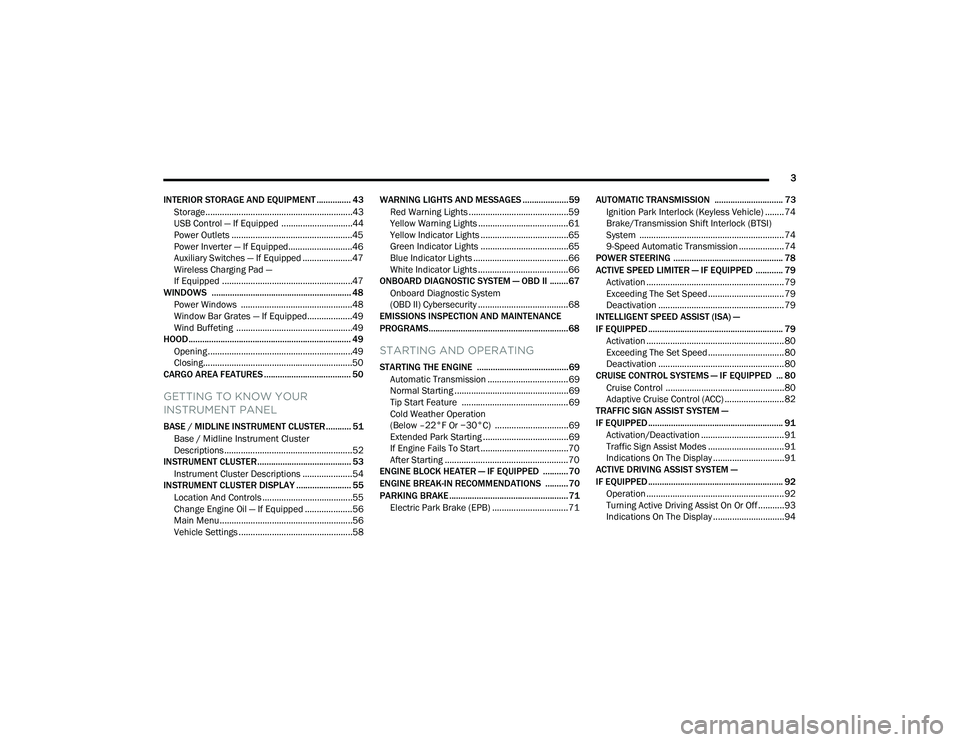
INTERIOR STORAGE AND EQUIPMENT ............... 43 Storage..............................................................43
USB Control — If Equipped ..............................44
Power Outlets ...................................................45
Power Inverter — If Equipped...........................46
Auxiliary Switches — If Equipped .....................47
Wireless Charging Pad —
If Equipped .......................................................47
WINDOWS ............................................................. 48
Power Windows ...............................................48
Window Bar Grates — If Equipped...................49
Wind Buffeting .................................................49
HOOD....................................................................... 49
Opening .............................................................49
Closing...............................................................50
CARGO AREA FEATURES ...................................... 50
GETTING TO KNOW YOUR
INSTRUMENT PANEL
BASE / MIDLINE INSTRUMENT CLUSTER........... 51
Base / Midline Instrument Cluster
Descriptions ......................................................52
INSTRUMENT CLUSTER......................................... 53
Instrument Cluster Descriptions .....................54
INSTRUMENT CLUSTER DISPLAY ........................ 55
Location And Controls ......................................55
Change Engine Oil — If Equipped ....................56
Main Menu........................................................56
Vehicle Settings ................................................58 WARNING LIGHTS AND MESSAGES ....................59
Red Warning Lights ..........................................59
Yellow Warning Lights ......................................61
Yellow Indicator Lights .....................................65
Green Indicator Lights .....................................65
Blue Indicator Lights ........................................66
White Indicator Lights ......................................66
ONBOARD DIAGNOSTIC SYSTEM — OBD II ........ 67
Onboard Diagnostic System
(OBD II) Cybersecurity ......................................68
EMISSIONS INSPECTION AND MAINTENANCE
PROGRAMS.............................................................68
STARTING AND OPERATING
STARTING THE ENGINE ........................................69
Automatic Transmission ..................................69
Normal Starting ................................................69
Tip Start Feature .............................................69
Cold Weather Operation
(Below –22°F Or −30°C) ...............................69
Extended Park Starting ....................................69
If Engine Fails To Start .....................................70
After Starting ....................................................70
ENGINE BLOCK HEATER — IF EQUIPPED ...........70
ENGINE BREAK-IN RECOMMENDATIONS ..........70
PARKING BRAKE ....................................................71
Electric Park Brake (EPB) ................................71 AUTOMATIC TRANSMISSION .............................. 73
Ignition Park Interlock (Keyless Vehicle) ........ 74
Brake/Transmission Shift Interlock (BTSI)
System ............................................................. 74
9-Speed Automatic Transmission ................... 74
POWER STEERING ................................................ 78
ACTIVE SPEED LIMITER — IF EQUIPPED ............ 79
Activation .......................................................... 79
Exceeding The Set Speed ................................ 79
Deactivation ..................................................... 79
INTELLIGENT SPEED ASSIST (ISA) —
IF EQUIPPED ........................................................... 79
Activation .......................................................... 80
Exceeding The Set Speed ................................ 80
Deactivation ..................................................... 80
CRUISE CONTROL SYSTEMS — IF EQUIPPED ... 80
Cruise Control .................................................. 80
Adaptive Cruise Control (ACC) ......................... 82
TRAFFIC SIGN ASSIST SYSTEM —
IF EQUIPPED ........................................................... 91
Activation/Deactivation ................................... 91
Traffic Sign Assist Modes ................................ 91
Indications On The Display .............................. 91
ACTIVE DRIVING ASSIST SYSTEM —
IF EQUIPPED ........................................................... 92
Operation .......................................................... 92
Turning Active Driving Assist On Or Off ........... 93
Indications On The Display .............................. 94
22_VF_OM_EN_USC_t.book Page 3
Page 12 of 268
10
Yellow Warning Lights
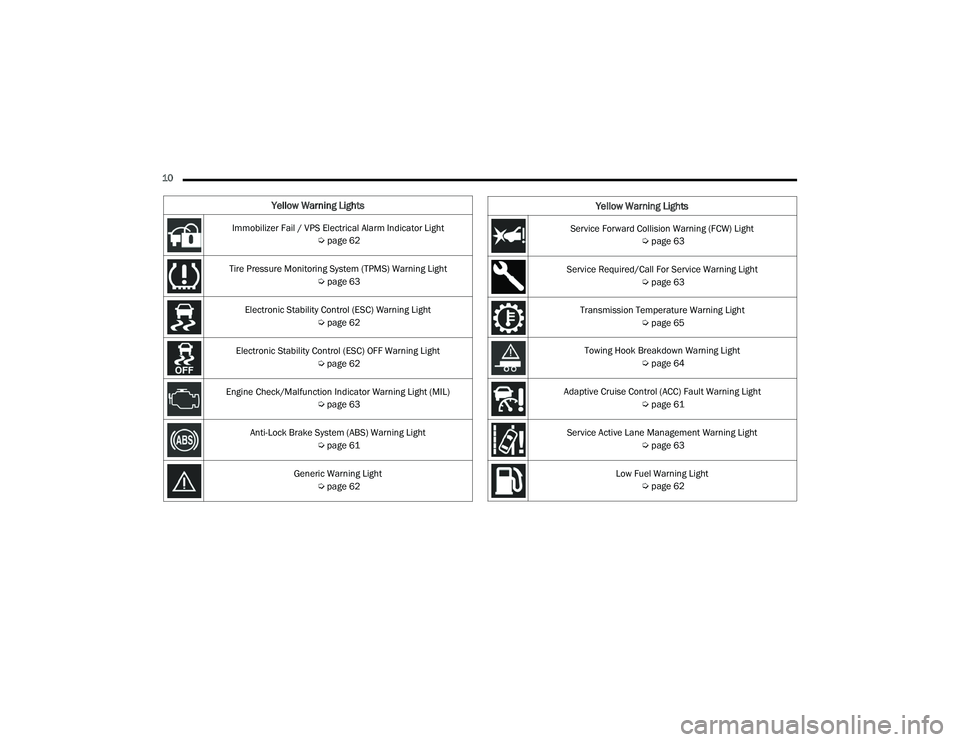
Immobilizer Fail / VPS Electrical Alarm Indicator Light Úpage 62
Tire Pressure Monitoring System (TPMS) Warning Light Úpage 63
Electronic Stability Control (ESC) Warning Light Úpage 62
Electronic Stability Control (ESC) OFF Warning Light Úpage 62
Engine Check/Malfunction Indicator Warning Light (MIL) Úpage 63
Anti-Lock Brake System (ABS) Warning Light Úpage 61
Generic Warning Light Úpage 62Service Forward Collision Warning (FCW) Light
Úpage 63
Service Required/Call For Service Warning Light Úpage 63
Transmission Temperature Warning Light Úpage 65
Towing Hook Breakdown Warning Light Úpage 64
Adaptive Cruise Control (ACC) Fault Warning Light Úpage 61
Service Active Lane Management Warning Light Úpage 63
Low Fuel Warning Light Úpage 62
Yellow Warning Lights
22_VF_OM_EN_USC_t.book Page 10
Page 13 of 268
11
Yellow Indicator Lights
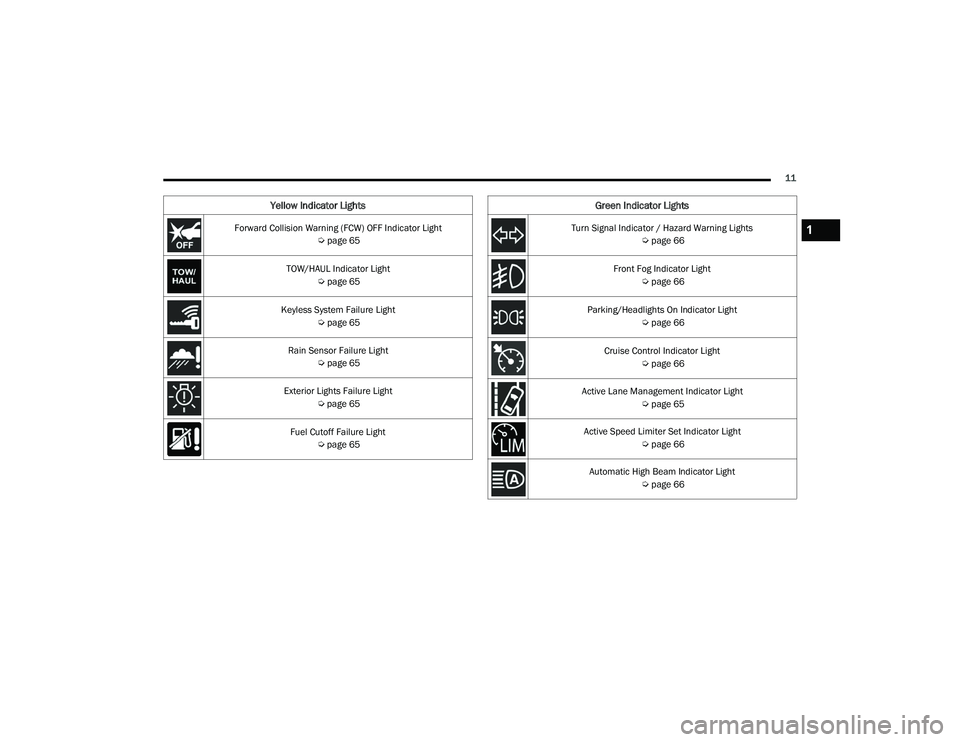
Forward Collision Warning (FCW) OFF Indicator Light Úpage 65
TOW/HAUL Indicator Light Úpage 65
Keyless System Failure Light Úpage 65
Rain Sensor Failure Light Úpage 65
Exterior Lights Failure Light Úpage 65
Fuel Cutoff Failure Light Úpage 65
Green Indicator Lights
Turn Signal Indicator / Hazard Warning Lights
Úpage 66
Front Fog Indicator Light Úpage 66
Parking/Headlights On Indicator Light Úpage 66
Cruise Control Indicator Light Úpage 66
Active Lane Management Indicator Light Úpage 65
Active Speed Limiter Set Indicator Light Úpage 66
Automatic High Beam Indicator Light Úpage 661
22_VF_OM_EN_USC_t.book Page 11
Page 14 of 268

12
Blue Indicator Lights
High Beam Indicator Light Úpage 66
White Indicator Lights
Speed Warning Indicator Light
Úpage 67
Adaptive Cruise Control (ACC) Set With Target Indicator Light Úpage 66
Active Lane Management Indicator Light
Úpage 67
Active Speed Limiter Ready Indicator Light Úpage 67
White Indicator Lights
22_VF_OM_EN_USC_t.book Page 12
Page 63 of 268
GETTING TO KNOW YOUR INSTRUMENT PANEL61
Rear Cargo Door Open Warning Light -
If Equipped
This warning light will illuminate when the
rear cargo door is open.
NOTE:This light will flash at a fast rate for approximately
15 seconds when the vehicle security system is
arming, and then will flash slowly until the vehicle
is disarmed.
Oil Pressure Warning Light
This warning light will illuminate to
indicate low engine oil pressure. If the
light turns on while driving, stop the
vehicle, shut off the engine as soon
as possible, and contact an authorized dealer.
A chime will sound when this light turns on.
Do not operate the vehicle until the cause is
corrected. This light does not indicate how much oil
is in the engine. The engine oil level must be
checked under the hood.
Seat Belt Reminder Warning Light
When the ignition is first placed in the
ON/RUN or MAR/ON/RUN position, if the
driver’s seat belt is unbuckled, a chime
will sound and the light will turn on. When
driving, if the driver or front passenger seat belt
remains unbuckled, the Seat Belt Reminder Light
will flash or remain on continuously and a chime
will sound Ú page 154.
Transmission Fault Warning Light
This light will illuminate (together with a
message in the instrument cluster display
and a buzzer) to indicate a transmission
fault. Contact an authorized dealer if the
message remains after restarting the engine.
Vehicle Security Warning Light —
If Equipped
This light will flash at a fast rate for
approximately 15 seconds when the vehicle
security system is arming, and then will flash
slowly until the vehicle is disarmed.
YELLOW WARNING LIGHTS
Adaptive Cruise Control (ACC) Fault
Warning Light — If Equipped
This warning light will illuminate to
indicate a fault in the ACC system.
Contact a local authorized dealer for
service Ú page 82.
Anti-Lock Brake System (ABS) Warning
Light
This light monitors the ABS. The light will
turn on when the ignition is placed in the
ON/RUN or MAR/ON/RUN position and
may stay on for as long as four seconds.
If the ABS light remains on or turns on while
driving, then the Anti-Lock portion of the brake
system is not functioning and service is required.
However, the conventional brake system will
continue to operate normally if the brake warning
light is not on.
If the ABS light is on, the brake system should be
serviced as soon as possible to restore the
benefits of Anti-Lock Brakes. If the ABS light
does not turn on when the ignition is placed in the
ON/RUN or MAR/ON/RUN position, have the light
inspected by an authorized dealer.
3
22_VF_OM_EN_USC_t.book Page 61
Page 68 of 268
66GETTING TO KNOW YOUR INSTRUMENT PANEL
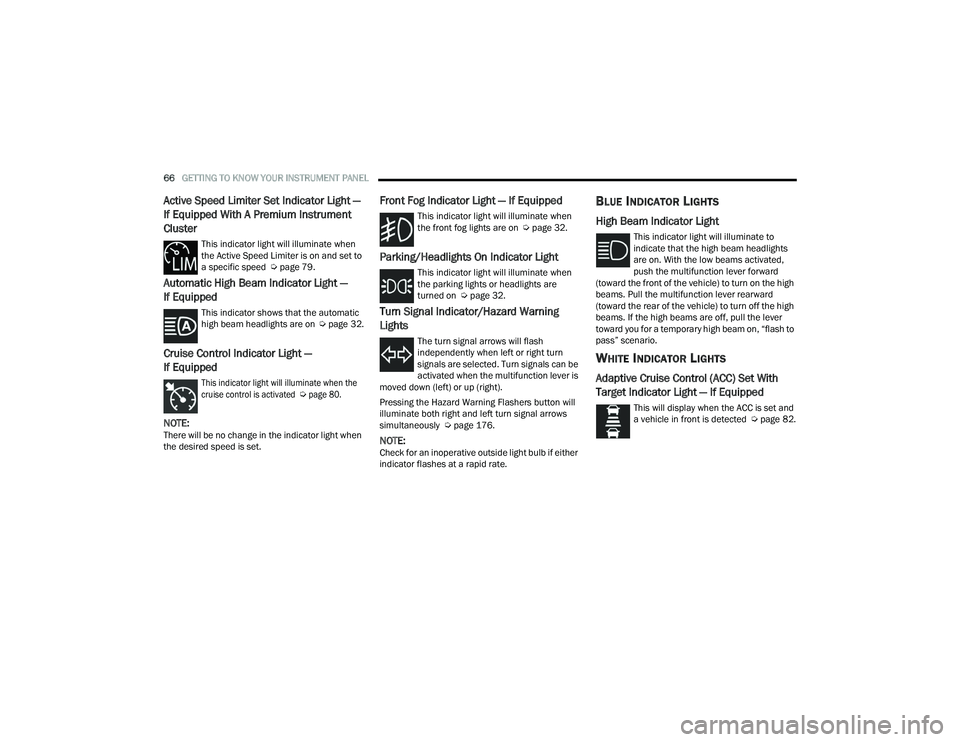
Active Speed Limiter Set Indicator Light —
If Equipped With A Premium Instrument
Cluster
This indicator light will illuminate when
the Active Speed Limiter is on and set to
a specific speed Úpage 79.
Automatic High Beam Indicator Light —
If Equipped
This indicator shows that the automatic
high beam headlights are on Úpage 32.
Cruise Control Indicator Light —
If Equipped
This indicator light will illuminate when the
cruise control is activated
Ú
page 80.
NOTE:There will be no change in the indicator light when
the desired speed is set.
Front Fog Indicator Light — If Equipped
This indicator light will illuminate when
the front fog lights are on Ú page 32.
Parking/Headlights On Indicator Light
This indicator light will illuminate when
the parking lights or headlights are
turned on Úpage 32.
Turn Signal Indicator/Hazard Warning
Lights
The turn signal arrows will flash
independently when left or right turn
signals are selected. Turn signals can be
activated when the multifunction lever is
moved down (left) or up (right).
Pressing the Hazard Warning Flashers button will
illuminate both right and left turn signal arrows
simultaneously Ú page 176.
NOTE:Check for an inoperative outside light bulb if either
indicator flashes at a rapid rate.
BLUE INDICATOR LIGHTS
High Beam Indicator Light
This indicator light will illuminate to
indicate that the high beam headlights
are on. With the low beams activated,
push the multifunction lever forward
(toward the front of the vehicle) to turn on the high
beams. Pull the multifunction lever rearward
(toward the rear of the vehicle) to turn off the high
beams. If the high beams are off, pull the lever
toward you for a temporary high beam on, “flash to
pass” scenario.
WHITE INDICATOR LIGHTS
Adaptive Cruise Control (ACC) Set With
Target Indicator Light — If Equipped
This will display when the ACC is set and
a vehicle in front is detected Ú page 82.
22_VF_OM_EN_USC_t.book Page 66
Page 81 of 268
STARTING AND OPERATING79
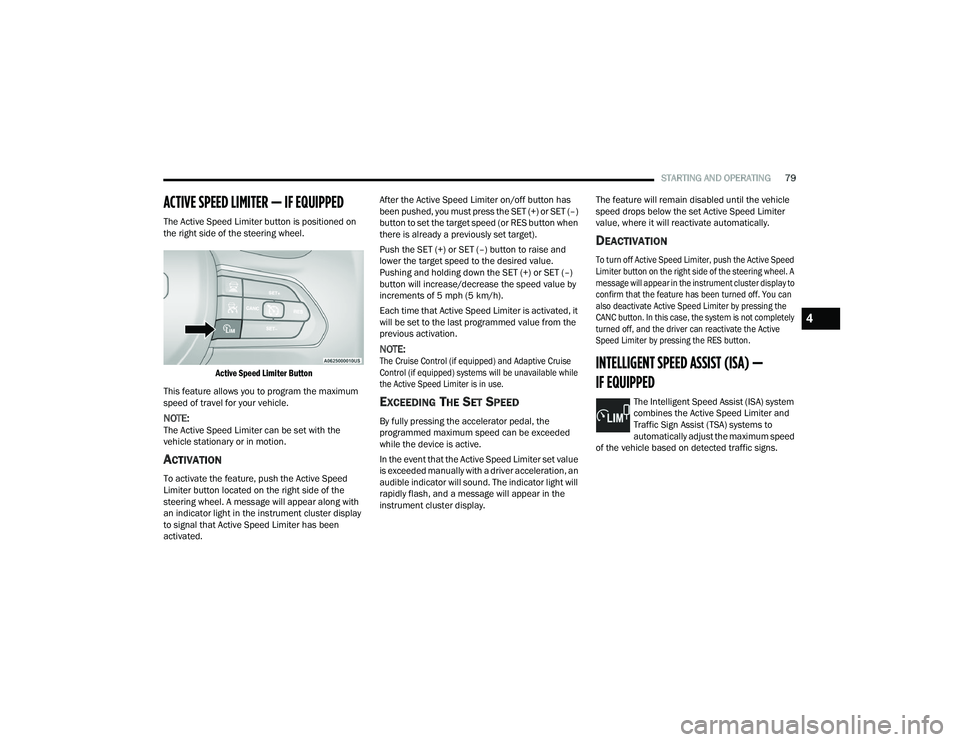
ACTIVE SPEED LIMITER — IF EQUIPPED
The Active Speed Limiter button is positioned on
the right side of the steering wheel.
Active Speed Limiter Button
This feature allows you to program the maximum
speed of travel for your vehicle.
NOTE:The Active Speed Limiter can be set with the
vehicle stationary or in motion.
ACTIVATION
To activate the feature, push the Active Speed
Limiter button located on the right side of the
steering wheel. A message will appear along with
an indicator light in the instrument cluster display
to signal that Active Speed Limiter has been
activated. After the Active Speed Limiter on/off button has
been pushed, you must press the SET (+) or SET (–)
button to set the target speed (or RES button when
there is already a previously set target).
Push the SET (+) or SET (–) button to raise and
lower the target speed to the desired value.
Pushing and holding down the SET (+) or SET (–)
button will increase/decrease the speed value by
increments of 5 mph (5 km/h).
Each time that Active Speed Limiter is activated, it
will be set to the last programmed value from the
previous activation.
NOTE:
The Cruise Control (if equipped) and Adaptive Cruise
Control (if equipped) systems will be unavailable while
the Active Speed Limiter is in use.
EXCEEDING THE SET SPEED
By fully pressing the accelerator pedal, the
programmed maximum speed can be exceeded
while the device is active.
In the event that the Active Speed Limiter set value
is exceeded manually with a driver acceleration, an
audible indicator will sound. The indicator light will
rapidly flash, and a message will appear in the
instrument cluster display. The feature will remain disabled until the vehicle
speed drops below the set Active Speed Limiter
value, where it will reactivate automatically.
DEACTIVATION
To turn off Active Speed Limiter, push the Active Speed
Limiter button on the right side of the steering wheel. A
message will appear in the instrument cluster display to
confirm that the feature has been turned off. You can
also deactivate Active Speed Limiter by pressing the
CANC button. In this case, the system is not completely
turned off, and the driver can reactivate the Active
Speed Limiter by pressing the RES button.
INTELLIGENT SPEED ASSIST (ISA) —
IF EQUIPPED
The Intelligent Speed Assist (ISA) system
combines the Active Speed Limiter and
Traffic Sign Assist (TSA) systems to
automatically adjust the maximum speed
of the vehicle based on detected traffic signs.
4
22_VF_OM_EN_USC_t.book Page 79
Page 82 of 268
80STARTING AND OPERATING
ACTIVATION
To activate the feature, make sure the Traffic Sign
Assist (TSA) system is enabled within Uconnect
Settings Úpage 120, then push the Active Speed
Limiter button located on the right side of the
steering wheel. The message “Ready” will appear
along with a white indicator light in the instrument
cluster display to signal that the system has been
activated.
While the system is in the “Ready” state, the driver
must press the SET (+), SET (–), or RES button to
engage the system. When the system is fully
engaged and detects the current speed limit using
the TSA system, the message in the instrument
cluster display will indicate the new detected
speed limit by suggesting the driver to press "RES"
to accept it.
If the detected speed sign is greater then the
current set speed, an up arrow will be displayed
too. If the detected speed sign is lower then the
current set speed, a down arrow will be displayed
instead. If the driver accepts the new suggested
speed sign, the indicator light will change to green.
Pushing the SET (+) or SET (–) button on the right
of the steering wheel will raise and lower the set
speed to a desired value above or below the set ISA
speed. Pushing and holding down the SET (+) or
SET (–) button will increase/decrease the speed
value by increments of 5 mph (5 km/h).
NOTE:The Cruise Control (if equipped) and Adaptive
Cruise Control (if equipped) systems will be
unavailable while the ISA system is in use.
EXCEEDING THE SET SPEED
By fully pressing the accelerator pedal, the
maximum set speed can be exceeded while the
system is active.
When the maximum set speed is exceeded, the
green indicator light will blink and the instrument
cluster display will show an override message for
five seconds, or until the accelerator pedal is
released.
DEACTIVATION
To turn off the Intelligent Speed Assist system,
push the Active Speed Limiter button on the right
side of the steering wheel. A message will appear
in the instrument cluster display to confirm that the
feature has been turned off. The Intelligent Speed
Assist system can also be deactivated by pressing
the CANC button. In this case, the ISA system is
not completely turned off, and the driver can
reactivate the system by pressing the RES button.
CRUISE CONTROL SYSTEMS — IF EQUIPPED
Your vehicle may be equipped with the Cruise
Control system, or the Adaptive Cruise Control
(ACC) system:
Cruise Control will keep your vehicle at a
constant preset speed.
Adaptive Cruise Control (ACC) will adjust the
vehicle speed up to the preset speed to main -
tain a distance with the vehicle ahead.
NOTE:
In vehicles equipped with ACC, if ACC is not
enabled, Fixed Speed Cruise Control will not
detect vehicles directly ahead of you. Always be
aware of the feature selected.
Only one Cruise Control feature can operate at a
time. For example, if Fixed Speed Cruise Control
is enabled, Adaptive Cruise Control will be
unavailable, and vice versa.
CRUISE CONTROL
When engaged, the Cruise Control takes over
accelerator operations at speeds greater than
25 mph (40 km/h) up to the maximum speed of
100 mph (160 km/h).
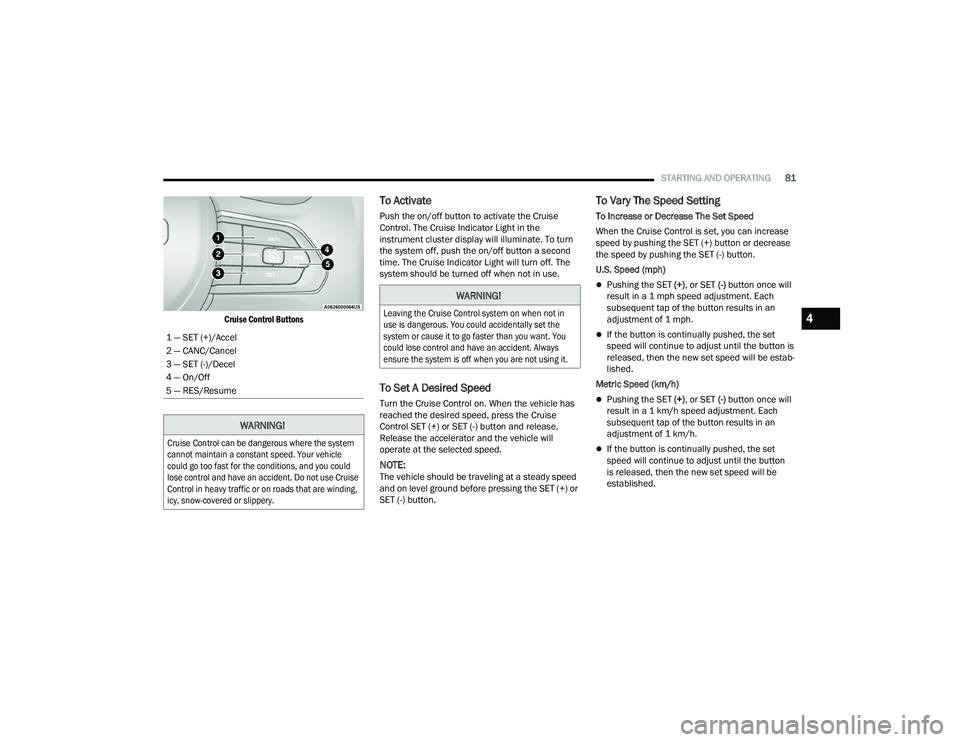
The Cruise Control buttons are located on the right
side of the steering wheel.
22_VF_OM_EN_USC_t.book Page 80
Page 83 of 268
STARTING AND OPERATING81
Cruise Control Buttons
To Activate
Push the on/off button to activate the Cruise
Control. The Cruise Indicator Light in the
instrument cluster display will illuminate. To turn
the system off, push the on/off button a second
time. The Cruise Indicator Light will turn off. The
system should be turned off when not in use.
To Set A Desired Speed
Turn the Cruise Control on. When the vehicle has
reached the desired speed, press the Cruise
Control SET (+) or SET (-) button and release.
Release the accelerator and the vehicle will
operate at the selected speed.
NOTE:The vehicle should be traveling at a steady speed
and on level ground before pressing the SET (+) or
SET (-) button.
To Vary The Speed Setting
To Increase or Decrease The Set Speed
When the Cruise Control is set, you can increase
speed by pushing the SET (+) button or decrease
the speed by pushing the SET (-) button.
U.S. Speed (mph)
Pushing the SET (+) , or SET (-) button once will
result in a 1 mph speed adjustment. Each
subsequent tap of the button results in an
adjustment of 1 mph.
If the button is continually pushed, the set
speed will continue to adjust until the button is
released, then the new set speed will be estab -
lished.
Metric Speed (km/h)
Pushing the SET (+) , or SET (-) button once will
result in a 1 km/h speed adjustment. Each
subsequent tap of the button results in an
adjustment of 1 km/h.
If the button is continually pushed, the set
speed will continue to adjust until the button
is released, then the new set speed will be
established.
1 — SET (+)/Accel
2 — CANC/Cancel
3 — SET (-)/Decel
4 — On/Off
5 — RES/Resume
WARNING!
Cruise Control can be dangerous where the system
cannot maintain a constant speed. Your vehicle
could go too fast for the conditions, and you could
lose control and have an accident. Do not use Cruise
Control in heavy traffic or on roads that are winding,
icy, snow-covered or slippery.
WARNING!
Leaving the Cruise Control system on when not in
use is dangerous. You could accidentally set the
system or cause it to go faster than you want. You
could lose control and have an accident. Always
ensure the system is off when you are not using it.
4
22_VF_OM_EN_USC_t.book Page 81
Page 84 of 268

82STARTING AND OPERATING
(Continued)
To Accelerate For Passing
While the Cruise Control system is set, press the
accelerator to pass as you would normally. When
the pedal is released, the vehicle will return to the
set speed.
USING CRUISE CONTROL ON HILLS
The transmission may downshift on hills to
maintain the vehicle set speed.
The Cruise Control system maintains speed up and
down hills. A slight speed change on moderate hills
is normal. On steep hills, a greater speed loss or
gain may occur so it may be preferable to drive
without Cruise Control.
To Resume Speed
To resume a previously set speed, push the RES
button and release. Resume can be used at any
speed above 20 mph (32 km/h) up to the
maximum speed of 100 mph (160 km/h).
To Deactivate
A soft tap on the brake pedal, pushing the CANC
button, or normal brake pressure while slowing the
vehicle will deactivate the Cruise Control without
erasing the set speed from memory.
Pushing the on/off button or placing the ignition
in the OFF position erases the set speed from
memory.
ADAPTIVE CRUISE CONTROL (ACC)
Adaptive Cruise Control (ACC) increases the driving
convenience provided by Cruise Control while
traveling on highways and major roadways.
However, it is not a safety system and not designed
to prevent collisions. The Cruise Control function
performs differently if your vehicle is not equipped
with ACC Ú page 80.
ACC will allow you to keep Cruise Control engaged
in light to moderate traffic conditions without the
constant need to reset your speed. ACC utilizes a
radar sensor and a forward facing camera
designed to detect a vehicle directly ahead of you
to maintain a set speed.
NOTE:
If the ACC sensor detects a vehicle ahead, ACC
will apply limited braking or accelerate (not to
exceed the original set speed) automatically to
maintain a preset following distance, while
matching the speed of the vehicle ahead.
Any chassis/suspension or tire size modifica -
tions to the vehicle will affect the performance
of the Adaptive Cruise Control and Forward Colli -
sion Warning system.
Fixed Speed Cruise Control (ACC not enabled)
will not detect vehicles directly ahead of you.
Always be aware of the feature selected
Ú page 256.
WARNING!
Cruise Control can be dangerous where the
system cannot maintain a constant speed.
Your vehicle could go too fast for the conditions,
and you could lose control and have an accident.
Do not use Cruise Control in heavy traffic or on
roads that are winding, icy, snow-covered or
slippery.
WARNING!
Adaptive Cruise Control (ACC) is a conve -
nience system. It is not a substitute for active
driver involvement. It is always the driver’s
responsibility to be attentive of road, traffic,
and weather conditions, vehicle speed,
distance to the vehicle ahead and, most
importantly, brake operation to ensure safe
operation of the vehicle under all road condi -
tions. Your complete attention is always
required while driving to maintain safe control
of your vehicle. Failure to follow these warn -
ings can result in a collision and death or
serious personal injury.
The ACC system:
Does not react to pedestrians, oncoming
vehicles, and stationary objects (e.g., a
stopped vehicle in a traffic jam or a
disabled vehicle).
22_VF_OM_EN_USC_t.book Page 82