radio RAM PROMASTER 2023 User Guide
[x] Cancel search | Manufacturer: RAM, Model Year: 2023, Model line: PROMASTER, Model: RAM PROMASTER 2023Pages: 296, PDF Size: 12.31 MB
Page 58 of 296
56GETTING TO KNOW YOUR INSTRUMENT PANEL
INSTRUMENT CLUSTER DISPLAY
Your vehicle will be equipped with an instrument
cluster display, which offers useful information
to the driver. With the ignition in the OFF mode,
opening/closing of a door will activate the display
for viewing, and display the total miles, or
kilometers, in the odometer. Your instrument
cluster display is designed to display important
information about your vehicle’s systems and
features. Using a driver interactive display located
on the instrument panel, your instrument cluster
display can show you how systems are working and
give you warnings when they are not. The steering
wheel mounted controls allow you to scroll through
the main menus and submenus. You can access
the specific information you want and make
selections and adjustments.
LOCATION AND CONTROLS
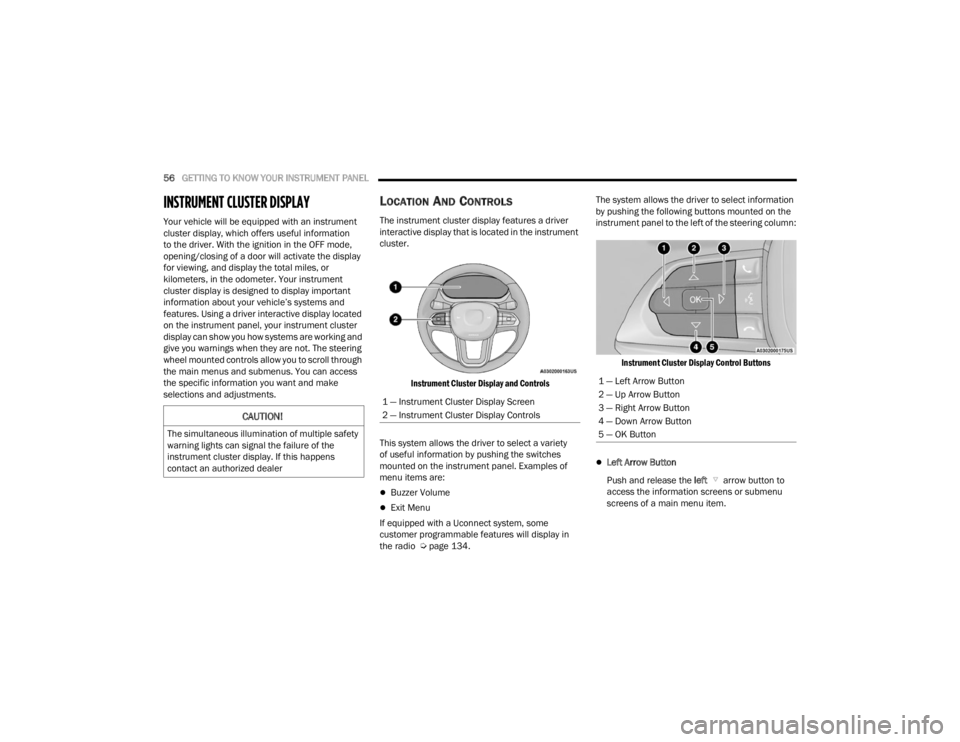
The instrument cluster display features a driver
interactive display that is located in the instrument
cluster.
Instrument Cluster Display and Controls
This system allows the driver to select a variety
of useful information by pushing the switches
mounted on the instrument panel. Examples of
menu items are:
Buzzer Volume
Exit Menu
If equipped with a Uconnect system, some
customer programmable features will display in
the radio Ú page 134. The system allows the driver to select information
by pushing the following buttons mounted on the
instrument panel to the left of the steering column:
Instrument Cluster Display Control Buttons
Left Arrow Button
Push and release the left arrow button to
access the information screens or submenu
screens of a main menu item.
CAUTION!
The simultaneous illumination of multiple safety
warning lights can signal the failure of the
instrument cluster display. If this happens
contact an authorized dealer
1 — Instrument Cluster Display Screen
2 — Instrument Cluster Display Controls
1 — Left Arrow Button
2 — Up Arrow Button
3 — Right Arrow Button
4 — Down Arrow Button
5 — OK Button
23_VF_OM_EN_USC_t.book Page 56
Page 109 of 296

STARTING AND OPERATING107
The vehicle is close to the obstacle when the instrument cluster display shows one flashing arc and sounds a continuous tone. The following chart shows the
warning alert operation when the system is detecting an obstacle:
WARNING ALERTS FOR REAR
Rear Distance (inches/cm) Greater than
59 inches (150 cm) 59–52 inches
(150-130 cm) 52-41 inches
(130-105 cm) 41-34 inches
(105-85 cm) 34-24 inches
(85-60 cm) 24-12 inches
(60-30 cm) Less than
12 inches (30 cm)
Arcs — Left None NoneNoneNoneNone 6th Flashing 5th Flashing
Arcs — Center None 10th Solid 9th Solid 8th Solid 7th Flashing 6th Flashing 5th Flashing
Arcs — Right None NoneNoneNoneNone 6th Flashing 5th Flashing
Audible Alert Chime None
Audible chime increases as the object gets closer to the vehicle Continuous
Radio Volume Reduced No
Yes
WARNING ALERTS FOR FRONT
Front Distance
(inches/cm) Greater than
39 inches (100 cm) 39-32 inches
(100-80 cm) 32-24 inches
(80-60 cm) 24-12 inches
(60-30 cm) Less than
12 inches (30 cm)
Arcs — Left NoneNoneNone3rd Flashing 4th Flashing
Arcs — Center None1st Solid2nd Flashing 3rd Flashing4th Flashing
Arcs — Right NoneNoneNone3rd Flashing 4th Flashing
Audible Alert Chime NoneAudible chime increases as the object gets close to the vehicle Continuous
Radio Volume Reduced No
Yes Yes Yes
4
23_VF_OM_EN_USC_t.book Page 107
Page 110 of 296
108STARTING AND OPERATING
NOTE:ParkSense will reduce the volume of the radio, if
on, when the system is sounding an audible tone.
Front Park Assist Audible Alerts
ParkSense will turn off the Front Park Assist
audible alert (chime) after approximately three
seconds when an obstacle has been detected, the
vehicle is stationary, and brake pedal is applied.
Adjustable Chime Volume Settings
Front and Rear chime volume settings can be
selected from the Uconnect system Ú page 134.
The chime volume settings include low, medium,
and high.
ParkSense will retain its last known configuration
state through ignition cycles.
ENABLING AND DISABLING PARKSENSE
ParkSense can be enabled and disabled with
the ParkSense switch, located on the switch
panel below the Uconnect display.
When the ParkSense switch is pushed to disable
the system, the instrument cluster display
Ú page 56 will show the “ParkSense Disabled”
message for approximately five seconds.
The ParkSense switch LED will be on when
ParkSense is disabled or requires service.
The ParkSense switch LED will be off when the
system is enabled. If the ParkSense switch is pushed, and requires service, the ParkSense
switch LED will blink momentarily, and then the
LED will be on.
SERVICE THE PARKSENSE PARK ASSIST
S
YSTEM
When the ParkSense System has detected a faulted
condition, the instrument cluster display will actuate
a single chime, and it will show the "PARKSENSE
UNAVAILABLE WIPE REAR SENSORS", "PARKSENSE
UNAVAILABLE WIPE FRONT SENSORS", or the
"PARKSENSE UNAVAILABLE SERVICE REQUIRED"
message for five seconds. Under this condition,
ParkSense will not operate.
If "PARKSENSE UNAVAILABLE WIPE REAR
SENSORS" or "PARKSENSE UNAVAILABLE WIPE
FRONT SENSORS" appears in the instrument
cluster display make sure the outer surface and
the underside of the rear fascia/bumper and/or
front fascia/bumper is clean and clear of snow,
ice, mud, dirt or other obstruction and then cycle
the ignition. If the message continues to appear,
see an authorized dealer.
If the "PARKSENSE UNAVAILABLE SERVICE
REQUIRED" message appears in the instrument
cluster display, see an authorized dealer.
PARKSENSE PARK ASSIST FAILURE
I
NDICATIONS
A malfunction of the ParkSense sensors
or system is indicated, during REVERSE
gear engagement, by the instrument
panel warning icon.
The warning icon is illuminated and a message is
displayed in the instrument cluster display
(if equipped) Ú page 65.
The sensors and wiring are tested continuously
when the ignition is in the ON/RUN position.
Failures are indicated immediately if they occur
when the system is on.
Even if the system is able to identify that a specific
sensor is in failure condition, the instrument
cluster display shall indicate that the ParkSense
system is unavailable, without reference to the
sensor in failure condition. If even a single sensor
fails, the entire system must be disabled.
The system is turned off automatically.
CLEANING THE PARKSENSE SYSTEM
Clean the ParkSense sensors with water, car wash
soap and a soft cloth. Do not use rough or hard
cloths. Do not scratch or poke the sensors.
Otherwise, you could damage the sensors.
23_VF_OM_EN_USC_t.book Page 108
Page 111 of 296

STARTING AND OPERATING109
(Continued)
PARKSENSE PARK ASSIST SYSTEM
U
SAGE PRECAUTIONS
NOTE:
Ensure that the front and rear fascia/bumper
are free of snow, ice, mud, dirt and debris to
keep the ParkSense system operating properly.
Construction equipment, large trucks, and other
vibrations could affect the performance of
ParkSense.
When you turn ParkSense off, the instrument
cluster display will read “PARKSENSE OFF.”
Furthermore, once you turn ParkSense off, it
remains off until you turn it on again, even if you
cycle the ignition key.
ParkSense, when on, will reduce the volume of
the radio when it is sounding a tone.
Clean the ParkSense sensors regularly, taking care
not to scratch or damage them. The sensors must
not be covered with ice, snow, slush, mud, dirt or
debris. Failure to do so can result in the system not
working properly. The ParkSense system might not
detect an obstacle behind or in front of the fascia/
bumper, or it could provide a false indication that an
obstacle is behind or in front of the fascia/bumper.
Use the ParkSense switch to turn the ParkSense
system and Side Distance Warning off if objects
such as bicycle carriers, etc. are placed within
12 inches (30 cm) from the rear fascia/bumper. Failure to do so can result in the system misin
-
terpreting a close object as a sensor problem,
causing the “PARKSENSE UNAVAILABLE
SERVICE REQUIRED” message to be displayed
in the instrument cluster display.
NOTE:If any objects are attached to the bumper within a
6.5 ft (2 m) field of view, they will interfere and
cause false alerts and possibly blockage.
There may be a delay in the object detection
rate if the object is moving.
The operation of the rear sensors is automati -
cally deactivated when the trailer's electric plug
is inserted in the vehicle's tow hook socket,
while the front sensors stay active and can
provide acoustic and visual warnings. The rear
sensors are automatically reactivated when the
trailer's cable plug is removed.
WARNING!
Drivers must be careful when backing up even
when using ParkSense. Always check carefully
behind your vehicle, look behind you, and be
sure to check for pedestrians, animals, other
vehicles, obstructions, and blind spots before
backing up. You are responsible for safety
and must continue to pay attention to your
surroundings. Failure to do so can result in
serious injury or death.
Before using ParkSense, it is strongly recom -
mended that the ball mount and hitch ball
assembly be disconnected from the vehicle
when the vehicle is not used for towing. Failure
to do so can result in injury or damage to vehi -
cles or obstacles because the hitch ball will be
much closer to the obstacle than the rear fascia
when the vehicle sounds the continuous tone.
Also, the sensors could detect the ball mount
and hitch ball assembly, depending on its size
and shape, giving a false indication that an
obstacle is behind the vehicle.
CAUTION!
ParkSense is only a parking aid and it is unable to
recognize every obstacle, including small obsta -
cles. Parking curbs might be temporarily detected
or not detected at all. Obstacles located above or
below the sensors will not be detected when they
are in close proximity.
The vehicle must be driven slowly when using
ParkSense in order to be able to stop in time
when an obstacle is detected. It is recom -
mended that the driver looks over his/her
shoulder when using ParkSense.
WARNING!
4
23_VF_OM_EN_USC_t.book Page 109
Page 112 of 296

110STARTING AND OPERATING
If it is necessary to keep the ball mount and hitch
ball assembly mounted for a long period, it is
possible to filter out the ball mount and hitch ball
assembly presence in the sensor field of view.
The filtering operation must be performed only by
an authorized dealer.
SIDE DISTANCE WARNING SYSTEM
The Side Distance Warning system detects the
presence of side obstacles near the vehicle using
the parking sensors located in the front and rear
fascia/bumpers.
Side Distance Warning Display
The Side Distance Warning screen will only be
displayed if this feature is enabled within Uconnect
Settings Ú page 134.
The system warns the driver with an acoustic
signal and, when enabled, with visual indications
on the instrument cluster display.
When the vehicle is in DRIVE, the Side Distance
Warning volume/chime will match the Front
ParkSense volume and chime type.
When the vehicle is in REVERSE, the Side Distance
Warning volume/chime will match the Rear
ParkSense volume and chime type.
NOTE:Parksense will reduce the volume of the radio if
on when the system is sounding an audible tone.
An audible tone will only sound if a collision is
possible.
Activation/Deactivation
The system can operate only after driving a short
distance and if the vehicle speed is between 0 and
7 mph (0 and 11 km/h). The system can be activated/
deactivated via the Settings menu of the Uconnect
system. If the ParkSense System is deactivated via
the ParkSense hard switch, then the Side Distance
Warning system will automatically be deactivated.
The system will automatically deactivate if any
door is opened.
ParkSense Park Assist System Usage
Precautions
NOTE:
Ensure that the front and rear fascia/bumper
are free of snow, ice, mud, dirt and debris to
keep the ParkSense system operating properly.
Construction equipment, large trucks, and other
vibrations could affect the performance of
ParkSense.
When you turn ParkSense off, the instrument
cluster display will read “PARKSENSE OFF.”
Furthermore, once you turn ParkSense off, it
remains off until you turn it on again, even if you
cycle the ignition key.
ParkSense, when on, will reduce the volume of
the radio when it is sounding a tone.
Clean the ParkSense sensors regularly,
taking care not to scratch or damage them.
The sensors must not be covered with ice, snow,
slush, mud, dirt or debris. Failure to do so can
result in the system not working properly. The
ParkSense system might not detect an obstacle
behind or in front of the fascia/bumper, or it
could provide a false indication that an obstacle
is behind or in front of the fascia/bumper.
WARNING ALERTS
Distance
(inches/cm) Less than
12 inches (30 cm) 12 –
24 inches
(30–60 cm)
Arcs-Left Flashing Flashing
Arcs-Right Flashing Flashing
Audible Alert Chime Continuous Fast audible
chime as the objects get
close to the vehicle
Radio Volume Reduced Yes
Yes
23_VF_OM_EN_USC_t.book Page 110
Page 135 of 296
133
MULTIMEDIA
UCONNECT SYSTEMS
For detailed information about your Uconnect 5
With 7-inch Display or Uconnect 5 NAV With
10.1-inch Display system, refer to your Uconnect
Radio Instruction Manual.
NOTE:Uconnect screen images are for illustration
purposes only and may not reflect exact software
for your vehicle.
CYBERSECURITY
Depending on applicability, your vehicle may be
able to send or receive information from a wired or
wireless network. This information allows systems
and features in your vehicle to function properly.Your vehicle may be equipped with certain security
features to reduce the risk of unauthorized and
unlawful access to vehicle systems and wireless
communications. Vehicle software technology
continues to evolve over time and FCA US LLC,
working with its suppliers, evaluates and takes
appropriate steps as needed. As always, if you
experience unusual behavior, contact an
authorized dealer immediately, Ú
page 275, or
refer to your Uconnect Radio Instruction Manual
for additional contact information.
The risk of unauthorized and unlawful access to
your vehicle systems may still exist, even if the
most recent version of vehicle software (such as
Uconnect software) is installed.NOTE:To help further improve user experience, features,
stability, etc., and minimize the potential risk of a
security breach, vehicle owners should routinely
check
www.driveuconnect.com (US Residents) or www.driveuconnect.ca (Canadian Residents) to
learn about available Uconnect software updates.
WARNING!
ONLY insert trusted devices/components into
your vehicle. Media of unknown origin could
possibly contain malicious software, and if
installed in your vehicle, it may increase the
possibility for vehicle systems to be breached.
As always, if you experience unusual vehicle
behavior, take your vehicle to an authorized
dealer immediately.
5
23_VF_OM_EN_USC_t.book Page 133
Page 136 of 296
134MULTIMEDIA
UCONNECT SETTINGS
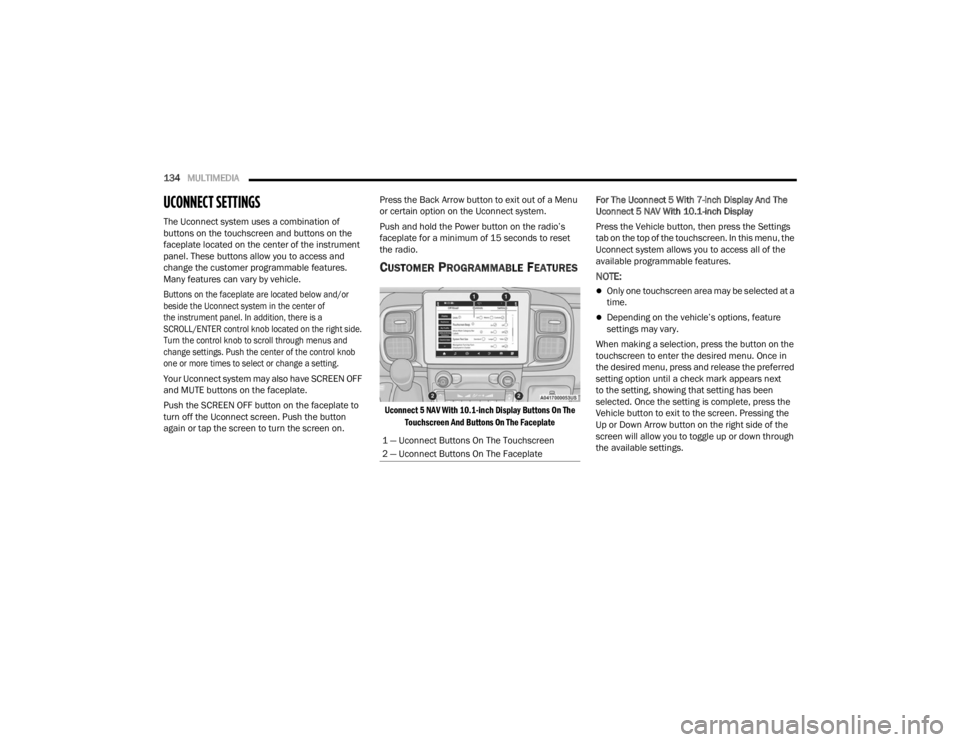
The Uconnect system uses a combination of
buttons on the touchscreen and buttons on the
faceplate located on the center of the instrument
panel. These buttons allow you to access and
change the customer programmable features.
Many features can vary by vehicle.
Buttons on the faceplate are located below and/or
beside the Uconnect system in the center of
the instrument panel. In addition, there is a
SCROLL/ENTER control knob located on the right side.
Turn the control knob to scroll through menus and
change settings. Push the center of the control knob
one or more times to select or change a setting.
Your Uconnect system may also have SCREEN OFF
and MUTE buttons on the faceplate.
Push the SCREEN OFF button on the faceplate to
turn off the Uconnect screen. Push the button
again or tap the screen to turn the screen on. Press the Back Arrow button to exit out of a Menu
or certain option on the Uconnect system.
Push and hold the Power button on the radio’s
faceplate for a minimum of 15 seconds to reset
the radio.
CUSTOMER PROGRAMMABLE FEATURES
Uconnect 5 NAV With 10.1-inch Display Buttons On The
Touchscreen And Buttons On The Faceplate
For The Uconnect 5 With 7-inch Display And The
Uconnect 5 NAV With 10.1-inch Display
Press the Vehicle button, then press the Settings
tab on the top of the touchscreen. In this menu, the
Uconnect system allows you to access all of the
available programmable features.
NOTE:
Only one touchscreen area may be selected at a
time.
Depending on the vehicle’s options, feature
settings may vary.
When making a selection, press the button on the
touchscreen to enter the desired menu. Once in
the desired menu, press and release the preferred
setting option until a check mark appears next
to the setting, showing that setting has been
selected. Once the setting is complete, press the
Vehicle button to exit to the screen. Pressing the
Up or Down Arrow button on the right side of the
screen will allow you to toggle up or down through
the available settings.
1 — Uconnect Buttons On The Touchscreen
2 — Uconnect Buttons On The Faceplate
23_VF_OM_EN_USC_t.book Page 134
Page 137 of 296

MULTIMEDIA135
My Profile
When the My Profile button is pressed on the touchscreen, the system displays options related to the vehicle’s profiles.
NOTE:Depending on the vehicle’s options, feature settings may vary.
Setting Name Description
LanguageThis setting will change the language of the Uconnect system and Instrument Cluster Display.
The available languages are English, French, and Spanish.
Display Mode This setting will adjust the display for the radio to “Auto” or “Manual”. “Manual” allows for more
customization with the radio display.
Display Brightness Headlights On This setting will allow you to set the brightness when the headlights are on. To access this setting,
Display Mode must be set to “Manual”. The “+” setting will increase the brightness; the “-” will
decrease the brightness.
Display Brightness Headlights Off This setting will allow you to set the brightness when the headlights are off. To access this setting,
Display Mode must be set to “Manual”. The “+” setting will increase the brightness; the “-” will
decrease the brightness.
Set Theme This setting will allow you to change the display theme.
Units This setting will allow you to change the units. The available options are “Speed” (MPH or km/h),
“Distance” (mi or km), “Fuel Consumption” (MPG [US], MPG [UK], L/100 km, or km/L), “Pressure”
(psi, kPa, or bar), and “Temperature” (°C or °F) units of measurement independently.
Theme Mode
This setting will allow you to adjust the brightness of your theme. Setting options are “Light”, “Dark” and “Auto”.
Select to show themes in Light or Dark mode. “Auto” changes the theme with the headlights.
Touchscreen Beep This setting will allow you to turn the touchscreen beep on or off.
Show Main Category Bar Labels This setting will allow the main category bar labels to be shown on or off.
Navigation Next Turn Pop-Ups Displayed in Cluster This setting will display Navigation prompts in the Instrument Cluster Display.
Phone Pop-Ups Displayed In Cluster This setting will display smartphone notifications and messages in the Instrument Cluster Display.
5
23_VF_OM_EN_USC_t.book Page 135
Page 138 of 296

136MULTIMEDIA
Time Format This setting will allow you to set the time format (AM/PM). Sync Time With GPS must be “Off” for this
setting to be available. The “12 hrs” setting will set the time to a 12-hour format. The “24 hrs” setting
will set the time to a 24-hour format.
Voice Options This setting will allow you to change the voice options for the radio to “Male” or “Female”.
Wake Up Word This setting will allow you to set the system “Wake Up” word. The available options are “Off”,
“Hey, Uconnect”, and “Hey, Ram”.
Voice Barge-in This setting will allow Voice Barge-in to be turned on or off. For more information about Voice Barge-in,
refer to your Uconnect Radio Instruction Manual.
Show Command List This setting will allow the Command List on the Voice Recognition window to be shown on or off.
Radio Off Delay
This setting will keep certain electrical features running after the engine is turned off. When any door is opened,
the electronics will deactivate. The available settings are “0 sec”, “45 sec”, “5 min”, and “10 min”.
Radio Off With Door This setting will allow you to determine if the radio shuts off when any of the doors are opened.
App Drawer Favoriting Pop-ups This setting will allow you to favorite app drawer pop-ups with “On” and “Off” options.
App Drawer Unfavoritings Pop-ups This setting will allow you to unfavorite app drawer pop-ups with “On” and “Off” options.
New Text Message Pop-ups This setting will allow you to have pop-up notifications for new text messages. Setting options are “On”
and “Off”.
Missed Calls Message
This setting will allow you to have pop-up notifications for missed calls. Setting options are “On” and “Off”.
Navigation Pop-ups
This setting will allow you to have pop-up notifications for Navigation. Setting options are “On” and “Off”.
Navigation Settings This setting will redirect to the list of Navigation settings. Refer to your Uconnect Radio Instruction
Manual for further information.
Audio Settings This setting will open the submenu, containing the audio settings Ú page 147.
Reset App Drawer to Default Order This setting will reset the app drawer to its factory default layout.
Setting Name Description
23_VF_OM_EN_USC_t.book Page 136
Page 142 of 296

140MULTIMEDIA
Clock & Date
When the Clock & Date button is pressed on the touchscreen, the system displays the different options related to the vehicle’s internal clock.
NOTE:Depending on the vehicle’s options, feature settings may vary.
Setting Name Description
Sync Time With GPSThis setting will sync the time to the GPS receiver in the system. The system will control the time via the
GPS location.
Set Time This setting will allow you to set the hours and minutes. Sync Time With GPS must be off for this setting
to be available. The “+” setting will increase the hours and minutes. The “-” setting will decrease the
hours and minutes.
Time Format This setting will allow you to set the time format (AM/PM). Sync Time With GPS must be off for this
setting to be available. The “12 hrs” setting will set the time to a 12-hour format. The “24 hrs” setting
will set the time to a 24-hour format.
Show Time in Status Bar This setting will place the time in the radio’s status bar.
Set Date This setting will allow you to set the day, month and year. Using “+” or “-”, you can scroll through the
available days, months, and years.
Show Time and Date During Screen Off This setting will allow you to show the time and date while the screen is off. Available options are “On”
and “Off”.
23_VF_OM_EN_USC_t.book Page 140