oil RAM PROMASTER 2023 Owners Manual
[x] Cancel search | Manufacturer: RAM, Model Year: 2023, Model line: PROMASTER, Model: RAM PROMASTER 2023Pages: 296, PDF Size: 12.31 MB
Page 5 of 296

3
INTERIOR STORAGE AND EQUIPMENT ............... 44 Storage..............................................................44
USB Control — If Equipped ..............................45
Power Outlets ...................................................46
Power Inverter — If Equipped...........................47
Auxiliary Switches — If Equipped .....................47
Wireless Charging Pad —
If Equipped .......................................................48
WINDOWS ............................................................. 49
Power Windows ...............................................49
Window Bar Grates — If Equipped...................49
Wind Buffeting .................................................50
HOOD....................................................................... 50
Opening .............................................................50
Closing...............................................................51
CARGO AREA FEATURES ...................................... 51
GETTING TO KNOW YOUR
INSTRUMENT PANEL
BASE / MIDLINE INSTRUMENT CLUSTER........... 52
Base / Midline Instrument Cluster
Descriptions ......................................................53
INSTRUMENT CLUSTER......................................... 54
Instrument Cluster Descriptions .....................55
INSTRUMENT CLUSTER DISPLAY ........................ 56
Location And Controls ......................................56
Change Engine Oil — If Equipped ....................57
Main Menu........................................................57
Settings .............................................................59 WARNING LIGHTS AND MESSAGES ....................65
Red Warning Lights ..........................................65
Yellow Warning Lights ......................................68
Yellow Indicator Lights .....................................72
Green Indicator Lights .....................................72
Blue Indicator Lights ........................................73
White Indicator Lights ......................................73
ONBOARD DIAGNOSTIC SYSTEM — OBD II ........ 74
Onboard Diagnostic System
(OBD II) Cybersecurity ......................................74
EMISSIONS INSPECTION AND MAINTENANCE
PROGRAMS.............................................................74
STARTING AND OPERATING
STARTING THE ENGINE ........................................76
Automatic Transmission ..................................76
Normal Starting ................................................76
Tip Start Feature .............................................76
Cold Weather Operation
(Below –22°F Or −30°C) ...............................76
Extended Park Starting ....................................76
If Engine Fails To Start .....................................77
After Starting ....................................................77
ENGINE BLOCK HEATER — IF EQUIPPED ...........77
ENGINE BREAK-IN RECOMMENDATIONS ..........78
PARKING BRAKE ....................................................78
Electric Park Brake (EPB) ................................78 AUTOMATIC TRANSMISSION .............................. 81
Ignition Park Interlock (Keyless Vehicle) ........ 81
Brake/Transmission Shift Interlock (BTSI)
System ............................................................. 81
9-Speed Automatic Transmission ................... 82
POWER STEERING ................................................ 85
ACTIVE SPEED LIMITER — IF EQUIPPED ............ 86
Activation .......................................................... 86
Exceeding The Set Speed ................................ 86
Deactivation ..................................................... 86
INTELLIGENT SPEED ASSIST (ISA) —
IF EQUIPPED ........................................................... 87
Activation .......................................................... 87
Exceeding The Set Speed ................................ 87
Deactivation ..................................................... 87
CRUISE CONTROL SYSTEMS — IF EQUIPPED ... 87
Cruise Control .................................................. 88
Adaptive Cruise Control (ACC) ......................... 89
TRAFFIC SIGN ASSIST SYSTEM —
IF EQUIPPED ........................................................... 98
Activation/Deactivation ................................... 98
Traffic Sign Assist Modes ................................ 98
Indications On The Display .............................. 99
ACTIVE DRIVING ASSIST SYSTEM —
IF EQUIPPED ......................................................... 100
Operation ....................................................... 100Turning Active Driving Assist
On Or Off ........................................................ 101
23_VF_OM_EN_USC_t.book Page 3
Page 7 of 296

5
SAFETY TIPS ........................................................ 189 Transporting Passengers .............................. 189Transporting Pets ......................................... 190
Connected Vehicles....................................... 190
Safety Checks You Should Make Inside The
Vehicle ........................................................... 190Periodic Safety Checks You Should Make
Outside The Vehicle ...................................... 191Exhaust Gas ................................................... 192Carbon Monoxide Warnings ......................... 192
IN CASE OF EMERGENCY
HAZARD WARNING FLASHERS ......................... 193
SOS AND ASSIST SYSTEM ................................. 193
JACKING AND TIRE CHANGING.......................... 196
Preparations For Jacking .............................. 197Jack And Tools Location................................ 197
Spare Tire Removal ....................................... 198
Jacking Instructions ...................................... 200Wheel Covers ................................................. 203
TIRE SERVICE KIT — IF EQUIPPED ..................... 203
Alternate Tire Service Kit —
If Equipped..................................................... 209
Tire Service Kit Components And
Operation ....................................................... 209
Tire Service Kit Usage Precautions .............. 210
Sealing A Tire With Tire Service Kit .............. 211 JUMP STARTING .................................................. 214
Preparations For Jump Start ........................ 214
Jump Starting Procedure .............................. 215Battery Location ............................................ 216
IF YOUR ENGINE OVERHEATS .......................... 216
GEAR SELECTOR OVERRIDE ............................. 217
FREEING A STUCK VEHICLE .............................. 218
TOWING A DISABLED VEHICLE ......................... 219 Automatic Transmission ............................... 220
ENHANCED ACCIDENT RESPONSE
SYSTEM (EARS) ................................................... 220
EVENT DATA RECORDER (EDR) ........................ 220SERVICING AND MAINTENANCE
SCHEDULED SERVICING ................................... 221
Maintenance Plan ......................................... 222
ENGINE COMPARTMENT .................................... 225
3.6L Engine .................................................. 225
Checking Oil Level ......................................... 226
Adding Washer Fluid ..................................... 226
Maintenance-Free Battery ........................... 227Pressure Washing ......................................... 227
VEHICLE MAINTENANCE..................................... 227
Engine Oil ....................................................... 228
Engine Oil Filter ............................................ 228
Engine Air Cleaner Filter .............................. 228Air Conditioner Maintenance ....................... 229 Body Lubrication ........................................... 231
Windshield Wiper Blades ............................. 231
Exhaust System ............................................ 232
Cooling System.............................................. 233
Brake System ............................................... 235Automatic Transmission ............................... 236
Fuses.............................................................. 236
Bulb Replacement ....................................... 244
TIRES .................................................................... 249
Tire Safety Information ................................ 249Tires — General Information ......................... 256
Tire Types....................................................... 259Spare Tires — If Equipped ............................ 260
Wheel And Wheel Trim Care ........................ 262Snow Traction Devices ................................. 263
Tire Rotation Recommendations ................. 264
DEPARTMENT OF TRANSPORTATION UNIFORM
TIRE QUALITY GRADES ...................................... 264
Treadwear...................................................... 264
Traction Grades ............................................. 264Temperature Grades..................................... 265
STORING THE VEHICLE ...................................... 265
BODYWORK .......................................................... 265
Protection From Atmospheric Agents .......... 265
Body And Underbody Maintenance ............. 266
Preserving The Bodywork ............................. 266
23_VF_OM_EN_USC_t.book Page 5
Page 11 of 296
9
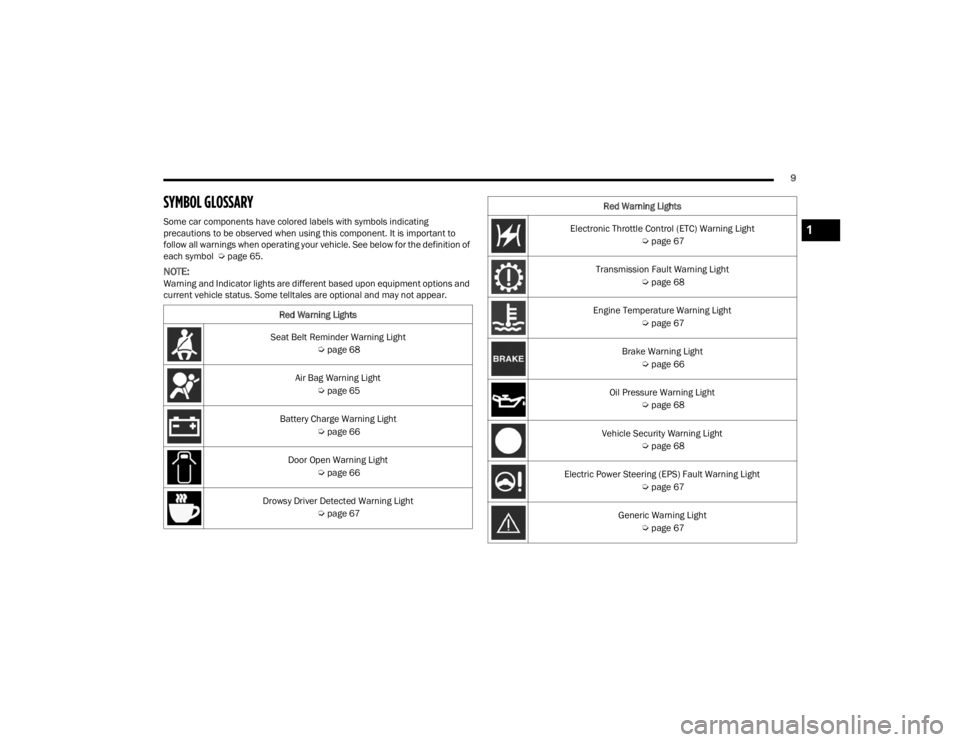
SYMBOL GLOSSARY
Some car components have colored labels with symbols indicating
precautions to be observed when using this component. It is important to
follow all warnings when operating your vehicle. See below for the definition of
each symbol Úpage 65.
NOTE:Warning and Indicator lights are different based upon equipment options and
current vehicle status. Some telltales are optional and may not appear.
Red Warning Lights
Seat Belt Reminder Warning Light Úpage 68
Air Bag Warning Light Úpage 65
Battery Charge Warning Light Úpage 66
Door Open Warning Light Úpage 66
Drowsy Driver Detected Warning Light Úpage 67
Electronic Throttle Control (ETC) Warning Light
Úpage 67
Transmission Fault Warning Light Úpage 68
Engine Temperature Warning Light Úpage 67
Brake Warning Light Úpage 66
Oil Pressure Warning Light Úpage 68
Vehicle Security Warning Light Úpage 68
Electric Power Steering (EPS) Fault Warning Light Úpage 67
Generic Warning Light Úpage 67
Red Warning Lights1
23_VF_OM_EN_USC_t.book Page 9
Page 17 of 296
GETTING TO KNOW YOUR VEHICLE15
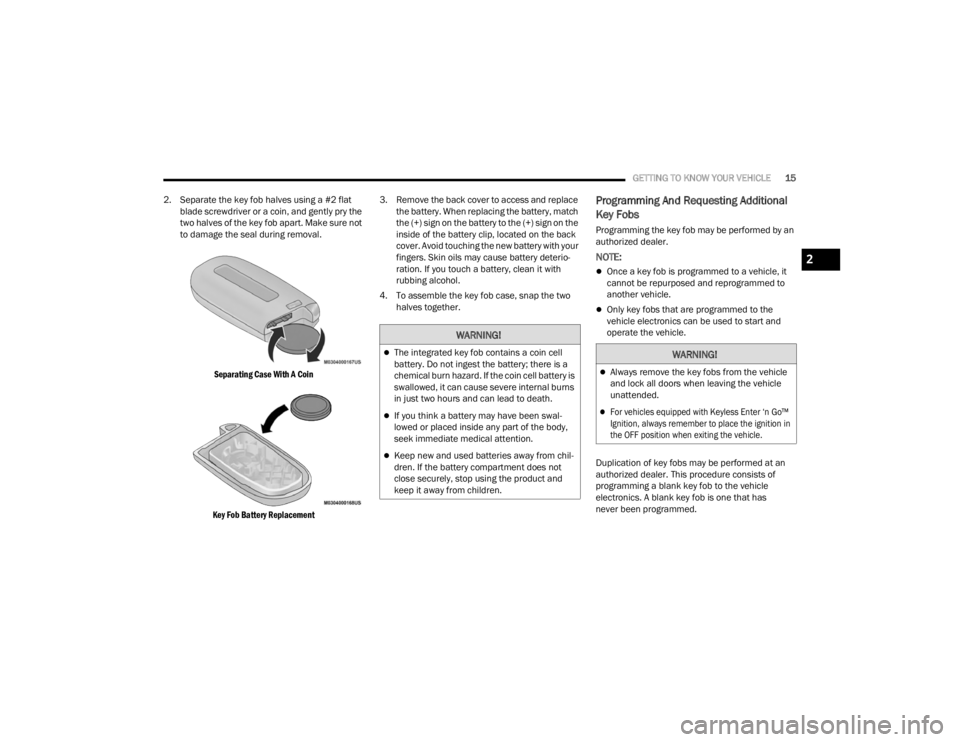
2. Separate the key fob halves using a #2 flat blade screwdriver or a coin, and gently pry the
two halves of the key fob apart. Make sure not
to damage the seal during removal.
Separating Case With A Coin
Key Fob Battery Replacement
3. Remove the back cover to access and replace
the battery. When replacing the battery, match
the (+) sign on the battery to the (+) sign on the
inside of the battery clip, located on the back
cover. Avoid touching the new battery with your
fingers. Skin oils may cause battery deterio -
ration. If you touch a battery, clean it with
rubbing alcohol.
4. To assemble the key fob case, snap the two halves together.
Programming And Requesting Additional
Key Fobs
Programming the key fob may be performed by an
authorized dealer.
NOTE:
Once a key fob is programmed to a vehicle, it
cannot be repurposed and reprogrammed to
another vehicle.
Only key fobs that are programmed to the
vehicle electronics can be used to start and
operate the vehicle.
Duplication of key fobs may be performed at an
authorized dealer. This procedure consists of
programming a blank key fob to the vehicle
electronics. A blank key fob is one that has
never been programmed.
WARNING!
The integrated key fob contains a coin cell
battery. Do not ingest the battery; there is a
chemical burn hazard. If the coin cell battery is
swallowed, it can cause severe internal burns
in just two hours and can lead to death.
If you think a battery may have been swal-
lowed or placed inside any part of the body,
seek immediate medical attention.
Keep new and used batteries away from chil -
dren. If the battery compartment does not
close securely, stop using the product and
keep it away from children.
WARNING!
Always remove the key fobs from the vehicle
and lock all doors when leaving the vehicle
unattended.
For vehicles equipped with Keyless Enter ‘n Go™
Ignition, always remember to place the ignition in
the OFF position when exiting the vehicle.
2
23_VF_OM_EN_USC_t.book Page 15
Page 50 of 296
48GETTING TO KNOW YOUR VEHICLE
WIRELESS CHARGING PAD —
I
F EQUIPPED
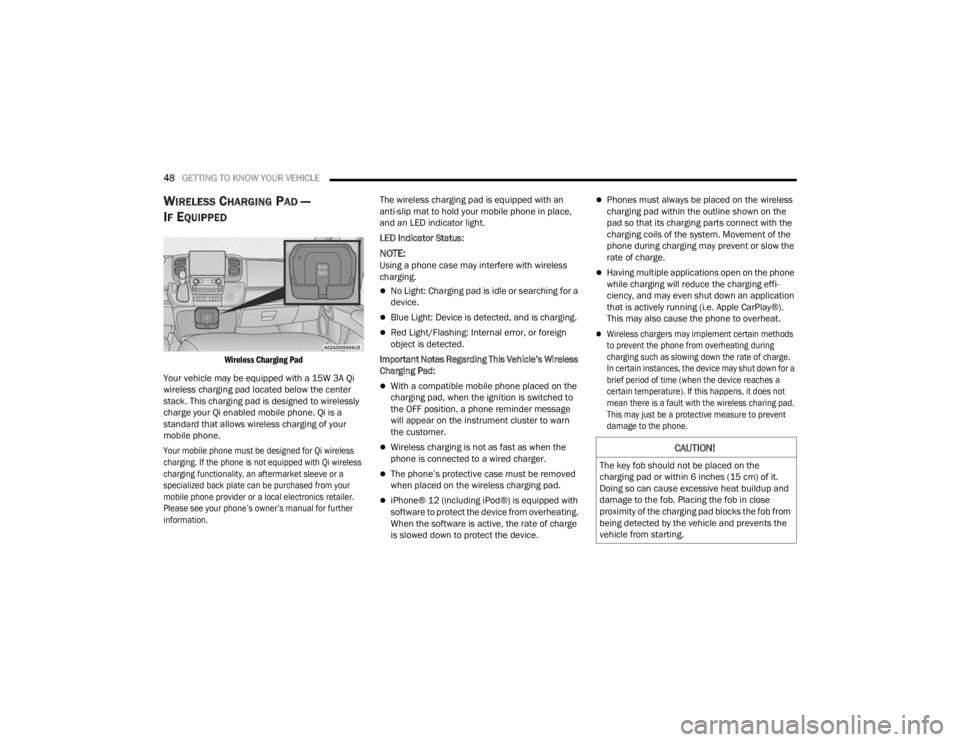
Wireless Charging Pad
Your vehicle may be equipped with a 15W 3A Qi
wireless charging pad located below the center
stack. This charging pad is designed to wirelessly
charge your Qi enabled mobile phone. Qi is a
standard that allows wireless charging of your
mobile phone.
Your mobile phone must be designed for Qi wireless
charging. If the phone is not equipped with Qi wireless
charging functionality, an aftermarket sleeve or a
specialized back plate can be purchased from your
mobile phone provider or a local electronics retailer.
Please see your phone’s owner’s manual for further
information.
The wireless charging pad is equipped with an
anti-slip mat to hold your mobile phone in place,
and an LED indicator light.
LED Indicator Status:
NOTE:Using a phone case may interfere with wireless
charging.
No Light: Charging pad is idle or searching for a
device.
Blue Light: Device is detected, and is charging.
Red Light/Flashing: Internal error, or foreign
object is detected.
Important Notes Regarding This Vehicle’s Wireless
Charging Pad:
With a compatible mobile phone placed on the
charging pad, when the ignition is switched to
the OFF position, a phone reminder message
will appear on the instrument cluster to warn
the customer.
Wireless charging is not as fast as when the
phone is connected to a wired charger.
The phone’s protective case must be removed
when placed on the wireless charging pad.
iPhone® 12 (including iPod®) is equipped with
software to protect the device from overheating.
When the software is active, the rate of charge
is slowed down to protect the device.
Phones must always be placed on the wireless
charging pad within the outline shown on the
pad so that its charging parts connect with the
charging coils of the system. Movement of the
phone during charging may prevent or slow the
rate of charge.
Having multiple applications open on the phone
while charging will reduce the charging effi -
ciency, and may even shut down an application
that is actively running (i.e. Apple CarPlay®).
This may also cause the phone to overheat.
Wireless chargers may implement certain methods
to prevent the phone from overheating during
charging such as slowing down the rate of charge.
In certain instances, the device may shut down for a
brief period of time (when the device reaches a
certain temperature). If this happens, it does not
mean there is a fault with the wireless charing pad.
This may just be a protective measure to prevent
damage to the phone.
CAUTION!
The key fob should not be placed on the
charging pad or within 6 inches (15 cm) of it.
Doing so can cause excessive heat buildup and
damage to the fob. Placing the fob in close
proximity of the charging pad blocks the fob from
being detected by the vehicle and prevents the
vehicle from starting.
23_VF_OM_EN_USC_t.book Page 48
Page 55 of 296
GETTING TO KNOW YOUR INSTRUMENT PANEL53
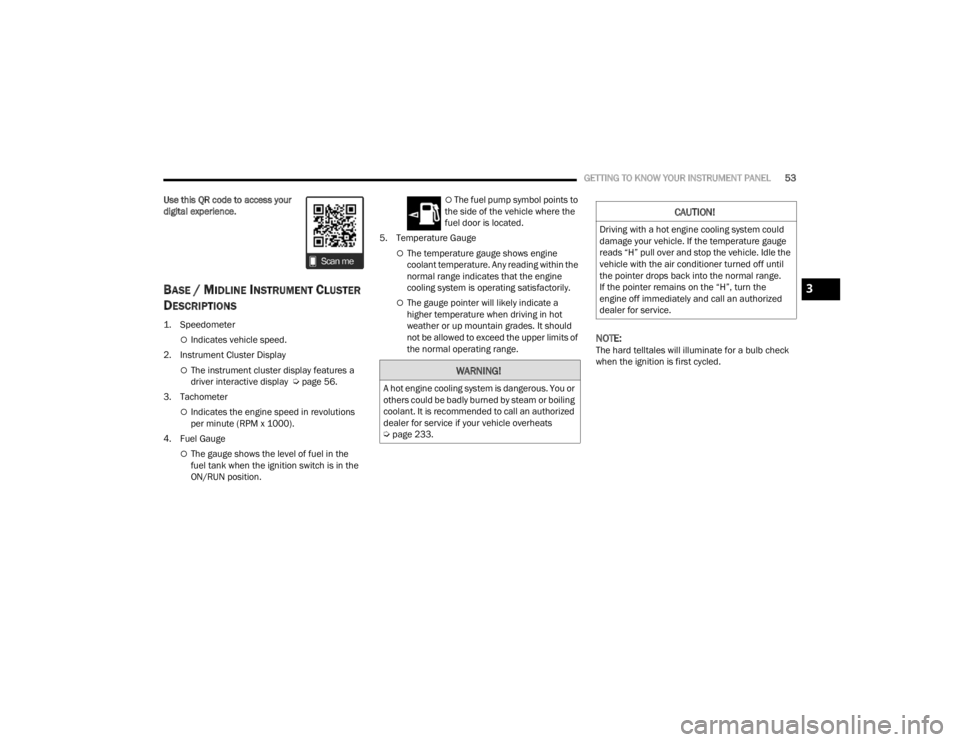
Use this QR code to access your
digital experience.
BASE / MIDLINE INSTRUMENT CLUSTER
D
ESCRIPTIONS
1. Speedometer
Indicates vehicle speed.
2. Instrument Cluster Display
The instrument cluster display features a
driver interactive display Ú page 56.
3. Tachometer
Indicates the engine speed in revolutions
per minute (RPM x 1000).
4. Fuel Gauge
The gauge shows the level of fuel in the
fuel tank when the ignition switch is in the
ON/RUN position.
The fuel pump symbol points to
the side of the vehicle where the
fuel door is located.
5. Temperature Gauge
The temperature gauge shows engine
coolant temperature. Any reading within the
normal range indicates that the engine
cooling system is operating satisfactorily.
The gauge pointer will likely indicate a
higher temperature when driving in hot
weather or up mountain grades. It should
not be allowed to exceed the upper limits of
the normal operating range.
NOTE:The hard telltales will illuminate for a bulb check
when the ignition is first cycled.
WARNING!
A hot engine cooling system is dangerous. You or
others could be badly burned by steam or boiling
coolant. It is recommended to call an authorized
dealer for service if your vehicle overheats
Ú page 233.
CAUTION!
Driving with a hot engine cooling system could
damage your vehicle. If the temperature gauge
reads “H” pull over and stop the vehicle. Idle the
vehicle with the air conditioner turned off until
the pointer drops back into the normal range.
If the pointer remains on the “H”, turn the
engine off immediately and call an authorized
dealer for service.
3
23_VF_OM_EN_USC_t.book Page 53
Page 57 of 296

GETTING TO KNOW YOUR INSTRUMENT PANEL55
INSTRUMENT CLUSTER DESCRIPTIONS
1. Tachometer
This gauge measures engine revolutions
per minute (RPM x 1000). Before the
pointer reaches the red area, ease up on
the accelerator to prevent engine damage.
2. Instrument Cluster Display
When the appropriate conditions exist, this
display shows instrument cluster display
messages Ú page 56.
Odometer/Trip Odometer Display Area
US Federal regulations require that upon transfer of
vehicle ownership, the seller certify to the purchaser
the correct mileage that the vehicle has been driven.
If your odometer needs to be repaired or serviced,
the repair technician should leave the odometer
reading the same as it was before the repair or
service. If the technician cannot do so, then the
odometer must be set at zero, and a sticker must be
placed in the door jamb stating what the mileage
was before the repair or service. It is a good idea
for you to make a record of the odometer reading
before the repair/service, so that you can be sure
that it is properly reset, or that the door jamb sticker
is accurate if the odometer must be reset at zero.
Gear Selector Status (PRND)
The gear selector status “P, R, N, D, 1, 2, 3, 4,
etc.” are displayed indicating the gear selector
position. Telltales “1, 2, 3, 4, etc.” indicate the
manual mode has been engaged and the gear
selected is displayed Ú page 81.
3. Temperature Gauge
The temperature gauge shows engine
coolant temperature. Any reading within the
normal range indicates that the engine
cooling system is operating satisfactorily.
The pointer will likely indicate a higher
temperature when driving in hot weather
or up mountain grades. It should not be
allowed to exceed the upper limits of the
normal operating range. 4. Fuel GaugeThe pointer shows the level of fuel in the
fuel tank when the ignition switch is in the
ON/RUN position.
The fuel pump symbol points to
the side of the vehicle where the
fuel door is located Ú page 122.
5. Speedometer
Indicates vehicle speed.
WARNING!
A hot engine cooling system is dangerous. You or
others could be badly burned by steam or boiling
coolant. You may want to call an authorized
dealer for service if your vehicle overheats.
CAUTION!
Driving with a hot engine cooling system could
damage your vehicle. If the temperature gauge
reads “H,” pull over and stop the vehicle. Idle the
vehicle with the air conditioner turned off until
the pointer drops back into the normal range.
If the pointer remains on the “H,” turn the
engine off immediately and call an authorized
dealer for service.
3
23_VF_OM_EN_USC_t.book Page 55
Page 59 of 296
GETTING TO KNOW YOUR INSTRUMENT PANEL57
Up Arrow Button
Push and release the up arrow button to
scroll upward through the main menu and
submenus.
Right Arrow Button
Push and release the right arrow button to
access the information screens or submenu
screens of a main menu item.
Down Arrow Button
Push and release the down arrow button to
scroll downward through the main menu and
submenus.
OK Button
Push the OK button to access/select the infor -
mation screens or submenu screens of a main
menu item. Push and hold the OK button for one
second to reset displayed/selected features
that can be reset.
NOTE:For vehicles with a 3.5 inch instrument cluster
display, press the OK button to toggle between
mph or km/h. For Screen Setup:
OK
button allows user to enter menu and
submenus.
Within each submenu layer, the up and
down arrow buttons will allow the user to
select the item of interest.
Pushing the OK button makes the selection and
a confirmation screen will appear (returning the
user to the first page of the submenu).
Pushing the left arrow button will exit each
submenu layer and return to the main menu.
Pushing the right arrow button will navigate
through each submenu layer.
CHANGE ENGINE OIL — IF EQUIPPED
Use this QR code to access your
digital experience.
Your vehicle is equipped with an
engine oil change indicator system.
The “Change Engine Oil” message
will display in the instrument cluster
display. The engine oil change
indicator system is duty cycle based, which means the
engine oil change interval may fluctuate, dependent
upon your personal driving style.
Unless reset, this message will continue to display
each time you turn the ignition switch to the
ON/RUN position. To turn off the message
temporarily, push and release the
OK button.
To reset the oil change indicator system (after
performing the scheduled maintenance),
refer to the following procedure.
1. Turn the ignition switch to the ON position (do not start the engine).
2. Fully push the accelerator pedal slowly, three times, within 10 seconds.
3. Turn the ignition switch to the OFF position.
NOTE:If the indicator message illuminates when you start
the vehicle, the oil change indicator system did not
reset. If necessary, repeat this procedure.
MAIN MENU
NOTE:All of the following items are accessed by pressing
the OK button.
3
23_VF_OM_EN_USC_t.book Page 57
Page 60 of 296

58GETTING TO KNOW YOUR INSTRUMENT PANEL
Home
Speedometer Graph
This uses the round bar graph filling to visually
represent current speed. When a speed control
system is active, the graph also provides visual
cues for the different states of that particular
speed control system.
Trip
Vehicles with 7 Inch Instrument Cluster Display
Access to trip information is available through the
following submenus.
Instant Consumption – Shows the instant
consumption in real time (MPG or L/100 km or
km/L).
Average Consumption – Shows the average
consumption (MPG or L/100 km or km/L) of
Trip A or Trip B since the last reset.
Distance – Shows the total distance (mi or km)
traveled for Trip A or Trip B since the last reset.
Average Speed – Shows the average speed
(MPH or KM/H) of Trip A or Trip B since the last
reset.
Travel Time – Shows the total elapsed time of
travel since Trip A or Trip B has been reset.
Hold the OK button to reset feature information.
NOTE:During the reset the instruction line disappears
and a bar graph appears to indicate the resetting
status; when the bar graph is full the reset is
complete.
Vehicles with 3.5 Inch Instrument Cluster Display
Instant Information – Shows the instantaneous
consumption (MPG or L/100 km or km/L) and
distance to empty (mi or km).
Trip A – Shows the total distance (mi or km) trav -
eled, the total elapsed time of travel, average
consumption (MPG or L/100 km or km/L), and
the average speed (MPH or KM/H).
Trip B – Shows the total distance (mi or km) trav -
eled, the total elapsed time of travel, average
consumption (MPG or L/100 km or km/L), and
the average speed (MPH or KM/H).
Hold the OK button to reset feature information.
Driver Assist
The Driver Assist systems are electronic aids
designed to offer the driver help in certain driving
situations Ú page 86
Vehicle Info
Tire Pressure (TPMS)
TPMS shows the tire status with the numeric
pressure and the unit for each tire, when low
pressure is detected an alert mess and a yellow
telltale will pop-up in the instrument cluster display
Úpage 168.
Oil Temperature
A bar graph in your instrument cluster display will
show your current temperature of your oil.
Battery Voltage
A bar graph in your instrument cluster display will
show your current battery voltage.
Service Information – If Equipped
This feature can provide information on scheduled
maintenance. It will display either “Service
Distance” or “Service Days” Ú page 221.
23_VF_OM_EN_USC_t.book Page 58
Page 70 of 296

68GETTING TO KNOW YOUR INSTRUMENT PANEL
Hood Open Warning Light
The telltale turns on when the hood is not
properly closed. Along with the icon, an
image of the vehicle with an open hood
cap appears on the display.
Close the hood properly.
Rear Door Open Warning Light —
If Equipped
This warning light will illuminate when the
rear door is open.
NOTE:This light will flash at a fast rate for approximately
15 seconds when the vehicle security system is
arming, and then will flash slowly until the vehicle
is disarmed.
Oil Pressure Warning Light
This warning light will illuminate to
indicate low engine oil pressure. If the
light turns on while driving, stop the
vehicle, shut off the engine as soon
as possible, and contact an authorized dealer.
A chime will sound when this light turns on.
Do not operate the vehicle until the cause is
corrected. This light does not indicate how much
oil is in the engine. The engine oil level must be
checked under the hood.
Seat Belt Reminder Warning Light
When the ignition is first placed in the
ON/RUN or MAR/ON/RUN position, if the
driver’s seat belt is unbuckled, a chime
will sound and the light will turn on. When
driving, if the driver or front passenger seat belt
remains unbuckled, the Seat Belt Reminder Light
will flash or remain on continuously and a chime
will sound Ú page 170.
Transmission Fault Warning Light
This light will illuminate (together with
a message in the instrument cluster display
and a buzzer) to indicate a transmission
fault. Contact an authorized dealer if the
message remains after restarting the engine.
Vehicle Security Warning Light —
If Equipped
This light will flash at a fast rate for
approximately 15 seconds when the
vehicle security system is arming, and
then will flash slowly until the vehicle is
disarmed.
Swivel Seat (Driver or Passenger)
Unlocked Warning Light — If Equipped
This light will illuminate when the driver
or passenger seat is unlocked.
YELLOW WARNING LIGHTS
Adaptive Cruise Control (ACC) Fault
Warning Light — If Equipped
This warning light will illuminate to
indicate a fault in the ACC system.
Contact a local authorized dealer for
service Ú page 89.
Anti-Lock Brake System (ABS) Warning
Light
This light monitors the ABS. The light will
turn on when the ignition is placed in the
ON/RUN or MAR/ON/RUN position and
may stay on for as long as four seconds.
If the ABS light remains on or turns on while
driving, then the Anti-Lock portion of the brake
system is not functioning and service is required.
However, the conventional brake system will
continue to operate normally if the brake warning
light is not on.
If the ABS light is on, the brake system should
be serviced as soon as possible to restore the
benefits of Anti-Lock Brakes. If the ABS light
does not turn on when the ignition is placed in
the ON/RUN or MAR/ON/RUN position, have the
light inspected by an authorized dealer.
23_VF_OM_EN_USC_t.book Page 68