driver Ram ProMaster City 2016 Service Manual
[x] Cancel search | Manufacturer: RAM, Model Year: 2016, Model line: ProMaster City, Model: Ram ProMaster City 2016Pages: 438, PDF Size: 3.26 MB
Page 178 of 438

ELECTRONIC VEHICLE INFORMATION CENTER
(EVIC)
The Electronic Vehicle Information Center (EVIC) fea-
tures a driver-interactive display that is located in the
instrument cluster.This system allows the driver to select a variety of useful
information by pushing the switches mounted on the
instrument panel. The EVIC Menu items consists of the
following:
•
Speed Beep
• Trip B Data
• Set Time
• Set Date
• Autoclose
• Units
• Language
• Buzzer Volume
• Seat Belt Buzzer
• Service
Electronic Vehicle Information Center (EVIC) Display
176 UNDERSTANDING YOUR INSTRUMENT PANEL
Page 179 of 438
•Daylights
• Exit Menu
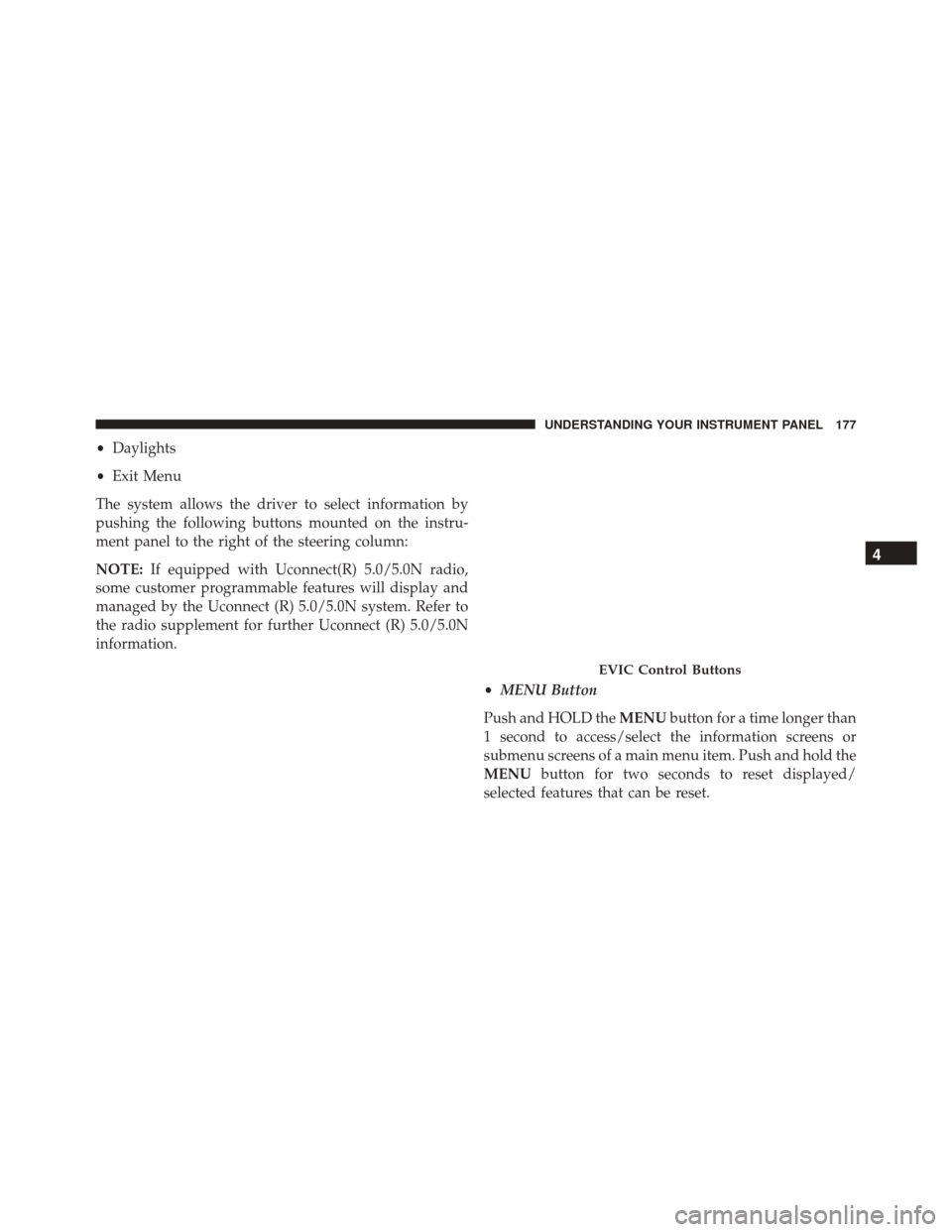
The system allows the driver to select information by
pushing the following buttons mounted on the instru-
ment panel to the right of the steering column:
NOTE: If equipped with Uconnect(R) 5.0/5.0N radio,
some customer programmable features will display and
managed by the Uconnect (R) 5.0/5.0N system. Refer to
the radio supplement for further Uconnect (R) 5.0/5.0N
information.
•MENU Button
Push and HOLD the MENUbutton for a time longer than
1 second to access/select the information screens or
submenu screens of a main menu item. Push and hold the
MENU button for two seconds to reset displayed/
selected features that can be reset.
EVIC Control Buttons
4
UNDERSTANDING YOUR INSTRUMENT PANEL 177
Page 181 of 438
Speed Beep
This function is used to set a speed limit (MPH or km/h);
the driver is alerted when this limit is exceeded.
To set the desired speed limit:
1. Push theMENUbutton briefly. The display will show
the wording (SPEED) and the unit (MPH) or (km/h)
previously set.
2. If the function is on, push and release the UP
or
DOWN
arrow button to select the required
speed limit and then push MENUto confirm.
NOTE:The speed may be set in the range from 20 to 125
MPH (30 to 200 km/h) according to the previously
chosen unit (see “Setting The Unit”) described below.
The setting will increase/decrease by five units each time
theUP
or DOWNarrow button is pushed. Hold down the
UP
orDOWNarrow button to auto-
matically increase/decrease the setting rapidly. Com-
plete the adjustment when you approach the desired
value.
Push the MENUbutton briefly to return to the menu
screen or hold the MENUbutton down to return to the
standard screen without storing.
To cancel the setting:
1. Briefly push the MENUbutton. “ON” will flash in the
display.
2. Push the DOWN
arrow button. “OFF” will flash
in the display
3. Push the MENUbutton briefly to return to the menu
screen or hold the MENUbutton down to return to the
standard screen without storing.
4
UNDERSTANDING YOUR INSTRUMENT PANEL 179
Page 189 of 438
Trip Computer
The Trip Computer is located in the instrument cluster. It
features a driver-interactive display (displays informa-
tion such as trip information, range, fuel consumption,
average speed, and travel time).
Trip Button
TheTRIP button, located on the right steering column
stalk, can be used to display and to reset the previously
described values.
• A short button push displays the different values.
• A long button push resets the system and then starts a
new trip.
New Trip
To reset:
• Push and hold the TRIPbutton to reset the system
manually. •
When the “Trip distance” reaches 99999.9 miles or
kilometers or when the “Travel time” reaches 999.59
(999 hours and 59 minutes), the system is reset auto-
matically.
• Disconnecting/Reconnecting the battery resets the
system.
NOTE: If the reset operation occurs in the presence of
the screens concerning Trip A or Trip B, only the infor-
mation associated with Trip A or Trip B functions will be
reset.
Start Of Trip Procedure
With the ignition on, push and hold the TRIPbutton for
over one second to reset.
Exit Trip
To exit the Trip function, wait until all the values have
been displayed or hold the MENUbutton for longer than
one second.
4
UNDERSTANDING YOUR INSTRUMENT PANEL 187
Page 213 of 438
1. Visit UconnectPhone.com to check mobile device andfeature compatibility and to find phone pairing in-
structions.
2. Reduce background noise. Wind and passenger con- versations are examples of noise that may impact
recognition.
3. Speak clearly at a normal pace and volume while facing straight ahead. The microphone is positioned
on the rearview mirror and aimed at the driver.
4. Each time you give a Voice Command, you must first push either the VR or Phone button, wait until after
the beep, then say your Voice Command.
5. You can interrupt the help message or system prompts by pushing the VR or Phone button and saying a Voice
Command from current category.
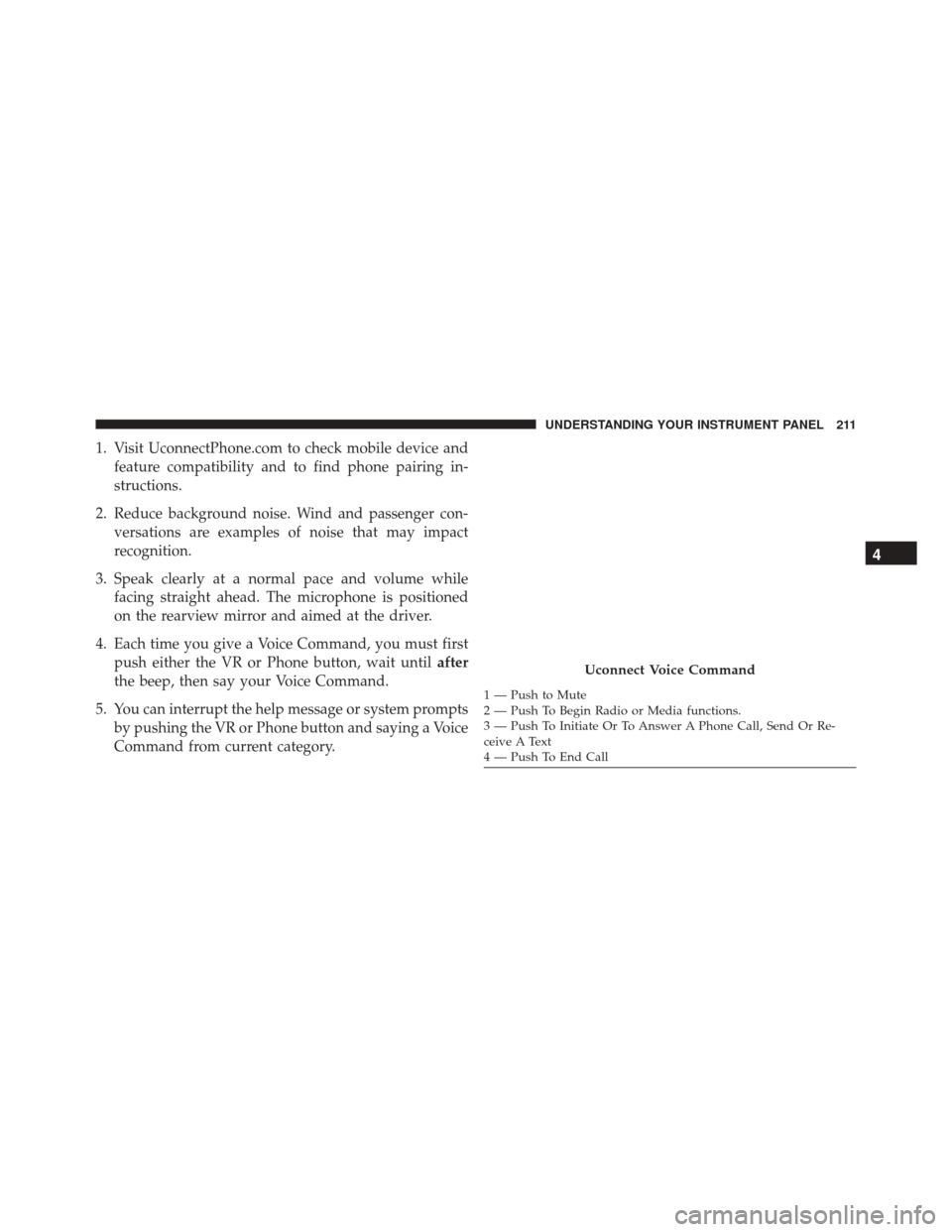
Uconnect Voice Command
1 — Push to Mute
2 — Push To Begin Radio or Media functions.
3 — Push To Initiate Or To Answer A Phone Call, Send Or Re-
ceive A Text
4 — Push To End Call
4
UNDERSTANDING YOUR INSTRUMENT PANEL 211
Page 227 of 438
If Engine Fails To Start
WARNING!
Never pour fuel or other flammable liquids into the
throttle body air inlet opening in an attempt to start
the vehicle. This could result in a flash fire causing
serious personal injury.
CAUTION!
•Do not attempt to push or tow your vehicle to get it
started. Vehicles equipped with an automatic trans-
mission cannot be started this way. Unburned fuel
could enter the catalytic converter and once the
engine has started, ignite and damage the converter
and vehicle.
• To prevent damage to the starter, do not continu-
ously crank the engine for more than 15 seconds at
a time. Wait 10 to 15 seconds before trying again.
After Starting
The idle speed is controlled automatically and it will
decrease as the engine warms up.
ENGINE BLOCK HEATER — IF EQUIPPED
The engine block heater warms the engine and permits
quicker starts in cold weather.
Connect the cord to a 110-115 Volt AC electrical outlet
with a grounded, three-wire extension cord.
For ambient temperatures below 0°F (-18°C), the engine
block heater is recommended. For ambient temperatures
below -20°F (-29°C), the engine block heater is required.
The engine block heater cord is routed under the hood,
behind to the driver ’s side headlamp. Follow the steps
below to properly use the engine block heater:
1. Locate the engine block heater cord (behind the driv- er ’s side headlamp).
5
STARTING AND OPERATING 225
Page 228 of 438
2. Undo the Velcro strap that secures the heater cord inplace.
3. Pull the cord to the front of the vehicle and plug it into a grounded, three-wire extension cord.
4. After the vehicle is running, reattach the cord to the Velcro strap and properly stow away behind the
driver ’s side headlamp.
NOTE:
• The engine block heater cord is a factory installed
option. If your vehicle is not equipped, heater cords
are available from your authorized MOPAR dealer.
• The engine block heater will require 110 Volts AC and
6.5 Amps to activate the heater element.
• The engine block heater must be plugged in at least
one hour to have an adequate warming effect on the
engine.WARNING!
Remember to disconnect the engine block heater
cord before driving. Damage to the 110-115 Volt
electrical cord could cause electrocution.
AUTOMATIC TRANSMISSION
WARNING!
• It is dangerous to shift out of PARK or NEUTRAL
if the engine speed is higher than idle speed. If
your foot is not firmly pressing the brake pedal, the
vehicle could accelerate quickly forward or in re-
verse. You could lose control of the vehicle and hit
someone or something. Only shift into gear when
the engine is idling normally and your foot is
firmly pressing the brake pedal.
(Continued)
226 STARTING AND OPERATING
Page 238 of 438
![Ram ProMaster City 2016 Service Manual NOTE:The torque converter clutch will not engage until
the transmission fluid is warm [usually after 1 to 3 miles
(2 to 5 km) of driving]. Because the engine speed is higher
when the torque converter](/img/34/12523/w960_12523-237.png "Ram ProMaster City 2016 Service Manual NOTE:The torque converter clutch will not engage until
the transmission fluid is warm [usually after 1 to 3 miles
(2 to 5 km) of driving]. Because the engine speed is higher
when the torque converter")
NOTE:The torque converter clutch will not engage until
the transmission fluid is warm [usually after 1 to 3 miles
(2 to 5 km) of driving]. Because the engine speed is higher
when the torque converter clutch is not engaged, it may
seem as if the transmission is not shifting properly when
cold. This is normal. The torque converter clutch will
function normally once the transmission is sufficiently
warm.
Electronic Range Select (ERS) Operation
The Electronic Range Select (ERS) shift control allows the
driver to limit the highest available gear. For example, if
you set the transmission gear limit to 5 (fifth gear), the
transmission will not shift above fifth gear, but will shift
through the lower gears normally.
You can switch between DRIVE and ERS mode at any
vehicle speed. When the shift lever is in the DRIVE
position, the transmission will operate automatically,
shifting between all available gears. Moving the shift lever to the ERS position (beside
DRIVE) will activate ERS mode, display the current gear
in the instrument cluster, and set that gear as the top
available gear. Once in ERS mode, moving the shift lever
forward (-) or rearward (+) will change the top available
gear and it will be displayed in the instrument cluster.
To exit ERS mode, simply return the shift lever to the
DRIVE position.WARNING!
Do not downshift for additional engine braking on a
slippery surface. The drive wheels could lose their
grip and the vehicle could skid, causing a collision or
personal injury.
NOTE: To select the proper gear position for maximum
deceleration (engine braking), move the shift lever into
the ERS position, then simply press and hold it forward
236 STARTING AND OPERATING
Page 244 of 438
When the parking brake is applied with the ignition
switch in the ON position, the “Brake Warning Light” in
the instrument cluster will illuminate.NOTE:
•
When the parking brake is applied and the automatic
transmission is placed in gear, the “Brake Warning
Light” will flash. If vehicle speed is detected, a chime
will sound to alert the driver. Fully release the parking
brake before attempting to move the vehicle.
• This light only shows that the parking brake is ap-
plied. It does not show the degree of brake application.
When parking on a hill, it is important to turn the front
wheels toward the curb on a downhill grade and away
from the curb on an uphill grade. For vehicles equipped
with an automatic transmission, apply the parking brake
before placing the shift lever in PARK, otherwise the load
on the transmission locking mechanism may make it
difficult to move the shift lever out of PARK. The parking
brake should always be applied whenever the driver is
not in the vehicle.
Parking Brake
242 STARTING AND OPERATING
Page 246 of 438
BRAKE SYSTEM
Your vehicle is equipped with dual hydraulic brake
systems. If either of the two hydraulic systems loses
normal capability, the remaining system will still func-
tion. However, there will be some loss of overall braking
effectiveness. You may notice increased pedal travel
during application, greater pedal force required to slow
or stop, and potential activation of the “Brake System
Warning Light”.
In the event power assist is lost for any reason (i.e.,
repeated brake applications with the engine off), the
brakes will still function. However, the effort required to
brake the vehicle will be much greater than that required
with the power system operating.
ELECTRONIC BRAKE CONTROL SYSTEM
Your vehicle is equipped with a advanced electronic
brake control system that includes the Anti-Lock Brake
System (ABS), Brake Assist System (BAS), Traction Con-
trol System (TCS), Hill Start Assist (HSA), and Electronic
Stability Control (ESC). All systems work together to
enhance vehicle stability and control in various driving
conditions and are commonly referred to as ESC.
Four-Wheel Anti-Lock Brake System (ABS)
The Four-Wheel ABS is designed to aid the driver in
maintaining vehicle control under adverse braking con-
ditions. The system operates with a separate computer to
modulate hydraulic pressure, to prevent wheel lock-up
and to help avoid skidding on slippery surfaces.
The system’s pump motor runs during an ABS stop to
provide regulated hydraulic pressure. The pump motor
makes a low humming noise during operation, which is
normal.
244 STARTING AND OPERATING