battery Ram ProMaster City 2020 User Guide
[x] Cancel search | Manufacturer: RAM, Model Year: 2020, Model line: ProMaster City, Model: Ram ProMaster City 2020Pages: 350, PDF Size: 13.27 MB
Page 85 of 350

82 GETTING TO KNOW YOUR INSTRUMENT PANEL
Seat Belt Buzzer
Only shows in the instrument cluster display if the seat belt
reminder was previously deactivated by an authorized dealer.
NOTE:
This is a one-time occurrence to enable the acoustic signal.
Exit Menu
This is the last function that closes the cycle of settings listed
in the menu screen.
1. Pushing the MENU button briefly will return the display
to the standard screen without storing.
2. Push the down arrow button to return to the first menu
item on the display.
TRIP COMPUTER
The Trip Computer is located in the instrument cluster. It
features a driver-interactive display (displays information
such as trip information, range, fuel consumption, average
speed, and travel time).
NOTE:
The Uconnect System also has a Trip Computer display and
menus to customize the information displayed in the cluster. For further information, refer to “Uconnect Settings” in
“Multimedia”.
Trip Button
The
TRIP button, located on the right steering column stalk,
can be used to display and to reset the previously described
values.
• A short button push displays the different values.
• A long button push resets the system and then starts a new trip.
New Trip
To reset:
• Push and hold the TRIP button to reset the system manually.
• When the “Trip distance” reaches 99999.9 miles or kilome -
ters or when the “Travel time” reaches 999.59 (999 hours
and 59 minutes), the system is reset automatically.
• Disconnecting/Reconnecting the battery resets the system.
NOTE:
If the reset operation occurs in the presence of the screens
concerning Trip A or Trip B, only the information associated
with Trip A or Trip B functions will be reset.
2020_RAM_PROMASTER_CITY_OM_USA=GUID-7B6A7FCA-79B0-423F-95C5-ED2A949C3D13=1=en=.book Page 82
Page 89 of 350

86 GETTING TO KNOW YOUR INSTRUMENT PANEL
Operation of the Brake Warning Light can be checked by turning
the ignition switch from the OFF position to the ON/RUN posi-
tion. The light should illuminate for approximately two seconds.
The light should then turn off unless the parking brake is applied
or a brake fault is detected. If the light does not illuminate, have
the light inspected by an authorized dealer.
The light also will turn on when the parking brake is applied
with the ignition switch in the ON/RUN position.
NOTE:
This light shows only that the parking brake is applied. It
does not show the degree of brake application.
Battery Charge Warning Light
This warning light will illuminate when the battery
is not charging properly. If it stays on while the
engine is running, there may be a malfunction with
the charging system. Contact an authorized dealer as soon as
possible.
This indicates a possible problem with the electrical system
or a related component. Door Open Warning Light
This indicator will illuminate when one or more
door(s) are not fully closed.
NOTE:
If the vehicle is moving and a door is opened, there will also
be a single chime.
Electronic Throttle Control (ETC) Warning Light This warning light will illuminate to inform of a
problem with the Electronic Throttle Control (ETC)
system. If a problem is detected while the vehicle is
running, the light will either stay on or flash depending on
the nature of the problem. Cycle the ignition when the
vehicle is safely and completely stopped and the transmis -
sion is placed in the PARK (P) position. The light should turn
off. If the light remains on with the vehicle running, your
vehicle will usually be drivable; however, see an authorized
dealer for service as soon as possible.
2020_RAM_PROMASTER_CITY_OM_USA=GUID-7B6A7FCA-79B0-423F-95C5-ED2A949C3D13=1=en=.book Page 86
Page 98 of 350

GETTING TO KNOW YOUR INSTRUMENT PANEL 95
For further information, refer to “Cybersecurity” in
“Multimedia”.
EMISSIONS INSPECTION AND MAINTENANCE
PROGRAMS
In some localities, it may be a legal requirement to pass an
inspection of your vehicle's emissions control system. Failure
to pass could prevent vehicle registration.For states that require an Inspection and Mainte -
nance (I/M), this check verifies the “Malfunction
Indicator Light (MIL)” is functioning and is not on
when the engine is running, and that the OBD II system is
ready for testing.
Normally, the OBD II system will be ready. The OBD II
system may not be ready if your vehicle was recently
serviced, recently had a depleted battery or a battery
replacement. If the OBD II system should be determined not
ready for the I/M test, your vehicle may fail the test.
WARNING!
• ONLY an authorized service technician should connect equipment to the OBD II connection port in order to
read the VIN, diagnose, or service your vehicle.
• If unauthorized equipment is connected to the OBD II connection port, such as a driver-behavior tracking
device, it may:
• Be possible that vehicle systems, including safety related systems, could be impaired or a loss of
vehicle control could occur that may result in an
accident involving serious injury or death.
• Access, or allow others to access, information stored in your vehicle systems, including personal
information.
3
2020_RAM_PROMASTER_CITY_OM_USA=GUID-7B6A7FCA-79B0-423F-95C5-ED2A949C3D13=1=en=.book Page 95
Page 99 of 350

96 GETTING TO KNOW YOUR INSTRUMENT PANEL
Your vehicle has a simple ignition actuated test, which you
can use prior to going to the test station. To check if your
vehicle's OBD II system is ready, you must do the following:
1. Cycle the ignition switch to the ON position, but do notcrank or start the engine.
NOTE:
If you crank or start the engine, you will have to start this test
over.
2. As soon as you cycle the ignition switch to the ON posi -
tion, you will see the “Malfunction Indicator Light (MIL)”
symbol come on as part of a normal bulb check.
3. Approximately 15 seconds later, one of two things will happen:
• The MIL will flash for about 10 seconds and then return to being fully illuminated until you turn OFF the igni -
tion or start the engine. This means that your vehicle's
OBD II system is not ready and you should not proceed
to the I/M station.
• The MIL will not flash at all and will remain fully illumi
-
nated until you place the ignition in the off position or
start the engine. This means that your vehicle's OBD II
system is ready and you can proceed to the I/M station.
If your OBD II system is not ready, you should see an autho -
rized dealer or repair facility. If your vehicle was recently
serviced or had a battery failure or replacement, you may
need to do nothing more than drive your vehicle as you
normally would in order for your OBD II system to update.
A recheck with the above test routine may then indicate that
the system is now ready.
Regardless of whether your vehicle's OBD II system is ready
or not, if the MIL is illuminated during normal vehicle
operation you should have your vehicle serviced before
going to the I/M station. The I/M station can fail your
vehicle because the MIL is on with the engine running.
2020_RAM_PROMASTER_CITY_OM_USA=GUID-7B6A7FCA-79B0-423F-95C5-ED2A949C3D13=1=en=.book Page 96
Page 124 of 350
SAFETY 121
• Supplemental Side Air Bags
• Supplemental Knee Air Bags
• Front and Side Impact Sensors
• Seat Belt Pretensioners
Air Bag Warning Light
The Occupant Restraint Controller (ORC) monitors the
readiness of the electronic parts of the air bag system
whenever the ignition switch is in the AVV/START or
MAR/ACC/ON/RUN position. If the ignition switch is in the
STOP/OFF/LOCK position the air bag system is not on and the air
bags will not inflate.
The ORC contains a backup power supply system that may
deploy the air bag system even if the battery loses power or
it becomes disconnected prior to deployment.
The ORC turns on the Air Bag Warning Light in the instrument
panel for approximately four to eight seconds for a self-check when
the ignition switch is in the MAR/ACC/ON/RUN position. After
the self-check, the Air Bag Warning Light will turn off. If the ORC
detects a malfunction in any part of the system, it turns on the Air
Bag Warning Light, either momentarily or continuously. A single
chime will sound to alert you if the light comes on again after initial
startup.
The ORC also includes diagnostics that will illuminate the
instrument panel Air Bag Warning Light if a malfunction is
detected that could affect the air bag system. The diagnostics
also record the nature of the malfunction. While the air bag
system is designed to be maintenance free, if any of the
following occurs, have an authorized dealer service the air
bag system immediately.
• The Air Bag Warning Light does not come on during the
four to eight seconds when the ignition switch is first in the
MAR/ACC/ON/RUN position.
• The Air Bag Warning Light remains on after the four to eight-second interval.
• The Air Bag Warning Light comes on intermittently or remains on while driving.
NOTE:
If the speedometer, tachometer, or any engine related gauges
are not working, the Occupant Restraint Controller (ORC)
may also be disabled. In this condition the air bags may not
be ready to inflate for your protection. Have an authorized
dealer service the air bag system immediately.
4
2020_RAM_PROMASTER_CITY_OM_USA=GUID-7B6A7FCA-79B0-423F-95C5-ED2A949C3D13=1=en=.book Page 121
Page 134 of 350
SAFETY 131
Enhanced Accident Response System
In the event of an impact, if the communication network
remains intact, and the power remains intact, depending on
the nature of the event, the ORC will determine whether to
have the Enhanced Accident Response System perform the
following functions:
• Cut off fuel to the engine (if equipped)
• Cut off battery power to the electric motor (if equipped)
• Flash hazard lights as long as the battery has power
• Turn on the interior lights, which remain on as long as thebattery has power or for 15 minutes from the intervention
of the Enhanced Accident Response System
• Unlock the power door locks
Your vehicle may also be designed to perform any of these
other functions in response to the Enhanced Accident
Response System:
• Turn off the Fuel Filter Heater, Turn off the HVAC Blower Motor, Close the HVAC Circulation Door • Cut off battery power to the:
• Engine
• Electric Motor (if equipped)
• Electric Power Steering
• Brake booster
• Automatic transmission gear selector
• Horn
• Front wiper
NOTE:
After an accident, remember to cycle the ignition to the STOP
(OFF/LOCK) position and remove the key from the ignition
switch to avoid draining the battery. Carefully check the
vehicle for fuel leaks in the engine compartment and on the
ground near the engine compartment and fuel tank before
resetting the system and starting the engine. If there are no
fuel leaks or damage to the vehicle electrical devices (e.g.
headlights) after an accident, reset the system by following
the procedure described below. If you have any doubt,
contact an authorized dealer.
4
2020_RAM_PROMASTER_CITY_OM_USA=GUID-7B6A7FCA-79B0-423F-95C5-ED2A949C3D13=1=en=.book Page 131
Page 161 of 350

158 STARTING AND OPERATING
Cold Weather Operation
To ensure reliable starting at low temperatures, use of an
externally powered electric engine block heater (available
from your authorized dealer) is recommended.
To prevent possible engine damage while starting at low
temperatures, this vehicle will inhibit engine cranking when
the ambient temperature is less than -31°F (-35° C) and the oil
temperature sensor reading indicates an engine block heater
has not been used. The message “plug in engine heater” will
be displayed in the instrument cluster when the ambient
temperature is below -25°F (-32° C) at the time the engine is
shut off as a reminder.
Extended Park Starting
NOTE:
Extended Park condition occurs when the vehicle has not
been started or driven for at least 30 days.
1. Install a battery charger or jumper cables to the battery toensure a full battery charge during the crank cycle.
2. Cycle the ignition to the AVV/”START” position and release it when the engine starts. 3. If the engine fails to start within ten seconds, cycle the
ignition to the STOP (OFF/LOCK) position, wait five
seconds to allow the starter to cool, then repeat the
Extended Park Starting procedure.
4. If the engine fails to start after eight attempts, allow the starter to cool for at least 10 minutes, then repeat the
procedure.
If Engine Fails To Start
If the engine fails to start after you have followed the "Normal
Starting" or "Extreme Cold Weather" procedure, and has not
experienced an extended park condition as identified in
"Extended Park Starting" procedure it may be flooded. Push
the accelerator pedal all the way to the floor and hold it there.
Crank the engine for no more than 15 seconds. This should
clear any excess fuel in case the engine is flooded. Leave the
ignition key in the MAR position, release the accelerator pedal
and repeat the “Normal Starting” procedure.
CAUTION!
To prevent damage to the starter, do not crank
continuously for more than 10 seconds at a time. Wait 10
to 15 seconds before trying again.
2020_RAM_PROMASTER_CITY_OM_USA=GUID-7B6A7FCA-79B0-423F-95C5-ED2A949C3D13=1=en=.book Page 158
Page 162 of 350
STARTING AND OPERATING 159
After Starting
The idle speed is controlled automatically, and it will
decrease as the engine warms up.
ENGINE BLOCK HEATER — IF EQUIPPED
The engine block heater warms the engine and permits
quicker starts in cold weather.
Connect the cord to a 110-115 Volt AC electrical outlet with a
grounded, three-wire extension cord.
For ambient temperatures below 0°F (-18°C), the engine
block heater is recommended. For ambient temperatures
below -20°F (-29°C), the engine block heater is required.
The engine block heater cord is routed under the hood,
behind to the driver’s side headlamp. Follow the steps below
to properly use the engine block heater:
1. Locate the engine block heater cord (behind the driver’sside headlamp).
2. Undo the hook-and-loop strap that secures the heater cord in place.
WARNING!
• Never pour fuel or other flammable liquid into the throttle body air inlet opening in an attempt to start the
vehicle. This could result in flash fire causing serious
personal injury.
• Do not attempt to push or tow your vehicle to get it started. Vehicles equipped with an automatic
transmission cannot be started this way. Unburned fuel
could enter the catalytic converter and once the engine
has started, ignite and damage the converter and
vehicle.
• If the vehicle has a discharged battery, booster cables may be used to obtain a start from a booster battery or
the battery in another vehicle. This type of start can be
dangerous if done improperly. Refer to “Jump Starting
Procedure” in “In Case Of Emergency” for further
information.
CAUTION!
To prevent damage to the starter, do not continuously
crank the engine for more than 25 seconds at a time. Wait
60 seconds before trying again.
5
2020_RAM_PROMASTER_CITY_OM_USA=GUID-7B6A7FCA-79B0-423F-95C5-ED2A949C3D13=1=en=.book Page 159
Page 196 of 350
STARTING AND OPERATING 193
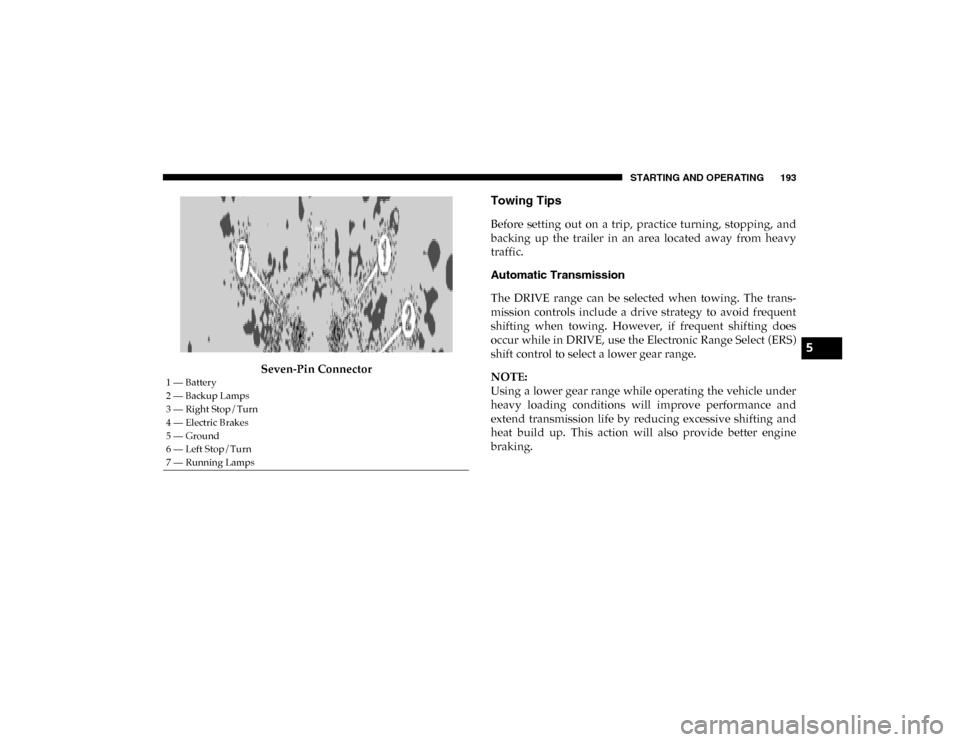
Seven-Pin Connector
Towing Tips
Before setting out on a trip, practice turning, stopping, and
backing up the trailer in an area located away from heavy
traffic.
Automatic Transmission
The DRIVE range can be selected when towing. The trans-
mission controls include a drive strategy to avoid frequent
shifting when towing. However, if frequent shifting does
occur while in DRIVE, use the Electronic Range Select (ERS)
shift control to select a lower gear range.
NOTE:
Using a lower gear range while operating the vehicle under
heavy loading conditions will improve performance and
extend transmission life by reducing excessive shifting and
heat build up. This action will also provide better engine
braking.
1 — Battery
2 — Backup Lamps
3 — Right Stop/Turn
4 — Electric Brakes
5 — Ground
6 — Left Stop/Turn
7 — Running Lamps
5
2020_RAM_PROMASTER_CITY_OM_USA=GUID-7B6A7FCA-79B0-423F-95C5-ED2A949C3D13=1=en=.book Page 193
Page 202 of 350
199
IN CASE OF EMERGENCY
HAZARD WARNING FLASHERS
The Hazard Warning flasher switch is located on the instru-
ment panel below the climate controls.Push the switch to turn on the Hazard Warning
flasher. When the switch is activated, all directional
turn signals will flash on and off to warn oncoming
traffic of an emergency. Push the switch a second time to
turn off the Hazard Warning flashers.
This is an emergency warning system and it should not be
used when the vehicle is in motion. Use it when your vehicle
is disabled and it is creating a safety hazard for other
motorists. When you must leave the vehicle to seek assistance, the
Hazard Warning flashers will continue to operate even
though the ignition is placed in the OFF position.
NOTE:
With extended use, the Hazard Warning flashers may wear
down your battery.
6
2020_RAM_PROMASTER_CITY_OM_USA=GUID-7B6A7FCA-79B0-423F-95C5-ED2A949C3D13=1=en=.book Page 199