service reset RAM PROMASTER CITY 2022 Owners Manual
[x] Cancel search | Manufacturer: RAM, Model Year: 2022, Model line: PROMASTER CITY, Model: RAM PROMASTER CITY 2022Pages: 260, PDF Size: 8.45 MB
Page 46 of 260
44GETTING TO KNOW YOUR INSTRUMENT PANEL
“Trip B” can be used to display the figures relating to:
Trip distance B
Average Economy B
Average speed B
Travel time B (driving time)
NOTE:“Trip B” functions may be excluded (see “Trip B
Data”). Range and Instantaneous Economy cannot
be reset.
VALUES DISPLAYED
Range
This indicates the distance which may be traveled
with the fuel remaining in the tank, assuming that
driving conditions will not change. The message “----”
will appear on the display in the following cases:
Distance less than 30 miles (or 50 km).
The vehicle is parked for a long time with the
engine running.
NOTE:The range depends on several factors: driving
style, type of route (freeway, residential, mountain
roads, etc.), conditions of use of the vehicle (load,
tire pressure, etc.). Trip planning must take into
account the above notes.
Travel Distance
This value shows the distance covered since the
last reset.
Average Fuel Consumption
This value shows the approximate average
consumption since the last reset.
Current Fuel Consumption
This indicates the fuel consumption. The value is
constantly updated. The message “----” will appear
on the display if the vehicle is parked with the
engine running.
Average Speed
This value shows the vehicle's average speed as a
function of the overall time elapsed since the last
reset.
Travel Time
This value shows the time elapsed since the last
reset.
WARNING LIGHTS AND MESSAGES
The warning/indicator lights will illuminate in the
instrument panel together with a dedicated
message and/or acoustic signal when applicable.
These indications are indicative and precautionary
and as such must not be considered as exhaustive
and/or alternative to the information contained in
the Owner’s Manual, which you are advised to read
carefully in all cases. Always refer to the information
in this chapter in the event of a failure indication. All
active telltales will display first if applicable. The
system check menu may appear different based
upon equipment options and current vehicle status.
Some telltales are optional and may not appear.
RED WARNING LIGHTS
Air Bag Warning Light
This light will turn on for four to eight
seconds as a bulb check when the
ignition is placed in the ON/RUN or
MAR/ON/RUN position. If the light is
either not on during startup, stays on, or turns on
while driving, have the system inspected by an
authorized dealer as soon as possible. This light
will illuminate with a single chime when a fault with
the Air Bag Warning Light has been detected, it will
stay on until the fault is cleared. If the light comes
on intermittently or remains on while driving, have
an authorized dealer service the vehicle
immediately.
22_VM_OM_EN_USC_t.book Page 44
Page 61 of 260

STARTING AND OPERATING59
If the transmission becomes extremely hot, the
Transmission Temperature Warning Light may
illuminate and the transmission may operate
differently until the transmission cools down.
During cold temperatures, transmission
operation may be modified depending on engine
and transmission temperature as well as vehicle
speed. This feature improves warm up time of the
engine and transmission to achieve maximum
efficiency. Engagement of the torque converter
clutch, and shifts into EIGHTH or NINTH gear, are
inhibited until the transmission fluid is warm
Ú
page 59. Normal operation will resume once
the transmission temperature has risen to a
suitable level.
Transmission Limp Home Mode
Transmission function is monitored electronically
for abnormal conditions. If a condition is detected
that could result in transmission damage,
Transmission Limp Home Mode is activated. In this
mode, the transmission may operate only in a fixed
gear, or may remain in NEUTRAL. The Malfunction
Indicator Light (MIL) may be illuminated. Limp
Home Mode may allow the vehicle to be driven to
an authorized dealer for service without damaging
the transmission. In the event of a momentary problem, the
transmission can be reset to regain all forward
gears by performing the following steps:
1. Stop the vehicle.
2. Shift the transmission into PARK.
3. Turn the ignition OFF.
4. Wait approximately 10 seconds.
5. Restart the engine.
6. Shift into the desired gear range. If the
problem is no longer detected, the
transmission will return to normal operation.
NOTE:
Even if the transmission can be reset, we recommend
that you visit an authorized dealer at your earliest
possible convenience. An authorized dealer has diag -
nostic equipment to assess the condition of your
transmission. If the transmission cannot be reset,
authorized dealer service is required.
Torque Converter Clutch
A feature designed to improve fuel economy has
been included in the automatic transmission on
your vehicle. A clutch within the torque converter
engages automatically at calibrated speeds. This
may result in a slightly different feeling or response
during normal operation in the upper gears. When
the vehicle speed drops or during some
accelerations, the clutch automatically
disengages.
NOTE:The torque converter clutch will not engage until
the transmission fluid is warm [usually after 1 to
3 miles (2 to 5 km) of driving]. Because the engine
speed is higher when the torque converter clutch is
not engaged, it may seem as if the transmission is
not shifting properly when cold. This is normal. The
torque converter clutch will function normally once
the transmission is sufficiently warm.
Electronic Range Select (ERS) Operation
The ERS shift control allows the driver to limit the
highest available gear. For example, if you set the
transmission gear limit to FIFTH gear, the
transmission will not shift above FIFTH gear, but
will shift through the lower gears normally.
You can switch between DRIVE and ERS mode at
any vehicle speed. When the gear selector is in the
DRIVE position, the transmission will operate
automatically, shifting between all available gears.
Moving the gear selector to the ERS position (beside
DRIVE) will activate ERS mode, display the current
gear in the instrument cluster, and set that gear as
the top available gear. Once in ERS mode, moving
the gear selector forward “-” or rearward “+” will
change the top available gear, which will be
displayed in the instrument cluster.
To exit ERS mode, simply return the gear selector
to the DRIVE position.4
22_VM_OM_EN_USC_t.book Page 59
Page 94 of 260
92MULTIMEDIA
DIRECT TUNE
Press the Tune button located at the bottom of the
radio screen to directly tune to a desired radio
station or channel.
Press the available number button on the
touchscreen to begin selecting a desired station.
Once a number has been entered, any numbers
that are no longer possible (stations that cannot be
reached) will become deactivated/grayed out.
INFO
Press the Info button to display the current track
information. Press the X button to cancel this
feature.
SETTING THE PRESETS
The Presets are available for all Radio Modes, and
are activated by pressing any of the four Preset
buttons, located at the top of the screen.
When you are receiving a station that you wish to
commit into memory, press and hold the desired
numbered button for more that two seconds or
until you hear a confirmation beep.
The Radio stores up to 12 presets in each of the
Radio modes. Four presets are visible at the top of
the radio screen.
Pressing the All button on the radio home screen
will display all of the preset stations for that mode.
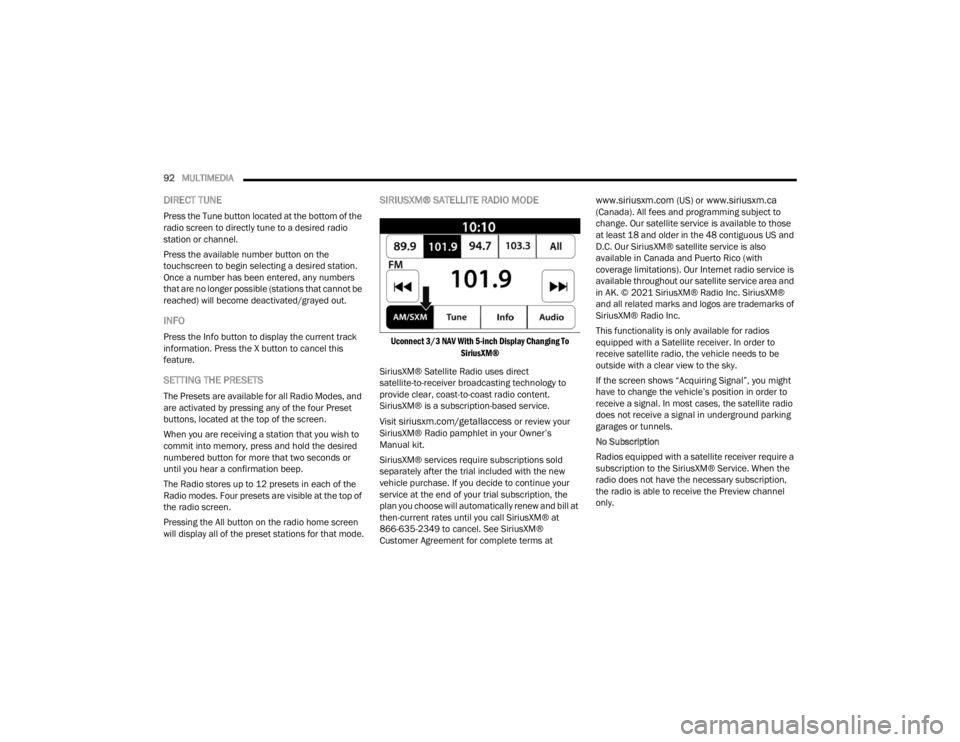
SIRIUSXM® SATELLITE RADIO MODE
Uconnect 3/3 NAV With 5-inch Display Changing To
SiriusXM®
SiriusXM® Satellite Radio uses direct
satellite-to-receiver broadcasting technology to
provide clear, coast-to-coast radio content.
SiriusXM® is a subscription-based service.
Visit
siriusxm.com/getallaccess or review your
SiriusXM® Radio pamphlet in your Owner’s
Manual kit.
SiriusXM® services require subscriptions sold
separately after the trial included with the new
vehicle purchase. If you decide to continue your
service at the end of your trial subscription, the
plan you choose will automatically renew and bill at
then-current rates until you call SiriusXM® at
866-635-2349 to cancel. See SiriusXM®
Customer Agreement for complete terms at
www.siriusxm.com (US) or www.siriusxm.ca
(Canada). All fees and programming subject to
change. Our satellite service is available to those
at least 18 and older in the 48 contiguous US and
D.C. Our SiriusXM® satellite service is also
available in Canada and Puerto Rico (with
coverage limitations). Our Internet radio service is
available throughout our satellite service area and
in AK. © 2021 SiriusXM® Radio Inc. SiriusXM®
and all related marks and logos are trademarks of
SiriusXM® Radio Inc.
This functionality is only available for radios
equipped with a Satellite receiver. In order to
receive satellite radio, the vehicle needs to be
outside with a clear view to the sky.
If the screen shows “Acquiring Signal”, you might
have to change the vehicle’s position in order to
receive a signal. In most cases, the satellite radio
does not receive a signal in underground parking
garages or tunnels.
No Subscription
Radios equipped with a satellite receiver require a
subscription to the SiriusXM® Service. When the
radio does not have the necessary subscription,
the radio is able to receive the Preview channel
only.
22_VM_OM_EN_USC_t.book Page 92
Page 127 of 260

MULTIMEDIA125
Safety Warnings: You can change settings for
whether you want to be warned, never warned,
or warned only if you are speeding. The following
options are available:
When speeding: This warning is given when
you exceed the speed limit by more than
3 mph (5 km/h). When you are speeding,
the speed panel also turns red in the Guid -
ance View.
Driver Safety: Select this setting to make
some features locked while the vehicle is in
motion.
NOTE:This feature increases safety by minimizing driver
distraction. When driver safety is on, a message
tells you when the lock is enabled.
SYSTEM
Select this setting to reset all other settings.
Selecting “Reset” will delete all saved places and
settings and restore the standard settings. This
includes the language, voice settings, warning
settings, and theme.
NOTE:This is not a software update and will not affect the
version of the software application installed on
your Uconnect system.
Points Of Interest
ABOUT POINTS OF INTEREST
Points Of Interest (POI) are useful places on the
map.
Here are some examples:
Restaurants
Hotels
Museums
Parking lots
Gas stations
Emergency Services
USING POIS TO PLAN A ROUTE
When you plan a route, you can use a POI for the
destination or as a stop along the route. Using Search
1. Select “Search” on the Main Menu to begin a
search. The search screen will open,
displaying the keyboard. Enter the name of
your desired destination. Your search results
will be displayed in two lists. Addresses and
city matches are shown in the list called
“Addresses.” POIs, types of POIs, and Places
are shown in the list called “Points of
Interest.” You can also select a POI category
to only see POI search results from that
category.
2. Select the desired POI. The location will appear on the map. From here, you can save the POI
to “My Places,” use this POI as a starting point,
begin navigation to this destination, or view
more details about this POI. By pressing “More
Information,” you can view the phone number
and full address of the POI.
3. If a route is already planned, you can add the location to your current route. To plan a route
to this destination, press the Drive button on
the touchscreen.
NOTE:Your Navigation system will calculate a route, and
guidance to your destination will begin. Guidance
View will begin as soon as you start driving.
5
22_VM_OM_EN_USC_t.book Page 125
Page 152 of 260

150SAFETY
NOTE:
Air bag covers may not be obvious in the interior
trim, but they will open during air bag deploy -
ment.
After any collision, the vehicle should be taken
to an authorized dealer immediately.
Enhanced Accident Response System
In the event of an impact, if the communication
network remains intact, and the power remains
intact, depending on the nature of the event, the
Occupant Restraint Controller (ORC) will determine
whether to have the Enhanced Accident Response
System perform the following functions:
Cut off fuel to the engine (if equipped)
Cut off battery power to the electric motor
(if equipped)
Flash hazard lights as long as the battery has
power
Turn on the interior lights, which remain on as
long as the battery has power or for 15 minutes
from the intervention of the Enhanced Accident
Response System
Unlock the power door locks
Your vehicle may also be designed to perform any
of these other functions in response to the
Enhanced Accident Response System:
Turn off the Fuel Filter Heater, Turn off the HVAC
Blower Motor, Close the HVAC Circulation Door
Cut off battery power to the:
Engine
Electric Motor (if equipped)
Electric Power Steering
Brake booster
Electric park brake
Automatic transmission gear selector
Horn
Front wiper
Headlamp washer pump (if equipped)
NOTE:After an accident, remember to cycle the ignition to
the STOP/OFF position and remove the key from
the ignition switch to avoid draining the battery.
Carefully check the vehicle for fuel leaks in the
engine compartment and on the ground near the
engine compartment and fuel tank before
resetting the system and starting the engine. If
there are no fuel leaks or damage to the vehicle
electrical devices (e.g. headlights) after an
accident, reset the system by following the
procedure described below. If you have any doubt,
contact an authorized dealer.
Enhanced Accident Response System
Reset Procedure
In order to reset the Enhanced Accident Response
System functions after an event, the ignition switch
must be changed from ignition AVV/START or
MAR/RUN to ignition STOP/OFF. Carefully check
the vehicle for fuel leaks in the engine
compartment and on the ground near the engine
compartment and fuel tank before resetting the
system and starting the engine. After an accident,
if the vehicle will not start after performing the
reset procedure, the vehicle must be towed to an
authorized dealer to be inspected and to have the
Enhanced Accident Response System reset.
WARNING!
Deployed air bags and seat belt pretensioners
cannot protect you in another collision. Have the
air bags, seat belt pretensioners, and the seat
belt retractor assemblies replaced by an
authorized dealer immediately. Also, have the
Occupant Restraint Controller System serviced
as well.
22_VM_OM_EN_USC_t.book Page 150
Page 191 of 260
189
SERVICING AND MAINTENANCE
SCHEDULED SERVICING
Your vehicle is equipped with an automatic oil
change indicator system. The oil change indicator
system will remind you that it is time to take your
vehicle in for scheduled maintenance.
Based on engine operation conditions, the oil
change indicator message will illuminate. This
means that service is required for your vehicle.
Operating conditions such as frequent short-trips,
trailer tow, extended engine idle time, extremely
hot or cold ambient temperatures will influence
when the “Oil Change Required” message is
displayed. Have your vehicle serviced as soon as
possible, within the next 500 miles (805 km).An authorized dealer will reset the oil change
indicator message after completing the scheduled
oil change. If a scheduled oil change is performed
by someone other than an authorized dealer, to
reset the message Ú
page 41.
NOTE:Under no circumstances should oil change
intervals exceed 10,000 miles (16,000 km), 350
hours of engine run time or 12 months, whichever
comes first. The 350 hours of engine run or idle
time is generally only a concern for fleet
customers. Once A Month Or Before A Long Trip:
Check engine oil level.
Check windshield washer fluid level.
Check tire pressure and look for unusual wear
or damage. Rotate tires at the first sign of irreg
-
ular wear, even if it occurs before the oil indi -
cator system turns on.
Check the fluid levels of the coolant reservoir
and brake master cylinder, fill as needed.
Check function of all interior and exterior lights.
8
22_VM_OM_EN_USC_t.book Page 189
Page 206 of 260
204SERVICING AND MAINTENANCE
Fluid Level Check
The fluid level is preset at the factory and does not
require adjustment under normal operating
conditions. Routine fluid level checks are not
required; therefore the transmission has no
dipstick. An authorized dealer can check your
transmission fluid level using special service tools.
If you notice fluid leakage or transmission
malfunction, visit an authorized dealer
immediately to have the transmission fluid level
checked. Operating the vehicle with an improper
fluid level can cause severe transmission damage.
Fluid And Filter Changes
Under normal operating conditions, the fluid
installed at the factory will provide satisfactory
lubrication for the life of the vehicle.
Routine fluid and filter changes are not required.
However, change the fluid and filter if the fluid
becomes contaminated (with water, etc.), or if the
transmission is disassembled for any reason.
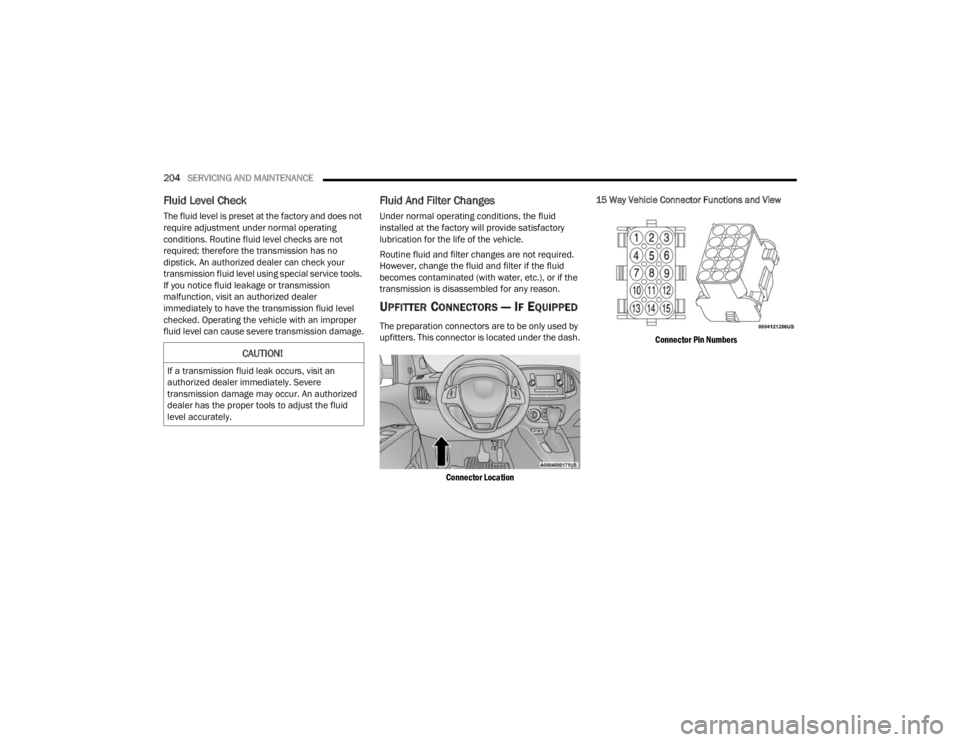
UPFITTER CONNECTORS — IF EQUIPPED
The preparation connectors are to be only used by
upfitters. This connector is located under the dash.
Connector Location
15 Way Vehicle Connector Functions and View
Connector Pin Numbers
CAUTION!
If a transmission fluid leak occurs, visit an
authorized dealer immediately. Severe
transmission damage may occur. An authorized
dealer has the proper tools to adjust the fluid
level accurately.
22_VM_OM_EN_USC_t.book Page 204
Page 251 of 260

249
H
Hazard Driving Through Flowing, Rising, Or Shallow Standing Water
....................................... 76Hazard Warning Flashers.............................. 171Head Restraints............................................... 19HeadlightsCleaning.................................................... 234Passing........................................................ 24Switch......................................................... 24Heated Mirrors................................................ 23Heated Seats................................................... 18Heater, Engine Block....................................... 53Hill Start Assist.............................................. 134HitchesTrailer Towing.............................................. 70Hood Prop........................................................ 36Hood Release.................................................. 36
I
Ignition............................................................ 12Key....................................................... 10, 12Switch......................................................... 12Ignition Key Removal....................................... 12Immobilizer (Sentry Key).................................. 12Inside Rearview Mirror..................................... 22
Instrument Cluster.................................... 39, 40Descriptions................................................ 49Display......................................................... 40Display Controls........................................... 40Engine Oil Reset.......................................... 41Menu Items................................................. 42Instrument Panel............................................. 39Instrument Panel Lens Cleaning................... 235Interior And Instrument Lights......................... 25Interior Appearance Care.............................. 235Interior Lights................................................... 25iPod Control..................................................... 32iPod/USB/MP3 Control.................................... 32Bluetooth Streaming Audio.......................... 32
J
Jack Location................................................ 171Jack Operation.............................................. 171Jacking And Tire Changing............................ 171Jump Starting............................................... 181
K
Key FobProgramming Additional Key Fobs
............... 11Key Fob Battery Service
(Remote Keyless Entry).................................... 10
Key Fob Programming (Remote Keyless Entry)..11
Keys.................................................................10Replacement...............................................11Sentry (Immobilizer).....................................12
L
Lane Change Assist..........................................25Lap/Shoulder Belts....................................... 139Latches......................................................... 170Hood............................................................36Leaks, Fluid................................................... 170Life Of Tires................................................... 227Light Bulbs........................................... 170, 213Lights............................................................ 170Air Bag............................................... 44, 168Brake Assist Warning................................ 133Brake Warning.............................................45Bulb Replacement.................................... 213Cruise..........................................................50Daytime Running.........................................24Engine Temperature Warning......................46Exterior.............................................. 24, 170Hazard Warning Flasher........................... 171Headlights...................................................24Interior.........................................................25Malfunction Indicator (Check Engine)..........48
11
22_VM_OM_EN_USC_t.book Page 249
Page 252 of 260

250 Park
...................................................... 24, 49Passing........................................................ 24Seat Belt Reminder..................................... 46Service...................................................... 213Tire Pressure Monitoring (TPMS)............... 135Traction Control......................................... 133Turn Signals....................................... 49, 170Warning Instrument Cluster Descriptions..................................... 46, 49Loading Vehicle........................................ 67, 68Capacities................................................... 68Tires.......................................................... 221LocksPower Door.................................................. 13Low Tire Pressure System............................. 135Lubrication, Body........................................... 197Lug Nuts/Bolts.............................................. 236
M
Maintenance Free Battery............................. 194Maintenance Schedule.................................. 189
Malfunction Indicator Light (Check Engine).. 48, 51
ManualService...................................................... 245Master CylinderBrakes....................................................... 202Methanol....................................................... 238
Mirrors............................................................. 22Electric Powered.......................................... 23Electric Remote........................................... 23Exterior Folding............................................ 23Heated......................................................... 23Outside........................................................ 22Rearview...................................................... 22Modifications/AlterationsVehicle........................................................... 7Monitor, Tire Pressure System...................... 135Mopar Parts.................................................. 244
N
New Vehicle Break-In Period............................ 54
O
Occupant Restraints..................................... 137Octane Rating, Gasoline (Fuel)............ 237, 240Oil Change Indicator........................................ 41Reset........................................................... 41Oil Filter, Change.......................................... 196Oil Filter, Selection........................................ 196Oil Pressure Light............................................. 46Oil Reset.......................................................... 41Oil, Engine............................................ 195, 240Capacity.................................................... 240Checking................................................... 194Dipstick.................................................... 194
Disposal.................................................... 196Filter................................................ 196, 240Filter Disposal........................................... 196Identification Logo.................................... 195Materials Added To................................... 196Pressure Warning Light................................46Recommendation............................ 195, 240Synthetic................................................... 196Viscosity.................................................... 240Onboard Diagnostic System.............................50Operating Precautions.....................................50Operator ManualOwner's Manual........................................ 245Outside Rearview Mirrors.................................22Overheating, Engine...................................... 183
P
Paint Care..................................................... 233Parking Brake..................................................54ParkSense System, Rear..................................62Passing Light....................................................24Personal Settings.............................................79Pets............................................................... 168Phone Mode.................................................. 100Placard, Tire And Loading Information.......... 221PowerMirrors.........................................................23Steering.......................................................60Windows......................................................34
22_VM_OM_EN_USC_t.book Page 250