warning RENAULT ALASKAN 2017 Owners Manual
[x] Cancel search | Manufacturer: RENAULT, Model Year: 2017, Model line: ALASKAN, Model: RENAULT ALASKAN 2017Pages: 340, PDF Size: 6.93 MB
Page 177 of 340
Track details:
Al ong press on the ➄
button will turn the
display into adetailed overview and after afew sec-
onds it returns to the main display, or press ➄
briefly.
iPod PLAYER OPERATION
(where fitted)
Connecting iPod
Open the console lid and connect the iPod cable to
the USB connector. The battery of the iPod will be
charged during the connection to the vehicle. The
display will show the notification message [iPod
reading the data.
If the audio system has been turned off while the
iPod was playing, pressing will start the iPod
operation. During the connection, the iPod can only be operated with the audio controls.
*i Pod and iPhone are trademarks of Apple Inc., reg-
istered in the U.S. and other countries. WARNING
Do not connect, disconnect or operate the USB
device while driving. Doing so can be adistrac-
tion. If distracted you could lose control of your
vehicle and cause an accident or serious injury.
CAUTION
• Do not force the iPod cable into the USB port.
Inserting the iPod cable tilted or upside- down into the port may damage the port. Make sure
that the iPod cable is connected correctly into
the USB port.
• Do not locate objects near the iPod cable to
prevent the objects from leaning on the iPod
cable and the port. Pressure from the objects
may damage the iPod cable and the port.
Refer to your device manufacturer’s owners manual
regarding the proper use and care of the device.
Compatibility:
NOTE
• At the time of publication, this audio system
was tested with the latest iPod players/iPhone
available. Due to the frequent update of con-
sumer devices like MP3 players, RENAULT
cannot guarantee that all new iPod players/
iPhone launched will be compatible with this
audio system.
• Some iPod operations may not be available
with this system.
• Make sure that the iPod/iPhone is updated
with the latest firmware.
• iPod Shuffle and iPod mini cannot be used
with this system.
• Full functionality of iPhone USB and Bluetooth
Audio may not be available to the user if the
same device is connected by USB and Blue-
tooth simultaneously. MEDIA
button
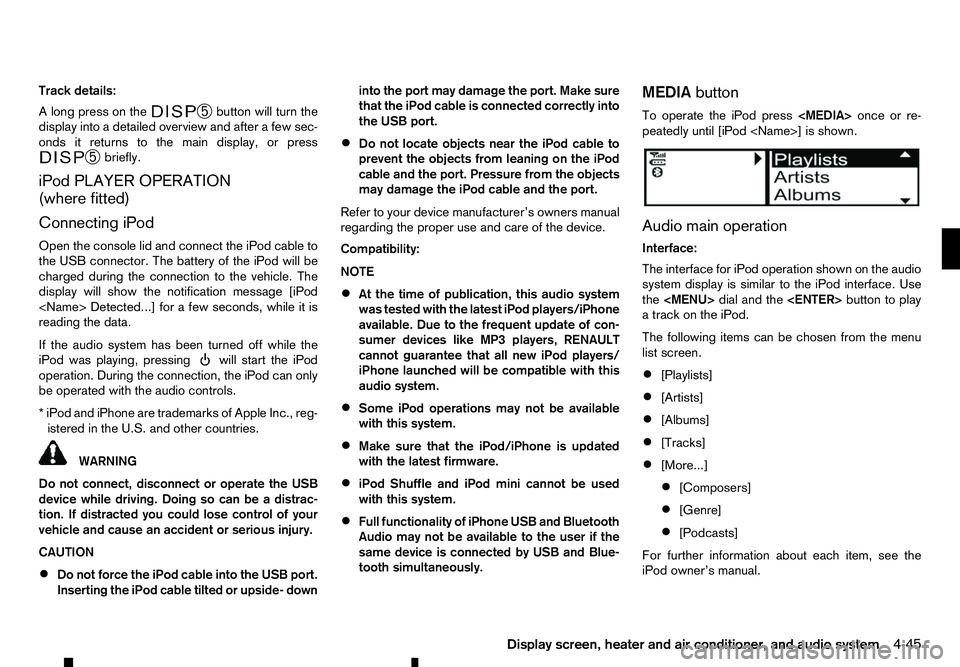
To operate the iPod press
peatedly until [iPod
Audio main operation
Interface:
The interface for iPod operation shown on the audio
system display is similar to the iPod interface. Use
the
Page 186 of 340
CAUTION
Do not force the compact disc into the slot. This
could damage the player. CD button:
When the CD button is pushed with the system off
and the CD loaded, the system will turn on and the
CD will start to play.
When the CD button is pushed with aCDloaded
while the radio playing, the radio will turned off and
the CD will start to play. Seek/Track button:
When the or button is pushed for more
than 1.5 seconds while the CD is being played, the
CD will play while fast forwarding or rewinding.
When the button is released, the CD will return to
normal play speed.
When the or button is pushed for less
than 1.5 seconds while the CD is being played, the
next track or the beginning of the current track on
the CD will be played. Push the button several times
to skip through the tracks on the CD. If the last track
on aCDiss kipped, the first track on the disc will
play. If the last track in afolder of an MP3 CD is
skipped, the first track of the next folder will play.
CD/MP3/WMA display mode:
While listening to aCDoranMP3/WMA CD, cer-
tain text may be displayed (when aCDencoded
with text is being used). Depending on how the CD or MP3/WMA CD is encoded, the text is displayed
listing the artist, album and song title. Operation
keys are also displayed on the screen.
Mix:
Touching the [Mix] key while an CD or MP3 CD is
playing will alternate the random play pattern as fol-
lows:
(CD)
(Normal)
→Mix →(Normal)
(CD with compressed audio files)
(Normal) →Random Folder →Random All →(Nor-
mal)
Repeat:
Touching the [Repeat] key while an CD or MP3 CD
is playing will alternate the repeat play pattern as fol-
lows:
(CD)
(Normal) →Repeat →(Normal)
(CD with compressed audio files)
(Normal) →Repeat Track →Repeat Folder →(Nor-
mal)
Browse:
Touch the [Browse] key to display the titles on the
CD in list format. Touch the title of asong in the list
to begin playing that song. If an MP3 CD is playing,
touching the [Browse] key will also list the folders
on the disc. Touch the [Folder Up] key to view the lists in the upper layer. Follow the procedure for
selecting asong with the touch screen to choose a
folder. Disc eject button:
When the Disc eject button is pushed while aCDis
loaded, the CD will be ejected.
If the CD is not removed within 10 seconds, the CD
will be reloaded.
USB (Universal Serial Bus) Connection
Port WARNING
Do not connect, disconnect or operate the USB
device while driving. Doing so can be adistrac-
tion. If distracted you could lose control of your
vehicle and cause an accident or serious injury.
CAUTION
• Do not force the USB device into the USB
port. Inserting the USB device tilted or up-
side-down into the port may damage the port.
Make sure that the USB device is connected
correctly into the USB port.
• Do not grab the USB port cover (where fitted)
when pulling the USB device out of the port.
This could damage the port and the cover.
• Do not leave the USB cable in
aplace where
it can be pulled unintentionally. Pulling the
cable may damage the port.
4-54 Display screen, heater and air conditioner, and audio system
Page 191 of 340
•
Reject an incoming call by pressing the
< >
button during the incoming call.
• End an active call by pushing the
< >
button
once.
• Redial the last outgoing call by pressing the
< >
button for more than
2seconds. BLUETOOTH
®MOBILE PHONE
FEATURE WARNING
Whilst
driving, using the mobile phone is ex-
tremely dangerous because it significantly im-
pairs your concentration and diminishes your re-
action capabilities to sudden changes on the
road, and it may lead to afatal accident. This
applies to all phone call situations such as when
receiving an incoming call, during aphone con-
versation, when calling through the phone book
search, etc.
CAUTION
Certain country jurisdictions prohibit the use of
the mobile phone in the car without hands-free
support.
This chapter provides information about the hands-
free phone system using aBluetooth
®connection.
Bluetooth
®is aw ireless radio communication stan-
dard. This system offers ahands-free facility for your
mobile telephone to enhance driving comfort.
In order to use your mobile phone with the Blue-
tooth
®of the audio system, the mobile phone must
first be setup. For details, see “BLUETOOTH®
settings” later in this section. Once it has been
setup, the hands-free mode is automatically acti-
vated on the registered mobile phone (via Blue-
tooth
®)w hen it comes into range. An
otification message appears on the audio display
when the phone is connected, when an incoming
call is being received, as well as when acall is initi-
ated.
When acall is active, the audio system, microphone
(located in the ceiling in front of the rear view mir-
ror), and steering wheel switches enable hands-free
communication.
If the audio system is in use at the time, the radio,
CD, iPod, USB audio, Bluetooth audio or AUX
source mode will be muted and will stay muted until
the active call has ended.
The Bluetooth
®system may not be able to connect
with your mobile phone for the following reasons:
• The mobile phone is too far away from the ve-
hicle.
• The Bluetooth
®mode on your mobile phone has
not been activated.
• Your mobile phone has not been paired with the
Bluetooth
®system of the audio unit.
• The mobile phone does not support Bluetooth
®
technology (BT Core v2.0).
NOTE
• For models with Audio with Navigation sys-
tem see the separately provided Owner’s
Manual.
• For details, see your mobile phone’s Owner’s
Manual.
BLUETOOTH® HANDS-FREE PHONE SYSTEM (without navigation system
and colour display)
Display screen, heater and air conditioner, and audio system 4-59
Page 195 of 340
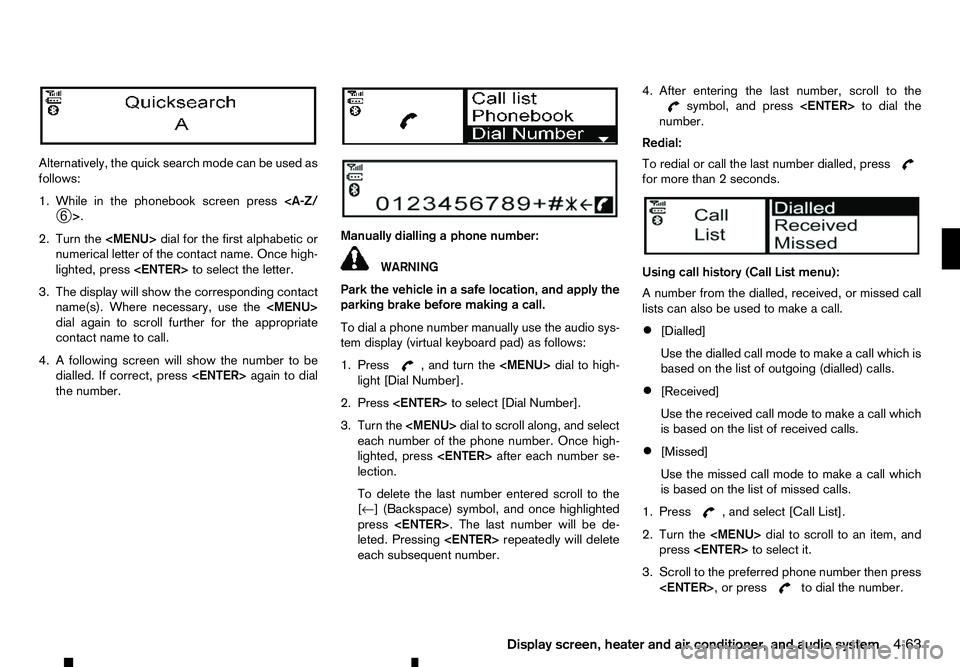
Alternatively, the quick search mode can be used as
follows:
1. While in the phonebook screen press
2. Turn the
Page 197 of 340
WARNING
• Use
aphone after stopping your vehicle in a
safe location. If you have to use aphone while
driving, exercise extreme caution at all times
so full attention may be given to vehicle op-
eration.
• If you are unable to devote full attention to
vehicle operation while talking on the phone,
pull off the road to
asafe location and stop
your vehicle.
CAUTION
To avoid discharging the vehicle battery, use a
phone after starting the engine.
Your vehicle is equipped with the Bluetooth®
Hands-Free Phone System. If you have acompat-
ible Bluetooth® enabled mobile phone, you can set
up the wireless connection between your mobile
phone and the in-vehicle phone module. With Blue-
tooth® wireless technology, you can make or re-
ceive ahands-free telephone call with your mobile
phone in the vehicle.
Once your mobile phone is connected to the in-ve-
hicle phone module, no other phone connecting pro-
cedure is required. Your phone is automatically re-
connected with the in-vehicle phone module when
the ignition switch is placed in the ON position with
the connected mobile phone turned on and carried
in the vehicle. You can register up to
5different Bluetooth® mo-
bile phones to the in-vehicle phone module. How-
ever, you can talk on only one mobile phone at a
time.
Before using the Bluetooth® Hands-Free Phone
System, refer to the following notes.
• Set up the wireless connection between
amo-
bile phone and the in-vehicle phone module be-
fore using the Bluetooth® Hands-Free Phone
System.
• Some Bluetooth® enabled mobile phones may
not be recognised by the in-vehicle phone mod-
ule.
• You will not be able to use
ahands-free phone
under the following conditions:
–Y our vehicle is outside of the mobile service
area.
–Y our vehicle is in an area where it is difficult
to receive mobile signal; such as in atunnel,
in an underground parking garage, near atall
building or in amountainous area.
–Y our mobile phone is locked to prevent it
from being dialled.
• When the radio wave condition is not ideal or
ambient sound is too loud, it may be difficult to
hear the other person’s voice during
acall.
• Immediately after the ignition switch is placed in
the ON position, it may be impossible to receive
ac
all for ashort period of time. •
Do not place the mobile phone in an area sur-
rounded by metal or far away from the in-vehicle
phone module to prevent tone quality degrada-
tion and wireless connection disruption.
• While
amobile phone is connected through the
Bluetooth® wireless connection, the battery
power of the mobile phone may discharge quicker than usual. The Bluetooth® Hands-Free
Phone System cannot charge mobile phones.
• Some mobile phones or other devices may cause
interference or
abuzzing noise to come from the
audio system speakers. Storing the device in a
different location may reduce or eliminate the
noise.
• Refer to the mobile phone owner’s manual re-
garding the telephone charges, mobile phone
antenna and body, etc.
• The signal strength display on the monitor will
not coincide with the signal strength display of
some mobile phones.
REGULATORY INFORMATION
Bluetooth® trademark
m Bluetooth®
is
at rademark
owned by Bluetooth SIG, Inc.
and licensed to Robert Bosch
GmbH.
BLUETOOTH® HANDS-FREE PHONE SYSTEM (with navigation system)
Display screen, heater and air conditioner, and audio system4-65
Page 202 of 340
5
Starting and driving
Starting and driving
Running-in schedule ................................................ 5-2
Before starting engine.............................................. 5-2
Precautions when starting and driving ...................... 5-3 Exhaust gas (carbon monoxide) .......................... 5-3
AdBlue® Selective Catalytic Reduction (SCR)
system (where fitted for diesel engine model) ...... 5-3
Diesel Particulate Filter (DPF) (where fitted) ............. 5-5 Automatic regeneration ....................................... 5-6
On-road and off-road driving precautions ................. 5-6 Driving safety precautions ................................... 5-6
Turbocharger system ............................................... 5-8
Care when driving ................................................... 5-8 Engine cold start period ...................................... 5-8
Loading luggage ................................................. 5-8
Driving in wet conditions ..................................... 5-8
Driving in winter conditions ................................. 5-8
Tyre Pressure Monitoring System (TPMS) (where
fitted) ....................................................................... 5-9 Meter information................................................ 5-12
Activation............................................................ 5-12
New and repositioned TPMS sensors
(including fitment of alternative wheels) ............... 5-12
Adjusting TPMS target pressure ......................... 5-13
Tyre pressure units ............................................. 5-13
[Check cold tyre] message ................................. 5-13
TPMS temperature calibration............................. 5-13
Ignition switch (models without Remote Control
Key system) ............................................................. 5-14
Manual Transmission (MT) .................................. 5-14
Key positions ...................................................... 5-14 Steering lock ...................................................... 5-14
Push-button ignition switch (models with Remote
Control Key system) ................................................ 5-15 Precautions on push-button ignition switch
operation ............................................................ 5-15
Remote Control Key system................................ 5-15
Automatic Transmission (AT) .............................. 5-16
Steering lock ...................................................... 5-16
Ignition switch positions ...................................... 5-16
Remote Control Key battery discharge ................ 5-17
Starting engine (models without Remote Control
Key system) ............................................................. 5-18
Starting engine (models with Remote Control Key
system).................................................................... 5-18
Driving the vehicle.................................................... 5-19 Driving with Automatic Transmission (AT) ........... 5-19
Driving with Manual Transmission (MT) ............... 5-22
Stop/Start System (where fitted) .............................. 5-23
Stop/Start System display................................... 5-24
Stop/Start OFF switch ....................................... 5-25
Four-Wheel Drive (4WD) (where fitted) .................... 5-26 Part time 4WD system ........................................ 5-26
4WD mode switch operation............................... 5-30
4WD mode indicator........................................... 5-30
4WD warning ..................................................... 5-31
Tyre recommendation for 4WD ........................... 5-32
Rear differential locking system (where fitted)........... 5-32
Electronic Stability Programme (ESP) system
(where fitted) ........................................................... 5-33
Page 204 of 340
During the first 1,600 km (1,000 miles), follow these
recommendations to obtain maximum engine per-
formance and ensure the future reliability and
economy of your new vehicle. Failure to follow these
recommendations may result in shortened engine
life and reduced engine performance.
• Do not drive at
aconstant speed, either fast or
slow, for long periods of time.
• Do not run the engine over 4,000 rpm.
• Do not accelerate at full throttle in any gear.
• Do not start quickly.
• Do not brake hard as much as possible.
• Do not tow
atrailer for at least the first 800 km
(500 miles). WARNING
The driving characteristics of your vehicle will
change remarkably by any additional load and its
distribution, as well as by adding optional equip-
ment (trailer coupling, roof rail, etc.). Your driv-
ing style and speed must be adjusted according
to the circumstances. Especially when carrying
heavy loads, your speed must be reduced ad-
equately.
• Make sure the area around the vehicle is clear.
• Check fluid levels such as engine oil, coolant,
brake (and clutch) fluid, window washer fluid as
frequently as possible, at least whenever you
refuel.
• Visually inspect tyres for their appearance and
condition. Measure and check the tyre pressure
for proper inflation.
• Check that all windows and lights are clean.
• Adjust the seat and head restraint positions.
• Adjust the inside and outside rearview mirror po-
sitions.
• Fasten your seat belt and ask all passengers to
do the same.
• Check that all doors are closed.
• Check the operation of the warning lights when
the ignition switch is placed in the “ON” position. •
Maintenance items in the “8. Maintenance and
do-it-yourself” section should be checked peri-
odically.
RUNNING-IN SCHEDULE
BEFORE STARTING ENGINE
5-2 Starting and driving
Page 205 of 340
WARNING
• Never leave children or adults who would nor-
mally require the support of others alone in
your vehicle. Pets should not be left alone
either. They could unknowingly activate
switches or controls, or move the vehicle, and
inadvertently become involved in aserious ac-
cident and injure themselves. On hot, sunny
days, temperatures in aclosed vehicle could
quickly become high enough to cause severe
or possibly fatal illness to people or animals.
• Properly secure all cargo to help prevent it
from sliding or shifting. Do not place cargo
higher than the seatbacks. In
asudden stop
or collision, unsecured cargo could cause per-
sonal injury.
NOTE
During the first few months after purchasing a
new vehicle, if you smell strong odours of Vola-
tile Organic Compounds (VOCs) inside the ve-
hicle, ventilate the passenger compartment thor-
oughly. Open all the windows before entering or
while in the vehicle. In addition, when the tem-
perature in the passenger compartment rises, or
when the vehicle is parked in direct sunlight for a
period of time, turn off the air recirculation mode
of the air conditioner and/or open the windows
to allow sufficient fresh air into the passenger
compartment. EXHAUST GAS (carbon monoxide) WARNING
• Do not breathe exhaust gas; it contains co-
lourless and odourless carbon monoxide. Car-
bon monoxide is dangerous. It can cause un-
consciousness or death.
• If you suspect that exhaust fumes are enter-
ing the vehicle, drive with all windows fully
open, and have the vehicle inspected imme-
diately.
• Do not run the engine in closed spaces such
as
ag arage.
• Do not park the vehicle with the engine run-
ning for an extended period of time.
• If electrical wiring or other cable connections
must pass to
atrailer through the seal of the
body, follow the manufacturer’s recommen-
dations to prevent carbon monoxide entry into
the vehicle.
• If
as pecial body or other equipment is added
for recreational or other usage, follow the
manufacturer’s recommendation to prevent
carbon monoxide entry into the vehicle.
(Some recreational vehicle appliances such
as stoves, refrigerators, heaters, etc. may also
generate carbon monoxide.)
• The exhaust system and body should be in-
spected by
aqualified mechanic whenever:
–Y our vehicle is raised while being serviced. –Y
ou suspect that exhaust fumes are enter-
ing into the passenger compartment.
–Y ou notice achange in the sound of the
exhaust system.
–Y ou have had an accident involving dam-
age to the exhaust system, underbody, or
rear of the vehicle.
AdBlue® SELECTIVE CATALYTIC
REDUCTION (SCR) SYSTEM (where
fitted for diesel engine model)
AdBlue® or Diesel Exhaust Fluid (DEF), is anon-
toxic solution of 32.5% urea in de-ionized water.
This fluid is sprayed into the exhaust system of die-
sel vehicles to cause achemical reaction that breaks
down potentially dangerous NOx (nitrogen oxides)
emissions into harmless nitrogen and water. This
system is called Selective Catalytic Reduction
(SCR). AdBlue® fluid is not afuel additive and is
never mixed with diesel fuel. It is always stored in a
separate tank on the vehicle.
AdBlue® will begin to freeze below -11°C (12°F). If
you often drive in areas where the temperature is
below -11°C (12°F), the AdBlue® tank should al-
ways be filled with AdBlue® at the beginning of the
cold season to ensure enough defrosting capacity with heating.
PRECAUTIONS WHEN STARTING
AND DRIVING
Starting and driving5-3
Page 206 of 340
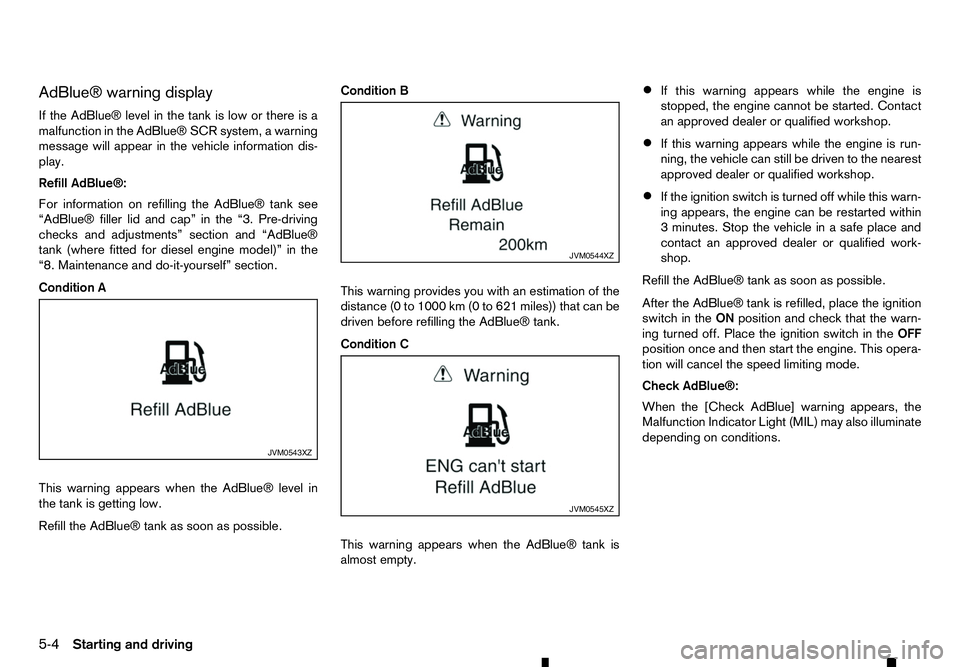
AdBlue® warning display
If the AdBlue® level in the tank is low or there is a malfunction in the AdBlue® SCR system, awarning
message will appear in the vehicle information dis- play.
Refill AdBlue®:
For information on refilling the AdBlue® tank see
“AdBlue® filler lid and cap” in the “3. Pre-driving
checks and adjustments” section and “AdBlue®
tank (where fitted for diesel engine model)” in the
“8. Maintenance and do-it-yourself” section.
Condition A
This warning appears when the AdBlue® level in
the tank is getting low.
Refill the AdBlue® tank as soon as possible. Condition B
This warning provides you with an estimation of the
distance (0 to 1000 km (0 to 621 miles)) that can be
driven before refilling the AdBlue® tank.
Condition C
This warning appears when the AdBlue® tank is
almost empty.•
If this warning appears while the engine is
stopped, the engine cannot be started. Contact
an approved dealer or qualified workshop.
• If this warning appears while the engine is run-
ning, the vehicle can still be driven to the nearest
approved dealer or qualified workshop.
• If the ignition switch is turned off while this warn-
ing appears, the engine can be restarted within
3m
inutes. Stop the vehicle in asafe place and
contact an approved dealer or qualified work-
shop.
Refill the AdBlue® tank as soon as possible.
After the AdBlue® tank is refilled, place the ignition
switch in the ONposition and check that the warn-
ing turned off. Place the ignition switch in the OFF
position once and then start the engine. This opera-
tion will cancel the speed limiting mode.
Check AdBlue®:
When the [Check AdBlue] warning appears, the
Malfunction Indicator Light (MIL) may also illuminate
depending on conditions. JVM0543XZ JVM0544XZ
JVM0545XZ
5-4 Starting and driving
Page 207 of 340
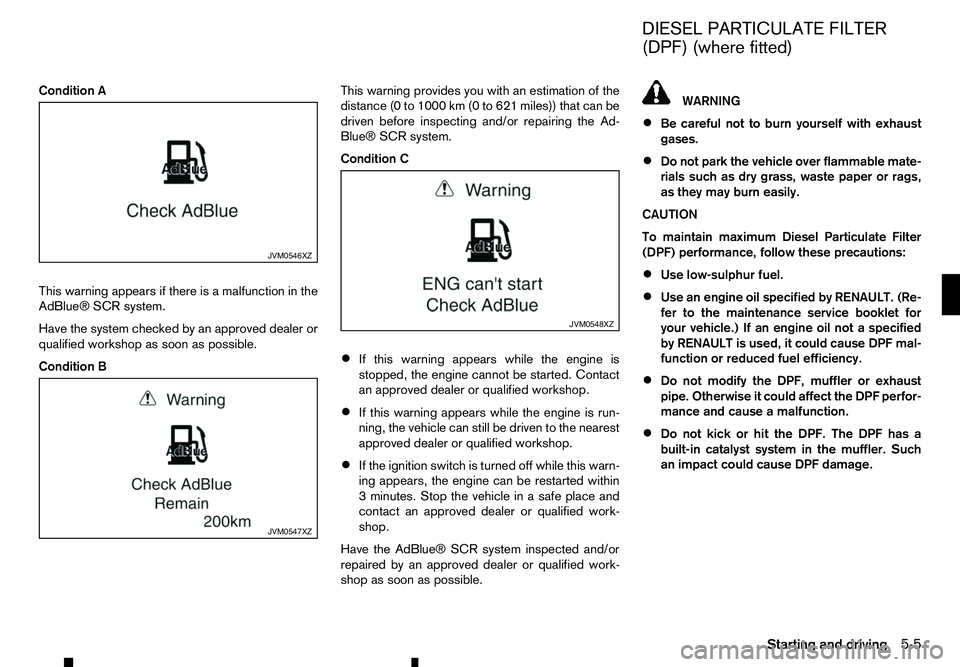
Condition A
This warning appears if there is amalfunction in the
AdBlue® SCR system.
Have the system checked by an approved dealer or
qualified workshop as soon as possible.
Condition B This warning provides you with an estimation of the
distance (0 to 1000 km (0 to 621 miles)) that can be
driven before inspecting and/or repairing the Ad-
Blue® SCR system.
Condition C
• If this warning appears while the engine is
stopped, the engine cannot be started. Contact
an approved dealer or qualified workshop.
• If this warning appears while the engine is run-
ning, the vehicle can still be driven to the nearest
approved dealer or qualified workshop.
• If the ignition switch is turned off while this warn-
ing appears, the engine can be restarted within
3m
inutes. Stop the vehicle in asafe place and
contact an approved dealer or qualified work-
shop.
Have the AdBlue® SCR system inspected and/or
repaired by an approved dealer or qualified work-
shop as soon as possible. WARNING
• Be careful not to burn yourself with exhaust
gases.
• Do not park the vehicle over flammable mate-
rials such as dry grass, waste paper or rags,
as they may burn easily.
CAUTION
To maintain maximum Diesel Particulate Filter
(DPF) performance, follow these precautions:
• Use low-sulphur fuel.
• Use an engine oil specified by RENAULT. (Re-
fer to the maintenance service booklet for
your vehicle.) If an engine oil not
aspecified
by RENAULT is used, it could cause DPF mal-
function or reduced fuel efficiency.
• Do not modify the DPF, muffler or exhaust
pipe. Otherwise it could affect the DPF perfor-
mance and cause
amalfunction.
• Do not kick or hit the DPF. The DPF has a
built-in catalyst system in the muffler. Such
an impact could cause DPF damage. JVM0546XZ
JVM0547XZ JVM0548XZ
DIESEL PARTICULATE FILTER
(DPF) (where fitted)
Starting and driving 5-5