key battery RENAULT ALASKAN 2017 User Guide
[x] Cancel search | Manufacturer: RENAULT, Model Year: 2017, Model line: ALASKAN, Model: RENAULT ALASKAN 2017Pages: 340, PDF Size: 6.93 MB
Page 118 of 340
USING REMOTE KEYLESS ENTRY
SYSTEM
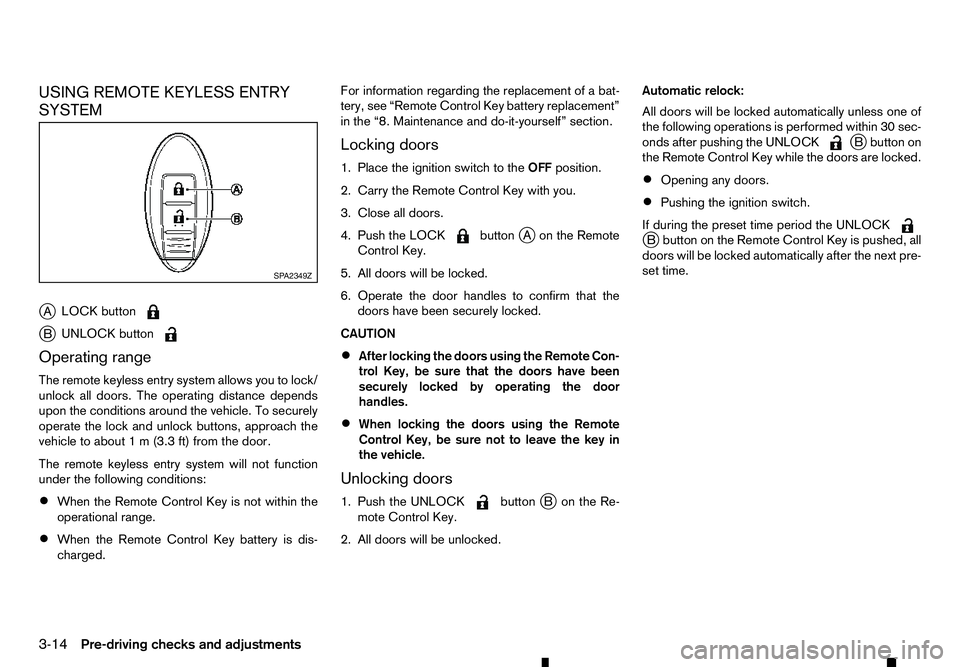
j A LOCK button j
B UNLOCK button
Operating range
The remote keyless entry system allows you to lock/
unlock all doors. The operating distance depends
upon the conditions around the vehicle. To securely
operate the lock and unlock buttons, approach the
vehicle to about 1m(3.3 ft) from the door.
The remote keyless entry system will not function
under the following conditions:
• When the Remote Control Key is not within the
operational range.
• When the Remote Control Key battery is dis-
charged. For information regarding the replacement of
abat-
tery, see “Remote Control Key battery replacement”
in the “8. Maintenance and do-it-yourself” section.
Locking doors
1. Place the ignition switch to the OFFposition.
2. Carry the Remote Control Key with you.
3. Close all doors.
4. Push the LOCK button
jAo nthe Remote
Control Key.
5. All doors will be locked.
6. Operate the door handles to confirm that the doors have been securely locked.
CAUTION
• After locking the doors using the Remote Con-
trol Key, be sure that the doors have been
securely locked by operating the door
handles.
• When locking the doors using the Remote
Control Key, be sure not to leave the key in
the vehicle.
Unlocking doors
1. Push the UNLOCK button
jBo nthe Re-
mote Control Key.
2. All doors will be unlocked. Automatic relock:
All doors will be locked automatically unless one of
the following operations is performed within 30 sec-
onds after pushing the UNLOCK j
Bb utton on
the Remote Control Key while the doors are locked.
• Opening any doors.
• Pushing the ignition switch.
If during the preset time period the UNLOCK j
Bb utton on the Remote Control Key is pushed, all
doors will be locked automatically after the next pre-
set time. SP A2349Z
3-14 Pre-driving checks and adjustments
Page 178 of 340
The following operations are identical to the audio
main operation of the Compact Disc (CD) opera-
tion. For details, see “Compact Disc (CD)
operation” earlier in this section.
• List view
• ,
•
MIX (Random play)
• RPT (Repeat track)
• Folder browsing button
➄
While atrack with recorded music information tags
(ID3–tags) is being played, the title of the played
track is displayed. If the tags are not provided then
an otification message is displayed.
When the ➄
button is pressed repeatedly,
further information about the track can be displayed
along with the track title as follows:
Track time →Artist name →Album title →Track
time
Track details:
Al ong press on the ➄
button, the screen
displays the song title, artist name, and album title.
After afew seconds it returns to the main display or
press ➄
briefly. BLUETOOTH® OPERATION
Regulatory information
m Bluetooth®
is
at rademark
owned by Bluetooth SIG, Inc.
CE statement
Hereby Yanfeng Visteon Automotive Electronics
Co., Ltd. declares that this system is in compliance
with the essential requirements and other relevant
provisions of Directive 1999/5/EC.
m NOTE
The
audio system only supports Bluetooth® de-
vices with AVRCP (Audio Video Remote Control
Profile) version 1.4 or earlier. BLUETOOTH® settings
To pair
adevice, make sure the Bluetooth is
switched on and use the [Scan device] key or the
[Pair device] key For details, see “[Scan devices]”
later in this section.
Up to 5different Bluetooth devices can be con-
nected. However, only one device can be used at a
time. If 5different Bluetooth registered devices are
registered, anew device can only replace one of the
5e xisting paired devices. Use [Del. device] key to
delete one of the existing paired devices. For de-
tails, see “[Pair device]” later in this section.
When successfully paired anotification message
will be displayed, then the audio system display will
return to the current audio source display. During
connection the following status icons will be dis-
played (top left of the display): Signal strength
( ), Battery status* (
)a
nd Bluetooth “ON”
( ).
*: If the low battery message comes on, the Blue-
tooth® device must be recharged soon.
The pairing procedure and operation may vary ac-
cording to device type and compatibility. See the
Bluetooth® owner’s manual for further details.
NOTE
• For device details, see your audio/mobile
phone Owner’s Manual.
• For assistance with the Bluetooth® audio/
mobile phone integration, please visit your lo-
cal approved dealer or qualified workshop. NAA1392
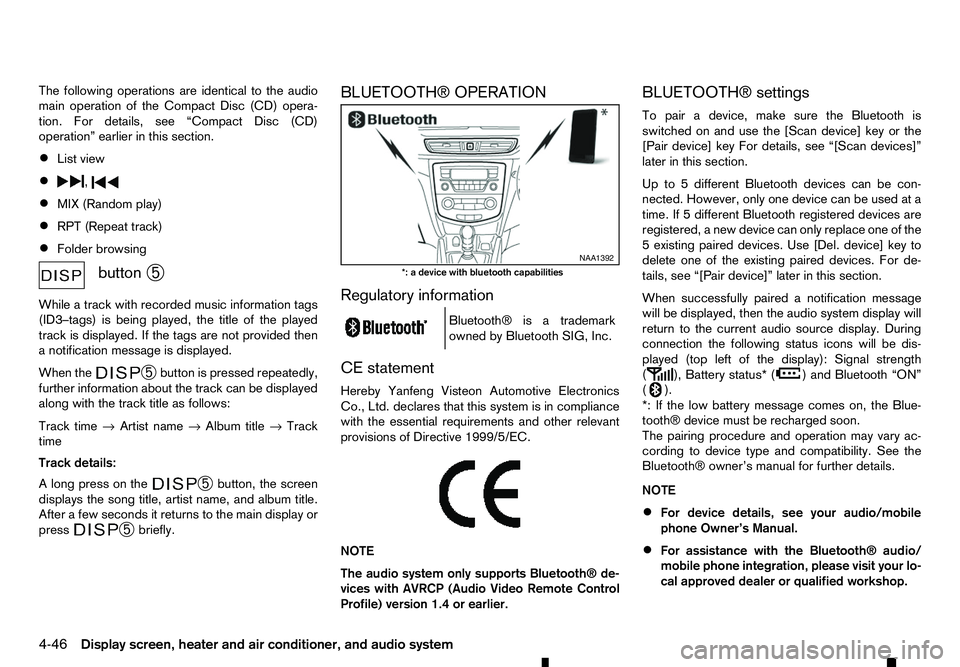
*: ad evice with bluetooth capabilities
4-46 Display screen, heater and air conditioner, and audio system
Page 187 of 340
General notes for USB use:
Refer to your device manufacturer’s owner informa-
tion regarding the proper use and care of the de-
vice.
The audio system operates when the ignition switch
is placed in the ONorACC position.
The USB port is located on the lower part of the
instrument panel. See “USB (Universal Serial Bus)
connection port” earlier in this section. Connect a
USB memory device into the connection port. The
USB memory device will be activated automatically.
USB main operation:
If another audio source is playing and aUSB memory
device is inserted, push the AUX button until the
screen on the display changes to the USB memory
mode.
If the system has been turned off while the USB
memory device was playing, push the Power/VOL-
UME dial to restart the USB memory device.
Touch the name of asong on the screen to begin
playing that song.
USB screen operation:
While files on aUSB memory device are playing,
the play pattern can be altered so that songs are
repeated or played randomly. Mix:
Touching the [Mix] key on the screen while aUSB
memory device is playing will alternate the random
play pattern as follows:
(Normal) →Random Folder →Random All →(Nor-
mal)
Repeat:
Touching the [Repeat] key on the screen while a
USB memory device is playing will alternate the re-
peat play pattern as follows:
(Normal) →Repeat Track →Repeat Folder →(Nor-
mal)
Browse:
Touch [Browse] key to display USB interface. Se-
lect the songs you wish to play by touching the item
on the screen. Seek/Track buttons:
Push the Seek/Track (rewind) button while an audio
file on the USB memory device is playing to return
to the beginning of the current track. Push the but-
ton several times to skip backward several tracks.
Push the Seek/Track (fast forward) button while an
audio file on the USB memory device is playing to
advance one track. Push the button several times to
skip forward several tracks. if the last track on the
USB memory device is skipped, the first track of the
next folder is played. iPod player operation
Connecting iPod:
Connect the iPod to the USB connection port using
the USB cable that came with your iPod.
The USB port is located on the lower part of the
instrument panel. See “USB (Universal Serial Bus)
connection port” earlier in this section.
If your iPod supports charging via
aUSB connec-
tion, its battery will be charged while connected to
the vehicle with the ignition switch placed in the ON
or ACC position.
Compatibility:
The following models are compatible:
• iPod 5th Generation (firmware version 1.2.3 or
later)
• iPod Classic (firmware version 1.1.1 or later)
• iPod Touch (firmware version 2.0.0 or later)*
• iPod nano
-1st generation (firmware version
1.3.1 or later)
• iPod nano
-2nd generation (firmware version
1.1.3 or later)
• iPod nano
-3rd generation (firmware version
1.1.3 or later)
• iPod nano
-4th generation (firmware version
1.0.4 or later)
• iPod nano
-5th generation (firmware version
1.0.1 or later)
Display screen, heater and air conditioner, and audio system 4-55
Page 192 of 340
•
For assistance with your mobile phone inte-
gration, please visit your local approved
dealer.
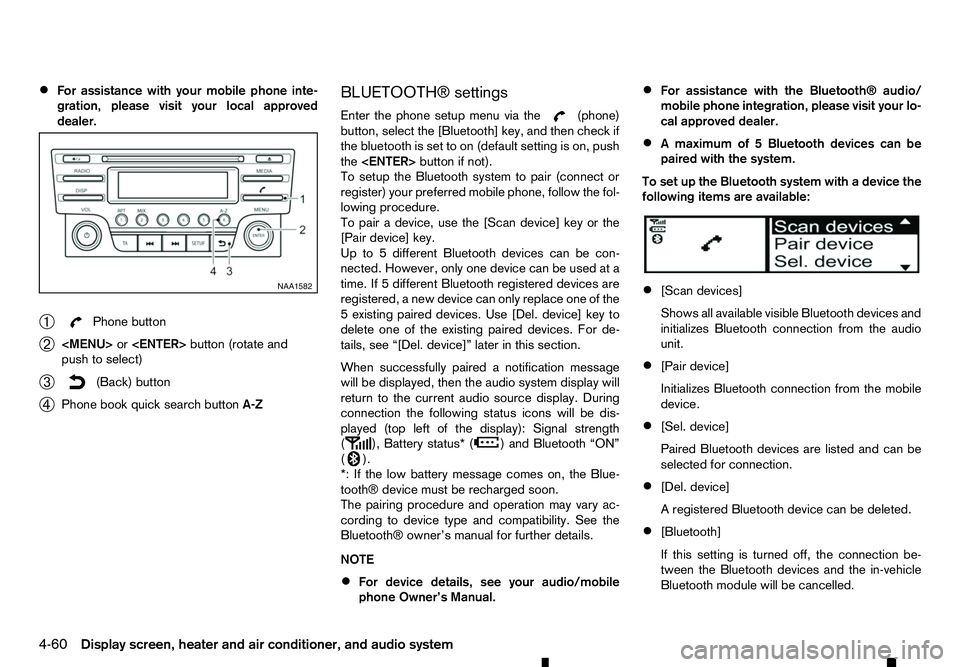
➀ Phone button
➁
Page 202 of 340
5
Starting and driving
Starting and driving
Running-in schedule ................................................ 5-2
Before starting engine.............................................. 5-2
Precautions when starting and driving ...................... 5-3 Exhaust gas (carbon monoxide) .......................... 5-3
AdBlue® Selective Catalytic Reduction (SCR)
system (where fitted for diesel engine model) ...... 5-3
Diesel Particulate Filter (DPF) (where fitted) ............. 5-5 Automatic regeneration ....................................... 5-6
On-road and off-road driving precautions ................. 5-6 Driving safety precautions ................................... 5-6
Turbocharger system ............................................... 5-8
Care when driving ................................................... 5-8 Engine cold start period ...................................... 5-8
Loading luggage ................................................. 5-8
Driving in wet conditions ..................................... 5-8
Driving in winter conditions ................................. 5-8
Tyre Pressure Monitoring System (TPMS) (where
fitted) ....................................................................... 5-9 Meter information................................................ 5-12
Activation............................................................ 5-12
New and repositioned TPMS sensors
(including fitment of alternative wheels) ............... 5-12
Adjusting TPMS target pressure ......................... 5-13
Tyre pressure units ............................................. 5-13
[Check cold tyre] message ................................. 5-13
TPMS temperature calibration............................. 5-13
Ignition switch (models without Remote Control
Key system) ............................................................. 5-14
Manual Transmission (MT) .................................. 5-14
Key positions ...................................................... 5-14 Steering lock ...................................................... 5-14
Push-button ignition switch (models with Remote
Control Key system) ................................................ 5-15 Precautions on push-button ignition switch
operation ............................................................ 5-15
Remote Control Key system................................ 5-15
Automatic Transmission (AT) .............................. 5-16
Steering lock ...................................................... 5-16
Ignition switch positions ...................................... 5-16
Remote Control Key battery discharge ................ 5-17
Starting engine (models without Remote Control
Key system) ............................................................. 5-18
Starting engine (models with Remote Control Key
system).................................................................... 5-18
Driving the vehicle.................................................... 5-19 Driving with Automatic Transmission (AT) ........... 5-19
Driving with Manual Transmission (MT) ............... 5-22
Stop/Start System (where fitted) .............................. 5-23
Stop/Start System display................................... 5-24
Stop/Start OFF switch ....................................... 5-25
Four-Wheel Drive (4WD) (where fitted) .................... 5-26 Part time 4WD system ........................................ 5-26
4WD mode switch operation............................... 5-30
4WD mode indicator........................................... 5-30
4WD warning ..................................................... 5-31
Tyre recommendation for 4WD ........................... 5-32
Rear differential locking system (where fitted)........... 5-32
Electronic Stability Programme (ESP) system
(where fitted) ........................................................... 5-33
Page 217 of 340
Unlocking the steering wheel
1) Insert the key into the ignition switch.
2) Gently turn the ignition switch while rotating the steering wheel left and right. PRECAUTIONS ON PUSH-BUTTON
IGNITION SWITCH OPERATION WARNING
Do not operate the push-button ignition switch
while driving the vehicle except in an emergency.
(The engine will stop when the ignition switch is
pushed 3consecutive times or the ignition switch
is pushed and held for more than 2seconds.)
The steering wheel may lock and could cause
the driver to lose control of the vehicle. This could
result in serious vehicle damage or personal in-
jury.
REMOTE CONTROL KEY SYSTEM
The Remote Control Key system can operate the
ignition switch without taking the key out from your
pocket or bag. The operating environment and/or
conditions may affect the Remote Control Key sys-
tem operation.
Some indicators and warnings for operation are dis-
played in the vehicle information display and/or in
the meter. (See “Warning lights, indicator lights and
audible reminders” in the “2. Instruments and
controls” section and “Vehicle information display”
in the “2. Instruments and controls” section.)
CAUTION
• Be sure to carry the Remote Control Key with
you when operating the vehicle.
• Never leave the Remote Control Key inside
the vehicle when you leave the vehicle. •
If the vehicle battery is discharged, the igni-
tion switch cannot be switched from the
“LOCK” position, and if the steering lock is
engaged, the steering wheel cannot be
moved. Charge the battery as soon as pos-
sible. (See “Remote Control Key battery
replacement” in the “8. Maintenance and
do-it-yourself” section.)
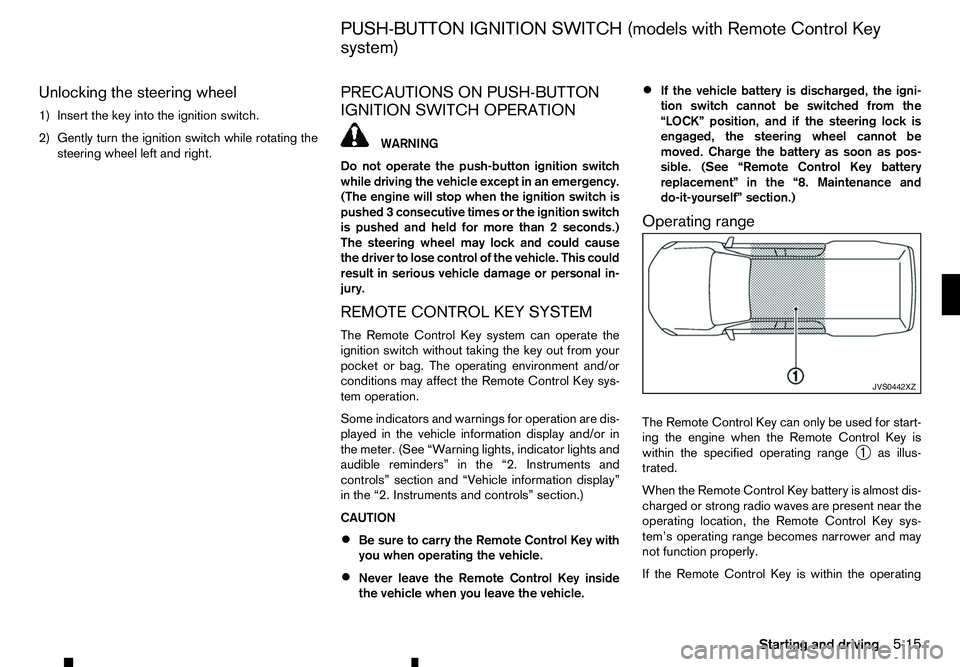
Operating range
The Remote Control Key can only be used for start-
ing the engine when the Remote Control Key is
within the specified operating range ➀as illus-
trated.
When the Remote Control Key battery is almost dis-
charged or strong radio waves are present near the
operating location, the Remote Control Key sys-
tem’s operating range becomes narrower and may
not function properly.
If the Remote Control Key is within the operating JVS0442XZ
PUSH-BUTTON IGNITION SWITCH (models with Remote Control Key
system)
Starting and driving5-15
Page 218 of 340
range, it is possible for anyone, even someone who
does not carry the Remote Control Key, to push the
ignition switch to start the engine.
• The cargo bed area is not included in the operat-
ing range of the engine start function.
• If the Remote Control Key is placed on the in-
strument panel, inside the glove box, door pocket
or the corner of the interior compartment, the
Remote Control Key may not function.
• If the Remote Control Key is placed near the
door or window outside the vehicle, the Remote
Control Key may function.
AUTOMATIC TRANSMISSION (AT)
The ignition lock is designed so that the ignition
switch cannot be switched to the “LOCK” position
until the shift lever is moved to the P(Park) position.
When pushing the ignition switch to the “OFF” posi-
tion, make sure the shift lever is in the P(Park) posi-
tion.
When the ignition switch cannot be switched to the
“LOCK” position:
1. [Shift to Park] warning appears on the vehicle
information display and achime sounds.
2. Move the shift lever to the P(Park) position.
3. If the ignition switch is in the “ACC” position, [PUSH] warning appears on the vehicle informa-
tion display.
4. Push the ignition switch. The ignition switch is switched to the “OFF” position. 5. Open the door. The ignition switch turns to the
“LOCK” position.
For warnings and indicators on the vehicle informa-
tion display, see “Indicators for operation” in the
“2. Instruments and controls” section.
If the ignition switch is switched to the “LOCK”
position, the shift lever cannot be moved from the P
(Park) position. The shift lever can be moved if the
ignition switch is in the “ON” position with the foot-
brake pedal depressed.
STEERING LOCK
The ignition switch is equipped with an anti-theft
steering lock device.
To lock steering wheel
1. Place the ignition switch in the “OFF” position where the ignition switch position indicator will
not illuminate.
2. Open or close the door. The ignition switch turns to the “LOCK” position.
3. Turn the steering wheel 1/6 of aturn to the right
or left from the straight up position.
To unlock steering wheel
Push the ignition switch, and the steering wheel will
be automatically unlocked.
CAUTION
• If the battery of the vehicle is discharged, the
push-button ignition switch cannot be
switched from the “LOCK” position. •
If the steering lock release malfunction indi-
cator (where fitted) appears in the vehicle in-
formation display, push the ignition switch
again while rotating the steering wheel slightly
to the right and left. (See “Vehicle information
display” in the “2. Instruments and controls”
section.)
IGNITION SWITCH POSITIONS WARNING
Never place the ignition switch in the “OFF” posi-
tion while driving. The steering wheel may lock
and cause the driver to lose control of the ve-
hicle, resulting in serious vehicle damage or per-
sonal injury.
CAUTION
• Do not leave the vehicle for extended periods
of time when the ignition switch is in the “ON”
position and the engine is not running. This
can discharge the battery.
• Use electrical accessories with the engine
running to avoid discharging the vehicle bat-
tery. If you must use accessories while the
engine is not running, do not use them for
extended periods of time and do not use mul-
tiple electrical accessories at the same time.
5-16 Starting and driving
Page 219 of 340
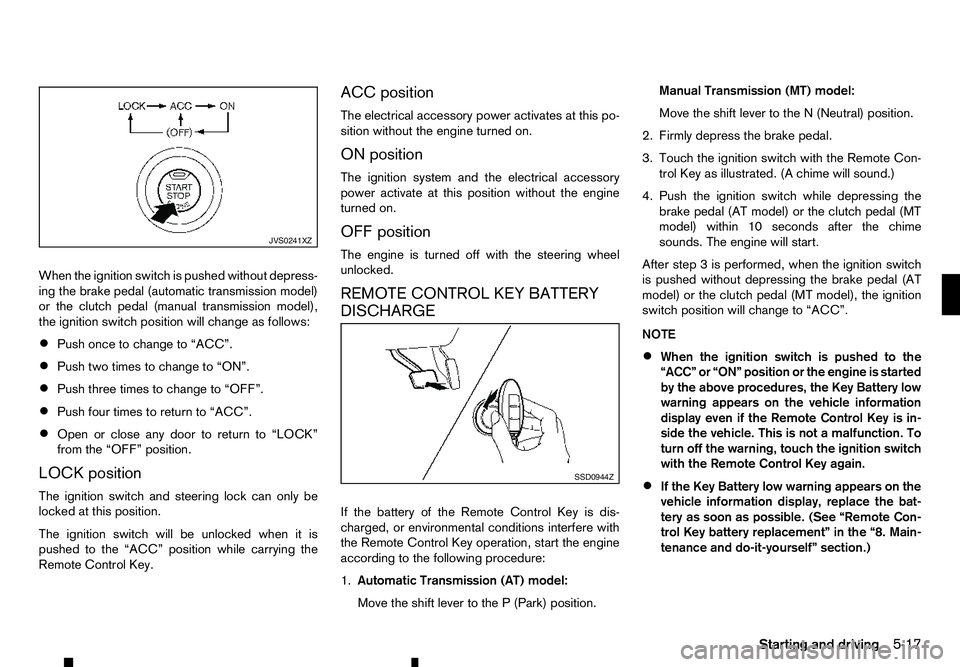
When the ignition switch is pushed without depress-
ing the brake pedal (automatic transmission model)
or the clutch pedal (manual transmission model),
the ignition switch position will change as follows:
• Push once to change to “ACC”.
• Push two times to change to “ON”.
• Push three times to change to “OFF”.
• Push four times to return to “ACC”.
• Open or close any door to return to “LOCK”
from the “OFF” position.
LOCK position
The ignition switch and steering lock can only be
locked at this position.
The ignition switch will be unlocked when it is
pushed to the “ACC” position while carrying the
Remote Control Key. ACC position
The electrical accessory power activates at this po-
sition without the engine turned on.
ON position
The ignition system and the electrical accessory
power activate at this position without the engine
turned on.
OFF position
The engine is turned off with the steering wheel
unlocked.
REMOTE CONTROL KEY BATTERY
DISCHARGE
If the battery of the Remote Control Key is dis-
charged, or environmental conditions interfere with
the Remote Control Key operation, start the engine
according to the following procedure:
1.
Automatic Transmission (AT) model:
Move the shift lever to the P(Park) position. Manual Transmission (MT) model:
Move the shift lever to the
N(Neutral) position.
2. Firmly depress the brake pedal.
3. Touch the ignition switch with the Remote Con- trol Key as illustrated. (A chime will sound.)
4. Push the ignition switch while depressing the brake pedal (AT model) or the clutch pedal (MT
model) within 10 seconds after the chime
sounds. The engine will start.
After step 3isperformed, when the ignition switch
is pushed without depressing the brake pedal (AT
model) or the clutch pedal (MT model), the ignition
switch position will change to “ACC”.
NOTE
• When the ignition switch is pushed to the
“ACC” or “ON” position or the engine is started
by the above procedures, the Key Battery low
warning appears on the vehicle information
display even if the Remote Control Key is in-
side the vehicle. This is not
amalfunction. To
turn off the warning, touch the ignition switch
with the Remote Control Key again.
• If the Key Battery low warning appears on the
vehicle information display, replace the bat-
tery as soon as possible. (See “Remote Con-
trol Key battery replacement” in the “8. Main-
tenance and do-it-yourself” section.) JVS0241XZ
SSD0944Z
Starting and driving
5-17
Page 225 of 340
The Stop/Start System is designed to prevent un-
necessary fuel consumption, exhaust emissions,
and noise during ajourney:
• When you stop the vehicle with the shift lever in
N(
Neutral) and clutch pedal released, the en-
gine is turned off automatically.
• When you push the clutch pedal, the engine is
automatically turned on.
CAUTION
At the end of the journey the engine must be
stopped and ignition turned off. Lock the vehicle
as normal. Turning the ignition switch OFF will
shut down all electrical systems. Failure to do
this may result in aflat battery.
NOTE
For model with Stop/Start System, use the spe-
cial battery that is enhanced in regard to the
charge-discharge capacity and life performance.
Avoid using anon-special battery for the Stop/
Start System, as this may cause early deteriora-
tion of the battery or amalfunction of the Stop/
Start System. For the battery, it is recommended
to use Genuine RENAULT parts. For more infor-
mation, contact an approved dealer or qualified
workshop.
NOTE
The Stop/Start System will not activate under
the following conditions:
• When the engine is kept idling without any
driving after the engine is turned on. •
When the engine coolant temperature is low.
• When the battery capacity is low.
• When the battery temperature is low.
• When the vehicle is moved.
• When the vacuum in the brake servo
decreases.
• When the engine bonnet is opened with the
engine running.
• When the engine is turned on with the engine
bonnet open.
• When the driver’s seat belt is not fastened.
• When the driver’s door is open.
• When the Stop/Start System indicator blinks
at
alow speed.
• When the fan speed control is in any position
other than OFF (0) while the air flow control is
in the front defogger position.
• When the front defogger switch is on.
• When the temperature inside the vehicle is
too high or low. (When the Auto air condition-
ing system is off, the Stop/Start System will
operate.)
• When the fan speed of the air conditioner is
set to the maximum speed.
• When the Stop/Start OFF switch is turned on.
• When the power consumption is large. •
When the vehicle is travelling at altitudes
higher than 2000
m(6562 ft) (MT model).
• For Manual Transmission (MT) models
• When the shift lever is in any position except
the
N(Neutral) position.
• When the clutch pedal is depressed.
• When the Remote Control Key is not in the
vehicle.
• When the steering wheel is turning or turned
more than 45 degrees.
NOTE
The engine will not restart even if the clutch pedal
is pressed while the Stop/Start System is acti-
vated under the following condition:
• When the engine bonnet is opened.
• When the driver seat belt is unfastened and
the driver’s door is opened.
• When the shift lever is not in the
N(Neutral)
position.
NOTE
It may take some time until the Stop/Start Sys-
tem activates under the following conditions:
• When the battery is discharged.
• When the outside temperature is low or high.
• When the battery is replaced or the battery
terminal is disconnected for extended peri-
ods and then reconnected.
STOP/START SYSTEM
(where fitted)
Starting and driving5-23
Page 227 of 340
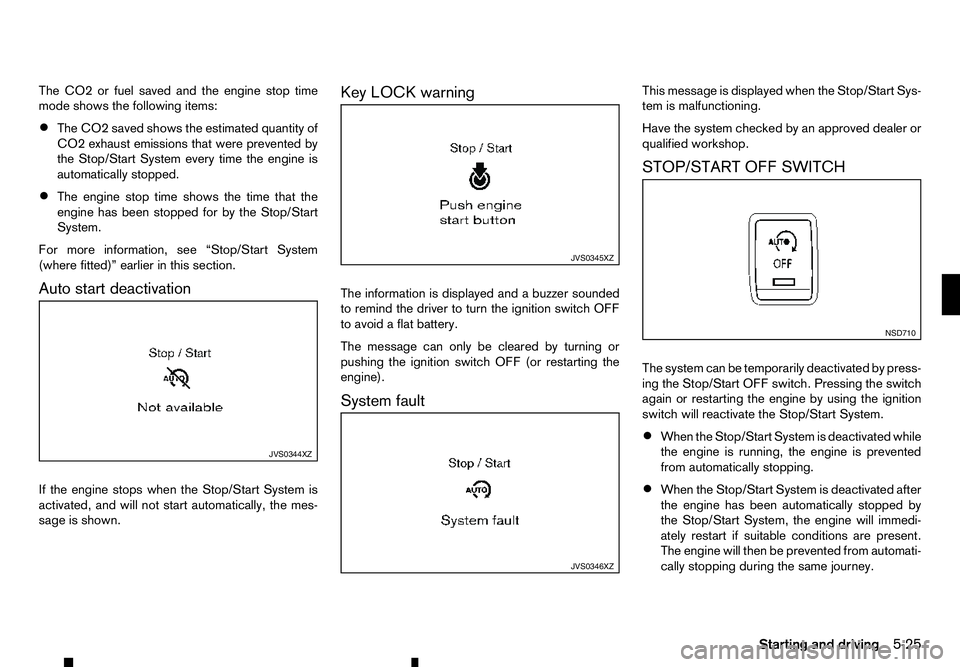
The CO2 or fuel saved and the engine stop time
mode shows the following items:
• The CO2 saved shows the estimated quantity of
CO2 exhaust emissions that were prevented by
the Stop/Start System every time the engine is
automatically stopped.
• The engine stop time shows the time that the
engine has been stopped for by the Stop/Start
System.
For more information, see “Stop/Start System
(where fitted)” earlier in this section.
Auto start deactivation
If the engine stops when the Stop/Start System is
activated, and will not start automatically, the mes-
sage is shown. Key LOCK warning
The information is displayed and
abuzzer sounded
to remind the driver to turn the ignition switch OFF
to avoid aflat battery.
The message can only be cleared by turning or
pushing the ignition switch OFF (or restarting the
engine).
System fault This message is displayed when the Stop/Start Sys-
tem is malfunctioning.
Have the system checked by an approved dealer or
qualified workshop.
STOP/START OFF SWITCH
The system can be temporarily deactivated by press-
ing the Stop/Start OFF switch. Pressing the switch
again or restarting the engine by using the ignition
switch will reactivate the Stop/Start System.
•
When the Stop/Start System is deactivated while
the engine is running, the engine is prevented
from automatically stopping.
• When the Stop/Start System is deactivated after
the engine has been automatically stopped by
the Stop/Start System, the engine will immedi-
ately restart if suitable conditions are present.
The engine will then be prevented from automati-
cally stopping during the same journey. JVS0344XZ JVS0345XZ
JVS0346XZ NSD710
Starting and driving
5-25