knob RENAULT CAPTUR 2016 1.G Owners Manual
[x] Cancel search | Manufacturer: RENAULT, Model Year: 2016, Model line: CAPTUR, Model: RENAULT CAPTUR 2016 1.GPages: 246, PDF Size: 2.55 MB
Page 23 of 246
1.17
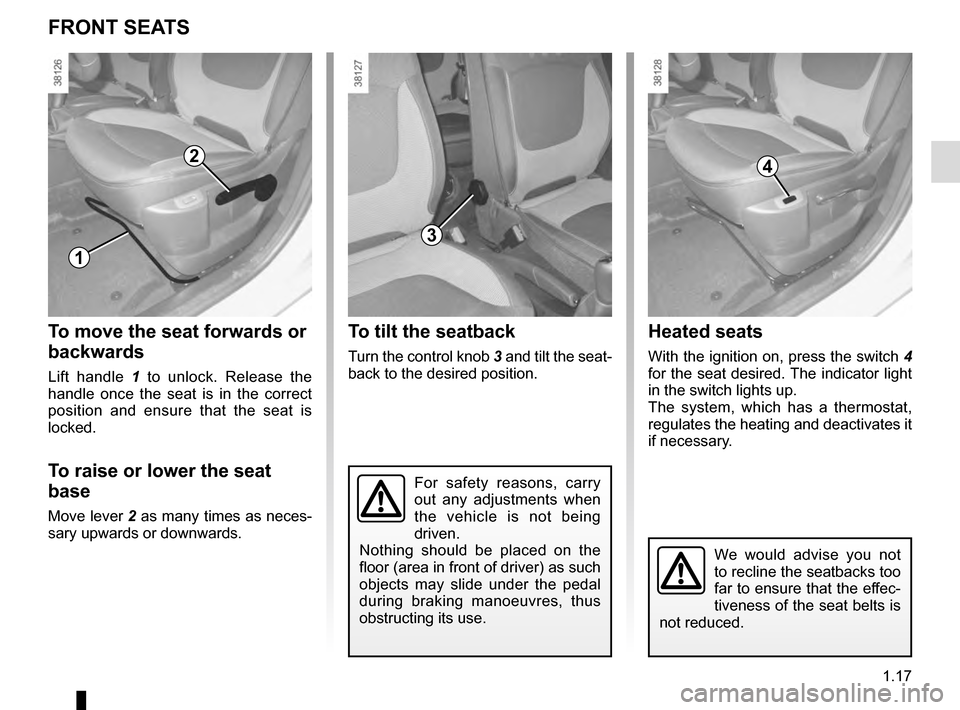
Heated seats
With the ignition on, press the switch 4
for the seat desired. The indicator light
in the switch lights up.
The system, which has a thermostat,
regulates the heating and deactivates it
if necessary.
To move the seat forwards or
backwards
Lift handle 1 to unlock. Release the
handle once the seat is in the correct
position and ensure that the seat is
locked.
To raise or lower the seat
base
Move lever 2 as many times as neces-
sary upwards or downwards.
FRONT SEATS
2
1
4
For safety reasons, carry
out any adjustments when
the vehicle is not being
driven.
Nothing should be placed on the
floor (area in front of driver) as such
objects may slide under the pedal
during braking manoeuvres, thus
obstructing its use.
To tilt the seatback
Turn the control knob 3 and tilt the seat-
back to the desired position.
3
We would advise you not
to recline the seatbacks too
far to ensure that the effec-
tiveness of the seat belts is
not reduced.
Page 50 of 246
1.44
WARNING LIGHTS (1/5)
In some cases, the appearance of a
warning light is accompanied by a mes-
sage.
šSide light warning light
áMain beam headlight tell-
tale
kDipped beam headlight tell-
tale
gFront fog light tell-tale
fRear fog light telltale
cLeft-hand direction indicator
tell-tale
bRight-hand direction indica-
tor tell-tale
åAir bag warning light
This lights up when the ignition
is switched on and goes out after a few
seconds.
If it does not come on when the igni-
tion is switched on, or comes on when
the engine is running, there is a fault in
the system.
Contact your approved Dealer as soon
as possible.
MLow fuel level warning light
This lights up when the ignition
is switched on and goes out after a few
seconds.
If it lights up when driving, fill up with
fuel as soon as possible. There is only
approximately 30 miles (50 km) worth
of fuel left.
A
If no lights or sounds are ap-
parent, this indicates a fault
in the instrument panel. This
indicates that it is essential
to stop immediately (as soon as traf-
fic conditions allow). Ensure that the
vehicle is correctly immobilised and
contact an approved Dealer.
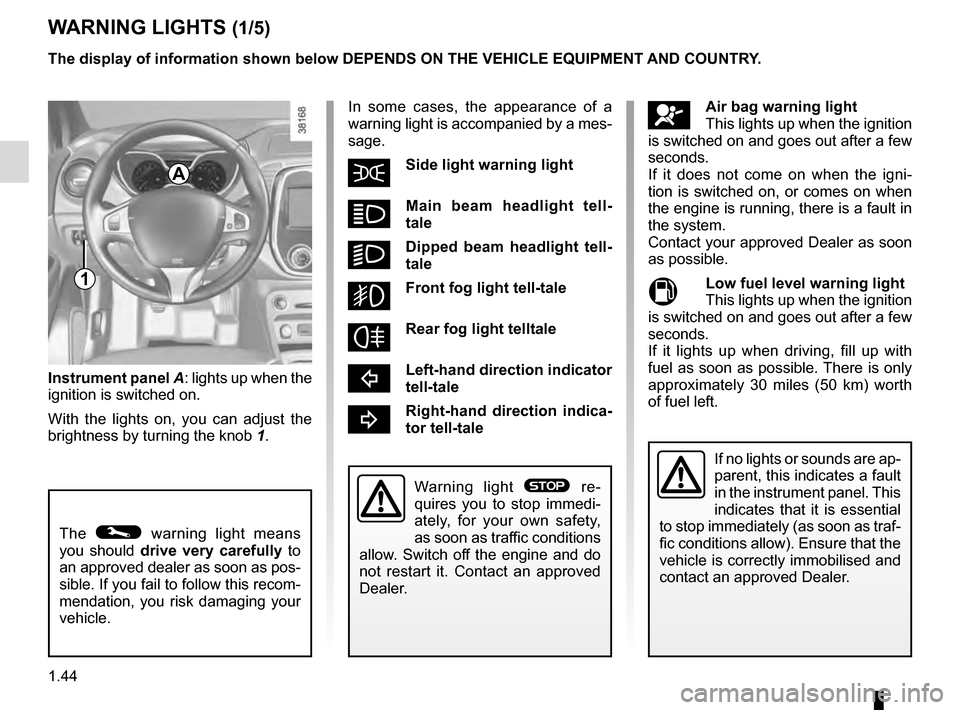
Instrument panel A: lights up when the
ignition is switched on.
With the lights on, you can adjust the
brightness by turning the knob 1.
The © warning light means
you should drive very carefully to
an approved dealer as soon as pos-
sible. If you fail to follow this recom-
mendation, you risk damaging your
vehicle.
Warning light ® re-
quires you to stop immedi-
ately, for your own safety,
as soon as traffic conditions
allow. Switch off the engine and do
not restart it. Contact an approved
Dealer.
The display of information shown below DEPENDS ON THE VEHICLE EQUIPMENT \
AND COUNTRY.
1
Page 94 of 246
2.12
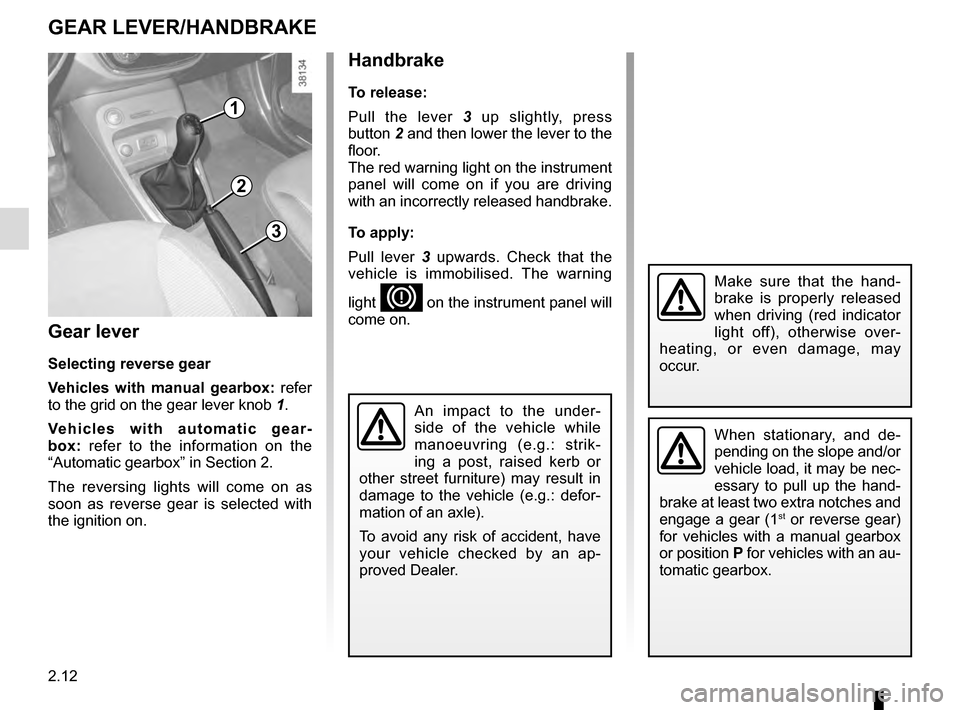
Gear lever
Selecting reverse gear
Vehicles with manual gearbox: refer
to the grid on the gear lever knob 1.
Vehicles with automatic gear-
box: refer to the information on the
“Automatic gearbox” in Section 2.
The reversing lights will come on as
soon as reverse gear is selected with
the ignition on.
1
GEAR LEVER/HANDBRAKE
Handbrake
To release:
Pull the lever 3 up slightly, press
button 2 and then lower the lever to the
floor.
The red warning light on the instrument
panel will come on if you are driving
with an incorrectly released handbrake.
To apply:
Pull lever 3 upwards. Check that the
vehicle is immobilised. The warning
light
D on the instrument panel will
come on.
3
2
When stationary, and de-
pending on the slope and/or
vehicle load, it may be nec-
essary to pull up the hand-
brake at least two extra notches and
engage a gear (1
st or reverse gear)
for vehicles with a manual gearbox
or position P for vehicles with an au-
tomatic gearbox.
An impact to the under-
side of the vehicle while
manoeuvring (e.g.: strik-
ing a post, raised kerb or
other street furniture) may result in
damage to the vehicle (e.g.: defor-
mation of an axle).
To avoid any risk of accident, have
your vehicle checked by an ap-
proved Dealer.
Make sure that the hand-
brake is properly released
when driving (red indicator
light off), otherwise over-
heating, or even damage, may
occur.
Page 131 of 246
3.3
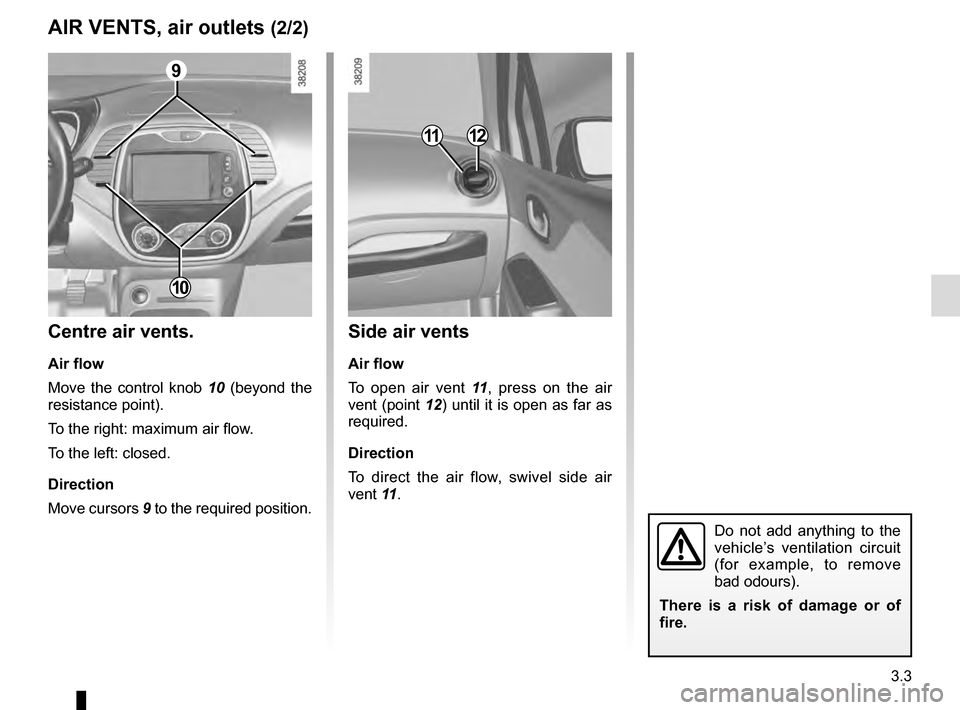
Side air vents
Air flow
To open air vent 11, press on the air
vent (point 12) until it is open as far as
required.
Direction
To direct the air flow, swivel side air
vent 11 .
Centre air vents.
Air flow
Move the control knob 10 (beyond the
resistance point).
To the right: maximum air flow.
To the left: closed.
Direction
Move cursors 9 to the required position.
AIR VENTS, air outlets (2/2)
1112
Do not add anything to the
vehicle’s ventilation circuit
(for example, to remove
bad odours).
There is a risk of damage or of
fire.
9
10