Media RENAULT CAPTUR 2017 1.G R Link User Guide
[x] Cancel search | Manufacturer: RENAULT, Model Year: 2017, Model line: CAPTUR, Model: RENAULT CAPTUR 2017 1.GPages: 96, PDF Size: 4.02 MB
Page 28 of 96
GB.26
USING VOICE RECOGNITION (5/6)
Launching a multimedia
system application using
voice recognition
You can launch an multimedia system
app using the voice control integrated
into your multimedia system. To do this:
– press the voice control button to dis-play the main voice control menu;
– when the system beeps, say “Applications”;
– say the application name you wish to launch to begin using it immediately. Note: you can also run the R-Link store
application from the voice control main
menu. To do this, press the voice con-
trol button and say “run the R-Link store
application”.
Page 29 of 96
GB.27
USING VOICE RECOGNITION (6/6)
Bastien's phoneAdd device
Activating the phone's
voice recognition with the
multimedia system
To use your phone's voice recognition
system with your multimedia system
you should:
– connect your telephone to the mul-timedia system (refer to the section
on “Connecting, disconnecting a tel-
ephone”);
– ensure that your phone has a voice recognition function compatible with
your multimedia system.
Note: if the your phone's voice recog-
nition is compatible with the multime-
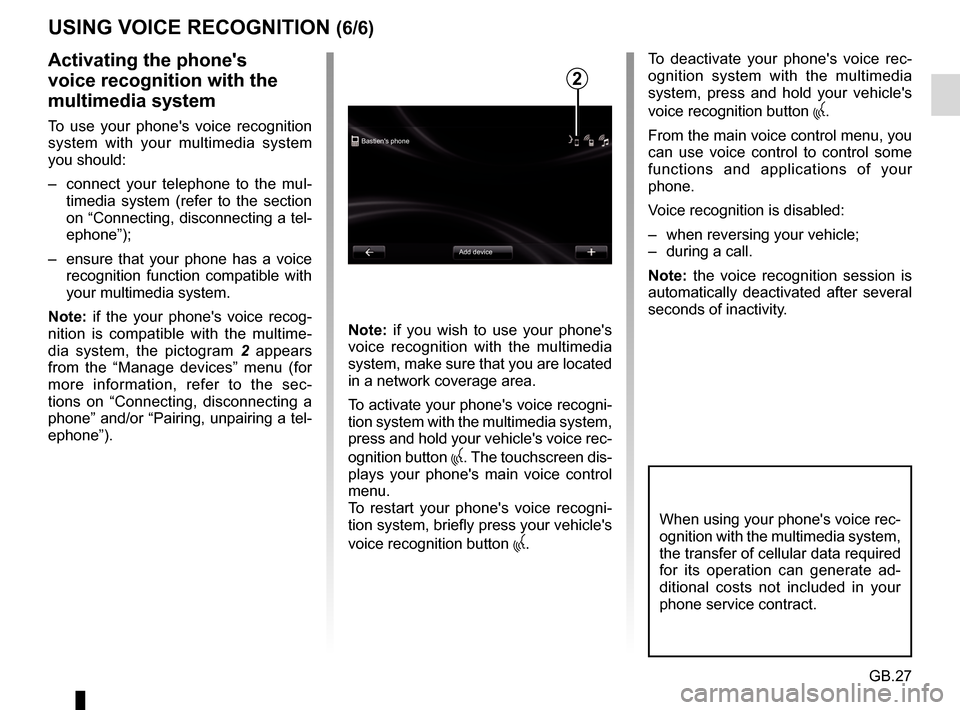
dia system, the pictogram 2 appears
from the “Manage devices” menu (for
more information, refer to the sec-
tions on “Connecting, disconnecting a
phone” and/or “Pairing, unpairing a tel-
ephone”). Note: if you wish to use your phone's
voice recognition with the multimedia
system, make sure that you are located
in a network coverage area.
To activate your phone's voice recogni-
tion system with the multimedia system,
press and hold your vehicle's voice rec-
ognition button
. The touchscreen dis-
plays your phone's main voice control
menu.
To restart your phone's voice recogni-
tion system, briefly press your vehicle's
voice recognition button
.
To deactivate your phone's voice rec-
ognition system with the multimedia
system, press and hold your vehicle's
voice recognition button
.
From the main voice control menu, you
can use voice control to control some
functions and applications of your
phone.
Voice recognition is disabled:
– when reversing your vehicle;
– during a call.
Note: the voice recognition session is
automatically deactivated after several
seconds of inactivity.
2
When using your phone's voice rec-
ognition with the multimedia system,
the transfer of cellular data required
for its operation can generate ad-
ditional costs not included in your
phone service contract.
Page 34 of 96
GB.32
ENTERING A DESTINATION (5/5)
Note: if you do not confirm, this page
will close after ten seconds and guid-
ance will start automatically.
Note: depending on the vehicle charge
level, if you can reach your destination,
guidance is launched – if the charge
level is too low, the system offers to
search for a recharging terminal on the
way.
Note: “ IQ Routes™” is a function which
optimises the journey time using statis-
tical data and calculates routes based
on the average traffic levels on that day
and time. To activate or deactivate this
function, refer to the “Navigation set-
tings” section.
Latest map guarantee
After delivery of your new vehicle you
have about 60 days in which to update
the map free of charge.
Once this time has elapsed, you will
need to pay for updates.
For more information, please see an
Authorised Dealer.54
Go to...ConfirmLIVE
Magny-les-hameaux 0:15 h
8.5 km
The quickest way IQ Routes
1 Janvier, 0:32
Summary of selected route
The summary is displayed after calcu-
lation of the route and the selection of
a destination.
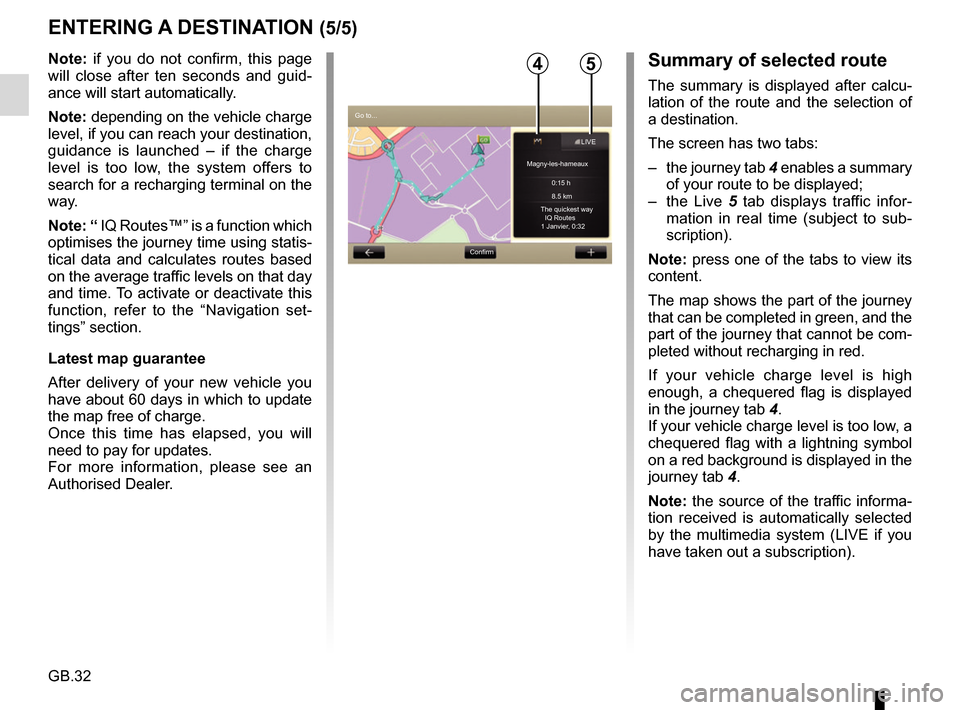
The screen has two tabs:
– the journey tab 4 enables a summary
of your route to be displayed;
– the Live 5 tab displays traffic infor-
mation in real time (subject to sub-
scription).
Note: press one of the tabs to view its
content.
The map shows the part of the journey
that can be completed in green, and the
part of the journey that cannot be com-
pleted without recharging in red.
If your vehicle charge level is high
enough, a chequered flag is displayed
in the journey tab 4.
If your vehicle charge level is too low, a
chequered flag with a lightning symbol
on a red background is displayed in the
journey tab 4.
Note: the source of the traffic informa-
tion received is automatically selected
by the multimedia system (LIVE if you
have taken out a subscription).
Page 54 of 96
GB.52
LISTENING TO THE RADIO (1/5)
Selecting a wavelength
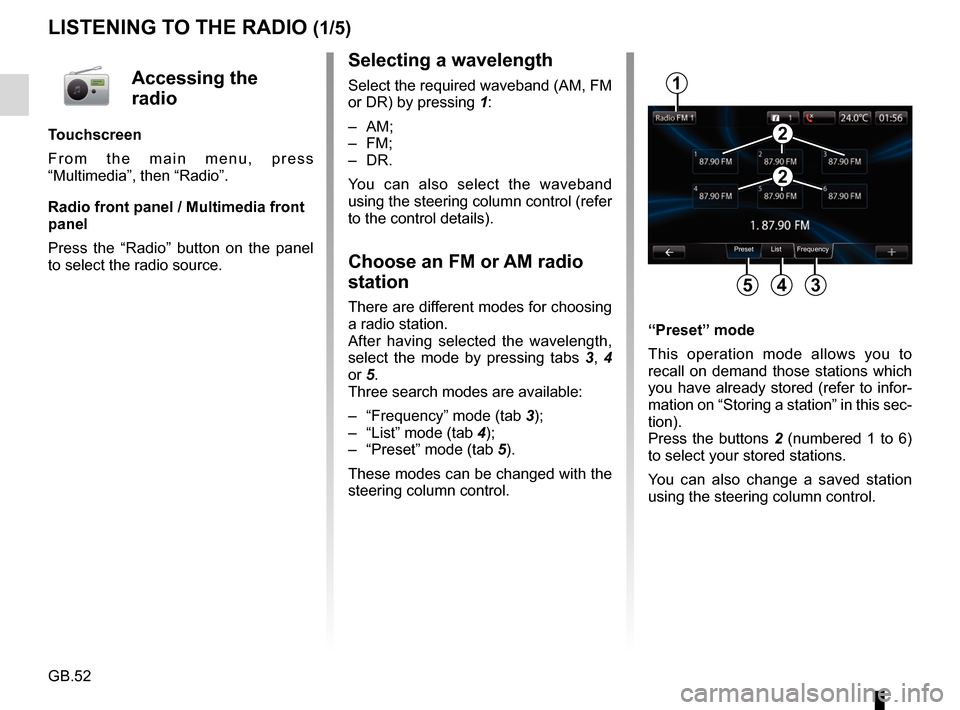
Select the required waveband (AM, FM
or DR) by pressing 1:
– AM;
– FM;
– DR.
You can also select the waveband
using the steering column control (refer
to the control details).
Choose an FM or AM radio
station
There are different modes for choosing
a radio station.
After having selected the wavelength,
select the mode by pressing tabs 3, 4
or 5.
Three search modes are available:
– “Frequency” mode (tab 3);
– “List” mode (tab 4);
– “Preset” mode (tab 5).
These modes can be changed with the
steering column control. “Preset” mode
This operation mode allows you to
recall on demand those stations which
you have already stored (refer to infor-
mation on “Storing a station” in this sec-
tion).
Press the buttons 2 (numbered 1 to 6)
to select your stored stations.
You can also change a saved station
using the steering column control.
Preset List Frequency
1
345
2
2
Accessing the
radio
Touchscreen
From the main menu, press
“Multimedia”, then “Radio”.
Radio front panel / Multimedia front
panel
Press the “Radio” button on the panel
to select the radio source.
Page 59 of 96
GB.57
MEDIA
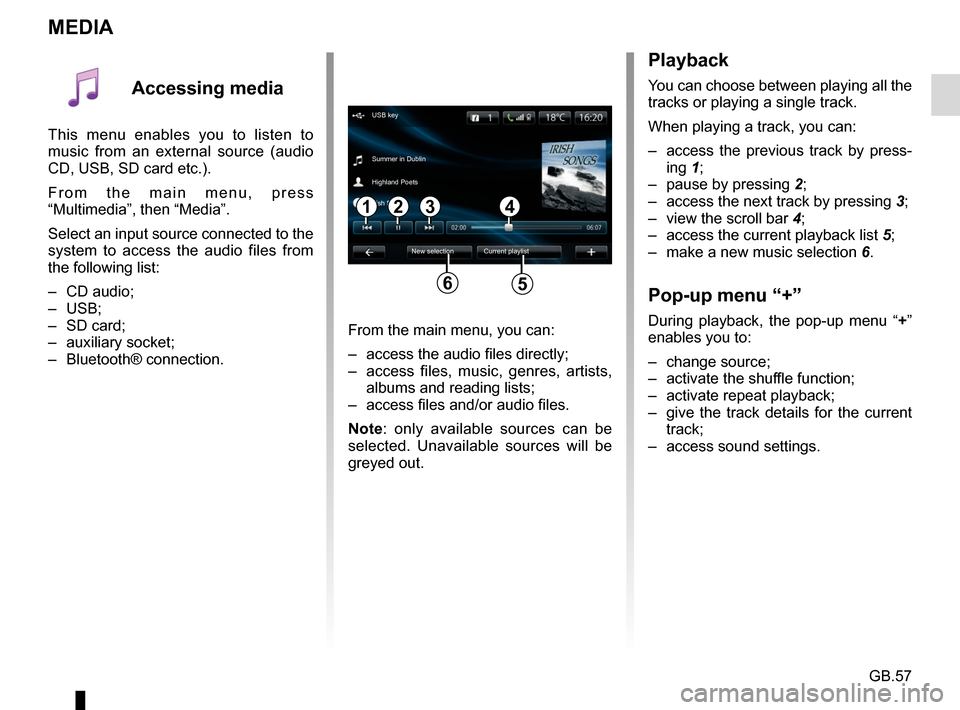
Playback
You can choose between playing all the
tracks or playing a single track.
When playing a track, you can:
– access the previous track by press-ing 1;
– pause by pressing 2;
– access the next track by pressing 3;
– view the scroll bar 4;
– access the current playback list 5;
– make a new music selection 6.
Pop-up menu “+”
During playback, the pop-up menu “ +”
enables you to:
– change source;
– activate the shuffle function;
– activate repeat playback;
– give the track details for the current track;
– access sound settings.From the main menu, you can:
– access the audio files directly;
– access files, music, genres, artists, albums and reading lists;
– access files and/or audio files.
Note: only available sources can be
selected. Unavailable sources will be
greyed out.
34
New selection
USB key
Summer in Dublin
Highland Poets
Current playlist
Irish Songs
21
56
Accessing media
This menu enables you to listen to
music from an external source (audio
CD, USB, SD card etc.).
From the main menu, press
“Multimedia”, then “Media”.
Select an input source connected to the
system to access the audio files from
the following list:
– CD audio;
– USB;
– SD card;
– auxiliary socket;
– Bluetooth® connection.
Page 60 of 96
GB.58
Accessing photos
From the “Multimedia” menu, press
“Pictures” then select the connected
source (Card SD, USB, etc.) to access
the photos. The system offers you two
options:
– “read all photos”;
– “Read a photo”.
Note: Some formats may not be rea-
dable by the system.
Options from folders
From the list of folders/photos, press
“+” to:
– change the source;
– display full screen;
– display the slideshow;
– access zoom in;
– access photo settings.
Note: For more information on compa-
tible photo formats, please consult an
Authorised Dealer.
PHOTO READER
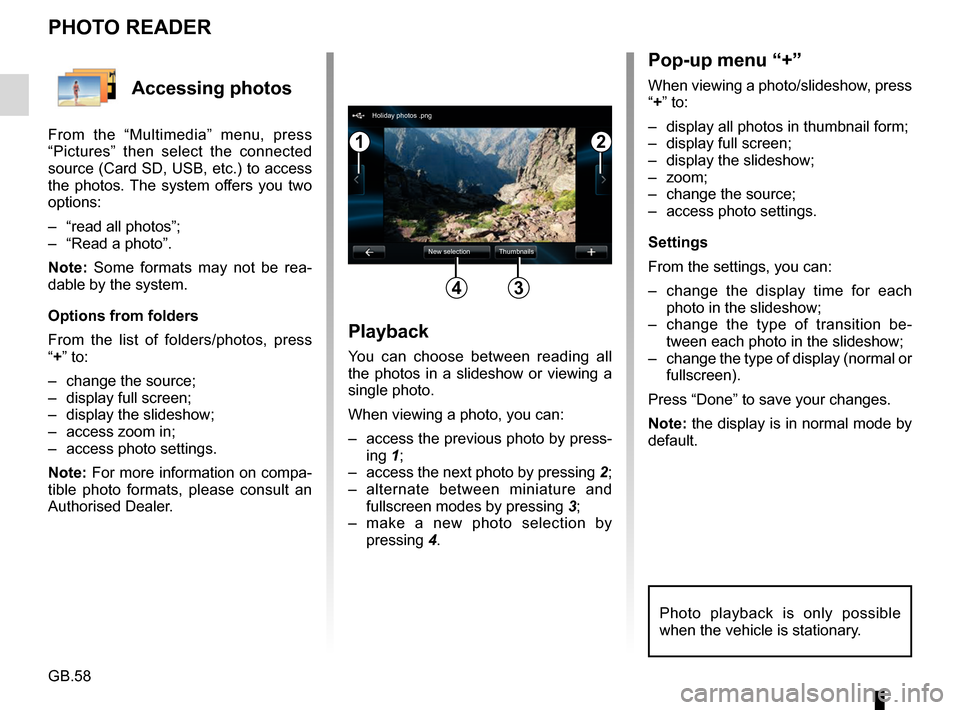
Playback
You can choose between reading all
the photos in a slideshow or viewing a
single photo.
When viewing a photo, you can:
– access the previous photo by press-ing 1;
– access the next photo by pressing 2;
– alternate between miniature and fullscreen modes by pressing 3;
– make a new photo selection by pressing 4.
Pop-up menu “+”
When viewing a photo/slideshow, press
“+” to:
– display all photos in thumbnail form;
– display full screen;
– display the slideshow;
– zoom;
– change the source;
– access photo settings.
Settings
From the settings, you can:
– change the display time for each
photo in the slideshow;
– change the type of transition be- tween each photo in the slideshow;
– change the type of display (normal or fullscreen).
Press “Done” to save your changes.
Note: the display is in normal mode by
default.
12
34
Holiday photos .png
New selection Thumbnails
Photo playback is only possible
when the vehicle is stationary.
Page 61 of 96
GB.59
Accessing videos
From the “Multimedia” menu, press
“Video” then select the source con-
nected (SD card, USB, etc.) to access
videos. The system offers you two op-
tions:
– “play all videos”;
– “play a video”.
Note: Some formats may not be read-
able by the system.
Options from folders
From the list of folders/videos, press “+”
to:
– change the source;
– access the settings.
Note: For more information on compat-
ible video formats, please consult an
Authorised Dealer.
VIDEO PLAYBACK
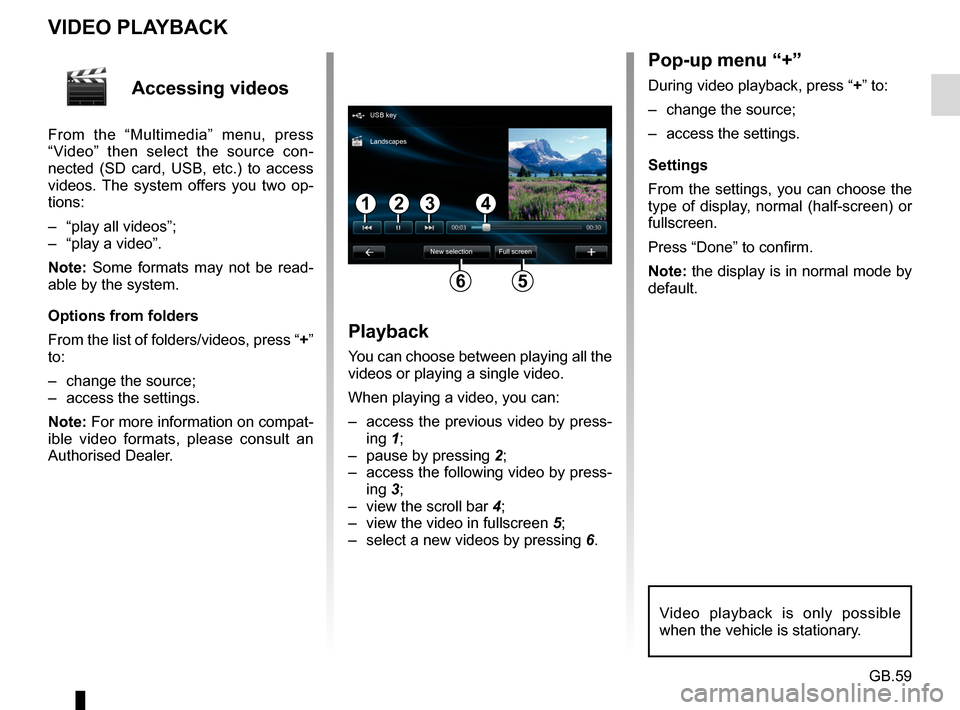
Playback
You can choose between playing all the
videos or playing a single video.
When playing a video, you can:
– access the previous video by press-ing 1;
– pause by pressing 2;
– access the following video by press- ing 3;
– view the scroll bar 4;
– view the video in fullscreen 5;
– select a new videos by pressing 6.
Pop-up menu “+”
During video playback, press “+” to:
– change the source;
– access the settings.
Settings
From the settings, you can choose the
type of display, normal (half-screen) or
fullscreen.
Press “Done” to confirm.
Note: the display is in normal mode by
default.
Video playback is only possible
when the vehicle is stationary.
1324
56
USB key
New selection Full screen
Landscapes
Page 62 of 96
GB.60
MULTIMEDIA SETTINGS (1/2)
Accessing
multimedia
settings
From the “Multimedia” menu, press
“Settings”, then select the element you
wish to modify:
– Sound;
– Radio;
– Media;
– Pictures;
– Video.
Radio
This menu enables you to adjust the
radio settings:
– activate/deactivate searching for alternative frequencies;
– activate/deactivate i-traffic;
– activate/deactivate programme type;
– update list of saved radio sta- tions.
Media
This menu allows you to adjust the mul-
timedia settings:
– activate/deactivate track repeat;
– activate/deactivate shuffle;
– activate/deactivate album image display;
– manage Bluetooth® devices connected.
Sound
This menu allows you to configure dif-
ferent sound settings:
– Spatialisation , for setting sound
distribution in the vehicle;
– “Bass Treble” , to set the treble
and bass levels. Once you have
made the adjustments, press
“Confirm” to confirm your set-
tings.
– Bass Boost Arkamys - to acti-
vate/deactivate bass amplifica-
tion.
– “ AGC Arkamys ”, to achieve an
even sound volume between two
audio tracks.
Page 63 of 96
GB.61
MULTIMEDIA SETTINGS (2/2)
Pictures
This menu allows you to adjust the mul-
timedia settings:
– set the timing of each picture in the slideshow;
– configure the default view for pic- tures.Video
This menu enables you to set the
type of video display:
– “Normal view”;
– “Full screen”.
Page 64 of 96
GB.62
PAIRING AND UNPAIRING A TELEPHONE (1/2)
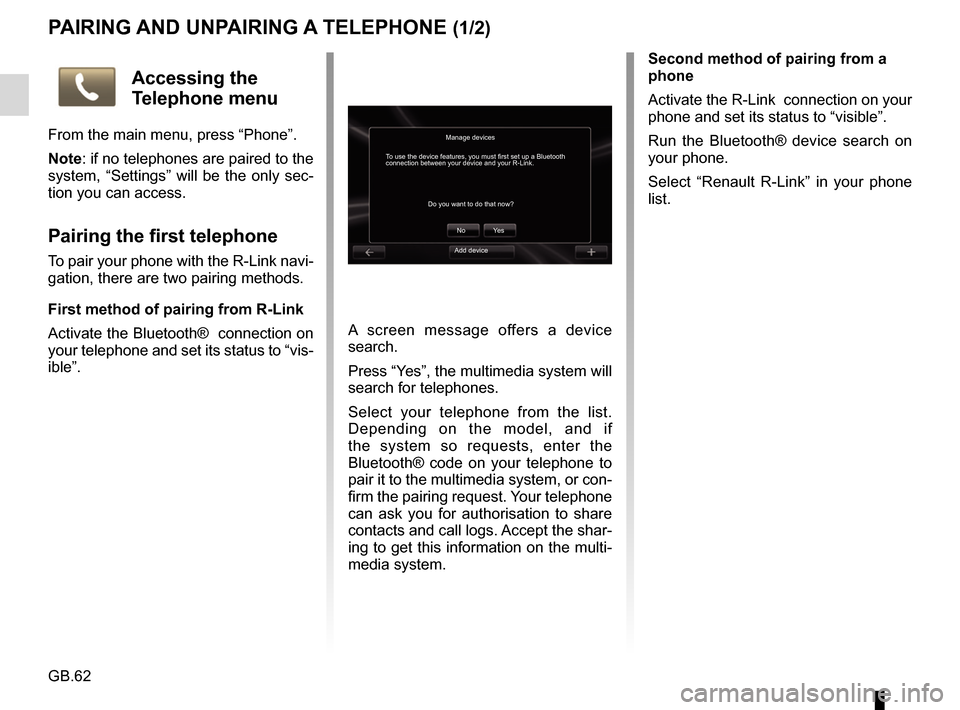
A screen message offers a device
search.
Press “Yes”, the multimedia system will
search for telephones.
Select your telephone from the list.
Depending on the model, and if
the system so requests, enter the
Bluetooth® code on your telephone to
pair it to the multimedia system, or con-
firm the pairing request. Your telephone
can ask you for authorisation to share
contacts and call logs. Accept the shar-
ing to get this information on the multi-
media system.Second method of pairing from a
phone
Activate the R-Link connection on your
phone and set its status to “visible”.
Run the Bluetooth® device search on
your phone.
Select “Renault R-Link” in your phone
list.
Manage devices
No
Do you want to do that now?
To use the device features, you must first set up a Bluetooth
connection between your device and your R-Link.
Ye s
Accessing the
Telephone menu
From the main menu, press “Phone”.
Note: if no telephones are paired to the
system, “Settings” will be the only sec-
tion you can access.
Pairing the first telephone
To pair your phone with the R-Link navi-
gation, there are two pairing methods.
First method of pairing from R-Link
Activate the Bluetooth® connection on
your telephone and set its status to “vis-
ible”.Add device