instrument panel RENAULT CAPTUR 2018 Owner's Manual
[x] Cancel search | Manufacturer: RENAULT, Model Year: 2018, Model line: CAPTUR, Model: RENAULT CAPTUR 2018Pages: 258, PDF Size: 7.15 MB
Page 96 of 258
2.12
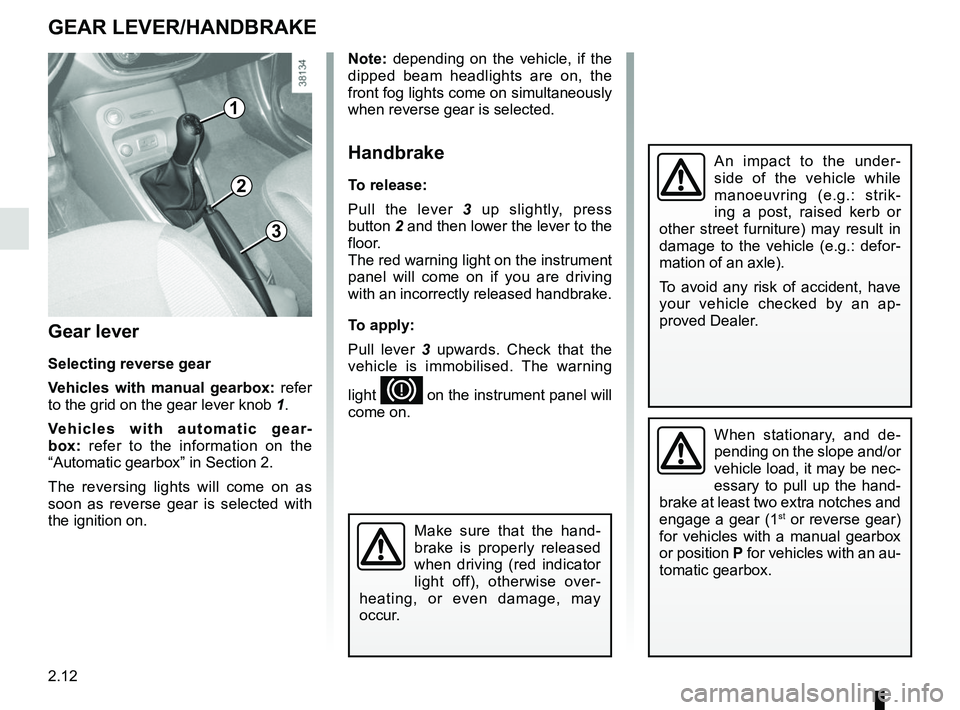
Gear lever
Selecting reverse gear
Vehicles with manual gearbox: refer
to the grid on the gear lever knob 1.
Vehicles with automatic gear-
box: refer to the information on the
“Automatic gearbox” in Section 2.
The reversing lights will come on as
soon as reverse gear is selected with
the ignition on.
1
GEAR LEVER/HANDBRAKE
Note: depending on the vehicle, if the
dipped beam headlights are on, the
front fog lights come on simultaneously
when reverse gear is selected.
Handbrake
To release:
Pull the lever 3 up slightly, press
button 2 and then lower the lever to the
floor.
The red warning light on the instrument
panel will come on if you are driving
with an incorrectly released handbrake.
To apply:
Pull lever 3 upwards. Check that the
vehicle is immobilised. The warning
light
D on the instrument panel will
come on.
3
2
When stationary, and de-
pending on the slope and/or
vehicle load, it may be nec-
essary to pull up the hand-
brake at least two extra notches and
engage a gear (1
st or reverse gear)
for vehicles with a manual gearbox
or position P for vehicles with an au-
tomatic gearbox.
An impact to the under-
side of the vehicle while
manoeuvring (e.g.: strik-
ing a post, raised kerb or
other street furniture) may result in
damage to the vehicle (e.g.: defor-
mation of an axle).
To avoid any risk of accident, have
your vehicle checked by an ap-
proved Dealer.
Make sure that the hand-
brake is properly released
when driving (red indicator
light off), otherwise over-
heating, or even damage, may
occur.
Page 97 of 258

2.13
DRIVING ADVICE, ECO DRIVING (1/5)
Driving style indicator 2
Informs you about the driving style
adopted in real time. You will be notified
by the colour of warning light 2.
– Green: measured, economical driv- ing;
– Yellow: opt for a calmer driving style;
– Orange: driving too fast.
To activate/deactivate the driving style
indicator, please see the multimedia
system instructions.
1
2
Gear change indicator 1
Depending on the vehicle, to obtain op-
timum consumption levels, a warning
light on the instrument panel lets you
know the best time to move up or down
a gear:
Š move up a gear;
‰ move down a gear.
Fuel consumption is accredited in ac-
cordance with a standard regulatory
method. Identical for all manufactu-
rers, this enables vehicles to be com-
pared with one another. Consumption
in real time depends on vehicle usage
conditions, the equipment fitted and the
user’s driving style. To optimise fuel
consumption, please refer to the fol-
lowing advice.
Depending on the vehicle, you will have
various functions which enable you to
lower your fuel consumption:
– the rev counter;
– gear change indicator;
– the driving style indicator;
– the journey record and eco-driving
advice via the multimedia display;
– ECO mode activated by button ECO.
If fitted on the vehicle, the navigation
system provides additional information.
Page 99 of 258

2.15
DRIVING ADVICE, ECO DRIVING (3/5)
ECO mode
ECO mode is a function which opti-
mises fuel consumption. It acts upon
certain power consuming systems in
the vehicle (heating, air conditioning,
power-assisted steering etc.) and on
certain driving actions (acceleration,
gear changing, cruise control, deceler-
ation etc.).
5
Disabling the function
Press switch 4.
The 5
light goes out on the ins-
trument panel to confirm deactivation.
4
Activating the function
Press switch 4.
The 5
warning light comes on on
the instrument panel to confirm activa-
tion.
While driving, it is possible to exit the
ECO mode temporarily in order to im-
prove engine performance.
Do this by pressing the accelerator
pedal down firmly and fully.
ECO mode is reactivated when you
take pressure off the accelerator pedal.
Page 105 of 258

2.21
Resetting the standard level for the
tyre pressures
This should be done:
– after each reinflation or readjustment of the pressure of one of the tyres;
– when the standard tyre pressure needs to be changed to adapt to
usage conditions (empty, carrying a
load, motorway driving, etc.);
– after changing a wheel;
– after using the tyre inflation kit;
2
3
4
– after swapping a wheel (however, this practice is not recommended).
It should always be done after checking
the tyre pressure of all four tyres when
cold.
Tyre pressures must correspond to the
current usage of the vehicle (empty,
carrying a load, motorway driving, etc.).
Resetting procedure
With the ignition on:
– repeatedly press one of the but- tons 3 or 4 to select the “TYRE
PRESSURE : SET TPW” function on
the display 2;
– press and hold (around 3 seconds) button 3 or 4 to start initialisation.
The display of the message “SET
TPW LAUNCHED” for around five
seconds indicates that the reset re-
quest for the tyre pressure reference
value has been taken into account.
Reinitialisation is carried out after a few
minutes’ driving.
TYRE PRESSURE LOSS WARNING (2/3)
Display
The display 2 on the instrument panel
informs you of any tyre pressure faults
(flat tyre, punctured tyre, etc.).
“INFLATE TIRES AND SET TPW”
Warning light
comes on, along
with the message “INFLATE TIRES
AND SET TPW”. They indicate that at
least one tyre is flat or punctured.
In the event of a flat tyre, inflate the re-
levant tyre.
In the event of a puncture, change the
tyre or consult an authorised dealer.
Check and readjust the pressure of the
four tyres when cold, and launch the
reset of the tyre pressure reference
value. Warning light
goes out
after launching the reinitialisation of the
tyre pressure reference value.
The sudden loss of pressure in a
tyre (burst tyre, etc.) cannot be de-
tected by the system.
Page 107 of 258

2.23
DRIVING CORRECTION DEVICES AND AIDS (1/5)
Anti-lock braking system
(ABS)
Under heavy braking, the ABS prevents
the wheels from locking, allowing the
stopping distance to be managed and
keeping control of the vehicle.
Under these circumstances, the vehi-
cle can be steered to avoid an obstacle
whilst braking. In addition, this system
can increase stopping distances, par-
ticularly on roads with low surface grip
(wet ground etc.).
You will feel a pulsation through the
brake pedal each time the system is
activated. The ABS does not in any
way improve the vehicle's physical per-
formance relating to the road surface
and road-holding. It is still essential to
follow the rules of good driving practice
(such as driving at a safe distance from
the vehicle in front etc.).
In an emergency, apply firm and
continuous pressure to the brake
pedal. There is no need to pump
it repeatedly. The ABS will modu-
late the force applied in the braking
system.
Your braking systems
are partially operational.
However, it is dangerous
to brake suddenly and
it is essential to stop immediately,
as soon as traffic conditions allow.
Contact an approved dealer.
Depending on the vehicle, this is com-
posed of:
– anti-lock braking system (ABS);
– electronic stability program (ESC) with understeer control and trac-
tion control;
– driver assistance with a trailer;
– emergency brake assist;
– grip control;
– hill start assistance. Operating faults:
– The
© and x come on
and the messages “Check ABS”,
“CHECK BRAKING SYSTEM” and,
depending on the vehicle, “Check
ESC” appear on the instrument
panel: the ABS, the ESC and emer-
gency brake assist are deactivated.
Braking is always enabled;
– The
x, D, © and
® come on and the message
“BRAKING SYSTEM FAULT” is dis-
played on the instrument panel: this
indicates a failure in the braking
system.
In both cases, please consult an
Authorised Dealer.
Page 108 of 258

2.24
DRIVING CORRECTION DEVICES AND AIDS (2/5)
Electronic stability program
(ESC) with understeer control
and traction control
Electronic stability control ESC
This system helps you to keep control
of the vehicle in critical driving condi-
tions (avoiding an obstacle, loss of grip
on a bend, etc.).
Operating principle
A sensor in the steering wheel detects
the direction selected by the driver.
Other sensors throughout the vehicle
measure the actual direction.
The system compares driver input to
the actual trajectory of the vehicle and
corrects the trajectory if necessary by
controlling the braking of certain wheels
and/or engine power. In the event that
the system is engaged, indicator light
flashes on the instrument panel.Understeer control
This system optimises the action of the
ESC in the case of pronounced under-
steer (loss of front axle road holding).
Traction control
This system helps to limit wheelspin of
the drive wheels and to control the ve-
hicle when pulling away accelerating or
decelerating.
Operating principle
Using the wheel sensors, the system
measures and compares the speed of
the drive wheels at all times and slows
down their over-rotation. If a wheel is
starting to slip, the system brakes au-
tomatically until the drive supplied be-
comes compatible with the level of grip
under the wheel again.
The system also adjusts the engine
speed to the grip available under the
wheels, independently of the pressure
exerted on the accelerator pedal.
These functions are an ad-
ditional aid in the event of
critical driving conditions,
enabling the vehicle behav-
iour to be adapted to suit the driving
conditions.
However, the functions do not take
the place of the driver. They do
not increase the vehicle’s limits
and should not encourage you
to drive more quickly. Therefore,
they can under no circumstances
replace the vigilance or responsibil-
ity of the driver when manoeuvring
the vehicle (the driver must always
be ready for sudden incidents which
may occur when driving).
Operating faults
When the system detects an operat-
ing fault, the
© and warn-
ing lights come on and, depending on
the vehicle, the message “Check ESC”
appears on the instrument panel. In
this case, the ESC and traction control
system are deactivated.
Consult an approved dealer.
Page 109 of 258

2.25
DRIVING CORRECTION DEVICES AND AIDS (3/5)
Emergency brake assist
This system supplements the ABS
and helps reduce vehicle stopping dis-
tances.
Operating principle
The system allows an emergency brak-
ing situation to be detected when the
brake pedal is pressed. In this case, the
braking assistance immediately devel-
ops maximum power and may trigger
ABS regulation.
ABS braking is maintained as long as
the brake pedal is applied. Hazard warning lights switching on
Depending on the vehicle, these may
light up in the event of sudden decel-
eration.
Braking anticipation
Depending on the vehicle, when you
rapidly release the accelerator, the
system anticipates the braking ma-
noeuvre in order to reduce stopping
distances.
When using the cruise control:
– if you use the accelerator, when you
release it, the system may be trig-
gered;
– if you do not use the accelerator, the system will not be triggered.
Operating faults
When the system detects an operating
fault the message “CHECK BRAKING
SYSTEM” appears on the instrument
panel along with the
© warning
light.
Consult an approved dealer.
These functions are an ad-
ditional aid in the event of
critical driving conditions,
enabling the vehicle behav-
iour to be adapted to suit the driving
conditions.
However, the functions do not take
the place of the driver. They do
not increase the vehicle’s limits
and should not encourage you
to drive more quickly. Therefore,
they can under no circumstances
replace the vigilance or responsibil-
ity of the driver when manoeuvring
the vehicle (the driver must always
be ready for sudden incidents which
may occur when driving).
Page 110 of 258

2.26
Grip control
If fitted on the vehicle, grip control
makes it easier to control the vehicle on
low grip surfaces (soft ground, etc.).
Tyres
When they need to be re-
placed, only tyres of the
same make, size, type and
profile should be used.
Tyres fitted to the vehicle should
either be identical to those fitted
originally or conform to those
recommended by your approved
dealer.
“Soft ground” mode
Turn the button 1: the integrated warn-
ing light
comes on, accompa-
nied by a message on the instrument
panel “NON GRIP ROAD MODE ON”.
This position enables optimal usage on
soft ground (mud, sand, dead leaves,
etc.). “Soft ground” mode uses traction
control functions. The system automati-
cally switches to “Road” mode after
around 25 mph (40 km/h), and the inte-
grated warning light
\b on button 1
comes on.
“Expert” mode
Turn the button 1: the integrated warn-
ing light
comes on, accompa-
nied by a message on the instrument
panel “ALL ROADSMODE ON”.
In this position, engine speed is left
under the driver’s control. The system
automatically switches to “Road” mode
after around 25 mph (40 km/h), and
the integrated warning light
\b on
button 1 comes on.
“Road” mode
When the vehicle is started up, the
warning light
\b on button 1 comes
on, along with the instrument panel
message “STANDARD ROAD MODE
ON”.
This position enables optimal usage
under normal driving conditions (dry-
ness, humidity, light snow, etc.).
“Road” mode uses traction control func-
tions.
1
DRIVING CORRECTION DEVICES AND AIDS (4/5)
Page 112 of 258

2.28
Special featureMake sure that the sensors are not ob-
scured (by dirt, mud, snow, etc.).
If a sensor is obscured, the message
“Blind spot clean sensor” will appear on
the instrument panel. If this happens,
please clean the sensors.
Activation/deactivation
On the multifunction screen 2, select
the menu “Vehicle”, “Aides à la con-
duite”, “Blind spot alert”, then choose
“ON” or “OFF”.
For vehicles not fitted with a multifunc-
tion screen, press switch 3.
BLIND SPOT WARNING (1/3)
This system alerts the driver to other
vehicles in the detection zone A.
The system is activated when the vehi-
cle’s speed is between approximately
30 km/h (19 mph) and 140 km/h (87
mph).
This function uses sensors 1 installed
in the front and rear bumper of both
sides.
1
A
A
2
When the engine is started, the system
remembers its position when the igni-
tion was last switched off.3
Page 114 of 258

2.30
Operating faults
If the system detects a fault, the mes-
sage “Check blind spot alert” is dis-
played on the instrument panel. Call an
approved Dealer.
Note: when the engine is started, the
indicator light 4, display B , flashes
three times. It is normal.
– The system’s detection
range operates according
to a standard lane width. If
you are driving in wide traf-
fic lanes, the system might not
be able to detect a vehicle in the
blind spot.
– The system might be disrupted momentarily if it is exposed to
strong electromagnetic waves
(as beneath high-tension power
lines) or to very poor weather
conditions (heavy rain, snow,
etc.). Remain aware of driving
conditions.
There is a risk of accidents.
BLIND SPOT WARNING (3/3)
Because sensors have
been installed in the bum-
pers, any work (repairs, re-
placements, touching up of
paintwork) must be carried out by a
qualified professional.
4
B
C
D
Conditions for non-function
– If the object is not moving;
– if traffic is heavy;
– the road is winding;
– if front and rear sensors both detect objects at the same time (e.g. when
passing an articulated lorry).
– ...
This function is an addi-
tional aid which indicates
other vehicles in the blind
spot area.
It can never in any case be a sub-
stitute for care nor for the driver’s
responsibility while in charge of his
vehicle.
The driver should always be ready
for sudden incidents while driv-
ing: always ensure that there are
no small, narrow moving obstacles
(such as a child, animal, pushchair,
bicycle, stone, post, etc.) in the blind
spot when manoeuvring.