instrument panel RENAULT CAPTUR 2018 Owner's Guide
[x] Cancel search | Manufacturer: RENAULT, Model Year: 2018, Model line: CAPTUR, Model: RENAULT CAPTUR 2018Pages: 258, PDF Size: 7.15 MB
Page 115 of 258

2.31
Switching on
Press switch 1 on the side showing .
Indicator light 6 comes on, lit orange,
and the message “SPEED LIMITER”
appears on the instrument panel, ac-
companied by dashes to indicate that
the speed limiter function is activated
and waiting to store a limit speed.
To store the current speed, press
switch 2 (+): the limited speed will re-
place the dashes.
The minimum stored speed is 20 mph
(30 km/h).
The speed limiter function helps you
stay within the driving speed limit that
you choose, known as the
limit speed.
Controls1 Main “On/Off” switch.
2 Limit speed activation, storage and
increase switch (+).
3 Decreasing the limit speed (-).
4 Activation and recall of memorised limit speed (R).
5 Speed limiter function standby (with limited speed memory) (O).
SPEED LIMITER (1/3)
6
2354
1
1
Page 116 of 258

2.32
Exceeding the limit speed
It is possible to exceed the limit speed
at any time. To do this: press the accel-
erator pedal firmly and fully (beyond
the resistance point).
While the speed is exceeded, the
speed limit flashes on the instrument
panel and, depending on the vehicle, a
beep sounds.
Then, release the accelerator: the
speed limiter function will return as
soon as you reach a speed lower than
the stored speed.
Limited speed cannot be maintained
If driving up or down a steep gradient,
the system is unable to maintain the
limited speed: the memorised speed
flashes on the instrument panel and
a beep sounds at regular intervals to
inform you.
Varying the limit speed
The limit speed may be changed by re-
peatedly pressing:
– switch 2 (+) to increase speed;
– switch 3 (-) to reduce speed.
Driving
When a limited speed has been stored
and this speed is not reached, driving is
similar to driving a vehicle without the
speed limiter function.
Once you have reached the stored
speed, no effort on the accelera-
tor pedal will allow you to exceed
the programmed speed except in an
emergency (refer to information on
“Exceeding the limit speed”).
SPEED LIMITER (2/3)
The speed limiter function is
in no way linked to the brak-
ing system.
23
Page 117 of 258

2.33
SPEED LIMITER (3/3)
Recalling the limit speed
If a speed has been saved, it can be re-
called by pressing switch 4 ((R)).
Putting the function on
standby
The speed limiter function is suspended
when you press the switch 5 (O). In this
case, the limit speed remains stored
and, depending on the vehicle:
– the message “Memorised” and
stored speed are displayed on the
instrument panel.
– the stored speed is displayed be- tween
ment panel.
Switching off the function
The speed limiter function is deac-
tivated if you press switch 1 : in this
case a speed is no longer stored. The
orange instrument panel warning light
goes out, confirming that the func-
tion is stopped.
When the speed limiter is put on
standby, pressing switch 2 (+) re-
activates the function without taking
into account the stored speed: it is
the speed at which the vehicle is
moving that is taken into account.
12354
1
Page 119 of 258
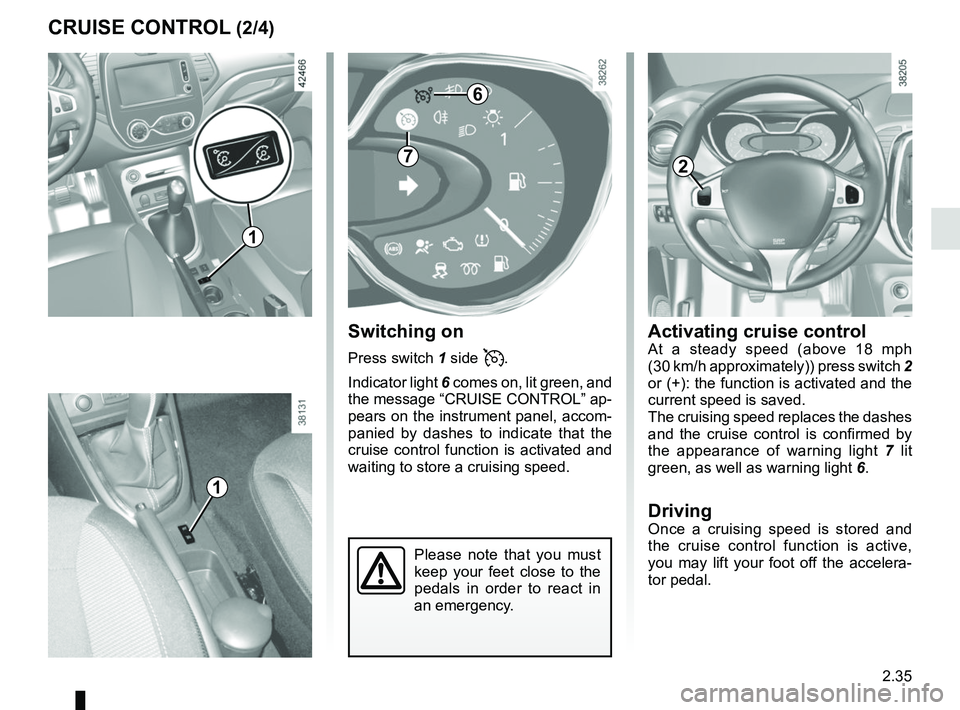
2.35
Activating cruise controlAt a steady speed (above 18 mph
(30 km/h approximately)) press switch 2
or (+): the function is activated and the
current speed is saved.
The cruising speed replaces the dashes
and the cruise control is confirmed by
the appearance of warning light 7 lit
green, as well as warning light 6.
DrivingOnce a cruising speed is stored and
the cruise control function is active,
you may lift your foot off the accelera-
tor pedal.
Please note that you must
keep your feet close to the
pedals in order to react in
an emergency.
Switching on
Press switch 1 side .
Indicator light 6 comes on, lit green, and
the message “CRUISE CONTROL” ap-
pears on the instrument panel, accom-
panied by dashes to indicate that the
cruise control function is activated and
waiting to store a cruising speed.
CRUISE CONTROL (2/4)
6
72
1
1
Page 120 of 258

2.36
CRUISE CONTROL (3/4)
Exceeding the cruising speed
The cruising speed may be exceeded
at any time by depressing the accelera-
tor pedal. While it is being exceeded,
the cruising speed flashes on the in-
strument panel.
Then, release the accelerator: after a
few seconds, the vehicle will automati-
cally return to its set cruising speed.
Cruising speed cannot be
maintained
When driving down a steep gradient,
the system is unable to maintain the
cruising speed: the stored speed will
flash on the instrument panel informa-
tion display to inform you of this situ-
ation.
Adjusting the cruising speed
The cruising speed may be changed by
pressing the following repeatedly:
– switch 2 (+) to increase the speed,
– switch 3 (-) to decrease the speed.
The cruise control function
is in no way linked to the
braking system.
23
Putting the function on
standby
The function is set to standby if you:
– use the switch 5 (O);
– the brake pedal;
– depress the clutch pedal or the shift
into neutral if the vehicle has an au-
tomatic gearbox.
In all three cases, the cruising speed
remains stored and, depending on the
vehicle:
– the message “Memorised” and stored speed are displayed on the
instrument panel.
– the stored speed is displayed be- tween
ment panel.
Standby is confirmed when indicator
light
goes out.
4
5
Page 125 of 258

2.41
4
PARKING DISTANCE CONTROL (4/4)
Deactivating the system
Press switch 5 to deactivate the system.
The indicator light built into the switch
lights up to remind you that the system
is deactivated.
Pressing the switch again will react-
ivate the system and switch off the in-
dicator light.
Depending on the vehicle, you can de-
activate the parking distance control
from the touch-screen. Please see the
equipment instructions for further infor-
mation.
5
An impact to the under-
side of the vehicle while
manoeuvring (e.g.: strik-
ing a post, raised kerb or
other street furniture) may result in
damage to the vehicle (e.g.: defor-
mation of an axle).
To avoid any risk of accident, have
your vehicle checked by an ap-
proved Dealer.
Operating faults
Depending on the vehicle, when the
system detects an operating fault,
the message “CHECK PARKING
SENSOR” appears on the instrument
panel, accompanied by the warning
light
© and a beep lasting approxi-
mately 5 seconds. Consult an approved
dealer
Adjusting the parking
distance control volume
Depending on the vehicle, certain set-
tings can be adjusted from the touch-
screen 4. Please see the equipment in-
structions for further information.
Page 129 of 258

2.45
ASSISTED PARKING (2/4)
Choice of manoeuvre
The system can perform four types of
manoeuvres:
– parallel parking;
– perpendicular parking;
– angle parking;
– moving out of a parallel parking space.
From the multifunction screen, select
the manoeuvre to be performed.
Note: when starting the vehicle, or after
having successfully completed parallel
parking using the system, the default
manoeuvre proposed by the system is
assistance in exiting a parallel parking
space. In other cases, the default ma-
noeuvre can be set from the multifunc-
tion screen.
Operation
Parking
As long as the vehicle speed is less
than 20 mph (30 km/h), the system
looks for available parking spaces on
both sides of the vehicle.
Once a space has been found, it is dis-
played on the multifunction screen, in-
dicated by a small letter “P”. So that
the vehicle can detect a space, drive
slowly, with the indicators activated on
the same side as the space, until the
message “Stop” is displayed, along
with a beep.
The space is then indicated on the mul-
tifunction screen by a capital “P”.
– Stop the vehicle;
– select reverse gear.
The
indicator light lights up
on the instrument panel and a beep
sounds;
– release the steering wheel;
– follow the system instructions pro- vided on the multifunction screen. Your speed should not exceed around
4 mph (7 km/h).
Once the warning light
on the
instrument panel goes off and a beep
sounds, the manoeuvre has been com-
pleted.
Page 130 of 258

2.46
ASSISTED PARKING (3/4)
Your speed should not exceed around
4 mph (7 km/h).
Once in position to exit the space, the
system will notify you of the end of the
manoeuvre.
Once the warning light
on the
instrument panel goes off and a beep
sounds, the manoeuvre has been com-
pleted.
Suspending the manoeuvreThe manoeuvre is suspended in the fol-
lowing circumstances:
– you take control of the wheel;
– a door or the boot is opened;
– the vehicle is at a standstill for too long;
– an obstacle in the direction of move- ment prevents the manoeuvre from
being completed;
– the engine will stop.
Once the warning light
on the
instrument panel goes off and a beep
sounds, the manoeuvre has been sus-
pended. To resume the manoeuvre,
press and hold the system activation
switch. In this case, the reason for suspending
the manoeuvre will be displayed on the
multifunction screen.
Make sure:
– you have released the steering wheel
and;
– that all doors and the boot are closed, and;
– that no obstacles are in the way of the direction of movement, and;
– that the engine is started.
Cancelling the manoeuvre
The manoeuvre can be stopped in the
following cases:
– by pressing the system activation switch;
– the vehicle speed has exceeded 4 mph (7 km/h);
– you have performed more than ten forwards/backwards movements in
one manoeuvre;
– the parking distance control sensors are dirty or blocked;
– the vehicle wheels have skidded.
Once the warning light
on the
instrument panel goes off and a beep
sounds, the manoeuvre has been com-
pleted.
Exiting a parallel parking space
– Select “Exit parallel parking space”
mode;
– activate the direction indicator on the side you wish to go out of;
– press and hold switch 1 (around
2 seconds).
The
indicator light lights up
on the instrument panel and a beep
sounds;
– release the steering wheel;
– go forwards and backwards using the parking distance control system
alerts.
1
Page 133 of 258

2.49
AUTOMATIC TRANSMISSION (2/3)
Special cases
In certain driving conditions (result-
ing in, for example, engine protection,
operation of the Electronic Stability
Control programme: ESC etc.) the au-
tomated system may change the gear
automatically.
Likewise, to prevent incorrect manoeu-
vres, a gear change may be refused by
the automatic system: in this case the
gear display flashes for a few seconds
as a warning.
Special circumstances
– If the bends and road surface do
not allow you to stay in automatic
mode (e.g. in the mountains), we
recommend that you change to
manual mode. This will prevent the
automatic gearbox from changing
gear repeatedly when climbing, and
permit engine braking on long de-
scents.
– In cold weather , start the engine
and wait a few seconds before
moving the selector lever from posi-
tion P or N and engaging it in D or R
to prevent the engine stalling.
Driving in manual mode
With the selection lever 1 in position D,
move the lever to the left.
Shifting the lever repeatedly allows you
to change gears manually:
– to move down through the gears, push the lever forwards;
– to move up through the gears, push the lever backwards.
The gear selected is displayed on the
instrument panel.
1
When facing uphill, to remain
stopped, do not keep your foot on
the accelerator.
Risk of overheating the automatic
gearbox.
Page 134 of 258

2.50
AUTOMATIC TRANSMISSION (3/3)
Parking the vehicle
When the vehicle is stopped, move the
lever to position P while keeping your
foot on the brake pedal: the gearbox is
in neutral and the drive wheels are me-
chanically locked by the driveshaft.
Apply the handbrake.
When setting off, if the lever is locked
in position P even though you are
pressing the brake pedal, the lever can
be released manually. For this, unclip
the base of the lever then insert a tool
(with a hard rod to it) into the slot 5 to
unlock the lever.
Contact an authorised dealer as soon
as possible.
Operating faults
– when driving , if the message
“CHECK AUTO GEARBOX” appears
on the instrument panel, it indicates
a failure.
Contact your approved Dealer as
soon as possible;
– when driving, if the message
“AUTO GEARBOX OVERHEATING”
appears on the instrument panel,
stop as soon as possible to let the
gearbox cool down and wait for the
message to disappear;
– If a vehicle with an automatic
gearbox breaks down, refer to the
information on “Towing” in Section 5.
5
For safety reasons, do not
switch off the ignition before
the vehicle has come to a
complete standstill.
An impact to the under-
side of the vehicle while
manoeuvring (e.g.: strik-
ing a post, raised kerb or
other street furniture) may result in
damage to the vehicle (e.g.: defor-
mation of an axle).
To avoid any risk of accident, have
your vehicle checked by an ap-
proved Dealer.