air RENAULT CAPTUR 2018 Owner's Guide
[x] Cancel search | Manufacturer: RENAULT, Model Year: 2018, Model line: CAPTUR, Model: RENAULT CAPTUR 2018Pages: 258, PDF Size: 7.15 MB
Page 126 of 258

2.42
REVERSING CAMERA (1/2)
2
1
Note:
– ensure that the reversing camera is not obscured (dirt, mud, snow, etc.);
– depending on the vehicle, certain settings can be adjusted from the
touch screen 2 . Refer to the hand-
book for the equipment.OperationWhen going into reverse gear (and up
to around 5 seconds after shifting into
another gear), the camera 1 placed
next to the lights transmits a view of
the rear surroundings of the vehicle on
the touch screen 2, accompanied by a
mobile and fixed gauge.
This system is initially used with the aid
of several gauges (mobile for trajectory
and fixed for distance). When the red
zone is reached, use the bumper image
to stop accurately.
This function is an additional
aid. It cannot, therefore,
under any circumstances
replace the vigilance or the
responsibility of the driver.
The driver should always be ready
for sudden incidents while driv-
ing: always ensure that there are
no small, narrow moving obstacles
(such as a child, animal, pushchair,
bicycle, stone, post, etc.) in the blind
spot when manoeuvring.
Page 131 of 258

This function is an additional driving aid. This function is not under any circumstances intended to replace the due\
care
and attention of the driver, who should at all")
2.47
ASSISTED PARKING (4/4)
This function is an additional driving aid. This function is not under any circumstances intended to replace the due\
care
and attention of the driver, who should at all times be in control of the vehicle.
Make sure that the manoeuvre complies with the applicable traffic regulations at your location.
– The driver should always be ready for sudden incidents while driving: al\
ways ensure that there are no small, narrow moving obstacles (such as a child, animal, pushchair, bicycle, stone, post etc.) in the blind spot when manoeuvring.
– The system cannot detect objects located in the sensor blind spots.
– When manoeuvring, the steering wheel may turn quickly: do not put your h\
ands inside, and make sure that nothing is caught inside.
– Always visually check that the parking space proposed by the system is s\
till available and contains no obstacles.
– The system should only be used when towing a trailer or when there is a \
towing or load carrying system on the vehicle.
Page 135 of 258

3.1
Section 3: Your comfort
Air Vents . . . . . . . . . . . . . . . . . . . . . . . . . . . . . . . . . . . .\
. . . . . . . . . . . . . . . . . . . . . . . . . . . . . . . . . . 3.2
Manual air conditioning/heating system . . . . . . . . . . . . . . . . . . . . . . . . . . . . . . . . . . . .\
. . . . . . . . . . 3.4
Automatic climate control . . . . . . . . . . . . . . . . . . . . . . . . . . . . . . . . . . . .\
. . . . . . . . . . . . . . . . . . . . . 3.7
Air conditioning: information and advice on use . . . . . . . . . . . . . . . . . . . . . . . . . . . . . . . . . . . .\
. . . . 3.11
Electric windows . . . . . . . . . . . . . . . . . . . . . . . . . . . . . . . . . . . .\
. . . . . . . . . . . . . . . . . . . . . . . . . . . . 3.13
Roof sun blind . . . . . . . . . . . . . . . . . . . . . . . . . . . . . . . . . . . .\
. . . . . . . . . . . . . . . . . . . . . . . . . . . . . . 3.15
Interior lighting . . . . . . . . . . . . . . . . . . . . . . . . . . . . . . . . . . . . \
. . . . . . . . . . . . . . . . . . . . . . . . . . . . . . 3.16
Passenger compartment storage/fittings . . . . . . . . . . . . . . . . . . . . . . . . . . . . . . . . . . . . \
. . . . . . . . . . 3.18
Ashtray/cigarette lighter . . . . . . . . . . . . . . . . . . . . . . . . . . . . . . . . . . . . \
. . . . . . . . . . . . . . . . . . . . . . . 3.23
Sliding rear bench seat . . . . . . . . . . . . . . . . . . . . . . . . . . . . . . . . . . . .\
. . . . . . . . . . . . . . . . . . . . . . . 3.25
Luggage compartment. . . . . . . . . . . . . . . . . . . . . . . . . . . . . . . . . . . . \
. . . . . . . . . . . . . . . . . . . . . . . . 3.27
Rear parcel shelf . . . . . . . . . . . . . . . . . . . . . . . . . . . . . . . . . . . . \
. . . . . . . . . . . . . . . . . . . . . . . . . . . . 3.28
Luggage compartment storage . . . . . . . . . . . . . . . . . . . . . . . . . . . . . . . . . . . .\
. . . . . . . . . . . . . . . . . 3.29
Transporting objects in the luggage compartment . . . . . . . . . . . . . . . . . . . . . . . . . . . . . . . . . . . .\
. . 3.31
Transporting objects: . . . . . . . . . . . . . . . . . . . . . . . . . . . . . . . . . . . . \
. . . . . . . . . . . . . . . . . . . . . . . . . 3.32 equipment . . . . . . . . . . . . . . . . . . . . . . . . . . . . . . . . . . . .\
. . . . . . . . . . . . . . . . . . . . . . . . . . . 3.32
Roof bars . . . . . . . . . . . . . . . . . . . . . . . . . . . . . . . . . . . . \
. . . . . . . . . . . . . . . . . . . . . . . . . . . . . . . . . . 3.33
Spoiler . . . . . . . . . . . . . . . . . . . . . . . . . . . . . . . . . . . . \
. . . . . . . . . . . . . . . . . . . . . . . . . . . . . . . . . . . . 3.33
Multimedia equipment . . . . . . . . . . . . . . . . . . . . . . . . . . . . . . . . . . . . \
. . . . . . . . . . . . . . . . . . . . . . . . 3.34
Page 136 of 258

3.2
AIR VENTS, air outlets (1/2)
3
8
5612
7
1 Left-hand side window demister
outlet.
2 Left-hand air vent.
3 Windscreen demisting vents.
4 Centre air vents.
5 Right-hand air vent.
6 Right-hand side window demister
outlet.
7 Passenger footwell heater out-
lets.
8 Control panel
7
4
Page 137 of 258

3.3
Side air vents
Air flow
To open air vent 11, press on the air
vent (point 12) until it is open as far as
required.
Direction
To direct the air flow, swivel side air
vent 11 .
Centre air vents.
Air flow
Move the control knob 10 (beyond the
resistance point).
To the right: maximum air flow.
To the left: closed.
Direction
Move cursors 9 to the required position.
AIR VENTS, air outlets (2/2)
1112
Do not add anything to the
vehicle’s ventilation circuit
(for example, to remove
bad odours).
There is a risk of damage or of
fire.
9
10
Page 138 of 258

3.4
Switching air conditioning on
or off
(depending on vehicle)
The air conditioning is switched on (in-
dicator light on) or off (indicator light off)
using button 3.
Activation is not possible if control 2 is
set to OFF.
The controls
1 Adjusting the air temperature.
2 Adjusting the ventilation speed.
3 Air conditioning.
4 Distribution of air in the passenger compartment.
5 De-icing/demisting of the rear screen and, depending on the vehicle, the
door mirrors.
6 Air recirculation.
MANUAL AIR CONDITIONING (1/3)
1234
65
The air conditioning system is used
for:
– lowering the temperature inside the
passenger compartment;
– eliminating condensation more quickly.
Page 139 of 258

3.5
Air recirculation is for:
– isolating the vehicle from the exter-nal atmosphere (driving in polluted
areas, etc.);
– lowering the passenger compart- ment temperature as quickly as pos-
sible.Switching the air
recirculation on
Press button 6: the integrated indicator
light comes on. In these conditions, air
is taken from the passenger compart-
ment and is recycled, with no air being
taken from outside the vehicle.
MANUAL AIR CONDITIONING (2/3)
Prolonged use of air recirculation can lead to condensation forming on t\
he side
windows and windscreen, and discomfort due to the use of non-renewed air\
in
the passenger compartment. We therefore advise you to return to normal mode
(external air) as soon as the air recirculation function is no longer \
required, by
pressing the button 6 again.
1234
65
Distribution of air in the
passenger compartment
There are five air distribution options.
Turn control 4 to choose the distribution
option.
WThe air flow is directed to the
windscreen and the front side
window demisting vents.
iThe air flow is distributed be-
tween all the air vents, the
front side window demisting vents, the
windscreen demisting vents and the
footwells.
óThe air flow is directed mainly
towards the footwells.
GThe air flow is directed towards
the dashboard air vents, the
front footwells and, depending on the
vehicle, the second row footwells.
JAll the air flow is directed to the
dashboard vents.
Page 140 of 258

3.6
Adjusting the ventilation
speed
Move control 2. The further the control is positioned to the right, the greater the
amount of air blown into the passenger
compartment. If you want to shut off the
flow of air, set control 2 to OFF.
4
5
MANUAL AIR CONDITIONING (3/3)
The system is deactivated: the ventila-
tion speed is zero (vehicle stationary).
You can, however, still feel a slight flow
of air when the vehicle is moving.
Rapid demisting
Turn controls 1, 2 and 4 to positions
W:
– air from the outside;
– maximum temperature;
– demisting.
1234
65
Positions W and i prevent air recirculation mode to avoid any risk of
condensation forming on the windscreen and triggers the air conditioning\
func-
tion. The integrated light in button 3 does not come on.
Adjusting the air temperature
Turn control 1 to obtain the desired
temperature. The further towards the
red the slide is, the higher the tempera-
ture will be.
When the air conditioning system is
used for long periods, it may begin to
feel cold. To increase the temperature,
turn control 1 to the right.
Rear screen de-icing/
demisting
With the engine running, press
button 5. The operating tell-tale comes
on.
This function permits rapid demisting/
de-icing of the rear screen and de-icing
of the door mirrors (on equipped vehi-
cles).
To exit this function, press button 5
again.
Demisting automatically stops.
Page 141 of 258

3.7
Varying the ventilation speed
In automatic mode, the system uses
the most suitable amount of air to reach
and maintain the desired comfort level.
You can still adjust the ventilation
speed by turning control 6 to increase
or reduce the ventilation speed.
Adjusting the air temperature
Turn control 2 to obtain the desired
temperature.
Turning the control to the right in-
creases the temperature.
Special note: the maximum and mini-
mum settings allow the system to pro-
duce a minimum or maximum tempera-
ture (18°C and 26°C).
The controls
1 Automatic mode.
2 Air temperature adjuster.
3 “Clear View” function.
4 Passenger compartment air distribu-
tion adjustment.
5 Air conditioning control.
6 Adjusting the ventilation fan speed.
7 Air recirculation.
8 De-icing/demisting of the rear screen
and, depending on the vehicle, the
door mirrors.
AUTOMATIC CLIMATE CONTROL (1/4)
235
786
Automatic mode
The automatic climate control system
guarantees comfort in the passen-
ger compartment and good visibility
(except in the event of extreme condi-
tions), while optimising consumption.
The system controls the ventilation
speed, air distribution, air recirculation,
and starting and stopping the air condi-
tioning and air temperature.
AUTO: allows the selected comfort
level to be best attained, depending on
the exterior conditions. Press button 1.
14
Page 142 of 258
3.8
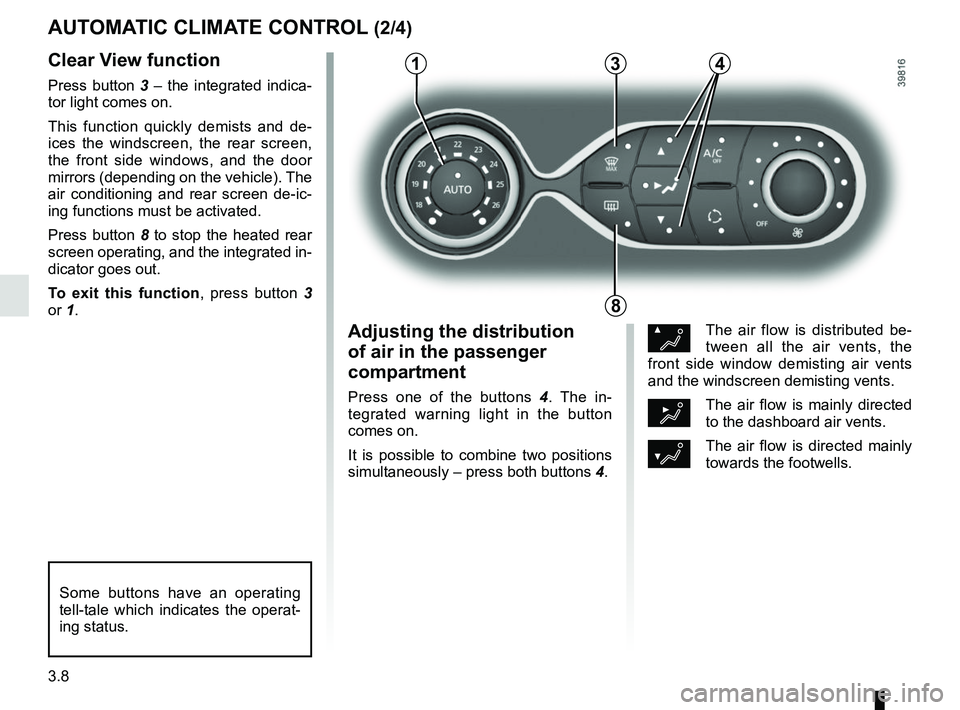
Clear View function
Press button 3 – the integrated indica-
tor light comes on.
This function quickly demists and de-
ices the windscreen, the rear screen,
the front side windows, and the door
mirrors (depending on the vehicle). The
air conditioning and rear screen de-ic-
ing functions must be activated.
Press button 8 to stop the heated rear
screen operating, and the integrated in-
dicator goes out.
To exit this function, press button 3
or 1.
AUTOMATIC CLIMATE CONTROL (2/4)
ØThe air flow is distributed be-
tween all the air vents, the
front side window demisting air vents
and the windscreen demisting vents.
½The air flow is mainly directed
to the dashboard air vents.
¿The air flow is directed mainly
towards the footwells.
Adjusting the distribution
of air in the passenger
compartment
Press one of the buttons 4 . The in-
tegrated warning light in the button
comes on.
It is possible to combine two positions
simultaneously – press both buttons 4.
8
3
Some buttons have an operating
tell-tale which indicates the operat-
ing status.
14