sensor RENAULT CAPTUR 2018 Owners Manual
[x] Cancel search | Manufacturer: RENAULT, Model Year: 2018, Model line: CAPTUR, Model: RENAULT CAPTUR 2018Pages: 258, PDF Size: 7.15 MB
Page 67 of 258

1.61
TRIP COMPUTER AND WARNING SYSTEM: operating fault messages
These appear with the © warning light and mean that you should drive very carefully to an author\
ised dealer as
soon as possible. If you fail to follow this recommendation, you risk da\
maging your vehicle.
They disappear when the display selection key is pressed or after severa\
l seconds and are stored in the computer log. The
© warning light stays on. Examples of operating fault messages are given \
in the following pages.
Examples of messages Interpreting the display selected
« CLEAN DIESEL FILTER » Indicates the presence of water in the diesel filter; contact an approve\
d Dealer
as soon as possible.
« CHECK VEHICLE » Indicates a fault in one of the pedal sensors, battery management system\
or oil
level sensor.
« CHECK AIRBAG » Indicates a fault in the restraint system in addition to the seat belts.\
In the event
of an accident, it is possible that they may not be triggered.
« CHECK ANTI-POLLUTION SYSTEM » Indicates a fault in the vehicle’s particle filter system.
Page 103 of 258

2.19
ENVIRONMENT
Emissions
Your vehicle has been designed to
emit fewer greenhouse gases (CO2)
while in use, and therefore to consume
less fuel (eg. 140 g/km, equivalent to
5.3 l/100 km for a diesel vehicle).
Our vehicles are also equipped with a
particle filter system including a cata-
lytic converter, an oxygen sensor and
an active carbon filter (the latter pre-
vents vapour from the fuel tank being
released into the open air).
For certain diesel vehicles, this system
also has a particle filter to reduce the
volume of soot particles emitted.
Please make your own
contribution towards
protecting the environment
too
– Worn parts replaced in the course of routine vehicle maintenance (vehi-
cle battery, oil filter, air filter, batter-
ies, etc.) and oil containers (empty or
filled with used oil) must be disposed
of through specialist organisations. – At the end of the vehicle’s service
life, it should be sent to approved
centres to ensure that it is recycled.
– In all cases, comply with local legis- lation.
Recycling
Your vehicle is 85% recyclable and
95% recoverable.
To achieve these objectives, many of
the vehicle components have been de-
signed to enable them to be recycled.
The materials and structures have
been carefully designed to allow these
components to be easily removed and
reprocessed by specialist companies.
In order to preserve raw material re-
sources, this vehicle incorporates nu-
merous parts made from recycled plas-
tics or renewable materials (vegetable
or animal-derived materials such as
cotton or wool).
Your vehicle has been designed with
respect for the environment in mind for
its entire service life: during production,
use and at the end of its life.
This commitment is illustrated by the
Renault eco² signature.Manufacture
Your vehicle has been manufactured at
a factory which complies with a policy
to reduce the environmental impact
on the surrounding areas (reduction of
water and energy consumption, visual
and noise pollution, atmospheric emis-
sions and waste water; sorting and re-
using waste).
Page 108 of 258

2.24
DRIVING CORRECTION DEVICES AND AIDS (2/5)
Electronic stability program
(ESC) with understeer control
and traction control
Electronic stability control ESC
This system helps you to keep control
of the vehicle in critical driving condi-
tions (avoiding an obstacle, loss of grip
on a bend, etc.).
Operating principle
A sensor in the steering wheel detects
the direction selected by the driver.
Other sensors throughout the vehicle
measure the actual direction.
The system compares driver input to
the actual trajectory of the vehicle and
corrects the trajectory if necessary by
controlling the braking of certain wheels
and/or engine power. In the event that
the system is engaged, indicator light
flashes on the instrument panel.Understeer control
This system optimises the action of the
ESC in the case of pronounced under-
steer (loss of front axle road holding).
Traction control
This system helps to limit wheelspin of
the drive wheels and to control the ve-
hicle when pulling away accelerating or
decelerating.
Operating principle
Using the wheel sensors, the system
measures and compares the speed of
the drive wheels at all times and slows
down their over-rotation. If a wheel is
starting to slip, the system brakes au-
tomatically until the drive supplied be-
comes compatible with the level of grip
under the wheel again.
The system also adjusts the engine
speed to the grip available under the
wheels, independently of the pressure
exerted on the accelerator pedal.
These functions are an ad-
ditional aid in the event of
critical driving conditions,
enabling the vehicle behav-
iour to be adapted to suit the driving
conditions.
However, the functions do not take
the place of the driver. They do
not increase the vehicle’s limits
and should not encourage you
to drive more quickly. Therefore,
they can under no circumstances
replace the vigilance or responsibil-
ity of the driver when manoeuvring
the vehicle (the driver must always
be ready for sudden incidents which
may occur when driving).
Operating faults
When the system detects an operat-
ing fault, the
© and warn-
ing lights come on and, depending on
the vehicle, the message “Check ESC”
appears on the instrument panel. In
this case, the ESC and traction control
system are deactivated.
Consult an approved dealer.
Page 112 of 258

2.28
Special featureMake sure that the sensors are not ob-
scured (by dirt, mud, snow, etc.).
If a sensor is obscured, the message
“Blind spot clean sensor” will appear on
the instrument panel. If this happens,
please clean the sensors.
Activation/deactivation
On the multifunction screen 2, select
the menu “Vehicle”, “Aides à la con-
duite”, “Blind spot alert”, then choose
“ON” or “OFF”.
For vehicles not fitted with a multifunc-
tion screen, press switch 3.
BLIND SPOT WARNING (1/3)
This system alerts the driver to other
vehicles in the detection zone A.
The system is activated when the vehi-
cle’s speed is between approximately
30 km/h (19 mph) and 140 km/h (87
mph).
This function uses sensors 1 installed
in the front and rear bumper of both
sides.
1
A
A
2
When the engine is started, the system
remembers its position when the igni-
tion was last switched off.3
Page 114 of 258

2.30
Operating faults
If the system detects a fault, the mes-
sage “Check blind spot alert” is dis-
played on the instrument panel. Call an
approved Dealer.
Note: when the engine is started, the
indicator light 4, display B , flashes
three times. It is normal.
– The system’s detection
range operates according
to a standard lane width. If
you are driving in wide traf-
fic lanes, the system might not
be able to detect a vehicle in the
blind spot.
– The system might be disrupted momentarily if it is exposed to
strong electromagnetic waves
(as beneath high-tension power
lines) or to very poor weather
conditions (heavy rain, snow,
etc.). Remain aware of driving
conditions.
There is a risk of accidents.
BLIND SPOT WARNING (3/3)
Because sensors have
been installed in the bum-
pers, any work (repairs, re-
placements, touching up of
paintwork) must be carried out by a
qualified professional.
4
B
C
D
Conditions for non-function
– If the object is not moving;
– if traffic is heavy;
– the road is winding;
– if front and rear sensors both detect objects at the same time (e.g. when
passing an articulated lorry).
– ...
This function is an addi-
tional aid which indicates
other vehicles in the blind
spot area.
It can never in any case be a sub-
stitute for care nor for the driver’s
responsibility while in charge of his
vehicle.
The driver should always be ready
for sudden incidents while driv-
ing: always ensure that there are
no small, narrow moving obstacles
(such as a child, animal, pushchair,
bicycle, stone, post, etc.) in the blind
spot when manoeuvring.
Page 122 of 258

2.38
Operating principle
Ultrasonic sensors in the rear bumper
measure the distance between the ve-
hicle and an obstacle.
This measurement is indicated by
beeps which become more frequent the
closer you come to the obstacle, until
they become a continuous beep when
the vehicle is approximately 20 to
30 centimetres from the obstacle.
The system detects obstacles to the
front, the rear and the sides of the ve-
hicle.
The parking distance control system
is only activated when the vehicle is
driven at a speed below approximately
6 mph (10 km/h).
The parking distance control system
does not take into account towing and
load carrying systems etc.
PARKING DISTANCE CONTROL (1/4)
Special features
Ensure that the ultrasonic sensors indi-
cated by arrows 1 are not obscured (by
dirt, mud, snow, etc.).
This function is an addi-
tional aid that indicates the
distance between the vehi-
cle and an obstacle whilst
reversing, using sound signals.
Under no circumstances should it
replace the driver’s care or respon-
sibility whilst reversing.
The driver should always be ready
for sudden incidents while driv-
ing: always ensure that there are
no small, narrow moving obstacles
(such as a child, animal, pushchair,
bicycle, stone, post etc.) in the blind
spot when manoeuvring.
1
Page 125 of 258

2.41
4
PARKING DISTANCE CONTROL (4/4)
Deactivating the system
Press switch 5 to deactivate the system.
The indicator light built into the switch
lights up to remind you that the system
is deactivated.
Pressing the switch again will react-
ivate the system and switch off the in-
dicator light.
Depending on the vehicle, you can de-
activate the parking distance control
from the touch-screen. Please see the
equipment instructions for further infor-
mation.
5
An impact to the under-
side of the vehicle while
manoeuvring (e.g.: strik-
ing a post, raised kerb or
other street furniture) may result in
damage to the vehicle (e.g.: defor-
mation of an axle).
To avoid any risk of accident, have
your vehicle checked by an ap-
proved Dealer.
Operating faults
Depending on the vehicle, when the
system detects an operating fault,
the message “CHECK PARKING
SENSOR” appears on the instrument
panel, accompanied by the warning
light
© and a beep lasting approxi-
mately 5 seconds. Consult an approved
dealer
Adjusting the parking
distance control volume
Depending on the vehicle, certain set-
tings can be adjusted from the touch-
screen 4. Please see the equipment in-
structions for further information.
Page 128 of 258
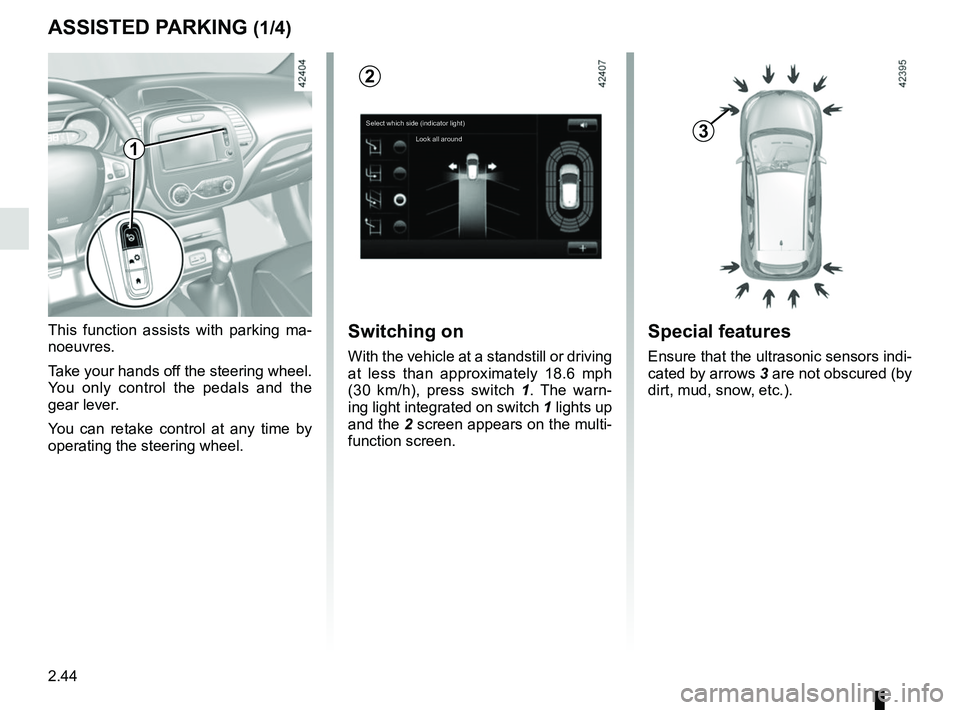
2.44
ASSISTED PARKING (1/4)
This function assists with parking ma-
noeuvres.
Take your hands off the steering wheel.
You only control the pedals and the
gear lever.
You can retake control at any time by
operating the steering wheel.Switching on
With the vehicle at a standstill or driving
at less than approximately 18.6 mph
(30 km/h), press switch 1. The warn-
ing light integrated on switch 1 lights up
and the 2 screen appears on the multi-
function screen.
1
2
Special features
Ensure that the ultrasonic sensors indi-
cated by arrows 3 are not obscured (by
dirt, mud, snow, etc.).
3Select which side (indicator light)
Look all around
Page 130 of 258

2.46
ASSISTED PARKING (3/4)
Your speed should not exceed around
4 mph (7 km/h).
Once in position to exit the space, the
system will notify you of the end of the
manoeuvre.
Once the warning light
on the
instrument panel goes off and a beep
sounds, the manoeuvre has been com-
pleted.
Suspending the manoeuvreThe manoeuvre is suspended in the fol-
lowing circumstances:
– you take control of the wheel;
– a door or the boot is opened;
– the vehicle is at a standstill for too long;
– an obstacle in the direction of move- ment prevents the manoeuvre from
being completed;
– the engine will stop.
Once the warning light
on the
instrument panel goes off and a beep
sounds, the manoeuvre has been sus-
pended. To resume the manoeuvre,
press and hold the system activation
switch. In this case, the reason for suspending
the manoeuvre will be displayed on the
multifunction screen.
Make sure:
– you have released the steering wheel
and;
– that all doors and the boot are closed, and;
– that no obstacles are in the way of the direction of movement, and;
– that the engine is started.
Cancelling the manoeuvre
The manoeuvre can be stopped in the
following cases:
– by pressing the system activation switch;
– the vehicle speed has exceeded 4 mph (7 km/h);
– you have performed more than ten forwards/backwards movements in
one manoeuvre;
– the parking distance control sensors are dirty or blocked;
– the vehicle wheels have skidded.
Once the warning light
on the
instrument panel goes off and a beep
sounds, the manoeuvre has been com-
pleted.
Exiting a parallel parking space
– Select “Exit parallel parking space”
mode;
– activate the direction indicator on the side you wish to go out of;
– press and hold switch 1 (around
2 seconds).
The
indicator light lights up
on the instrument panel and a beep
sounds;
– release the steering wheel;
– go forwards and backwards using the parking distance control system
alerts.
1
Page 131 of 258

This function is an additional driving aid. This function is not under any circumstances intended to replace the due\
care
and attention of the driver, who should at all")
2.47
ASSISTED PARKING (4/4)
This function is an additional driving aid. This function is not under any circumstances intended to replace the due\
care
and attention of the driver, who should at all times be in control of the vehicle.
Make sure that the manoeuvre complies with the applicable traffic regulations at your location.
– The driver should always be ready for sudden incidents while driving: al\
ways ensure that there are no small, narrow moving obstacles (such as a child, animal, pushchair, bicycle, stone, post etc.) in the blind spot when manoeuvring.
– The system cannot detect objects located in the sensor blind spots.
– When manoeuvring, the steering wheel may turn quickly: do not put your h\
ands inside, and make sure that nothing is caught inside.
– Always visually check that the parking space proposed by the system is s\
till available and contains no obstacles.
– The system should only be used when towing a trailer or when there is a \
towing or load carrying system on the vehicle.