instrument panel RENAULT CLIO 2009 X85 / 3.G User Guide
[x] Cancel search | Manufacturer: RENAULT, Model Year: 2009, Model line: CLIO, Model: RENAULT CLIO 2009 X85 / 3.GPages: 264, PDF Size: 15.68 MB
Page 61 of 264
ENG_NU_853-3_BCSK85_Renaul")
Downloaded from www.Manualslib.com manuals search engine
JauneNoirNoir texte
1.55
ENG_UD10344_1Tableau de bord : témoins lumineux (X85 - B85 - C85 - S85 - K85 - Ren\
ault)ENG_NU_853-3_BCSK85_Renault_1
INSTRUMENT PANEL: warning lights (4/4)
The presence and operation of the warning lights DEPEND ON THE EQUIPMENT\
AND COUNTRY.
ÀOil pressure warning light
This lights up when the ignition is switched on and goes out after a few seconds.
If it comes on when you are driving ac-
companied by the ® warning light
and a beep, it is essential to stop and switch off the ignition.
Check the oil level. If the level is normal, the indicator light is being lit by something else. Contact an approved Dealer.
ÒElectronic fault warning light
This lights up when the ignition is switched on and goes out after a few seconds.
If it comes on when driving, it indicates a fault in the injection computer or the automatic transmission.
Contact your approved Dealer as soon as possible.
^Water in the diesel filter warning light
This lights up when the ignition is switched on and goes out after a few seconds.
If it comes on when driving, it indicates the presence of water in the diesel.
Contact your approved Dealer as soon as possible.
2
Door status warning light
A
ÉPreheating warning light (diesel version)
This should come on when the igni-tion is switched on. It indicates that the heater plugs are in operation.
It goes out when preheating is com-plete. The engine can be started.
ÆWarning light for serious in-jection fault
This lights up when the ignition is switched on and goes out after a few seconds.
If this light comes on when you are driv- ing, it indicates a fault in the injection system. Stop immediately, switch off the ignition and contact an approved Dealer.
UVa r i a b l e p o w e r - a s s i s t e d steering warning light
This comes on when the ignition is switched on and goes out after a few seconds.
If it lights up when you are driving, this indicates a fault in the system. Consult an approved Dealer as soon as possi- ble.
Page 62 of 264
Downloaded from www.Manualslib.com manuals search engine
control instruments ...............................(up to the end of the DU)indicators:instrument panel .............................(up to the end of the DU)instrument panel ...................................(up to the end of the DU)warning lights........................................(up to the end of the DU)fuel level ................................................................(current page)
1.56
ENG_UD10345_1Tableau de bord : afficheurs et indicateurs (X85 - B85 - C85 - S85 - K85 - Renault)ENG_NU_853-3_BCSK85_Renault_1
JauneNoirNoir texte
INSTRUMENT PANEL: displays and indicators (1/3)
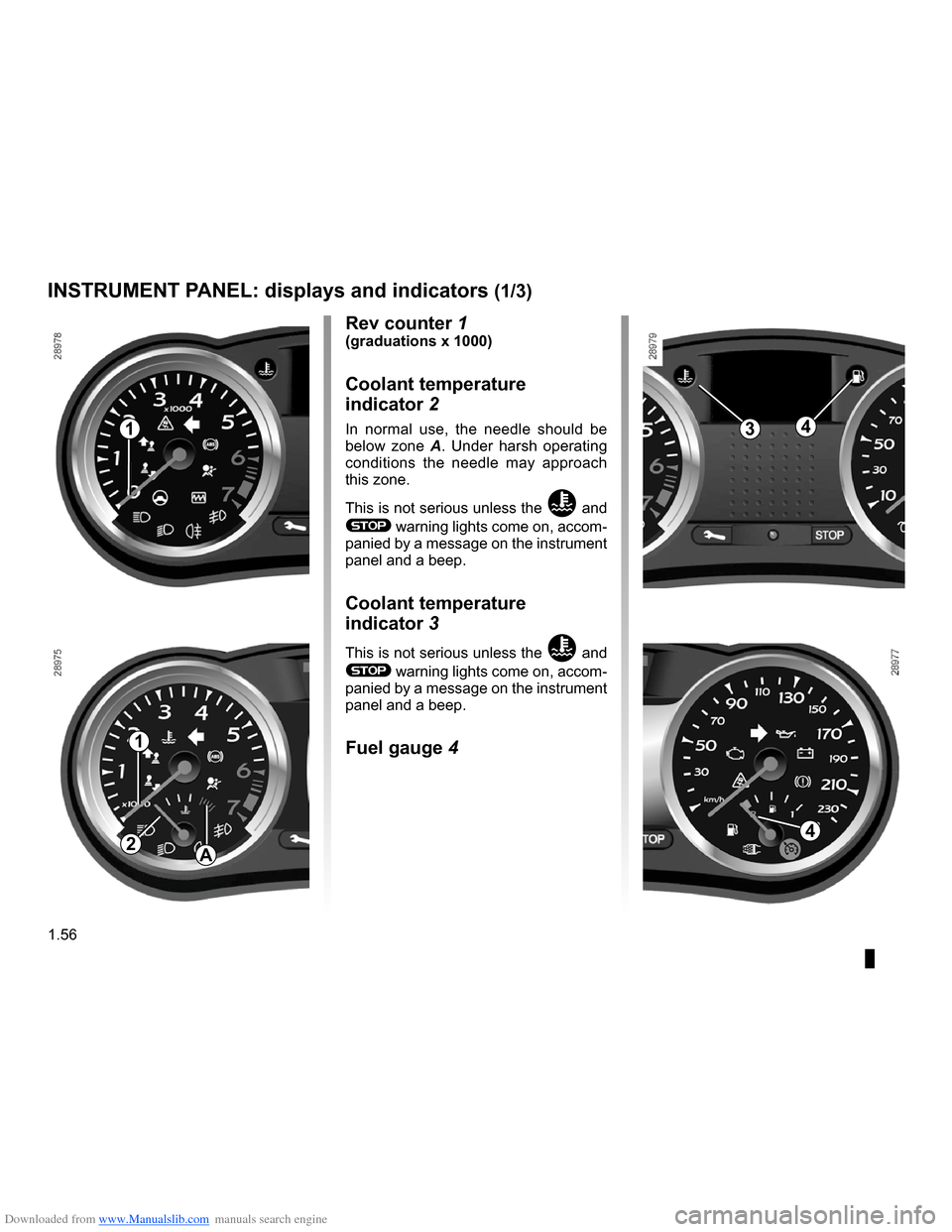
Rev counter 1(graduations x 1000)
Coolant temperature
indicator 2
In normal use, the needle should be below zone A. Under harsh operating conditions the needle may approach this zone.
This is not serious unless the Ö and
® warning lights come on, accom- panied by a message on the instrument panel and a beep.
Coolant temperature
indicator 3
This is not serious unless the Ö and
® warning lights come on, accom- panied by a message on the instrument panel and a beep.
Fuel gauge 4
1
1
A
34
24
Page 63 of 264
Downloaded from www.Manualslib.com manuals search engine
warning buzzer ......................................................(current page)
JauneNoirNoir texte
1.57
ENG_UD10345_1Tableau de bord : afficheurs et indicateurs (X85 - B85 - C85 - S85 - K85 - Renault)ENG_NU_853-3_BCSK85_Renault_1
INSTRUMENT PANEL: displays and indicators (2/3)
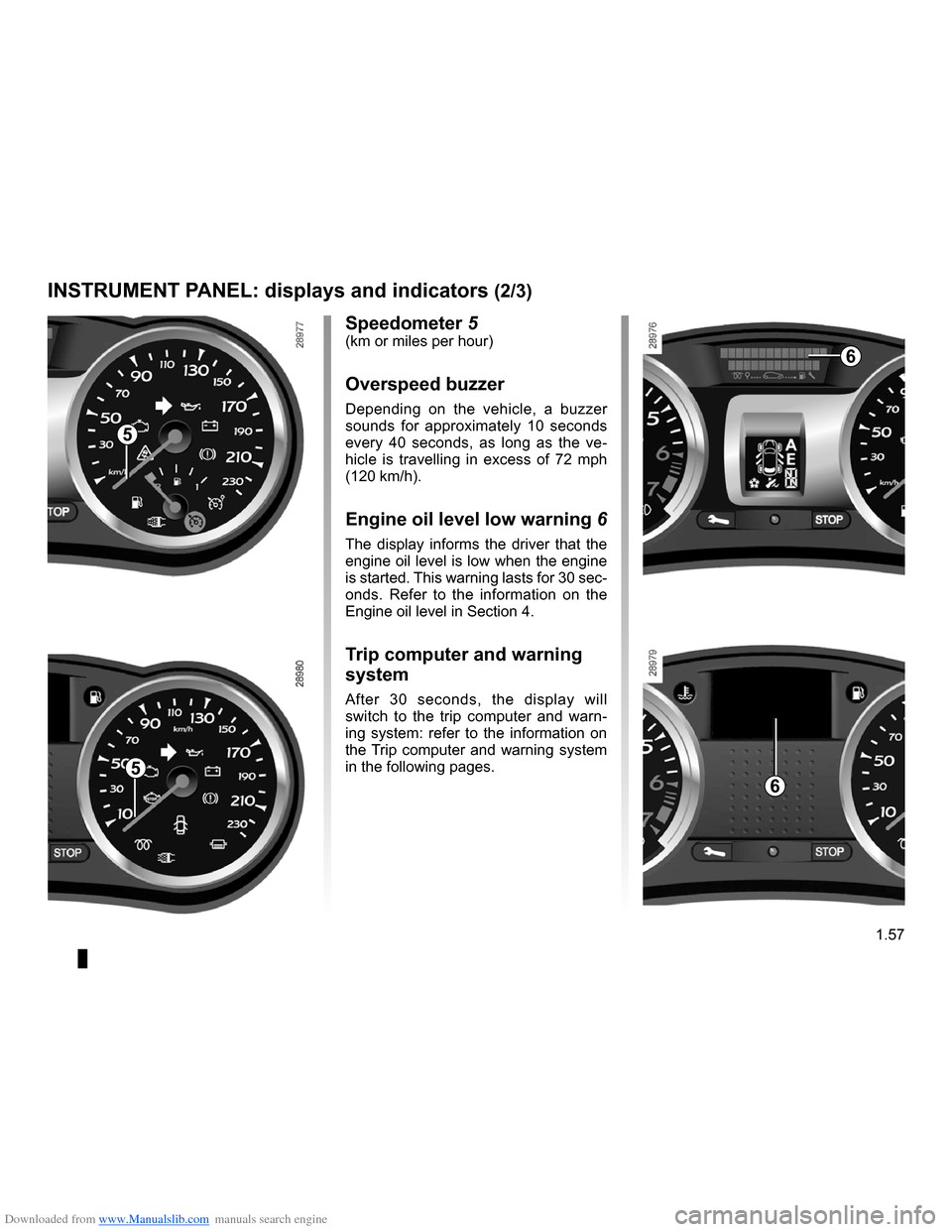
Speedometer 5(km or miles per hour)
Overspeed buzzer
Depending on the vehicle, a buzzer sounds for approximately 10 seconds every 40 seconds, as long as the ve- hicle is travelling in excess of 72 mph (120 km/h).
Engine oil level low warning 6
The display informs the driver that the engine oil level is low when the engine is started. This warning lasts for 30 sec- onds. Refer to the information on the Engine oil level in Section 4.
Trip computer and warning
system
After 30 seconds, the display will switch to the trip computer and warn- ing system: refer to the information on the Trip computer and warning system in the following pages.
5
5
6
6
Page 64 of 264
Downloaded from www.Manualslib.com manuals search engine
1.58
ENG_UD10345_1Tableau de bord : afficheurs et indicateurs (X85 - B85 - C85 - S85 - K85 - Renault)ENG_NU_853-3_BCSK85_Renault_1
INSTRUMENT PANEL: displays and indicators (3/3)
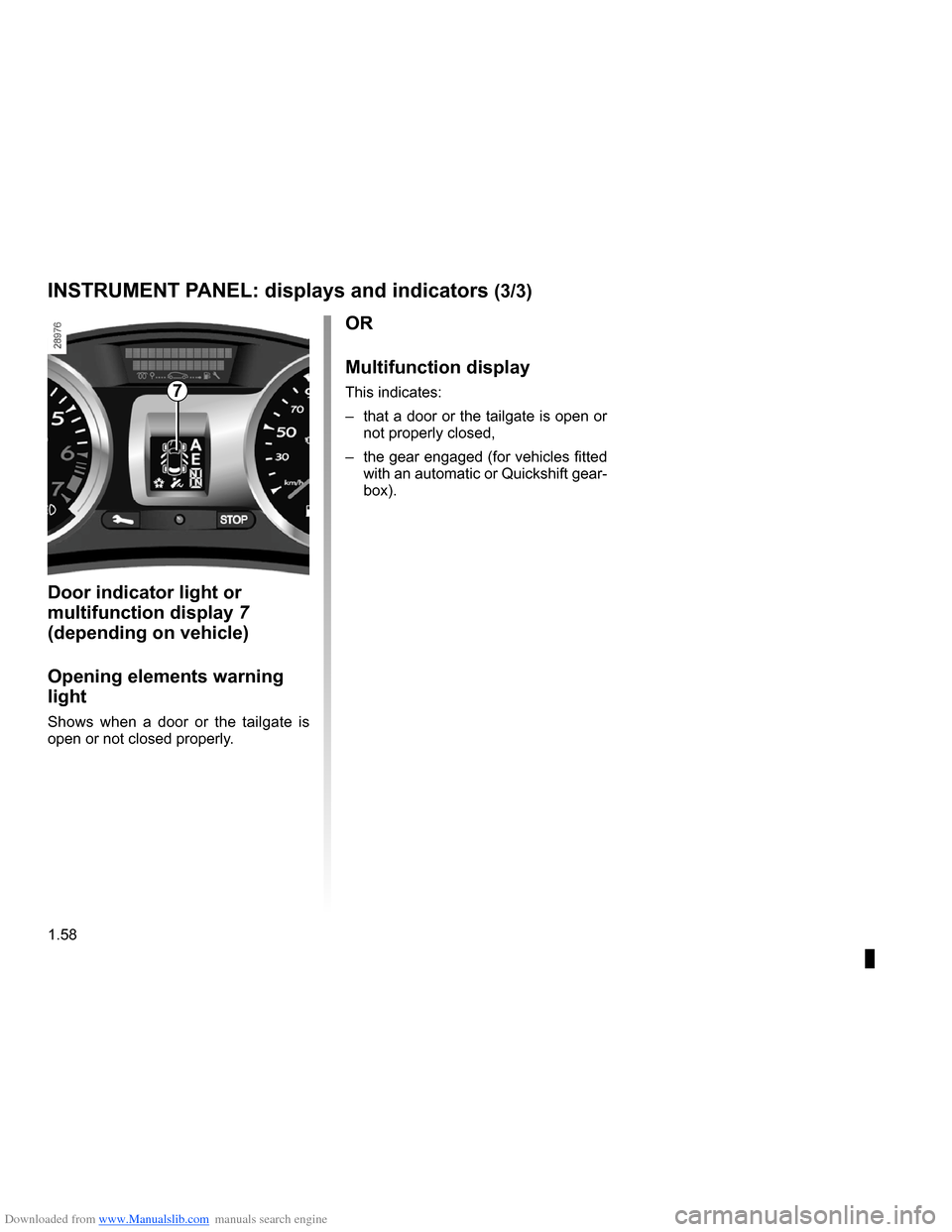
Door indicator light or
multifunction display
7
(depending on vehicle)
Opening elements warning
light
Shows when a door or the tailgate is open or not closed properly.
OR
Multifunction display
This indicates:
– that a door or the tailgate is open or
not properly closed,
– the gear engaged (for vehicles fitted
with an automatic or Quickshift gear- box).
7
Page 65 of 264
Downloaded from www.Manualslib.com manuals search engine
control instruments ...............................(up to the end of the DU)indicators:instrument panel .............................(up to the end of the DU)trip computer and warning system........(up to the end of the DU)instrument panel ...................................(up to the end of the DU)warning lights........................................(up to the end of the DU)instrument panel messages..................(up to the end of the DU)
1.59
ENG_UD13453_3Ordinateur de bord (X85 - B85 - C85 - S85 - K85 - Renault)ENG_NU_853-3_BCSK85_Renault_1
Trip computer and warning system
TRIP COMPUTER AND WARNING SYSTEM (1/10)
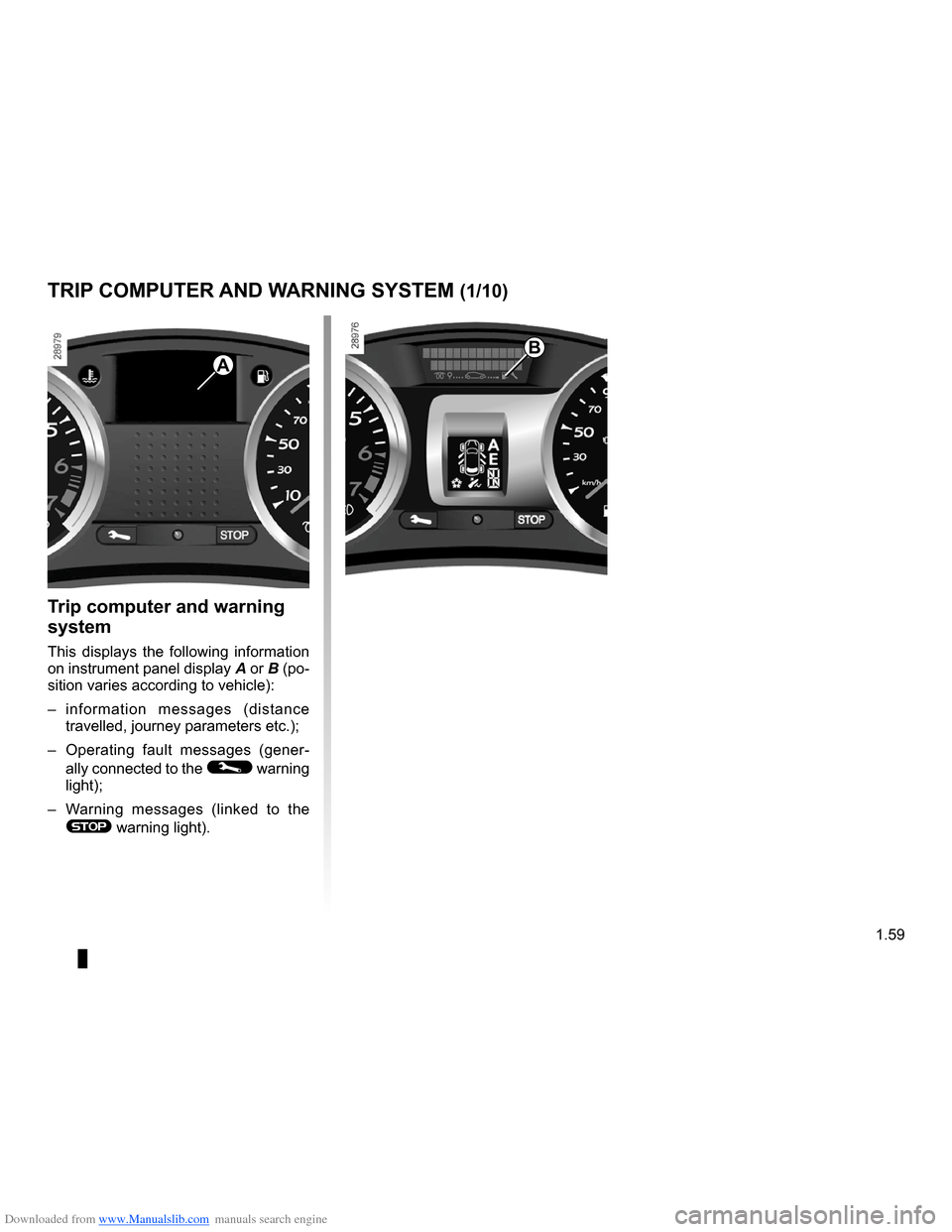
Trip computer and warning
system
This displays the following information
on instrument panel display A or B (po- sition varies according to vehicle):
– information messages (distance
travelled, journey parameters etc.);
– Operating fault messages (gener
-
ally connected to the © warning light);
– Warning messages (linked to the
® warning light).
B
A
Page 81 of 264
Downloaded from www.Manualslib.com manuals search engine
lighting:exterior ............................................(up to the end of the DU)lights:side lights .........................................................(current page)signals and lights ..................................(up to the end of the DU)lighting:instrument panel ..............................................(current page)
1.75
ENG_UD10541_1Éclairages et signalisations extérieures (X85 - B85 - C85 - S85 -\
K85 - Renault)ENG_NU_853-3_BCSK85_Renault_1
Exterior lighting and signals
EXTERIOR LIGHTING AND SIGNALS (1/5)
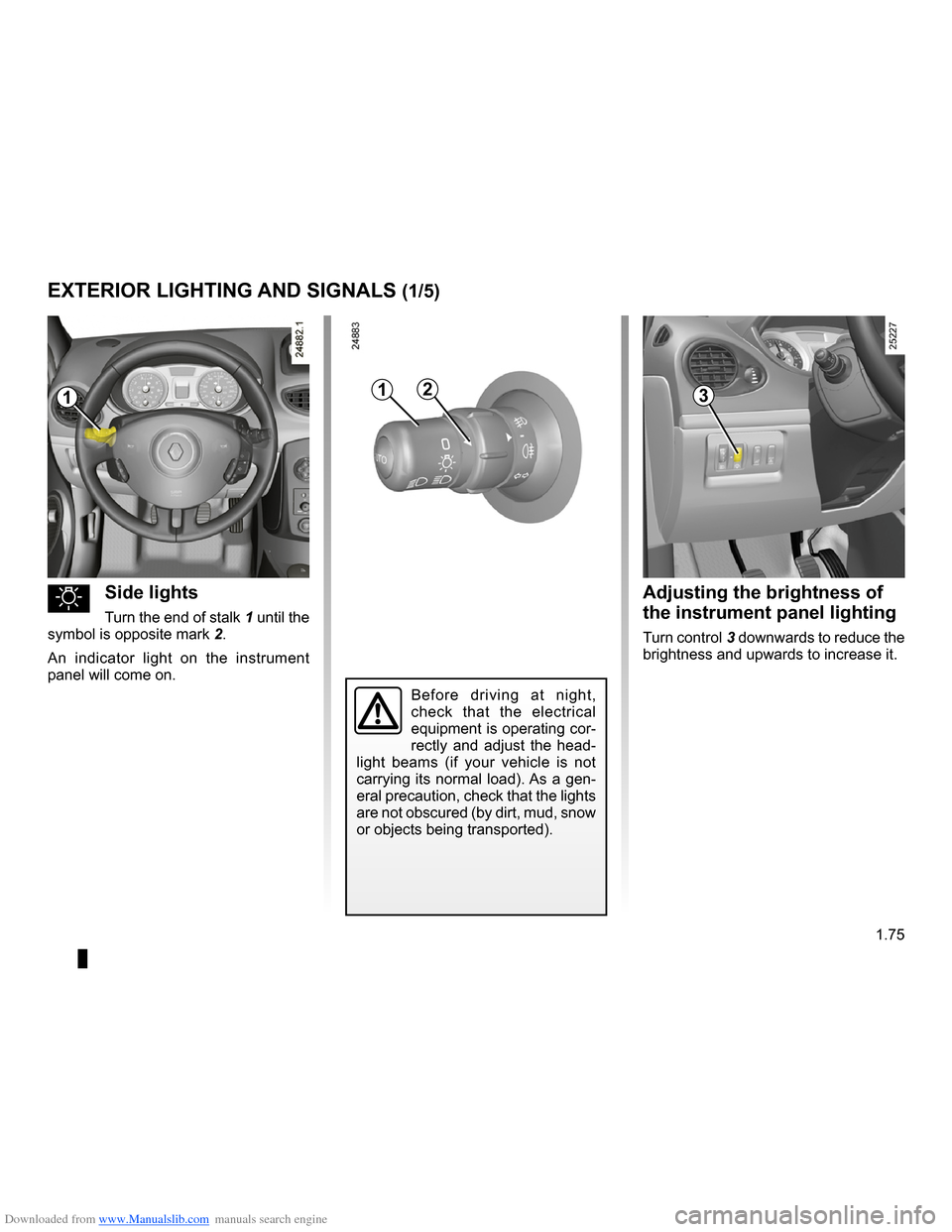
uSide lights
Turn the end of stalk 1 until the
symbol is opposite mark 2.
An indicator light on the instrument panel will come on.
Adjusting the brightness of
the instrument panel lighting
Turn control 3 downwards to reduce the brightness and upwards to increase it.
1132
Before driving at night, check that the electrical equipment is operating cor- rectly and adjust the head- light beams (if your vehicle is not carrying its normal load). As a gen-
eral precaution, check that the lights are not obscured (by dirt, mud, snow or objects being transported).
Page 82 of 264
Downloaded from www.Manualslib.com manuals search engine
lights:dipped beam headlights ...................................(current page)lighting:see-me-home ...................................................(current page)
1.76
ENG_UD10541_1Éclairages et signalisations extérieures (X85 - B85 - C85 - S85 -\
K85 - Renault)ENG_NU_853-3_BCSK85_Renault_1
JauneNoirNoir texte
EXTERIOR LIGHTING AND SIGNALS (2/5)
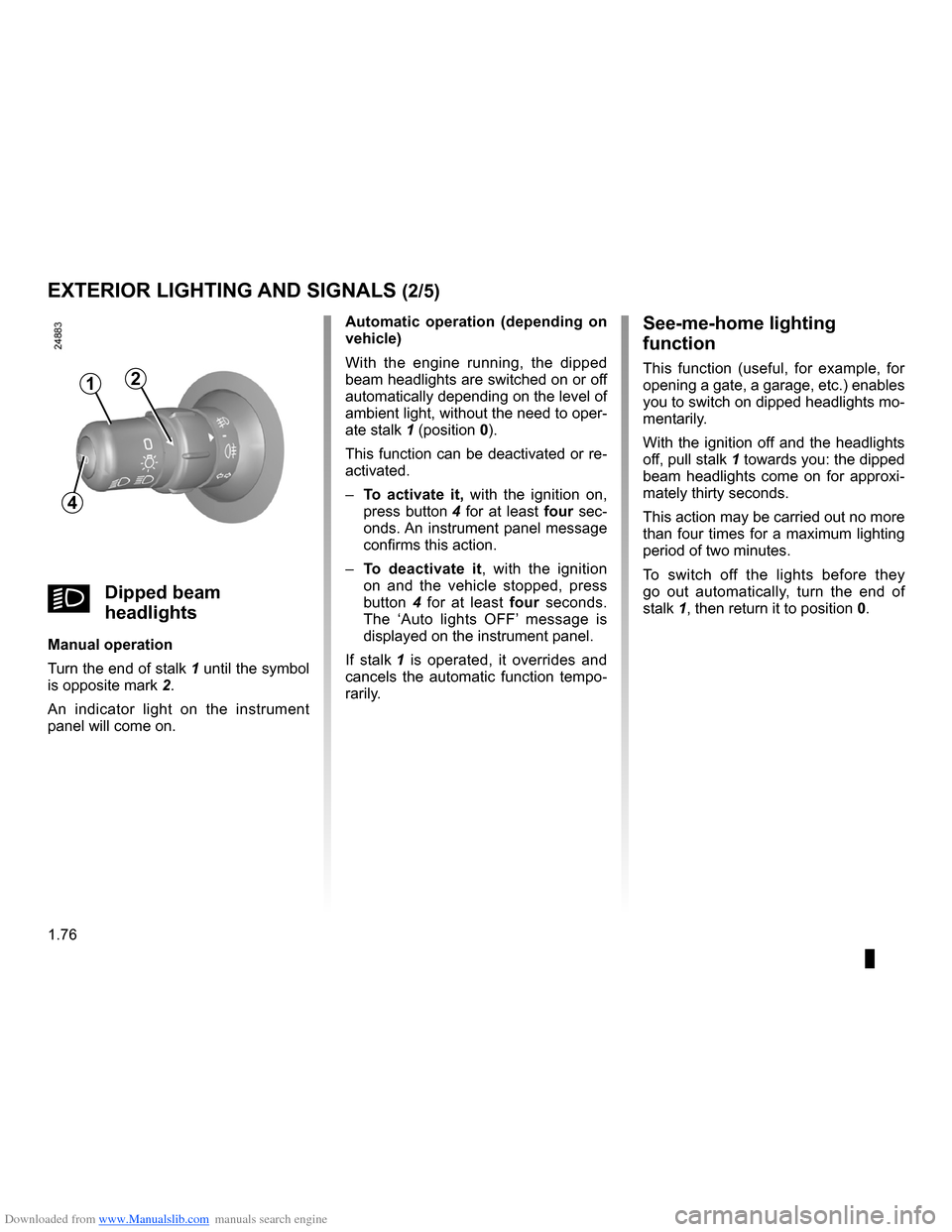
kDipped beam
headlights
Manual operation
Turn the end of stalk
1 until the symbol
is opposite mark 2.
An indicator light on the instrument panel will come on.
Automatic operation (depending on vehicle)
With the engine running, the dipped beam headlights are switched on or off automatically depending on the level of ambient light, without the need to oper-
ate stalk 1 (position 0).
This function can be deactivated or re- activated.
–
To activate it, with the ignition on,
press button 4 for at least four sec- onds. An instrument panel message confirms this action.
–
To deactivate it, with the ignition on and the vehicle stopped, press button 4 for at least four seconds. The ‘Auto lights OFF’ message is displayed on the instrument panel.
If stalk
1 is operated, it overrides and cancels the automatic function tempo- rarily.
See-me-home lighting
function
This function (useful, for example, for opening a gate, a garage, etc.) enables you to switch on dipped headlights mo- mentarily.
With the ignition off and the headlights
off, pull stalk 1 towards you: the dipped beam headlights come on for approxi- mately thirty seconds.
This action may be carried out no more than four times for a maximum lighting period of two minutes.
To switch off the lights before they go out automatically, turn the end of
stalk 1, then return it to position 0.
4
12
Page 83 of 264

Downloaded from www.Manualslib.com manuals search engine
lights:main beam headlights ......................................(current page)lightsmobile directional .............................................(current page)
JauneNoirNoir texte
1.77
ENG_UD10541_1Éclairages et signalisations extérieures (X85 - B85 - C85 - S85 -\
K85 - Renault)ENG_NU_853-3_BCSK85_Renault_1
EXTERIOR LIGHTING AND SIGNALS (3/5)
Cornering lights
Depending on the vehicle, if the dipped beam headlights are on when corner- ing, and under certain driving condi- tions (speed, steering wheel angle, for- wards gear selected, etc.), additional lights are switched on to light the inside of the bend.
Note: under certain conditions of pro- longed use, this system will be switched off automatically as it is intended for use over limited periods.
áMain beam headlights
With the dipped beam head-
lights lit, pull stalk 1 towards you.
When the main beam headlights are lit up, an indicator light on the instrument panel comes on.
To return to the dipped headlight posi- tion, pull stalk 1 towards you again.
Automatic lighting with main
beam headlights
Depending on the vehicle, when you change to main beam headlights, the dipped beam headlight raise to improve lighting.
Note: in the event of an operating fault on this system, when returning from main beam to dipped beam headlights, the dipped beam headlight concerned goes out and the front fog lights come
on, accompanied by the g warning light and a fault message on the instru- ment panel
Warning: as this operating mode is not a normal driving condition, consult an approved Dealer as soon as possible.
1
Page 85 of 264
Downloaded from www.Manualslib.com manuals search engine
fog lights ................................................................(current page)lights:fog lights ..........................................................(current page)
JauneNoirNoir texte
1.79
ENG_UD10541_1Éclairages et signalisations extérieures (X85 - B85 - C85 - S85 -\
K85 - Renault)ENG_NU_853-3_BCSK85_Renault_1
EXTERIOR LIGHTING AND SIGNALS (5/5)
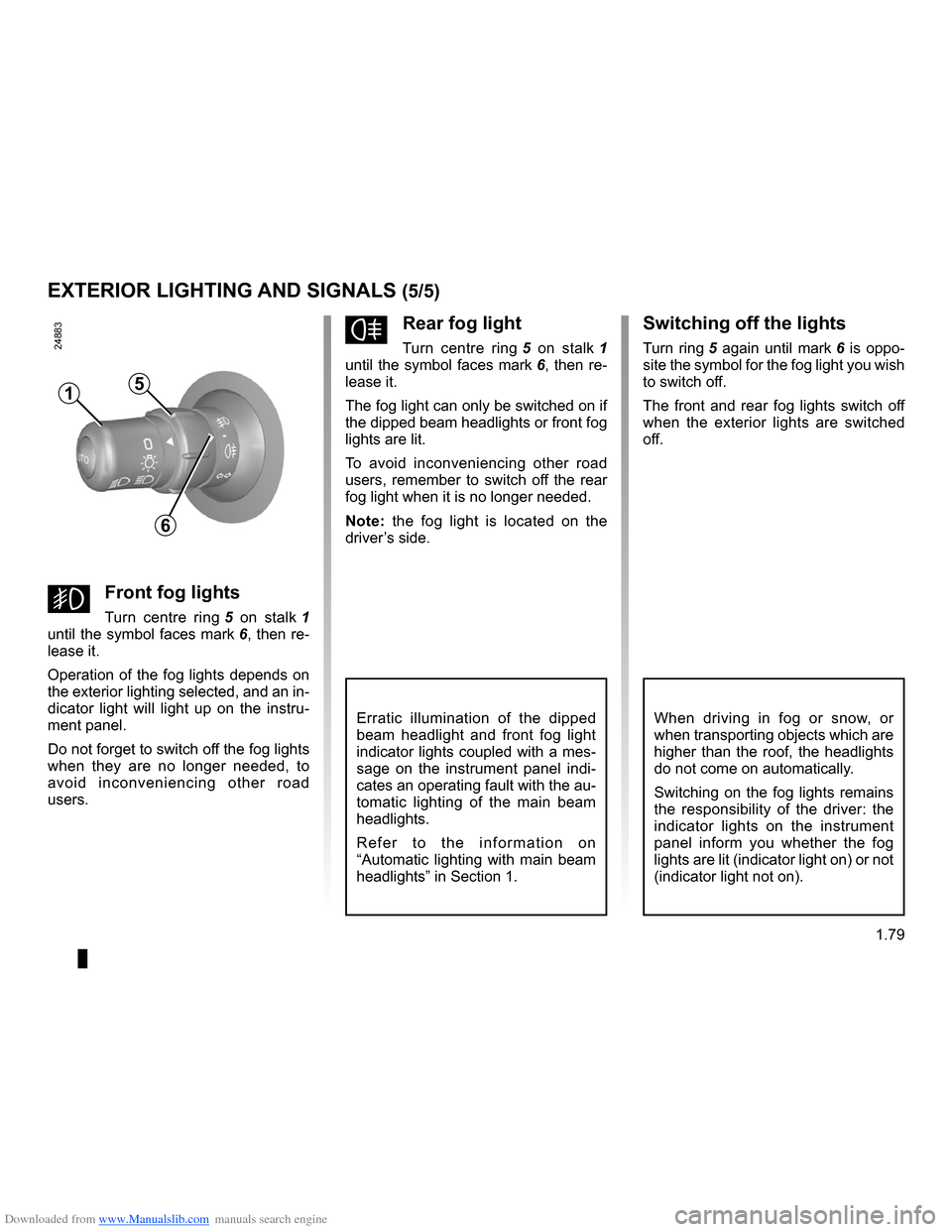
gFront fog lights
Turn centre ring 5 on stalk 1
until the symbol faces mark 6, then re- lease it.
Operation of the fog lights depends on the exterior lighting selected, and an in- dicator light will light up on the instru- ment panel.
Do not forget to switch off the fog lights when they are no longer needed, to avoid inconveniencing other road users.
fRear fog light
Turn centre ring 5 on stalk 1
until the symbol faces mark 6, then re- lease it.
The fog light can only be switched on if the dipped beam headlights or front fog lights are lit.
To avoid inconveniencing other road users, remember to switch off the rear fog light when it is no longer needed.
Note: the fog light is located on the driver’s side.
Erratic illumination of the dipped beam headlight and front fog light indicator lights coupled with a mes- sage on the instrument panel indi- cates an operating fault with the au- tomatic lighting of the main beam headlights.
R e f e r t o t h e i n f o r m a t i o n o n “Automatic lighting with main beam headlights” in Section 1.
Switching off the lights
Turn ring 5 again until mark 6 is oppo- site the symbol for the fog light you wish to switch off.
The front and rear fog lights switch off when the exterior lights are switched off.
15
6
When driving in fog or snow, or when transporting objects which are higher than the roof, the headlights do not come on automatically.
Switching on the fog lights remains the responsibility of the driver: the indicator lights on the instrument panel inform you whether the fog lights are lit (indicator light on) or not (indicator light not on).
Page 97 of 264
Downloaded from www.Manualslib.com manuals search engine
stopping the engine ..............................(up to the end of the DU)engine start/stop button ........................(up to the end of the DU)RENAULT carduse ..................................................(up to the end of the DU)starting the engine ................................(up to the end of the DU)driving ...................................................(up to the end of the DU)child safety.............................................................(current page)
2.5
ENG_UD10551_1Démarrage moteur : véhicule avec carte Renault (X85 - B85 - C85 -\
S85 - K85 - Renault)ENG_NU_853-3_BCSK85_Renault_2
Starting - stopping the engine using the RENAULT card
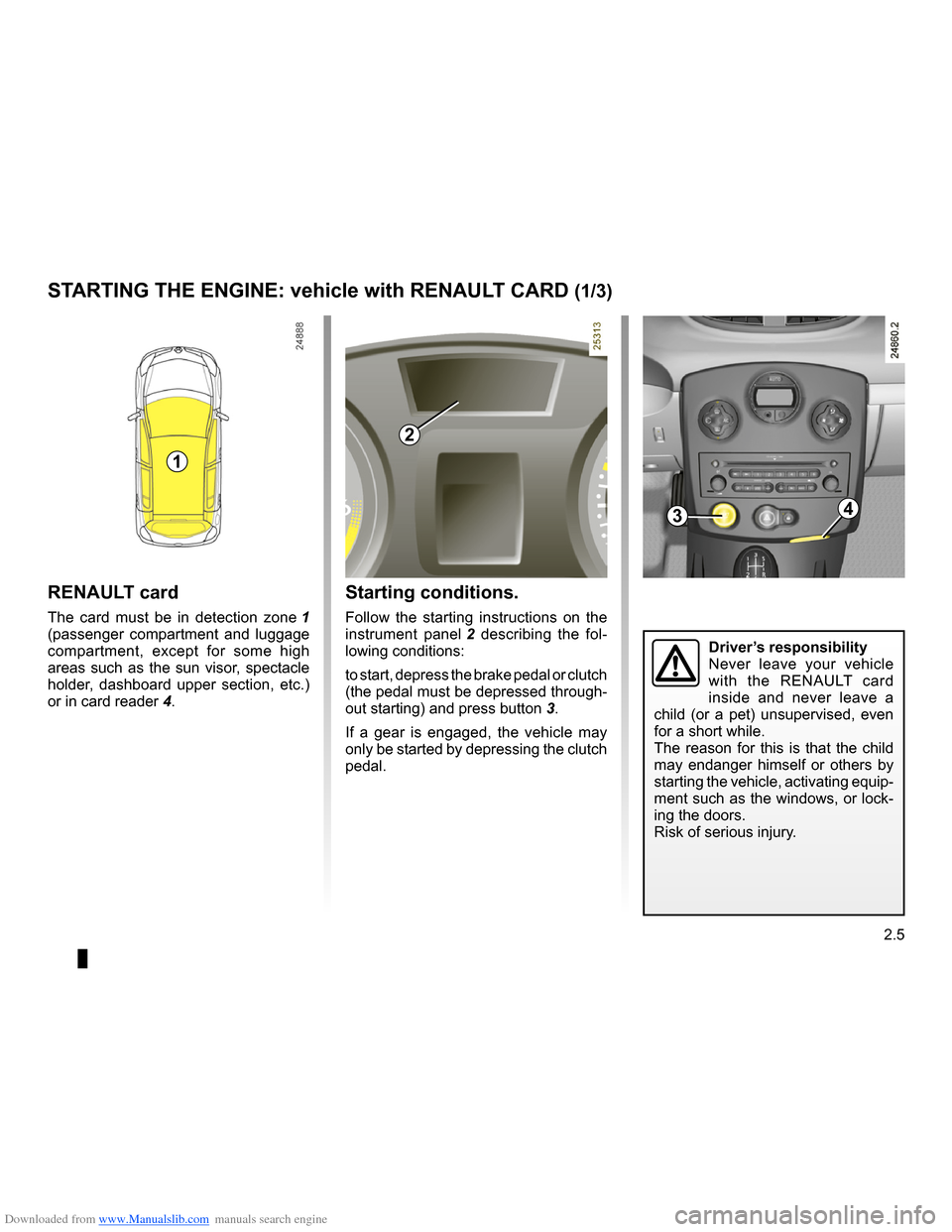
Starting conditions.
Follow the starting instructions on the
instrument panel 2 describing the fol- lowing conditions:
to start, depress the brake pedal or clutch (the pedal must be depressed through-
out starting) and press button 3.
If a gear is engaged, the vehicle may only be started by depressing the clutch pedal.
RENAULT card
The card must be in detection zone 1 (passenger compartment and luggage compartment, except for some high areas such as the sun visor, spectacle holder, dashboard upper section, etc.)
or in card reader 4.
STARTING THE ENGINE: vehicle with RENAULT CARD (1/3)
1
2
34
Driver’s responsibilityNever leave your vehicle with the RENAULT card inside and never leave a child (or a pet) unsupervised, even for a short while.The reason for this is that the child may endanger himself or others by starting the vehicle, activating equip- ment such as the windows, or lock- ing the doors.Risk of serious injury.