key RENAULT CLIO 2009 X85 / 3.G User Guide
[x] Cancel search | Manufacturer: RENAULT, Model Year: 2009, Model line: CLIO, Model: RENAULT CLIO 2009 X85 / 3.GPages: 264, PDF Size: 15.68 MB
Page 25 of 264
Downloaded from www.Manualslib.com manuals search engine
engine immobiliser................................(up to the end of the DU)engine immobiliser................................(up to the end of the DU)
1.19
ENG_UD10518_1Système antidémarrage (X85 - B85 - C85 - S85 - K85 - Renault)ENG_NU_853-3_BCSK85_Renault_1
Engine immobiliser
Operating fault warning light
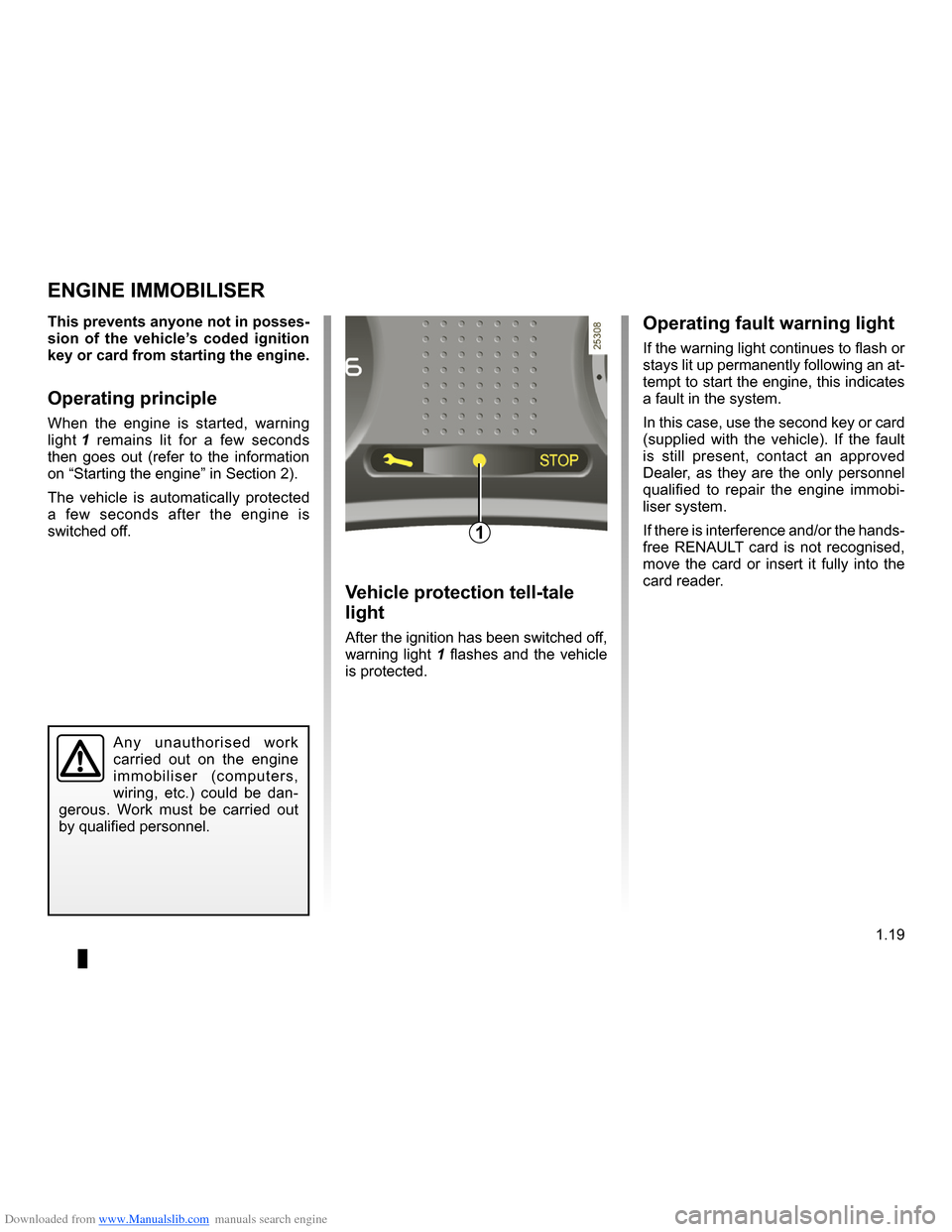
If the warning light continues to flash or stays lit up permanently following an at- tempt to start the engine, this indicates a fault in the system.
In this case, use the second key or card (supplied with the vehicle). If the fault is still present, contact an approved Dealer, as they are the only personnel qualified to repair the engine immobi- liser system.
If there is interference and/or the hands- free RENAULT card is not recognised, move the card or insert it fully into the card reader.Vehicle protection tell-tale
light
After the ignition has been switched off, warning light 1 flashes and the vehicle is protected.
This prevents anyone not in posses- sion of the vehicle’s coded ignition key or card from starting the engine.
Operating principle
When the engine is started, warning
light 1 remains lit for a few seconds then goes out (refer to the information on “Starting the engine” in Section 2).
The vehicle is automatically protected a few seconds after the engine is switched off.
ENGINE IMMOBILISER
1
Any unauthorised work
carried out on the engine immobiliser (computers, wiring, etc.) could be dan- gerous. Work must be carried out by qualified personnel.
Page 55 of 264
ENG_NU_853-3_BCSK85_Rena")
Downloaded from www.Manualslib.com manuals search engine
JauneNoirNoir texte
1.49
ENG_UD10531_1Poste de conduite direction à gauche (X85 - B85 - C85 - S85 - K85 - \
Renault)ENG_NU_853-3_BCSK85_Renault_1
DRIVING POSITION: LEFT-HAND DRIVE (2/2)
The equipment fitted, described below, DEPENDS ON THE VERSION AND COUNTRY.
1 Side air vent.
2 Stalk for:
– direction indicator lights;
– exterior lights;
– front fog lights;
– rear fog lights.
3 Instrument panel.
4 Driver ’s Airbag location, horn, cruise control/speed limiter con- trols.
5 – Radio remote control.
– Hands-free telephone integrated control.
6 Stalk for:
– windscreen and rear screen wash/wipe;
– trip computer and warning system information readout.
7 Ignition switch (vehicle with key).
8 Centre air vents.
9 Warning lights for:
– driver’s seat belt warning light;
– deactivating the front passenger
airbag.
10 Display (depending on the vehicle) of time, temperature, radio infor- mation, navigation system infor- mation, etc.
11 Heating or air conditioning con- trols.
12 Passenger Airbag location.
13 Side air vent.
14 Glove box.
15 Location for radio, navigation system, etc.
16 Central door locking switch.
17 RENAULT card reader (vehicle with RENAULT card).
18 Hazard warning lights switch.
19 Gear lever.
20 Cruise control and speed limiter control.
21 Cigar lighter.
22 Handbrake.
23 Location for a cup holder, ashtray, etc.
24 Engine start or stop control (vehi- cle with RENAULT card).
25 Parking distance control switch.
26 Fuse box.
27 Steering column height adjustment control.
28 Controls for:
– traction control and ESP;
– headlight beam height remote
adjustment;
– instrument panel lighting rheo- stat.
29 Bonnet release.
Page 57 of 264
ENG_NU_853-3_BCSK85_Rena")
Downloaded from www.Manualslib.com manuals search engine
JauneNoirNoir texte
1.51
ENG_UD10532_1Poste de conduite direction à droite (X85 - B85 - C85 - S85 - K85 - \
Renault)ENG_NU_853-3_BCSK85_Renault_1
DRIVING POSITION: RIGHT-HAND DRIVE (2/2)
1 Side air vent.
2 Passenger Airbag location.
3 Centre air vents.
4 Warning lights for:
– driver’s seat belt warning light;
– deactivating the front passenger
airbag.
5 Display (depending on the vehicle) of time, temperature, radio infor- mation, navigation system infor- mation, etc.
6 Heating or air conditioning con- trols.
7 Parking distance control switch.
8 Stalk for:
– direction indicator lights;
– exterior lights;
– front and rear fog lights.
9 Instrument panel.
10 Driver ’s Airbag location, horn, cruise control/speed limiter con-
trols.
11 – Radio remote control.
– Hands-free telephone integrated control.
12 Stalk for:
– windscreen and rear screen wash/wipe;
– trip computer and warning system information readout.
13 Side air vent.
14 Controls for:
– traction control and ESP;
– headlight beam height remote
adjustment;
– instrument panel lighting rheo- stat.
15 Ignition switch (vehicle with key).
16 Steering column height adjustment control.
17 Fuse box.
18 Central door locking switch.
19 RENAULT card reader (vehicle with RENAULT card).
20 Gear lever.
21 Cigar lighter.
22 Handbrake.
23 Cruise control and speed limiter control.
24 Location for a cup holder, ashtray, etc.
25 Hazard warning lights switch.
26 Engine start or stop control (vehi- cle with RENAULT card).
27 Location for radio, navigation system, etc.
28 Glove box.
29 Bonnet release.
The equipment fitted, described below, DEPENDS ON THE VERSION AND COUNTRY.
Page 66 of 264
Downloaded from www.Manualslib.com manuals search engine
1.60
ENG_UD13453_3Ordinateur de bord (X85 - B85 - C85 - S85 - K85 - Renault)ENG_NU_853-3_BCSK85_Renault_1
JauneNoirNoir texte
TRIP COMPUTER AND WARNING SYSTEM (2/10)
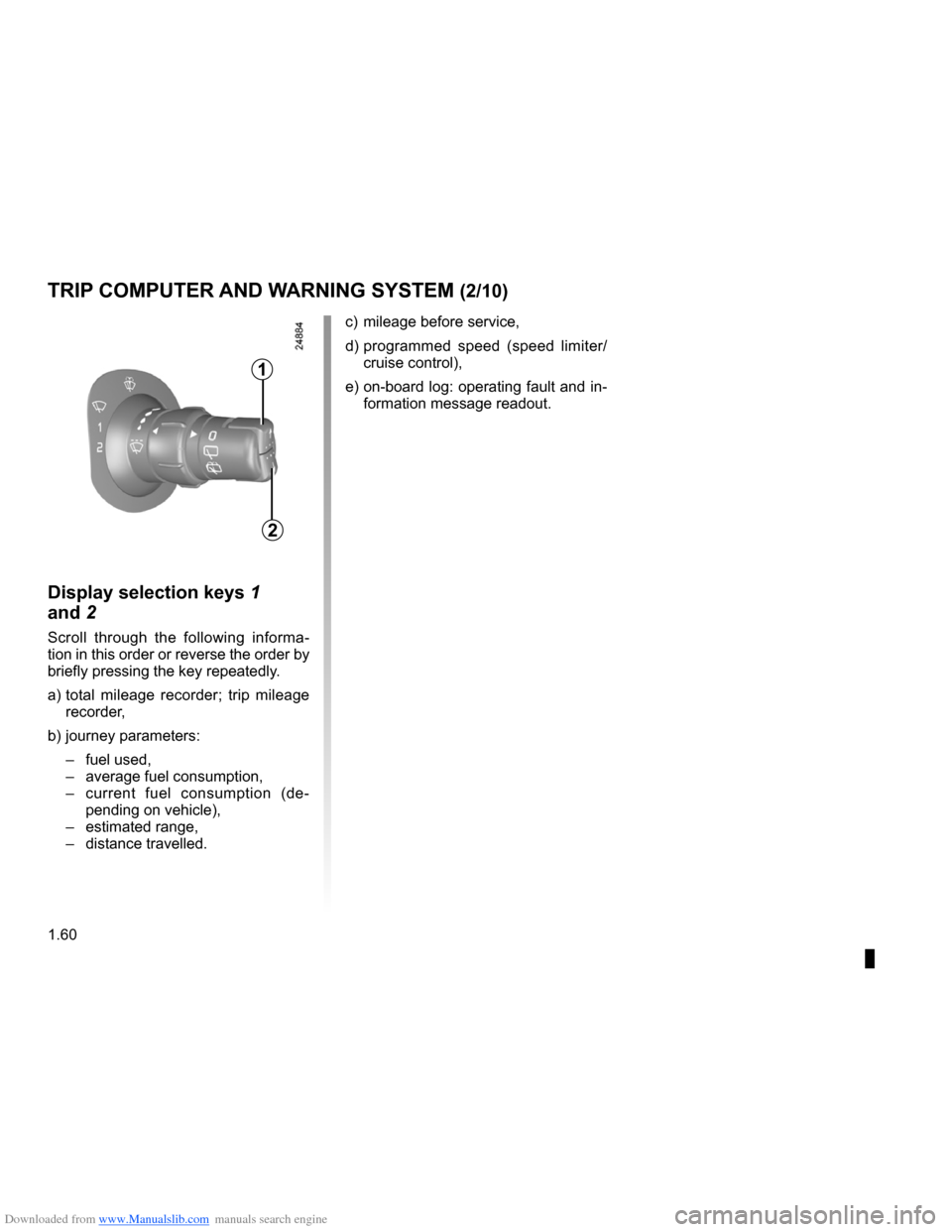
Display selection keys 1
and
2
Scroll through the following informa- tion in this order or reverse the order by briefly pressing the key repeatedly.
a) total mileage recorder; trip mileage
recorder,
b) journey parameters:
– fuel used,
– average fuel consumption,
– current fuel consumption (de
- pending on vehicle),
– estimated range,
– distance travelled. c)
mileage before service,
d) programmed speed (speed limiter/
cruise control),
e) on-board log: operating fault and in
- formation message readout.
1
2
Page 67 of 264
Downloaded from www.Manualslib.com manuals search engine
JauneNoirNoir texte
1.61
ENG_UD13453_3Ordinateur de bord (X85 - B85 - C85 - S85 - K85 - Renault)ENG_NU_853-3_BCSK85_Renault_1
TRIP COMPUTER AND WARNING SYSTEM (3/10)
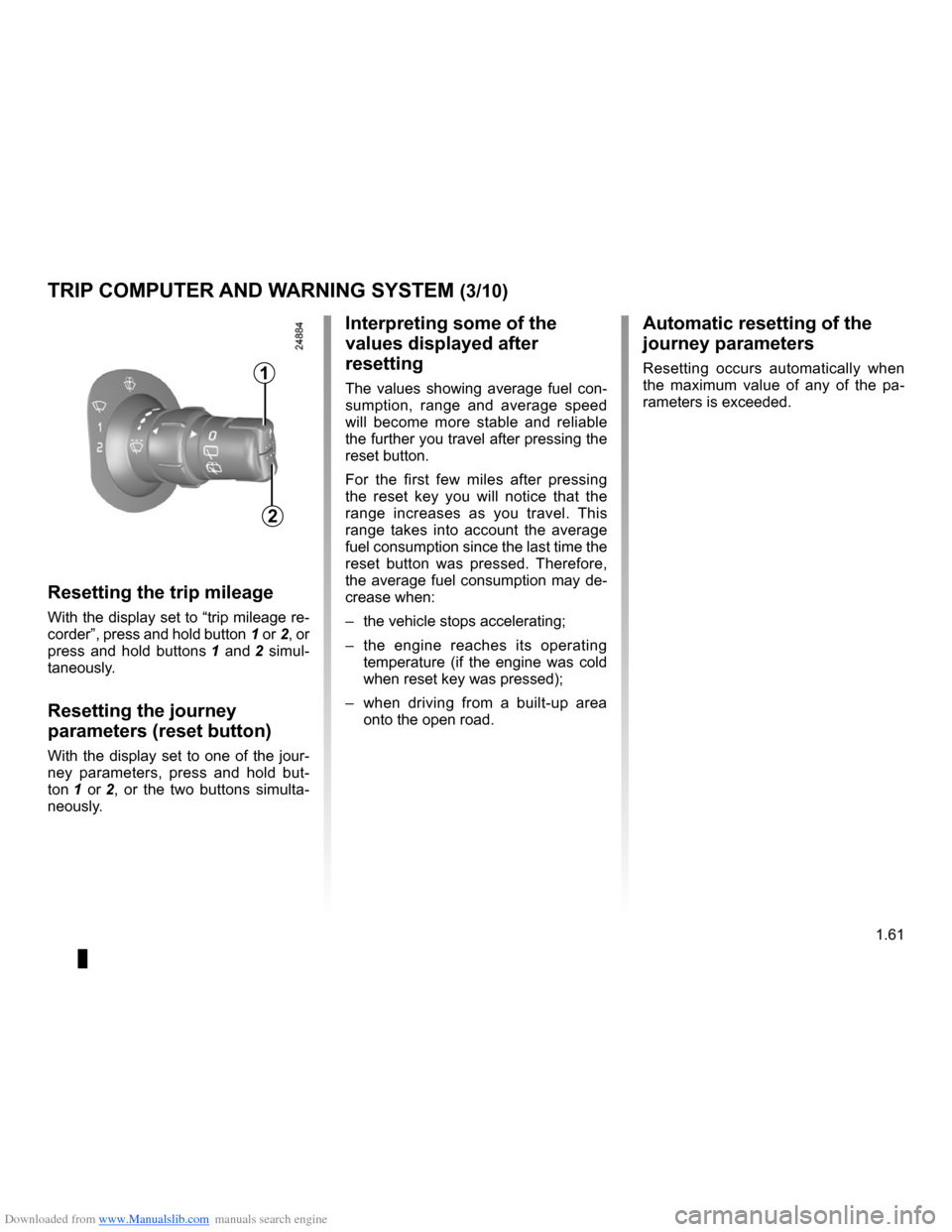
Resetting the trip mileage
With the display set to “trip mileage re-
corder”, press and hold button 1 or 2, or
press and hold buttons 1 and 2 simul- taneously.
Resetting the journey
parameters (reset button)
With the display set to one of the jour- ney parameters, press and hold but-
ton 1 or 2, or the two buttons simulta- neously.
Interpreting some of the
values displayed after
resetting
The values showing average fuel con- sumption, range and average speed will become more stable and reliable the further you travel after pressing the reset button.
For the first few miles after pressing the reset key you will notice that the range increases as you travel. This range takes into account the average fuel consumption since the last time the reset button was pressed. Therefore, the average fuel consumption may de- crease when:
– the vehicle stops accelerating;
– the engine reaches its operating
temperature (if the engine was cold when reset key was pressed);
– when driving from a built-up area
onto the open road.
Automatic resetting of the
journey parameters
Resetting occurs automatically when the maximum value of any of the pa- rameters is exceeded.
1
2
Page 73 of 264
Downloaded from www.Manualslib.com manuals search engine
JauneNoirNoir texte
1.67
ENG_UD13453_3Ordinateur de bord (X85 - B85 - C85 - S85 - K85 - Renault)ENG_NU_853-3_BCSK85_Renault_1
TRIP COMPUTER AND WARNING SYSTEM (9/10)
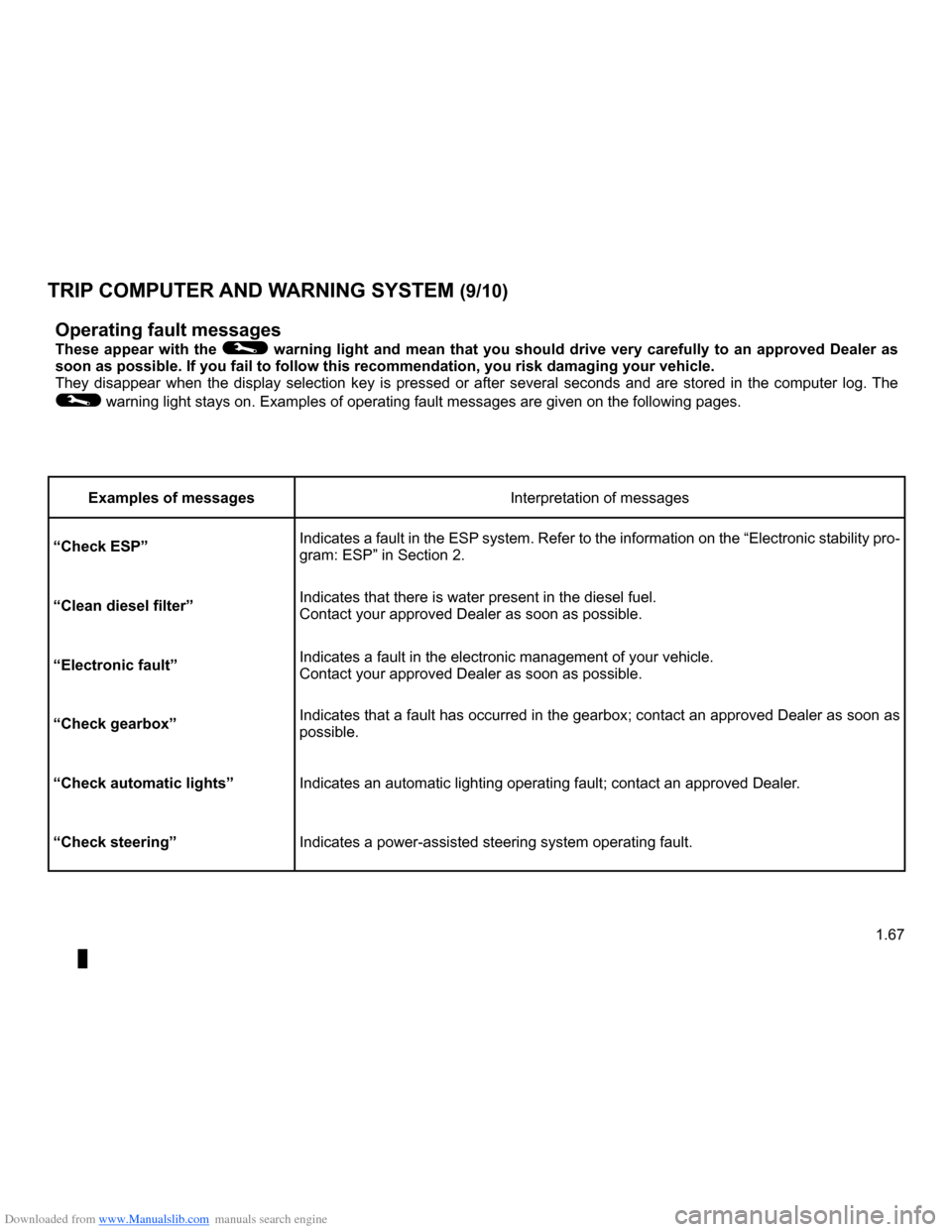
Operating fault messages
These appear with the © warning light and mean that you should drive very carefully to an approved Dealer as soon as possible. If you fail to follow this recommendation, you risk da\
maging your vehicle.They disappear when the display selection key is pressed or after several seconds and are stored in the computer log. The
© warning light stays on. Examples of operating fault messages are given \
on the following pages.
Examples of messagesInterpretation of messages
“Check ESP”Indicates a fault in the ESP system. Refer to the information on the “Electronic stability pro- gram: ESP” in Section 2.
“Clean diesel filter”Indicates that there is water present in the diesel fuel.Contact your approved Dealer as soon as possible.
“Electronic fault”Indicates a fault in the electronic management of your vehicle.Contact your approved Dealer as soon as possible.
“Check gearbox”Indicates that a fault has occurred in the gearbox; contact an approved Dealer as soon as possible.
“Check automatic lights”Indicates an automatic lighting operating fault; contact an approved Dea\
ler.
“Check steering”Indicates a power-assisted steering system operating fault.
Page 93 of 264
Downloaded from www.Manualslib.com manuals search engine
2.1
ENG_UD14665_4Sommaire 2 (X85 - B85 - C85 - S85 - K85 - Renault)ENG_NU_853-3_BCSK85_Renault_2
Section 2: Driving
(Advice on use relating to fuel economy and the environment)
Running in . . . . . . . . . . . . . . . . . . . . . . . . . . . . . . . . . . . . \
. . . . . . . . . . . . . . . . . . . . . . . . . . . . . . . . . 2.2
Ignition switch . . . . . . . . . . . . . . . . . . . . . . . . . . . . . . . . . . . .\
. . . . . . . . . . . . . . . . . . . . . . . . . . . . . . 2.3
Starting/stopping the engine using the key . . . . . . . . . . . . . . . . . . . . . . . . . . . . . . . . . . . . \
. . . . . . . . 2.4
Starting/stopping the engine using the RENAULT card . . . . . . . . . . . . . . . . . . . . . . . . . . . . . . . . . . . 2.5
Special features of petrol versions . . . . . . . . . . . . . . . . . . . . . . . . . . . . . . . . . . . .\
. . . . . . . . . . . . . . 2.9
Special features of diesel versions . . . . . . . . . . . . . . . . . . . . . . . . . . . . . . . . . . . .\
. . . . . . . . . . . . . . 2.10
Special features of diesel versions with particle filter . . . . . . . . . . . . . . . . . . . . . . . . . . . . . . . . . . . .\
2.11
Gear lever/Handbrake . . . . . . . . . . . . . . . . . . . . . . . . . . . . . . . . . . . . \
. . . . . . . . . . . . . . . . . . . . . . . . 2.12
Advice on antipollution, fuel economy and driving . . . . . . . . . . . . . . . . . . . . . . . . . . . . . . . . . . . .\
. . 2.13
Environment . . . . . . . . . . . . . . . . . . . . . . . . . . . . . . . . . . . .\
. . . . . . . . . . . . . . . . . . . . . . . . . . . . . . . 2.16
Anti-lock braking system: ABS. . . . . . . . . . . . . . . . . . . . . . . . . . . . . . . . . . . . \
. . . . . . . . . . . . . . . . . . 2.17
Electronic Stability Program: ESP . . . . . . . . . . . . . . . . . . . . . . . . . . . . . . . . . . . . \
. . . . . . . . . . . . . . . 2.19
Traction control: ASR . . . . . . . . . . . . . . . . . . . . . . . . . . . . . . . . . . . . \
. . . . . . . . . . . . . . . . . . . . . . . . . 2.21
Emergency brake assist . . . . . . . . . . . . . . . . . . . . . . . . . . . . . . . . . . . .\
. . . . . . . . . . . . . . . . . . . . . . 2.23
Speed limiter . . . . . . . . . . . . . . . . . . . . . . . . . . . . . . . . . . . .\
. . . . . . . . . . . . . . . . . . . . . . . . . . . . . . . 2.24
Cruise control . . . . . . . . . . . . . . . . . . . . . . . . . . . . . . . . . . . .\
. . . . . . . . . . . . . . . . . . . . . . . . . . . . . . 2.27
Automatic gearbox. . . . . . . . . . . . . . . . . . . . . . . . . . . . . . . . . . . . \
. . . . . . . . . . . . . . . . . . . . . . . . . . . 2.31
Quickshift gearbox . . . . . . . . . . . . . . . . . . . . . . . . . . . . . . . . . . . . \
. . . . . . . . . . . . . . . . . . . . . . . . . . . 2.34
Parking distance control . . . . . . . . . . . . . . . . . . . . . . . . . . . . . . . . . . . .\
. . . . . . . . . . . . . . . . . . . . . . 2.39
Page 95 of 264
Downloaded from www.Manualslib.com manuals search engine
engine start/stop button ........................(up to the end of the DU)ignition switch .......................................(up to the end of the DU)starting the engine ................................(up to the end of the DU)starting the engine ................................(up to the end of the DU)switching on the vehicle ignition ...........(up to the end of the DU)
2.3
ENG_UD10549_1Contacteur de démarrage : véhicule avec clé / télécommand\
e à radiofréquence (X85 - B85 - C85 - S85 - K85 - Renault)ENG_NU_853-3_BCSK85_Renault_2
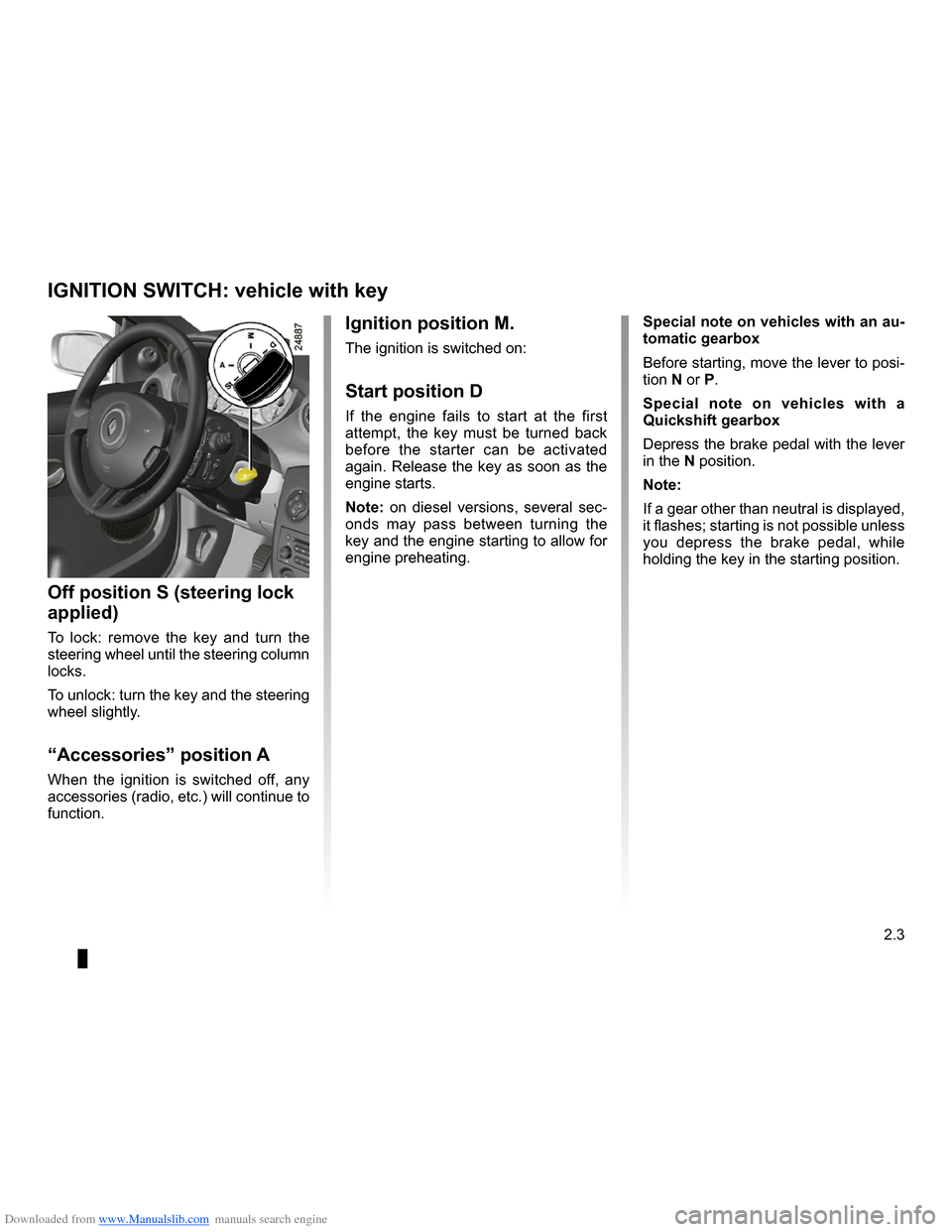
Ignition switch
Special note on vehicles with an au- tomatic gearbox
Before starting, move the lever to posi- tion N or P.
Special note on vehicles with a Quickshift gearbox
Depress the brake pedal with the lever in the N position.
Note:
If a gear other than neutral is displayed, it flashes; starting is not possible unless you depress the brake pedal, while holding the key in the starting position.
Ignition position M.
The ignition is switched on:
Start position D
If the engine fails to start at the first attempt, the key must be turned back before the starter can be activated again. Release the key as soon as the engine starts.
Note: on diesel versions, several sec- onds may pass between turning the
key and the engine starting to allow for engine preheating.
Off position S (steering lock
applied)
To lock: remove the key and turn the steering wheel until the steering column locks.
To unlock: turn the key and the steering wheel slightly.
“Accessories” position A
When the ignition is switched off, any accessories (radio, etc.) will continue to function.
IGNITION SWITCH: vehicle with key
Page 96 of 264
Downloaded from www.Manualslib.com manuals search engine
stopping the engine ..............................(up to the end of the DU)engine start/stop button ........................(up to the end of the DU)driving ...................................................(up to the end of the DU)starting the engine ................................(up to the end of the DU)
2.4
ENG_UD10550_1Démarrage / arrêt moteur : véhicule avec clé / télécom\
mande à radiofréquence (X85 - B85 - C85 - S85 - K85 - Renault)ENG_NU_853-3_BCSK85_Renault_2
Starting/stopping the engine using the key
Stopping the engine
With the engine idling, turn the key back to the Stop position.
ÉDiesel injection
Cold or warm engine
– Turn the key to the “Start” posi
- tion D without depressing the accelerator pedal.
– Release the key as soon as the
engine starts.
Note: several seconds may pass be- tween turning the key and the engine starting to allow for engine preheating.
Starting the engine
Petrol injection
Engine warm or cold
– Run the starter
without depress- ing the accelerator.
– Release the key as soon as the
engine starts.
STARTING/STOPPING THE ENGINE: vehicle with key
Driver’s responsibility
Never leave your vehi- cle with the key inside and never leave a child (or a pet) unsupervised, even for a short while.
There is a risk that they could start the engine or operate electrical equipment (electric windows etc.) and trap part of their body (neck, arms, hands, etc.).Risk of serious injury.
Never switch off the ignition before the vehicle has stopped completely. Once the engine has stopped, the brake servo, power-assisted steer- ing, etc., and the passive safety de- vices such as the airbags and pre- tensioners will no longer operate.
Page 127 of 264
\
ENG_NU_853-3_BCSK85_Renault_2
O")
Downloaded from www.Manualslib.com manuals search engine
JauneNoirNoir texte
2.35
ENG_UD12578_2Boîte de vitesses Quickshift (X85 - B85 - C85 - S85 - K85 - Renault)\
ENG_NU_853-3_BCSK85_Renault_2
Operation
Switch on the ignition.The display on the instrument panel switches on. If neutral (N) is displayed, start the engine but do not depress the accelerator.
If a gear other than neutral (N) is dis- played, it will flash; starting is possi- ble if you depress the brake pedal (indicator light 4 will come on if you forget) when holding the key in the starting position.The gear will automatically change to neutral (N) and the engine will start.
You may also select neutral after switch- ing on the ignition by pushing the lever to the right whilst depressing the brake pedal.When the engine is running, automatic mode will be selected by default.
Note: if the display does not light up when the ignition is switched on (dis- charged battery), do not attempt to start the engine by pushing the vehicle.
Shifting to neutral
With the brake pedal depressed (indi- cator light 4 will come on if you forget), push the lever towards the right.
Starting
The display shows N (neutral) and A (automatic mode).
Moving off forwards
– With your foot on the brake pedal,
push the selector lever forwards or backwards and then release it again (the number 1 appears on the dis- play).
– Release the brake pedal then accel
- erate gently to move forwards.
Reverse
– With your foot on the brake pedal,
push the selector lever towards the right and backwards, and then re- lease it.
Reverse gear is engaged (letter R appears on the display).
– Release the brake pedal then accel
- erate gently to move backwards.
When the vehicle is stationary, push the selector lever towards the front to engage a forwards gear.
QUICkSHIFT GEARBOX (2/5)
For safety reasons, do not switch off the ignition before the vehicle has come to a complete standstill.
4