warning RENAULT CLIO 2009 X85 / 3.G Workshop Manual
[x] Cancel search | Manufacturer: RENAULT, Model Year: 2009, Model line: CLIO, Model: RENAULT CLIO 2009 X85 / 3.GPages: 264, PDF Size: 15.68 MB
Page 115 of 264
Downloaded from www.Manualslib.com manuals search engine
emergency brake assist........................(up to the end of the DU)driving ...................................................(up to the end of the DU)emergency braking ...............................(up to the end of the DU)
2.23
ENG_UD10564_1Assistance au freinage d urgence (X85 - B85 - C85 - S85 - K85 - Renault\
)ENG_NU_853-3_BCSK85_Renault_2
Emergency brake assist
This function is an addi- tional aid in the event of critical driving conditions, enabling the vehicle behav- iour to be adapted to suit the driving conditions.
However, the function does not take the place of the driver. It does not increase the vehicle’s limits and should not encourage you to drive more quickly.
Therefore, it can under no circum- stances replace the vigilance or re- sponsibility of the driver when ma- noeuvring the vehicle (the driver must always be ready for sudden in- cidents which may occur when driv- ing).
This system supplements the ABS and helps reduce vehicle stopping dis- tances.
Operating principle
The system is for detecting an emer- gency braking situation. In this case, the braking assistance immediately de- velops maximum power and may trig- ger ABS regulation.
ABS braking is maintained as long as the brake pedal is applied.
Hazard warning lights
switching on
Depending on the vehicle, these may light up in the event of sudden decel- eration.
EMERGENCY BRAkE ASSIST
Page 128 of 264
\
ENG_NU_853-3_BCSK85_Renault_2
JauneNoirNoir texte
D")
Downloaded from www.Manualslib.com manuals search engine
2.36
ENG_UD12578_2Boîte de vitesses Quickshift (X85 - B85 - C85 - S85 - K85 - Renault)\
ENG_NU_853-3_BCSK85_Renault_2
JauneNoirNoir texte
Driving in automatic mode
Each time the ignition is switched on, automatic mode is selected by default (letter A on the display).
The vehicle is controlled using the ac- celerator and the brake.
Gears will change automatically at the correct moment and at a suitable engine speed because automatic mode takes into consideration the road sur- face and the chosen driving style.
You may modify the gear selected auto- matically by moving the lever forwards or backwards (except if there is a risk of under- or overrevving).
The oil level in the automatic gear- box system reservoir varies ac- cording to use. Adding oil is strictly forbidden (except by qualified ap-
proved network personnel).
QUICkSHIFT GEARBOX (3/5)
If the engine is being overrevved or underevved, the system will select the optimal gear.
Changing mode
You can change mode at any time by pushing the lever to the left. This switches mode without changing gear.
Driving in manual mode
Using the selector lever
Pushing the lever repeatedly allows you to change gears manually.
– to change up a gear: push the lever
forwards
– to change down a gear: push the lever backwards
– to change to neutral: with the brake
pedal depressed (indicator light 4 will come on if you forget), push the lever towards the right
Note: when the vehicle is stationary (braking, red light, etc.), the system au- tomatically switches to the most suita- ble gear.
Accelerating and overtaking
To obtain maximum vehicle perform- ance, in automatic or manual mode se- lected, quickly depress the accelerator pedal beyond the kickdown point.
This will activate the kickdown func- tion allowing you to change down to the most suitable gear.
Audible warning
If you leave the vehicle with the engine
running when in gear, an audible warn- ing will sound. You must switch to neu- tral before leaving the vehicle.
Page 130 of 264
\
ENG_NU_853-3_BCSK85_Renault_2
QUICkSHIFT GEARBOX (5/5")
Downloaded from www.Manualslib.com manuals search engine
2.38
ENG_UD12578_2Boîte de vitesses Quickshift (X85 - B85 - C85 - S85 - K85 - Renault)\
ENG_NU_853-3_BCSK85_Renault_2
QUICkSHIFT GEARBOX (5/5)
The vehicle will not start
If you cannot start the engine and if the battery is not discharged (display lit up):
– switch on the ignition,
– select neutral,
– push the vehicle or roll it down a suf
- ficiently steep slope. Then push the selector lever forwards.
The optimum gear for starting the engine will then be automatically se- lected.
Note: never attempt this manoeuvre in reverse.
Towing the vehicle
Refer to the information on “Towing” in Section 5.
Operating faults
‘Check gearbox’
If, when driving, the message “Check
gearbox” and the © warning light appear on the instrument panel, this in- dicates a fault.
Contact your approved Dealer as soon as possible.
‘Gearbox overheating’
If you keep the vehicle on a slope for too long without applying the brakes or handbrake, the message “Gearbox overheating” will appear along with the
© warning light.
Depress the brake pedal or apply the handbrake.
Page 131 of 264
Downloaded from www.Manualslib.com manuals search engine
parking distance control........................(up to the end of the DU)driving ...................................................(up to the end of the DU)reversing sensor ...................................(up to the end of the DU)
2.39
ENG_UD10569_1Aide au parking (X85 - B85 - C85 - S85 - K85 - Renault)ENG_NU_853-3_BCSK85_Renault_2
Parking distance control
This function is an addi- tional aid that indicates the distance between the vehi- cle and an obstacle whilst reversing, using sound signals.
Under no circumstances should it replace the driver’s care or respon- sibility whilst reversing.
The driver should always pay atten- tion to sudden incidents during driv- ing: always ensure that there are no moving obstacles (such as a child, animal, pram, bicycle, etc.) or small, narrow objects such as stones or posts in your path when manoeu- vring.
Operating principle
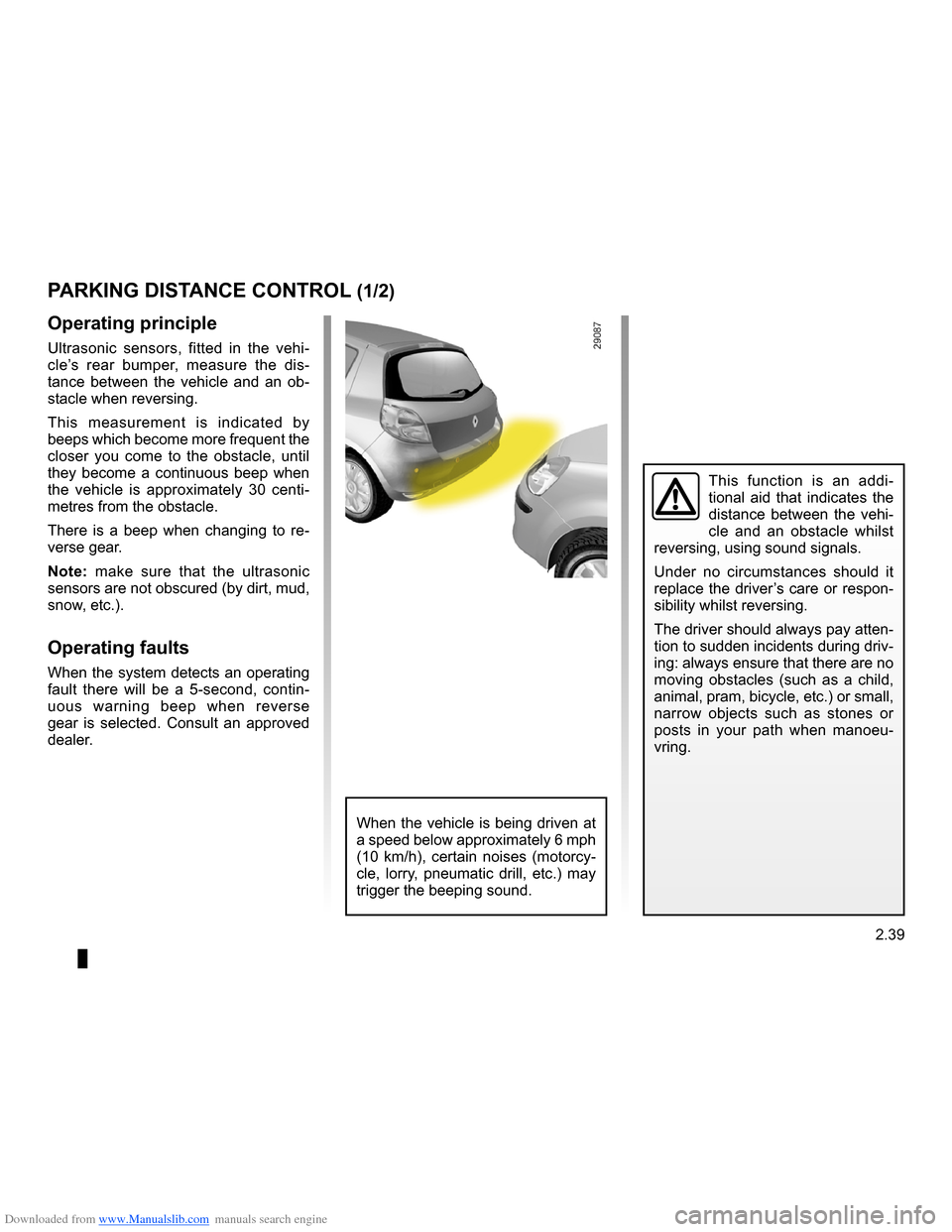
Ultrasonic sensors, fitted in the vehi- cle’s rear bumper, measure the dis- tance between the vehicle and an ob- stacle when reversing.
This measurement is indicated by beeps which become more frequent the closer you come to the obstacle, until they become a continuous beep when the vehicle is approximately 30 centi- metres from the obstacle.
There is a beep when changing to re- verse gear.
Note: make sure that the ultrasonic sensors are not obscured (by dirt, mud, snow, etc.).
Operating faults
When the system detects an operating fault there will be a 5-second, contin- uous warning beep when reverse gear is selected. Consult an approved dealer.
PARkING DISTANCE CONTROL (1/2)
When the vehicle is being driven at a speed below approximately 6 mph (10 km/h), certain noises (motorcy- cle, lorry, pneumatic drill, etc.) may trigger the beeping sound.
Page 132 of 264
Downloaded from www.Manualslib.com manuals search engine
2.40
ENG_UD10569_1Aide au parking (X85 - B85 - C85 - S85 - K85 - Renault)ENG_NU_853-3_BCSK85_Renault_2
Prolonged deactivation of the
system
You can deactivate the system for pro- longed periods by pressing the switch for longer than approximately three seconds.
The warning light built into the switch remains lit constantly.
Once deactivated, the system can be reactivated by pressing the button again for longer than approximately three seconds.
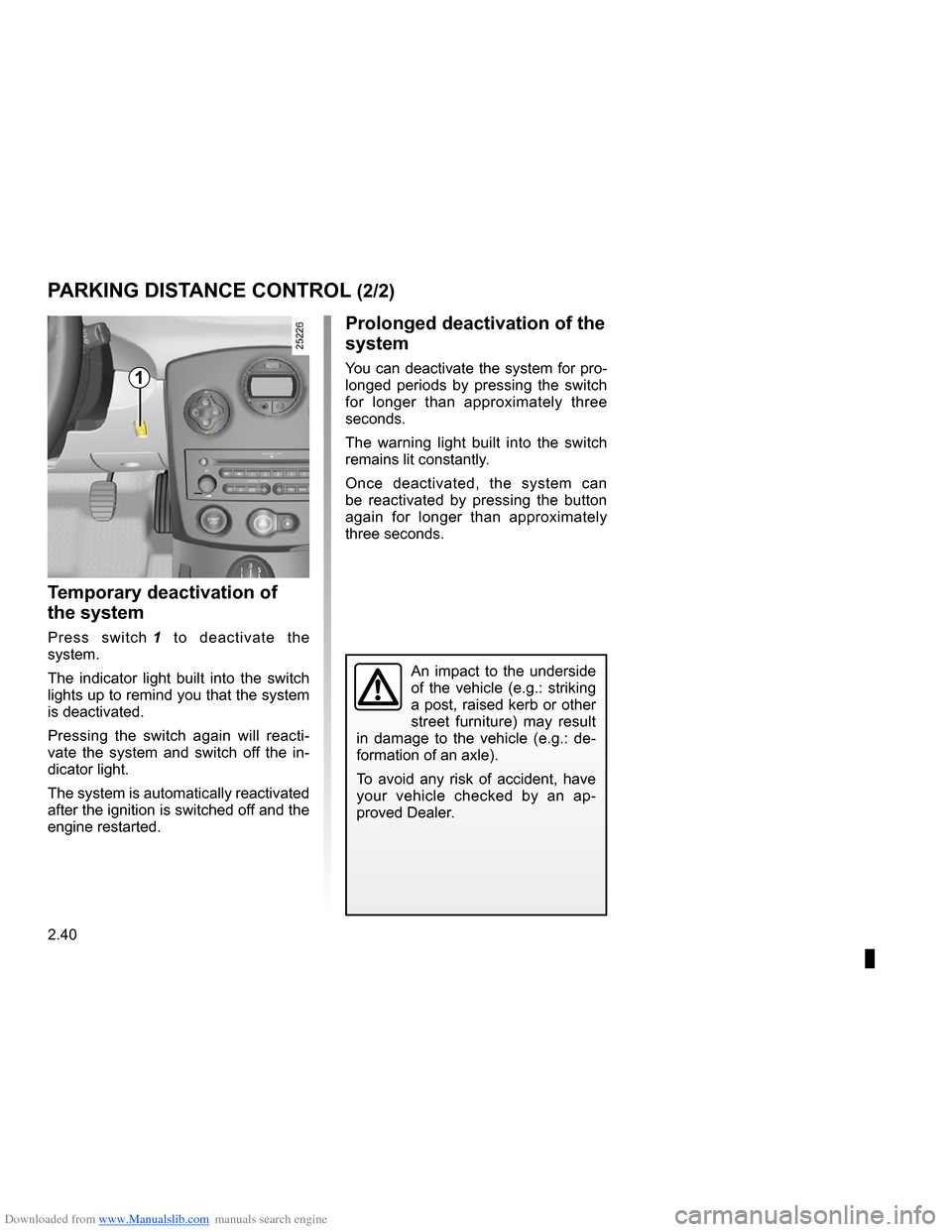
Temporary deactivation of
the system
Press switch 1 to deactivate the system.
The indicator light built into the switch lights up to remind you that the system is deactivated.
Pressing the switch again will reacti- vate the system and switch off the in- dicator light.
The system is automatically reactivated after the ignition is switched off and the engine restarted.
PARkING DISTANCE CONTROL (2/2)
1
An impact to the underside of the vehicle (e.g.: striking a post, raised kerb or other street furniture) may result in damage to the vehicle (e.g.: de-
formation of an axle).
To avoid any risk of accident, have your vehicle checked by an ap- proved Dealer.
Page 144 of 264
\
ENG_NU_853-3_BCSK85_Renault_3
JauneNoirNoir texte
No")
Downloaded from www.Manualslib.com manuals search engine
3.12
ENG_UD12579_2Air conditionné automatique (X85 - B85 - C85 - S85 - K85 - Renault)\
ENG_NU_853-3_BCSK85_Renault_3
JauneNoirNoir texte
Note: the Clear View function auto- matically activates the air conditioning system (indicator light on). Press but-
ton 6 to return to automatic mode.
AUTOMATIC CLIMATE CONTROL (5/8)
In automatic mode, in cold weather, the ventilation will not start imme- diately at maximum power but will increase progressively until the engine temperature is warm enough to heat the passenger compartment air. This may take from a few sec- onds to several minutes.
Varying the ventilation speed
In automatic mode, the system uses the most suitable amount of air to reach and maintain the desired comfort level.
Automatic mode is switched off by
pressing buttons 9 and 11.
These buttons allow you to increase or decrease ventilation speed. If you set it to zero, the system switches off.
Switching air conditioning on
or off
In automatic mode, the system switches the air conditioning system on or off, depending on the climate conditions.
Exit automatic mode by pressing
button 3: the AUTO warning light on
display 5 goes out.
Button
3 activates (display warning light comes on) or stops (warning light goes out) the air conditioning function.
356
9
11
Page 146 of 264
Downloaded from www.Manualslib.com manuals search engine
demistingwindscreen .......................................................(current page)
3.14
ENG_UD12579_2Air conditionné automatique (X85 - B85 - C85 - S85 - K85 - Renault)\
ENG_NU_853-3_BCSK85_Renault_3
JauneNoirNoir texte
AUTOMATIC CLIMATE CONTROL (7/8)
Note: if you wish to reduce the air flow (which may produce a certain amount of noise in the passenger compart-
ment), press button 11.
To exit this function, press either:
– button
1 again;
– button
6 (the AUTO indicator light on the display will light up).
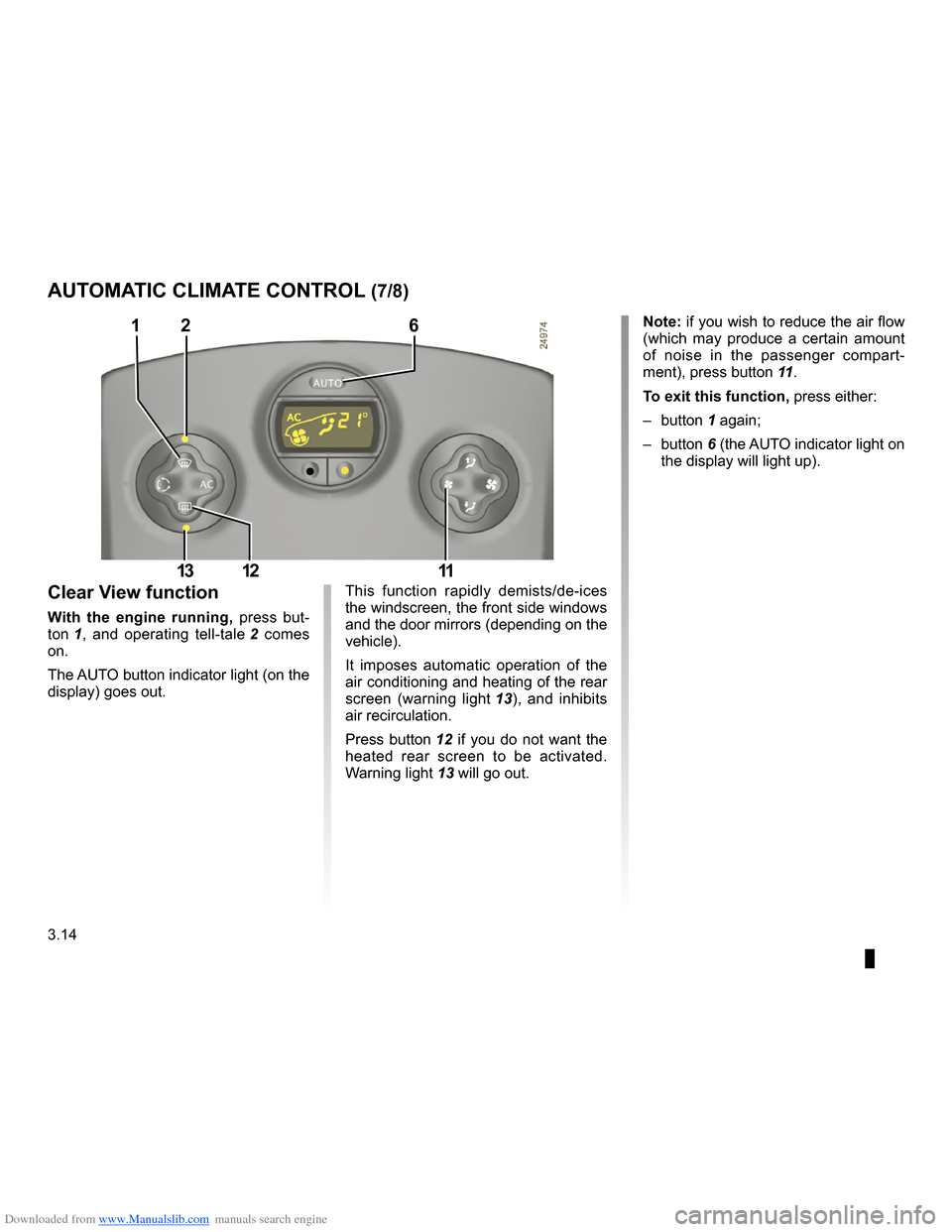
This function rapidly demists/de-ices the windscreen, the front side windows and the door mirrors (depending on the vehicle).
It imposes automatic operation of the air conditioning and heating of the rear
screen (warning light 13), and inhibits air recirculation.
Press button
12 if you do not want the heated rear screen to be activated.
Warning light 13 will go out.
Clear View function
With the engine running, press but-
ton 1, and operating tell-tale 2 comes on.
The AUTO button indicator light (on the display) goes out.
126
111213
Page 177 of 264
Downloaded from www.Manualslib.com manuals search engine
maintenance:mechanical ......................................(up to the end of the DU)engine oil level ......................................(up to the end of the DU)engine oil ..............................................(up to the end of the DU)
4.3
ENG_UD12585_2Niveau huile moteur/Vidange moteur (X85 - B85 - C85 - S85 - K85 - Renault)ENG_NU_853-3_BCSK85_Renault_4
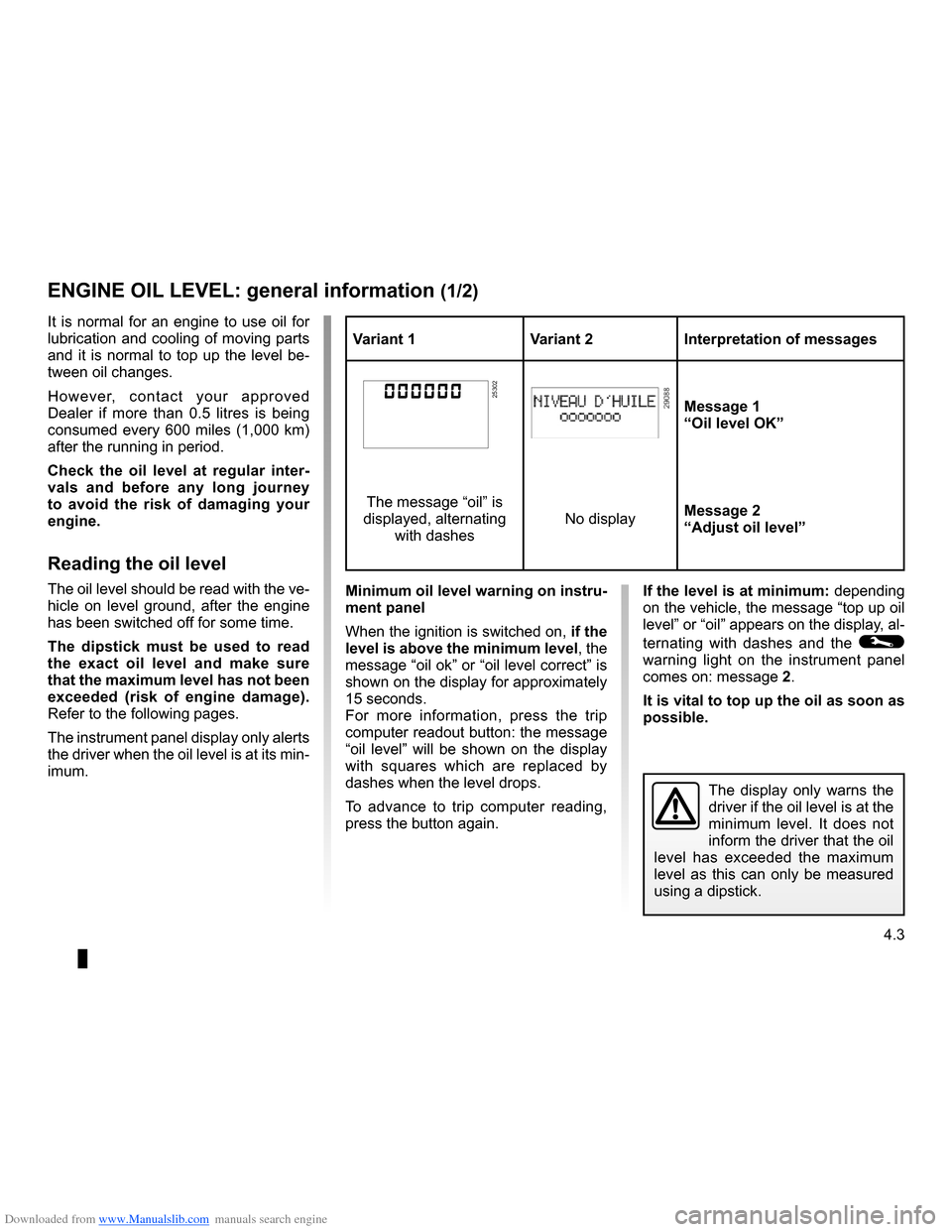
Variant 1Variant 2Interpretation of messages
25302Message 1“Oil level OK”
The message “oil” is
displayed, alternating
with dashes
No displayMessage 2“Adjust oil level”
If the level is at minimum: depending on the vehicle, the message “top up oil level” or “oil” appears on the display, al-
ternating with dashes and the © warning light on the instrument panel comes on: message 2.
It is vital to top up the oil as soon as possible.
Engine oil level: general information
The display only warns the driver if the oil level is at the minimum level. It does not inform the driver that the oil level has exceeded the maximum level as this can only be measured
using a dipstick.
Minimum oil level warning on instru- ment panel
When the ignition is switched on, if the level is above the minimum level, the message “oil ok” or “oil level correct” is shown on the display for approximately 15 seconds.For more information, press the trip computer readout button: the message
“oil level” will be shown on the display with squares which are replaced by dashes when the level drops.
To advance to trip computer reading, press the button again.
It is normal for an engine to use oil for lubrication and cooling of moving parts and it is normal to top up the level be- tween oil changes.
However, contact your approved Dealer if more than 0.5 litres is being consumed every 600 miles (1,000 km) after the running in period.
Check the oil level at regular inter- vals and before any long journey to avoid the risk of damaging your engine.
Reading the oil level
The oil level should be read with the ve- hicle on level ground, after the engine has been switched off for some time.
The dipstick must be used to read the exact oil level and make sure that the maximum level has not been exceeded (risk of engine damage). Refer to the following pages.
The instrument panel display only alerts the driver when the oil level is at its min- imum.
ENGINE OIL LEVEL: general information (1/2)
Page 195 of 264
ENG_NU_853-3_BCSK85_Renault_5")
Downloaded from www.Manualslib.com manuals search engine
JauneNoirNoir texte
5.7
ENG_UD12589_2Kit de gonflage des pneumatiques (X85 - B85 - C85 - S85 - K85 - Renault\
)ENG_NU_853-3_BCSK85_Renault_5
TYRE PRESSURE KIT (2/3)
In the event of a puncture, use the kit which is located under the luggage compartment carpet on equipped ve-
hicles: open the kit, remove the caps 1
and 4 (it is essential not to remove the bursting disc from the bottle) and screw
bottle 2 in place of cap 4.
Do not pull out the foreign body causing the puncture if it is still in the tyre.
With the ignition on,
– adapter
8 must be connected to ve-
hicle accessories socket 9;
– unscrew the valve cap of the wheel
concerned and screw on the inflation
adapter 6;
– press switch
3 to inflate the tyre to the recommended pressure (refer to the information on “Tyre pressure”);
– after a maximum of
7 minutes, stop inflating and read the pressure (on
the pressure gauge 5).
Note: while the bottle is emptying (ap- proximately 30 seconds), the pressure
gauge 5 will indicate briefly a pressure of 6 bar, then the pressure drops.
1
3
4
5
6
7
89
Before using this kit, park
the vehicle at a sufficient distance from traffic, switch on the hazard warning lights, apply the handbrake, ask all passengers to leave the vehicle and keep them away from traffic.
2
Page 200 of 264

Downloaded from www.Manualslib.com manuals search engine
tyres ......................................................(up to the end of the DU)wheels (safety) .....................................(up to the end of the DU)
5.12
ENG_UD10601_1Pneumatiques (X85 - B85 - C85 - S85 - K85 - Renault)ENG_NU_853-3_BCSK85_Renault_5
JauneNoirNoir texte
Tyre and wheel safety
The tyres are the only contact between the vehicle and the road, so it is essen- tial to keep them in good condition.
You must make sure that your tyres con- form to local road traffic regulations.
When the tyre tread has been worn to the level of the warning strips, they become visible 2: it is then neces- sary to replace your tyres because the tread rubber is now only 1.6 mm deep at most, resulting in poor road hold- ing on wet roads.
An overloaded vehicle, long journeys by motorway, particularly in very hot weather, or continual driving on poorly surfaced minor roads will lead to more rapid tyre wear and affect safety.
Tyres (tyre and wheel safety, use in winter)
Maintaining the tyres
The tyres must be in good condition and the tread form must have sufficient depth; tyres approved by our Technical D e p a r t m e n t h a v e w e a r w a r n i n g strips 1 which are indicators moulded into the tread at several points.
TYRES (1/3)
1
2
When they need to be re- placed, only tyres of the same make, size, type and profile should be used.
Tyres fitted to the vehicle should either be identical to those fitted originally or conform to those recommended by your approved dealer.
Incidents which occur when
driving, such as striking the kerb, may damage the tyres and wheel rims, and could also lead to misalignment of the front or rear axle geometry. In this case, have the condition of these checked by an approved dealer.