radio RENAULT CLIO 2012 X85 / 3.G User Guide
[x] Cancel search | Manufacturer: RENAULT, Model Year: 2012, Model line: CLIO, Model: RENAULT CLIO 2012 X85 / 3.GPages: 268, PDF Size: 8.73 MB
Page 97 of 268
Downloaded from www.Manualslib.com manuals search engine engine start/stop button ........................ (up to the end of the DU)
ignition switch ....................................... (up to the end of the DU)
starting the engine ................................ (up to the end of the DU)
starting the engine ................................ (up to the end of the DU)
switching on the vehicle ignition ........... (up to the end of the DU)
2.3
ENG_UD25390_2
Contacteur de démarrage : véhicule avec clé / télécommand\
e à radiofréquence (X85 - B85 - C85 - S85 - K85 - Renault)
ENG_NU_853-7_BCSK85_Renault_2
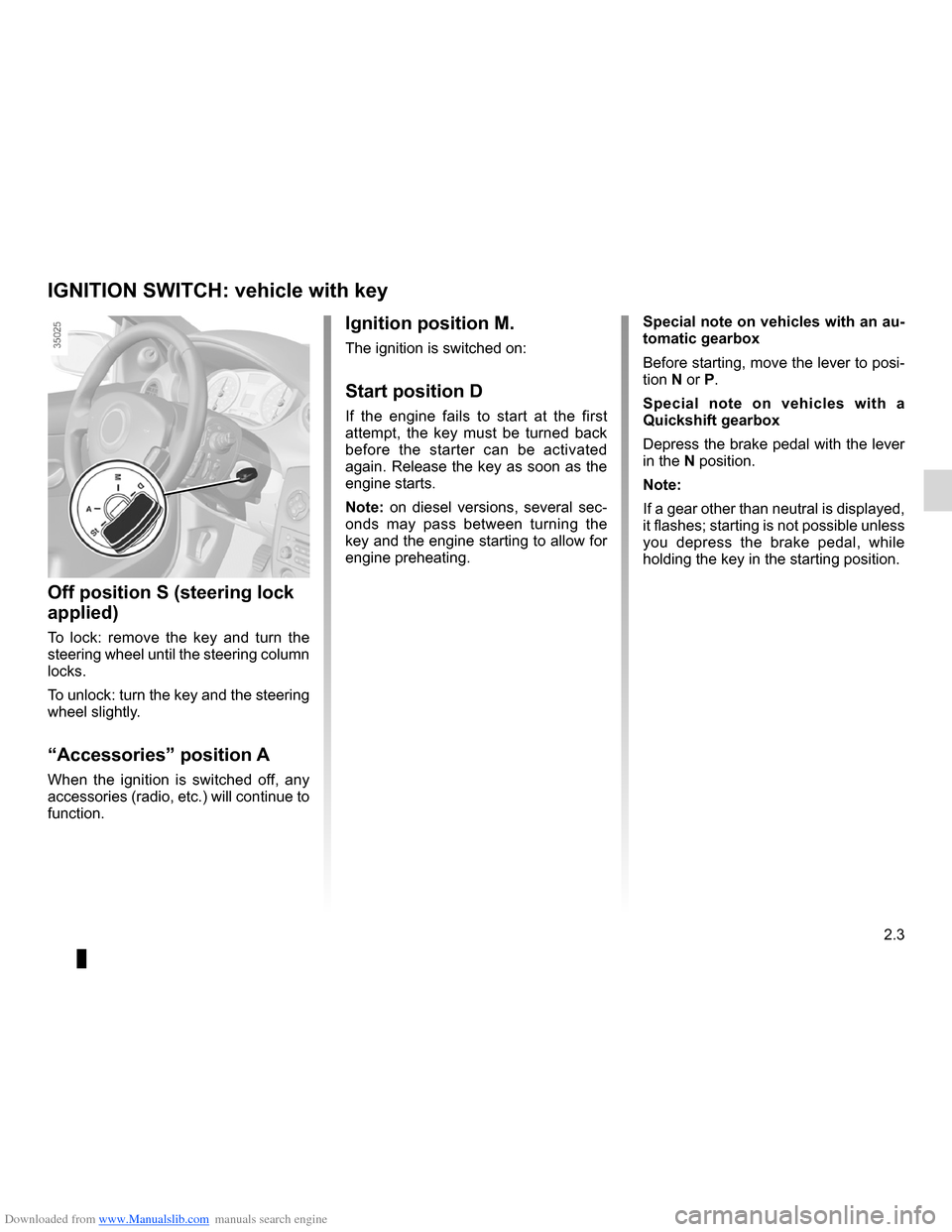
Ignition switch
Special note on vehicles with an au-
tomatic gearbox
Before starting, move the lever to posi-
tion N or P.
Special note on vehicles with a
Quickshift gearbox
Depress the brake pedal with the lever
in the N position.
Note:
If a gear other than neutral is displayed,
it flashes; starting is not possible unless
you depress the brake pedal, while
holding the key in the starting position.Ignition position M.
The ignition is switched on:
Start position D
If the engine fails to start at the first
attempt, the key must be turned back
before the starter can be activated
again. Release the key as soon as the
engine starts.
Note: on diesel versions, several sec -
onds may pass between turning the
key and the engine starting to allow for
engine preheating.
Off position S (steering lock
applied)
To lock: remove the key and turn the
steering wheel until the steering column
locks.
To unlock: turn the key and the steering
wheel slightly.
“Accessories” position A
When the ignition is switched off, any
accessories (radio, etc.) will continue to
function.
IGNITION SWITCH: vehicle with key
Page 98 of 268
Downloaded from www.Manualslib.com manuals search engine stopping the engine .............................. (up to the end of the DU)
engine start/stop button ........................ (up to the end of the DU)
driving ................................................... (up to the end of the DU)
starting the engine ................................ (up to the end of the DU)
2.4
ENG_UD10550_1
Démarrage / arrêt moteur : véhicule avec clé / télécom\
mande à radiofréquence (X85 - B85 - C85 - S85 - K85 - Renault)
ENG_NU_853-7_BCSK85_Renault_2
Starting/stopping the engine using the key
Stopping the engine
With the engine idling, turn the key
back to the Stop position.ÉDiesel injection
Cold or warm engine
– Turn the key to the “Start” posi -
tion D without depressing the
accelerator pedal .
– Release the key as soon as the
engine starts.
Note: several seconds may pass be -
tween turning the key and the engine
starting to allow for engine preheating.Starting the engine
Petrol injection
Engine warm or cold
– Run the starter without depress-
ing the accelerator.
– Release the key as soon as the
engine starts.
STARTING/STOPPING THE ENGINE: vehicle with key
Driver’s responsibility
Never leave your vehi-
cle with the key inside and
never leave a child (or a
pet) unsupervised, even for a short
while.
There is a risk that they could start
the engine or operate electrical
equipment (electric windows etc.)
and trap part of their body (neck,
arms, hands, etc.).
Risk of serious injury.
Never switch off the ignition before
the vehicle has stopped completely.
Once the engine has stopped, the
brake servo, power-assisted steer -
ing, etc., and the passive safety de-
vices such as the airbags and pre -
tensioners will no longer operate.
Page 101 of 268
Downloaded from www.Manualslib.com manuals search engine switching on the vehicle ignition ............................ (current page)
JauneNoirNoir texte
2.7
ENG_UD10551_1
Démarrage moteur : véhicule avec carte Renault (X85 - B85 - C85 -\
S85 - K85 - Renault)
ENG_NU_853-7_BCSK85_Renault_2
STARTING THE ENGINE: vehicle with RENAULT CARD (3/3)
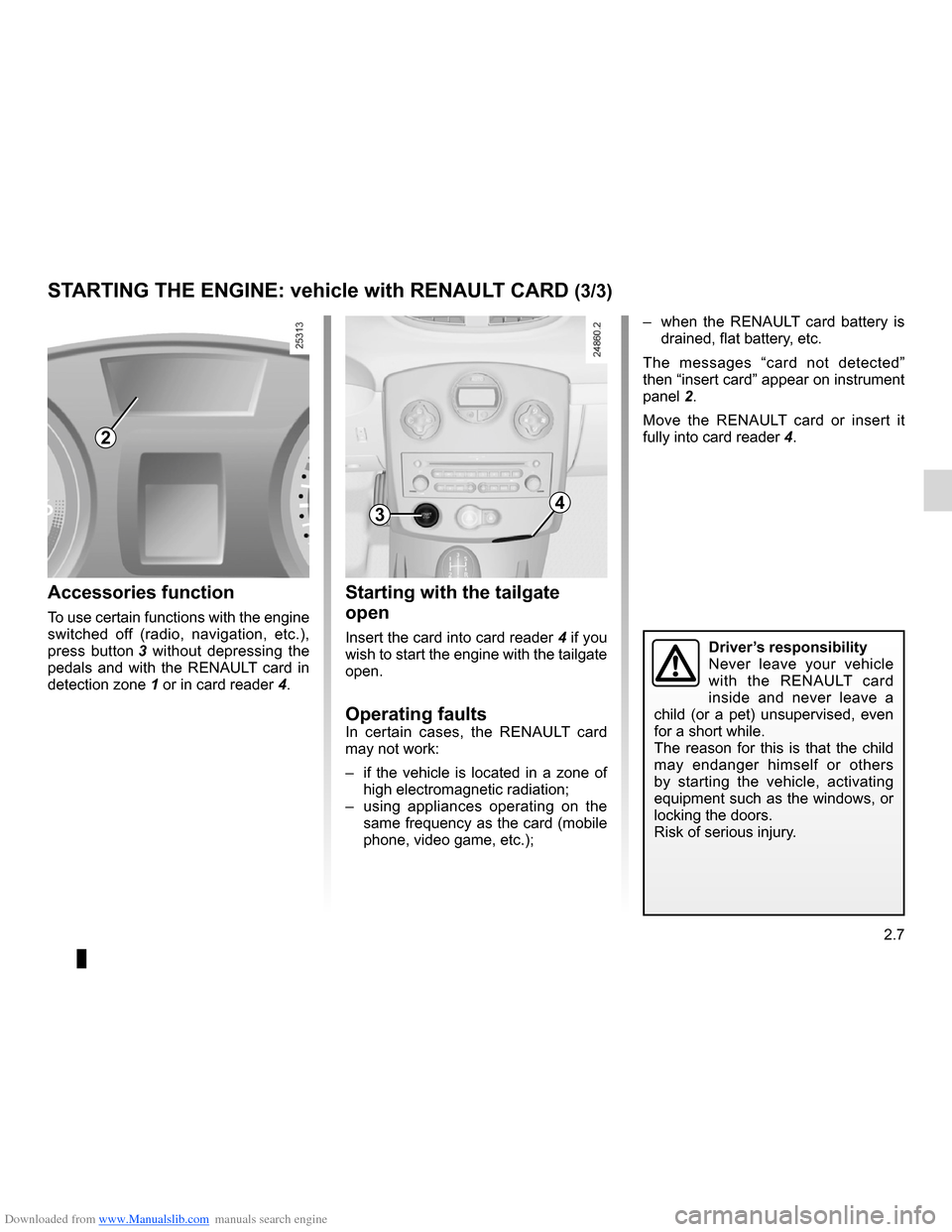
– when the RENAULT card battery is
drained, flat battery, etc.
The messages “card not detected”
then “insert card” appear on instrument
panel 2.
Move the RENAULT card or insert it
fully into card reader 4.
Starting with the tailgate
open
Insert the card into card reader 4 if you
wish to start the engine with the tailgate
open.
Operating faultsIn certain cases, the RENAULT card
may not work:
– if the vehicle is located in a zone of
high electromagnetic radiation;
– using appliances operating on the
same frequency as the card (mobile
phone, video game, etc.);
Accessories function
To use certain functions with the engine
switched off (radio, navigation, etc.),
press button 3 without depressing the
pedals and with the RENAULT card in
detection zone 1 or in card reader 4.
2
34
Driver’s responsibility
Never leave your vehicle
with the RENAULT card
inside and never leave a
child (or a pet) unsupervised, even
for a short while.
The reason for this is that the child
may endanger himself or others
by starting the vehicle, activating
equipment such as the windows, or
locking the doors.
Risk of serious injury.
Page 102 of 268
Downloaded from www.Manualslib.com manuals search engine stopping the engine .............................. (up to the end of the DU)
engine start/stop button ........................ (up to the end of the DU)
RENAULT card use .................................................. (up to the end of the DU)
driving ................................................... (up to the end of the DU)
2.8
ENG_UD12574_2
Arrêt moteur : véhicule avec carte Renault (X85 - B85 - C85 - S85\
- K85 - Renault)
ENG_NU_853-7_BCSK85_Renault_2
When you leave your vehi -
cle, especially if you have
your RENAULT card with
you, check that the engine
is completely switched off.
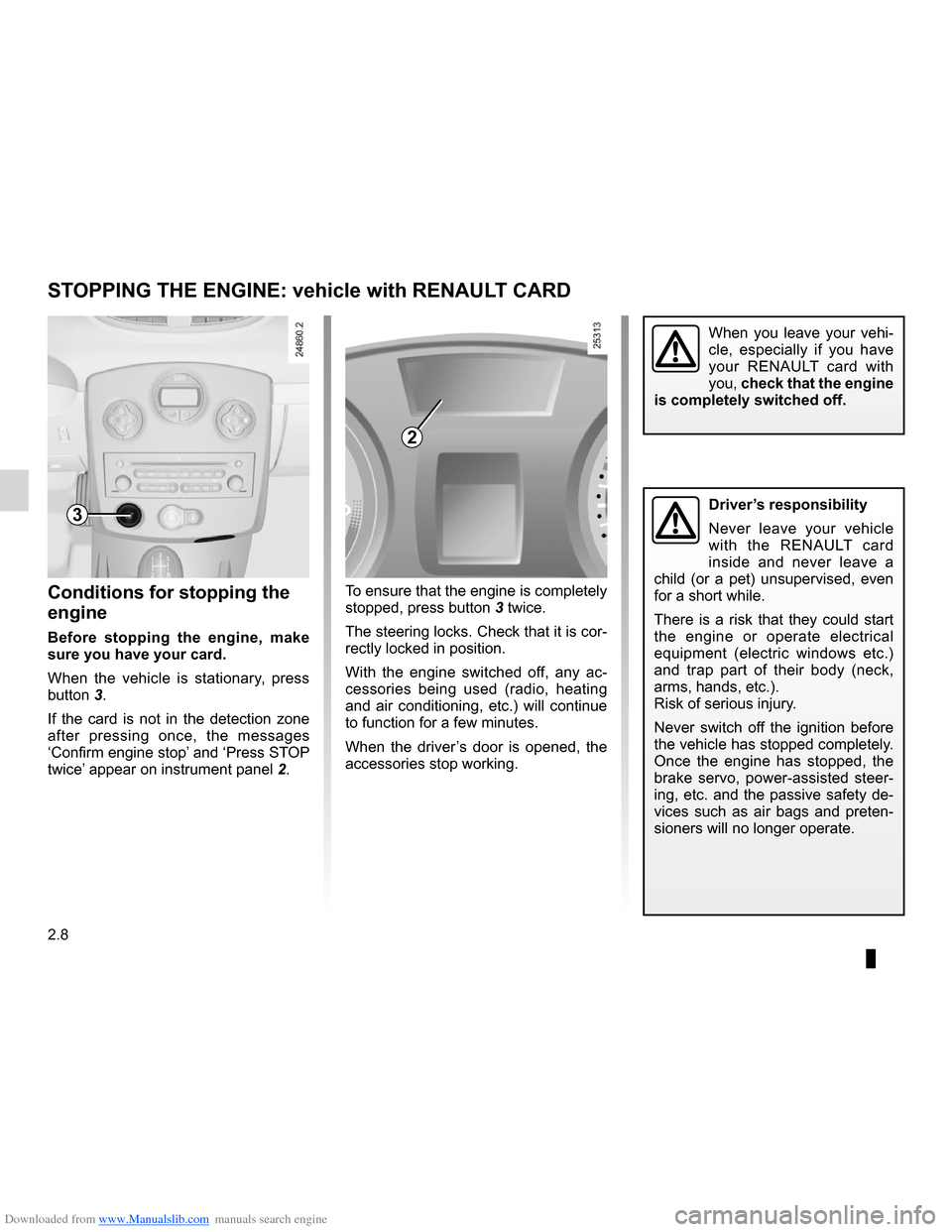
To ensure that the engine is completely
stopped, press button 3 twice.
The steering locks. Check that it is cor-
rectly locked in position.
With the engine switched off, any ac -
cessories being used (radio, heating
and air conditioning, etc.) will continue
to function for a few minutes.
When the driver’s door is opened, the
accessories stop working.Conditions for stopping the
engine
Before stopping the engine, make
sure you have your card.
When the vehicle is stationary, press
button 3.
If the card is not in the detection zone
after pressing once, the messages
‘Confirm engine stop’ and ‘Press STOP
twice’ appear on instrument panel 2.
STOPPING THE ENGINE: vehicle with RENAULT CARD
3
2
Driver’s responsibility
Never leave your vehicle
with the RENAULT card
inside and never leave a
child (or a pet) unsupervised, even
for a short while.
There is a risk that they could start
the engine or operate electrical
equipment (electric windows etc.)
and trap part of their body (neck,
arms, hands, etc.).
Risk of serious injury.
Never switch off the ignition before
the vehicle has stopped completely.
Once the engine has stopped, the
brake servo, power-assisted steer -
ing, etc. and the passive safety de-
vices such as air bags and preten -
sioners will no longer operate.
Page 190 of 268
Downloaded from www.Manualslib.com manuals search engine 4.14
ENG_UD25392_1
Entretien de la carrosserie (X95 - J95 - R95 - Renault)
ENG_NU_853-7_BCSK85_Renault_4
– bird droppings , which cause a
chemical reaction with the paint that
rapidly discolours paintwork and
may even cause the paint to peel
off;
Wash the vehicle immediately to
remove these marks since it is im -
possible to remove them by polish -
ing;
– salt, particularly in the wheel arches
and underneath the body after driv -
ing in areas where the roads have
been gritted.
Using a roller type car wash
Return the windscreen wiper stalk to
the Park position (refer to the informa-
tion on the “Windscreen washer, wiper”
in Section 1). Check the mounting of
external accessories, additional lights
and mirrors, and ensure that the wiper
blades are secured with adhesive tape.
Remove the radio aerial mast if your
vehicle is fitted with this equipment.
Remember to remove the tape and refit
the antenna after washing.y ou should
Observe the vehicle stopping distances
when driving on gravelled surfaces to
prevent paint damage.
Repair, or have repaired quickly, areas
where the paint has been damaged, to
prevent corrosion spreading.
Remember to visit the body shop pe -
riodically in order to maintain your
anti-corrosion warranty. Refer to the
Maintenance Service Booklet.
Respect local regulations about wash -
ing vehicles (e.g. do not wash your ve-
hicle on a public highway).
Wash your car frequently, with the
engine off, with cleaning products rec-
ommended by the manufacturer (never
use abrasive products). Rinse thor -
oughly beforehand with a jet:
– spots of tree resin and industrial
grime;
– mud in the wheel arches and under -
neath the body which forms damp
patches;
BODyWORK MAINTENANCE (2/2)
If it is necessary to clean mechani -
cal components, hinges, etc., spray
them with products approved by our
Technical Department to protect them
after they have been cleaned.
Cleaning the headlights
As the headlights are made of plastic
“glass”, use a soft cloth or cotton wool
to clean them. If this does not clean
them properly, moisten the cloth with
soapy water, then wipe clean with a soft
damp cloth or cotton wool.
Finally, carefully dry off with a soft dry
cloth.
Cleaning products containing alco -
hol must not be used.
We have selected special products
to care for your vehicle and you can
obtain these from the manufactur -
er’s accessory outlets.
Page 191 of 268
Downloaded from www.Manualslib.com manuals search engine maintenance:interior trim ...................................... (up to the end of the DU)
interior trim maintenance ................................... (up to the end of the DU)
4.15
ENG_UD21919_7
Entretien des garnitures intérieures (X35 - X45 - X65 - J77 - X81 - \
J81 - X85 - X91 - B91 - K91 - D91 - X83 - X61 - X77 ph2 - X95 - B95 - D9\
5 - K95 - J95 - R95 - L38 -
ENG_NU_853-7_BCSK85_Renault_4
Interior trim maintenance
Glass instrument panel(e.g. instrument panel, clock, exterior
temperature display, radio display, etc.)
Use a soft cloth (or cotton wool).
If this does not clean it properly, use a
soft cloth (or cotton wool) slightly mois-
tened with soapy water and then wipe
clean with a soft damp cloth or cotton
wool.
Finally, carefully dry off with a soft dry
cloth.
Cleaning products containing alco -
hol must not be used under any cir-
cumstances.
Seat belts
These must be kept clean.
Use products selected by our Technical
Department (Approved outlets) or
warm, soapy water and a sponge and
wipe with a dry cloth.
Detergents or dyes must not be used
under any circumstances.
INTERIOR TRIM MAINTENANCE (1/2)
Textiles (seats, door trim, etc)
Vacuum-clean the textiles regularly.
Liquid stain
Use soapy water.
Dab lightly (never rub) with a soft cloth,
rinse and remove the excess.
Solid or pasty stain
Carefully remove the excess solid or
pasty material immediately with a
spatula (working from the edges to the
centre to avoid spreading the stain).
Clean as for a liquid stain.
Special instructions for sweets or
chewing gum
Put an ice cube on the stain to solidify
it, then proceed as for a solid stain.
A well-maintained vehicle will last
longer. It is therefore recommended to
maintain the interior of the vehicle regu-
larly.
A stain should always be dealt with
swiftly.
Whatever type of stain is on the trim,
use
cold (or warm) soapy water with
natural soap.
Detergents (washing-up liquid, pow -
dered products, alcohol-based prod-
ucts) should not be used.
Use a soft cloth.
Rinse and soak up the excess.
For further recommendations for
maintaining the interior, and/or for
any unsatisfactory results, please
see an authorised dealer.
Page 193 of 268
Downloaded from www.Manualslib.com manuals search engine 5.1
ENG_UD25611_8
Sommaire 5 (X85 - B85 - C85 - S85 - K85 - Renault)
ENG_NU_853-7_BCSK85_Renault_5
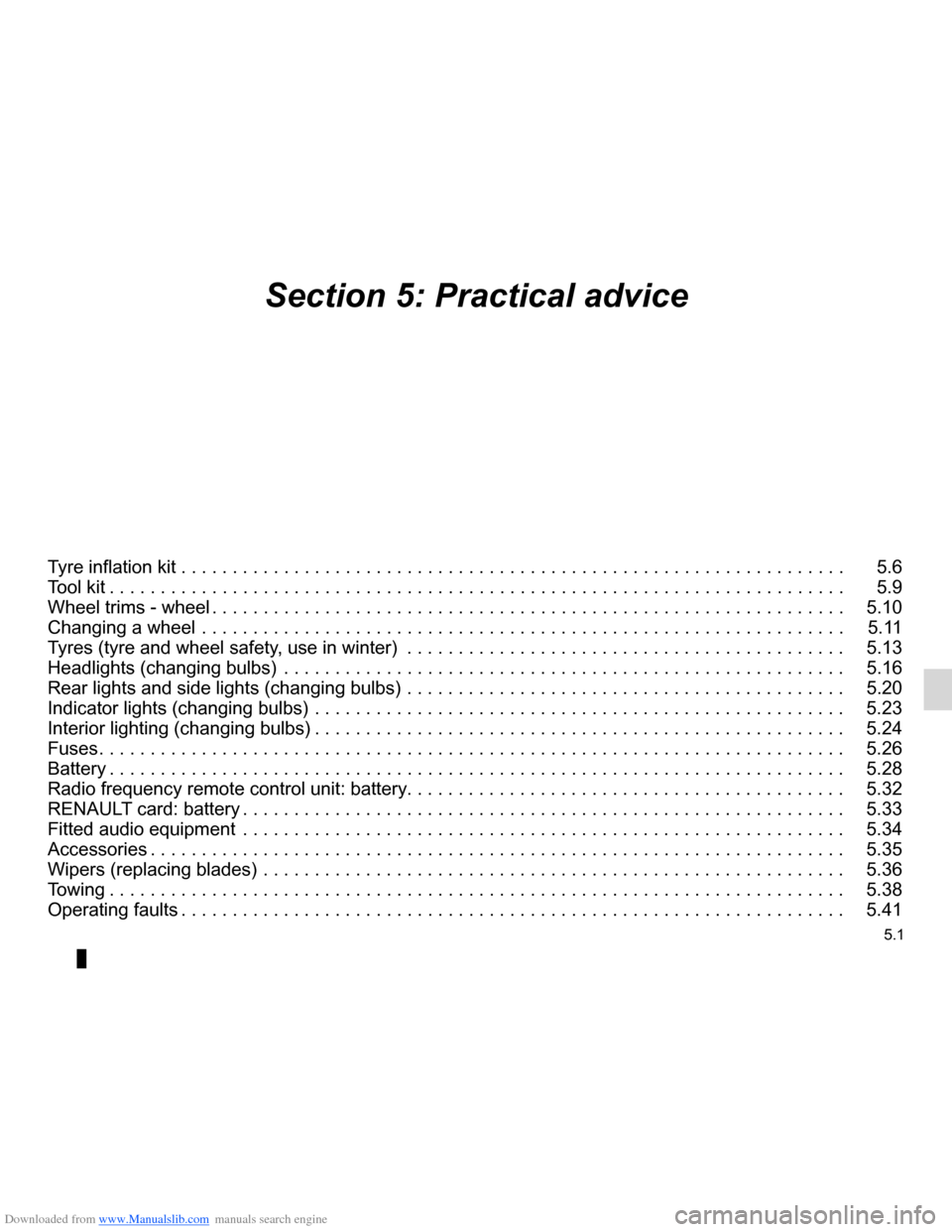
Section 5: Practical advice
Tyre inflation kit . . . . . . . . . . . . . . . . . . . . . . . . . . . . . . . . . . . . . . . . . . . . . . . . . . . . . . . . . . . . . . . . . 5.6
Tool kit . . . . . . . . . . . . . . . . . . . . . . . . . . . . . . . . . . . . . . . . . . . . . . . . . . . . . . . . . . . . . . . . . . . . . . . . 5.9
Wheel trims - wheel . . . . . . . . . . . . . . . . . . . . . . . . . . . . . . . . . . . . . . . . . . . . . . . . . . . . . . . . . . . . . . 5.10
Changing a wheel . . . . . . . . . . . . . . . . . . . . . . . . . . . . . . . . . . . . . . . . . . . . . . . . . . . . . . . . . . . . . . . 5.11
Tyres (tyre and wheel safety, use in winter) . . . . . . . . . . . . . . . . . . . . . . . . . . . . . . . . . . . . . . . . . . . 5.13
Headlights (changing bulbs) . . . . . . . . . . . . . . . . . . . . . . . . . . . . . . . . . . . . . . . . . . . . . . . . . . . . . . . 5.16
Rear lights and side lights (changing bulbs) . . . . . . . . . . . . . . . . . . . . . . . . . . . . . . . . . . . . . . . . . . . 5.20
Indicator lights (changing bulbs) . . . . . . . . . . . . . . . . . . . . . . . . . . . . . . . . . . . . . . . . . . . . . . . . . . . . 5.23
Interior lighting (changing bulbs) . . . . . . . . . . . . . . . . . . . . . . . . . . . . . . . . . . . . . . . . . . . . . . . . . . . . 5.24
Fuses . . . . . . . . . . . . . . . . . . . . . . . . . . . . . . . . . . . . . . . . . . . . . . . . . . . . . . . . . . . . . . . . . . . . . . . . . 5.26
Battery . . . . . . . . . . . . . . . . . . . . . . . . . . . . . . . . . . . . . . . . . . . . . . . . . . . . . . . . . . . . . . . . . . . . . . . . 5.28
Radio frequency remote control unit: battery . . . . . . . . . . . . . . . . . . . . . . . . . . . . . . . . . . . . \
. . . . . . . 5.32
RENAULT card: battery . . . . . . . . . . . . . . . . . . . . . . . . . . . . . . . . . . . . . . . . . . . . . . . . . . . . . . . . . . . 5.33
Fitted audio equipment . . . . . . . . . . . . . . . . . . . . . . . . . . . . . . . . . . . . . . . . . . . . . . . . . . . . . . . . . . . 5.34
Accessories . . . . . . . . . . . . . . . . . . . . . . . . . . . . . . . . . . . . . . . . . . . . . . . . . . . . . . . . . . . . . . . . . . . . 5.35
Wipers (replacing blades) . . . . . . . . . . . . . . . . . . . . . . . . . . . . . . . . . . . . . . . . . . . . . . . . . . . . . . . . . 5.36
Towing . . . . . . . . . . . . . . . . . . . . . . . . . . . . . . . . . . . . . . . . . . . . . . . . . . . . . . . . . . . . . . . . . . . . . . . . 5.38
Operating faults . . . . . . . . . . . . . . . . . . . . . . . . . . . . . . . . . . . . . . . . . . . . . . . . . . . . . . . . . . . . . . . . . 5.41
Page 219 of 268
Downloaded from www.Manualslib.com manuals search engine JauneNoirNoir texte
5.27
ENG_UD24921_5
Fusibles (X85 - B85 - C85 - S85 - K85 - Renault)
ENG_NU_853-7_BCSK85_Renault_5
Some accessories are protected by
fuses located in the engine compart -
ment.
However, due to their reduced acces -
sibility, we advise you to have your
fuses replaced by an approved
Dealer .
FUSES (2/2)
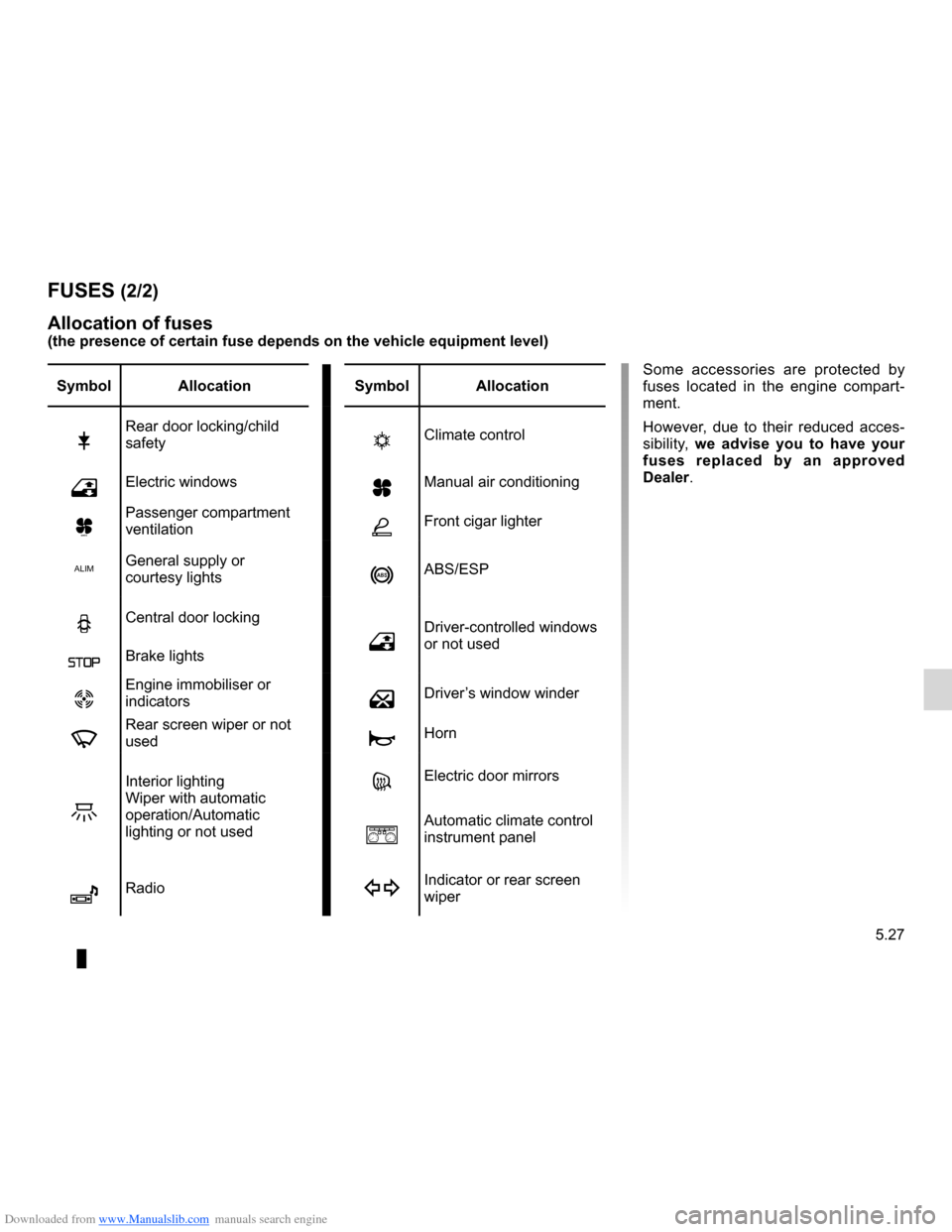
Allocation of fuses
(the presence of certain fuse depends on the vehicle equipment level)
Symbol Allocation SymbolAllocation
2Rear door locking/child
safetytClimate control
hElectric windowsyManual air conditioning
ÚPassenger compartment
ventilationÆFront cigar lighter
ALIMGeneral supply or
courtesy lightsnABS/ESP
NCentral door locking
hDriver-controlled windows
or not used
ßBrake lights
ÙEngine immobiliser or
indicatorsæDriver’s window winder
fRear screen wiper or not
usedÌHorn
Z
Interior lighting
Wiper with automatic
operation/Automatic
lighting or not usedgElectric door mirrors
aAutomatic climate control
instrument panel
îRadioIndicator or rear screen
wiper
Page 222 of 268
Downloaded from www.Manualslib.com manuals search engine 5.30
ENG_UD12592_2
Batterie : dépannage (X85 - B85 - C85 - S85 - K85 - Renault)
ENG_NU_853-7_BCSK85_Renault_5
Jaune NoirNoir texte
BATTERY: troubleshooting (3/4)
Special procedures may be
required to charge some
batteries. Contact your ap-
proved Dealer.
Avoid all risk of sparks which may
cause an immediate explosion and
charge the battery in a well-venti -
lated area. Risk of serious injury.
If your vehicle is to be left stationary for
a relatively long time, disconnect the
battery or have it recharged regularly,
particularly during cold weather. It will
then be necessary, with the engine run-
ning, to move the steering wheel slowly,
from lock to lock and to reprogram the
electronic equipment with a memory
feature, radio, etc. The battery should
be stored in a cool and dry location pro-
tected from frost.
Note: if you have disconnected or re -
charged a battery, move the steering
wheel slowly from lock to lock to reset
the system.
Have the battery’s charge status
checked regularly:
–
especially if you use your vehicle for
short journeys or for frequent driving
in town;
– when the exterior temperature drops
(in winter), the charge decreases .
In winter, only use the electrical
equipment that is really necessary;
– finally, you should understand that
the charge decreases naturally as a
result of certain permanent electrical
consumers such as the clock, after-
sales accessories, etc.
When many accessories are fitted to
the vehicle, have them connected to
the + after ignition feed. In this case, it
is advisable to have your vehicle fitted
with a battery which has an increased
nominal capacity. Contact an approved
Dealer.Connecting a battery charger
The battery charger must be com -
patible with a battery with nominal
voltage of 12 volts.
Switch the engine off and then discon -
nect both battery leads starting with
the negative terminal.
Do not disconnect the battery when the
engine is running. Follow the instruc-
tions given by the manufacturer for
the battery charger you are using.
Only a fully charged and well-main -
tained battery will have a long and
useful life and enable you to start the
vehicle’s engine normally.
The battery must be kept clean and dry.
Page 224 of 268
Downloaded from www.Manualslib.com manuals search engine battery (remote control) ........................ (up to the end of the DU)
5.32
ENG_UD12595_2
Télécommandes à radiofréquence : piles (X85 - B85 - C85 - S\
85 - K85 - Renault)
ENG_NU_853-7_BCSK85_Renault_5
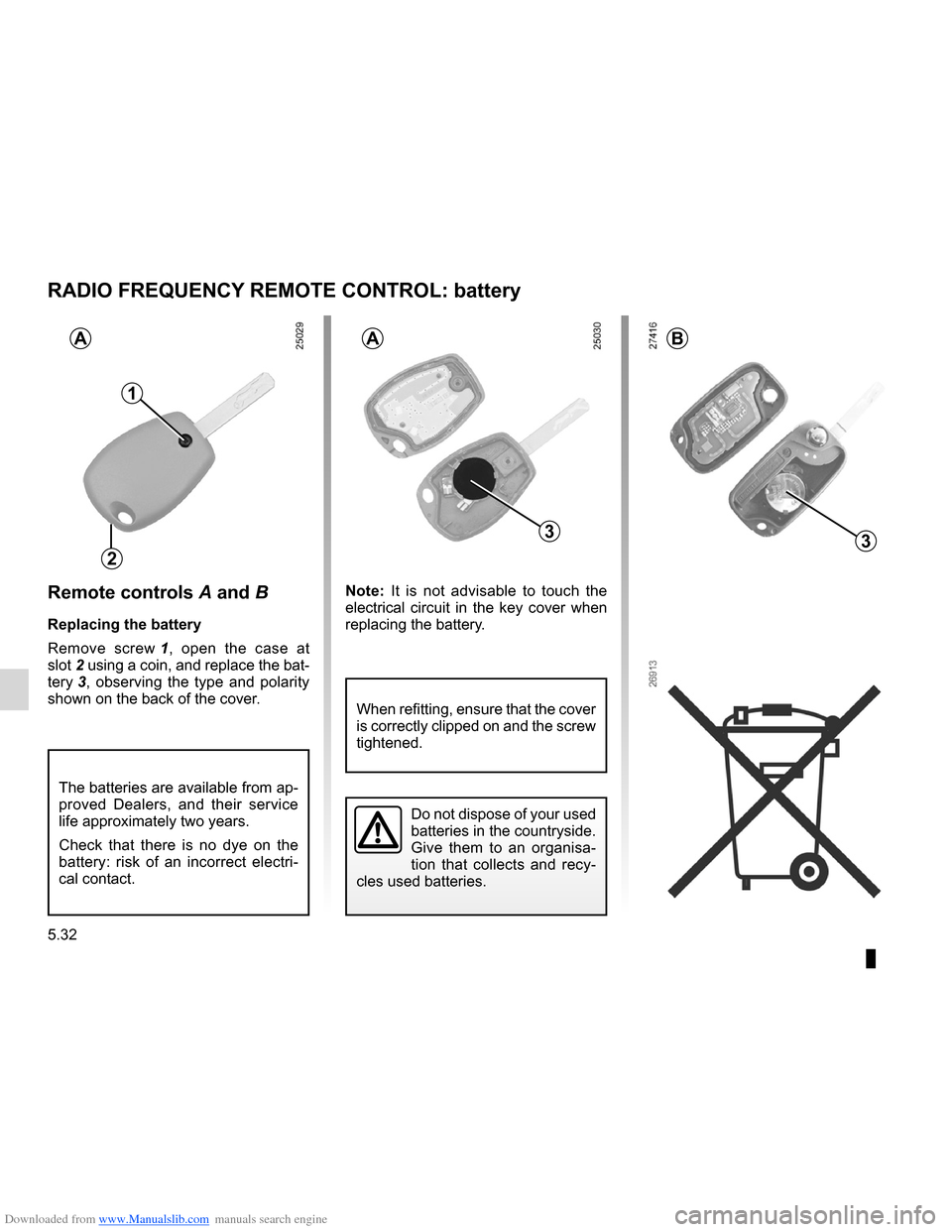
Remote controls A and B
Replacing the battery
Remove screw 1 , open the case at
slot 2 using a coin, and replace the bat-
tery 3 , observing the type and polarity
shown on the back of the cover. Note:
It is not advisable to touch the
electrical circuit in the key cover when
replacing the battery.
Radio frequency remote control: battery
The batteries are available from ap-
proved Dealers, and their service
life approximately two years.
Check that there is no dye on the
battery: risk of an incorrect electri -
cal contact.
RADIO FREQUENCY REMOTE CONTROL: battery
2
1
3
AAB
3
Do not dispose of your used
batteries in the countryside.
Give them to an organisa-
tion that collects and recy -
cles used batteries.
When refitting, ensure that the cover
is correctly clipped on and the screw
tightened.