light RENAULT CLIO 2012 X85 / 3.G Repair Manual
[x] Cancel search | Manufacturer: RENAULT, Model Year: 2012, Model line: CLIO, Model: RENAULT CLIO 2012 X85 / 3.GPages: 268, PDF Size: 8.73 MB
Page 118 of 268
Downloaded from www.Manualslib.com manuals search engine driving ................................................... (up to the end of the DU)
speed limiter ......................................... (up to the end of the DU)
cruise control-speed limiter................... (up to the end of the DU)
2.24
ENG_UD10565_1
Régulateur-limiteur de vitesses : fonction limiteur (X85 - B85 - C85\
- S85 - K85 - Renault)
ENG_NU_853-7_BCSK85_Renault_2
Jaune NoirNoir texte
Speed limiter
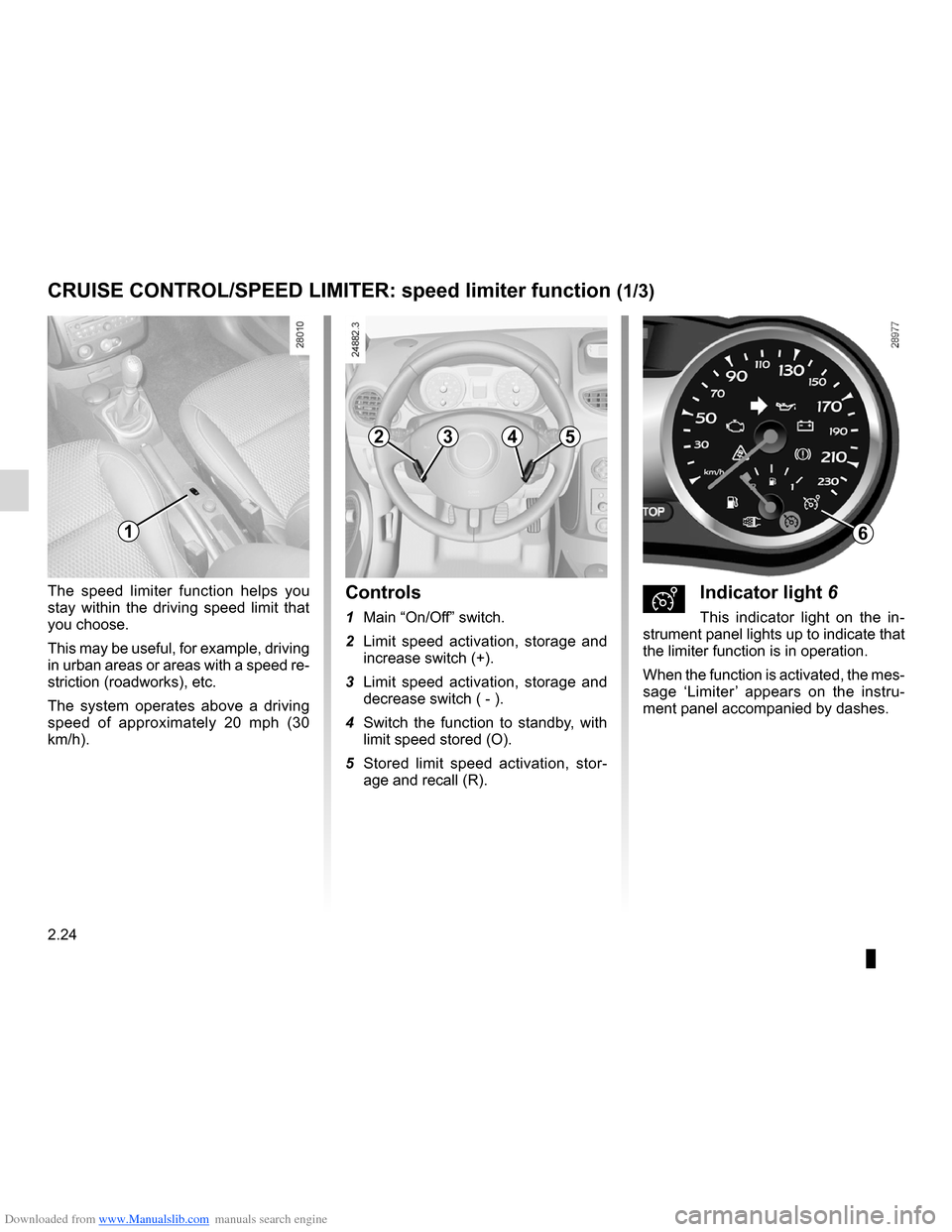
ÐIndicator light 6
This indicator light on the in -
strument panel lights up to indicate that
the limiter function is in operation.
When the function is activated, the mes-
sage ‘Limiter ’ appears on the instru -
ment panel accompanied by dashes.
Controls
1 Main “On/Off” switch.
2 Limit speed activation, storage and
increase switch (+).
3 Limit speed activation, storage and
decrease switch ( - ).
4 Switch the function to standby, with
limit speed stored (O).
5 Stored limit speed activation, stor -
age and recall (R).
The speed limiter function helps you
stay within the driving speed limit that
you choose.
This may be useful, for example, driving
in urban areas or areas with a speed re-
striction (roadworks), etc.
The system operates above a driving
speed of approximately 20 mph (30
km/h).
CRUISE CONTROL/SPEED LIMITER:
speed limiter function (1/3)
16
2534
Page 119 of 268

ENG_NU_85")
Downloaded from www.Manualslib.com manuals search engine JauneNoirNoir texte
2.25
ENG_UD10565_1
Régulateur-limiteur de vitesses : fonction limiteur (X85 - B85 - C85\
- S85 - K85 - Renault)
ENG_NU_853-7_BCSK85_Renault_2
Varying the limit speed
The limit speed may be changed by
pressing repeatedly or holding down:
– switch 2 (+) to increase the speed;
– switch 3 (-) to decrease the speed.
The system is designed in such a
way that it is possible to detect a dif-
ference between the stored speed
and the speed shown on the instru-
ment panel.
Driving
When a limit speed has been stored,
if this speed is not reached the vehicle
behaves in a similar way to those with-
out the speed limiter function.
From this point, no effort on the accel-
erator pedal will allow you to exceed
the programmed speed except in an
emergency (refer to information on
“Exceeding the limit speed”).
Switching on
Press switch 1 on the side showing
Ð. This indicator light on the instru-
ment panel comes on.
Limiting the speed
At a steady speed (above 20 mph
(30 km/ h)), press switch 2 (+): the
speed is stored.
CRUISE CONTROL/SPEED LIMITER: speed limiter function (2/3)
The speed limiter function is
in no way linked to the brak-
ing system.
23
1
Page 120 of 268

ENG_NU_853-7_BCSK85_Renault_2")
Downloaded from www.Manualslib.com manuals search engine 2.26
ENG_UD10565_1
Régulateur-limiteur de vitesses : fonction limiteur (X85 - B85 - C85\
- S85 - K85 - Renault)
ENG_NU_853-7_BCSK85_Renault_2
CRUISE CONTROL/SPEED LIMITER: speed limiter function (3/3)
Recalling the limit speed
A stored speed can be recalled by
pressing switch 5 (R) until the message
“Speed limiter” is displayed.
Exceeding the limit speed
In the event of an emergency
It is possible to exceed the limit speed
at any moment. To do this: press the
accelerator pedal firmly and fully
(beyond the kickdown point).
Whilst the speed is being exceeded,
the cruising speed displayed on the in-
strument panel flashes.
When the emergency has passed, re -
lease the accelerator pedal: the speed
limiter function will return as soon as
you reach a speed lower than the limit
speed before the emergency.
Limit speed cannot be maintained
In some driving conditions (for example
when driving up or down a steep gradi -
ent), the system is unable to maintain
the limit speed: the stored speed on the
instrument panel information display
will flash to inform you of this situation.
Switching off the function
The speed limiter function is interrupted
when you press:
– switch 4 (O), in which case the limit
speed remains stored and the mes-
sage “Stored” appears on the instru-
ment panel;
– switch 1 , in which case the limit
speed is no longer stored, and the in-
dicator light on the instrument panel
goes out to confirm that the function
has been cancelled.
1
5423
Page 122 of 268

ENG_NU_853-7_BCSK85_Renaul")
Downloaded from www.Manualslib.com manuals search engine 2.28
ENG_UD22304_2
Régulateur-limiteur de vitesses : fonction régulateur (X85 - B85 \
- C85 - S85 - K85 - Renault)
ENG_NU_853-7_BCSK85_Renault_2
Jaune NoirNoir texte
Driving
Once a cruising speed is stored and
the cruise control function is active,
you may lift your foot off the accelera -
tor pedal.
Important: you are never -
theless advised to keep
your feet close to the pedals
in order to react if neces -
sary.The system is designed in such a
way that it is possible to detect a dif-
ference between the stored speed
and the speed shown on the instru-
ment panel.
Activating cruise control
At a steady speed (above 20 mph
( 3 0 k m / h ) a p p r o x i m a t e l y ) p r e s s
switch 2 (+) or 3 (-): the speed is stored.
Cruise control activation is confirmed
when indicator light 6 is lit up in green
in addition to indicator light 7.Switching on
Press switch 1 on the side showing
Ï.
Indicator light 7 on the instrument panel
lights up to indicate that the cruise con-
trol function is in operation.
When the function is activated, the
message ‘Cruise control’ appears on
the instrument panel accompanied by
dashes.
CRUISE CONTROL/SPEED LIMITER: cruise control function (2/4)
1
23
7
6
Page 124 of 268

ENG_NU_853-7_BCSK85_Renaul")
Downloaded from www.Manualslib.com manuals search engine 2.30
ENG_UD22304_2
Régulateur-limiteur de vitesses : fonction régulateur (X85 - B85 \
- C85 - S85 - K85 - Renault)
ENG_NU_853-7_BCSK85_Renault_2
Switching off the function
Press switch 1. If you do this, the speed
is not memorised.
The instrument panel green indicator
lights
Ï and ¦ go out, con -
firming that the function is deactivated.
Recalling the cruising speed
If a speed has been stored, it is possi-
ble to recall it by pressing switch 5 (R),
on condition that you are driving faster
than 20 mph (30 km/h) and that you
are sure that the driving conditions are
suitable (traffic, road surface condition,
weather conditions, etc.).
Pressing switches 2 (+) or 3 (-) re -
activates the cruise control func -
tion without taking into account the
memorised speed: it is the speed at
which the vehicle is moving that is
taken into account.
Putting the function on
standby
The function is interrupted when you:
– the switch 4 (O);
– the brake pedal;
– the clutch pedal or shift into neutral
if the vehicle has an automatic gear-
box.
In all three cases, the cruising speed is
stored.
Standby is confirmed when indicator
light
¦ goes out.
CRUISE CONTROL/SPEED LIMITER: cruise control function (4/4)
Putting the cruise control
on standby or switching it
off does not cause a rapid
reduction in speed: you
must brake by depressing the brake
pedal.
1
2354
Page 125 of 268
Downloaded from www.Manualslib.com manuals search engine automatic gearbox (use) ....................... (up to the end of the DU)
changing gear ....................................... (up to the end of the DU)
driving ................................................... (up to the end of the DU)
automatic gearbox selector lever ..........(up to the end of the DU)
2.31
ENG_UD12577_2
Boîte automatique (X85 - B85 - C85 - S85 - K85 - Renault)
ENG_NU_853-7_BCSK85_Renault_2
Automatic gearbox
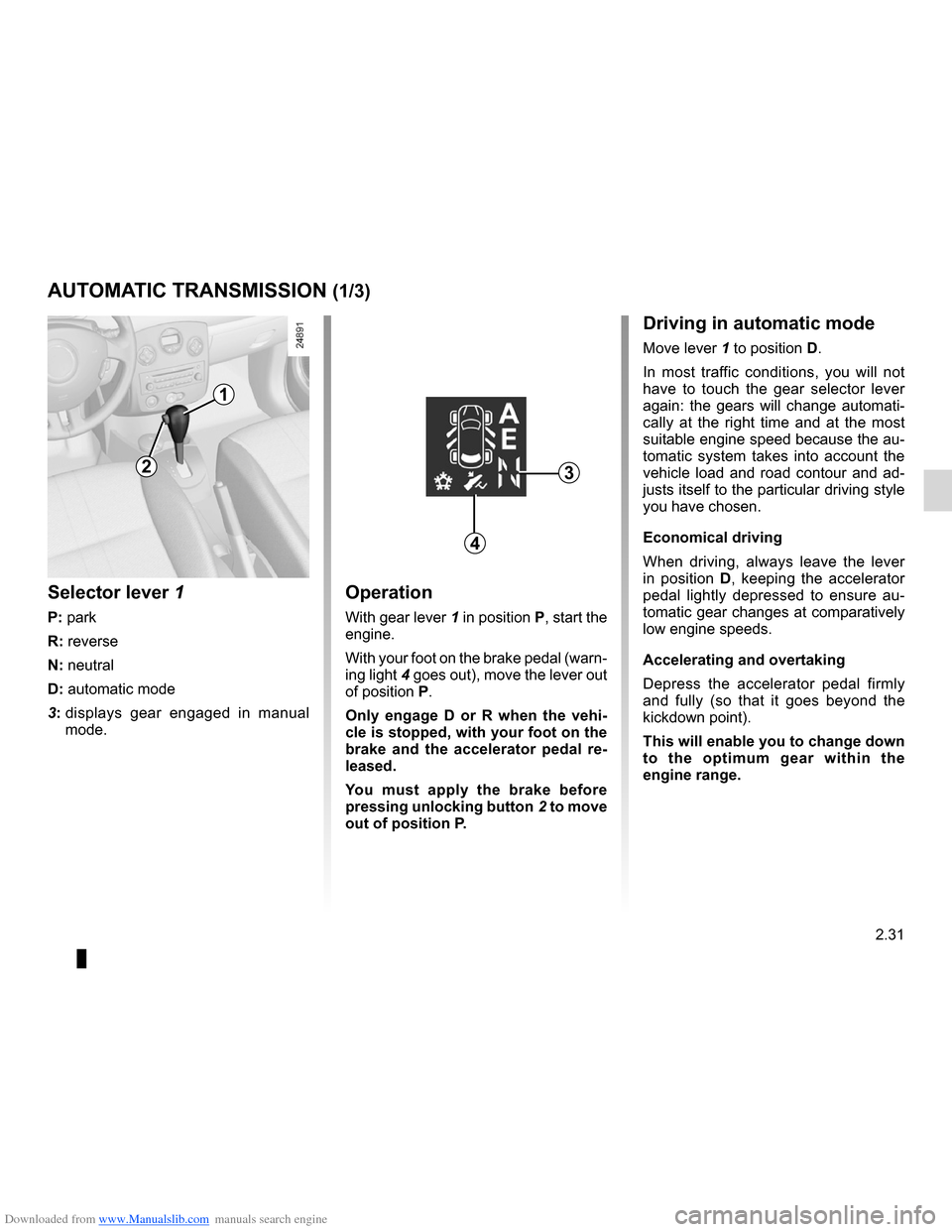
Operation
With gear lever 1 in position P, start the
engine.
With your foot on the brake pedal (warn-
ing light 4 goes out), move the lever out
of position P.
Only engage D or R when the vehi -
cle is stopped, with your foot on the
brake and the accelerator pedal re -
leased.
You must apply the brake before
pressing unlocking button 2 to move
out of position P.
Selector lever 1
P: park
R: reverse
N: neutral
D: automatic mode
3: displays gear engaged in manual
mode.
AUTOMATIC TRANSMISSION (1/3)
1
3
Driving in automatic mode
Move lever 1 to position D.
In most traffic conditions, you will not
have to touch the gear selector lever
again: the gears will change automati -
cally at the right time and at the most
suitable engine speed because the au-
tomatic system takes into account the
vehicle load and road contour and ad-
justs itself to the particular driving style
you have chosen.
Economical driving
When driving, always leave the lever
in position D, keeping the accelerator
pedal lightly depressed to ensure au -
tomatic gear changes at comparatively
low engine speeds.
Accelerating and overtaking
Depress the accelerator pedal firmly
and fully (so that it goes beyond the
kickdown point).
This will enable you to change down
to the optimum gear within the
engine range.
4
2
Page 126 of 268
Downloaded from www.Manualslib.com manuals search engine 2.32
ENG_UD12577_2
Boîte automatique (X85 - B85 - C85 - S85 - K85 - Renault)
ENG_NU_853-7_BCSK85_Renault_2
Jaune NoirNoir texte
AUTOMATIC TRANSMISSION (2/3)
1
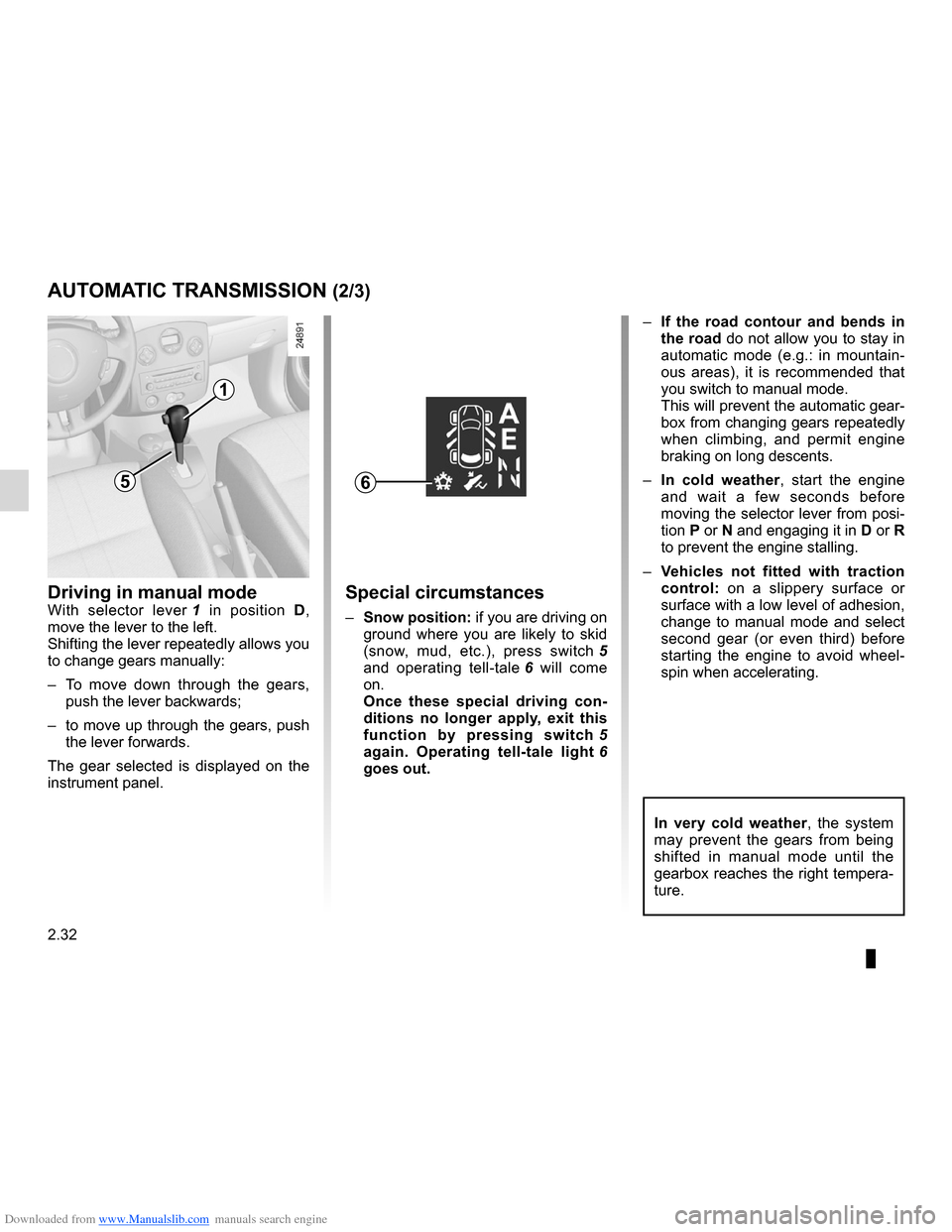
Driving in manual modeWith selector lever 1 in position D,
move the lever to the left.
Shifting the lever repeatedly allows you
to change gears manually:
– To move down through the gears,
push the lever backwards;
– to move up through the gears, push
the lever forwards.
The gear selected is displayed on the
instrument panel.Special circumstances
– Snow position: if you are driving on
ground where you are likely to skid
(snow, mud, etc.), press switch 5
and operating tell-tale 6 will come
on.
Once these special driving con -
ditions no longer apply, exit this
function by pressing switch 5
again. Operating tell-tale light 6
goes out. –
If the road contour and bends in
the road do not allow you to stay in
automatic mode (e.g.: in mountain -
ous areas), it is recommended that
you switch to manual mode.
This will prevent the automatic gear-
box from changing gears repeatedly
when climbing, and permit engine
braking on long descents.
– In cold weather , start the engine
and wait a few seconds before
moving the selector lever from posi-
tion P or N and engaging it in D or R
to prevent the engine stalling.
– Vehicles not fitted with traction
control: on a slippery surface or
surface with a low level of adhesion,
change to manual mode and select
second gear (or even third) before
starting the engine to avoid wheel -
spin when accelerating.
65
In very cold weather , the system
may prevent the gears from being
shifted in manual mode until the
gearbox reaches the right tempera-
ture.
Page 128 of 268
Downloaded from www.Manualslib.com manuals search engine Quickshift gearbox ................................ (up to the end of the DU)
driving ................................................... (up to the end of the DU)
changing gear ....................................... (up to the end of the DU)
2.34
ENG_UD12578_2
Boîte de vitesses Quickshift (X85 - B85 - C85 - S85 - K85 - Renault)\
ENG_NU_853-7_BCSK85_Renault_2
Jaune NoirNoir texte
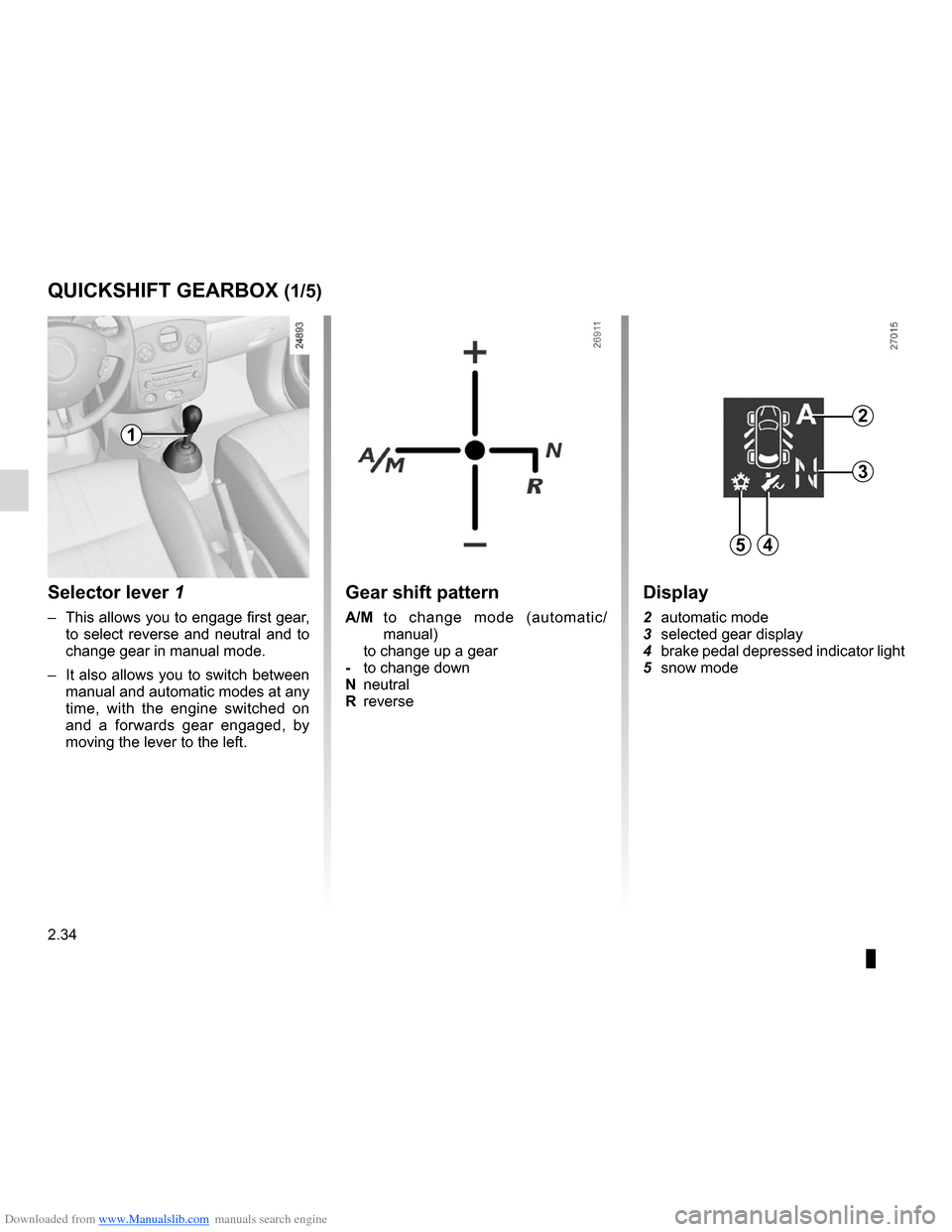
Selector lever 1
– This allows you to engage first gear,
to select reverse and neutral and to
change gear in manual mode.
– It also allows you to switch between
manual and automatic modes at any
time, with the engine switched on
and a forwards gear engaged, by
moving the lever to the left.
Quickshift gearbox
Gear shift pattern
A/M to change mode (automatic/
manual)
to change up a gear
- to change down
N neutral
R reverse
QUICkSHIFT GEARBOX (1/5)
1
54
2
3
Display
2 automatic mode
3 selected gear display
4 brake pedal depressed indicator light
5 snow mode
Page 129 of 268
\
ENG_NU_853-7_BCSK85_Renault_2
Op")
Downloaded from www.Manualslib.com manuals search engine JauneNoirNoir texte
2.35
ENG_UD12578_2
Boîte de vitesses Quickshift (X85 - B85 - C85 - S85 - K85 - Renault)\
ENG_NU_853-7_BCSK85_Renault_2
Operation
Switch on the ignition.
The display on the instrument panel
switches on. If neutral (N) is displayed,
start the engine but do not depress the
accelerator.
If a gear other than neutral ( N) is dis -
played, it will flash; starting is possi-
ble if you depress the brake pedal
(indicator light 4 will come on if you
forget) when holding the key in the
starting position.
The gear will automatically change to
neutral (N) and the engine will start.
You may also select neutral after
switching on the ignition by pushing the
lever to the right whilst depressing the
brake pedal.
When the engine is running, automatic
mode will be selected by default.
Note: if the display does not light up
when the ignition is switched on (dis -
charged battery), do not attempt to start
the engine by pushing the vehicle. Shifting to neutral
With the brake pedal depressed (indi
-
cator light 4 will come on if you forget),
push the lever towards the right.
Starting
The display shows N (neutral) and A
(automatic mode).
Moving off forwards
– With your foot on the brake pedal,
push the selector lever forwards or
backwards and then release it again
(the number 1 appears on the dis -
play).
– Release the brake pedal then accel-
erate gently to move forwards.
Reverse
– With your foot on the brake pedal,
push the selector lever towards the
right and backwards, and then re -
lease it.
Reverse gear is engaged (letter R
appears on the display).
– Release the brake pedal then accel-
erate gently to move backwards.
When the vehicle is stationary, push
the selector lever towards the front to
engage a forwards gear.
QUICkSHIFT GEARBOX (2/5)
For safety reasons, do not
switch off the ignition before
the vehicle has come to a
complete standstill.
4
Page 130 of 268
\
ENG_NU_853-7_BCSK85_Renault_2
Jaune NoirNoir texte
D")
Downloaded from www.Manualslib.com manuals search engine 2.36
ENG_UD12578_2
Boîte de vitesses Quickshift (X85 - B85 - C85 - S85 - K85 - Renault)\
ENG_NU_853-7_BCSK85_Renault_2
Jaune NoirNoir texte
Driving in automatic mode
Each time the ignition is switched on,
automatic mode is selected by default
(letter A on the display).
The vehicle is controlled using the ac -
celerator and the brake.
Gears will change automatically at
the correct moment and at a suitable
engine speed because automatic mode
takes into consideration the road sur -
face and the chosen driving style.
You may modify the gear selected auto-
matically by moving the lever forwards
or backwards (except if there is a risk of
under- or overrevving).
The oil level in the automatic gear-
box system reservoir varies ac -
cording to use. Adding oil is strictly
forbidden (except by qualified ap -
proved network personnel).
QUICkSHIFT GEARBOX (3/5)
If the engine is being overrevved or
underevved, the system will select
the optimal gear.
Changing mode
You can change mode at any time
by pushing the lever to the left. This
switches mode without changing gear.
Driving in manual mode
Using the selector lever
Pushing the lever repeatedly allows
you to change gears manually.
– to change up a gear: push the lever
forwards
– to change down a gear: push the
lever backwards
– to change to neutral: with the brake
pedal depressed (indicator light 4
will come on if you forget), push the
lever towards the right
Note: when the vehicle is stationary
(braking, red light, etc.), the system au-
tomatically switches to the most suita -
ble gear.
Accelerating and overtaking
To obtain maximum vehicle perform -
ance, in automatic or manual mode se-
lected, quickly depress the accelerator
pedal beyond the kickdown point.
This will activate the kickdown func -
tion allowing you to change down to the
most suitable gear.
Audible warning
If you leave the vehicle with the engine
running when in gear, an audible warn-
ing will sound. You must switch to neu-
tral before leaving the vehicle.