instrument panel RENAULT ESPACE 2012 J81 / 4.G User Guide
[x] Cancel search | Manufacturer: RENAULT, Model Year: 2012, Model line: ESPACE, Model: RENAULT ESPACE 2012 J81 / 4.GPages: 267, PDF Size: 8.95 MB
Page 58 of 267
control instruments ............................... (up to the end of the DU)
indicators: instrument panel ............................. (up to the end of the DU)
instrument panel ................................... (up to the end of the DU)
warning lights ........................................ (up to the end of the DU)
instrument panel messages ..................(up to the end of the DU)
trip computer and warning system ........(up to the end of the DU)
1.52
ENG_UD24088_3
Ordinateur de bord (X81 - J81 - Renault)
ENG_NU_932-3_X81ph3_Renault_1
Jaune NoirNoir texte
Trip computer
TrIP cOMPUTer: general information (1/2)
Trip computer and warning
system
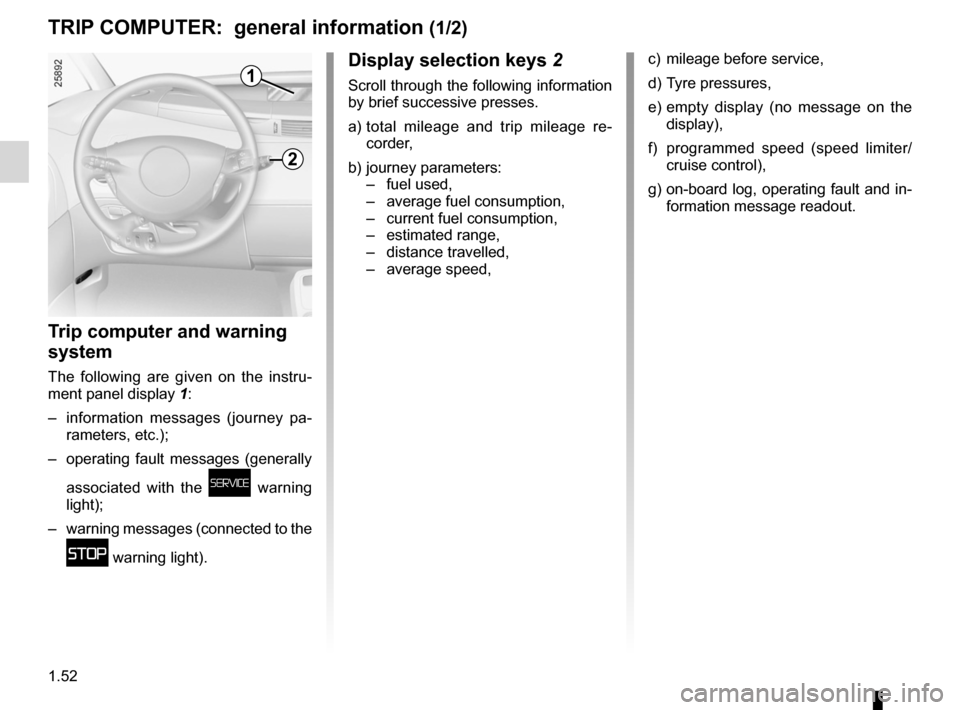
The following are given on the instru-
ment panel display 1:
– information messages (journey pa -
rameters, etc.);
– operating fault messages (generally
associated with the
ú warning
light);
– warning messages (connected to the
û warning light).
display selection keys 2
Scroll through the following information
by brief successive presses.
a) total mileage and trip mileage re -
corder,
b) journey parameters:
– fuel used,
– average fuel consumption,
– current fuel consumption,
– estimated range,
– distance travelled,
– average speed,
c) mileage before service,
d) Tyre pressures,
e) empty display (no message on the
display),
f) programmed speed (speed limiter/
cruise control),
g) on-board log, operating fault and in-
formation message readout.
1
2
Page 65 of 267

ENG_NU_932-3_X81ph3_Renault_1
TrIP cOMPUTer: operating fault messages (1/2)
These appear with t")
1.59
ENG_UD24101_1
Ordinateur de bord : messages d’anomalies de fonctionnement (X81 - J\
81 - Renault)
ENG_NU_932-3_X81ph3_Renault_1
TrIP cOMPUTer: operating fault messages (1/2)
These appear with the ú warning light and mean that you should drive very carefully to an approved dealer as soon
as possible. If you fail to follow this recommendation, you risk damagin\
g your vehicle.
They disappear when the display selection key is pressed or after several seconds and are stored in the computer log. The
ú
warning light stays on. Examples of operating fault messages are given i\
n the following pages.
Messages Interpretation of messages
« esP Off » Deactivation of the A.S.R. traction control system (see information on the “A.S.R. traction
control system” in Section 2).
« TYre sensOr aBsenT »Sensor fault on the wheel not shown on the instrument panel: this is the case, for example,
when the emergency spare wheel is fitted on the vehicle (see the information on “Tyre pres-
sure monitor” in Section 2).
« cHecK TYre PressUres »Insufficient tyre pressure for the wheel shown on the multifunction display or on the instru-
ment panel; correct the tyre pressure as soon as possible.
« cHeck fUeL fILTer » Indicates that there is water present in the diesel fuel. Contact your approved Dealer as soon
as possible.
Page 73 of 267

lights:dipped beam headlights ................................... (current page)
lights: side lights ......................................................... (current page)
1.67
ENG_UD20353_1
Eclairage et signalisation extérieure (X81 - J81 - Renault)
ENG_NU_932-3_X81ph3_Renault_1
Lighting and exterior signals
eXTerIOr LIGHTInG and sIGnaLs (1/3)
kdipped beam
headlights
automatic operation
With the engine running, the dipped
beam headlights are switched on or off
automatically depending on the level of
ambient light, without the need to oper-
ate stalk 1 (position 0).
This function can be deactivated or re-
activated.
– To deactivate it, with the ignition
on and engine switched off , turn
stalk 1 twice consecutively from po -
sition 0 to side lights. This action is
confirmed by an audible signal.
– To activate it, with the ignition
switched on and engine running or
off, turn stalk 1 twice consecutively
from position 0 to side lights. This
action is confirmed by an audible
signal.
– To select the main beam headlights,
pull stalk 1 towards you. To return to
the dipped beam headlight position,
pull the stalk towards you again.
– The lights go out when the engine
is stopped, when the driver’s door is
opened or when the vehicle is locked
with the RENAULT card.
Manual operation
Turn the end of stalk 1 until the symbol
is opposite mark 3.
An indicator light lights up on the instru-
ment panel in all cases.
daytime running lights
The daytime running lights come on
when the engine is started if stalk 1 is
in position 0.
If the dipped beam headlights oper -
ate automatically, the daytime running
lights only come on if the side lights are
off
1
2
1
3
uside lights
Turn the end of stalk 1 until the
symbol is opposite mark 3.
The instrument panel lights up, the
brightness can be adjusted by using
control knob 2.
Page 74 of 267
warning buzzer ...................................................... (current page)
lights: fog lights .......................................................... (current page)
lights: main beam headlights ...................................... (current page)
1.68
ENG_UD20353_1
Eclairage et signalisation extérieure (X81 - J81 - Renault)
ENG_NU_932-3_X81ph3_Renault_1
Jaune NoirNoir texte
eXTerIOr LIGHTInG and sIGnaLs (2/3)
áMain beam headlights
With the dipped beam head -
lights lit, pull the switch stalk towards
you.
When the main beam headlights are
lit, an indicator light on the instrument
panel comes on.
To return to the dipped beam headlight
position, pull the stalk towards you.
eswitching off the lights
Return stalk 1 to its original po-
sition.
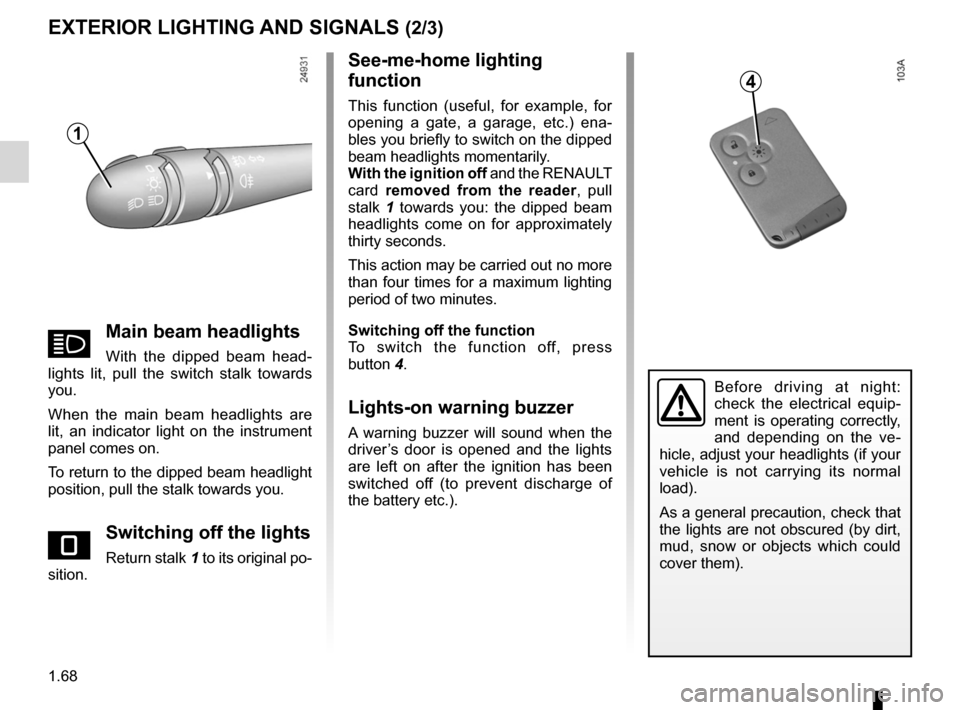
see-me-home lighting
function
This function (useful, for example, for
opening a gate, a garage, etc.) ena -
bles you briefly to switch on the dipped
beam headlights momentarily.
With the ignition off and the RENAULT
card removed from the reader , pull
stalk 1 towards you: the dipped beam
headlights come on for approximately
thirty seconds.
This action may be carried out no more
than four times for a maximum lighting
period of two minutes.
switching off the function
To switch the function off, press
button 4.
Lights-on warning buzzer
A warning buzzer will sound when the
driver’s door is opened and the lights
are left on after the ignition has been
switched off (to prevent discharge of
the battery etc.).
Before driving at night:
check the electrical equip -
ment is operating correctly,
and depending on the ve -
hicle, adjust your headlights (if your
vehicle is not carrying its normal
load).
As a general precaution, check that
the lights are not obscured (by dirt,
mud, snow or objects which could
cover them).
1
4
Page 75 of 267
fog lights ................................................................ (current page)
JauneNoirNoir texte
1.69
ENG_UD20353_1
Eclairage et signalisation extérieure (X81 - J81 - Renault)
ENG_NU_932-3_X81ph3_Renault_1
eXTerIOr LIGHTInG and sIGnaLs (3/3)
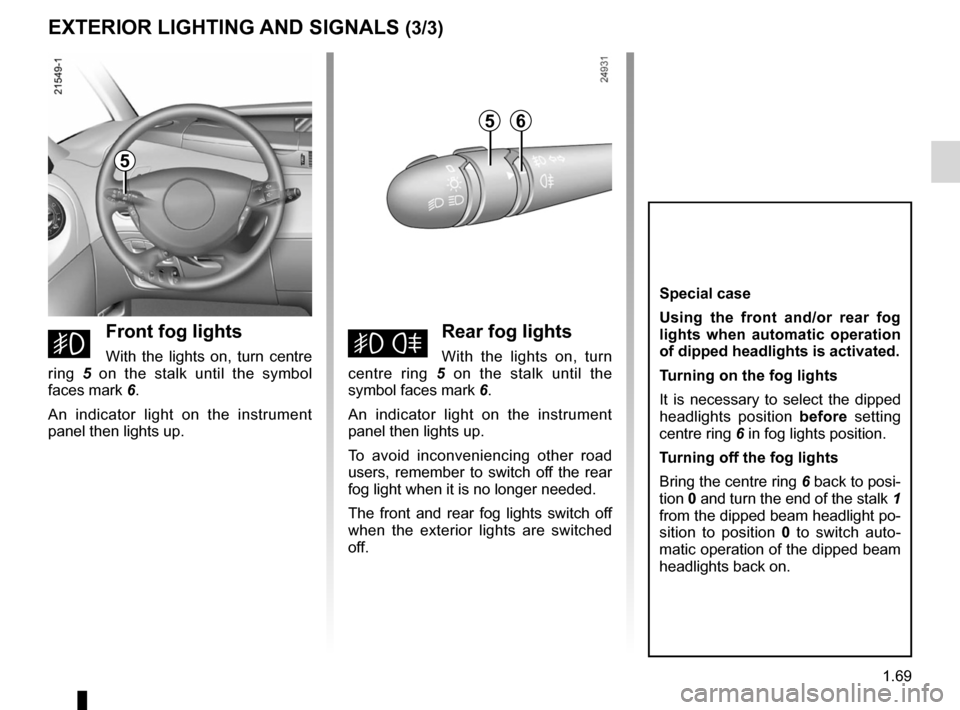
gfront fog lights
With the lights on, turn centre
ring 5 on the stalk until the symbol
faces mark 6.
An indicator light on the instrument
panel then lights up.hrear fog lights
With the lights on, turn
centre ring 5 on the stalk until the
symbol faces mark 6.
An indicator light on the instrument
panel then lights up.
To avoid inconveniencing other road
users, remember to switch off the rear
fog light when it is no longer needed.
The front and rear fog lights switch off
when the exterior lights are switched
off.
special case
Using the front and/or rear fog
lights when automatic operation
of dipped headlights is activated.
Turning on the fog lights
It is necessary to select the dipped
headlights position before setting
centre ring 6 in fog lights position.
Turning off the fog lights
Bring the centre ring 6 back to posi-
tion 0 and turn the end of the stalk 1
from the dipped beam headlight po-
sition to position 0 to switch auto -
matic operation of the dipped beam
headlights back on.
5
56
Page 86 of 267
2.4
ENG_UD25550_3
Démarrage/arrêt moteur avec carte RENAULT mains libres (X81 - J81 - Renault)
ENG_NU_932-3_X81ph3_Renault_2
Jaune NoirNoir texte
STARTING/STOPPING THE ENGINE (2/3)
Limited use
– When the engine is running, a ve -
hicle door is open and the card is
outside the vehicle (for example
when the driver gets out to open the
garage door): the engine continues
to run.
– When the engine is running, the ve-
hicle doors are closed and the card
is outside the vehicle (for example
when a passenger leaves the ve -
hicle and takes the RENAULT card
with them): the message “card not
detected” appears on the instrument
panel. The warning light flashes on
emergency card reader 3 and a beep
sounds when the vehicle is restarted
to warn you.
– The RENAULT card's operation
may be affected by interference
from nearby devices, such as exte -
rior installations or equipment oper -
ating on the same frequency as the
RENAULT card.
When you leave your vehi -
cle, especially if you have
your RENAULT card with
you, check that the engine
is completely switched off.
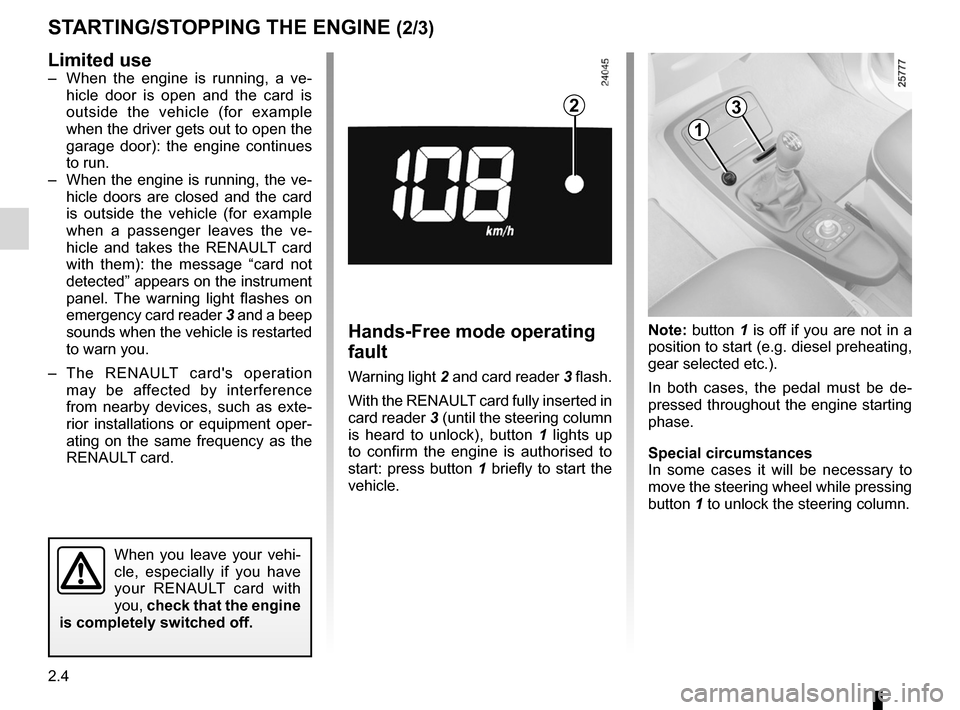
Hands-Free mode operating
fault
Warning light 2 and card reader 3 flash.
With the RENAULT card fully inserted in
card reader 3 (until the steering column
is heard to unlock), button 1 lights up
to confirm the engine is authorised to
start: press button 1 briefly to start the
vehicle. Note: button
1 is off if you are not in a
position to start (e.g. diesel preheating,
gear selected etc.).
In both cases, the pedal must be de -
pressed throughout the engine starting
phase.
Special circumstances
In some cases it will be necessary to
move the steering wheel while pressing
button 1 to unlock the steering column.
23
1
Page 87 of 267
JauneNoirNoir texte
2.5
ENG_UD25550_3
Démarrage/arrêt moteur avec carte RENAULT mains libres (X81 - J81 - Renault)
ENG_NU_932-3_X81ph3_Renault_2
3
1
STARTING/STOPPING THE ENGINE (3/3)
“Engine start” position
(continued)
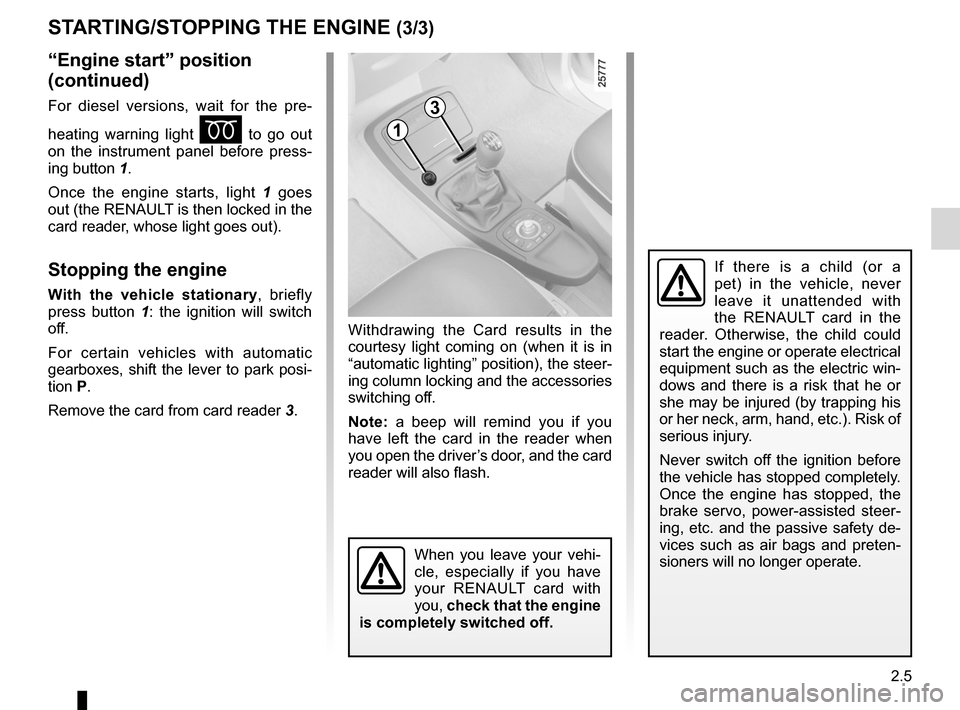
For diesel versions, wait for the pre -
heating warning light
É to go out
on the instrument panel before press -
ing button 1.
Once the engine starts, light 1 goes
out (the RENAULT is then locked in the
card reader, whose light goes out).
Stopping the engine
With the vehicle stationary , briefly
press button 1 : the ignition will switch
off.
For certain vehicles with automatic
gearboxes, shift the lever to park posi-
tion P.
Remove the card from card reader 3.Withdrawing the Card results in the
courtesy light coming on (when it is in
“automatic lighting” position), the steer-
ing column locking and the accessories
switching off.
Note:
a beep will remind you if you
have left the card in the reader when
you open the driver’s door, and the card
reader will also flash.
When you leave your vehi -
cle, especially if you have
your RENAULT card with
you, check that the engine
is completely switched off.
If there is a child (or a
pet) in the vehicle, never
leave it unattended with
the RENAULT card in the
reader. Otherwise, the child could
start the engine or operate electrical
equipment such as the electric win-
dows and there is a risk that he or
she may be injured (by trapping his
or her neck, arm, hand, etc.). Risk of
serious injury.
Never switch off the ignition before
the vehicle has stopped completely.
Once the engine has stopped, the
brake servo, power-assisted steer -
ing, etc. and the passive safety de-
vices such as air bags and preten -
sioners will no longer operate.
Page 90 of 267
parking brake ........................................ (up to the end of the DU)
driving ................................................... (up to the end of the DU)
2.8
ENG_UD20366_1
Frein de parking assisté (X81 - J81 - Renault)
ENG_NU_932-3_X81ph3_Renault_2
Jaune NoirNoir texte
Electronic parking brake
ASSISTED PARKING BRAKE
Applying the assisted
parking brake
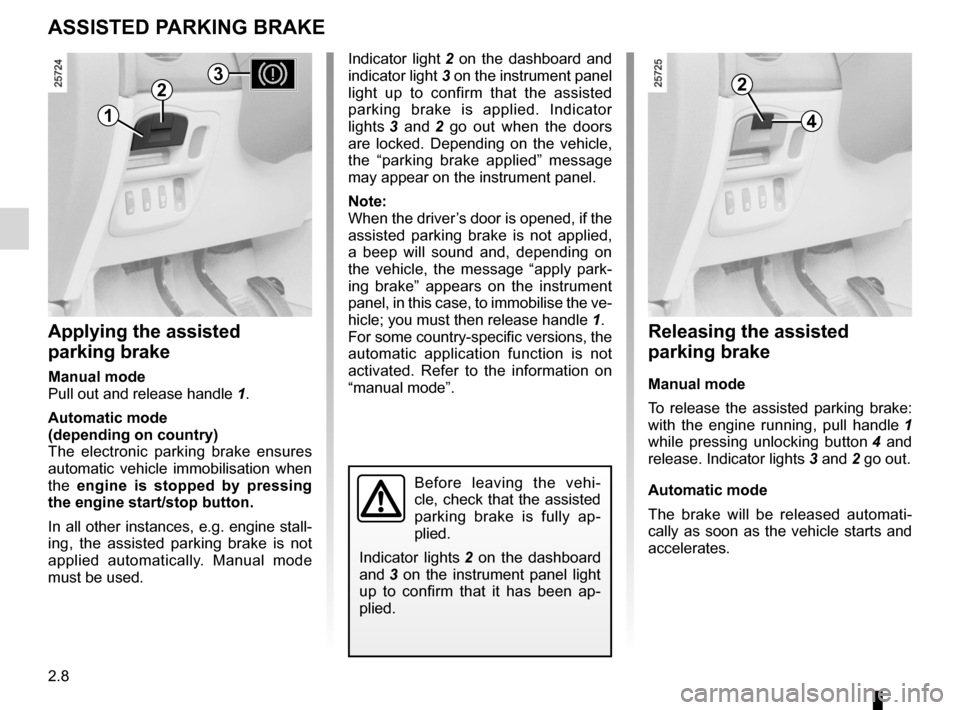
Manual mode
Pull out and release handle 1.
Automatic mode
(depending on country)
The electronic parking brake ensures
automatic vehicle immobilisation when
the engine is stopped by pressing
the engine start/stop button.
In all other instances, e.g. engine stall-
ing, the assisted parking brake is not
applied automatically. Manual mode
must be used.
Indicator light 2 on the dashboard and
indicator light 3 on the instrument panel
light up to confirm that the assisted
parking brake is applied. Indicator
lights 3 and 2 go out when the doors
are locked. Depending on the vehicle,
the “parking brake applied” message
may appear on the instrument panel.
Note:
When the driver’s door is opened, if the
assisted parking brake is not applied,
a beep will sound and, depending on
the vehicle, the message “apply park -
ing brake” appears on the instrument
panel, in this case, to immobilise the ve-
hicle; you must then release handle 1.
For some country-specific versions, the
automatic application function is not
activated. Refer to the information on
“manual mode”.
Releasing the assisted
parking brake
Manual mode
To release the assisted parking brake:
with the engine running, pull handle 1
while pressing unlocking button 4 and
release. Indicator lights 3 and 2 go out.
Automatic mode
The brake will be released automati -
cally as soon as the vehicle starts and
accelerates.
Before leaving the vehi -
cle, check that the assisted
parking brake is fully ap -
plied.
Indicator lights 2 on the dashboard
and 3 on the instrument panel light
up to confirm that it has been ap -
plied.
1
22
4
3
Page 91 of 267
JauneNoirNoir texte
2.9
ENG_UD20366_1
Frein de parking assisté (X81 - J81 - Renault)
ENG_NU_932-3_X81ph3_Renault_2
ASSISTED PARKING BRAKE (continued)
Special cases
If you have to park on a slope or are
towing a trailer, keep handle 1 pulled
out for a few seconds to obtain the
maximum braking effect.
Temporary stop
The assisted parking brake is not ap -
plied automatically when the engine is
running.
In all cases, the assisted parking brake
can be applied manually, e.g. when
stopping at a red light or on a slope.
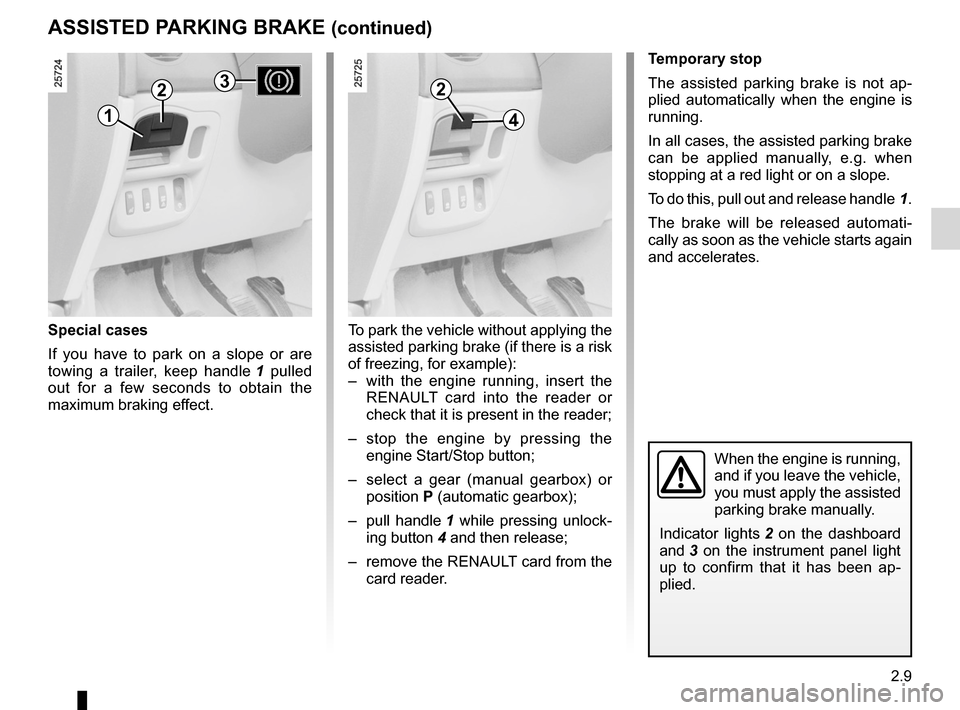
To do this, pull out and release handle 1.
The brake will be released automati -
cally as soon as the vehicle starts again
and accelerates.
When the engine is running,
and if you leave the vehicle,
you must apply the assisted
parking brake manually.
Indicator lights 2 on the dashboard
and 3 on the instrument panel light
up to confirm that it has been ap -
plied.
To park the vehicle without applying the
assisted parking brake (if there is a risk
of freezing, for example):
– with the engine running, insert the
RENAULT card into the reader or
check that it is present in the reader;
– stop the engine by pressing the
engine Start/Stop button;
– select a gear (manual gearbox) or
position P (automatic gearbox);
– pull handle 1 while pressing unlock-
ing button 4 and then release;
– remove the RENAULT card from the
card reader.
2
41
23
Page 99 of 267
\
ENG_NU_932-3_X81ph3_Renault_2
TYRE PRESSURE MONITOR
Fitting tyres(replacing tyres or fi")
JauneNoirNoir texte
2.17
ENG_UD20370_1
Système de surveillance de pression des pneus (X81 - J81 - Renault)\
ENG_NU_932-3_X81ph3_Renault_2
TYRE PRESSURE MONITOR
Fitting tyres(replacing tyres or fitting winter
tyres)
Since replacing tyres requires special
precautions, we advise you to contact
your approved dealer.
Reading the tyre pressure on the in-
strument panel (if fitted to the vehicle).
After the vehicle’s tyre pressures have
been checked, the warning messages
on the instrument panel and/or the
values read on the trip computer and
warning system are updated once you
exceed 15 mph (25 km/h).
Non-interchangeability of
wheels
Each of the sensors incor -
porated in the valves 1 is
dedicated to a single wheel:
under no circumstances
should you swap the wheels.
There is a risk of incorrect informa-
tion which could have serious con -
sequences.
To mark the correct position of the
wheel, note the colour of ring 2 (after
cleaning, if necessary) on each valve:
A yellow ring
B black ring
C red ring
D green ring
AB
Dc1
2
1