Door RENAULT ESPACE 2015 5.G User Guide
[x] Cancel search | Manufacturer: RENAULT, Model Year: 2015, Model line: ESPACE, Model: RENAULT ESPACE 2015 5.GPages: 316, PDF Size: 6.98 MB
Page 17 of 316
1.11
OPENING AND CLOSING THE DOORS (1/3)
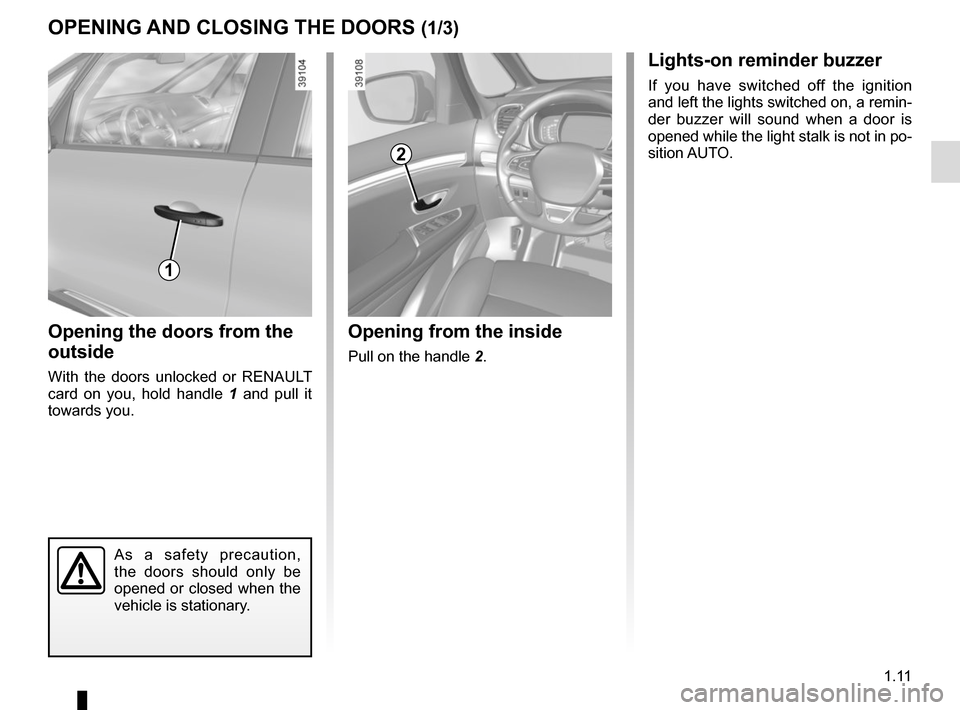
Opening the doors from the
outside
With the doors unlocked or RENAULT
card on you, hold handle 1 and pull it
towards you.
Opening from the inside
Pull on the handle 2.
2
As a safety precaution,
the doors should only be
opened or closed when the
vehicle is stationary.
1
Lights-on reminder buzzer
If you have switched off the ignition
and left the lights switched on, a remin-
der buzzer will sound when a door is
opened while the light stalk is not in po-
sition AUTO.
Page 18 of 316
1.12
OPENING AND CLOSING THE DOORS (2/3)
4
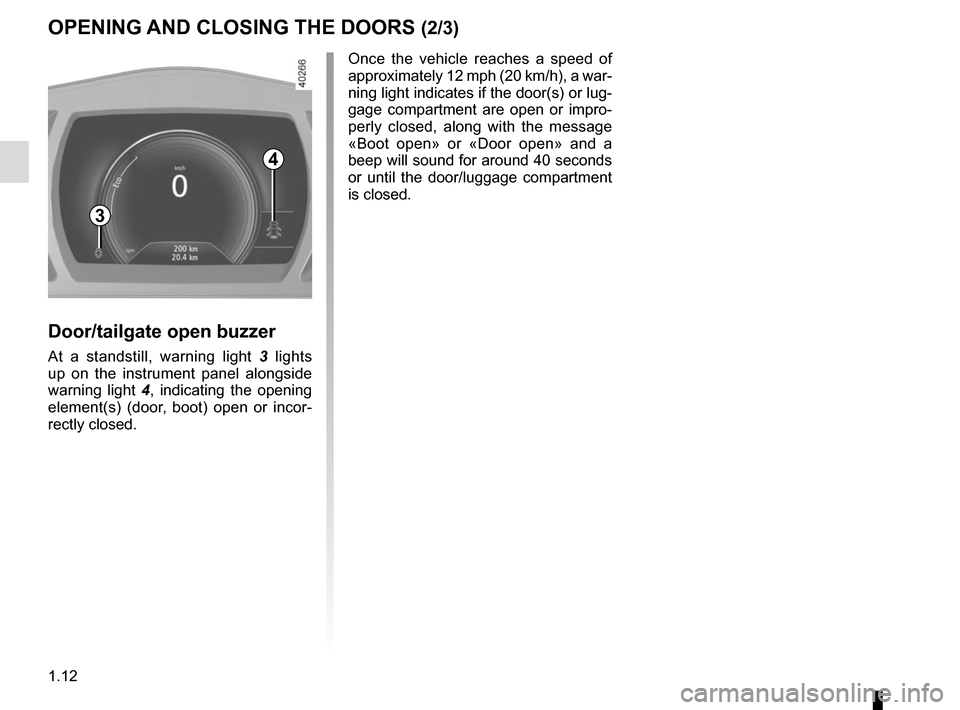
Door/tailgate open buzzer
At a standstill, warning light 3 lights
up on the instrument panel alongside
warning light 4, indicating the opening
element(s) (door, boot) open or incor-
rectly closed. Once the vehicle reaches a speed of
approximately 12 mph (20 km/h), a war-
ning light indicates if the door(s) or lug-
gage compartment are open or impro-
perly closed, along with the message
«Boot open» or «Door open» and a
beep will sound for around 40 seconds
or until the door/luggage compartment
is closed.
3
Page 19 of 316
1.13
OPENING AND CLOSING THE DOORS (3/3)
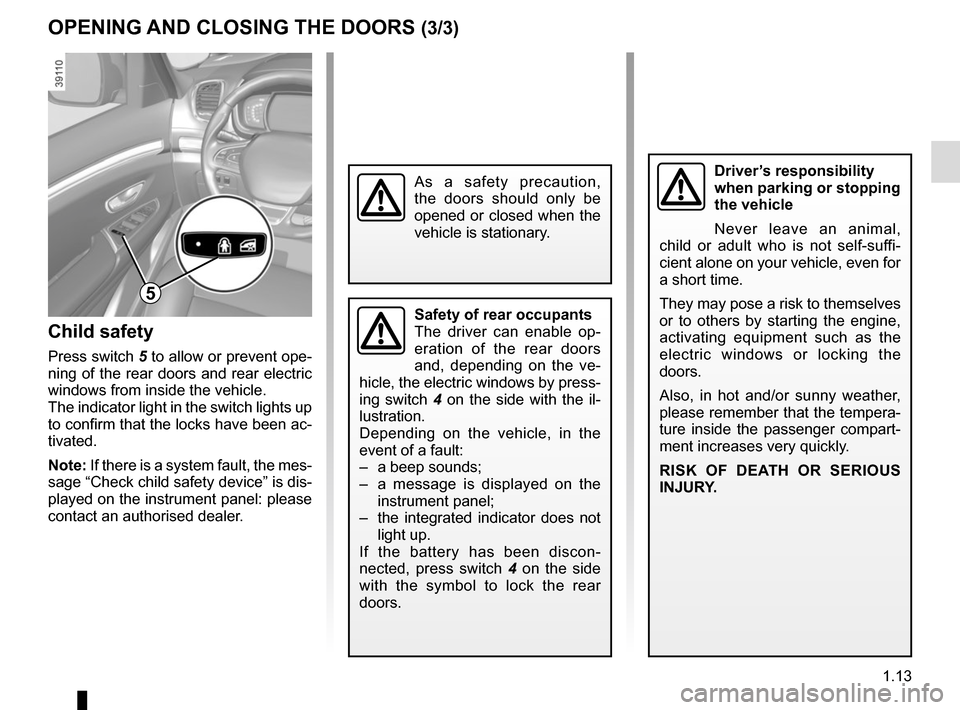
Child safety
Press switch 5 to allow or prevent ope-ning of the rear doors and rear electric
windows from inside the vehicle.
The indicator light in the switch lights up
to confirm that the locks have been ac-
tivated.
Note: If there is a system fault, the mes-
sage “Check child safety device” is dis-
played on the instrument panel: please
contact an authorised dealer.
Safety of rear occupants
The driver can enable op-
eration of the rear doors
and, depending on the ve-
hicle, the electric windows by press-
ing switch 4 on the side with the il-
lustration.
Depending on the vehicle, in the
event of a fault:
– a beep sounds;
– a message is displayed on the instrument panel;
– the integrated indicator does not light up.
If the battery has been discon-
nected, press switch 4 on the side
with the symbol to lock the rear
doors.
Driver’s responsibility
when parking or stopping
the vehicle
Never leave an animal,
child or adult who is not self-suffi-
cient alone on your vehicle, even for
a short time.
They may pose a risk to themselves
or to others by starting the engine,
activating equipment such as the
electric windows or locking the
doors.
Also, in hot and/or sunny weather,
please remember that the tempera-
ture inside the passenger compart-
ment increases very quickly.
RISK OF DEATH OR SERIOUS
INJURY.
5
As a safety precaution,
the doors should only be
opened or closed when the
vehicle is stationary.
Page 20 of 316
1.14
AUTOMATIC LOCKING WHEN DRIVING
Operating principleAfter the vehicle is started, the system
automatically locks the doors when you
are driving at approximately 6 mph
(10 km/h) and over.
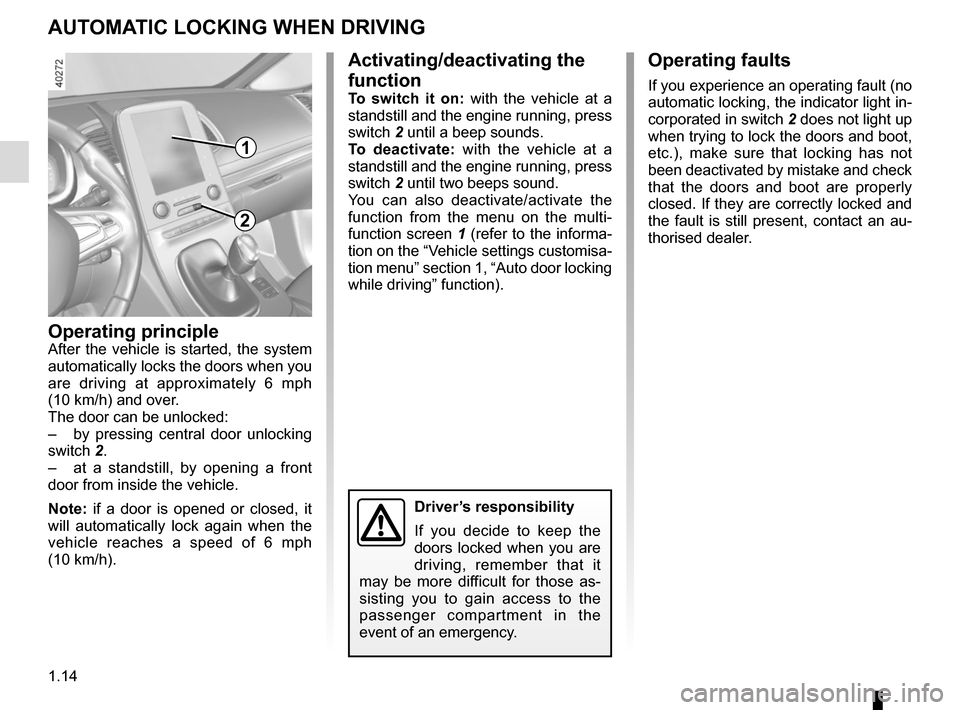
The door can be unlocked:
– by pressing central door unlocking
switch 2.
– at a standstill, by opening a front
door from inside the vehicle.
Note: if a door is opened or closed, it
will automatically lock again when the
vehicle reaches a speed of 6 mph
(10 km/h).
Activating/deactivating the
function
To switch it on: with the vehicle at a
standstill and the engine running, press
switch 2 until a beep sounds.
To deactivate: with the vehicle at a
standstill and the engine running, press
switch 2 until two beeps sound.
You can also deactivate/activate the
function from the menu on the multi-
function screen 1 (refer to the informa-
tion on the “Vehicle settings customisa-
tion menu” section 1, “Auto door locking
while driving” function).
Operating faults
If you experience an operating fault (no
automatic locking, the indicator light in-
corporated in switch 2 does not light up
when trying to lock the doors and boot,
etc.), make sure that locking has not
been deactivated by mistake and check
that the doors and boot are properly
closed. If they are correctly locked and
the fault is still present, contact an au-
thorised dealer.
2
Driver’s responsibility
If you decide to keep the
doors locked when you are
driving, remember that it
may be more difficult for those as-
sisting you to gain access to the
passenger compartment in the
event of an emergency.
1
Page 21 of 316
1.15
If fitted on the vehicle, the tailgate locks
and unlocks at the same time as the
doors.
There are four modes to manoeuvre
the tailgate:
– using the RENAULT card remote control;
– using the controls on the tailgate;
– using the dashboard control;
– using the hands-free function.
AUTOMATIC TAILGATE (1/5)
Conditions of use
– Immobilise the vehicle.
– If there is any ice or snow prevent-ing the tailgate from opening, this ice
or snow must be removed to free the
tailgate.
– In the event that the battery is dis- charged or if it is changed, the tail-
gate should be closed (manually
if necessary) to restart the tailgate
motor.
Ensure that nobody is close
to the moving parts when
opening/closing the tail-
gate.
Risk of injury.
Opening/Closing
Activating the automatic tailgate open-
ing or closing using the dashboard
control or using the card, three beeps
sound just before the tailgate begins to
move.
When opening or closing the tail-
gate, ensure that nothing interferes
with the manoeuvre.
To avoid damaging the tailgate
system, do not manually force the
tailgate to open or close while it is
moving.
Page 22 of 316
1.16
AUTOMATIC TAILGATE (2/5)
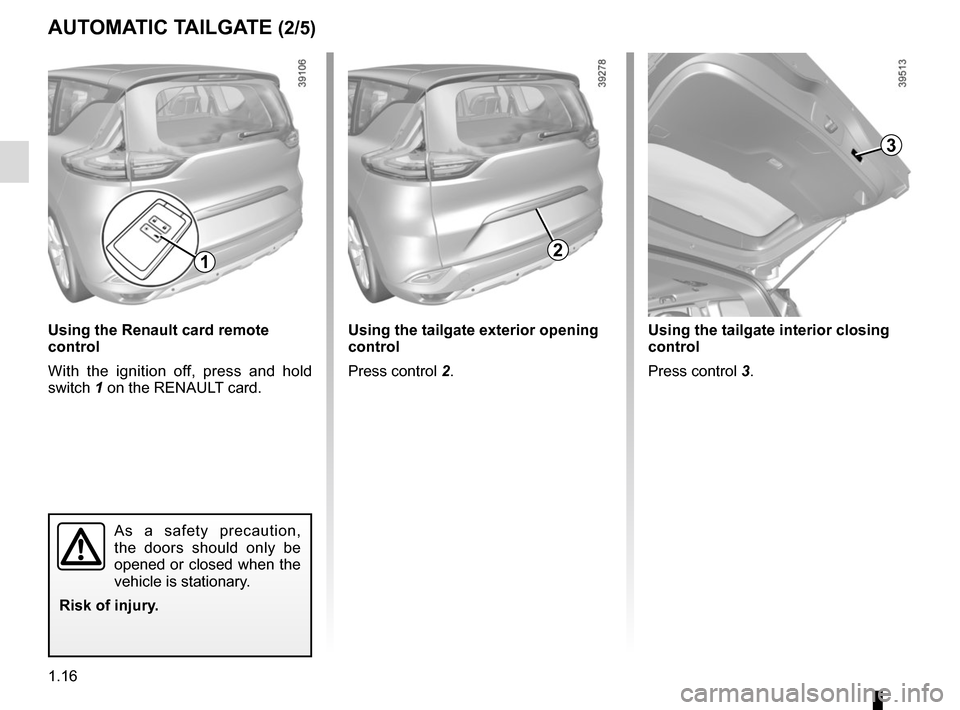
3
Using the tailgate interior closing
control
Press control 3.
2
Using the tailgate exterior opening
control
Press control 2.
1
Using the Renault card remote
control
With the ignition off, press and hold
switch 1 on the RENAULT card.
As a safety precaution,
the doors should only be
opened or closed when the
vehicle is stationary.
Risk of injury.
Page 25 of 316
1.19
AUTOMATIC TAILGATE (5/5)Operating faults
If you activate the automatic tailgate
continuously for around a minute (se-
quence of opening and closing), it will
stop in order to avoid overheating. The
operation will return to normal after
about a minute.
The automatic tailgate will not operate
if the battery is on low charge. In this
case, operate the automatic tailgate
with the engine started.
In very cold weather conditions, the au-
tomatic opening or closing may not op-
erate if the tailgate joints are frozen.
Precautions during use
Before opening/closing the tailgate,
ensure that the surrounding space is
sufficient to allow the tailgate to oper-
ate. If not, stop the tailgate movement
before contact.
The installation of accessories such as
a bicycle carrier on the tailgate will lead
to more weight on the tailgate. The tail-
gate may operate slowly or not open
fully.
If the tailgate is moving and the engine
is started, the movement will stop for a
seconds before continuing.
Avoid multiple manual stops during the
automatic tailgate movement (risk of
damaging the tailgate system).
Driver’s responsibility
Never leave an animal,
child or adult who is not
self-sufficient alone in your
vehicle, even for a short time.
They may pose a risk to themselves
or to others by starting the engine,
activating equipment such as the
electric windows or locking the
doors, for example.
Also, in hot and/or sunny weather,
please remember that the tempera-
ture inside the passenger compart-
ment increases very quickly.
RISK OF DEATH OR SERIOUS
INJURY.
Page 33 of 316
1.27
FRONT SEATS: Functions (3/3)
Position
It is possible to store the driving posi-
tion of the driver seat.
The driving position includes the set-
tings for the seat base and seatback as
well as the door mirrors.
The driving position can be stored and
recalled by pressing the buttons:
– RENAULT hands-free card detected;
– when the driver’s door is opened.
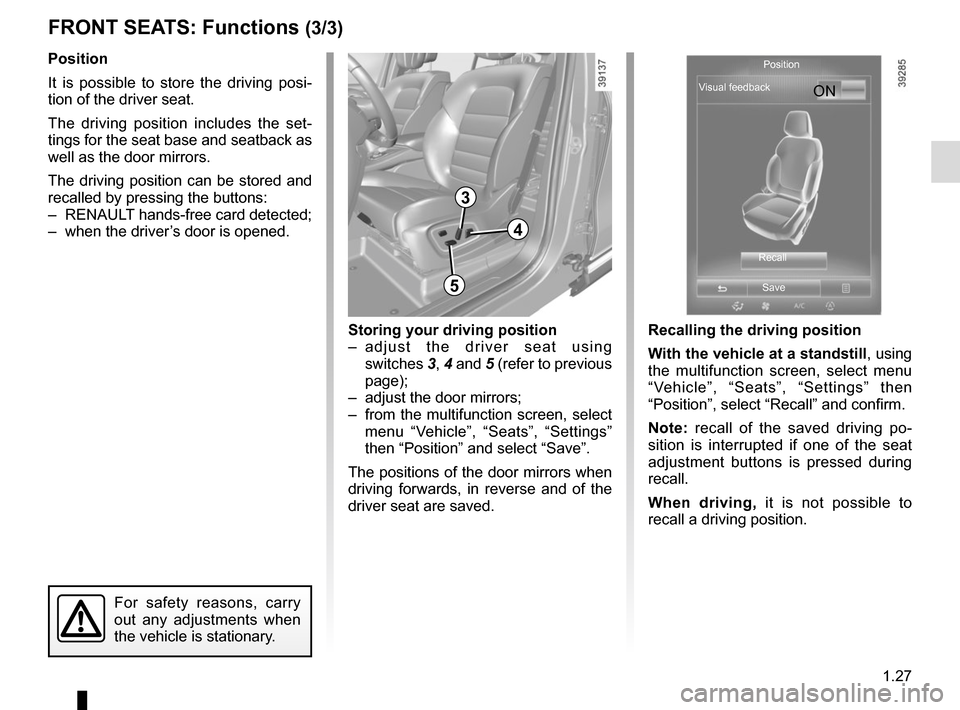
3
3
Recalling the driving position
With the vehicle at a standstill, using
the multifunction screen, select menu
“Vehicle”, “Seats”, “Settings” then
“Position”, select “Recall” and confirm.
Note: recall of the saved driving po-
sition is interrupted if one of the seat
adjustment buttons is pressed during
recall.
When driving, it is not possible to
recall a driving position.
4
5
For safety reasons, carry
out any adjustments when
the vehicle is stationary.
Storing your driving position
– adjust the driver seat using switches 3, 4 and 5 (refer to previous
page);
– adjust the door mirrors;
– from the multifunction screen, select menu “Vehicle”, “Seats”, “Settings”
then “Position” and select “Save”.
The positions of the door mirrors when
driving forwards, in reverse and of the
driver seat are saved. ON
Position
Visual feedback
RecallSave
Page 35 of 316
1.29
SEAT BELTS (2/3)
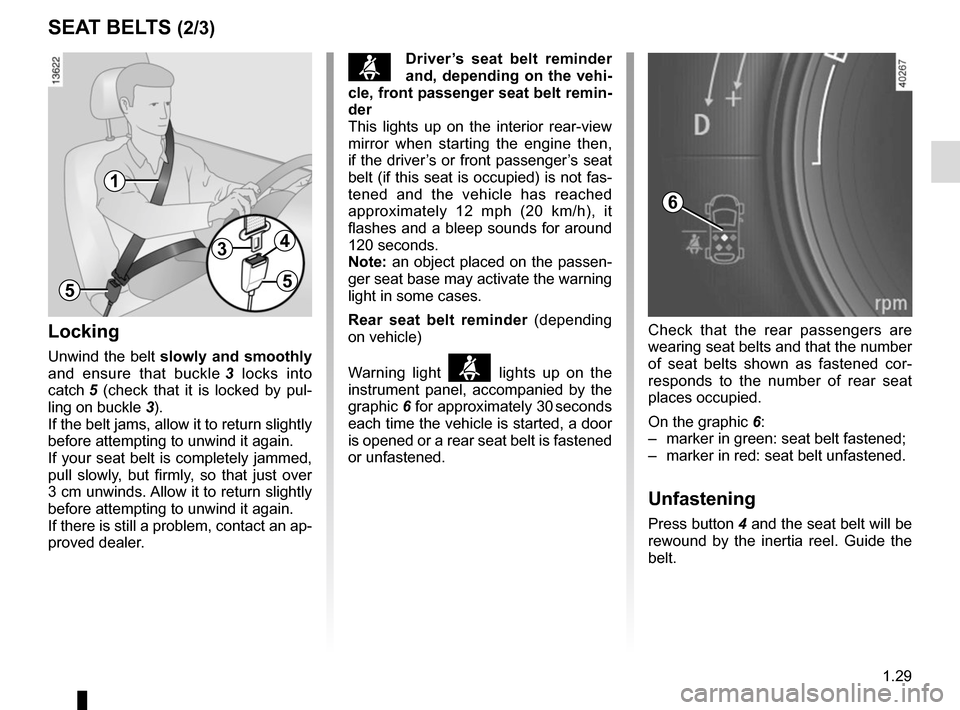
Locking
Unwind the belt slowly and smoothly
and ensure that buckle 3 locks into
catch 5 (check that it is locked by pul-
ling on buckle 3).
If the belt jams, allow it to return slightly
before attempting to unwind it again.
If your seat belt is completely jammed,
pull slowly, but firmly, so that just over
3 cm unwinds. Allow it to return slightly
before attempting to unwind it again.
If there is still a problem, contact an ap-
proved dealer.
ßDriver’s seat belt reminder
and, depending on the vehi-
cle, front passenger seat belt remin-
der
This lights up on the interior rear-view
mirror when starting the engine then,
if the driver’s or front passenger’s seat
belt (if this seat is occupied) is not fas-
tened and the vehicle has reached
approximately 12 mph (20 km/h), it
flashes and a bleep sounds for around
120 seconds.
Note: an object placed on the passen-
ger seat base may activate the warning
light in some cases.
Rear seat belt reminder (depending
on vehicle)
Warning light
ß lights up on the
instrument panel, accompanied by the
graphic 6 for approximately 30 seconds
each time the vehicle is started, a door
is opened or a rear seat belt is fastened
or unfastened.
1
34
55
Check that the rear passengers are
wearing seat belts and that the number
of seat belts shown as fastened cor-
responds to the number of rear seat
places occupied.
On the graphic 6:
– marker in green: seat belt fastened;
– marker in red: seat belt unfastened.
Unfastening
Press button 4 and the seat belt will be
rewound by the inertia reel. Guide the
belt.
6
Page 43 of 316
1.37
SIDE PROTECTION DEVICES
Warning concerning the side air bag
– Fitting seat covers: seats equipped with an air bag require covers
specifically designed for your vehicle. Contact an approved Dealer to fi\
nd
out if these covers are available. The use of any covers other than those
designed for your vehicle (including those designed for another vehicle\
) may
affect the operation of the air bags and reduce your protection.
– Do not place any accessories, objects or even pets between the seatback,\
the door and the internal fittings. Do not cover the seatback with any items\
such as
clothes or accessories. This may prevent the air bag from operating correctly
or cause injury when the air bag is deployed.
– No work or modification whatsoever may be carried out on the seat or int\
ernal fittings, except by qualified personnel from an approved dealer.
– These airbags operate through slits in the front seatbacks (door side)\
: Never place any objects here.
Side air bags
These air bags are fitted to the front
seats and are activated at the sides of
the seats (door side) to protect the oc-
cupants in the event of a severe side
impact.
Curtain air bags
These are air bags fitted along the sides
of the vehicle in the ceiling which trigger
along the front and rear side windows
to protect the passengers in case of a
severe side impact.
Depending on the vehicle, a mark-
ing on the windscreen informs you
of the presence of additional means
of restraint (airbags, pretensioners,
etc.) in the passenger compartment.