lock RENAULT ESPACE 2015 5.G User Guide
[x] Cancel search | Manufacturer: RENAULT, Model Year: 2015, Model line: ESPACE, Model: RENAULT ESPACE 2015 5.GPages: 316, PDF Size: 6.98 MB
Page 17 of 316
1.11
OPENING AND CLOSING THE DOORS (1/3)
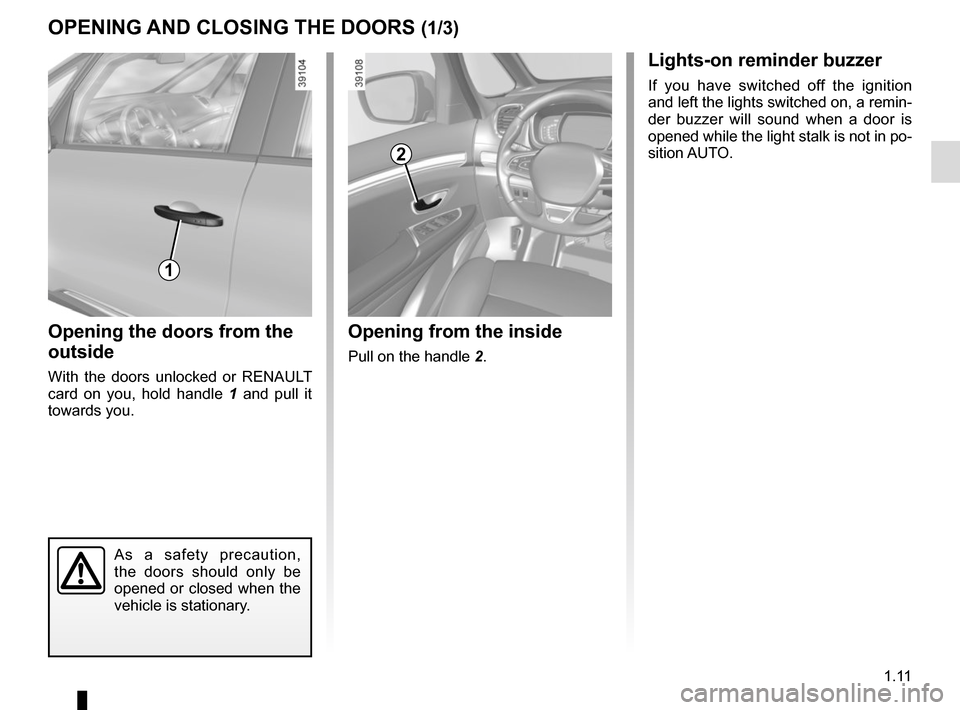
Opening the doors from the
outside
With the doors unlocked or RENAULT
card on you, hold handle 1 and pull it
towards you.
Opening from the inside
Pull on the handle 2.
2
As a safety precaution,
the doors should only be
opened or closed when the
vehicle is stationary.
1
Lights-on reminder buzzer
If you have switched off the ignition
and left the lights switched on, a remin-
der buzzer will sound when a door is
opened while the light stalk is not in po-
sition AUTO.
Page 19 of 316
1.13
OPENING AND CLOSING THE DOORS (3/3)
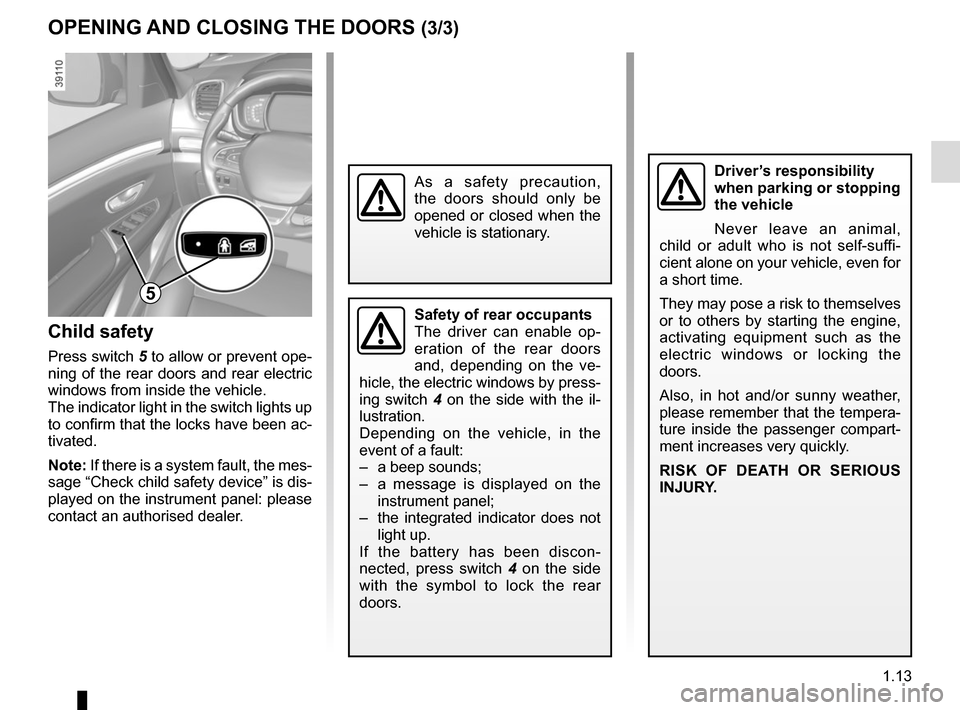
Child safety
Press switch 5 to allow or prevent ope-ning of the rear doors and rear electric
windows from inside the vehicle.
The indicator light in the switch lights up
to confirm that the locks have been ac-
tivated.
Note: If there is a system fault, the mes-
sage “Check child safety device” is dis-
played on the instrument panel: please
contact an authorised dealer.
Safety of rear occupants
The driver can enable op-
eration of the rear doors
and, depending on the ve-
hicle, the electric windows by press-
ing switch 4 on the side with the il-
lustration.
Depending on the vehicle, in the
event of a fault:
– a beep sounds;
– a message is displayed on the instrument panel;
– the integrated indicator does not light up.
If the battery has been discon-
nected, press switch 4 on the side
with the symbol to lock the rear
doors.
Driver’s responsibility
when parking or stopping
the vehicle
Never leave an animal,
child or adult who is not self-suffi-
cient alone on your vehicle, even for
a short time.
They may pose a risk to themselves
or to others by starting the engine,
activating equipment such as the
electric windows or locking the
doors.
Also, in hot and/or sunny weather,
please remember that the tempera-
ture inside the passenger compart-
ment increases very quickly.
RISK OF DEATH OR SERIOUS
INJURY.
5
As a safety precaution,
the doors should only be
opened or closed when the
vehicle is stationary.
Page 20 of 316
1.14
AUTOMATIC LOCKING WHEN DRIVING
Operating principleAfter the vehicle is started, the system
automatically locks the doors when you
are driving at approximately 6 mph
(10 km/h) and over.
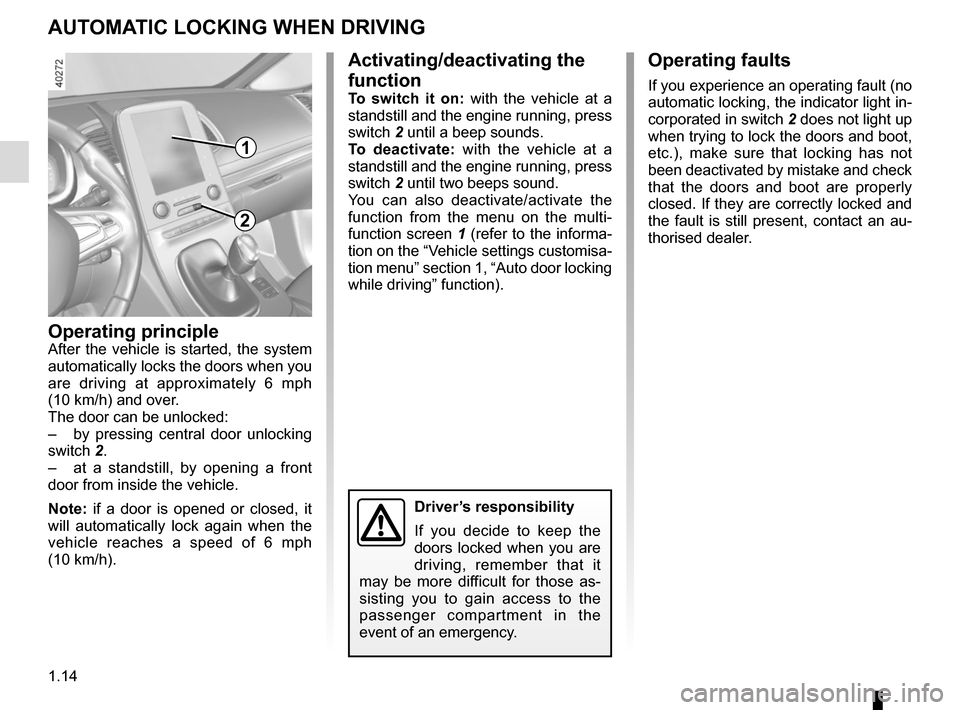
The door can be unlocked:
– by pressing central door unlocking
switch 2.
– at a standstill, by opening a front
door from inside the vehicle.
Note: if a door is opened or closed, it
will automatically lock again when the
vehicle reaches a speed of 6 mph
(10 km/h).
Activating/deactivating the
function
To switch it on: with the vehicle at a
standstill and the engine running, press
switch 2 until a beep sounds.
To deactivate: with the vehicle at a
standstill and the engine running, press
switch 2 until two beeps sound.
You can also deactivate/activate the
function from the menu on the multi-
function screen 1 (refer to the informa-
tion on the “Vehicle settings customisa-
tion menu” section 1, “Auto door locking
while driving” function).
Operating faults
If you experience an operating fault (no
automatic locking, the indicator light in-
corporated in switch 2 does not light up
when trying to lock the doors and boot,
etc.), make sure that locking has not
been deactivated by mistake and check
that the doors and boot are properly
closed. If they are correctly locked and
the fault is still present, contact an au-
thorised dealer.
2
Driver’s responsibility
If you decide to keep the
doors locked when you are
driving, remember that it
may be more difficult for those as-
sisting you to gain access to the
passenger compartment in the
event of an emergency.
1
Page 21 of 316
1.15
If fitted on the vehicle, the tailgate locks
and unlocks at the same time as the
doors.
There are four modes to manoeuvre
the tailgate:
– using the RENAULT card remote control;
– using the controls on the tailgate;
– using the dashboard control;
– using the hands-free function.
AUTOMATIC TAILGATE (1/5)
Conditions of use
– Immobilise the vehicle.
– If there is any ice or snow prevent-ing the tailgate from opening, this ice
or snow must be removed to free the
tailgate.
– In the event that the battery is dis- charged or if it is changed, the tail-
gate should be closed (manually
if necessary) to restart the tailgate
motor.
Ensure that nobody is close
to the moving parts when
opening/closing the tail-
gate.
Risk of injury.
Opening/Closing
Activating the automatic tailgate open-
ing or closing using the dashboard
control or using the card, three beeps
sound just before the tailgate begins to
move.
When opening or closing the tail-
gate, ensure that nothing interferes
with the manoeuvre.
To avoid damaging the tailgate
system, do not manually force the
tailgate to open or close while it is
moving.
Page 23 of 316
1.17
Do not keep your foot in the air. Carry
out the movement without stopping.
Note: With the tailgate open, after de-
tecting a closure control, it waits around
3 seconds before triggering the closure
(a beep is emitted every second).
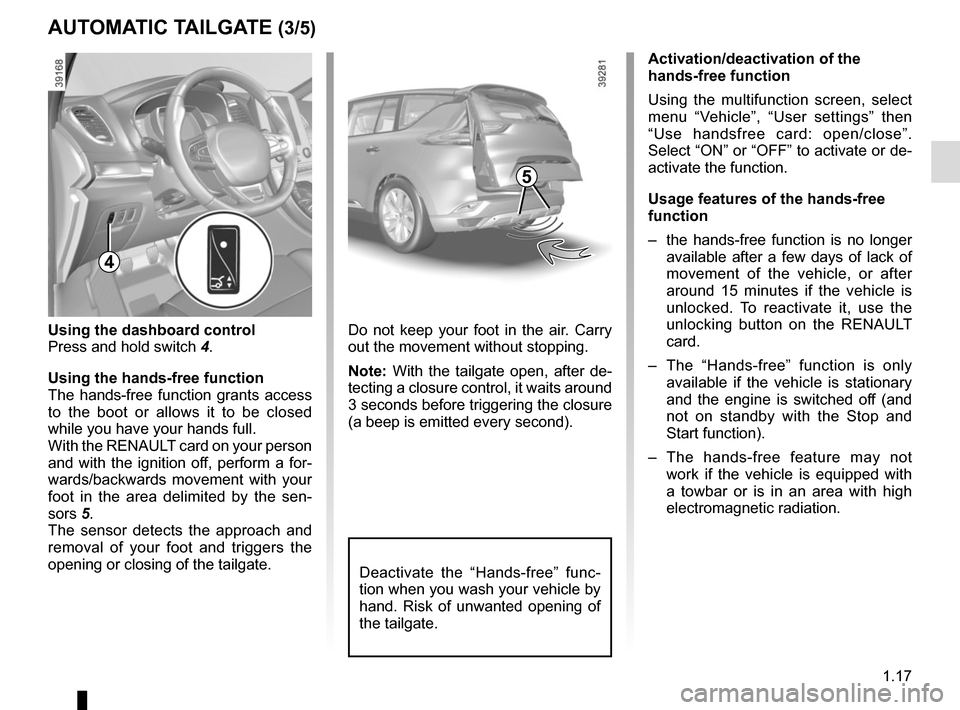
4
Using the dashboard control
Press and hold switch 4.
Using the hands-free function
The hands-free function grants access
to the boot or allows it to be closed
while you have your hands full.
With the RENAULT card on your person
and with the ignition off, perform a for-
wards/backwards movement with your
foot in the area delimited by the sen-
sors 5. The sensor detects the approach and
removal of your foot and triggers the
opening or closing of the tailgate.
AUTOMATIC TAILGATE (3/5)
Activation/deactivation of the
hands-free function
Using the multifunction screen, select
menu “Vehicle”, “User settings” then
“Use handsfree card: open/close”.
Select “ON” or “OFF” to activate or de-
activate the function.
Usage features of the hands-free
function
– the hands-free function is no longer available after a few days of lack of
movement of the vehicle, or after
around 15 minutes if the vehicle is
unlocked. To reactivate it, use the
unlocking button on the RENAULT
card.
– The “Hands-free” function is only available if the vehicle is stationary
and the engine is switched off (and
not on standby with the Stop and
Start function).
– The hands-free feature may not work if the vehicle is equipped with
a towbar or is in an area with high
electromagnetic radiation.
5
Deactivate the “Hands-free” func-
tion when you wash your vehicle by
hand. Risk of unwanted opening of
the tailgate.
Page 25 of 316
1.19
AUTOMATIC TAILGATE (5/5)Operating faults
If you activate the automatic tailgate
continuously for around a minute (se-
quence of opening and closing), it will
stop in order to avoid overheating. The
operation will return to normal after
about a minute.
The automatic tailgate will not operate
if the battery is on low charge. In this
case, operate the automatic tailgate
with the engine started.
In very cold weather conditions, the au-
tomatic opening or closing may not op-
erate if the tailgate joints are frozen.
Precautions during use
Before opening/closing the tailgate,
ensure that the surrounding space is
sufficient to allow the tailgate to oper-
ate. If not, stop the tailgate movement
before contact.
The installation of accessories such as
a bicycle carrier on the tailgate will lead
to more weight on the tailgate. The tail-
gate may operate slowly or not open
fully.
If the tailgate is moving and the engine
is started, the movement will stop for a
seconds before continuing.
Avoid multiple manual stops during the
automatic tailgate movement (risk of
damaging the tailgate system).
Driver’s responsibility
Never leave an animal,
child or adult who is not
self-sufficient alone in your
vehicle, even for a short time.
They may pose a risk to themselves
or to others by starting the engine,
activating equipment such as the
electric windows or locking the
doors, for example.
Also, in hot and/or sunny weather,
please remember that the tempera-
ture inside the passenger compart-
ment increases very quickly.
RISK OF DEATH OR SERIOUS
INJURY.
Page 26 of 316
1.20
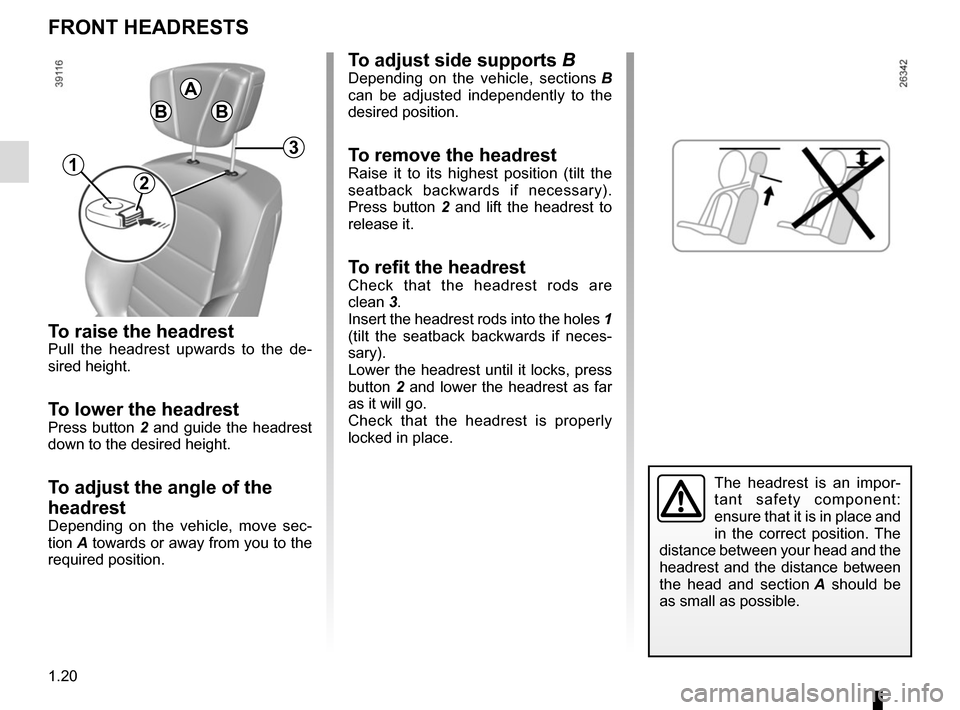
To raise the headrestPull the headrest upwards to the de-
sired height.
To lower the headrestPress button 2 and guide the headrest
down to the desired height.
To adjust the angle of the
headrest
Depending on the vehicle, move sec-
tion A towards or away from you to the
required position.
To adjust side supports BDepending on the vehicle, sections B
can be adjusted independently to the
desired position.
To remove the headrest
Raise it to its highest position (tilt the
seatback backwards if necessary).
Press button 2 and lift the headrest to
release it.
To refit the headrestCheck that the headrest rods are
clean 3.
Insert the headrest rods into the holes 1
(tilt the seatback backwards if neces-
sary).
Lower the headrest until it locks, press
button 2 and lower the headrest as far
as it will go.
Check that the headrest is properly
locked in place.
FRONT HEADRESTS
The headrest is an impor-
tant safety component:
ensure that it is in place and
in the correct position. The
distance between your head and the
headrest and the distance between
the head and section A should be
as small as possible.
B
A
B
2
3
1
Page 27 of 316
1.21
FRONT SEATS WITH MANUAL CONTROL (1/2)
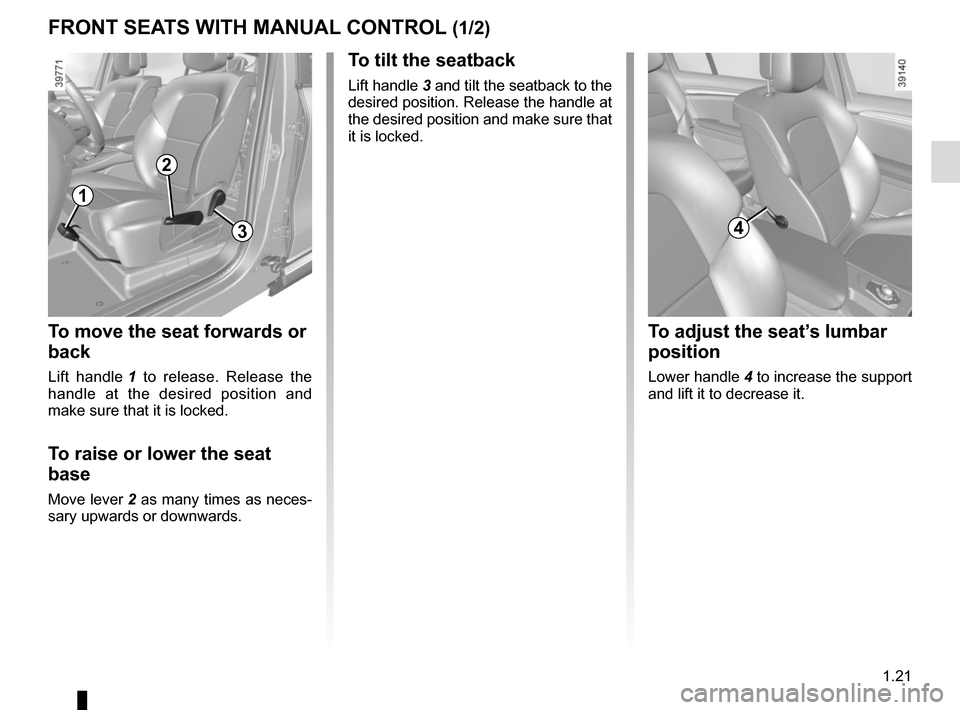
To move the seat forwards or
back
Lift handle 1 to release. Release the
handle at the desired position and
make sure that it is locked.
To raise or lower the seat
base
Move lever 2 as many times as neces-
sary upwards or downwards.
To tilt the seatback
Lift handle 3 and tilt the seatback to the
desired position. Release the handle at
the desired position and make sure that
it is locked.
1
2
34
To adjust the seat’s lumbar
position
Lower handle 4 to increase the support
and lift it to decrease it.
Page 29 of 316
1.23
DRIVER’S SEAT WITH ELECTRIC CONTROLS (1/2)
For safety reasons, carry
out any adjustments when
the vehicle is not being
driven.
Make sure that the seatbacks are
correctly locked in place.
We would advise you not to recline
the seatbacks too far to ensure that
the effectiveness of the seat belts is
not reduced.
No object should be placed on the
floor (in front of the driver). such
objects may slide under the pedals
during sudden braking manoeuvres
and obstruct their use.
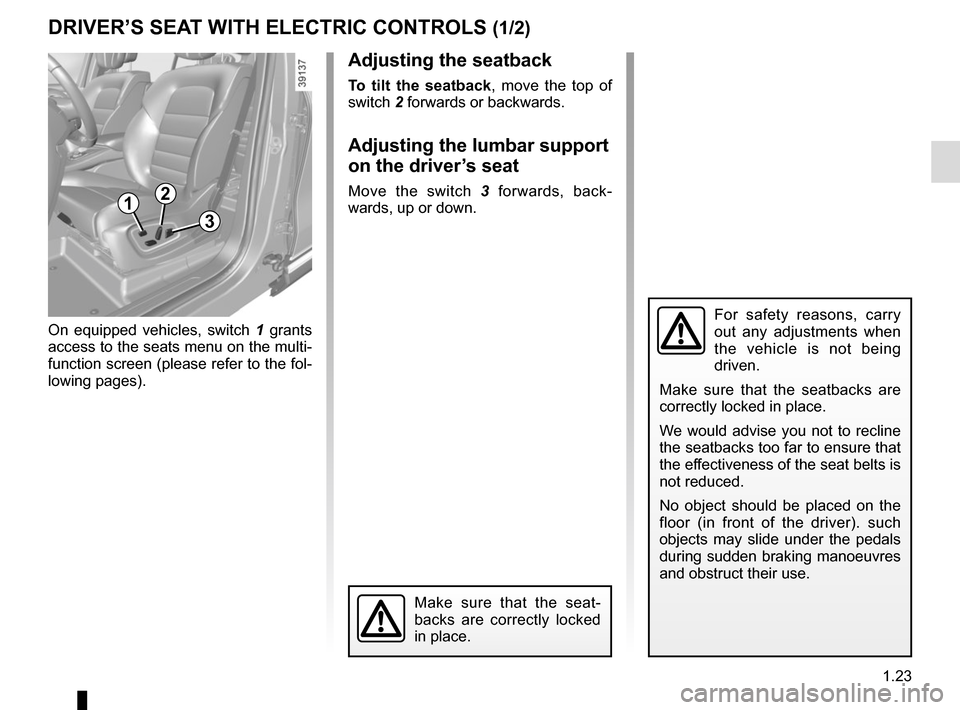
12
3
On equipped vehicles, switch 1 grants
access to the seats menu on the multi-
function screen (please refer to the fol-
lowing pages).
Make sure that the seat-
backs are correctly locked
in place.
Adjusting the seatback
To tilt the seatback, move the top of
switch 2 forwards or backwards.
Adjusting the lumbar support
on the driver’s seat
Move the switch 3 forwards, back-
wards, up or down.
Page 30 of 316
1.24
DRIVER’S SEAT WITH ELECTRIC CONTROLS (2/2)
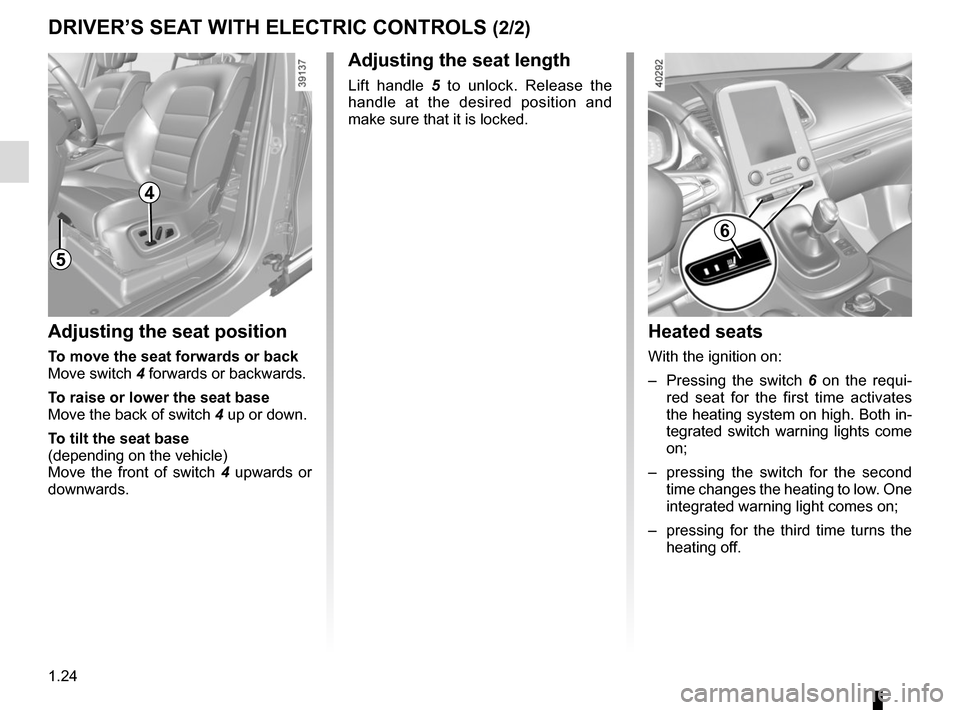
5
Heated seats
With the ignition on:
– Pressing the switch 6 on the requi-
red seat for the first time activates
the heating system on high. Both in-
tegrated switch warning lights come
on;
– pressing the switch for the second time changes the heating to low. One
integrated warning light comes on;
– pressing for the third time turns the heating off.
Adjusting the seat position
To move the seat forwards or back
Move switch 4 forwards or backwards.
To raise or lower the seat base
Move the back of switch 4 up or down.
To tilt the seat base
(depending on the vehicle)
Move the front of switch 4 upwards or
downwards.
Adjusting the seat length
Lift handle 5 to unlock. Release the
handle at the desired position and
make sure that it is locked.
6
4