4 control RENAULT ESPACE 2016 5.G Repair Manual
[x] Cancel search | Manufacturer: RENAULT, Model Year: 2016, Model line: ESPACE, Model: RENAULT ESPACE 2016 5.GPages: 318, PDF Size: 3.32 MB
Page 199 of 318
3.11
AUTOMATIC CLIMATE CONTROL (5/5)
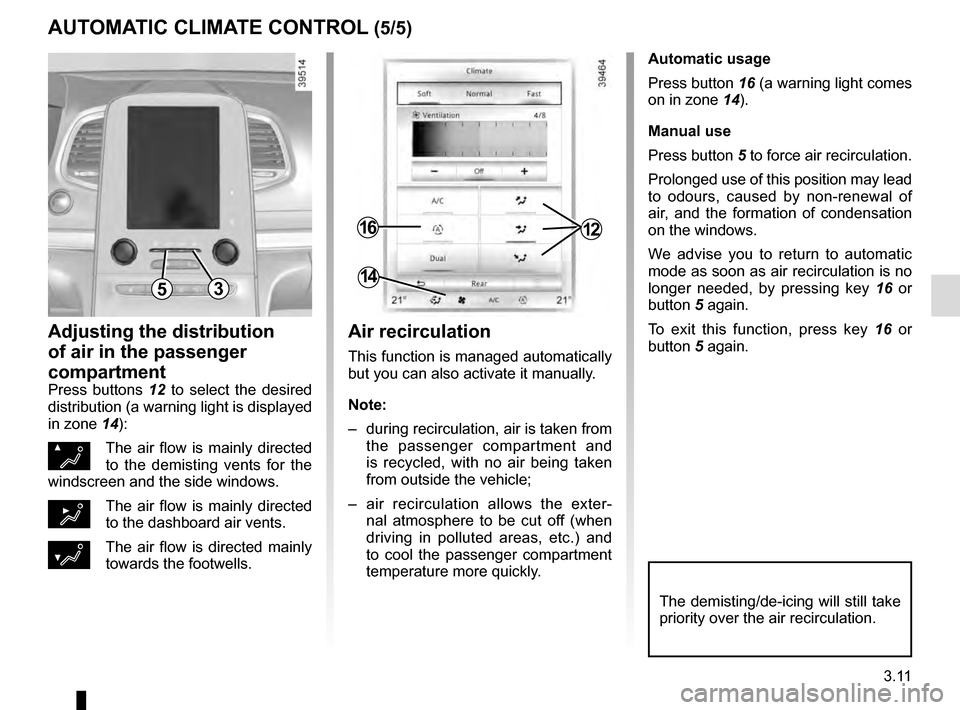
Automatic usage
Press button 16 (a warning light comes
on in zone 14).
Manual use
Press button 5 to force air recirculation.
Prolonged use of this position may lead
to odours, caused by non-renewal of
air, and the formation of condensation
on the windows.
We advise you to return to automatic
mode as soon as air recirculation is no
longer needed, by pressing key 16 or
button 5 again.
To exit this function, press key 16 or
button 5 again.
Adjusting the distribution
of air in the passenger
compartment
Press buttons 12 to select the desired
distribution (a warning light is displayed
in zone 14):
ØThe air flow is mainly directed
to the demisting vents for the
windscreen and the side windows.
½The air flow is mainly directed
to the dashboard air vents.
¿The air flow is directed mainly
towards the footwells.
The demisting/de-icing will still take
priority over the air recirculation.
53
1216
14
Air recirculation
This function is managed automatically
but you can also activate it manually.
Note:
– during recirculation, air is taken from the passenger compartment and
is recycled, with no air being taken
from outside the vehicle;
– air recirculation allows the exter- nal atmosphere to be cut off (when
driving in polluted areas, etc.) and
to cool the passenger compartment
temperature more quickly.
Page 200 of 318
3.12
ADDITIONAL AIR CONDITIONING (1/2)
Control
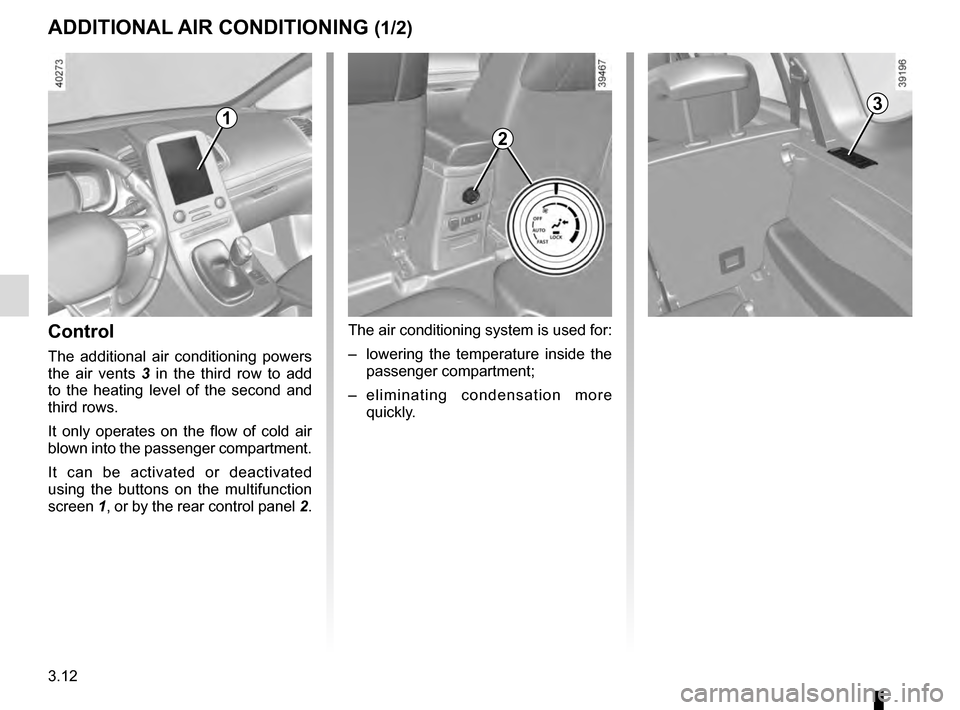
The additional air conditioning powers
the air vents 3 in the third row to add
to the heating level of the second and
third rows.
It only operates on the flow of cold air
blown into the passenger compartment.
It can be activated or deactivated
using the buttons on the multifunction
screen 1, or by the rear control panel 2.
2
The air conditioning system is used for:
– lowering the temperature inside the
passenger compartment;
– eliminating condensation more quickly.
31
Page 201 of 318
3.13
4
ADDITIONAL AIR CONDITIONING (2/2)
Switching on or off
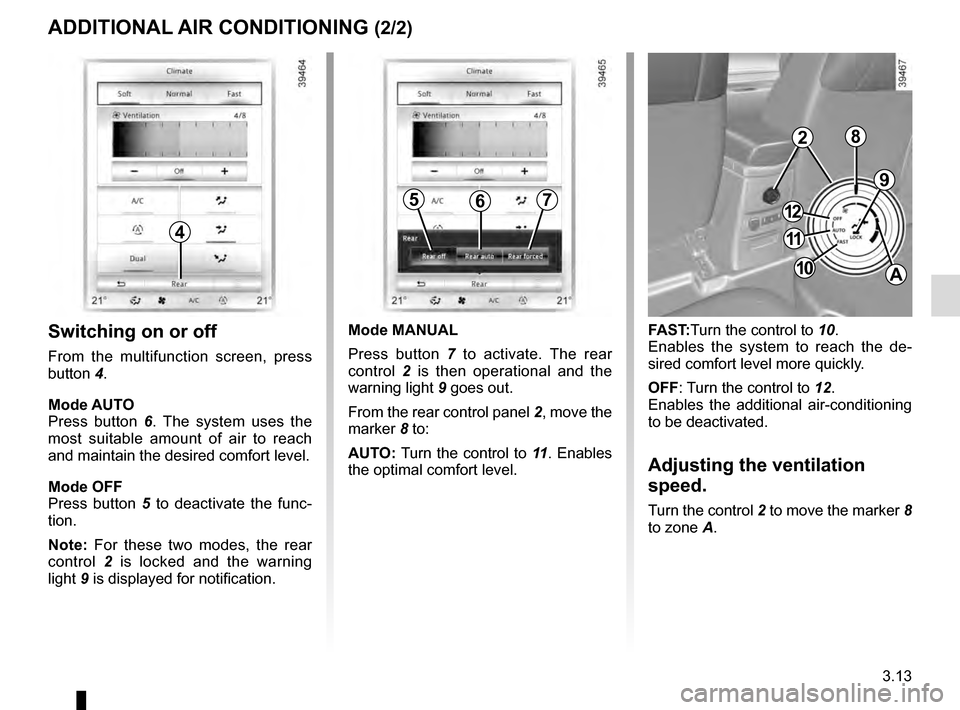
From the multifunction screen, press
button 4.
Mode AUTO
Press button 6. The system uses the
most suitable amount of air to reach
and maintain the desired comfort level.
Mode OFF
Press button 5 to deactivate the func-
tion.
Note: For these two modes, the rear
control 2 is locked and the warning
light 9 is displayed for notification.
9
FAST:Turn the control to 10.
Enables the system to reach the de-
sired comfort level more quickly.
OFF: Turn the control to 12.
Enables the additional air-conditioning
to be deactivated.
Adjusting the ventilation
speed.
Turn the control 2 to move the marker 8
to zone A.
567
Mode MANUAL
Press button 7 to activate. The rear
control 2 is then operational and the
warning light 9 goes out.
From the rear control panel 2, move the
marker 8 to:
AUTO: Turn the control to 11 . Enables
the optimal comfort level.
2
11
10
12
A
8
Page 202 of 318
3.14
AIR CONDITIONING: information and advice on use
Do not add anything to the
vehicle’s ventilation circuit
(for example, to remove
bad odours).
There is a risk of damage or of
fire.
Do not open the refriger-
ant fluid circuit. The fluid
may damage eyes or skin.
Fuel consumption
You will normally notice an increase in
fuel consumption (especially in town)
when the air conditioning is operating.
For vehicles fitted with air conditioning
with no automatic mode, switch off the
system when it is not required.
Advice for reducing consumption
and helping to preserve the environ-
ment
Drive with the air vents open and the
windows closed.
If the vehicle has been parked in the
sun, open the doors for a few moments
to let the hot air escape before starting
the engine.
Maintenance
Refer to the Maintenance Document
for your vehicle for the inspection fre-
quency.
Operating faults
As a general rule, contact your ap-
proved dealer in the event of an oper-
ating fault.
– Reduction in de-icing, demisting or air conditioning performance.
This may be caused by the passen-
ger compartment filter cartridge be-
coming clogged.
– No cold air is being produced .
Check that the controls are set cor-
rectly and that the fuses are sound.
Otherwise, switch off the system.
Presence of water under the
vehicle
After prolonged use of the air condi-
tioning system, it is normal for water
to be present under the vehicle. This is
caused by condensation.
Advice on use
In some situations, (air conditioning
off, air recirculation activated, ventila-
tion speed at zero or low, etc.) you may
notice that condensation starts to form
on the windows and windscreen.
If there is condensation, use the “Clear
View” function to remove it, then use
the air conditioning in automatic mode
to stop it forming again.
Vehicles equipped with the
ECOmode: once activated, ECO
mode can reduce the perform-
ance of the automatic air condition-
ing. Please refer to the information
on “Driving advice, Eco-driving” in
Section 2.
Page 205 of 318
3.17
Operating faults
In case of a fault when closing a
window, the system reverts to normal
mode: pull the switch as many times as
necessary until the window closes com-
pletely, hold the switch (still on the clo-
sing side) for around one second, then
completely lower then raise the window
to reset the system.
If necessary, contact an approved
Dealer.
ELECTRIC WINDOWS (2/2)Remote control window
closing
(vehicles with 4 one-touch electric win-
dows).
When you lock the doors from the out-
side, press the locking button on the
RENAULTcard twice in quick suc-
cession, or on the driver’s door in
hands-free mode, and all the windows
will close automatically (and, depen-
ding on the vehicle, the sunroof).
It is recommended that the user only
operates the system when the vehi-
cle can be seen clearly and no one is
inside.
When closing the windows,
ensure that no part of the
body (arm, hand, etc.) is
protruding from the vehicle.
Risk of serious injury.
One-touch mode
This mode works in addition to the ope-
ration of the electric windows described
previously.
Briefly press or pull the window switch
fully: the window is fully lowered or
raised. Pressing the switch again stops
the window moving.
Note: if the window detects resistance
when closing (e.g.: branch of a tree,
etc.) it stops and then lowers again by a
few centimetres.
Page 207 of 318
3.19
ELECTRIC SUNROOF (2/3)Closing the sunroof by
remote control
(depending on the vehicle)
If you press the locking button on
the card twice in quick succession
RENAULT,, the windows and the elec-
tric sunroof will close automatically.
It is recommended that the user only
operates the system when the vehi-
cle can be seen clearly and no one is
inside.
Precautions during use
– Vehicle with loaded roof bars.
As a general rule, if there is a load
on the roof, use of the sunroof is not
recommended.
Before using the sunroof, check the
objects and/or accessories (bike
racks, roof boxes, etc.) attached to
the roof bars: they should be pro-
perly arranged and secured and
should not interfere with the opera-
tion of the sunroof.
Contact an approved dealer for de-
tails of possible conversions;
– check that the sunroof is properly
closed before leaving your vehicle;
– clean the seal every three months using products recommended by our
Technical Department;
– do not open the sunroof immedia-
tely after it has rained or immediately
after washing the vehicle.
When closing the sunroof,
ensure that no part of the
body (arm, hand, etc.) is
protruding from the vehicle.
Risk of serious injury.
Special features
Your vehicle is fitted with an anti-pinch
facility: when the sunroof encounters
resistance whilst closing (arm, tree
branch etc.), it stops and then moves
back a few centimetres.
After closing the sunroof by remote
control, pressing button 2 allows the
sunroof to return to its previous posi-
tion.
Page 221 of 318
3.33
REAR SEATS (3/5)
To automatically fold down
the seats (flat position)
The rear seats are electrically unlocked
to fold down in order to create a flat
floor.
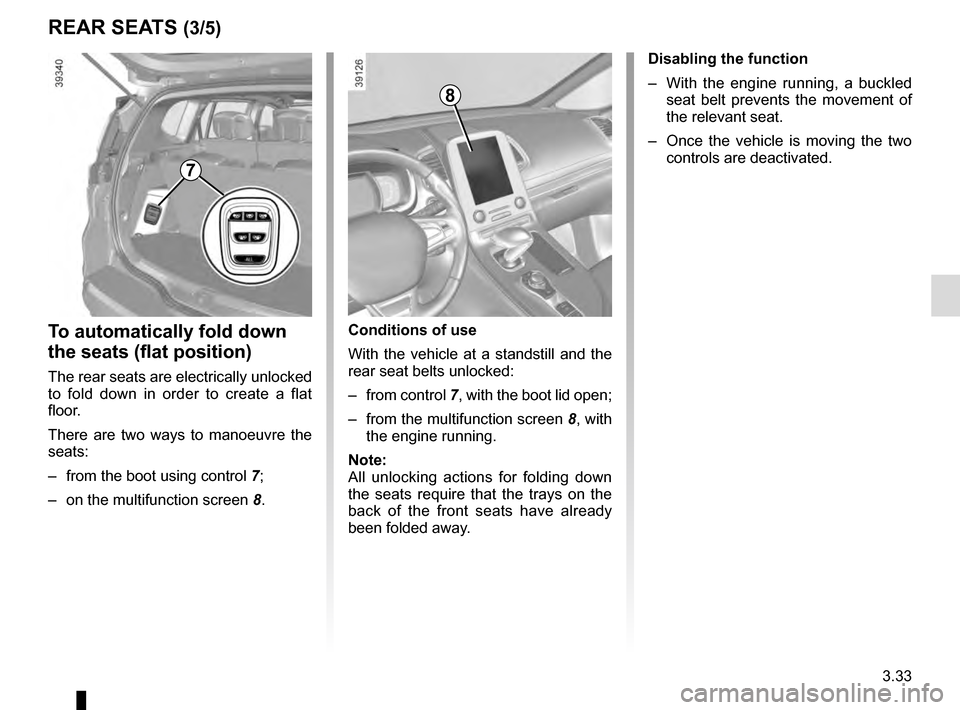
There are two ways to manoeuvre the
seats:
– from the boot using control 7;
– on the multifunction screen 8. Disabling the function
– With the engine running, a buckled
seat belt prevents the movement of
the relevant seat.
– Once the vehicle is moving the two controls are deactivated.
7
8
Conditions of use
With the vehicle at a standstill and the
rear seat belts unlocked:
– from control 7, with the boot lid open;
– from the multifunction screen 8, with
the engine running.
Note:
All unlocking actions for folding down
the seats require that the trays on the
back of the front seats have already
been folded away.
Page 222 of 318
3.34
REAR SEATS (4/5)
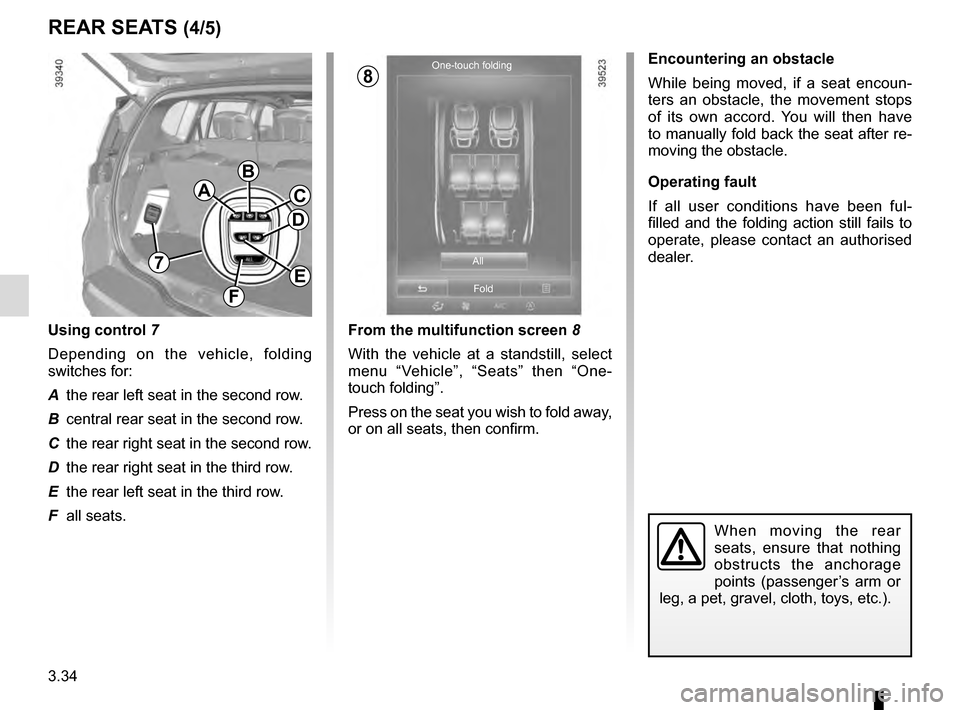
From the multifunction screen 8
With the vehicle at a standstill, select
menu “Vehicle”, “Seats” then “One-
touch folding”.
Press on the seat you wish to fold away,
or on all seats, then confirm.
Encountering an obstacle
While being moved, if a seat encoun-
ters an obstacle, the movement stops
of its own accord. You will then have
to manually fold back the seat after re-
moving the obstacle.
Operating fault
If all user conditions have been ful-
filled and the folding action still fails to
operate, please contact an authorised
dealer.
When moving the rear
seats, ensure that nothing
obstructs the anchorage
points (passenger’s arm or
leg, a pet, gravel, cloth, toys, etc.).
One-touch folding
All
Fold
A
B
C
E
F
D
7
Using control 7
Depending on the vehicle, folding
switches for:
A the rear left seat in the second row.
B central rear seat in the second row.
C the rear right seat in the second row.
D the rear right seat in the third row.
E the rear left seat in the third row.
F all seats.
8
Page 224 of 318

3.36
TAILGATE
1
2
Manual controls
To open
Press button 1 and lift the tailgate.
To close
Lower the boot lid using the handle
inside the boot 2 to assist you.
Electric controls
Please refer to the information on the
“Automatic tailgate” in Section 3.
Opening the doors manually
from the inside
If it is impossible to unlock the tailgate,
it can be done manually from inside:
– access the boot by tilting the rear
seat(s);
– unclip the lock access flap 3;
3
– slide the tab 5 to the right in vehicles
with a manual tailgate, or tab 4 on
vehicles with an automatic tailgate.
– push the boot lid to open it;
4
5
The attaching of any carry-
ing device (bike rack, lug-
gage box, etc.) resting on
the luggage compartment
lid is prohibited. To install a carrying
device on your vehicle, contact an
Approved Dealer.
Page 225 of 318
3.37
If fitted on the vehicle, the tailgate locks
and unlocks at the same time as the
doors.
The following modes are available to
manoeuvre the tailgate:
– using the RENAULT card remote control;
– using the controls on the tailgate;
– using the dashboard control;
– depending on the vehicle, using the «hands-free» function.
AUTOMATIC TAILGATE (1/5)
Conditions of use
– Immobilise the vehicle.
– If there is any ice or snow prevent-ing the tailgate from opening, this ice
or snow must be removed to free the
tailgate.
– In the event that the battery is dis- charged or if it is changed, the tail-
gate should be closed (manually
if necessary) to restart the tailgate
motor.
Ensure that nobody is close
to the moving parts when
opening/closing the tail-
gate.
Risk of injury.
Opening/Closing
Activating the automatic tailgate open-
ing or closing using the dashboard
control or using the card, three beeps
sound just before the tailgate begins to
move.
When opening or closing the tail-
gate, ensure that nothing interferes
with the manoeuvre.
To avoid damaging the tailgate
system, do not manually force the
tailgate to open or close while it is
moving.