4 control RENAULT ESPACE 2016 5.G Workshop Manual
[x] Cancel search | Manufacturer: RENAULT, Model Year: 2016, Model line: ESPACE, Model: RENAULT ESPACE 2016 5.GPages: 318, PDF Size: 3.32 MB
Page 177 of 318
2.69
ASSISTED PARKING (1/4)
This function assists with parking ma-
noeuvres.
Take your hands off the steering wheel.
You only control the pedals and the
gear lever.
You can retake control at any time by
operating the steering wheel.Switching on
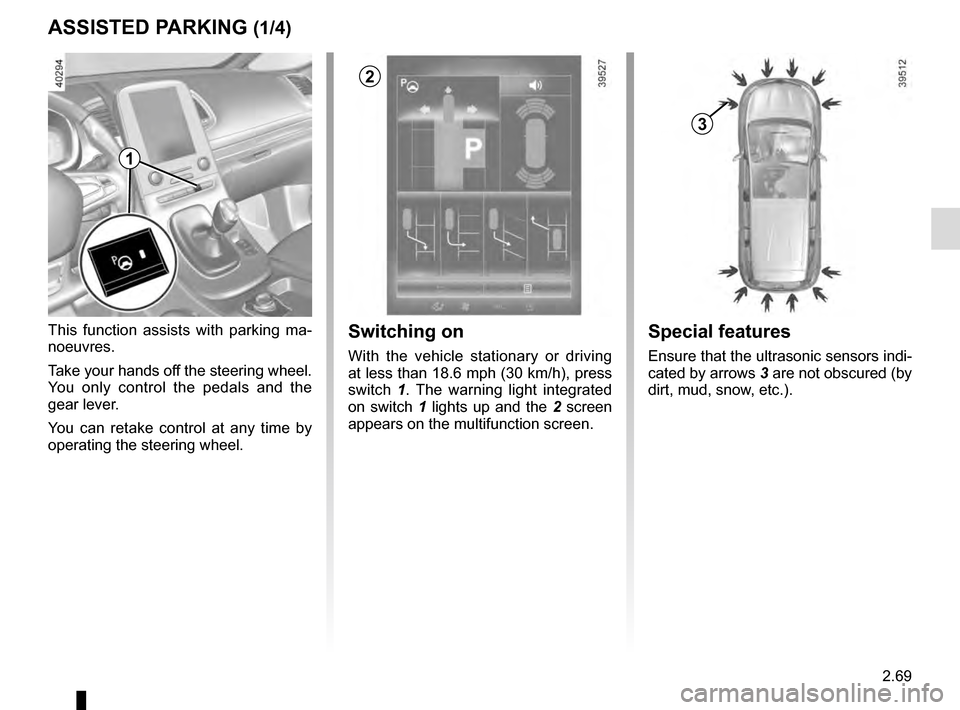
With the vehicle stationary or driving
at less than 18.6 mph (30 km/h), press
switch 1. The warning light integrated
on switch 1 lights up and the 2 screen
appears on the multifunction screen.
1
2
Special features
Ensure that the ultrasonic sensors indi-
cated by arrows 3 are not obscured (by
dirt, mud, snow, etc.).
3
Page 179 of 318
2.71
ASSISTED PARKING (3/4)
Your speed should not exceed around
4 mph (7 km/h).
Once in position to exit the space, the
system will notify you of the end of the
manoeuvre.
Once the warning light
on the
instrument panel goes off and a beep
sounds, the manoeuvre has been com-
pleted.
Suspending the manoeuvreThe manoeuvre is suspended in the fol-
lowing circumstances:
– you take control of the wheel;
– a door or the boot is opened;
– the vehicle is at a standstill for too long;
– an obstacle in the direction of move- ment prevents the manoeuvre from
being completed;
– the engine will stop.
Once the warning light
on the
instrument panel goes off and a beep
sounds, the manoeuvre has been sus-
pended. Then to resume the manoeu-
vre, press and hold the system activa-
tion switch. In this case, the reason for suspending
the manoeuvre will be displayed on the
multifunction screen.
Make sure:
– you have released the steering wheel
and;
– that all doors and the boot are closed, and;
– that no obstacles are in the way of the direction of movement, and;
– that the engine is started.
Cancelling the manoeuvre
The manoeuvre can be stopped in the
following cases:
– by pressing the system activation switch;
– the vehicle speed has exceeded 4 mph (7 km/h);
– You have performed more than ten forwards/backwards movements in
one manoeuvre;
– the parking distance control sensors are dirty or blocked;
– the vehicle wheels have skidded.
Once the warning light
on the
instrument panel goes off and a beep
sounds, the manoeuvre has been
ended.
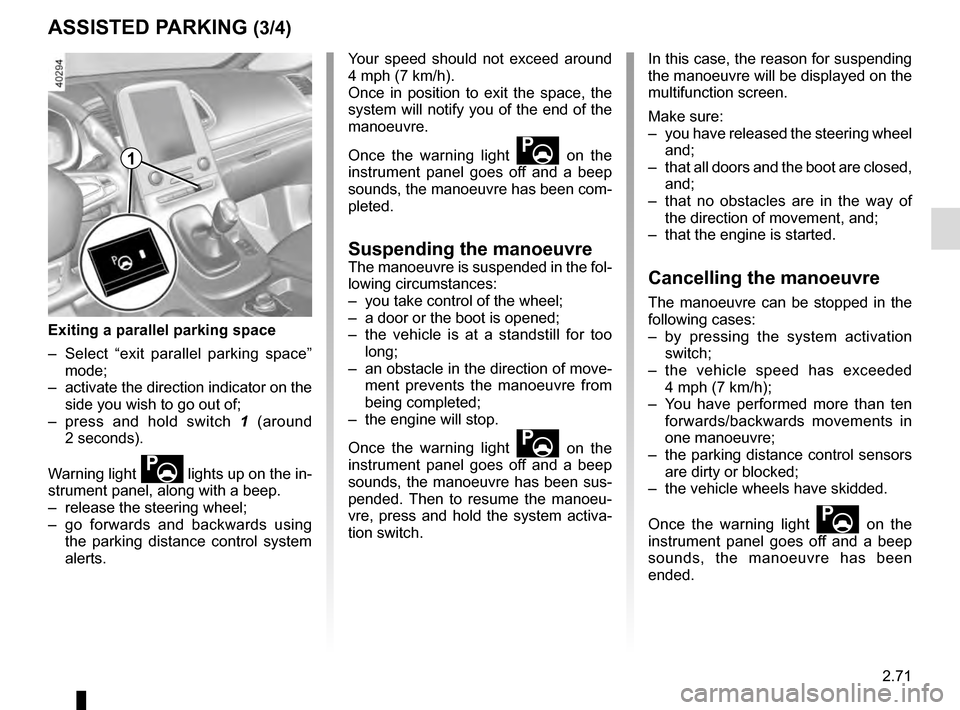
Exiting a parallel parking space
– Select “exit parallel parking space” mode;
– activate the direction indicator on the side you wish to go out of;
– press and hold switch 1 (around
2 seconds).
Warning light
lights up on the in-
strument panel, along with a beep.
– release the steering wheel;
– go forwards and backwards using the parking distance control system
alerts.
1
Page 180 of 318
2.72
ASSISTED PARKING (4/4)
This function is an additional driving aid. However, this function is not under any circumstances intended to replace the
due care and attention of the driver, who should at all times be in control of the vehicle.
Make sure that the manoeuvre complies with the applicable traffic regulations at your location.
– The driver should always look out for sudden hazards during driving: alw\
ays ensure that there are no moving obstacles (such as a child, animal, pram, bicycle, etc.) or small, narrow object\
s such as stones or posts in your path when manoeu-
vring.
– The system cannot detect objects located in the sensor blind spots.
– During manoeuvring, the steering wheel may turn quickly: do not place yo\
ur hands inside the wheel, and ensure nothing is located in this space.
– Always visually check that the parking space proposed by the system is s\
till available and contains no obstacles.
– The system should be deactivated when towing a trailer.
Page 181 of 318
2.73
ADAPTIVE SUSPENSION
Adaptive suspension makes it possible
to modify the suspension automatically,
according to driving conditions and to
your driving style.
Choosing a preset mode
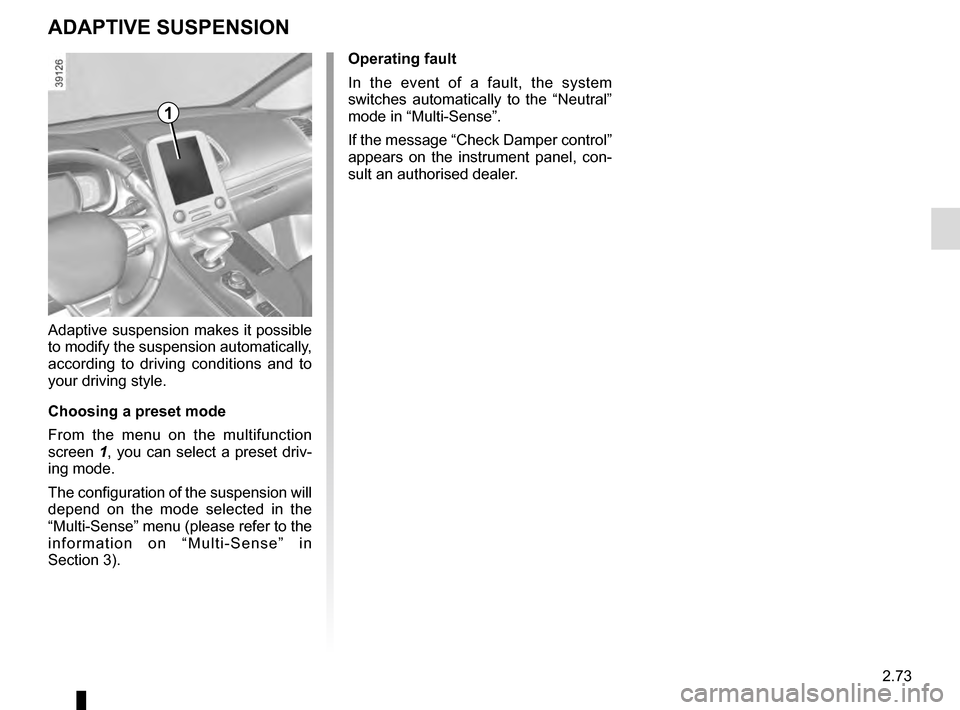
From the menu on the multifunction
screen 1, you can select a preset driv-
ing mode.
The configuration of the suspension will
depend on the mode selected in the
“Multi-Sense” menu (please refer to the
information on “Multi-Sense” in
Section 3). Operating fault
In the event of a fault, the system
switches automatically to the “Neutral”
mode in “Multi-Sense”.
If the message “Check Damper control”
appears on the instrument panel, con-
sult an authorised dealer.
1
Page 189 of 318

3.1
Section 3: Your comfort
multi-Sense . . . . . . . . . . . . . . . . . . . . . . . . . . . . . . \
. . . . . . . . . . . . . . . . . . . . . . . . . . . . . . . . . . . . . . 3.2
Air Vents . . . . . . . . . . . . . . . . . . . . . . . . . . . . . . . . . . . .\
. . . . . . . . . . . . . . . . . . . . . . . . . . . . . . . . . . 3.4
Automatic climate control . . . . . . . . . . . . . . . . . . . . . . . . . . . . . . . . . . . .\
. . . . . . . . . . . . . . . . . . . . . 3.7
Additional heating and air conditioning . . . . . . . . . . . . . . . . . . . . . . . . . . . . . . . . . . . .\
. . . . . . . . . . . 3.12
Air conditioning: information and advice on use . . . . . . . . . . . . . . . . . . . . . . . . . . . . . . . . . . . .\
. . . . 3.14
Outside air quality and deodorisation functions . . . . . . . . . . . . . . . . . . . . . . . . . . . . . . . . . . . . \
. . . . . 3.15
Electric windows . . . . . . . . . . . . . . . . . . . . . . . . . . . . . . . . . . . .\
. . . . . . . . . . . . . . . . . . . . . . . . . . . . 3.16
Electric sunroof . . . . . . . . . . . . . . . . . . . . . . . . . . . . . . . . . . . .\
. . . . . . . . . . . . . . . . . . . . . . . . . . . . . 3.18
Fixed glass roof . . . . . . . . . . . . . . . . . . . . . . . . . . . . . . . . . . . . \
. . . . . . . . . . . . . . . . . . . . . . . . . . . . . 3.20
Interior lighting . . . . . . . . . . . . . . . . . . . . . . . . . . . . . . . . . . . . \
. . . . . . . . . . . . . . . . . . . . . . . . . . . . . . 3.21
Sun visor/blinds . . . . . . . . . . . . . . . . . . . . . . . . . . . . . . . . . . . . \
. . . . . . . . . . . . . . . . . . . . . . . . . . . . . 3.23
Passenger compartment storage/fittings . . . . . . . . . . . . . . . . . . . . . . . . . . . . . . . . . . . . \
. . . . . . . . . . 3.24
Accessories socket . . . . . . . . . . . . . . . . . . . . . . . . . . . . . . . . . . . .\
. . . . . . . . . . . . . . . . . . . . . . . . . . 3.29
Ashtray . . . . . . . . . . . . . . . . . . . . . . . . . . . . . . . . . . . .\
. . . . . . . . . . . . . . . . . . . . . . . . . . . . . . . . . . . 3.29
Cigarette lighter . . . . . . . . . . . . . . . . . . . . . . . . . . . . . . . . . . . . \
. . . . . . . . . . . . . . . . . . . . . . . . . . . . . 3.29
Headrests - Rear seats . . . . . . . . . . . . . . . . . . . . . . . . .\
. . . . . . . . . . . . . . . . . . . . . . . . . . . . . . . . . . 3.30
Luggage compartment. . . . . . . . . . . . . . . . . . . . . . . . . . .\
. . . . . . . . . . . . . . . . . . . . . . . . . . . . . . . . . 3.36
Automatic tailgate . . . . . . . . . . . . . . . . . . . . . . . . . . . . . . . . . . . .\
. . . . . . . . . . . . . . . . . . . . . . . . . . . 3.37
Luggage cover . . . . . . . . . . . . . . . . . . . . . . . . . . . . . . . . . . . . \
. . . . . . . . . . . . . . . . . . . . . . . . . . . . . . 3.42
Luggage compartment storage space and fittings . . . . . . . . . . . . . . . . . . . . . . . . . . . . . . . . . . . .\
. . 3.43
Transporting objects in the luggage compartment . . . . . . . . . . . . . . . . . . . . . . . . . . . . . . . . . . . .\
. . 3.44
Transporting objects: . . . . . . . . . . . . . . . . . . . . . . . . . . . . . . . . . . . . \
. . . . . . . . . . . . . . . . . . . . . . . . . 3.45 equipment . . . . . . . . . . . . . . . . . . . . . . . . . . . . . . . . . . . .\
. . . . . . . . . . . . . . . . . . . . . . . . . . . 3.45
Luggage net. . . . . . . . . . . . . . . . . . . . . . . . . . . . . . .\
. . . . . . . . . . . . . . . . . . . . . . . . . . . . . . . . . . . . . 3.46
Roof bars . . . . . . . . . . . . . . . . . . . . . . . . . . . . . . . . . . . . \
. . . . . . . . . . . . . . . . . . . . . . . . . . . . . . . . . . 3.48
Multimedia equipment . . . . . . . . . . . . . . . . . . . . . . . . . . . . . . . . . . . . \
. . . . . . . . . . . . . . . . . . . . . . . . 3.49
Page 192 of 318
3.4
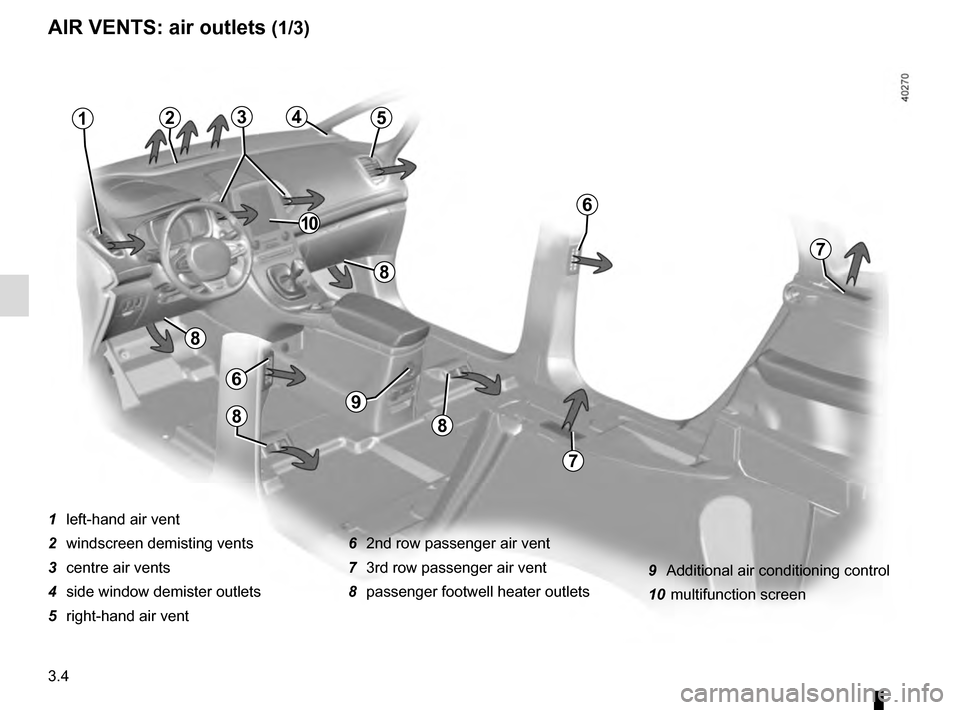
AIR VENTS: air outlets (1/3)
1 left-hand air vent
2 windscreen demisting vents
3 centre air vents
4 side window demister outlets
5 right-hand air vent6 2nd row passenger air vent
7 3rd row passenger air vent
8 passenger footwell heater outlets
21
6
7
5
7
6
8
8
9
88
43
10
9 Additional air conditioning control
10 multifunction screen
Page 195 of 318
3.7
10
AUTOMATIC CLIMATE CONTROL (1/5)
15
6543
9
1216
17
18
19
11
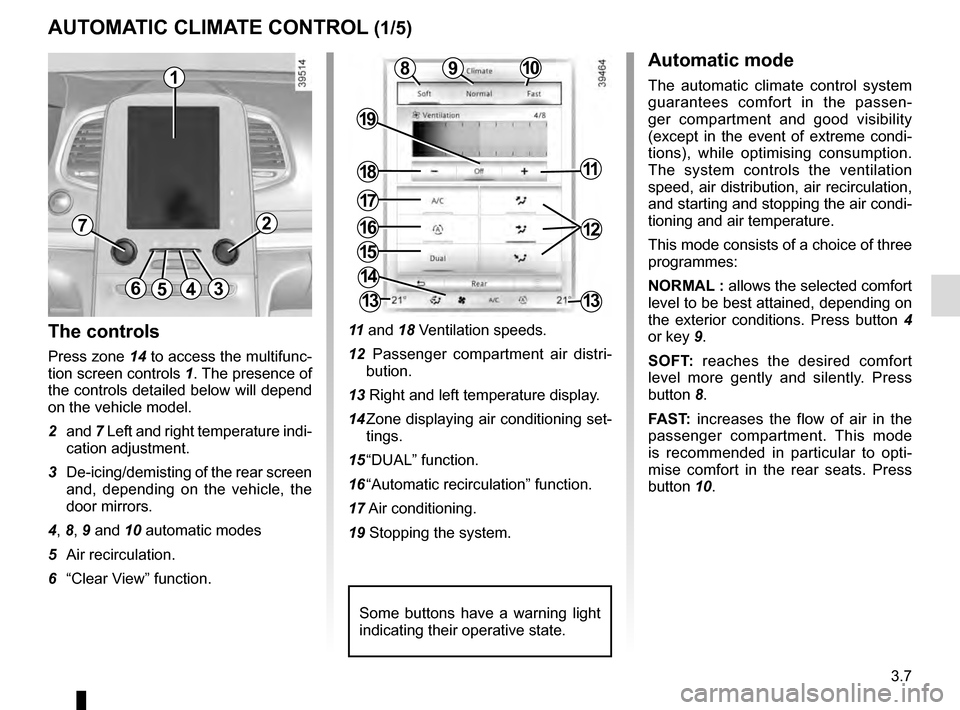
The controls
Press zone 14 to access the multifunc-
tion screen controls 1. The presence of
the controls detailed below will depend
on the vehicle model.
2 and 7 Left and right temperature indi-
cation adjustment.
3 De-icing/demisting of the rear screen and, depending on the vehicle, the
door mirrors.
4, 8, 9 and 10 automatic modes
5 Air recirculation.
6 “Clear View” function. 11
and 18 Ventilation speeds.
12 Passenger compartment air distri- bution.
13 Right and left temperature display.
14 Zone displaying air conditioning set- tings.
15 “DUAL” function.
16 “Automatic recirculation” function.
17 Air conditioning.
19 Stopping the system.
Automatic mode
The automatic climate control system
guarantees comfort in the passen-
ger compartment and good visibility
(except in the event of extreme condi-
tions), while optimising consumption.
The system controls the ventilation
speed, air distribution, air recirculation,
and starting and stopping the air condi-
tioning and air temperature.
This mode consists of a choice of three
programmes:
NORMAL : allows the selected comfort
level to be best attained, depending on
the exterior conditions. Press button 4
or key 9.
SOFT: reaches the desired comfort
level more gently and silently. Press
button 8.
FAST: increases the flow of air in the
passenger compartment. This mode
is recommended in particular to opti-
mise comfort in the rear seats. Press
button 10.8
14
13
72
13
1
Some buttons have a warning light
indicating their operative state.
Page 196 of 318
3.8
Varying the ventilation speed
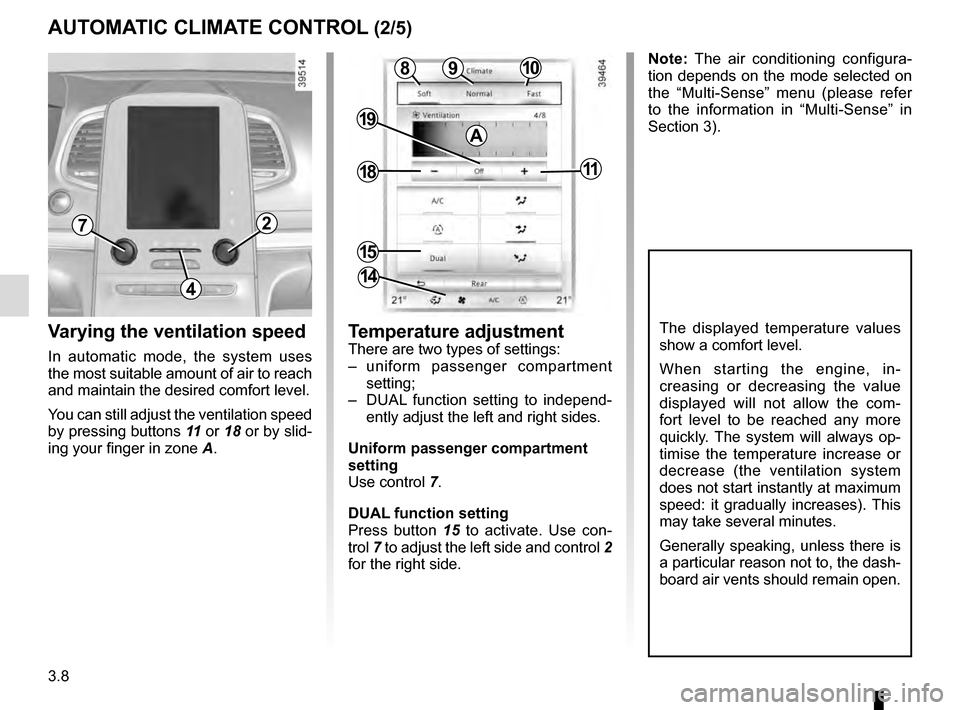
In automatic mode, the system uses
the most suitable amount of air to reach
and maintain the desired comfort level.
You can still adjust the ventilation speed
by pressing buttons 11 or 18 or by slid-
ing your finger in zone A.
AUTOMATIC CLIMATE CONTROL (2/5)
Temperature adjustment
There are two types of settings:
– uniform passenger compartment setting;
– DUAL function setting to independ- ently adjust the left and right sides.
Uniform passenger compartment
setting
Use control 7.
DUAL function setting
Press button 15 to activate. Use con-
trol 7 to adjust the left side and control 2
for the right side.
The displayed temperature values
show a comfort level.
When starting the engine, in-
creasing or decreasing the value
displayed will not allow the com-
fort level to be reached any more
quickly. The system will always op-
timise the temperature increase or
decrease (the ventilation system
does not start instantly at maximum
speed: it gradually increases). This
may take several minutes.
Generally speaking, unless there is
a particular reason not to, the dash-
board air vents should remain open.
4
72
10
15
9
18
19
11
8
14
Note: The air conditioning configura-
tion depends on the mode selected on
the “Multi-Sense” menu (please refer
to the information in “Multi-Sense” in
Section 3).
A
Page 197 of 318
3.9
AUTOMATIC CLIMATE CONTROL (3/5)
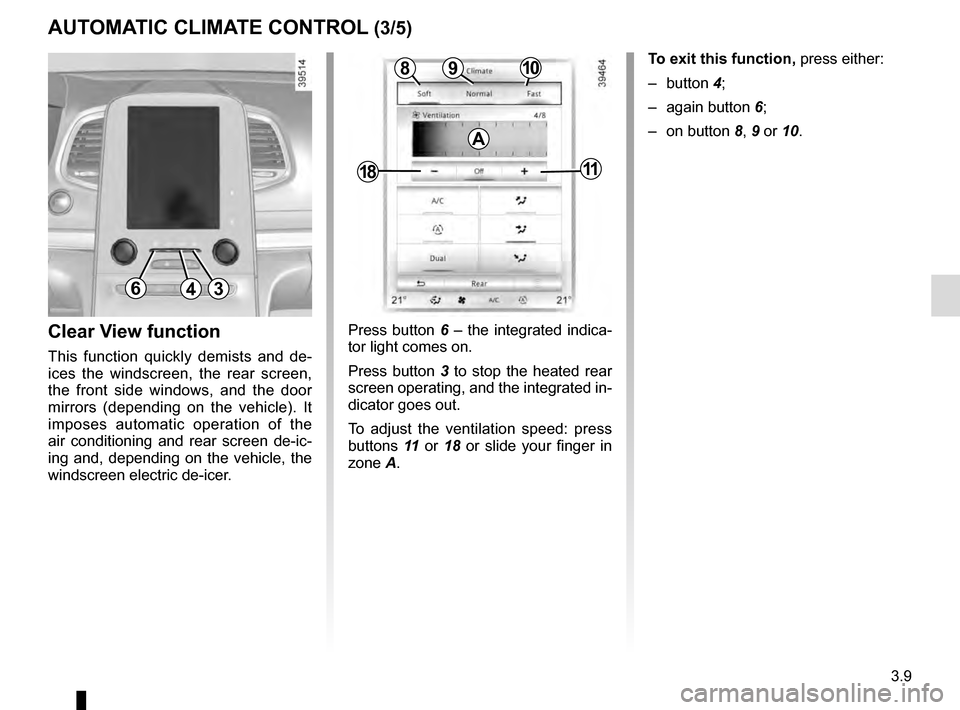
Press button 6 – the integrated indica-
tor light comes on.
Press button 3 to stop the heated rear
screen operating, and the integrated in-
dicator goes out.
To adjust the ventilation speed: press
buttons 11 or 18 or slide your finger in
zone A.Clear View function
This function quickly demists and de-
ices the windscreen, the rear screen,
the front side windows, and the door
mirrors (depending on the vehicle). It
imposes automatic operation of the
air conditioning and rear screen de-ic-
ing and, depending on the vehicle, the
windscreen electric de-icer.
643
109
1811
8
A
To exit this function, press either:
– button 4;
– again button 6;
– on button 8, 9 or 10.
Page 198 of 318
3.10
AUTOMATIC CLIMATE CONTROL (4/5)
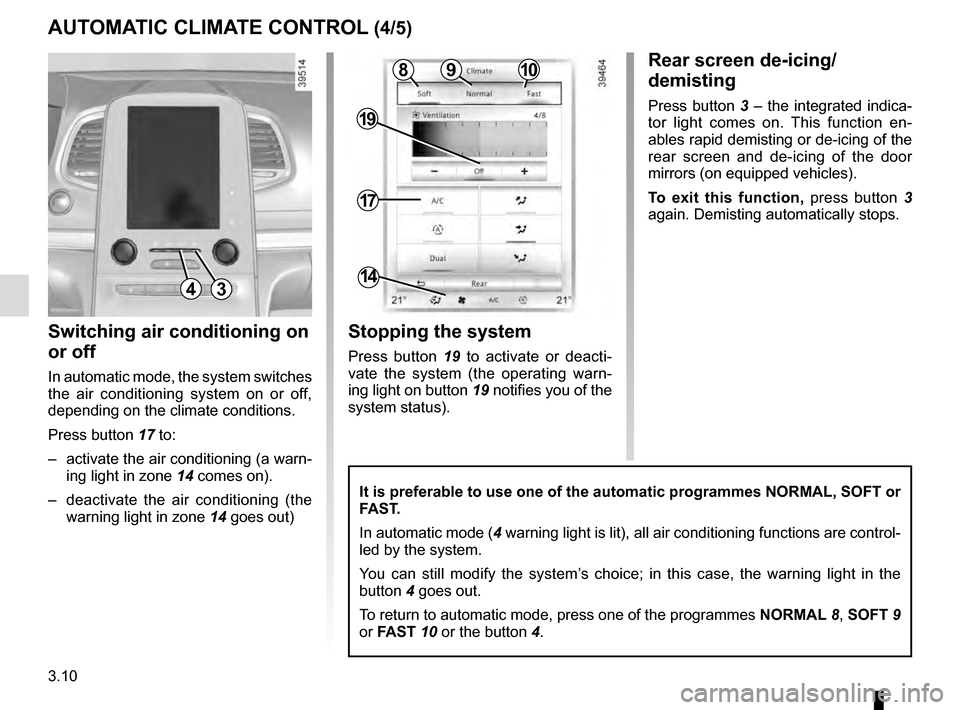
Switching air conditioning on
or off
In automatic mode, the system switches
the air conditioning system on or off,
depending on the climate conditions.
Press button 17 to:
– activate the air conditioning (a warn- ing light in zone 14 comes on).
– deactivate the air conditioning (the warning light in zone 14 goes out)
4
17
19
14
Stopping the system
Press button 19 to activate or deacti-
vate the system (the operating warn-
ing light on button 19 notifies you of the
system status).
It is preferable to use one of the automatic programmes NORMAL, SOFT or
FAST.
In automatic mode (4 warning light is lit), all air conditioning functions are control-
led by the system.
You can still modify the system’s choice; in this case, the warning light in the
button 4 goes out.
To return to automatic mode, press one of the programmes NORMAL 8, SOFT 9
or FAST 10 or the button 4.
Rear screen de-icing/
demisting
Press button 3 – the integrated indica-
tor light comes on. This function en-
ables rapid demisting or de-icing of the
rear screen and de-icing of the door
mirrors (on equipped vehicles).
To exit this function, press button 3
again. Demisting automatically stops.
3
1098